When you’re writing online, being unique doesn’t matter nearly as much as being found.
I’m not sure I could disagree more. But I’ve jumped in half way through his post. Let’s backtrack a bit.
Andy begins:
A blogger showed me his website the other day.
…
But no one was reading it.
Firstly: let’s just observe that you were shown a website… and now you’re talking about it… but you haven’t linked to it? You’re complaining about its lack of discoverability,
while simultaneously being part of the problem.
Hyperlinks remain, as they have been since the mid-to-late 1990s, a primary mechanism in helping search engines’ spiders to discover new sites, and nowadays they’re doubly-important
because they help establish legitimacy.
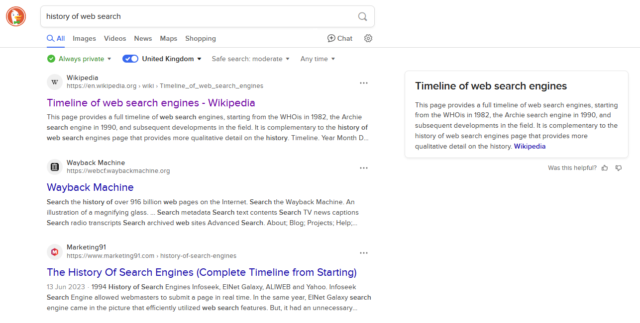
When you search for, say, “history of web search” and this Wikipedia article is at the top, a significant
reason for that is that people link to that page when talking about the history of web search! A secondary reason is that lots of people link to Wikipedia in
general.
Your mileage may vary depending on your preferred search engine and other factors.
Berating somebody for an unindexed site… but not linking to that site… feels awfully-close to victim-blaming!
(Especially recently, as still-dominant search engine Google continues to make it harder and harder for “new” sites to get onto the ladder.)
When I asked him why he didn’t just use WordPress or Bear Blog, he looked offended.
“Those are so basic. Everyone uses those. I wanted something unique.”
I’m not sure I understand the logic of the person whose argument against e.g. WordPress is that it’s not “unique”. There are lots of great reasons that you might use WordPress. There
are lots of great reasons that you might not. The right choice of CMS should be based on a variety of factors.
It’s possible that the person being referred to meant “customisable”. They’d still be wrong (in the case of WordPress, at least: Bear Blog offers significantly less customisation
options, which is fine if the other features are what you’re looking for), but anyway: the short of it is that I briefly agreed, here, until:
WordPress powers about 43% of all websites. That means search engines know exactly how to read WordPress sites.
They know where to look for the content, the metadata, the tags.
Let’s correct the points here:
Search engines know exactly how to read HTML. WordPress outputs HTML. (If you’re outputting HTML, your site can be indexed. Hell, even that isn’t a firm
requirement: my plaintext-only blog shows up in search engines!)
Web standards dictate how content, metadata, and tags should be laid out. A search engine’s spider doesn’t look at your site and go “hey, it’s WordPress, so I need to
look for this“. Instead, it’ll generally look for content and metadata based on established standards. Titles, headings, <meta> tags, semantic elements:
these are the things a search engine looks for.
Sure, WordPress gets those things right. But they’re not hard to get right. You shouldn’t use WordPress (or Bear, or anything else) based just on the fact
that it exposes metadata correctly. Any site can do this. And because what’s eventually exposed to the search engine – and to the user – is HTML code… which is independent of the CMS
that generated it… it doesn’t have to matter what the underlying CMS is.
Then there’s some more confusion:
Here’s what matters: WordPress and other major platforms have spent years optimising for search engines and social sharing.
They’ve spent millions making sure posts load fast.
This sounds like it’s conflating WordPress (the open-source CMS) with one or more of several WordPress hosting providers (probably WordPress.com). That’s a common mistake, but it is a mistake.
WordPress can do terrible SEO. WordPress can be really slow. Trust me: in a previous life I’ve made a part of my living out of fixing and improving people’s WordPress-powered websites!
A large part of this comes from WordPress’s flexibility: the theme you choose, for example, can completely change the functionality of your site. Inspired by my plain text blog,
Terence Eden made a WordPress theme that does the same thing! That WordPress theme completely
upends the way that most people would use WordPress, but it’s still fundamentally WordPress, even though it exposes to search engines no HTML code, no metadata,
and no tags.
WordPress can also do great SEO, and it can be really fast. A properly-configured WordPress site can be a well-oiled machine. But if you conflate WordPress itself with its output,
you’re arguing against a straw man.
Don’t get me wrong: I love WordPress! But I dislike people making the false claim that if you’re not using it (or another popular blogging tool), you’re destined to fail at SEO. There’s
nothing “magical” about WordPress. It just takes content and renders HTML, in the end!
But all of this is moot, perhaps, when we get back to that first point:
When you’re writing online, being unique doesn’t matter nearly as much as being found.
This entire statement presupposes the purpose of “writing online”.
It’s 100% okay to write for yourself, first and foremost. It’s also okay to write for a small target audience, like for your friends or family. It’s okay to write content that
isn’t exposed to search engines (consider all of the wonderful content that my fellow RSS Club members put out, sometimes!). It’s
okay to write just for the joy of making things.
A website doesn’t have to be “professional”, as Andy’s post goes on to imply. A website doesn’t have to be anything in particular. A website can just… be. And that’s
enough.
As I mentioned in my recent Blog Questions Challenge, I recently switched my blog from WordPress, which it had been running on for over 20 years of its 26 year history, to ClassicPress.1
I’m aware that I’m not the only person for whom ClassicPress might be a better fit
than WordPress2,
so I figured I should share the process by which I undertook the change.
Switching from WordPress to ClassicPress
Switching from WordPress to ClassicPress should be a non-destructive, 100% reversible process, but (even though I’ve got solid backups) I wasn’t ready to
trust that, so I decided to operate on a copy of my site. I’m glad I did, because there were a couple of teething issues I needed to tackle before I could launch.
1. Duplicating the site
I took a simple approach to duplicating the site: (1) I copied the site directory, and (2) I copied the database, and (3) I set up a new subdomain to use for testing. Here’s how I did
each step:
1.1. Copying the site directory
This should’ve been simple, but a du -sh revealed that my /wp-content/uploads directory is massive (I should look into that) and I didn’t want to
clone it. And I didn’t want r need to clone my /wp-content/cache directory either. So I ran:
rsync -av --exclude=wp-content ./old-site-directory/ ./new-site-directory/ to copy everything exceptwp-content, and then
rsync -av --exclude=uploads --exclude=cache ./old-site-directory/wp-content/ ./new-site-directory/wp-content/ to copy wp-contentexcept the
uploads and cache subdirectories, and then finally
ln -s ./old-site-directory/wp-content/uploads ./new-site-directory/wp-content/uploads to symlink the uploads directory, sharing it between the two sites
1.2. Copying the database
I just piped mysqldump into mysql to clone from one database to the other:
mysqldump -uUSERNAME -p --lock-tables=false old-site-database | mysql -uUSERNAME -p new-site-database
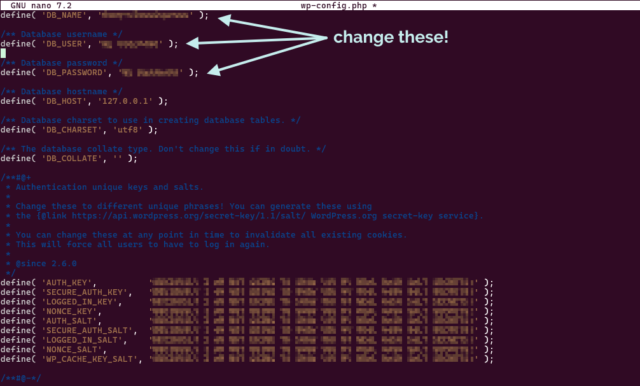
I edited DB_NAME in wp-config.php in the new site’s directory to point it at the new database.
If you’re going to clone your WordPress site before converting to ClassicPress, you’ll want to be comfortable editing your wp-config.php.
1.3. Setting up a new subdomain
My DNS is already configured with a wildcard to point (almost) all *.danq.me subdomains to this server already. I decided to use the name classicpress-testing.danq.me as my
temporary/test domain name. To keep any “changes” to my cloned site to a minimum, I overrode the domain name in my wp-config.php rather than in my database, by adding the
following lines:
Because I use Caddy/FrankenPHP as my webserver3,
configuration was really easy: I just copied the relevant part of my Caddyfile (actually an include), changed the domain name and the root, and it just worked,
even provisioning me out a LetsEncrypt SSL certificate. Magical4.
2. Switching the duplicate to ClassicPress
Now that I had a duplicate copy of my blog running at https://classicpress-testing.danq.me/, it was time to switch it to ClassicPress. I started by switching my wp-admin
colour scheme to a different one in my cloned site, so it’d be immediately visually-obvious to me if I’d accidentally switched and was editing the “wrong” site (I also made sure I was
logged-out of my primary, live site, so I was confident I wouldn’t break anything while I was experimenting!).
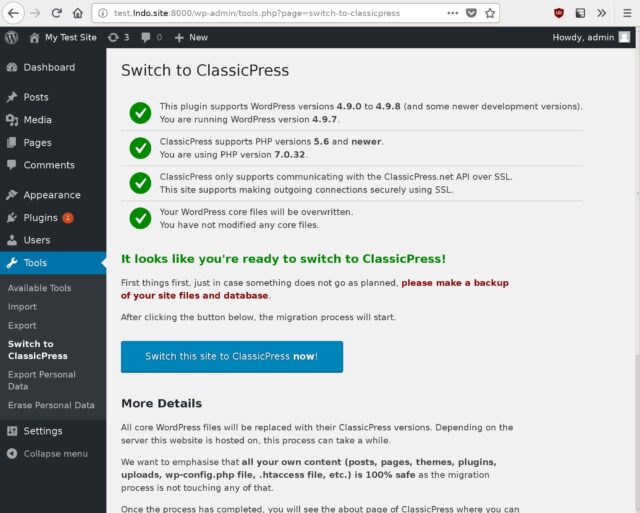
ClassicPress provides a migration plugin which checks for common problems and then switches your site
from WordPress to ClassicPress, so I installed it and ran it. It said that everything was okay except for my (custom) theme and a my self-built plugins, which it understandably couldn’t
check compatibility of. It recommended that I install Twenty Seventeen – the last WordPress default theme to not
require the block editor – but I didn’t do so: I was confident that my theme would work anyway… and if it didn’t, I’d want to fix it rather than switch theme!
I failed to take a screenshot of the actual process, but it looked broadly like this.
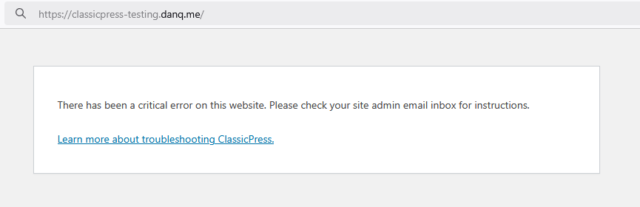
And then… it all broke.
3. Fixing what broke
After swiftly doing a safety-check that my live site was still intact, I started trying to work out why my site wasn’t broken. Debugging a ClassicPress PHP issue is functionally
identical to debugging a similar WordPress issue, for obvious reasons: check the logs, work out what’s broken, realise it’s a plugin, disable that plugin while you investigate further,
etc.
EWWW Image Optimizer: I use this plugin to pregenerate WebP variants of my images, which I then serve using webserver rules. It’s not a
complex job, and I should probably integrate the feature into my theme at some point, but for now I use this plugin. Version 8.0.0 of the plugin doesn’t work on ClassicPress 2.3.1, so
I used WP-CLI to downgrade to the last version that does (7.7.0), and then it worked fine.
Dan’s Geocaching Log Reposter: a self-made plugin that copies my logs from geocaching websites stopped working properly, which I think is because
ClassicPress is doing a more-aggressive job than WordPress at nonce validation on admin REST endpoints? I put a quick hack into my plugin to work around it, but I’ll need to look into
this properly at some point.
Some other bits of my stack, e.g. CapsulePress (my Gemini/Spartan/Nex server), have their own copies of my
database credentials, because I’ve been too lazy to centralise them into environment variables, and needed updating (but not until live switchover time).
I ran the two sites in-parallel for a couple of weeks, with the ClassicPress one as a “read only” version (so I didn’t pollute my uploads directory!), but it was pretty unnecessary
because it all worked pretty seamlessly, despite my complex stack of custom code. When I wanted to switch for-real, all I needed to do was swap the domain names over in my Caddyfile and
edit the wp-config.php of my ClassicPress installation: step 1.3, but in reverse!
If you hadn’t been told5, you probably wouldn’t have even known I’d made a change: I suppress basically all infrastructure-identifying
headers from my server output as a matter of course, and ClassicPress and WordPress are functionally-interchangeable from a front-end perspective6.
So what’s difference?
From my experience, here are the differences I’ve discovered since switching from WordPress to ClassicPress:
The good stuff
😅 ClassicPress has no Gutenberg/block editor. This would absolutely be a showstopper for many people, and that’s fine: I have nothing against the block editor (I
use it basically every day elsewhere!), but I’ve never really used it on danq.me and don’t feel the need to change that! My theme, my workflow, and my custom plugins are all
geared around the perfectly-good “classic” editor, and so getting a more-lightweight CMS by removing a feature I wasn’t using anyway falls somewhere between neutral and a blessing.
⚡The backend is fast again! One of the changes the ClassicPress team have been working on applying to WordPress is to strip out jQuery and other redundancies from
the backend, and I love how much faster and lighter my editor interface is as a result. (With caveat; see below!)
🔌Virtually everything “just works”. With the few exceptions described above, everything works exactly as it does under WordPress. Which is what you’d hope for a fork
that’s mostly “WordPress, but without the block editor”, right, but it’s still reassuring (and, for me, an essential feature). There are a few “new” features to do with paging through
posts and the media library and they’re fine, I suppose, but not by themselves worth switching for (though it might be nice to backport them into WordPress!).
The bad stuff
🏷️ Adding tags to posts takes a step backwards. A side-effect of dropping jQuery is the partial loss of the autocomplete feature when selecting tags to add to a post.
You still get a partial autocomplete, but not after typing a comma: you need to press enter to submit the tag you were writing and then start typing them next, which
frankly sucks. This is because they’re relying on a <datalist>, which isn’t as full-featured as the Javascript solution WordPress employs. This bugs
me almost enough to be a showstopper, but I gather it’s getting fixed in a near-future version.
🗺️ You’re in uncharted territory when things go wrong. One great benefit of WordPress is the side-effects of its ubiquity. If you have a query or a problem
you can throw a stone at your favourite search engine and get a million answers… and some of them will even be right! If you have a problem in ClassicPress and it’s not shared with (or
you’re not sure if it’s shared with) WordPress… you’re mostly on your own. The forums are good and friendly,
but if you want a quick answer to something, you’re likely to have to roll your sleeves up and open some source code. I don’t mind this at all – when I first started using WordPress,
this was the case, too! – but it might be a showstopper for some folks.
In summary: I’m enjoying using ClassicPress, even where there are rough edges. For me, 99% of my experience with it is identical to how I used WordPress anyway, it’s relatively
lightweight and fast, and it’s easy enough to switch back if I change my mind.
Footnotes
1 It saddens me that I have to keep clarifying this, but I feel like I do: my switch from
WordPress to ClassicPress is absolutely nothing to do with any drama in the WordPress space that’s going on right now: in fact, I’d been planning to try it out since before
any of the drama appeared. I appreciate that some people making a similar switch, including folks who use this blog post as a guide, might have different motivations to me, and that’s
fine too. Personally, I think that ditching an installation of open-source WordPress based on your interpretation of what’s going on in the ecosystem is… short-sighted? But
hey: the joy of open source is you can – and should! – do what you want. Anyway: the short of it is – the desire to change from WordPress to ClassicPress was, for me, 100% a
technical decision and 0% a political one. And I’ll thank you for leaving any of your drama at the door if you slide into my comments, ta!
2Matt recently described ClassicPress as “the last decent fork
attempt for WordPress”, and I absolutely agree. There’s been a spate of forks and reimplementations recently. I’ve looked into many of them and been… very much underwhelmed. Want my
hot take? Sure, here you go: AspirePress is all lofty ideas and no deliverables. FreeWP seems to be the same, but somehow without the lofty ideas. ForkPress is a ghost. Speaking of
ghosts, Ghost isn’t a WordPress fork; they have got some cool ideas though. b2evolution is even less a WordPress fork but it’s pretty cool in its own right. I’m not sure what
clamPress is trying to achieve but I’ve not given it a serious look. So yeah: ClassicPress is, in my mind, the only WordPress fork even worth consideration at this point, and as I
describe in this blog post: it’s not for everybody.
3 I switched from Nginx over the winter and it’s been just magical: I really love
Caddy’s minimal approach to production configuration. The only thing I’ve been able to fault it on is that it’s not capable of setting up client-side SSL certificate authentication on
a path, only on an entire domain, which meant I needed to reimplement the authentication mechanism I use on a small part of my (non-blog) internal
infrastructure.
4 To be fair, it wouldn’t have been hard if I’d still be using Nginx, because I’d
set up Certbot to use DNS-based vertification to issue me wildcard SSL certificates. But doing this in Caddy still felt magical.
6 Indeed, I wouldn’t have considered a switch to ClassicPress in the first place if it
wasn’t a closely-aligned-enough fork that I retained the ability to flip-flop between the two to my heart’s content! I’ve loved WordPress for over two decades; that’s not going to
change any time soon… and if e.g. ClassicPress ceased tracking WordPress releases and the fork diverged too far for my comfort, I’d probably switch back to regular old WordPress!
[a quote from Ed Catmull’s book Creativity Inc.] made me think a lot about the early days of Gutenberg and the huge
resistance it had in the community, including causing the fork of ClassicPress. Now that we’re much further along there’s a pretty widespread acceptance of Gutenberg, and it’s
responsible for the vast majority of all WP posts and pages made, however if we had taken a vote for whether it should happen or not, it probably wouldn’t have ever gotten off the
ground.
What’s funny is if you go back even further, using a visual WYSIWYG editor in the first place was very controversial, and many people didn’t want the classic editor brought into
WordPress.
Long-term WordPresser here; I remember when 2.0 integrated TinyMCE and it was absolutely necessary to ensure that raw HTML editing
remained an option, clear and up-front. Which I’m glad of: I probably hit raw HTML about once a month when I’m blogging, to this day!
I was among those who strongly resisted Gutenberg. Nowadays I use it every day! But my primary personal blog, which was already almost six years old when it migrated to WordPress 1.2
back in 2004, still uses the classic editor. I enjoy that I have the freedom to do that.
When we talk about open source meaning freedom, this is the kind of thing we mean. Years ago, I was in charge of the CMS for a major academic
institution when the company behind that CMS made a gradual and concerted effort to become less-open-source. That CMS didn’t have the ecosystem
and community around it that WordPress has, and so no forks took off, and so my employer got locked-in to upgrading to a new version that was mostly-closed-source and was in some ways
inferior. Ugh.
(Incidentally, I got them off that CMS: they’re now using a mixture of WordPress and Drupal for most of their
systems. Open source won.)
Change isn’t always good. But open source provides the freedom to embrace change in the way that suits you best.
Last week, I discovered Geneveive Raine‘s “The Continuum”, a super-compressed image comprised of
1-pixel-tall versions of her home page’s daily banners, stitched together1.
I thought it was a beautiful idea, so I stole adapted it to produce an illustration based on the featured images of my blog posts:
Only about 38% of my 5,445 blog posts have featured images suitable for use in this diagram. But here they are!
I generated a horizontal version too, but I’ve used the vertical version above because it’s
more-suitable for use with a HTML imagemap2.
Here’s the code I used to generate the images (and the imagemap), if you want to run it against your own
WordPress-ish blog.
Footnotes
1 Which was in-turn inspired by Movie
Iris, a tool that visualises the frames of a movie as a radial graphic.
2 What’s a HTML imagemap, you ask? You don’t need to ask: you shouldn’t be using it
anyway. Relying on it means you’re setting yourself up for an accessibility nightmare. Anyway: I used one above: you
can click on any “stripe” of the image to jump to the corresponding post. It needed some fighting-with because imagemaps can’t work with rescaled images, so I’ve forced the height of
the image even as it resizes horizontally. Not that you’re going to click on the stripes anyway: it’s just about the worst way imaginable to navigate a blog.
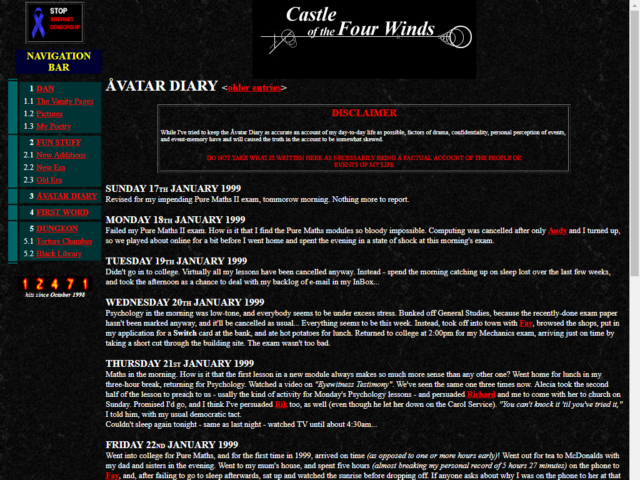
It felt like a natural evolution of my second vanity-site. It was 1998, and my site – Castle of the Four Winds – was home to a selection of the same kinds of random crap that
everybody put on their homepages at the time. I figured I’d start keeping an online diary: the word “blog” hadn’t been coined yet, and its predecessor “weblog” had only been around for
a year and I hadn’t come across it.
So I experimentally started posting a few times a week.
What platform are you using to manage your blog and why did you choose it? Have you blogged on other platforms before?
1998: Static HTML and a bit of Perl
When I started blogging my site was almost entirely plain HTML2.
So my original “platform” was probably Emacs.
2000: Static files indexed by PHP
In the Summer of 2000 I registered avangel.com and moved my diary there. I was still storing posts in static files, but used PHP wrappers to share the structure and menus across the
pages. It was a massive improvement.
Later, I moved everything to the (ill-advised?) domain name scatmania.org and reimplemented in pretty-much the same way. Until…
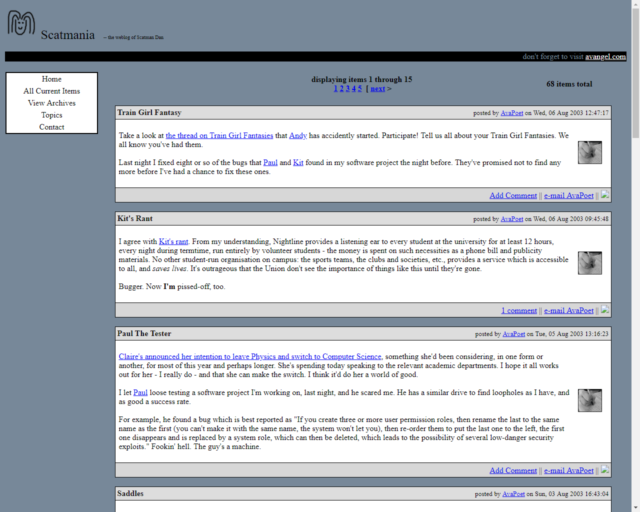
I’d have outgrown Flip eventually, but I got a nudge in that direction in July 2004. At the time, I was sharing a server
with some friends and operated by Gareth, and something went wrong and the server went completely offline. The co-located server disappeared back
to Gareth’s house, eventually, and while I’d recovered many of the posts from my own backups, 61 posts remain partially-incomplete to this
day (if you happen to have a copy of any of them I’d love to see it!).
I brought my blog back online using WordPress, whose then-new release version 1.2
included an RSS-powered importer: this allowed me to write a little code to convert my entire previous archive into a fat RSS file and then import it wholesale. WordPress was, as
remains, pretty magical – a universal blogging platform that evolved into a universal CMS – and I back in the day I occasionally argued online with Matt
about technical aspects of the future direction of the project4.
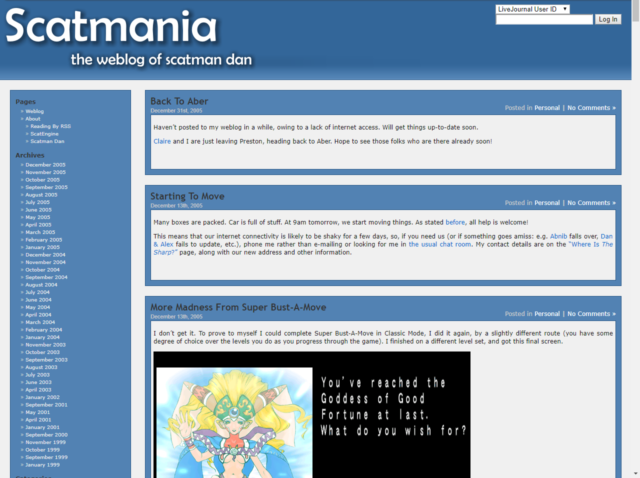
Those drop-shadows! Those gradients! Those naked hyperlinks differentiated only by being a slightly different colour! That aggressive use of sans-serif fonts with expanded
line-heights! Those RSS links, front-and-centre! The only thing that could make this more-obviously “Web 2.0” would be the addition of a wonky “beta” star in the corner.
If you didn’t know better, you might well not know I’m running WordPress. My theme and custom plugins are… well, they’re an ecosystem all by themselves. And that’s before you even get
to things like CapsulePress, my WordPress-to-Gopher/Gemini/Spartan/Nex bridge, the
pile of scripts I use to sync-up with the Fediverse, the PWA I use to post notes while I’m on the move, and so on.
2025: ClassicPress
Earlier this year I experimentally switched to ClassicPress; a fork of WordPress. There’ll doubtless be lots more to say about that, down the
line5,
but here’s the skinny: I don’t use Gutenberg on my blog anyway6,
I appreciate having my backend be almost as high-performance as I’ve worked to make my frontend, and I enjoy most of
the feature differences7.
How do you write your posts? For example, in a local editing tool, or in a panel/dashboard that’s part of your blog?
With the exception of notes (most of which are written in a tool of my own creation and then pushed to one or both of my Mastodon and my blog
simultaneously), I mostly write right into the WordPress/ClassicPress post editor.
I often write ideas, concepts, and first drafts into my Obsidian notebook and then copy/paste out when the time comes.
When do you feel most inspired to write?
There’s no particular pattern, though it feels like I’m most-inspired to write exactly when I should be prioritising something else! That’s why it’s so helpful to be able to
write three sentences into Obsidian and then come back to it later!
I’ve been on a bit of a blogging kick these last few years, though. Last year I wrote a massive 436 posts, although that admittedly includes PESOS‘d checkins from geocaching and geohashing expeditions. I’m a fan of
Kev’s #100DaysToOffload challenge, and I’m on course to achieve it earlier than ever before, this year (my sixth consecutive year: I do the
challenge strictly by calendar years!), as this post is already by 48th… all within the first 38 days of this year8.
Do you publish immediately after writing, or do you let it simmer a bit as a draft?
A mixture of both. Probably most of my posts are written in a single sitting… or, at least, are written in a tab that stays open for the entire time during which it’s written.
But others spend a long time in-progress. You remember how almost a year ago I gave a talk about why Oxford’s area code is 01865? And I promised that there’d be a blog/vlog/maybe-podcast version of that talk later?
Yeah: that’s been 90%-there and sitting in a draft pretty-much since then, just waiting for me to make the finishing touches (and record the vlog/podcast variants, if that’s the
direction I decide to go in).
And I’ve dusted off drafts that’ve been much older than that, before, too. So it really is a mixture.
What’s your favourite post on your blog?
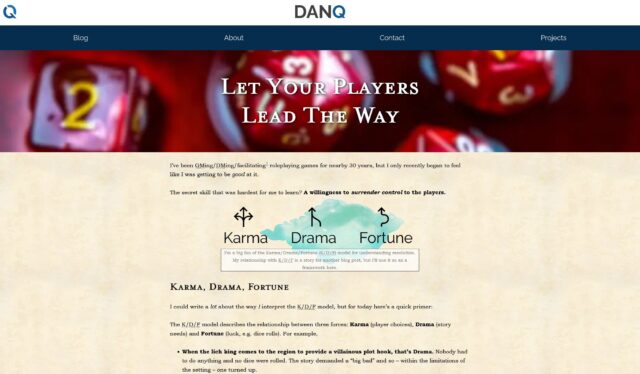
I couldn’t pick out a favourite that I wouldn’t change my mind about five minutes later. But a recent favourite might have been last Spring’s “Let Your Players Lead The Way”, which aimed to impart some of the things I’ve learned about gamemastering (especially) while being the
dungeon master for The Levellers these last few years9.
Not only was it a post that had been a long time coming, and based on months of drafts and re-drafts, but also I really enjoyed writing some post-specific CSS to give it just a slightly
more-magical feel.
The downside is that I’ve now got one more thing to try not to break the next time I re-write my blog’s stylesheet.
Any future plans for your blog? Maybe a redesign, a move to another platform, or adding a new feature?
I want to redesign the homepage to be simpler, less-graphical, and more-informational. I’m not sure how that’s going to look, yet.
And as I mentioned: I’m experimenting with ClassicPress. It’s working out mostly-okay so far, but that’s a story for another post.
Next?
I feel like I’m the last person in the universe to do this quiz. But if you haven’t – and you have anything approximating a blog – then you should go next.
Footnotes
1 I wouldn’t recommend actually reading my older posts, though. I was a teenager,
and it shows.
2 I had a slightly-fancier kind of hosting, by this point, that gave me a
cgi-bin directory into which I could compile binaries (in C) or write scripts (in Perl). My hit counter? That was a Perl script I adapted from Matt Wright’s counter.pl and “enhanced” with some flaming text using Corel
Photo-Paint.
5 Right off the bat, though, let me stress that trying ClassicPress is absolutely nothing
to do with the drama in the WordPress space right now: in fact I’ve been planning to give it a try ever since the project got its shit together, re-forked WordPress, and released ClassicPress 2.0 a year ago.
6 I don’t have anything against Gutenberg – I use it on other blogs, and every day at
work! – and Block Themes are magical… but I’ve never found any benefit to them here: I’ve no need for it, and I’ve got plugins I’ve written for my own use that I’ve never bothered to
make Gutenberg-compatible.
7 My biggest gripe with ClassicPress so far is that in removing the jQuery dependency on
the post editor’s tag selector they’ve only replaced it with a <datalist>, which is neat and all but kills the ability to autocomplete multiple
comma-separated tags at once. But it looks like that’s getting fixed, so I’m going to hang in there for a bit
before I decide whether I’m sticking with ClassicPress or not.
8 I’ll save you from doing the maths: if I complete 48 posts in 38 days, I’d expect to
complete 100 posts on my 80th day: as it’s not a leap year, that would be Friday 21 March 2025. Let’s see how I get on!
9 Although I’ve been horribly neglecting them for the last couple of months, for various
reasons.
I’ve a notion that during 2025 I might put some effort into tidying up the tagging taxonomy on my blog. There’s a few tags that are duplicates (e.g.
ai and artificial intelligence) or that exhibit significant overlap (e.g. dog and dogs), or that were clearly created when I
speculated I’d write more on the topic than I eventually did (e.g. homa night, escalators1,
or nintendo) or that are just confusing and weird (e.g. not that bacon sandwich picture).
One part of such an effort might be to go back and retroactively add tags where they ought to be. For about the first decade of my blog, i.e. prior to around 2008, I rarely used tags to
categorise posts. And as more tags have been added it’s apparent that many old posts even after that point might be lacking tags that perhaps they ought to have2.
I remain sceptical about many uses of (what we’re today calling) “AI”, but one thing at
which LLMs seem to do moderately well is summarisation3. And isn’t tagging and categorisation only a stone’s throw away from
summarisation? So maybe, I figured, AI could help me to tidy up my tagging. Here’s what I was thinking:
Tell an LLM what tags I use, along with an explanation of some of the quirkier ones.
Train the LLM with examples of recent posts and lists of the tags that were (correctly, one assumes) applied.
Give it the content of blog posts and ask what tags should be applied to it from that list.
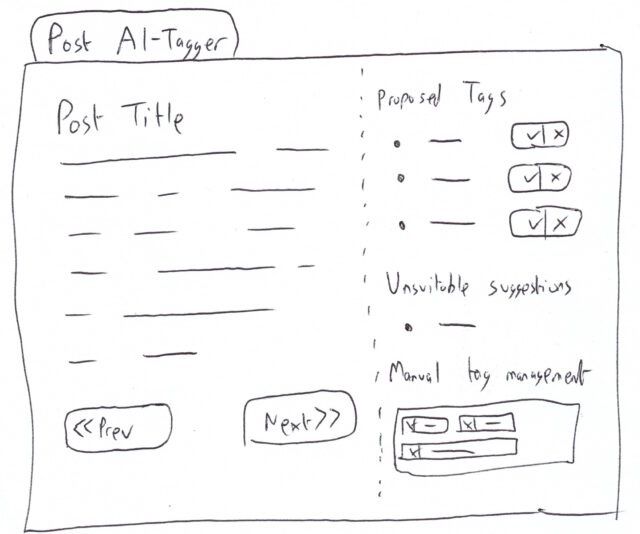
Script the extraction of the content from old posts with few tags and run it through the above, presenting to me a report of what tags are recommended (which could then be coupled
with a basic UI that showed me the post and suggested tags, and “approve”/”reject” buttons or similar.
Extracting training data
First, I needed to extract and curate my tag list, for which I used the following SQL4:
SELECTCOUNT(wp_term_relationships.object_id) num, wp_terms.slug FROM wp_term_taxonomy
LEFTJOIN wp_terms ON wp_term_taxonomy.term_id = wp_terms.term_id
LEFTJOIN wp_term_relationships ON wp_term_taxonomy.term_taxonomy_id = wp_term_relationships.term_taxonomy_id
WHERE wp_term_taxonomy.taxonomy ='post_tag'AND wp_terms.slug NOTIN (
-- filter out e.g. 'rss-club', 'published-on-gemini', 'dancast' etc.-- these are tags that have internal meaning only or are already accurately applied'long', 'list', 'of', 'tags', 'the', 'ai', 'should', 'never', 'apply'
)
GROUPBY wp_terms.slug
HAVING num >2-- filter down to tags I actually routinely useORDERBY wp_terms.slug
Many of my tags are used for internal purposes; e.g. I tag posts published on gemini if they’re to appear on gemini://danq.me/ and
dancast if they embed an episode of my podcast. I filtered these out because I never want the AI to suggest applying them.
I took my output and dumped it into a list, and skimmed through to add some clarity to some tags whose purpose might be considered ambiguous, writing my explanation of each in
parentheses afterwards. Here’s a part of the list, for example:
I used that list as the basis for the system message of my initial prompt:
Suggest topical tags from a predefined list that appropriately apply to the content of a given blog post.

# Steps

1. **Read the Blog Post**: Carefully read through the provided content of the blog post to identify its main themes and topics.
2. **Analyse Key Aspects**: Identify key topics, themes, or subjects discussed in the blog post.
3. **Match with Tags**: Compare these identified topics against the list of available tags.
4. **Select Appropriate Tags**: Choose tags that best represent the main topics and themes of the blog post.

# Output Format

Provide a list of suggested tags. Each tag should be presented as a single string. Multiple tags should be separated by commas.

# Allowed Tags

Tags that can be suggested are as follows. Text in parentheses are not part of the tag but are a description of the kinds of content to which the tag ought to be applied:

- aberdyfi
- aberystwyth
- ...
- youtube
- zoos

# Examples

**Input:**
The rapid advancement of AI technology has had a significant impact on my industry, even on the ways in which I write my blog posts. This post, for example, used AI to help with tagging.

**Output:**
ai, technology, blogging, meta, work

...(other examples)...

# Notes

- Ensure that all suggested tags are relevant to the key themes of the blog post.
- Tags should be selected based on their contextual relevance and not just keyword matching.
This system prompt is somewhat truncated, but you get the idea.
That post already has the following tags (but this wasn’t disclosed to the AI in its training set; it had to work from scratch): children, language, languages (a bit of a redundancy there!), spain, and unicode.
Testing it out
Let’s see what the AI suggests:
curl https://api.openai.com/v1/chat/completions \
-H "Content-Type: application/json"\
-H "Authorization: Bearer $OPENAI_TOKEN"\
-d '{ "model": "gpt-4o-mini", "messages": [ { "role": "system", "content": [ { "type": "text", "text": "[PROMPT AS DESCRIBED ABOVE]" } ] }, { "role": "user", "content": [ { "type": "text", "text": "My 8-year-old asked me \"In Spanish, I need to use an upside-down interrobang at the start of the sentence‽\" I assume the answer is yes A little while later, I thought to check whether Unicode defines a codepoint for an inverted interrobang. Yup: ‽ = U+203D, ⸘ = U+2E18. Nice. And yet we dont have codepoints to differentiate between single-bar and double-bar \"cifrão\" dollar signs..." } ] } ], "response_format": { "type": "text" }, "temperature": 1, "max_completion_tokens": 2048, "top_p": 1, "frequency_penalty": 0, "presence_penalty": 0}'
Running this via command-line curl meant I quickly ran up against some Bash escaping issues, but set +H and a little massaging of the blog post content
seemed to fix it.
GPT-4o-mini
When I ran this query against the gpt-4o-mini model, I got back: unicode, language, education, children, symbols.
That’s… not ideal. I agree with the tags unicode, language, and children, but this isn’t really abouteducation. If I tagged
everything vaguely educational on my blog with education, it’d be an even-more-predominant tag than geocaching is! I reserve that tag for things that relate
specifically to formal education: but that’s possibly something I could correct for with a parenthetical in my approved tags list.
symbols, though, is way out. Sure, the post could be argued to be something to do with symbols… but symbols isn’t on the approved tag list in
the first place! This is a clear hallucination, and that’s pretty suboptimal!
Maybe a beefier model will fare better…
GPT-4o
I switched gpt-4o-mini for gpt-4o in the command above and ran it again. It didn’t take noticeably longer to run, which was pleasing.
The model returned: children, language, unicode, typography. That’s a big improvement. It no longer suggests education,
which was off-base, nor symbols, which was a hallucination. But it did suggest typography, which is a… not-unreasonable suggestion.
Neither model suggested spain, and strictly-speaking they were probably right not to. My post isn’t about Spain so much as it’s about Spanish. I don’t
have a specific tag for the latter, but I’ve subbed in the former to “connect” the post to ones which are about Spain, but that might not be ideal. Either way: if this is how
I’m using the tag then I probably ought to clarify as such in my tag list, or else add a note to the system prompt to explain that I use place names as the tags for posts about
the language of those places. (Or else maybe I need to be more-consistent in my tagging).
I experimented with a handful of other well-tagged posts and was moderately-satisfied with the results. Time for a more-challenging trial.
This time, with feeling…
Next, I decided to run the code against a few blog posts that are in need of tags. At this point, I wasn’t quite ready to implement a UI, so I just adapted my little hacky Bash
script and copy-pasted HTML-stripped post contents directly into it.
If it worked, I decided, I could make a UI. Until then, the command line was plenty sufficient.
In this post, I shared that my grandmother and my coworker had (independently) been taken into hospital. It had no tags whatsoever.
The AI suggested the tags hospital, family, injury, work, weddings, pub, humour. Which at
a glance, is probably a superset of the tags that I’d have considered, but there’s a clear logic to them all.
It clearly picked out weddings based on a throwaway comment I made about a cousin’s wedding, so I disagree with that one: the post isn’t strictly about weddings
just because it mentions one.
pub could go either way. It turns out my coworker’s injury occurred at or after a trip to the pub the previous night, and so its relevance is somewhat unknowable from this
post in isolation. I think that’s a reasonable suggestion, and a great example of why I’d want any such auto-tagging system to be a human assistant (suggesting
candidate tags) and not a fully-automated system. Interesting!
Finally, you might think of humour as being a little bit sarcastic, or maybe overly-laden with schadenfreude. But the blog post explicitly states that my coworker
“carefully avoided saying how he’d managed to hurt himself, which implies that it’s something particularly stupid or embarrassing”, before encouraging my friends to speculate on it.
However, it turns out that humour isn’t one of my existing tags at all! Boo, hallucinating AI!
I ended up applying all of the AI’s suggestions except weddings and humour. I also applied smartdata, because that’s where I worked (the AI couldn’t have been expected to guess that without context, though!).
This post talked about Ash and I’s travels around the UK to see REM and Green Day in concert5 and to the National Science Museum in London where I discovered that Ash was prejudiced towards…
carrot cake.
The AI suggested: concerts, travel, music, preston, london, science museum, blogging.
Those all seemed pretty good at a first glance. Personally, I’d forgotten that we swung by Preston during that particular grand tour until the AI suggested the tag, and then I had to
look back at the post more-carefully to double-check! blogging initially seemed like a stretch given that I was only blogging about not having blogged much, but on
reflection I think I agree with the robot on this one, because I did explicitly link to a 2002 page that fell off the Internet only a few years ago aboutthe pointlessness of blogging. So I think it counts.
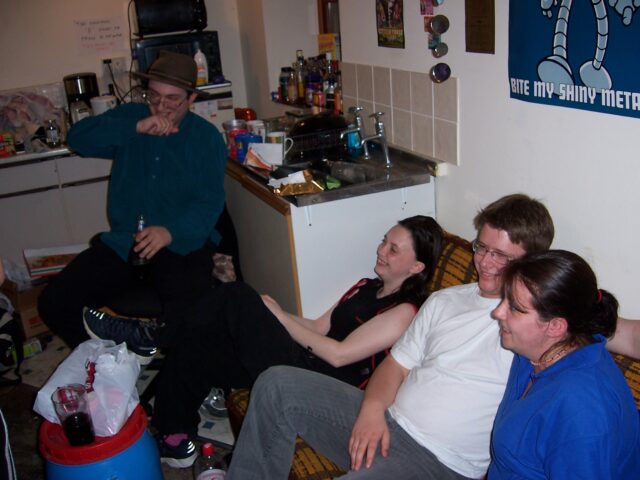
I was able to verify that I’d been in Preston with thanks to this contemporaneous photo. I have no further explanation for the content of the photo, though.
science museum is a big fail though. I don’t use that tag, but I do use the tag museum. So close, but not quite there, AI!
I applied all of its suggestions, after switching museum in place of science museum.
I wrote this blog post in celebration of having managed to hack together some stuff to help me remote-control my PC from my phone via Bluetooth, which back then used to be a challenge,
in the hope that this would streamline pausing, playing, etc. at pizza-distribution-time at Troma Night, a weekly film night I hosted back then.
If you were sat on that sofa, fighting your way past other people and a mango-chutney-barrel-cum-table to get to a keyboard was genuinely challenging!
It already had the tag technology, which it inherited from a pre-tagging evolution of my blog which used something akin to categories (of which only one
could be assigned to a post). In addition to suggesting this, the AI also picked out the following options: bluetooth, geeky, mobile, troma
night, dvd, technology, and software.
The big failure here was dvd, which isn’t remotely one of my tags (and probably wouldn’t apply here if it were: this post isn’t about DVDs; it barely even mentions
them). Possibly some prompt engineering is required to help ensure that the AI doesn’t make a habit of this “include one tag not from the approved list, every time” trend.
Apart from that it’s a pretty solid list. Annoyingly the AI suggested mobile, which isn’t an approved tag, instead of mobiles, which is. That’s probably a
tokenisation fault, but it’s still annoying and a reminder of why even a semi-automated “human-checked” system would need a safety-check to ensure that no absent tags are
allowed through to the final stage of approval.
This post!
As a bonus experiment, I tried running my code against a version of this post, but with the information about the AI’s own prompt and the examples removed (to reduce the risk
of confusion). It came up with: ai, wordpress, blogging, tags, technology, automation.
All reasonable-sounding choices, and among those I’d made myself… except for tags and automation which, yet again, aren’t among tags that I use. Unless this
tendency to hallucinate can be reined-in, I’m guessing that this tool’s going to continue to have some challenges when used on longer posts like this one.
Conclusion and next steps
The bottom line is: yes, this is a job that an AI can assist with, but no, it’s not one that it can do without supervision. The laser-focus with which gpt-4o was able to
pick out taggable concepts, faster than I’d have been able to do for the same quantity of text, shows that there’s potential here, but it’s not yet proven itself enough of a time-saver
to justify me writing a fluffy UI for it.
However, I might expand on the command-line tools I’ve been using in order to produce a non-interactive list of tagging suggestions, and use that to help inform my work as I tidy up the
tags throughout my blog.
You still won’t see any “AI-authored” content on this site (except where it’s for the purpose of talking about AI-generated content, and it’ll always be clearly labelled), and
I can’t see that changing any time soon. But I’ll admit that there might be some value in AI-assisted curation and administration, so long as there’s an informed human in the loop at
all times.
Footnotes
1 Based on my tagging, I’ve apparently only written about escalators once, while playing Pub Jenga at Robin‘s 21st birthday party. I can’t imagine why I thought it deserved a tag.
2 There are, of course, various other people trying similar approaches to this and similar
problems. I might have tried one of them, were it not for the fact that I’m not quite as interested in solving the problem as I am in understanding how one might use an AI to
solve the problem. It’s similar to how I don’t enjoy doing puzzles like e.g. sudoku as much as I enjoy writing software that optimises for solving such puzzles. See also, for
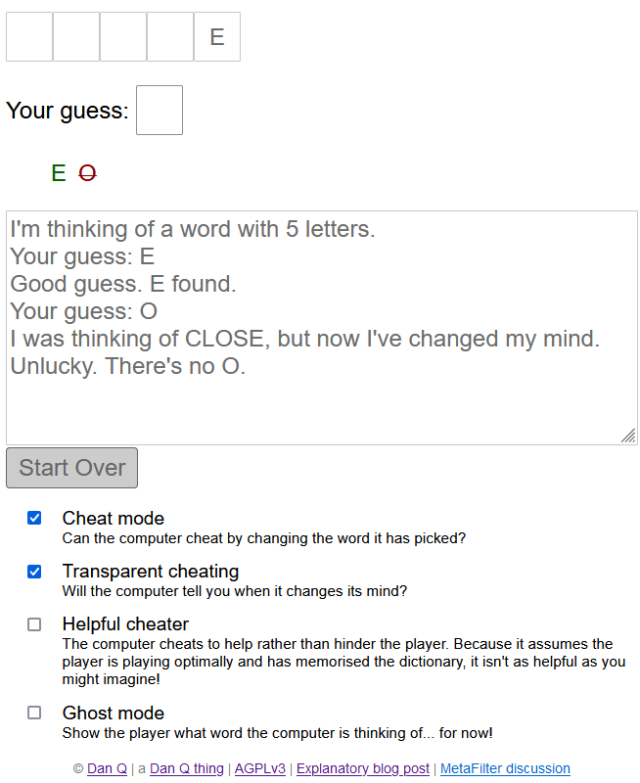
example, how I beat my children at Mastermind or what the hardest word in Hangman is
or my variousattempts to avoid doing online jigsaws.
I’m pretty impressed with running WordPress on Caddy so far.
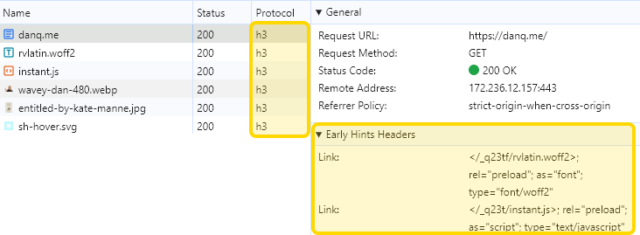
It took a little jiggerypokery to configure it with an equivalent of the Nginx configuration I use for DanQ.me. But off the back of it I get the capability for HTTP/3,
103 Early Hints, and built-in “batteries included” infrastructure for things like certificate renewal and log rotation.
(why yes, I am celebrating my birthday by doing selfhosting server configuration, why do you ask? 😅)
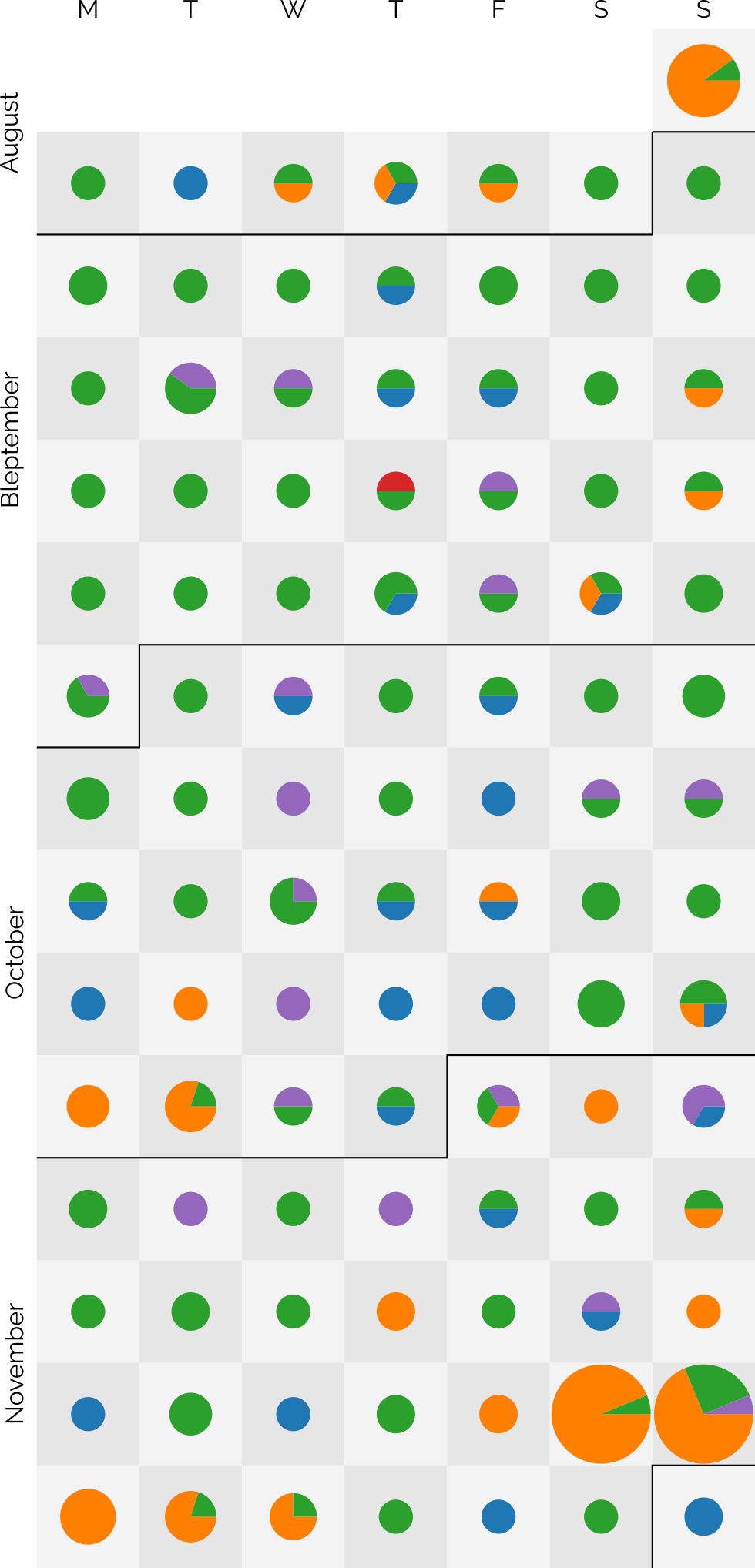
The dots are sized based on the number of posts and broken-down by post kind: articles are blue, notes are green, checkins are orange, reposts are purple, and replies are red3.
I didn’t set out with the aim of getting to a hundred4, as I might well
manage tomorrow, but after a while I began to think it a real possibility. In particular, when a few different factors came together:
Travel’s given me more opportunity for geocaching (and, this last week, geohashing), as reflected in my copious checkin logs for that period.
Earlier this year, inspired by Clayton Errington, I came up with a process to streamline my mobile blogging
“flow”5. I now use a custom
Progressive Web App to provide a better interface for quickly posting on-the-move to one or both of this blog and my personal Mastodon account,
which I tested heavily during Bleptember.
Previous long streaks have sometimes been aided by pre-writing posts in bulk and then scheduling them to come out one-a-day6.
I mostly don’t do that any more: when a post is “ready”, it gets published.
I didn’t want to make a “this is my 100th day of consecutive blogging” on the 100th day. That attaches too much weight to the nice round number. But I wanted to post to
acknowledge that I’m going to make it to 100 days of consecutive blogging… so long as I can think of something worth saying tomorrow. I guess we’ll all have to wait and see.
Footnotes
1 Given that I’ve been blogging for over 26 years, that I’m still finding noteworthy
blogging “firsts” is pretty cool, I think
2 My previous record “streak” was only 37 days, so there’s quite a leap there.
3 A massive 219 posts are represented over the last 99 days: that’s an average of over 2 a
day!
theimprobable.blog, which I look after on behalf of my partner’s brother after using it to GPS-track his adventures
I think that’s all of them, but it’s hard to be sure…
Footnotes
1 Maybe I’ve finally shaken off my habit of buying a domain name for everything.
Or maybe it’s just that I’ve embraced subdomains for more stuff. Probably the latter.
Setting up and debugging your FreshRSS XPath Scraper
Okay, so here’s Adam’s blog. I’ve checked, and there’s no RSS feed1, so it’s time to start planning my XPath Scraper. The first thing I want to do is to find some way of identifying the “posts” on the page. Sometimes people use
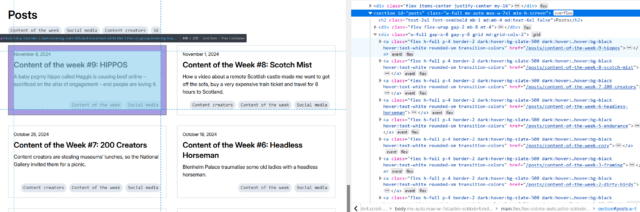
solid, logical id="..." and class="..." attributes, but I’m going to need to use my browser’s “Inspect Element” tool to check:
If you’re really lucky, the site you’re scraping uses an established microformat like h-feed. No such luck here, though…
The next thing that’s worth checking is that the content you’re inspecting is delivered with the page, and not loaded later using JavaScript. FreshRSS’s XPath Scraper works with the raw
HTML/XML that’s delivered to it; it doesn’t execute any JavaScript2,
so I use “View Source” and quickly search to see that the content I’m looking for is there, too.
New developers are sometimes surprised to see how different View Source and Inspect Element’s output can be3.
This looks pretty promising, though.
Now it’s time to try and write some XPath queries. Luckily, your browser is here to help! If you pop up your debug console, you’ll discover that you’re probably got a predefined
function, $x(...), to which you can path a string containing an XPath query and get back a NodeList of the element.
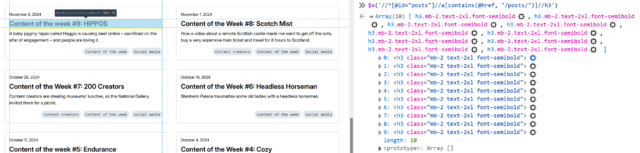
First, I’ll try getting all of the links inside the #posts section by running $x( '//*[@id="posts"]//a' ) –
Once you’ve run a query, you can expand the resulting array and hover over any element in it to see it highlighted on the page. This can be used to help check that you’ve found what
you’re looking for (and nothing else).
In my first attempt, I discovered that I got not only all the posts… but also the “tags” at the top. That’s no good. Inspecting the URLs of each, I noticed that the post URLs all
contained /posts/, so I filtered my query down to $x( '//*[@id="posts"]//a[contains(@href, "/posts/")]' ) which gave me the
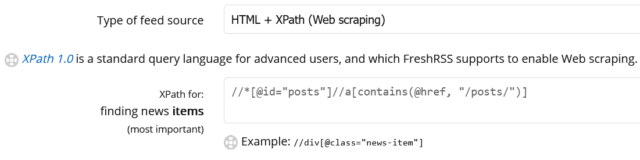
expected number of results. That gives me //*[@id="posts"]//a[contains(@href, "/posts/")]
as the XPath query for “news items”:
I like to add the rules I’ve learned to my FreshRSS configuration as I go along, to remind me what I still need to find.
Obviously, this link points to the full post, so that tells me I can put ./@href as the “item link” attribute in FreshRSS.
Next, it’s time to see what other metadata I can extract from each post to help FreshRSS along:
Inspecting the post titles shows that they’re <h3>s. Running $x( '//*[@id="posts"]//a[contains(@href, "/posts/")]//h3' ) gets them.
Within FreshRSS, everything “within” a post is referenced relative to the post, so I convert this to descendant::h3 for my “XPath (relative to item) for Item
Title:” attribute.
I was pleased to see that Adam’s using a good accessible heading cascade. This also makes my XPathing easier!
Inspecting within the post summary content, it’s… not great for scraping. The elements class names don’t correspond to what the content is4: it looks like Adam’s using a utility class library5.
Everything within the <a> that we’ve found is wrapped in a <div class="flex-grow">. But within that, I can see that the date is
directly inside a <p>, whereas the summary content is inside a <p>within a<div class="mb-2">. I don’t want my code to
be too fragile, and I think it’s more-likely that Adam will change the class names than the structure, so I’ll tie my queries to the structure. That gives me
descendant::div/p for the date and descendant::div/div/p for the “content”. All that remains is to tell FreshRSS that Adam’s using F j, Y as his
date format (long month name, space, short day number, comma, space, long year number) so it knows how to parse those dates, and the feed’s good.
If it’s wrong and I need to change anything in FreshRSS, the “Reload Articles” button can be used to force it to re-load the most-recent X posts. Useful if you need to tweak things. In
my case, I’ve also set the “Article CSS selector on original website” field to article so that the full post text can be pulled into my reader rather than having to visit
the actual site. Then I’m done!
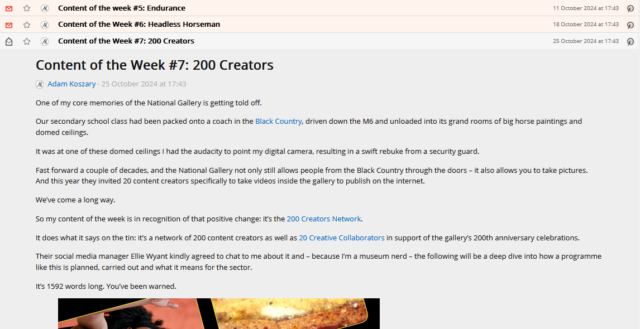
Yet another blog I can read entirely from my feed reader, despite the fact that it doesn’t offer a “feed”.
Takeaways
Use Inspect Element to find the elements you want to scrape for.
Use $x( ... ) to test your XPath expressions.
Remember that most of FreshRSS’s fields ask for expressions relative to the news item and adapt accordingly.
If you make a mistake, use “Reload Articles” to pull them again.
2 If you need a scraper than executes JavaScript, you need something more-sophisticated. I
used to use my very own RSSey for this purpose but nowadays XPath Scraping is sufficient so I don’t bother any more, but RSSey might be a
good starting point for you if you really need that kind of power!
3 If you’ve not had the chance to think about it before: View Source shows you the actual
HTML code that was delivered from the web server to your browser. This then gets interpreted by the browser to generate the DOM, which might result in changes to it: for example,
invalid elements might be removed, ambiguous markup will have an interpretation applied, and so on. The DOM might further change as a result of JavaScript code, browser plugins, and
whatever else. When you Inspect Element, you’re looking at the DOM (represented “as if” it were HTML), not the actual underlying HTML
4 The date isn’t in a <time> element nor does it have a class like
.post--date or similar.
5 I’ll spare you my thoughts on utility class libraries for now, but they’re… not
positive. I can see why people use them, and I’ve even used them myself before… but I don’t think they’re a good thing.
Look at the following list of words and try to find the intruder:
wp-activate.php
wp-admin
wp-blog-header.php
wp_commentmeta
wp_comments
wp-comments-post.php
wp-config-sample.php
wp-content
wp-cron.php
wp engine
wp-includes
wp_jetpack_sync_queue
wp_links
wp-links-opml.php
wp-load.php
wp-login.php
wp-mail.php
wp_options
wp_postmeta
wp_posts
wp-settings.php
wp-signup.php
wp_term_relationships
wp_term_taxonomy
wp_termmeta
wp_terms
wp-trackback.php
wp_usermeta
wp_users
What are these words?
Well, all the ones that contain an underscore _ are names of the WordPress core database tables. All the ones that contain a dash - are WordPress core file
or folder names. The one with a space is a company name…
…
A smart (if slightly tongue-in-cheek) observation by my colleague Paolo, there. The rest of his article’s cleverer and worth-reading if you’re following the WordPress Drama (but it’s
pretty long!).
tl;dr: I’m tidying up and consolidating my personal hosting; I’ve made a little progress, but I’ve got a way to go – fortunately I’ve got a sabbatical coming up at
work!
At the weekend, I kicked-off what will doubtless be a multi-week process of gradually tidying and consolidating some of the disparate digital things I run, around the Internet.
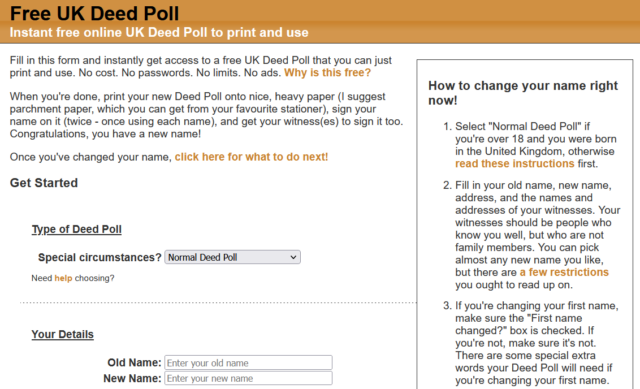
I’ve a long-standing habit of having an idea (e.g. gamebook-making tool Twinebook, lockpicking puzzle game Break Into Us, my Cheating Hangman game, and even FreeDeedPoll.org.uk!),
deploying it to one of several servers I run, and then finding it a huge headache when I inevitably need to upgrade or move said server because there’s such an insane diversity of
different things that need testing!
DNDle, my Wordle-clone where you have to guess the Dungeons & Dragons 5e monster’s stat block, is now hosted by GitHub Pages. Also, I
fixed an issue reported a month ago that meant that I was reporting Giant Scorpions as having a WIS of 19 instead of 9.
Abnib, which mostly reminds people of upcoming birthdays and serves as a dumping ground for any Abnib-related shit I produce, is now hosted by
GitHub Pages.
RockMonkey.org.uk, which doesn’t really do much any more, is now hosted by GitHub Pages.
Sour Grapes, the single-page promo for a (remote) murder mystery party I hosted during a COVID lockdown, is now hosted by GitHub
Pages.
A convenience-page for giving lost people directions to my house is now hosted by GitHub Pages.
Dan Q’s Things is now automatically built on a schedule and hosted by GitHub Pages.
Robin’s Improbable Blog, which spun out from 52 Reflect, wasn’t getting enough traffic to justify
“proper” hosting so now it sits in a Docker container on my NAS.
My μlogger server, which records my location based on pings from my phone, has also moved to my NAS. This has broken
Find Dan Q, but I’m not sure if I’ll continue with that in its current form anyway.
All of my various domain/subdomain redirects have been consolidated on, or are in the process of moving to, to a tinyLinode/Akamai
instance. It’s a super simple plain Nginx server that does virtually nothing except redirect people – this is where I’ll park the domains I register but haven’t found a use for yet, in
future.
I was pretty proud of EGXchange.org, but I’ll be first to admit that it’s among the stupider of my throwaway domains.
It turns out GitHub pages is a fine place to host simple, static websites that were open-source already. I’ve been working on improving my understanding of GitHub Actions
anyway as part of what I’ve been doing while wearing my work, volunteering, and personal hats, so switching some static build processes like DNDle’s to GitHub
Actions was a useful exercise.
Stuff I’m still to tidy…
There’s still a few things I need to tidy up to bring my personal hosting situation under control:
DanQ.me
You’re looking at it. But later this year, you might be looking at it… elsewhere?
This is the big one, because it’s not just a WordPress blog: it’s also a Gemini, Spartan, and Gopher server (thanks CapsulePress!), a Finger server, a general-purpose host to a stack of complex stuff only some of which is powered by Bloq (my WordPress/PHP integrations): e.g.
code to generate the maps that appear on my geopositioned posts, code to integrate with the Fediverse, a whole stack of configuration to make my caching work the way I want, etc.
FreeDeedPoll.org.uk
Right now this is a Ruby/Sinatra application, but I’ve got a (long-running) development branch that will make it run completely in the browser, which will further improve privacy, allow
it to run entirely-offline (with a service worker), and provide a basis for new features I’d like to provide down the line. I’m hoping to get to finishing this during my Automattic
sabbatical this winter.
The website’s basically unchanged for most of a decade and a half, and… umm… it looks it!
A secondary benefit of it becoming browser-based, of course, is that it can be hosted as a static site, which will allow me to move it to GitHub Pages too.
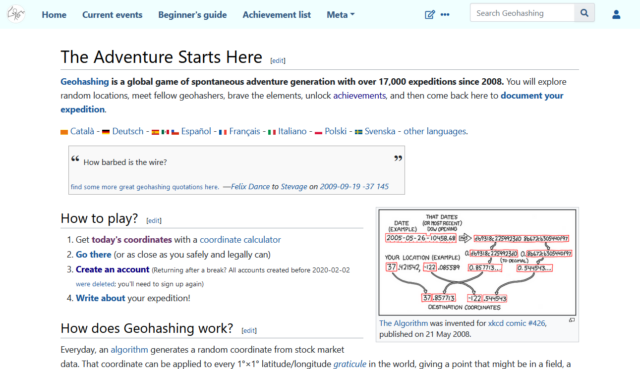
When I took over running the world’s geohashing hub from xkcd‘s Randall Munroe (and davean), I flung the site together on whatever hosting I had sitting
around at the time, but that’s given me some headaches. The outbound email transfer agent is a pain, for example, and it’s a hard host on which to apply upgrades. So I want to get that
moved somewhere better this winter too. It’s actually the last site left running on its current host, so it’ll save me a little money to get it moved, too!
Geohashing’s one of the strangest communities I’m honoured to be a part of. So it’d be nice to treat their primary website to a little more respect and attention.
Right now I run this on my NAS, but that turns out to be a pain sometimes because it means that if my home Internet goes down (e.g. thanks to a power cut, which we have from time to time), I lose access to the first and last place I
go on the Internet! So I’d quite like to move that to somewhere on the open Internet. Haven’t worked out where yet.
Next steps
It’s felt good so far to consolidate and tidy-up my personal web hosting (and to rediscover some old projects I’d forgotten about). There’s work still to do, but I’m expecting to spend
a few months not-doing-my-day-job very soon, so I’m hoping to find the opportunity to finish it then!
Maintaining a blog can be a lot of work. A single article can take weeks of research, drafting and editing, collecting and producing included materials, etc. It’s not unusual to
seek some form of compensation for it, and those rewards require initiative. With a good monetization strategy, it can become a fairly
lucrative venture.
So let’s talk about monetizing a blog, starting with the most obvious and perhaps easiest avenue: display advertising.
A content creator with an established audience can leverage that audience and sell ad space on their blog. Here’s an example:
…
I’m not sure I have words for how awesome this blog post is. If you’ve ever wanted to monetise your blog and are considering an ad-driven model, this should absolutely be the first (and
perhaps last) thing you read on the subject.
If you’re not convinced that Tyler is an appropriate authority to speak on this subject, I highly suggest you visit their other site that’s got a wealth of useful tips, PutAToothpickInTheChargingPortDoctorsHateThatShit.christmas. Yes, really.
If the most useful thing I achieve this Bank Holiday Monday will have been to make it easier to post short geotagged notes from my mobile to my blog (and Mastodon), it will have been a
success.
This has been a test post. Feel free to ignore it.
I used to pay for VaultPress. Nowadays I get it for free as one of the many awesome perks of my job. But I’d probably still pay for it
because it’s a lifesaver.




![A browser's debug console executes $x('//*[@id="posts"]//a') , and gets 14 results.](https://bcdn.danq.me/_q23u/2024/11/adam-k-xpath-1-640x188.png)