Is there a name for that experience when you forget for a moment that somebody’s dead?
For a year or so after my dad’s death 11 years ago I’d routinely have that moment:
when I’d go “I should tell my dad about this!”, followed immediately by an “Oh… no, I can’t, can I?”. Then, of course, it got rarer. It happened in 2017, but I don’t know if it happened again after that – maybe once? – until last
week.
Last week I took our eldest up Cairn Gorm, a mountain my dad and I have climbed up (and/or skiied down!) many times.
I wonder if subconsciously I was aware that the anniversary of his death – “Dead Dad Day”, as my sisters and I call it – was coming up? In any
case, when I found myself on Cairn Gorm on a family trip and snapped a photo from near the summit, I had a moment where I thought “I should send this picture to my dad”, before once
again remembering that nope, that wasn’t possible.
My dad loved a good Munro: this photo of
him was taken only about a kilometre and a half West of where I took my most recent snap on Cairn Gorm, as he ice climbed up the North face of Stob Coire an t-Sneachda.
Strange that this can still happen, over a decade on. If there’s a name for the phenomenon, I’d love to know it.
The two most important things you can do to protect your online accounts remain to (a) use a different password, ideally a randomly-generated one, for every service, and (b) enable
two-factor authentication (2FA) where it’s available.
If you’re not already doing that, go do that. A password manager like 1Password, Bitwarden, or LastPass will help (although be aware that the latter’s had some security issues lately, as I’ve mentioned).
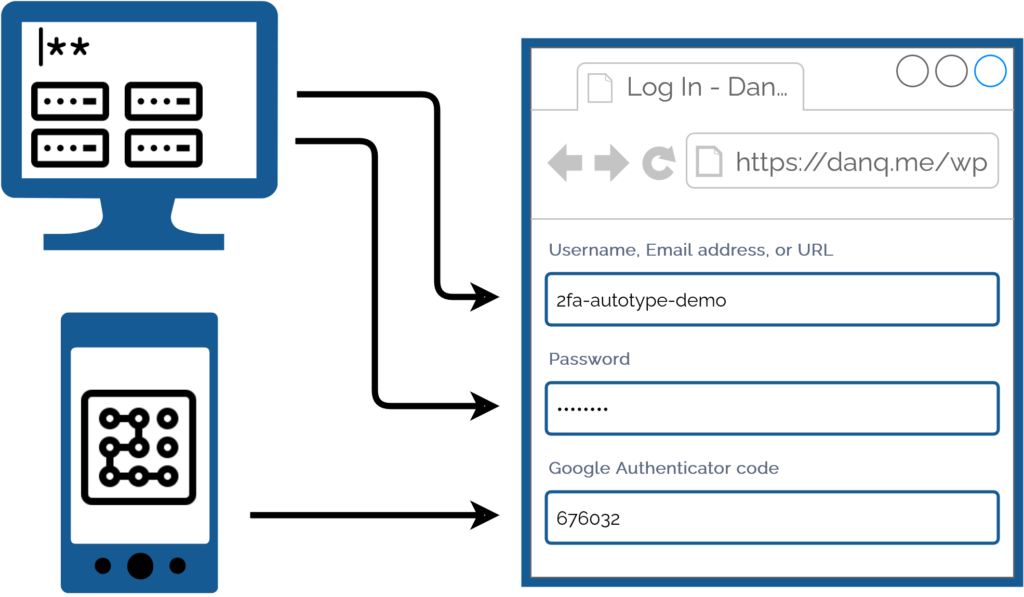
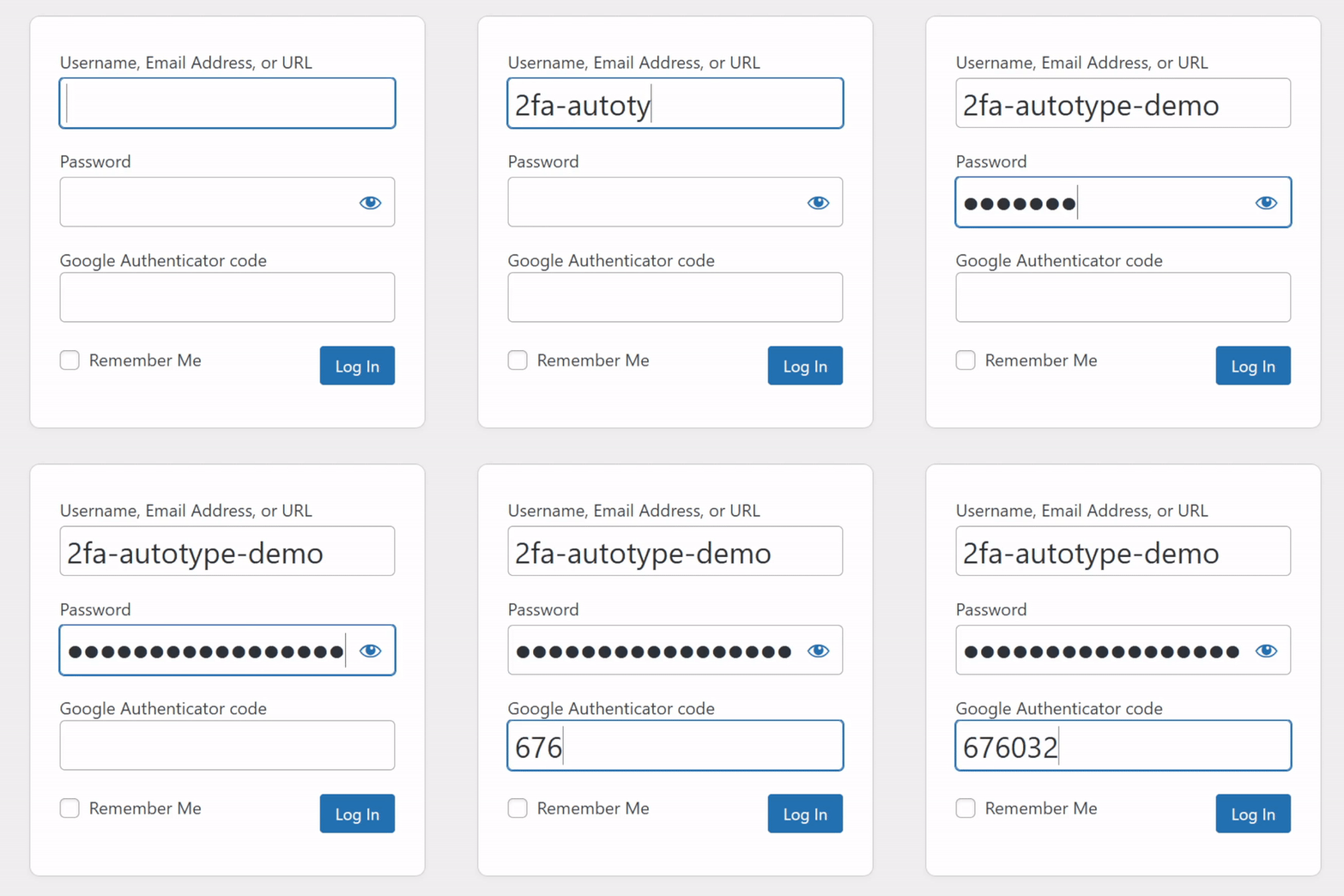
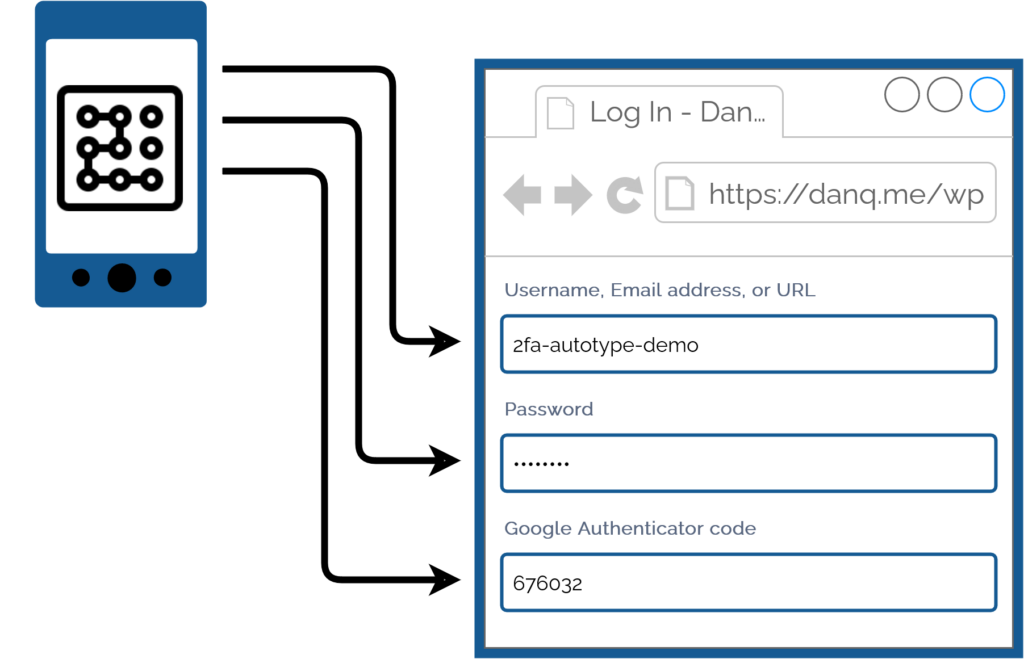
For many people, authentication looks like this: put in a username and password from a password safe (or their brain), and a second factor from their phone.
I promised back in 2018 to talk about what
this kind of authentication usually1
looks like for me, because my approach is a little different:
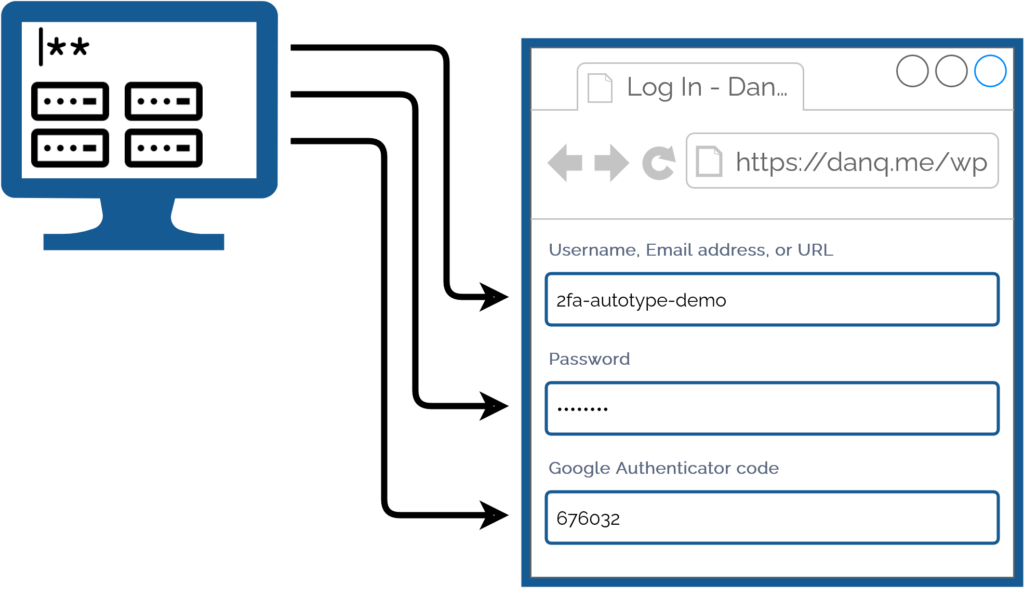
My password manager fills the username, password, and second factor parts of most login forms for me. It feels pretty magical.
I simply press my magic key combination, (re-)authenticate with my password safe if necessary, and then it does the rest. Including, thanks to some light scripting/hackery, many
authentication flows that span multiple pages and even ones that ask for randomly-selected characters from a secret word or similar2.
I love having long passwords and 2FA enabled. But I also love being able to log in with the convenience of a master
password and my fingerprint.
My approach isn’t without its controversies. The argument against it broadly comes down to this:
Storing the username, password, and the means to provide an authentication code in the same place means that you’re no-longer providing a second factor. It’s no longer e.g.
“something you have” and “something you know”, but just “something you have”. Therefore, this is equivalent to using only a username and password and not enabling 2FA at all.
I disagree with this argument. I provide two counter-arguments:
1. For most people, they’re already simplifying down to “something you have” by running the authenticator software on the same device, protected in the same way, as their
password safe: it’s their mobile phone! If your phone can be snatched while-unlocked, or if your password safe and authenticator are protected by the same biometrics3,
an attacker with access to your mobile phone already has everything.
If your argument about whether it counts as multifactor is based on how many devices are involved, this common pattern also isn’t multifactor.
2. Even if we do accept that this is fewer factors, it doesn’t completely undermine the value of time-based second factor codes4.
Time-based codes have an important role in protecting you from authentication replay!
For instance: if you use a device for which the Internet connection is insecure, or where there’s a keylogger installed, or where somebody’s shoulder-surfing and can see what you type…
the most they can get is your username, password, and a code that will stop working in 30 seconds5. That’s
still a huge improvement on basic username/password-based system.6
Note that I wouldn’t use this approach if I were using a cloud-based password safe like those I linked in the first paragraph! For me personally: storing usernames, passwords, and
2FA authentication keys together on somebody else’s hardware feels like too much of a risk.
But my password manager of choice is KeePassXC/KeePassDX, to which I migrated after I realised that the
plugins I was using in vanilla KeePass were provided as standard functionality in those forks. I keep the master copy of my password database
encrypted on a pendrive that attaches to my wallet, and I use Syncthing to push
secondary copies to a couple of other bits of hardware I control, such as my phone. Cloud-based password safes have their place and they’re extremely accessible to people new to
password managers or who need organisational “sharing” features, but they’re not the right tool for me.
As always: do your own risk assessment and decide what’s right for you. But from my experience I can say this: seamless, secure logins feel magical, and don’t have to require an
unacceptable security trade-off.
Footnotes
1 Not all authentication looks like this, for me, because some kinds of 2FA can’t be provided by my password safe. Some service providers “push” verification checks to an app, for example. Others use proprietary
TOTP-based second factor systems (I’m looking at you, banks!). And some, of course, insist on proven-to-be-terrible
solutions like email and SMS-based 2FA.
2 Note: asking for a username, password, and something that’s basically another-password
is not true multifactor authentication (I’m looking at you again, banks!), but it’s still potentially useful for organisations that need to authenticate you by multiple media
(e.g. online and by telephone), because it can be used to help restrict access to secrets by staff members. Important, but not the same thing: you should still demand 2FA.
3 Biometric security uses your body, not your mind, and so is still usable even if you’re
asleep, dead, uncooperative, or if an attacker simply removes and retains the body part that is to be scanned. Eww.
4 TOTP is a very popular
mechanism: you’ve probably used it. You get a QR code to scan into the authenticator app on your device (or multiple devices,
for redundancy), and it comes up with a different 6-digit code every 30 seconds or so.
5 Strictly, a TOTP code is
likely to work for a few minutes, on account of servers allowing for drift between your clock and theirs. But it’s still a short window.
6 It doesn’t protect you if an attacker manages to aquire a dump of the usernames,
inadequately-hashed passwords, and 2FA configuration from the server itself, of course, where other forms of 2FA (e.g. certificate-based) might, but protecting servers from bad actors is a whole separate essay.
If you read a lot of the “how to start a blog in 2023” type posts (please don’t ever use that title in a post) the advice will often boil down to something like:
Kev writes about what he’s learned from ten years of blogging. As a fellow long-term
blogger1, I was
especially pleased with his observation that, for some (many?) of us old hands, all the tips on starting a blog nowadays are things that we just don’t do, sometimes
deliberately.
Like Kev, I don’t have a “niche” (I write about the Web, life, geo*ing, technology, childwrangling, gaming, work…). I’ve experimented with email subscription but only as a convenience to people who prefer to get updates that way – the same reason I push articles to Facebook – and it certainly didn’t take off (and that’s fine!). And
as for writing on a regular schedule? Hah! I don’t even
manage to be uniform throughout the year, even after averaging over my blog’s quarter-century2 of history.
Also like Kev, and I think this is the reason that we ignore these kinds of guides to blogging, I blog for me first and foremost. Creation is a good thing, and I take
my “permission to write” and just create stuff. Not having a “niche” means that I can write about what interests me, variable as that is. In my opinion the only guide to starting a blog that anybody needs to read is
Andrew Stephens‘ “So You Want To Start An Unpopular Blog”.
And if that’s not enough inspiration for you to jump back in your time machine and party like the Web’s still in 2005, I don’t know what is.
Two years after our last murder mystery party, almost
three years since the one before, and much, much longer since our last in-person one, we finally managed to have another
get-the-guests-in-one-place murder mystery party, just like old times. And it was great!
Full credit goes to Ruth who did basically all the legwork this time around. Cheers!
D’Avekki’s murder mystery sets use an unusual mechanic that I’ve discussed before online with other murder mystery party authorship enthusiasts1 but never tried in practice: a way of determining at
random who the murderer is when play begins. This approach has a huge benefit in that it means that you can assign characters to players using a subset of those available (rather
than the usual challenges that often come up when, for example, somebody need to play somebody of a different gender than their own) and, more-importantly, it protects you from the
eventuality that a player drops-out at short notice. This latter feature proved incredibly useful as we had a total of three of our guests pull out unexpectedly!
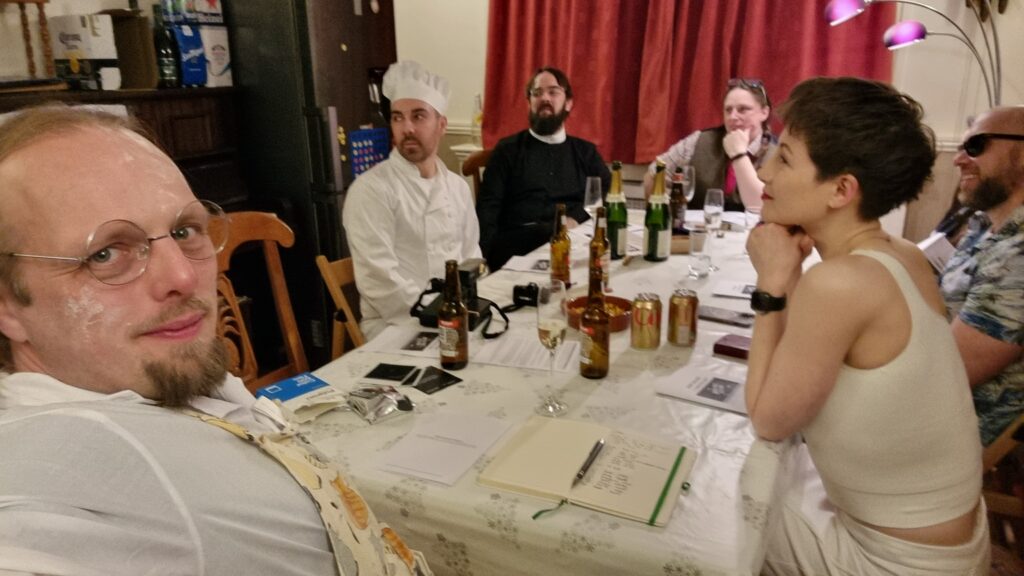
Most of our guests were old hands at murder mystery games, but for Owen’s date Kirsty this was a completely novel experience.
The challenge of writing a murder mystery with such a mechanic is to ensure that the script and evidence adapt to the various possible murderers. When I first examined the set
that was delivered to us, I was highly skeptical: the approach is broadly as follows2:
At the start of the party, the players secretly draw lots to determine who is the murderer: the player who receives the slip marked with an X is the murderer.
Each character “script” consists of (a) an initial introduction, (b) for each of three acts, a futher introduction which sets up two follow-up questions, (c) the answers to those
two follow-up questions, (d) a final statement of innocence, and (e) a final statement of guilt, for use by the murderer.
In addition, each script has a handful of underlined sections, which are to be used only if you are the murderer. This
means that the only perceivable difference between one person and another being the murderer is that the only who is the murderer will present a small amount of additional information.
The writing is designed such that this additional piece of evidence will be enough to make the case against them be compelling (e.g. because their story becomes
internally-inconsistent).
The writing was good overall: I especially appreciated the use of a true crime podcast as a framing device (expertly delivered thanks to Rory‘s
radio voice). It was also pleasing to see, in hindsight, how the story had been assembled such that any character could be the murderer, but only one would give away a
crucial clue. The downside of the format is pretty obvious, though: knowing what the mechanic is, a detective only needs to look at each piece of evidence that appears and look for a
connection with each statement given by every other player, ruling out any “red herring” pairings that connect to every other player (as is common with just about the entire
genre, all of the suspects had viable motives: only means and opportunity may vary).
It worked very well, but I wonder if – now the formula’s understood by us – a second set in a similar style wouldn’t be as successful.
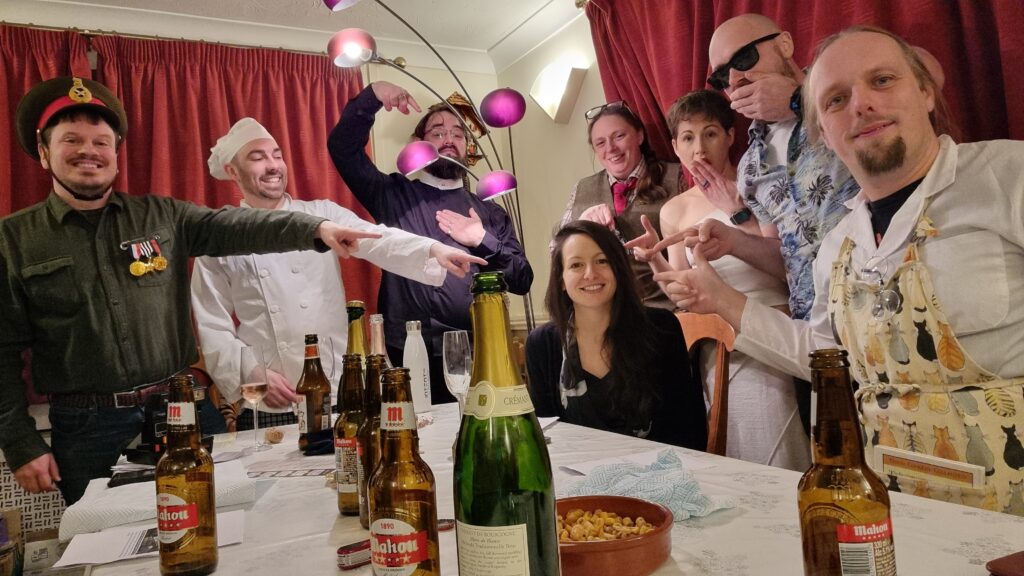
Our classic end-of-murder-mystery-party photo post makes a comeback. Extra-special hat tip to Kirsty, who ended up by coincidence being the murderer at her first ever such event and
did astoundingly well. From left to right: Rory (Major Clanger), Simon (Chef Flambé), JTA (Noah Sinner), Kirsty (Phyllis
Ora), Ruth (Dusty Tomes), Liz (Ruby Daggers), Owen (Max
Cruise), and me (Professor Pi).
That said, nobody correctly fingered the murderer this time around. Maybe we’re out of practice? Or maybe the quality of the hints in such a wide-open and dynamic murderer-selection
mechanic is less-solid than we’re used to? It’s hard to say: I’d certainly give another D’Avekki a go to find out.
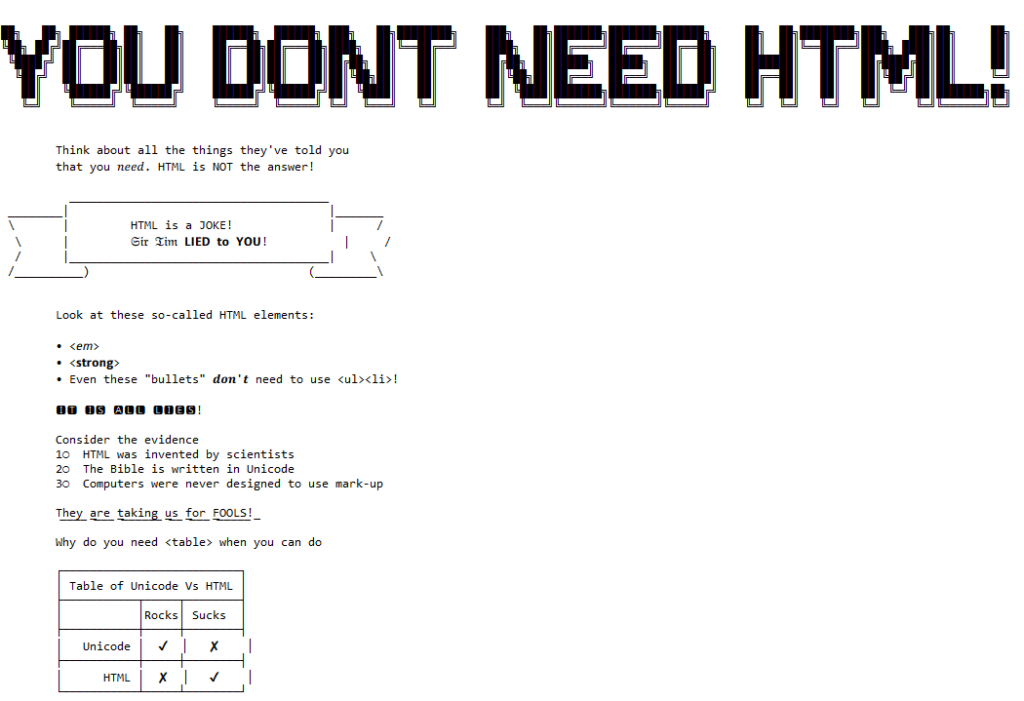
It all started when I saw no-ht.ml, Terence Eden‘s hilarious response to Salma
Alam-Naylor‘s excellent HTML is all you need to make a website. The latter is an
argument against both the silly amount of JavaScript with which websites routinely burden their users, but also even against depending on CSS. As a fan of CSS Naked Day and a firm
believer in using JS only for progressive enhancement, I’m obviously in favour.
Obviously no-ht.ml is to be taken as tongue-in-cheek, but as you’re about to see: it caught my interest and got me thinking: how could I go even further.
Terence’s site works by delivering a document with a
claimed MIME type of text/html, but which contains only the (invalid) “HTML” code
<!doctype UNICODE><meta charset="UTF-8"><plaintext> (to work around browsers’ wish to treat the page as HTML). This is followed by a block of UTF-8 plain text making use of spacing
and emoji to illustrate and decorate the content. It’s frankly very silly, and I love it.1
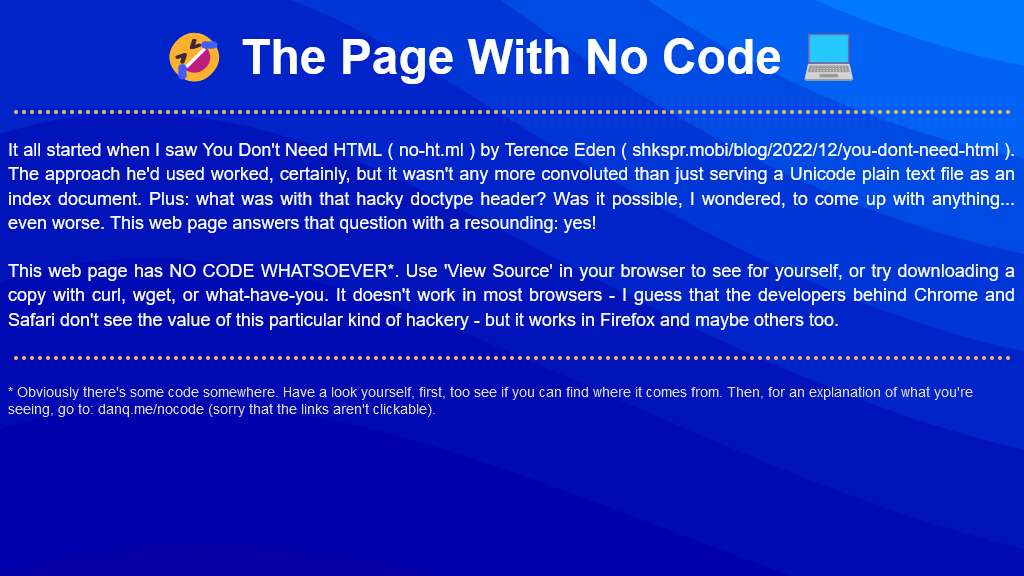
I think it’s possible to go one step further, though, and create a web page with no code whatsoever. That is, one that you can read as if it were a regular web page, but where
using View Source or e.g. downloading the page with curl will show you… nothing.
I present: The Page With No Code! (It’ll probably only work if you’re using Firefox, for reasons that will become apparent later.)
I’d encourage you to visit The Page With No Code, use View Source to confirm for yourself that it truly has no code, and see if you can work out for yourself how it manages
this feat… before coming back here for an explanation. Again: probably Firefox-only.
Once you’ve had a look for yourself and had a chance to form an opinion, here’s an explanation of the black magic that makes this atrocity possible:
The page is blank. It’s delivered with Content-Type: text/html. Your browser interprets a completely-blank page as faulty and corrects it to a functionally-blank
minimal HTML page: <html><head></head><body></body></html>.
<body> and <html> elements can be styled with CSS; this includes the ability to add
content:::before and ::after each
element. If only we could load a stylesheet then content injection is possible.
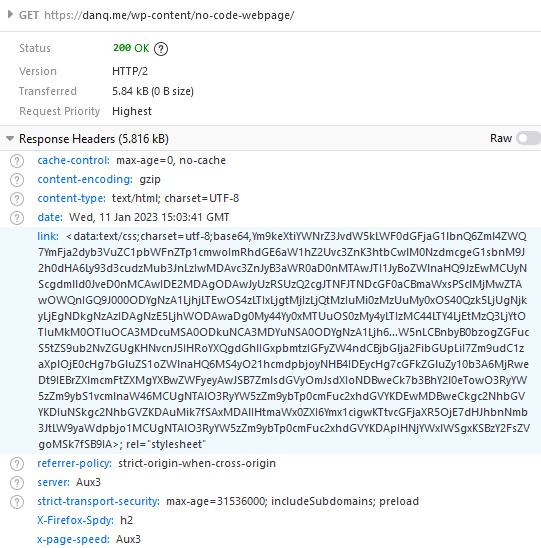
We use the fourth way to inject
CSS – a Link: HTTP header – to deliver a CSS payload (this, unfortunately, only works in Firefox). To further obfuscate what’s happening and remove the need for a round-trip, this is encoded
as a data: URI.
The stylesheet – and all the page content – is right there in the Link: header if you just care to decode it! Observe that while 5.84kB of
data are transferred, the browser rightly states that the page is zero bytes in size.
My server-side implementation of this broke in 2023 after I upgraded Nginx; my new version doesn’t support the super-long Link: header needed
to make this hack work, so I’ve updated the page to use the Link: to reference the CSS file rather than embed it via a data URI. It’s not as cool, but it at least means you can
still see the page. Thanks to Thomas Bradshaw for pointing out the problem.
Footnotes
1 My first reaction was “why not just deliver something with Content-Type:
text/plain; charset=utf-8 and dispense with the invalid code, but perhaps that’s just me overthinking the non-existent problem.
Following their security incident last month, many users of LastPass are in the process of cycling
their security credentials for many of their accounts1.
I don’t use LastPass2,
but I’ve had ocassion to cycle credentials before, so I appreciate the pain that people are going through.
It’s not just passwords, though: it may well be your “security question” answers you need to rotate too. Your passwords quickly become worthless if an attacker can guess the answers to
your “security questions” at services that use them. If you’re using a password safe anyway, you should either:
Answer security questions with long strings of random garbage3,
or
Ensure that you use different answers for every service you use, as you would with passwords.4
In the latter case, you’re probably storing your security answers in a password safe5.
If the password safe they’re stored in is compromised, you need to change the answers to those security questions in order to secure the account.
This leads to the unusual situation where you can need to call up your bank and say: “Hi, I’d like to change my mother’s maiden name.” (Or, I suppose, father’s middle
name, first pet’s name, place of birth, or whatever.) Banks in particular are prone to disallowing you from changing your security answers over the Internet, but all kinds of other
businesses can also make this process hard… presumably because a well-meaning software engineer couldn’t conceive of any reason that a user might want to.
I sometimes use a pronouncable password generator to produce fake names for security question answers. And I’ll tell you what: I get some bemused reactions when I say things like “I’d
like to change my mother’s maiden name from Tuyiborhooniplashon to Mewgofartablejuki.”
1 If you use LastPass, you should absolutely plan to do this. IMHO, LastPass’s reassurances about the difficulty in cracking the encryption on the leaked data is a gross exaggeration. I’m not saying you need to
panic – so long as your master password is reasonably-long and globally-unique – but perhaps cycle all your credentials during 2023. Oh, and don’t rely on your second factor:
it doesn’t help with this particular incident.
2 I used to use LastPass, until around 2016, and I still think it’s a good choice for many
people, but nowadays I carry an encrypted KeePassXC password safe on a pendrive (with an automated backup onto an encrypted partition on our
household NAS). This gives me some security and personalisation benefits, at the expense of only a little convenience.
3 If you’re confident that you could never lose your password (or rather: that you could
never lose your password without also losing the security question answers because you would store them in the same place!), there’s no value in security questions, and the best thing
you can do might be to render them unusable.
4 If you’re dealing with a service that uses the security questions in a misguided effort
to treat them as a second factor, or that uses them for authentication when talking to them on the telephone, you’ll need to have usable answers to the questions for when they come
up.
5 You can, of course, use a different password safe for your randomly-generatred
security question answers than you would for the password itself; perhaps a more-secure-but-less-convenient one; e.g. an encrypted pendrive kept in your fire safe?
I bundled the dog into the car and drove out to Piddington, a couple of kilometres North of the hashpoint. Cherwell Council advertise a circular walk
that seems to circle from the village (which looked like a good place to park) up to Muswell Hill, the summit of which is near the hashpoint.
She and I walked through Piddington, past the church, and up onto the path. A soggy kilometre or so later we quickly discovered that this was going to be more-challenging than I’d
anticipated. We quickly got bogged down in a flooded field and needed to double-back. With my socks already soaking wet and the dog in a similar condition, we found a different route
that looped around the entire hill and through an alpaca farm (or were they llamas?), then we worked our way up the South face of the hill, over the summit, and down to the hashpoint.
We got there at 11:00 UTC, took a quick look around and pulled the closest thing a dog can manage to a silly grin, and then hacked our way back (by road) to Piddington for the drive
home and some dry clothes.
There’s been a bit of a resurgence lately of sites whose only subscription option is email, or – worse yet – who provide certain “exclusive” content only to email subscribers.
I don’t want to go giving an actual email address to every damn service, because:
It’s not great for privacy, even when (as usual) I use a unique alias for each sender.
It’s usually harder to unsubscribe than I’d like, and rarely consistent: you need to find a recent message, click a link, sometimes that’s enough or sometimes you need to uncheck a
box or click a button, or sometimes you’ll get another email with something to click in it…
I rarely want to be notified the very second a new issue is published; email is necessarily more “pushy” than I like a subscription to be.
I don’t want to use my email Inbox to keep track of which articles I’ve read/am still going to read: that’s what a feed reader is for! (It also provides tagging, bookmarking,
filtering, standardised and bulk unsubscribing tools, etc.)
So what do I do? Well…
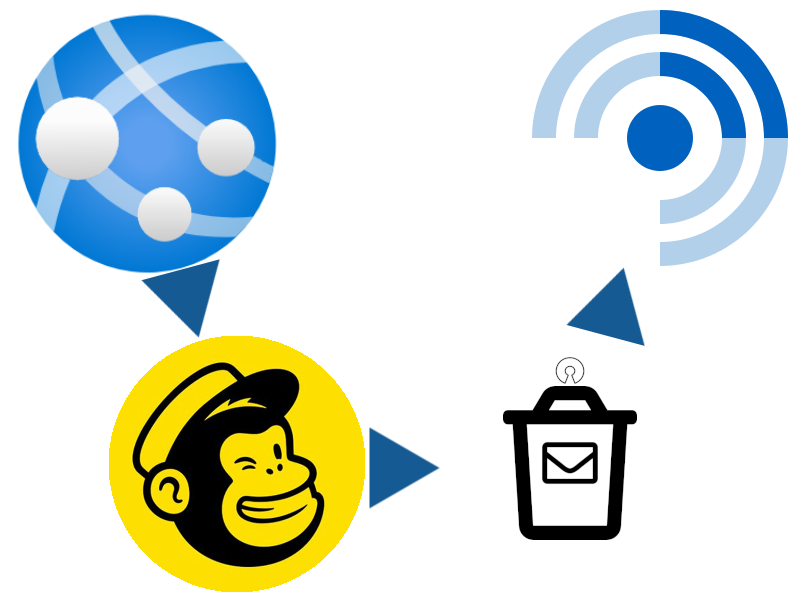
I already operate an OpenTrashMail instance for one-shot throwaway email addresses (which I highly recommend). And
OpenTrashMail provides a rich RSS feed. Sooo…
How I subscribe to newsletters (in my feed reader)
If I want to subscribe to your newsletter, here’s what I do:
Put an email address (I usually just bash the keyboard to make a random one, then put @-a-domain-I-control on the end, where that domain is handled by OpenTrashMail) in to
subscribe.
Put https://my-opentrashmail-server/rss/the-email-address-I-gave-you/rss.xml into my feed reader.
That’s all. There is no step 3.
Now I get your newsletter alongside all my other subscriptions. If I want to unsubscribe I just tell my feed reader to stop polling the RSS feed (You don’t even get to find out that I’ve unsubscribed; you’re now just dropping emails into an unmonitored box, but of course I can
resubscribe and pick up from where I left off if I ever want to).
Obviously this approach isn’t suitable for personalised content or sites for which your email address is used for authentication, because anybody who can guess the random email address
can get the feed! But it’s ideal for those companies who’ll ocassionally provide vouchers in exchange for being able to send you other stuff to your Inbox, because you can
simply pipe their content to your feed reader, then add a filter to drop anything that doesn’t contain the magic keyword: regular vouchers, none of the spam. Or for blogs that provide
bonus content to email subscribers, you can get the bonus content in the same way as the regular content, right there in a folder of your reader. It’s pretty awesome.
If you don’t already have and wouldn’t benefit from running OpenTrashMail (or another trashmail system with feed support) it’s probably not worth setting one up just for this
purpose. But otherwise, I can certainly recommend it.
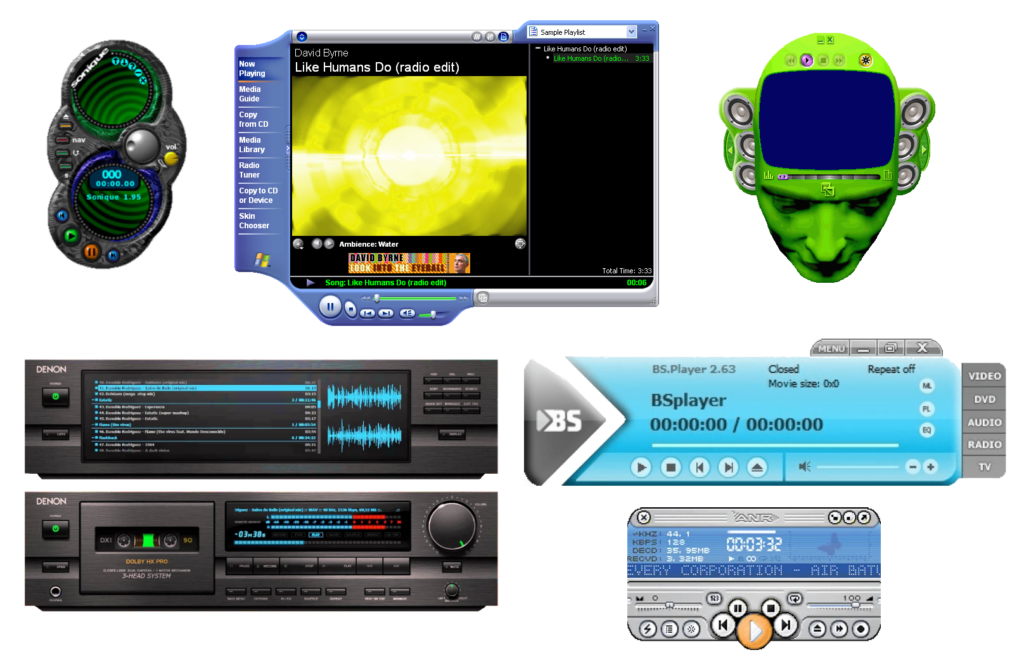
You don’t really see it any more, but: if you downloaded some media player software a couple of decades ago, it’d probably appear in a weird-shaped window, and I’ve never understood
why.
Mostly, these designs are… pretty ugly. And for what? It’s also worth noting that this kind of design can be found in all kinds of applications, in media players that it
was almost ubiquitous.
You might think that they’re an overenthusiastic kind of skeuomorphic design: people trying
to make these players look like their physical analogues. But hardware players were still pretty boxy-looking at this point, either because of the limitations of their data
storage1. By the time flash memory-based
portable MP3 players became commonplace their design was copying software players, not the other way around.
So my best guess is that these players were trying to stand out as highly-visible. Like: they were things you’d want to occupy a disproportionate amount of desktop space. Maybe
other people were listening to music differently than me… but for me, back when screen real estate was at such a premium2,
a music player’s job was to be small, unintrusive, and out-of-the-way.
I used to run Winamp in its very-smallest minified size, tucked up at the top of the screen, using
the default skin or one that made it even less-obtrusive.
It’s a mystery to me why anybody would (or still
does) make media player software or skins for them that eat so much screen space, frequently looking ugly while they do so, only to look like a hypothetical hardware device that
wouldn’t actually become commonplace until years after this kind of player design premiered!
Maybe other people listened to music on their computer differently from me: putting it front and centre, not using their computer for other tasks at the same time. And maybe for these
people the choice of player and skin was an important personalisation feature; a fashion statement or a way to show off their personal identity. But me? I didn’t get it then, and I
don’t get it now. I’m glad that this particular trend seems to have died and windows are, for the most part, rounded rectangles once more… even for music player software!
Footnotes
1 A walkman, minidisc player, or hard drive-based digital music device is always going to
look somewhat square because of what’s inside.
2 I “only” had 1600 × 1200 (UXGA) pixels on the very biggest monitor I owned before I went widescreen, and I spent a lot of time on monitors at lower resolutions e.g.
1024 × 768 (XGA); on such screens, wasting space on a music player when you’re mostly going to be listening “in the
background” while you do something else seemed frivolous.
…removing a SIM tray is harder than it looks when you don’t wear earrings. I had to search everywhere to find one of those little SIM tools…
Stuart writes a fun article about his experience of changing mobile network. It’s worth a read, and there’s only one “Dan pro tip” I’d add:
If you have a case on your mobile phone, tuck one of those SIM extractor tools into the case, behind your phone.
It’s exactly where you need it to be, if you need one yourself (you probably need to remove the case to access the SIM tray
anyway), but beyond that: it means you’re always carrying one for when a friend needs one. They’re also useful for pressing those tiny “factory reset” buttons you see
sometimes.
A SIM extractor has been sneakily part of my “everyday carry” for about a decade and it’s proven its value time and time
again.
When I saw this hashpoint appear I thought to myself: that’s eminently achievable! I hoped I might be able to slip away from work for a lunchtime cycle to claim it.
But the gods of technology didn’t approve of my plan and turned my workday into a catastrophe of the kind that only a computer can, and the chance of taking a long lunch evaporated
quickly. But fortune dealt me a second hand when the weather held off into the evening, and I instead opted for a post-dinner huckle in the dark out to this hashpoint.
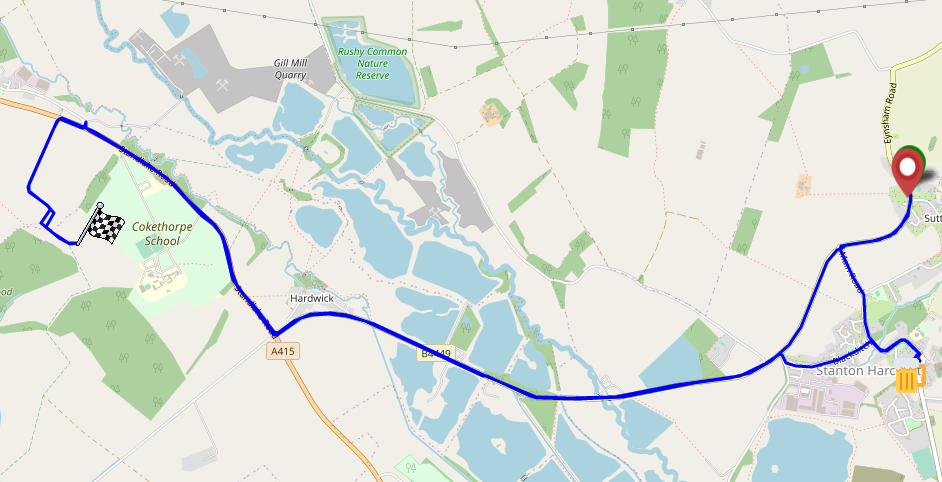
I set out around 18:30, South through Stanton Harcourt then North up the adorably-named Ducklington Road. It took some time to sight the somewhat-concealed bridleway around the hill of
Cokethorpe School. And then, another challenge – navigating by OpenStreetMap I missed my turning and went straight through a farmyard, and had to carry my bike over a fence at the other
end. Turns out the map is wrong and I later found a sign indicating the true course of the bridleway; I’ll get that
corrected.
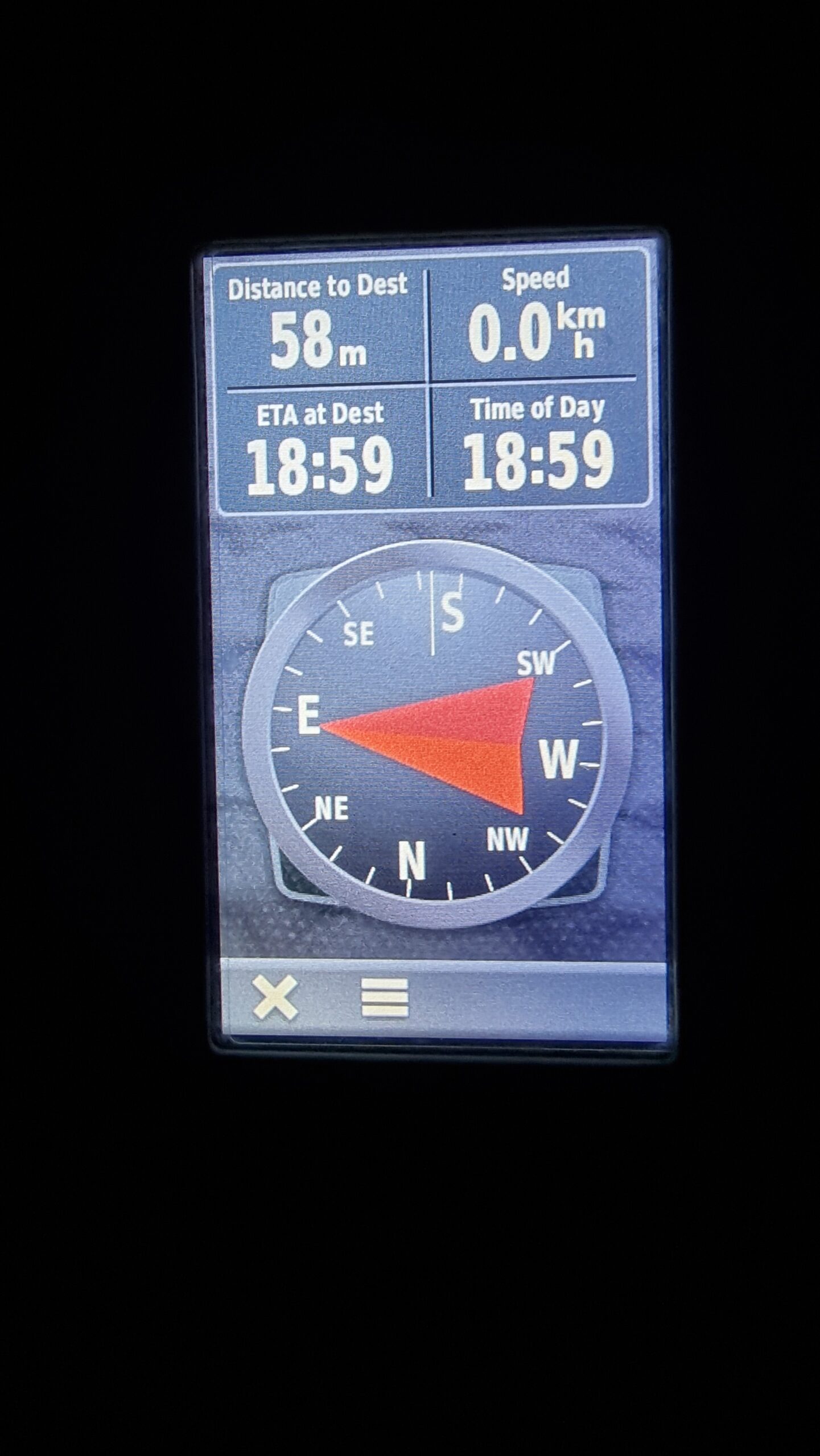
I abandoned my bike for the final 50 metres, trekking through the thick grass of an unmown meadow to the hashpoint and arriving around 19:00. No panoramic photo today it’s too dark –
but you get a silly grin.
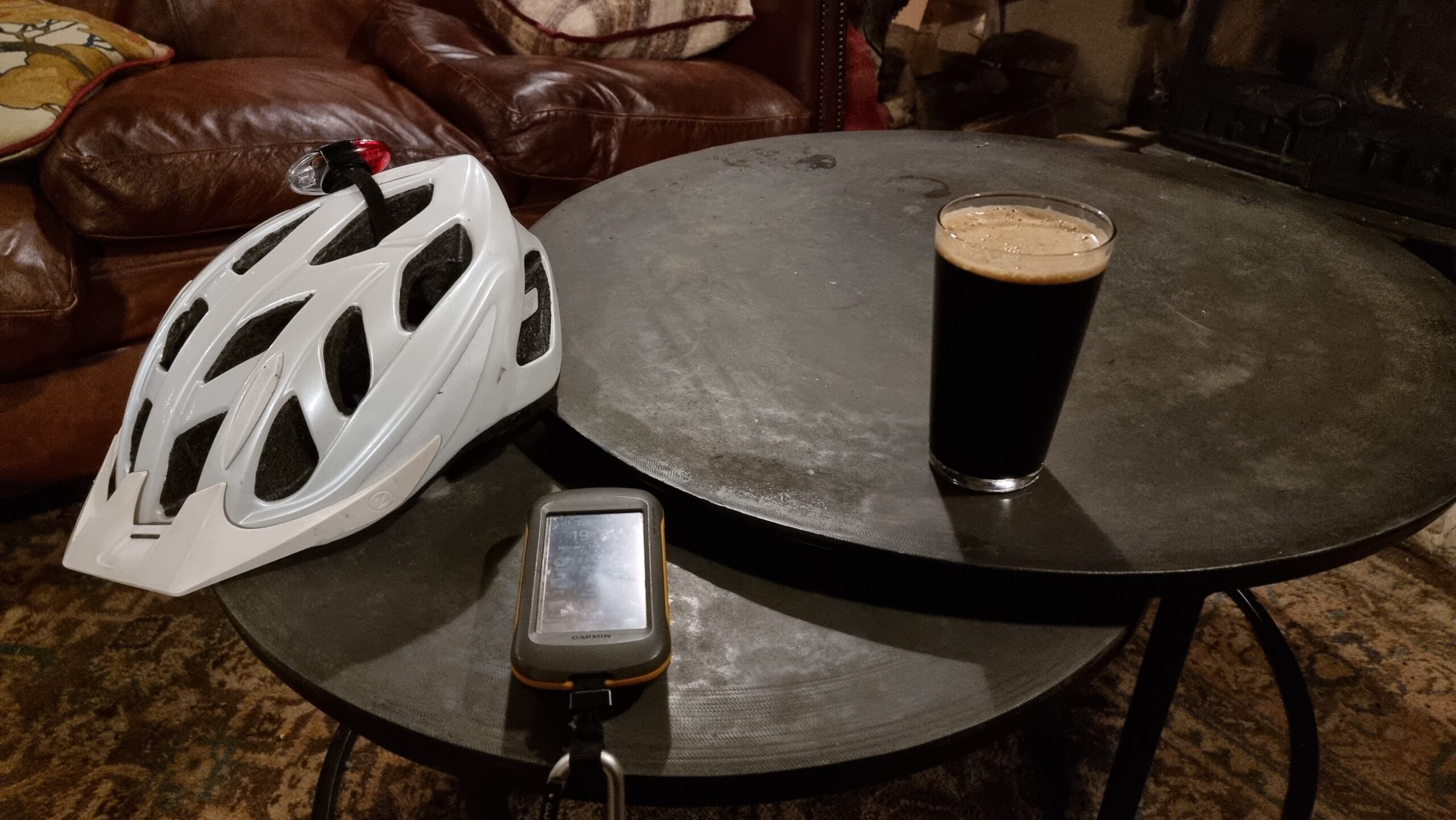
Pleased with this fast expedition, I diverted on my route home to the Harcourt Arms pub for a pint of their surprisingly-delicious
seasonal guest ale, Fairytale of Brew York, which genuinely tastes like stollen. There, I wrote up this
expedition report, but I’ll have to get home before I can extract my GPSr‘s tracklog.
This is a reply to a post published elsewhere. Its content might be duplicated as a traditional comment at the original source.
In his blog post “The ethics of syndicating comments using WebMentions”, Terence Eden said:
…
I want to see what people are writing in public about my posts. I also want to direct people to the conversations which are happening elsewhere on the web. But people – quite
rightly – might not want their content permanently stored by my site.
So I think I have a few options.
Do nothing. My site; my rules. If you don’t want me to grab your hot takes, don’t post them in public. (Feels a bit rude, TBQH.)
Be reactive. If someone asks me to remove their content, do so. (But, of course, how will they know I’ve made a copy?)
Stop syndicating comments. (I don’t wanna!)
Replace the verbatim comments with a link saying “Fred mentioned this article on Twitter” . (A bit of a disruptive experience for readers.)
Use oEmbed to capture the user’s comment and dynamically load it from the 3rd party site. That would update automatically if the user changes their name or deleted the
comment. (A massive faff to set up.)
…
Terence describes a problem that I’ve wrestled with myself. If somebody comments directly on my blog using the form at the bottom of a post, that’s a pretty strong indicator of
them giving their consent for their comment to be published at the bottom of that post (at my discretion). If somebody publicly replies somewhere my post is syndicated, that’s
less-obvious, but still pretty clear. If somebody merely mentions my post publicly, writing their own post and linking to mine… that’s a real fuzzy area.
I take a minimal approach; only capturing their full content if it’s short and otherwise trying to extract a snippet that contains the bit that mentioned my content, and I think that
works great. But Terence points out an important follow-up: what if the commenter deletes that content?
My approach so far has always been a reactive one – the second in Terence’s list – and I think it’s a morally-acceptable stance for a personal blogger. But I’m not sure it scales. I
find myself asking: what if a news outlet did this, taking my self-published feedback to their story and publishing it on their site, even if I later amended, retracted, or deleted it
on my own? If somebody’s making money out of my content, that feels different: I’ve always been clear that what I write on my blog is permissively-licensed, but that permissiveness is based on the prohibition of
commercial use of my content.
Perhaps down the line this can be solved technologically: something machine-readable akin to the <link rel="license" ...> tag could state an author’s preference for
how their content is syndicated by third parties they’ve mentioned, answering questions like:
Can you quote me, or just link to me? Who do these rules apply to? (Should we be attaching metadata to individual links?)
Should you inform me that you’ve done so, and if so: how (WebMention, etc.)?
If you (or your site) observe that my content has disappeared or changed for an extended time, should that be taken as revokation of consent to syndicate it?
Right now, the relevant technologies are not well-established enough to even begin this kind of work, but if a modern interconected federated web of personal websites takes off, it’s
the kind of question we might one day have to answer.
For now my gut feeling is that option #2 (reactive moderation of syndicated comments) is ethically-sufficient for personal websites. But I’ll be watching the feedback Terence (who
probably gets many more readers than I) receives in case my gut doesn’t represent the majority!
Nowadays if you’re on a railway station and hear an announcement, it’s usually a computer stitching together samples1. But back in the day, there used to be a human
with a Tannoy microphone sitting in the back office, telling you about the platform alternations and
destinations.
I had a friend who did it as a summer job, once. For years afterwards, he had a party trick that I always quite enjoyed: you’d say the name of a terminus station on a direct line from
Preston, e.g. Edinburgh Waverley, and he’d respond in his announcer-voice: “calling at Lancaster, Oxenholme the Lake District, Penrith, Carlisle, Lockerbie, Haymarket, and Edinburgh
Waverley”, listing all of the stops on that route. It was a quirky, beautiful, and unusual talent. Amazingly, when he came to re-apply for his job the next summer he didn’t get it,
which I always thought was a shame because he clearly deserved it: he could do the job blindfold!
There was a strange transitional period during which we had machines to do these announcements, but they weren’t that bright. Years later I found myself on Haymarket station waiting for
the next train after mine had been cancelled, when a robot voice came on to announce a platform alteration: the train to Glasgow would now be departing from platform 2, rather than
platform 1. A crowd of people stood up and shuffled their way over the footbridge to the opposite side of the tracks. A minute or so later, a human announcer apologised for the
inconvenience but explained that the train would be leaving from platform 1, and to disregard the previous announcement. Between then and the train’s arrival the computer tried twice
more to send everybody to the wrong platform, leading to a back-and-forth argument between the machine and the human somewhat reminiscient of the white zone/red zone scene from Airplane! It was funny perhaps only
because I wasn’t among the people whose train was in superposition.
Clearly even by then we’d reached the point where the machine was well-established and it was easier to openly argue with it than to dig out the manual and work out how to turn it off.
Nowadays it’s probably even moreso, but hopefully they’re less error-prone.
When people talk about how technological unemployment, they focus on the big changes, like how a tipping point with self-driving vehicles might one day revolutionise the haulage
industry… along with the social upheaval that comes along with forcing a career change on millions of drivers.
But in the real world, automation and technological change comes in salami slices. Horses and carts were seen alongside the automobile for decades. And you still find stations with
human announcers. Even the most radically-disruptive developments don’t revolutionise the world overnight. Change is inevitable, but with preparation, we can be ready for it.
A few yeras ago, I wanted to subscribe to The Far Side‘s “Daily Dose” via my RSS reader. The Far Side doesn’t have an RSS feed, so I implemented a proxy/middleware to bridge the two.
If you’re looking for a more-general instruction on using XPath scraping in FreshRSS, this isn’t it.
The release of version 1.20.0 of my favourite RSS reader FreshRSS provided a new mechanism for subscribing to content from sites that didn’t provide feeds: XPath scraping. I demonstrated the use of this to subscribe to my friend Beverley‘s blog, but this week I figured it was time to have a go at retiring my middleware and subscribing directly to The Far Side from FreshRSS.
It turns out that FreshRSS’s XPath Scraping is almost enough to achieve exactly what I want. The big problem is that the image server on The Far Side website tries to
prevent hotlinking by checking the Referer: header on requests, so we need a proxy to spoof that. I threw together a quick PHP program to act as a proxy (if
you don’t have this, you’ll have to click-through to read each comic), then configured my FreshRSS feed as follows:
Feed URL:https://www.thefarside.com/
The “Daily Dose” gets published to The Far Side‘s homepage each day.
XPath for finding new items://div[@class="card tfs-comic js-comic"]
Finds each comic on the page. This is probably a little over-specific and brittle; I should probably switch to using the contains function at some point. I
subsequently have to use parent:: and ancestor:: selectors which is usually a sign that your screen-scraping is suboptimal, but in this case it’s necessary
because it’s only at this deep level that we start seeing really specific classes.
Item title:concat("Far Side #", parent::div/@data-id)
The comics don’t have titles (“The one with the cow”?), but these seem to have unique IDs in the data-id attribute of the parent <div>, so I’m using
those as a reference.
Item content:descendant::div[@class="card-body"]
Within each item, the <div class="card-body"> contains the comic and its text. The comic itself can’t be loaded this way for two reasons: (1) the <img
src="..."> just points to a placeholder (the site uses JavaScript-powered lazy-loading, ugh – the actual source is in the data-src attribute), and (2) as
mentioned above, there’s anti-hotlink protection we need to work around.
Item link:descendant::input[@data-copy-item]/@value
Each comic does have a unique link which you can access by clicking the “share” button under it. This makes a hidden text <input> appear, which we can
identify by the presence of the data-copy-item attribute. The contents of this textbox is the sharing URL for
the comic.
Item thumbnail:concat("https://example.com/referer-faker.php?pw=YOUR-SECRET-PASSWORD-GOES-HERE&referer=https://www.thefarside.com/&url=",
descendant::div[@class="tfs-comic__image"]/img/@data-src)
Here’s where I hook into my special proxy server, which spoofs the Referer: header to work around the anti-hotlinking code. If you wanted you might be able to come up
with an alternative solution using a custom JavaScript loaded into your FreshRSS instance (there’s a plugin for that!), perhaps to load an iframe of the sharing URL? Or you can
host a copy of my proxy server yourself (you can’t use mine, it’s got a password and that password isn’tYOUR-SECRET-PASSWORD-GOES-HERE!)
Item date:ancestor::div[@class="tfs-page__full tfs-page__full--md"]/descendant::h3
There’s nothing associating each comic with the date it appeared in the Daily Dose, so we have to ascend up to the top level of the page to find the date from the heading.
Item unique ID:parent::div/@data-id
Giving FreshRSS a unique ID can help it stop showing duplicates. We use the unique ID we discovered earlier; this way, if the Daily Dose does a re-run of something it already did
since I subscribed, I won’t be shown it again. Omit this if you want to see reruns.
Hurrah; once again I can laugh at repeats of Gary Larson’s best work alongside my other morning feeds.
There’s a moral to this story: when you make your website deliberately hard to consume, fewer people will access it in the way you want!The Far Side‘s website
is actively hostile to users (JavaScript lazy-loading, anti-right click scripts, hotlink protection, incorrect MIME types, no feeds etc.), and an inevitable consequence of that is that people like me will find and share workarounds to that
hostility.
If you’re ad-supported or collect webstats and want to keep traffic “on your site” on this side of 2004, you should make it as easy as possible for people to subscribe to content.
Consider The Oatmeal or Oglaf, for example, which offer RSS feeds that include only a partial thumbnail of each comic and a link through to the full thing. I don’t feel the need to screen-scrape those sites
because they’ve given me a subscription option that works, and I routinely click-through to both of them to enjoy their latest content!
Conversely, the Far Side‘s aggressive anti-subscription technology ultimately means that there are fewer actual visitors to their website… because folks like me work
to circumvent them.
And now you know how I did so.
Update: want the new content that’s being published to The Far Side in FreshRSS, too? I’ve got a recipe for that!