Experimenting with some unusual combinations in anticipation of International Crisp Sandwich Day.
This one’s Roast Beef Monster Munch on Farmhouse White.
(I hereby release the crisp sandwich photo into the public domain / CC0 license; your choice.)
Experimenting with some unusual combinations in anticipation of International Crisp Sandwich Day.
This one’s Roast Beef Monster Munch on Farmhouse White.
(I hereby release the crisp sandwich photo into the public domain / CC0 license; your choice.)
Foundry is a wonderful virtual tabletop tool well-suited to playing tabletop roleplaying games with your friends, no matter how far away they are. It compares very favourably to the market leader Roll20, once you get past some of the initial set-up challenges and a moderate learning curve.
You can run it on your own computer and let your friends “connect in” to it, so long as you’re able to reconfigure your router a little, but you’ll be limited by the speed of your home Internet connection and people won’t be able to drop in and e.g. tweak their character sheet except when you’ve specifically got the application running.
A generally better option is to host your Foundry server in the cloud. For most of its history, I’ve run mine on Fox, my NAS, but I’ve recently set one up on a more-conventional cloud virtual machine too. A couple of friends have asked me about how to set up their own, so here’s a quick guide:
Getting a virtual server is really easy nowadays.
You’ll need:
Choose a root password when you set up your server. If you’re a confident SSH user, add your public key so you can log in easily (and then disable password authentication entirely!).
For laziness, this guide has you run Foundry as root on your new server. Ensure you understand the implications of this.2
DNS propogation can be pretty fast, but… sometimes it isn’t. So get this step underway before you need it.
Your newly-created server will have an IP address, and you’ll be told what it is. Put that IP address into an A-record for your domain.
In my examples, my domain name is vtt.danq.me and my server is at 1.2.3.4. Yours will be different!
Connect to your new server using SSH. Your host might even provide a web interface if you don’t have an SSH client installed: e.g. Linode’s “Launch LISH Console” button will do pretty-much exactly that for you. Log in as root using the password you chose
when you set up the server (or your SSH private key, if that’s your preference). Then, run each of the commands below in order (the full script is available as a single file if you
prefer).
You’ll need unzip (to decompress Foundry), nodejs (to run Foundry), ufw (a firewall, to prevent unexpected surprises), nginx (a
webserver, to act as a reverse proxy to Foundry), certbot (to provide a free SSL certificate for Nginx),
nvm (to install pm2) and pm2 (to keep Foundry running in the background). You can install them all like this:
apt update apt upgrade apt install -y unzip nodejs ufw nginx certbot nvm npm install -g pm2
By default, Foundry runs on port 30000. If we don’t configure it carefully, it can be accessed directly, which isn’t what we intend: we want connections to go through the webserver (over https, with http redirecting to https). So we configure our firewall to allow only these ports to be accessed. You’ll also want ssh enabled so we can remotely connect into the server, unless you’re exclusively using an emergency console like LISH for this purpose:
ufw allow ssh ufw allow http ufw allow https ufw enable
Putting the domain name we’re using into a variable for the remainder of the instructions saves us from typing it out again and again. Make sure you type your domain name (that you pointed to your server in step 2), not mine (vtt.danq.me):
DOMAIN=vtt.danq.me
So long as the DNS change you made has propogated, this should Just Work. If it doesn’t, you might need to wait for a bit then try again.
certbot certonly --agree-tos --register-unsafely-without-email --rsa-key-size 4096 --webroot -w /var/www/html -d $DOMAIN
Don’t continue past this point until you’ve succeeded in getting the SSL certificate sorted.
The certificate will renew itself automatically, but you also need Nginx to restart itself whenever that happens. You can set that up like this:
printf "#!/bin/bash\nservice nginx restart\n" > /etc/letsencrypt/renewal-hooks/post/restart-nginx.sh chmod +x /etc/letsencrypt/renewal-hooks/post/restart-nginx.sh
You can, of course, manually write the Nginx configuration file: just remove the > /etc/nginx/sites-available/foundry from the end of the printf line to see
the configuration it would write and then use/adapt to your satisfaction.
set +H
printf "server {\n listen 80;\n listen [::]:80;\n server_name $DOMAIN;\n\n # Redirect everything except /.well-known/* (used for ACME) to HTTPS\n root /var/www/html/;\n if (\$request_uri !~ \"^/.well-known/\") {\n return 301 https://\$host\$request_uri;\n }\n}\n\nserver {\n listen 443 ssl http2;\n listen [::]:443 ssl http2;\n server_name $DOMAIN;\n\n ssl_certificate /etc/letsencrypt/live/$DOMAIN/fullchain.pem;\n ssl_certificate_key /etc/letsencrypt/live/$DOMAIN/privkey.pem;\n\n client_max_body_size 300M;\n\n location / {\n # Set proxy headers\n proxy_set_header Host \$host;\n proxy_set_header X-Forwarded-For \$proxy_add_x_forwarded_for;\n proxy_set_header X-Forwarded-Proto \$scheme;\n\n # These are important to support WebSockets\n proxy_set_header Upgrade \$http_upgrade;\n proxy_set_header Connection \"Upgrade\";\n\n proxy_pass http://127.0.0.1:30000/;\n }\n}\n" > /etc/nginx/sites-available/foundry
ln -sf /etc/nginx/sites-available/foundry /etc/nginx/sites-enabled/foundry
service nginx restart
mkdir {vtt,data}
cd vtt
Substitute in your Timed URL in place of <url from website> (keep the quotation marks – " –
though!):
wget -O foundryvtt.zip "<url from website>" unzip foundryvtt.zip rm foundryvtt.zip
Now you’re finally ready to launch Foundry! We’ll use PM2 to get it to run automatically in the background and keep running:
pm2 start --name "Foundry" node -- resources/app/main.js --dataPath=/root/data
You can watch the logs for Foundry with PM2, too. It’s a good idea to take a quick peep at them to check it launched okay (press CTRL-C to exit):
pm2 logs 0
https://vtt.danq.me) and you should see Foundry’s first-load page, asking for your license key.
Provide your license key to get started, and then immediately change the default password: a new instance of Foundry has a blank default password, which means that anybody on Earth can administer your server: get that changed to something secure!
Now you’re running on Foundry!
1 Which currency you pay in, and therefore how much you pay, for a Foundry license depends on where in the world you are where
your VPN endpoint says you are. You might like to plan accordingly.
2 Running Foundry as root is dangerous, and you should consider the risks for yourself. Adding a new user is relatively simple, but for a throwaway server used for a single game session and then destroyed, I wouldn’t bother. Specifically, the risk is that a vulnerability in Foundry, if exploited, could allow an attacker to reconfigure any part of your new server, e.g. to host content of their choice or to relay spam emails. Running as a non-root user means that an attacker who finds such a vulnerability can only trash your Foundry instance.
For a while now, this site has been partially mirrored via the Gemini1 and Gopher protocols.2 Earlier this year I presented hacky versions of the tools I’d used to acieve this (and made people feel nostalgic).
Now I’ve added support for Spartan3 too and, seeing as the implementations shared functionality, I’ve combined all three – Gemini, Spartan, and Gopher – into a single package: CapsulePress.
CapsulePress is a Gemini/Spartan/Gopher to WordPress bridge. It lets you use WordPress as a CMS for any or all of those three non-Web protocols in addition to the Web.
For example, that means that this post is available on all of:
It’s also possible to write posts that selectively appear via different media: if I want to put something exclusively on my gemlog, I can, by assigning metadata that tells WordPress to suppress a post but still expose it to CapsulePress. Neat!
I’ve open-sourced the whole thing under a super-permissive license, so if you want your own WordPress blog to “feed” your Gemlog… now you can. With a few caveats:
Whether or not your WordPress blog makes the jump to Geminispace4, I hope you’ll came take a look at mine at one of the URLs linked above, and then continue to explore.
If you’re nostalgic for the interpersonal Internet – or just the idea of it, if you’re too young to remember it… you’ll find it there. (That Internet never actually went away, but it’s harder to find on today’s big Web than it is on lighter protocols.)
2 Also via Finger (but that’s another story).
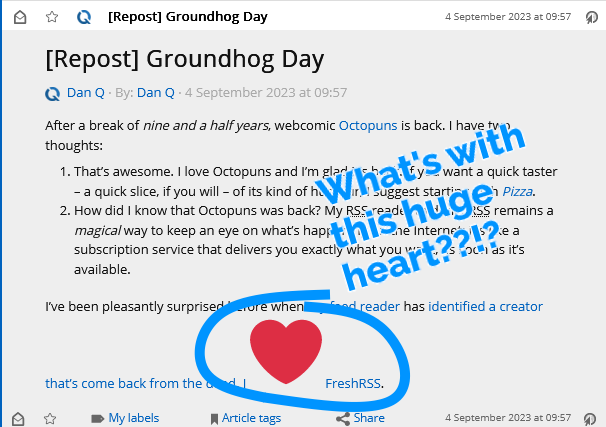
After sharing that Octopuns has started posting again after a 9½-year hiatus earlier today, I noticed something odd: where I’d written “I ❤️ FreshRSS“, the heart emoji was huge when viewed in my favourite feed reader.
It turns out that by default, WordPress replaces emoji in its feeds (and when sending email) with images of those emoji, using the Tweemoji set, and with the alt-text set to the original emoji. These images are hosted at https://s.w.org/images/core/emoji/…-based
URLs.
For example, this heart was served with the following HTML code (the number 2764 refers to the codepoint of the emoji):
<img src="https://s.w.org/images/core/emoji/14.0.0/72x72/2764.png"
alt="❤"
class="wp-smiley"
style="height: 1em; max-height: 1em;"
/>
I can see why this functionality was added: what if the feed reader didn’t support Unicode or didn’t have a font capable of showing the appropriate emoji?
But I can also see reasons why it might not be desirable to everybody. For example:
I opted to remove this functionality. I briefly considered overriding the emoji_url filter (which could be used to selfhost the emoji set) but I discovered that I could just un-hook the filters that were being added in the first place.
Here’s what I added to my theme’s functions.php:
remove_filter( 'the_content_feed', 'wp_staticize_emoji' ); remove_filter( 'comment_text_rss', 'wp_staticize_emoji' );
That’s all there is to it. Now, my feed reader shows my system’s emoji instead of a huge image:
I’m always grateful to discover that a piece of WordPress functionality, whether core or in an extension, makes proper use of hooks so that its functionality can be changed, extended, or disabled. One of the single best things about the WordPress open-source ecosystem is that you almost never have to edit somebody else’s code (and remember to re-edit it every time you install an update).
Want to hear about other ways I’ve improved WordPress’s feeds?
Earlier this year, for reasons of privacy/love of selfhosting, I moved the DanQ.me mailing list from Mailchimp to Listmonk (there’s a blog post about how I set it up), relaying outbound messages via an SMTP server provided by my domain registrar, Gandi.
Unfortunately, Gandi recently announced that they’ll no longer be providing email services for free, so rather than fork out €4/month for an email address I won’t even read, I decided to inhouse it.
And because I learned a few things while doing so, I wrote this blog post so that next time I have to configure Postfix + DKIM, I’ll know where to find a guide. If it helps you in the meantime, that’s just a bonus.
Running your own mailserver is a pain. I used to do it for all of my email, but – like many other nerds – when spam reached its peak and deliverability became an issue, I gave up and oursourced it1.
sudo apt install postfix, accepted all the default
options, and put the details into Listmonk.
Next, I tweaked my DNS configuration to add an SPF record, and tested it. This ought to have been enough to achieve approximate parity with what Gandi had been providing me with. Not bad.
$ dig +short -t TXT danq.link "v=spf1 a mx a:fox.q-t-a.uk ip4:83.151.206.115 ~all"
I sent a test email to a Gmail account, where I noticed two problems:
The first problem was that Postfix on Debian isn’t configured by-default to use opportunistic TLS when talking to other
mailservers. That’s a bit weird, but I’m sure there’s a good reason for it. The solution was to add smtp_tls_security_level = may to my
/etc/postfix/main.cf.
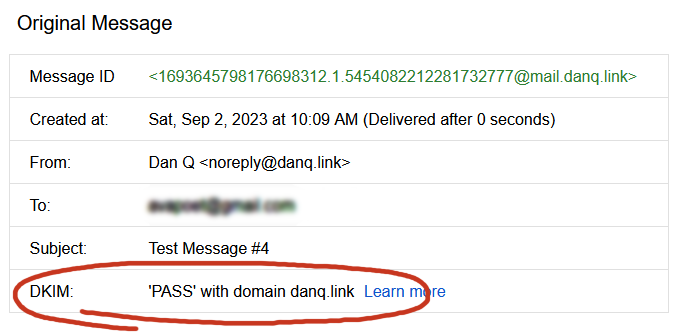
The second problem was that without a valid DKIM signature on them, about half of my test emails were going straight to the spam folder. Again, it seems that since the last time I seriously ran a mailserver 20 years ago, this has become something that isn’t strictly required… but your emails aren’t going to get through if you don’t.
I’ve put it off this long, but I think it’s finally time for me to learn some practical DKIM.
What’s DKIM, then?
In this way, a recipient can be sure that an email received from a domain was sent with the authorisation of the owner of that domain. Properly-implemented, this is a strong mitigation against email spoofing.
To set up my new server to sign outgoing mail, I installed OpenDKIM and its keypair generator using sudo apt install opendkim
opendkim-tools. It’s configuration file at /etc/opendkim.conf needed the following lines added to it:
# set up a socket for Postfix to connect to: Socket inet:12301@localhost # set up a file to specify which IPs/hosts can send through us without authentication and get their messages signed: ExternalIgnoreList refile:/etc/opendkim/TrustedHosts InternalHosts refile:/etc/opendkim/TrustedHosts # set up a file to specify which selector/domain are used to each incoming email address: SigningTable refile:/etc/opendkim/SigningTable # set up a file to specify which signing key to use for each selector/domain: KeyTable refile:/etc/opendkim/KeyTable
Into /etc/opendkim/TrustedHosts I put a list of local IPs/domains that would have their emails signed by this server. Mine looks like this (in this example I’m using
example.com as my domain name, and default as the selector for it: the selector can be anything you like, it only matters if you’ve got multiple
mailservers signing mail for the same domain). Note that 192.168.0.0/16 is the internal subnet on which my sending VM will
run.
127.0.0.0.1 ::1 192.168.0.0/16 *.example.com example.com
/etc/opendkim/SigningTable maps email addresses (I’m using a wildcard) to the subdomain whose TXT record will hold the public key for the signature. This also goes on to
inform the KeyTable which private key to use:
*@example.com default._domainkey.example.com
And then /etc/opendkim/KeyTable says where to find the private key for that:
default._domainkey.example.com example.com:default:/etc/opendkim/keys/example.com/default.private
Next, we need to create and secure that keypair. In /etc/opendkim/keys/example.com/, we run:
sudo opendkim-genkey -s default -d example.com sudo chown opendkim:opendkim default.private
At last, we can configure Postfix to filter all mail through OpenDKIM by adding to our /etc/postfix/main.cf file:
milter_protocol = 2 milter_default_action = accept smtpd_milters = inet:localhost:12301 non_smtpd_milters = inet:localhost:12301
The public key needs publishing via DNS. Conveniently, when you create a keypair using its tools, OpenDKIM provides a sample (in
BIND-style) for you to copy-paste from or adapt: look in /etc/opendkim/keys/example.com/default.txt!
Once we’ve restarted both services (sudo service postfix restart; sudo service opendkim restart), we can test it!
So I learned something new today.
If you, too, love to spend your Saturday mornings learning something new, have a look at those subscription options to decide how you’d like to hear about whatever I get up to next.
1 I still outsource my personal email, and I sing the praises of the excellent folks behind ProtonMail.
2 My desktop email client also doubles as my newsreader, because, yes, of course you can still find me on USENET. Which, by the way, is undergoing a mini-revival…
3 Why doesn’t DKIM sign
all the headers in an email? Because intermediary servers and email clients will probably add their own headers, thereby invalidating the signature! DKIM gets used to sign the From: header, for obvious reasons, and ought to be used for other headers whose tampering could be
significant such as the Date: and Subject:, but it’s really up to the signing server to choose a subset.
This weekend, I threw a Virtual Free Fringe party for some friends. The party was under-attended, but it’s fine because I got to experiment with some tech that I’d been meaning to try.
If you ever want to run something like this yourself1, here’s how I did it.
My goals were:
There were two parts to this project:
Linode offers a free trial of $100 of hosting credit over 60 days and has a ready-to-go recipe for installing Owncast, an open-source streaming server I’ve used before, so I used their recipe, opting for a 4GB dedicated server in their London datacentre: at $36/mo, there’d be no risk of running out of my free trial credit even if I failed to shut down and delete the virtual machine in good time. If you prefer the command-line, here’s the API call for that:
curl -H "Content-Type: application/json" \ -H "Authorization: Bearer $TOKEN" \ -X POST -d '{ "authorized_users": [ "[YOUR LINODE USERNAME]" ], "backups_enabled": false, "booted": true, "image": "linode/debian10", "label": "owncast-eu-west", "private_ip": false, "region": "eu-west", "root_pass": "[YOUR ROOT PASSWORD]", "stackscript_data": { "server_hostname": "[YOUR DOMAIN NAME]", "email_address": "[YOUR EMAIL ADDRESS]" }, "stackscript_id": 804172, "tags": [], "type": "g6-dedicated-2" }' https://api.linode.com/v4/linode/instances
The IP address got assigned before the machine finished booting, so I had time to copy that into my DNS configuration so the domain was already pointing to the machine before it was fully running. This enabled it to get its SSL certificate set up rightaway (if not, I’d have had to finish waiting for the DNS change to propogate and then reboot it).
Out of the box, Owncast is insecure-by-default, so I wanted to jump in and change some passwords. For some reason you’re initially only able to correct this over unencrypted
HTTP! I opted to take the risk on this server (which would only be alive for a few hours) and just configure it with this
limitation, logging in at http://mydomain:8080/admin with the default username and password (admin / abc123), changing the credentials to
something more-secure. I also tweaked the configuration in general: setting the service name, URL, disabling chat features,
and so on, and generating a new stream key to replace the default one.
Now I was ready to configure OBS Studio to stream video to my new Owncast server, which would distribute it to anybody who tuned-in.
I configured OBS Studio with a “Custom…” stream service with server rtmp://mydomain:1935/live and the stream key I chose when configuring Owncast and kicked off a test
stream to ensure that I could access it via https://mydomain. I added a VLC source4
to OBS and fed it a playlist of videos, and added some branding.
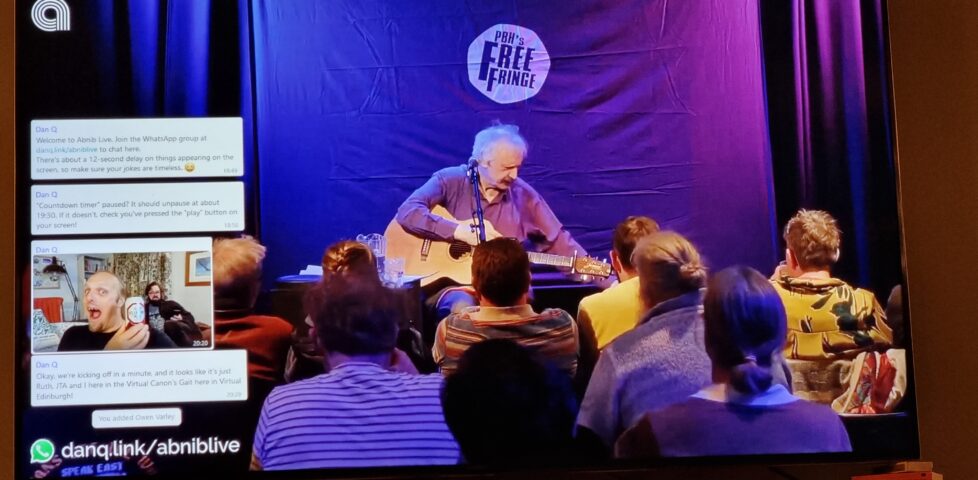
With that all working, I now needed a way to display the WhatsApp chat superimposed over the video.For this, I added a Window Capture source and pointed it at a Firefox window that was showing a WhatsApp Web view of the relevant channel. I added a Crop/Pad filter to trim off the unnecessary chrome.
Next, I used the Firefox debugger “Style Editor” to inject some extra CSS into WhatsApp Web. The class names vary frequently, so there’s no point we re-documenting all of them here, but the essence of the changes were:
.message-in, .message-out { align-items: flex-start !important; } to align them all to the left
[aria-label="You:"]::after { content: "Dan Q"; height: 15px !important; display: block; color: #00f !important; padding: 8px 0 0 8px; } to force my name to appear
even on my own messages
[aria-label^="Open chat details for "] { display: none; } to remove people’s avatars
[data-testid="msg-meta"] { display: none !important; } to remove message metadata
[data-icon] { display: none; }
I aimed where possible to exploit selectors that probably won’t change frequently, like [aria-label]s; this improves the chance that I can use the same code next time. I
also manually removed “old” messages from the channel that didn’t need to be displayed on the big screen. I wasn’t able to consistently remove “X new messages” notifications, but I’ll
probably try again another time, perhaps with the help of an injected userscript.
A little bit of a shame that more people didn’t get to see the results of this experiment, but I’m sure I’ll use the techniques I’ve learned on another ocassion.
1 Or, let’s be honest, if you’re Future Dan and you’re trying to remember how you did it in last time.
2 We were to watch a show by one of my favourite comedians Peter Buckley Hill, the man behind the Free Fringe. I’ve written about him previously… here, there, also several times in 2012 when I also helped make an official digital map of Free Fringe venues. I was especially delighted to have my photo taken with him in 2006. I might be a bit of a fanboy.
3 This could probably be adapted for any other chat system that has a web interface, so if you prefer Telegram or Slack or whatever ever, that’s fine.
4 OBS’s VLC source is just amazing: not only can you give it files, but you can give it URLs, meaning that you can set up a playlist of YouTube videos, or RTSP security camera feeds, or pretty much anything else you feel like (and have the codecs for).
This is a repost promoting content originally published elsewhere. See more things Dan's reposted.
Known Leaders is an open-source program that combines WikiData with a random generator to come up with almost-invariably inaccurate but sometimes hilarious facts. Jim Kang came up with it during Recurse Center‘s Never Graduate Week. Go have a play, or read more about how and why he made it.
When geocachers find a geocache, they typically “log” their find both in the cache’s paper logbook and on one of the online listing sites on which the cache’s coordinates can be found.1
I’ve been finding and hiding geocaches for… a long while, so I’ve seen lots of log entries from people who’ve found my caches (and those of others). And it feels to me like the average length of a geocaching log entry is getting shorter.
“It feels to me like…” isn’t very scientific, though. Let’s see if we can do better.
To test my hypothesis, I needed a decade or so of logs. I didn’t want to compare old caches to new caches (in case people are biased by the logs before them) so I used Geocaching.com’s own search to open the pages for the 500 caches closest to me that are each at least 10 years old.
I hacked together a quick userscript to save all of the logs in a way that was easier than copy-pasting each of them but still didn’t involve hitting Geocaching.com’s API or automating bulk-scraping (which would violate their terms of service). Clicking each of several hundred tabs once every few minutes in the background while I got on with other things wasn’t as much of an ordeal as you might think… but it did take a while.
I mashed that together into a CSV file and for the first time looked at the size of my sample data: ~134,000 log entries, spanning 20 years. I filtered out everything over 10 years old (because some of the caches might have no logs that old) and stripped out everything that wasn’t a “found it” or “didn’t find it” log.
That gave me a far more-reasonable ~80,000 records with which I could make Excel cry.2
It looks like my hunch is right. The wordcount of “found” logs on traditional and multi-stage caches has generally decreased over time:
“Did not find” logs, which can be really helpful for cache owners to diagnose problems with their caches, have an even more-pronounced dip:
When I first saw that deep dip on the average length of “did not find” logs, my first thought was to wonder whether the sample might not be representative because the did-not-find rate itself might have fallen over time. But no: the opposite is true:
Strangely, the only place that the trend is reversed is in “found” logs of virtual caches, which have seen a slight increase in verbosity.
Within the limitations of my research (80,000 logs from 500 caches each 10+ years old, near me), there are a handful of clear trends over the last decade:
Are these trends a sign of shortening attention spans? Increased use of mobile phones for logging? Use of emoji and acronyms to pack more detail into shorter messages? I don’t know.
I’d love to see some wider research, perhaps by somebody at Geocaching.com HQ (who has database access and is thus able to easily extract enough data for a wider analysis!). I’m also very interested in whether the identity of the cache finder has an impact on log length: is it impacted by how long ago they started ‘caching? Whether or not they have hidden caches of their own? How many caches they’ve found?
But personally, I’m just pleased to have been able to have a question in the back of my mind and – through a little bit of code and a little bit of data-mashing – have a pretty good go at answering it.
1 I have a dream that someday cache logging could be powered by Webmentions or ActivityPub or some similar decentralised-Web technology, so that cachers can log their finds on any site on which a cache is listed or even on their own site and have all the dots joined-up… but that’s pretty far-fetched I’m afraid. It’s not stopping some of us from experimenting with possible future standards, though…
2 Just for fun, try asking Excel to extrapolate a second-order polynomial trendline across 80,000 pairs of datapoints. Just don’t do it if you’re hoping to use your computer for anything in the next quarter hour.
3 With stricter guidelines on how a “virtual rewards” virtual caches should work than existed for original pre-2005 virtuals, these new virtuals are more-likely than their predecessor to encourage or require longer logs.
Max credit to garry (@repeattofade) for the original toot. All I did was adapt it into a motivational poster.
The thing I’m wondering is whether that bus lane is one that a bi-cyclist like me can use? 😂
Proud to say that danq.me is the newest site to be admitted into Kev Quirk‘s 512kb club. Let’s keep the web lean!
The week before last, Katie shared with me that article from last month, Who killed Google Reader? I’d read it before so I didn’t bother clicking through again, but we did end up chatting about RSS a bit1.
Katie “abandoned feeds a few years ago” because they were “regularly ending up with 200+ unread items that felt overwhelming”.
Conversely: I think that dropping your feed reader because there’s too much to read is… solving the wrong problem.
Dave Rupert last week wrote about his feed reader’s “unread” count having grown to a mammoth 2,000+ items, and his plan to reduce that.
I think that he, like Katie, might be looking at his reader in a different way than I do mine.
I’ve been in the position that Katie and David describe: of feeling overwhelmed by the sheer volume of unread items. And I know others have, too. So let me share something I’ve learned sooner:
There’s nothing special about reaching Inbox Zero in your feed reader.
It’s not noble nor enlightened to get to the bottom of your “unread” list.
Your 👏 feed 👏 reader 👏 is 👏 not 👏 an 👏 email 👏 client. 👏
The idea of Inbox Zero as applied to your email inbox is about productivity. Any message in your email might be something that requires urgent action, and you won’t know until you filter through and categorise .
But your RSS reader doesn’t (shouldn’t?) be there to add to your to-do list. Your RSS reader is a list of things you might like to read. In an ideal world, reaching “RSS Zero” would mean that you’ve seen everything on the Internet that you might enjoy. That’s not enlightened; that’s sad!
My RSS reader is a place of joy, never of stress. I’ve tried to boil down the principles that makes it so, and here they are:
And if you’d like to put those tips in your RSS reader to digest later or at your own pace, you can: here’s an RSS feed containing (only) these RSS tips!
1 You’d be forgiven for thinking that RSS was my favourite topic, given that so-far-this-year I’ve written about improving WordPress’s feeds, about mathematical quirks in FreshRSS, on using XPath scraping as an RSS alternative (twice), and the joy of getting notified when a vlog channel is ressurected (thanks to RSS). I swear I have other interests.
2 If your feed reader doesn’t support any kind of grouping, get a better reader.
3 If your feed reader doesn’t support any kind of marking/favouriting/tagging of articles, get a better reader.
4 If your feed reader doesn’t support customisable expiry times… well that’s not too unusual, but you might want to consider getting a better reader.
5 FreshRSS calls the feature that fetches actual post content from the resulting page “Article CSS selector on original website”, which is a bit of a mouthful, but you can see what it’s doing. If your feed reader doesn’t support fetching full content… well, it’s probably not that big a deal, but it’s a good nice-to-have if you’re shopping around for a reader, in my opinion.
6 There’s so much choice in feed readers, and migrating between them is (usually) very easy, so everybody can find the best choice for them. Feedly, Inoreader, and The Old Reader are popular, free, and easy-to-use if you’re looking to get started. I prefer a selfhosted tool so I use the amazing FreshRSS (having migrated from Tiny Tiny RSS). Here’s some more tips on getting started. You might prefer a desktop or mobile tool, or even something exotic: part of the beauty of RSS feeds is they’re open and interoperable, so if for example you love using Slack, you can use Slack to push feed updates to you and get almost all the features you need to do everything in my list, including grouping (using channels) and saving for later (using Slackbot/”remind me about this”). Slack’s a perfectly acceptable feed reader for some people!
This week, Ruth and I didn’t go the Isle of Man.
It’s (approximately) our 0x10th anniversary1,
and, struggling to find a mutually-convenient window in our complex work schedules, we’d opted to spend a few days exploring the Isle of Man. Everything was fine, until we were aboard
the ‘plane.
Once everybody was seated and ready to take off, the captain stood up at the front of the ‘plane and announced that it had been cancelled2.
The Isle of Man closes, he told us (we assume he just meant the airport) and while they’d be able to get us there before it did, there wouldn’t be sufficient air traffic control crew to allow them to get back (to, presumably, the cabin crews’ homes in London).
Back at the terminal we made our way through border control (showing my passport despite having not left the airport, never mind the country) and tried to arrange a rebooking, only to be told that they could only manage to get us onto a flight that’d be leaving 48 hours later, most of the way through our mini-break, so instead we opted for a refund and gave up.3
We resolved to try to do the same kinds of things that we’d hoped to do on the Isle of Man, but closer to home: some sightseeing, some walks, some spending-time-together. You know the drill.
A particular highlight of our trip to the North Leigh Roman Villa – one of those “on your doorstep so you never go” places – was when the audio tour advised us to beware of the snails when crossing what was once the villa’s central courtyard.
At first we thought this was an attempt at humour, but it turns out that the Romans brought with them to parts of Britain a variety of large edible snail – helix pomatia – which can still be found in concentration in parts of the country where they were widely farmed.4
There’s a nice little geocache near the ruin, too, which we were able to find on our way back.
Before you think that I didn’t get anything out of my pointless hours at the airport, though, it turns out I’d brought home a souvenier… a stinking cold! How about that for efficiency: I got all the airport-germs, but none of the actual air travel. By mid-afternoon on Tuesday I was feeling pretty rotten, and it only got worse from then on.
I’m confident that Ruth didn’t mind too much that I spent Wednesday mostly curled up in a sad little ball, because it let her get on with applying to a couple of jobs she’s interested in. Because it turns out there was a third level of disaster to this week: in addition to our ‘plane being cancelled and me getting sick, this week saw Ruth made redundant as her employer sought to dig itself out of a financial hole. A hat trick of bad luck!
As Ruth began to show symptoms (less-awful than mine, thankfully) of whatever plague had befallen me, we bundled up in bed and made not one but two abortive attempts at watching a film together:
As Thursday drew on and the pain in my head and throat was replaced with an unrelenting cough, I decided I needed some fresh air.
So while Ruth collected the shopping, I found my way to the 2023-07-27 51 -1 geohashpoint. And came back wheezing and in need of a lie-down.
I find myself wondering if (despite three jabs and a previous infection) I’ve managed to contract covid again, but I haven’t found the inclination to take a test. What would I do differently if I do have it, now, anyway? I feel like we might be past that point in our lives.
All in all, probably the worst anniversary celebration we’ve ever had, and hopefully the worst we’ll ever have. But a fringe benefit of a willingness to change bases is that we can celebrate our 10th5 anniversary next year, too. Here’s to that.
1 Because we’re that kind of nerds, we count our anniversaries in base 16
(0x10 is 16), or – sometimes – in whatever base is mathematically-pleasing and gives us a nice round number. It could be our 20th anniversary, if you prefer octal.
2 I’ve been on some disastrous aeroplane journeys before, including one just earlier this year which was supposed to take me from Athens to Heathrow, got re-arranged to go to Gatwick, got delayed, ran low on fuel, then instead had to fly to Stansted, wait on the tarmac for a couple of hours, then return to Gatwick (from which I travelled – via Heathrow – home). But this attempt to get to the Isle of Man was somehow, perhaps, even worse.
3 Those who’ve noticed that we were flying EasyJet might rightly give a knowing nod at this point.
4 The warning to take care not to tread on them is sound legal advice: this particular variety of snail is protected under the Wildlife and Countryside Act 1981!
5 Next year will be our 10th anniversary… in base 17. Eww, what the hell is base 17 for and why does it both offend and intrigue me so?
There’s a perception that a blog is a long-lived, ongoing thing. That it lives with and alongside its author.1
But that doesn’t have to be true, and I think a lot of people could benefit from “short-term” blogging. Consider:
One of my favourite examples of such a blog was 52 Reflect3 (now integrated into its successor The Improbable Blog). For 52 consecutive weeks my partner‘s brother Robin blogged about adventures that took him out of his home in London and it was amazing. The project’s finished, but a blog was absolutely the right medium for it because now it’s got a “forever home” on the Web (imagine if he’d posted instead to Twitter, only for that platform to turn into a flaming turd).
I don’t often shill for my employer, but I genuinely believe that the free tier on WordPress.com is an excellent way to give a forever home to your short-term blog4. Did you know that you can type new.blog (or blog.new; both work!) into your browser to start one?
What are you going to write about?
1 This blog is, of course, an example of a long-term blog. It’s been going in some form or another for over half my life, and I don’t see that changing. But it’s not the only kind of blog.
2 Personally, I really love the serendipity of asking a web search engine for the solution to a problem and finding a result that turns out to be something that I myself wrote, long ago!
3 My previous posts about 52 Reflect: Challenge Robin, Twatt, Brixton to Brighton by Boris Bike, Ending on a High (and associated photo/note)
4 One of my favourite features of WordPress.com is the fact that it’s built atop the world’s most-popular blogging software and you can export all your data at any time, so there’s absolutely no lock-in: if you want to migrate to a competitor or even host your own blog, it’s really easy to do so!
This post is also available as a video. If you'd prefer to watch/listen to me talk about this topic, give it a look.
This blog post is also available as a video. Would you prefer to watch/listen to me tell you about the video game that had the biggest impact on my life?
Of all of the videogames I’ve ever played, perhaps the one that’s had the biggest impact on my life1 was: Werewolves and (the) Wanderer.2
This simple text-based adventure was originally written by Tim Hartnell for use in his 1983 book Creating Adventure Games on your Computer. At the time, it was common for computing books and magazines to come with printed copies of program source code which you’d need to re-type on your own computer, printing being significantly many orders of magnitude cheaper than computer media.3
I’d been working my way through the operating manual for our microcomputer, trying to understand it all.5
[ENTER] at the end of each line.
In particular, I found myself comparing Werewolves to my first attempt at a text-based adventure. Using what little I’d grokked of programming so far, I’d put together
a series of passages (blocks of PRINT statements6)
with choices (INPUT statements) that sent the player elsewhere in the story (using, of course, the long-considered-harmful GOTO statement), Choose-Your-Own-Adventure
style.
Werewolves was… better.
Werewolves and Wanderer was my first lesson in how to structure a program.
Let’s take a look at a couple of segments of code that help illustrate what I mean (here’s the full code, if you’re interested):
10 REM WEREWOLVES AND WANDERER 20 GOSUB 2600:REM INTIALISE 30 GOSUB 160 40 IF RO<>11 THEN 30 50 PEN 1:SOUND 5,100:PRINT:PRINT "YOU'VE DONE IT!!!":GOSUB 3520:SOUND 5,80:PRINT "THAT WAS THE EXIT FROM THE CASTLE!":SOUND 5,200 60 GOSUB 3520 70 PRINT:PRINT "YOU HAVE SUCCEEDED, ";N$;"!":SOUND 5,100 80 PRINT:PRINT "YOU MANAGED TO GET OUT OF THE CASTLE" 90 GOSUB 3520 100 PRINT:PRINT "WELL DONE!" 110 GOSUB 3520:SOUND 5,80 120 PRINT:PRINT "YOUR SCORE IS"; 130 PRINT 3*TALLY+5*STRENGTH+2*WEALTH+FOOD+30*MK:FOR J=1 TO 10:SOUND 5,RND*100+10:NEXT J 140 PRINT:PRINT:PRINT:END ... 2600 REM INTIALISE 2610 MODE 1:BORDER 1:INK 0,1:INK 1,24:INK 2,26:INK 3,18:PAPER 0:PEN 2 2620 RANDOMIZE TIME 2630 WEALTH=75:FOOD=0 2640 STRENGTH=100 2650 TALLY=0 2660 MK=0:REM NO. OF MONSTERS KILLED ... 3510 REM DELAY LOOP 3520 FOR T=1 TO 900:NEXT T 3530 RETURN
...) have been added for readability/your convenience.
What’s interesting about the code above? Well…
GOSUB statements):
2610), the RNG (2620), and player
characteristics (2630 – 2660). This also makes it easy to call it again (e.g. if the player is given the option to “start over”). This subroutine
goes on to set up the adventure map (more on that later).
160: this is the “main game” logic. After it runs, each time, line 40 checks IF RO<>11 THEN 30. This tests
whether the player’s location (RO) is room 11: if so, they’ve exited the castle and won the adventure. Otherwise, flow returns to line 30 and the “main
game” subroutine happens again. This broken-out loop improving the readability and maintainability of the code.8
3520). It just counts to 900! On a known (slow) processor of fixed speed, this is a simpler way to put a delay in than
relying on a real-time clock.
The game setup gets more interesting still when it comes to setting up the adventure map. Here’s how it looks:
2680 REM SET UP CASTLE 2690 DIM A(19,7):CHECKSUM=0 2700 FOR B=1 TO 19 2710 FOR C=1 TO 7 2720 READ A(B,C):CHECKSUM=CHECKSUM+A(B,C) 2730 NEXT C:NEXT B 2740 IF CHECKSUM<>355 THEN PRINT "ERROR IN ROOM DATA":END ... 2840 REM ALLOT TREASURE 2850 FOR J=1 TO 7 2860 M=INT(RND*19)+1 2870 IF M=6 OR M=11 OR A(M,7)<>0 THEN 2860 2880 A(M,7)=INT(RND*100)+100 2890 NEXT J 2910 REM ALLOT MONSTERS 2920 FOR J=1 TO 6 2930 M=INT(RND*18)+1 2940 IF M=6 OR M=11 OR A(M,7)<>0 THEN 2930 2950 A(M,7)=-J 2960 NEXT J 2970 A(4,7)=100+INT(RND*100) 2980 A(16,7)=100+INT(RND*100) ... 3310 DATA 0, 2, 0, 0, 0, 0, 0 3320 DATA 1, 3, 3, 0, 0, 0, 0 3330 DATA 2, 0, 5, 2, 0, 0, 0 3340 DATA 0, 5, 0, 0, 0, 0, 0 3350 DATA 4, 0, 0, 3, 15, 13, 0 3360 DATA 0, 0, 1, 0, 0, 0, 0 3370 DATA 0, 8, 0, 0, 0, 0, 0 3380 DATA 7, 10, 0, 0, 0, 0, 0 3390 DATA 0, 19, 0, 8, 0, 8, 0 3400 DATA 8, 0, 11, 0, 0, 0, 0 3410 DATA 0, 0, 10, 0, 0, 0, 0 3420 DATA 0, 0, 0, 13, 0, 0, 0 3430 DATA 0, 0, 12, 0, 5, 0, 0 3440 DATA 0, 15, 17, 0, 0, 0, 0 3450 DATA 14, 0, 0, 0, 0, 5, 0 3460 DATA 17, 0, 19, 0, 0, 0, 0 3470 DATA 18, 16, 0, 14, 0, 0, 0 3480 DATA 0, 17, 0, 0, 0, 0, 0 3490 DATA 9, 0, 16, 0, 0, 0, 0
DATA statements form a “table”.
What’s this code doing?
2690 defines an array (DIM) with two dimensions9
(19 by 7). This will store room data, an approach that allows code to be shared between all rooms: much cleaner than my first attempt at an adventure with each room
having its own INPUT handler.
2700 through 2730 populates the room data from the DATA blocks. Nowadays you’d probably put that data in a
separate file (probably JSON!). Each “row” represents a room, 1 to 19. Each “column” represents the room you end up
at if you travel in a given direction: North, South, East, West, Up, or Down. The seventh column – always zero – represents whether a monster (negative number) or treasure
(positive number) is found in that room. This column perhaps needn’t have been included: I imagine it’s a holdover from some previous version in which the locations of some or all of
the treasures or monsters were hard-coded.
2850 selects seven rooms and adds a random amount of treasure to each. The loop beginning on line 2920 places each of six
monsters (numbered -1 through -6) in randomly-selected rooms. In both cases, the start and finish rooms, and any room with a treasure or monster, is
ineligible. When my 8-year-old self finally deciphered what was going on I was awestruck at this simple approach to making the game dynamic.
2970 – 2980), replacing any treasure or monster already there: the Private Meeting Room (always
worth a diversion!) and the Treasury, respectively.
2740 is cute, and a younger me appreciated deciphering it. I’m not convinced it’s necessary (it sums all of the values in
the DATA statements and expects 355 to limit tampering) though, or even useful: it certainly makes it harder to modify the rooms, which may undermine
the code’s value as a teaching aid!
Something you might notice is missing is the room descriptions. Arrays in this language are strictly typed: this array can only contain integers and not strings. But there are other reasons: line length limitations would have required trimming some of the longer descriptions. Also, many rooms have dynamic content, usually based on random numbers, which would be challenging to implement in this way.
As a child, I did once try to refactor the code so that an eighth column of data specified the line number to which control should pass to display the room description. That’s
a bit of a no-no from a “mixing data and logic” perspective, but a cool example of metaprogramming before I even knew it! This didn’t work, though: it turns out you can’t pass a
variable to a Locomotive BASIC GOTO or GOSUB. Boo!10
Werewolves and Wanderer has many faults11. But I’m clearly not the only developer whose early skills were honed and improved by this game, or who hold a special place in their heart for it. Just while writing this post, I discovered:
A decade or so later, I’d be taking my first steps as a professional software engineer. A couple more decades later, I’m still doing it.
And perhaps that adventure -the one that’s occupied my entire adult life – was facilitated by this text-based one from the 1980s.
1 The game that had the biggest impact on my life, it might surprise you to hear, is not among the “top ten videogames that stole my life” that I wrote about almost exactly 16 years ago nor the follow-up list I published in its incomplete form three years later. Turns out that time and impact are not interchangable. Who knew?
2 The game is variously known as Werewolves and Wanderer, Werewolves and
Wanderers, or Werewolves and the
Wanderer. Or, on any system I’ve been on, WERE.BAS, WEREWOLF.BAS, or WEREWOLV.BAS, thanks to the CPC’s eight-point-three filename limit.
3 Additionally, it was thought that having to undertake the (painstakingly tiresome) process of manually re-entering the source code for a program might help teach you a little about the code and how it worked, although this depended very much on how readable the code and its comments were. Tragically, the more comprehensible some code is, the more long-winded the re-entry process.
4 The CPC’s got a fascinating history in its own right, but you can read that any time.
5 One of my favourite features of home microcomputers was that seconds after you turned them on, you could start programming. Your prompt was an interface to a programming language. That magic had begun to fade by the time DOS came to dominate (sure, you can program using batch files, but they’re neither as elegant nor sophisticated as any BASIC dialect) and was completely lost by the era of booting directly into graphical operating systems. One of my favourite features about the Web is that it gives you some of that magic back again: thanks to the debugger in a modern browser, you can “tinker” with other people’s code once more, right from the same tool you load up every time. (Unfortunately, mobile devices – which have fast become the dominant way for people to use the Internet – have reversed this trend again. Try to View Source on your mobile – if you don’t already know how, it’s not an easy job!)
6 In particular, one frustration I remember from my first text-based adventure was that I’d been unable to work around Locomotive BASIC’s lack of string escape sequences – not that I yet knew what such a thing would be called – in order to put quote marks inside a quoted string!
7 “Screen editors” is what we initially called what you’d nowadays call a “text editor”: an application that lets you see a page of text at the same time, move your cursor about the place, and insert text wherever you feel like. It may also provide features like copy/paste and optional overtyping. Screen editors require more resources (and aren’t suitable for use on a teleprinter) compared to line editors, which preceeded them. Line editors only let you view and edit a single line at a time, which is how most of my first 6 years of programming was done.
8 In a modern programming language, you might use while true or similar for a
main game loop, but this requires pushing the “outside” position to the stack… and early BASIC dialects often had strict (and small, by modern standards) limits on stack height that
would have made this a risk compared to simply calling a subroutine from one line and then jumping back to that line on the next.
9 A neat feature of Locomotive BASIC over many contemporary and older BASIC dialects was its support for multidimensional arrays. A common feature in modern programming languages, this language feature used to be pretty rare, and programmers had to do bits of division and modulus arithmetic to work around the limitation… which, I can promise you, becomes painful the first time you have to deal with an array of three or more dimensions!
10 In reality, this was rather unnecessary, because the ON x GOSUB command
can – and does, in this program – accept multiple jump points and selects the one referenced by the
variable x.
11 Aside from those mentioned already, other clear faults include: impenetrable controls unless you’ve been given instuctions (although that was the way at the time); the shopkeeper will penalise you for trying to spend money you don’t have, except on food, presumably as a result of programmer laziness; you can lose your flaming torch, but you can’t buy spares in advance (you can pay for more, and you lose the money, but you don’t get a spare); some of the line spacing is sometimes a little wonky; combat’s a bit of a drag; lack of feedback to acknowledge the command you enterted and that it was successful; WHAT’S WITH ALL THE CAPITALS; some rooms don’t adequately describe their exits; the map is a bit linear; etc.
Finally got around to rewriting my Mastodon introduction, now that my selfhosted server’s got enough interconnection that people might actually see it!
If you’re on the Fediverse and you’re not already doing so, you can follow me at @dan@danq.me. Or follow my blog at @blog@danq.me.