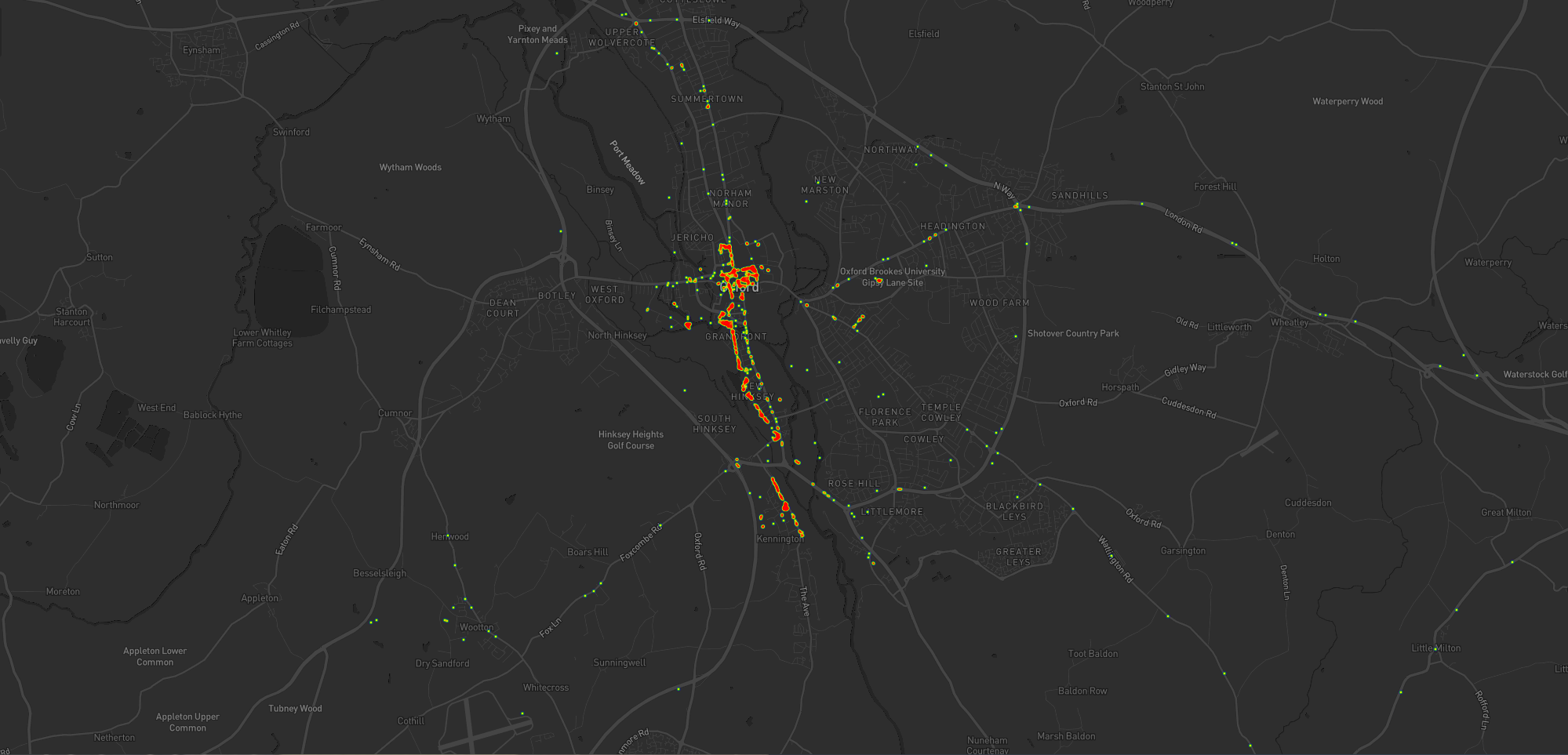
Take a look at the map below. I’m the pink pin here in Oxfordshire. The green pins are my immediate team – the people I work with on a
day-to-day basis – and the blue pins are people outside of my immediate team but in its parent team (Automattic’s org chart is a bit like a fractal).
I’m the pink pin; my immediate team are the green pins. People elsewhere in our parent team are the blue pins. Some pins represent multiple people.
Thinking about timezones, there are two big benefits to being where I am:
I’m in the median timezone, which makes times that are suitable-for-everybody pretty convenient for me (I have a lot of lunchtime/early-afternoon meetings where I get to
watch the sun rise and set, simultaneously, through my teammates’ windows).
I’m West of the mean timezone, which means that most of my immediate coworkers start their day before me so I’m unlikely to start my day blocked by anything I’m waiting on.
(Of course, this privilege is in itself a side-effect of living close to the meridian, whose arbitrary location owes a lot to British naval and political clout in the 19th century: had
France and Latin American countries gotten their way the prime median would have probably cut through the Atlantic or Pacific oceans.)
2. Language Privilege
English is Automattic’s first language (followed perhaps by PHP and Javascript!), not one of the 120 other languages spoken
by Automatticians. That’s somewhat a consequence of the first language of its founders and the language in which the keywords of most programming languages occur.
It’s also a side-effect of how widely English is spoken, which in comes from (a) British colonialism and (b) the USA using
Hollywood etc. to try to score a cultural victory.
Languages self-reportedly spoken by Automatticians, sized proportional to the number of speakers. No interpretation/filtering has been done, so you’ll see multiple dialects of the
same root language.
I’ve long been a fan of the concept of an international axillary language but I appreciate that’s an idealistic dream whose war
has probably already been lost.
For now, then, I benefit from being able to think, speak, and write in my first language all day, every day, and not have the experience of e.g. my two Indonesian colleagues who
routinely speak English to one another rather than their shared tongue, just for the benefit of the rest of us in the room!
3. Passport Privilege
Despite the efforts of my government these last few years to isolate us from the world stage, a British passport holds an incredible amount of power, ranking fifth or sixth in the world depending on whose passport index you
follow. Compared to many of my colleagues, I can enjoy visa-free and/or low-effort travel to a wider diversity of destinations.
Normally I might show you a map here, but everything’s a bit screwed by COVID-19, which still bars me from travelling to many
places around the globe, but as restrictions start to lift my team have begun talking about our next in-person meetup, something we haven’t done since I first started when I met up with my colleagues in Cape Town and got
assaulted by a penguin.
But even looking back to that trip, I recall the difficulties faced by colleagues who e.g. had to travel to a different country in order tom find an embassy just to apply for the visa
they’d eventually need to travel to the meetup destination. If you’re not a holder of a privileged passport, international travel can be a lot harder, and I’ve definitely taken that for
granted in the past.
I’m going to try to be more conscious of these privileges in my industry.
Of course, you don’t strictly need a digital wallet to use EGX. But as we’re in a culture where people invariably ask “is
there an app for it?”, I thought I’d make one.
You can install it as an offline-first progressive web application, which means that this could be the first ever digital currency to have an app that works without an Internet
connection. That’s probably something no other digital currency can claim to have, right?
Here’s what it looks like if I send 0.1 EGX to my friend Chris using the app:
Naturally, I wouldn’t be backing Emma Goldcoin if it didn’t represent such a brilliant step up better-known digital currencies like Bitcoin, Ripple, and Etherium. Specific features
unique to Emma Goldcoin include:
Using it doesn’t massively contribute to energy wastage and environmental damage.
It doesn’t increase the digital divide by helping early adopters at the expense of late adopters.
It’s entirely secure: it’s mathematically impossible to “steal”EGX.
Emma Goldcoin is so simple that you don’t even need a computer to use it: it “just works”.
Sure, it’s got its downsides, and I’d encourage you to read the specification if you’d like to learn more about what
those are. Or if you already know what EGX is all about and just want to try a new way to manage your portfolio, give my new site EGXchange.org a go!
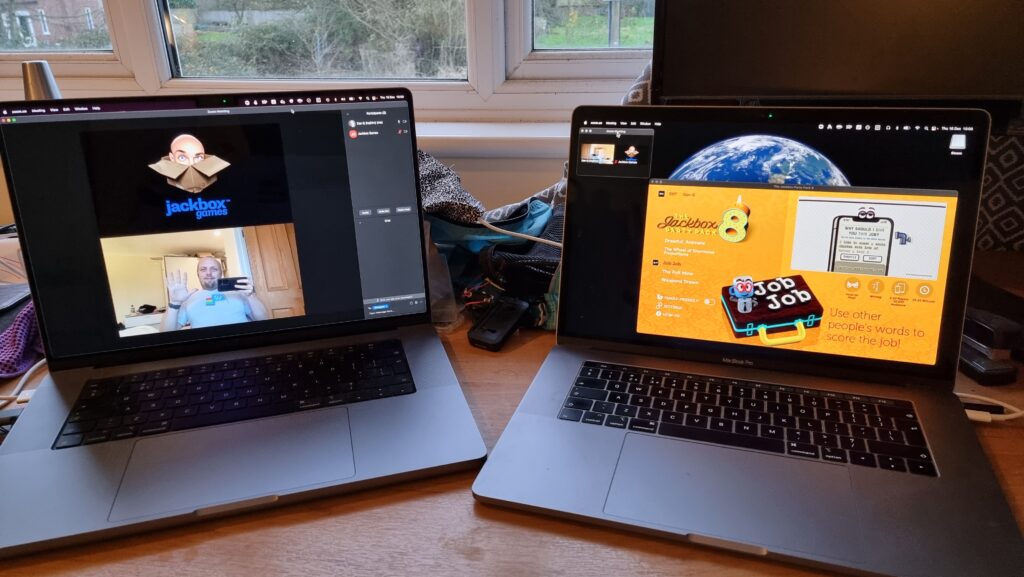
A love a good Jackbox Game. There’s nothing quite like sitting around the living room playing Drawful, Champ’d Up, Job
Job, Trivia MurderParty, or Patently Stupid. But nowadays getting together in the same place isn’t as easy as it used to be, and as often as not I find
my Jackbox gaming with friends or coworkers takes place over Zoom, Around, Google Meet or Discord.
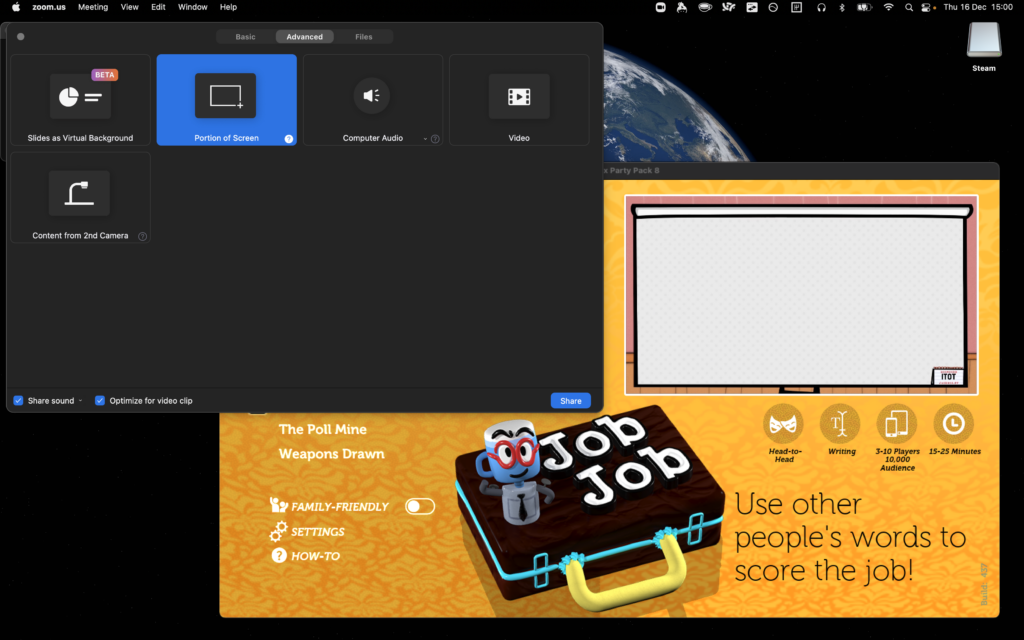
There’s lots of guides to doing this – even an official one! – but they all miss a
few pro tips that I think can turn a good party into a great party. Get all of this set up before your guests are due to arrive to make yourself look like a super-prepared
digital party master.
1. Use two computers!
You can use more than two, but two should be considered the minimum for the host.
Using one computer for your video call and a second one to host the game (in addition to the device you’re using to play the games, which could be your phone) is really helpful
for several reasons:
You can keep your video chat full-screen without the game window getting in the way, letting you spend more time focussed on your friends.
Your view of the main screen can be through the same screen-share that everybody else sees, helping you diagnose problems. It also means you experience similar video lag to
everybody else, keeping things fair!
You can shunt the second computer into a breakout room, giving your guests the freedom to hop in and out of a “social” space and a “gaming” space at will. (You can even set up
further computers and have multiple different “game rooms” running at the same time!)
2. Check the volume
Plugging an adapter into the headphone port tricks the computer into thinking some headphones are plugged in without actually needing the headphones quietly buzzing away on your desk.
Connect some headphones to the computer that’s running the game (or set up a virtual audio output device if you’re feeling more technical). This means you can still have the game
play sounds and transmit them over Zoom, but you’ll only hear the sounds that come through the screen share, not the sounds that come through the second computer too.
That’s helpful, because (a) it means you don’t get feedback or have to put up with an echo at your end, and (b) it means you’ll be hearing the game exactly the same as your guests hear
it, allowing you to easily tweak the volume to a level that allows for conversation over it.
3. Optimise the game settings
Jackbox games were designed first and foremost for sofa gaming, and playing with friends over the Internet benefits from a couple of changes to the default settings.
Sometimes the settings can be found in the main menu of a party pack, and sometimes they’re buried in the game itself, so do your research and know your way around before your party
starts.
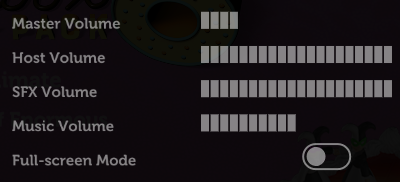
Turn the volume down, especially the volume of the music, so you can have a conversation over the game. I’d also recommend disabling Full-screen Mode: this reduces the resolution of the
game, meaning there’s less data for your video-conferencing software to stream, and makes it easier to set up screen sharing without switching back and forth between your applications
(see below).
Turning on the Motion Sensitivity or Reduce Background Animations option if your game has it means there’ll be less movement in the background of the game. This can really help with the
video compression used in videoconferencing software, meaning players on lower-speed connections are less-likely to experience lag or “blockiness” in busy scenes.
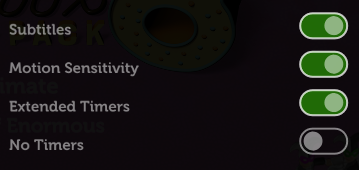
It’s worth considering turning Subtitles on so that guests can work out what word they missed (which for the trivia games can be a big deal). Depending on your group, Extended Timers is
worth considering too: the lag introduced by videoconferencing can frustrate players who submit answers at the last second only to discover that – after transmission delays – they
missed the window! Extended Timers don’t solve that, but they do mean that such players are less-likely to end up waiting to the last second in the first place.
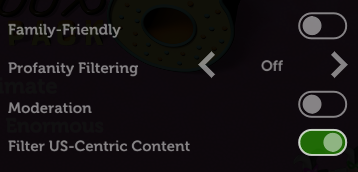
Finally: unless the vast majority or all of your guests are in the USA, you might like to flip the Filter US-Centric Content
switch so that you don’t get a bunch of people scratching their heads over a cultural reference that they just don’t get.
By the way, you can use your cursor keys and enter to operate Jackbox games menus, which is usually easier than fiddling with a mouse.
4. Optimise Zoom’s settings
A few quick tweaks to your settings can make all the difference to how great the game looks.
Whatever videoconferencing platform you’re using, the settings for screen sharing are usually broadly similar. I suggest:
Make sure you’ve ticked “Share sound” or a similar setting that broadcasts the game’s audio: in some games, this is crucial; in others, it’s nice-to-have. Use your other computer to
test how it sounds and tweak the volume accordingly.
Check “Optimize for video clip”; this hints to your videoconferencing software that all parts of the content could be moving at once so it can use the same kind of codec it would
for sending video of your face. The alternative assumes that most of the screen will stay static (because it’s the desktop, the background of your slides, or whatever), which works
better with a different kind of codec.
Use “Portion of Screen” sharing rather than selecting the application. This ensures that you can select just the parts of the application that have content in, and not “black bars”,
window chrome and the like, which looks more-professional as well as sending less data over the connection.
If your platform allows it, consider making the mouse cursor invisible in the shared content: this means that you won’t end up with an annoying cursor sitting in the middle of the
screen and getting in the way of text, and makes menu operation look slicker if you end up using the mouse instead of the keyboard for some reason.
Don’t forget to shut down any software that might “pop up” notifications: chat applications, your email client, etc.: the last thing you want is somebody to send you a naughty picture
over WhatsApp and the desktop client to show it to everybody else in your party!
Looking for something with an “escape room” vibe for our date night this week, Ruth and I tried Tick Tock: A Tale for Two, a multiplayer simultaneous cooperative play game for two people, produced by Other Tales Interactive. It was amazing and I’d highly recommend it.
If you enjoyed the puzzles of Myst but you only want to spend about an hour, not the rest of your life, solving then, this
might be the game for you.
The game’s available on a variety of platforms: Windows, Mac, Android, iOS, and Nintendo Switch. We opted for the Android version because, thanks to Google Play Family Library, this meant we only had to buy one
copy (you need it installed on both devices you’re playing it on, although both devices don’t have to be of the same type: you could use an iPhone and a Nintendo Switch for
example).
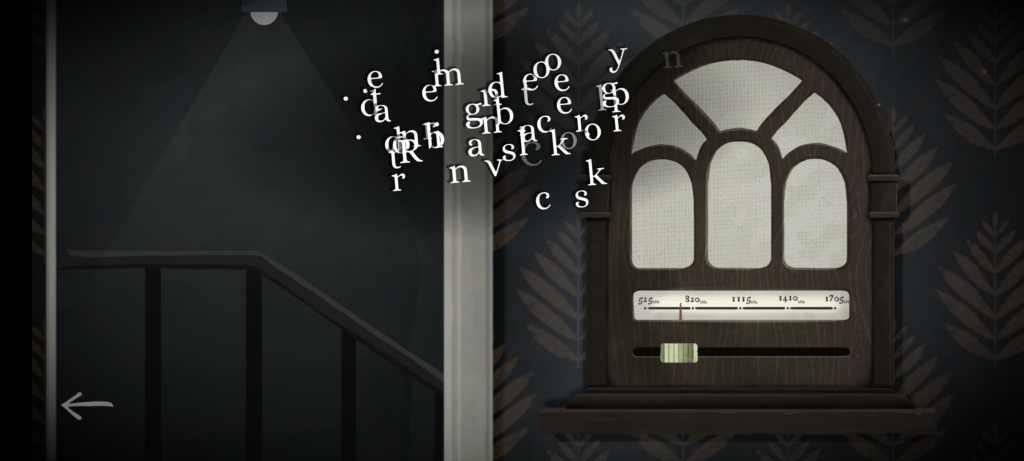
I can’t read that text. But if I could, it still wouldn’t make much sense without my partner’s input.
The really clever bit from a technical perspective is that the two devices don’t communicate with one another. You could put your devices in flight mode and this game would
still work just fine! Instead, the gameplay functions by, at any given time, giving you either (a) a puzzle for which the other person’s device will provide the solution, or (b) a
puzzle that you both share, but for which each device only gives you half of the clues you need. By working as a team and communicating effectively (think Keep Talking and Nobody Explodes but without the time pressure), you and your partner will solve the puzzles and progress the plot.
(We’re purists for this kind of puzzle game so we didn’t look at one another’s screens, but I can see how it’d be tempting to “cheat” in this way, especially given that even the guys in
the trailer do so!)
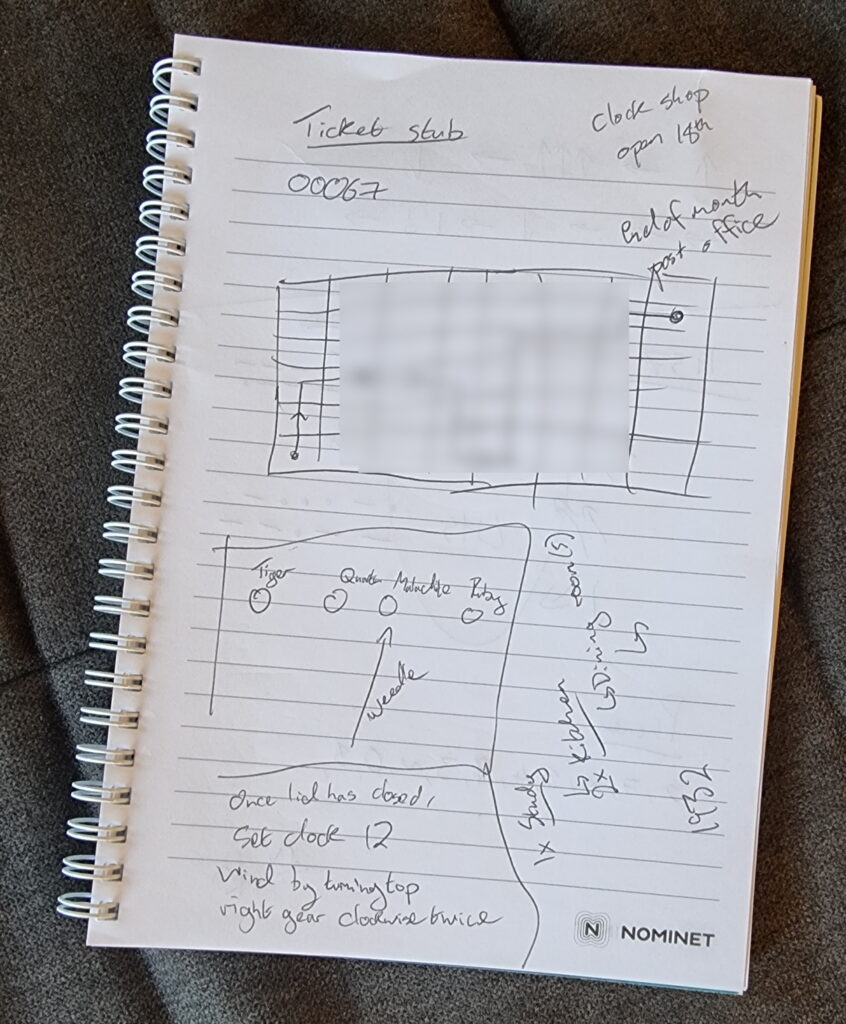
You could probably play successfully without keeping notes, but we opted to grab a pad and pen at one point.
The puzzles start easy enough, to the extent that we were worried that the entire experience might not be challenging for us. But the second of the three acts proved us wrong and we had
to step up our communication and coordination, and the final act had one puzzle that had us scratching our heads for some time! Quite an enjoyable difficulty curve, but still balanced
to make sure that we got to a solution, together, in the end. That’s a hard thing to achieve in a game, and deserves praise.
The art style and user interface is simple and intuitive, leaving you to focus on the puzzles.
The plot is a little abstract at times and it’s hard to work out exactly what role we, the protagonists, play until right at the end. That’s a bit of a shame, but not in itself a reason
to reject this wonderful gem of a game. We spent 72 minutes playing it, although that includes a break in the middle to eat a delivery curry.
If you’re looking for something a bit different for a quiet night in with somebody special, it’s well worth a look.
Prior to 2018, Three Rings had a relatively simple approach to how it would use pronouns when referring to volunteers.
If the volunteer’s gender was specified as a “masculine” gender (which particular options are available depends on the volunteer’s organisation, but might include “male”, “man”, “cis
man”, and “trans man”), the system would use traditional masculine pronouns like “he”, “his”, “him” etc.
If the gender was specified as a “feminine” gender (e.g .”female”, “woman”, “cis women”, “trans woman”) the system would use traditional feminine pronouns like “she”, “hers”, “her” etc.
For any other answer, no specified answer, or an organisation that doesn’t track gender, we’d use singular “they” pronouns. Simple!
This selection was reflected throughout the system. Three Rings might say:
They have done 7 shifts by themselves.
She verified her email address was hers.
Would you like to sign him up to this shift?
Unfortunately, this approach didn’t reflect the diversity of personal pronouns nor how they’re applied. It didn’t support volunteer whose gender and pronouns are not
conventionally-connected (“I am a woman and I use ‘them/they’ pronouns”), nor did it respect volunteers whose pronouns are not in one of these three sets (“I use ze/zir pronouns”)… a
position it took me an embarrassingly long time to fully comprehend.
So we took a new approach:
The New Way
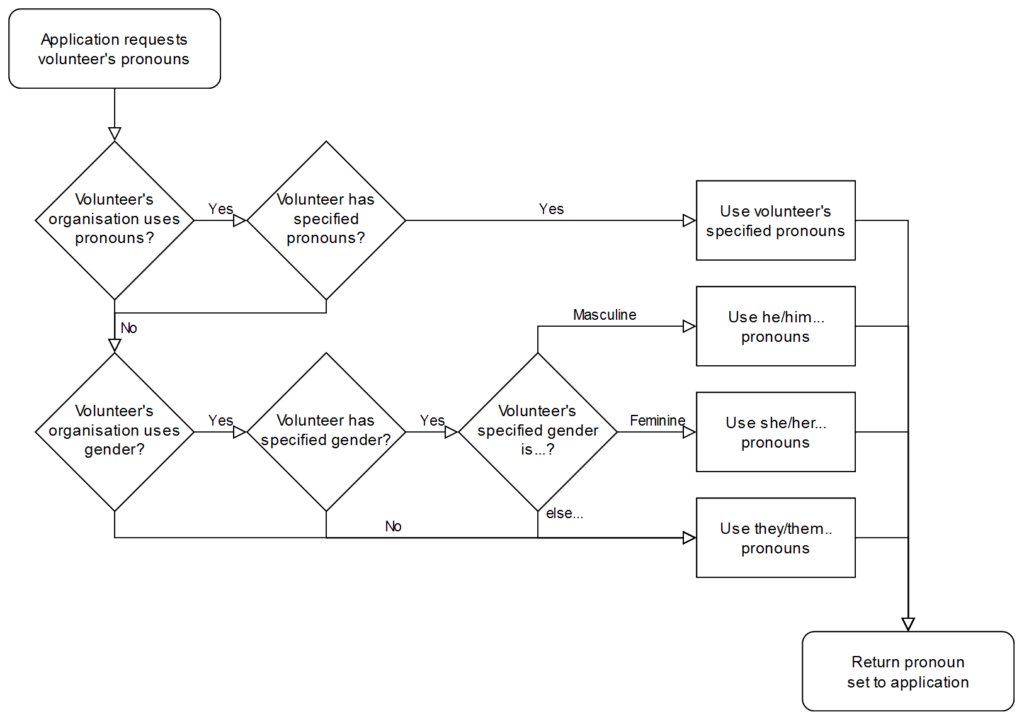
From 2018 we allowed organisations to add a “Pronouns” property, allowing volunteers to select from 13 different pronoun sets. If they did so, we’d use it; failing that we’d continue to
assume based on gender if it was available, or else use the singular “they”.
The process has some further complexities to cover the fact that we say “they are” but “he is“, but this broadly covers it.
Let’s take a quick linguistics break
Three Rings‘ pronoun field always shows five personal pronouns, separated by slashes, because you can’t necessarily derive one from another. That’s one for each of
five types:
the subject, used when the person you’re talking about is primary argument to a verb (“he called”),
object, for when the person you’re talking about is the secondary argument to a transitive verb (“he called her“),
dependent possessive, for talking about a noun that belongs to a person (“this is their shift”),
independent possessive, for talking about something that belongs to a person potentially would an explicit noun (“this is theirs“), and the
reflexive (and intensive), two types which are generally the same in English, used mostly in Three Rings when a person is both the subject
and indeirect of a verb (“she signed herself up to a shift”).
Let’s see what those look like – here are the 13 pronoun sets supported by Three Rings at the time of writing:
Subject
Object
Possessive
Reflexive/intensive
Dependent
Independent
he
him
his
himself
she
her
hers
herself
they
them
their
theirs
themselves
e
em
eir
eirs
emself
ey
eirself
hou
hee
hy
hine
hyself
hu
hum
hus
humself
ne
nem
nir
nirs
nemself
per
pers
perself
thon
thons
thonself
ve
ver
vis
verself
xe
xem
xyr
xyrs
xemself
ze
zir
zirs
zemself
That’s all data-driven rather than hard-coded, by the way, so adding additional pronoun sets is very easy for our developers. In fact, it’s even possible for us to apply an additional
“override” on an individual, case-by-case basis: all we need to do is specify the five requisite personal pronouns, separated by slashes, and Three Rings understands how to use
them.
Writing code that respects pronouns
Behind the scenes, the developers use a (binary-gendered, for simplicity) convenience function to produce output, and the system corrects for the pronouns appropriate to the volunteer
in question:
<%=@volunteer.his_her.capitalize %>
account has been created for
<%=@volunteer.him_her %>
so
<%=@volunteer.he_she %>
can now log in.
The code above will, dependent on the pronouns specified for the volunteer @volunteer, output something like:
His account has been created for him so he can now log in.
Her account has been created for her so she can now log in.
Their account has been created for them so they can now log in.
Eir account has been created for em so ey can now log in.
Etc.
We’ve got extended functions to automatically detect cases where the use of second person pronouns might be required (“Your account has been created for
you so you can now log in.”) as well as to help us handle the fact that we say “they are” but
“he/she/ey/ze/etc. is“.
It’s all pretty magical and “just works” from a developer’s perspective. I’m sure most of our volunteer developers don’t think about the impact of pronouns at all when they code; they
just get on with it.
Is that a complete solution?
Does this go far enough? Possibly not. This week, one of our customers contacted us to ask:
Is there any way to give the option to input your own pronouns? I ask as some people go by she/them or he/them and this option is not included…
You can probably see what’s happened here: some organisations have taken our pronouns property – which exists primarily to teach the system itself how to talk about volunteers – and are
using it to facilitate their volunteers telling one another what their pronouns are.
What’s the difference? Well:
When a human discloses that their pronouns are “she/they” to another human, they’re saying “You can refer to me using either traditional feminine pronouns (she/her/hers etc.)
or the epicene singular ‘they’ (they/their/theirs etc.)”.
But if you told Three Rings your pronouns were “she/her/their/theirs/themselves”, it would end up using a mixture of the two, even in the same sentence! Consider:
She has done 7 shifts by themselves.
She verified her email address was theirs.
That’s some pretty clunky English right there! Mixing pronoun sets for the same person within a sentence is especially ugly, but even mixing them within the same page can cause
confusion. We can’t trivially meet this customer’s request simply by adding new pronoun sets which mix things up a bit! We need to get smarter.
A Newer Way?
Ultimately, we’re probably going to need to differentiate between a more-rigid “what pronouns should Three Rings use when talking about you” and a more-flexible, perhaps
optional “what pronouns should other humans use for you”? Alternatively, maybe we could allow people to select multiple pronoun sets to display but Three Rings would
only use one of them (at least, one of them at a time!): “which of the following sets of pronouns do you use: select as many as apply”?
Even after this, there’ll always be more work to do.
For instance: I’ve met at least one person who uses no pronouns! By this, they actually
mean they use no third-person personal pronouns (if they actually used no pronouns they wouldn’t say “I”, “me”, “my”, “mine” or “myself” and wouldn’t
want others to say “you”, “your”, “yours” and “yourself” to them)! Semantics aside… for these people Three Ringsshould use the person’s name rather than a
pronoun.
Maybe we can get there one day.
Three Rings is already capable of supporting people who use no pronouns, but we don’t yet have a user interface to help them specify this! Maybe it’d look like this?
But so long as Three Rings continues to remain ahead of the curve in its respect for and understanding of pronoun use then I’ll be happy.
Our mission is to focus on volunteers and make volunteering easier. At the heart of that mission is treating volunteers with
respect. Making sure our system embraces the diversity of the 65,000+ volunteers who use it by using pronouns correctly might be a small part of that, but it’s a part of it, and I for
one am glad we make the effort.
A few weeks ago, my credit card provider wrote to me to tell me that they were switching me back from paperless to postal billing because I’d “not been receiving their emails”.
This came as a surprise to me because I have been receiving their emails. Why would they think that I hadn’t?
This is a re-enactment but I promise the facial expression is pretty much right.
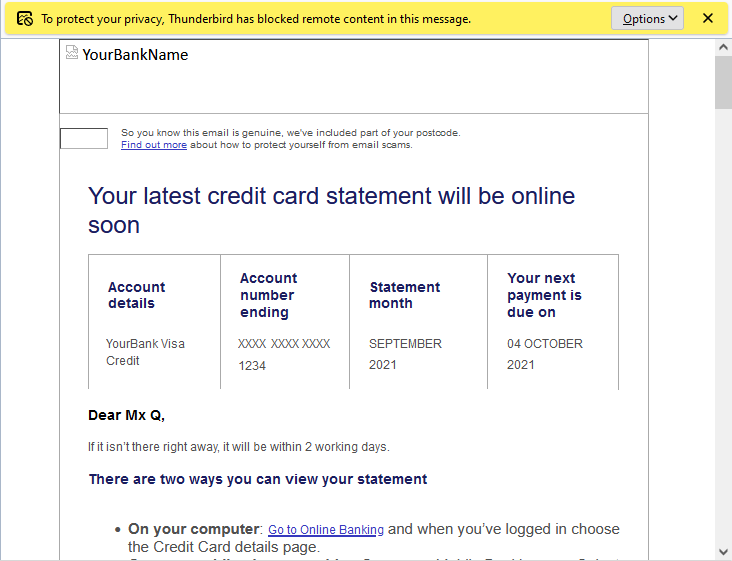
Turns out they have a tracking pixel in their email to track that it’s been opened, as well as potentially additional data such as when it was opened (or re-opened), what email client
or clients the recipient uses, what IP address or addresses they read their mail from, and so on.
“To protect your privacy from fucking creepy banks misusing features of HTML emails, Thunderbird has blocked remote content
in this message.” only tells half the story.
Do you have numbers on how many people opened a particular newsletter? Do you have numbers on how many people clicked a particular link?
You can call it data, or stats, or analytics, but make no mistake, that’s tracking.
Follow-on question: do you honestly think that everyone who opens a newsletter or clicks on a link in a newsletter has given their informed constent to be tracked by you?
Needless to say, I had words with my credit card provider. Paperless billing is useful to almost everybody but it’s incredibly useful for blind and partially-sighted users (who are also
the ones least-likely to have images loading in the first place, for obvious reasons) because your computer can read your communication to you which is much more-convenient
than a letter. Imagine how annoyed you’d be if your bank wrote you a letter (which you couldn’t read but had to get somebody else to read to you) to tell you that because you don’t
look at the images in their emails they’re not going to send them to you any more?
Even if you can somehow justify using tracking technologies (which don’t work reliably) to make general, statistical decisions (“fewer people open our emails when the subject
contains the word ‘overdraft’!”), you can’t make individual decisions based on them. That’s just wrong.
I’ve a long history of blogging about dreams I’ve had, and though I’ve not done so recently I don’t want you to think it’s because my dreams have gotten any
less trippy-as-fuck. Take last night for example…
I plough every penny and spare minute I can into a side-project that in my head at least qualifies as “art”. The result will be fake opening credits animation for the (non-existent)
pilot episode of an imagined 80s-style children’s television show. But it gets weirder.
Do you remember Hot Shots!? There’s this scene near the end where Topper Harley, played by Charlie Sheen, returns to the Native
American tribe he’s been living with since before the film (in sort of a clash between the “proud warrior
race” trope and a parody of Dances With Wolves, which came out the previous year). Returning to his teepee, Topper meets tribal
elder Owatonna (Rino Thunder), who asks him about the battle Topper had gone to fight in and, in a callback to an earlier joke, receives the four AA-cell batteries he’d asked Topper
to pick up for him “while he was out”.
There are very few occasions where a parody film is objectively better than it’s source material, but I maintain that Hot Shots! beats Top Gun hands-down.
I take the dialogue from this scene (which in reality is nonsense, only the subtitles give it any meaning),
mangle it slightly, and translate it into Japanese using an automated translation service. I find some Japanese-speaking colleagues to help verify that each line broadly makes sense,
at least in isolation.
I commission the soundtrack for my credits sequence. A bit of synth-pop about a minute long. I recruit some voice actors to read each of my Japanese lines, as if they’re characters in
an animated kids TV show. I mix it together, putting bits of Japanese dialogue in the right places so that if anybody were to sync-up my soundtrack with the correct scene in Hot
Shots!, the Japanese dialogue would closely mirror the conversation that the characters in that film were having. The scene, though, is slow-paced enough that, re-recorded, the voices
in my new soundtrack don’t sound like they’re part of the same conversation as one another. This is deliberate.
Meanwhile, I’ve had some artists put together some concept character art for me, based on some descriptions. There’s the usual eclectic mix of characters that you’d expect from 80s
cartoons: one character’s a friendly bear-like thing, another’s a cowardly robot, there’s a talking flying unicorn… you know the kind of shit. I give them descriptions, they give me
art.
Next, I send the concept art and the soundtrack to an animation team and ask them to produce a credits sequence for it, and I indicate which of the characters depicted should be
saying which lines.
Identifying the shows I lifted images from to make this sample is left as an exercise for the reader.
Finally, I dump the credits sequence around the Internet, wait a bit, and then start asking on forums “hey, what show is this?” to see what kind of response it gets.
The thing goes viral. It scratches the itch of people who love to try to find the provenance of old TV clips, but of course there’s no payoff because the show doesn’t exist. It
doesn’t take too long before somebody translates the dialogue and notices some of the unusual phasing and suggests a connection to Hot Shots! That seems to help date the show as
post-1991, but it’s still a mystery. By the time somebody get around to posting a video where the soundtrack overlays the scene from Hot Shots!, conspiracy theories are already all
over: the dominant hypothesis is that the clips are from a series of different shows (still to be identified) but only the soundtrack is new… but that still doesn’t answer what the
different shows are!
As the phenomenon begins to expand into mainstream media I become aware that even the most meme-averse folks I know are going to hear about it, at some point. And as I ‘m likely to be
“found out” as the creator of this weird thing, sooner or later, I decide to come clean about it to people I know sooner, rather than later. I’m hanging out with Ruth and her brothers Robin and Owen and I bring it up:
“Do you remember Hot Shots!? There’s this scene near the end where Topper Harley, played by Charlie Sheen…”, I begin, hoping that the explanation of my process might somehow justify
the weird shit I’ve brought to the world. Or at least, that one of this group has already come across this latest Internet trend and will interject and give me an “in”.
Ruth interrupts: “I don’t think I’ve seen Hot Shots!”
“Really?” Realising that this’ll take some background explanation, I begin by referring to Top Gun and the tropes Hot Shots! plays into and work from there.
Some time later, I’m involved with a team who are making a documentary about the whole phenomenon and my part in it. They’re proposing to release a special edition disc with a chapter
that uses DVD video’s “multi angle” and “audio format switch” features to allow you to watch your choice of either the scene from
Hot Shots! or from my trailer with your choice of either the original audio, my soundtrack, or a commentary by me, but they’re having difficulty negotiating the relevant rights.
After I woke, I tried to tell Ruth about this most-bizarre dream, but soon got stuck in an “am I still dreaming” moment after the following exchange:
It just passed two years since I started working at Automattic, and I just made a startling
discovery: I’ve now been with the company for longer than 50% of the staff.
When you hear that from a 2-year employee at a tech company, it’s easy to assume that they have a high staff turnover, but Automattic’s churn rate is relatively low, especially for our
sector: 86% of developers stay longer than 5 years. So what’s happening? Let’s visualise it:
Everything in this graph, in which each current Automattician is a square, explains how I feel right now: still sometimes like a new fish, but in an increasingly big sea.
All that “red” at the bottom of the graph? That’s recent growth. Automattic’s expanding really rapidly right now, taking on new talent at a never-before-seen speed.
Since before I joined it’s been the case that our goals have demanded an influx of new engineers at a faster rate than we’ve been able to recruit, but it looks like things are
improving. Recent refinements to our recruitment process (of which I’ve written about my experience) have helped, but I wonder how much we’ve
also been aided by pandemic-related changes to working patterns? Many people, and especially in tech fields, have now discovered that working-from-home works for them, and a company
like Automattic that’s been built for the last decade and a half on a “distributed” model is an ideal place to see that approach work at it’s best.
We’re rolling out new induction programmes to support this growth. Because I care about our corporate culture, I’ve volunteered
myself as a Culture Buddy, so I’m going to spend some of this winter helping Newmatticians integrate into our (sometimes quirky, often chaotic) ways of working. I’m quite excited to be
at a point where I’m in the “older 50%” of the organisation and so have a responsibility for supporting the “younger 50%”, even though I’m surprised that it came around so quickly.
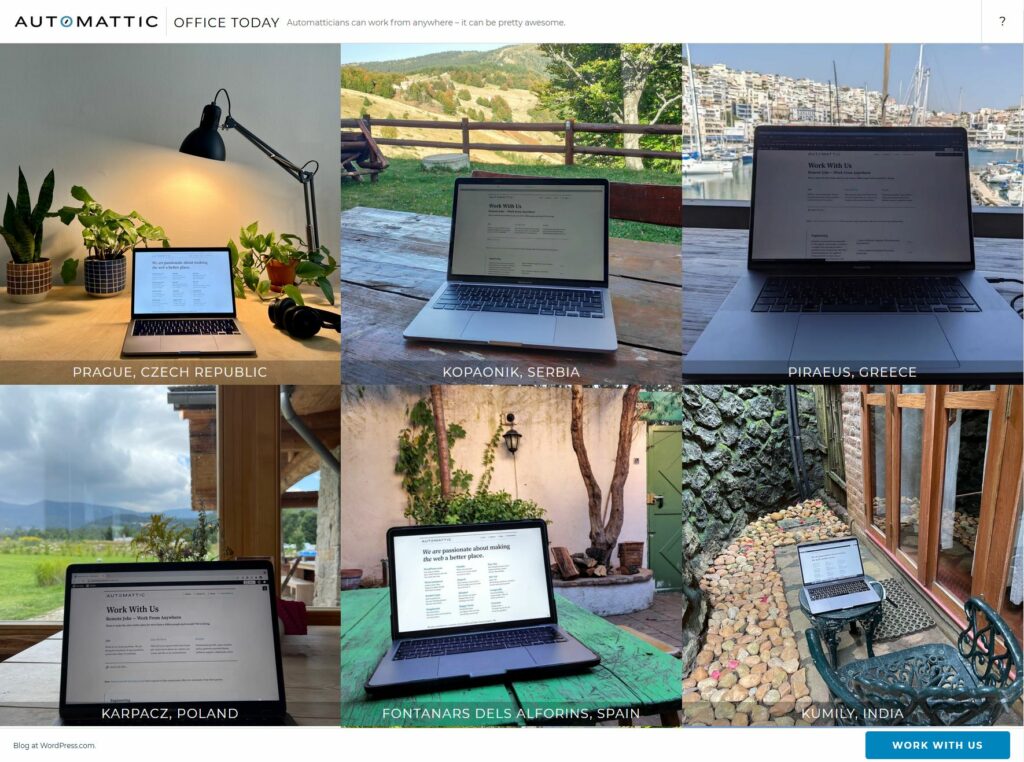
Automattic… culture? Can’t we just show them Office Today and be done with it?
I wonder how that graph will look in another two years.
A not-entirely-theoretical question about open source software licensing came up at work the other day. I thought it was interesting
enough to warrant a quick dive into the philosophy of minification, and how it relates to copyleft open source licenses. Specifically: does distributing (only) minified
source code violate the GPL?
If you’ve come here looking for a legally-justifiable answer to that question, you’re out of luck. But what I can give you is a (fictional) story:
TheseusJS is slow
TheseusJS is a (fictional) Javascript library designed to be run in a browser. It’s released under the GPLv3 license. This license allows you to download and use TheseusJS for any purpose you like, including making money off it, modifying
it, or redistributing it to others… but it requires that if you redistribute it you have to do so under the same license and include the source code. As such, it forces you to
share with others the same freedoms you enjoy for yourself, which is highly representative of some schools of open-source thinking.
It’s a cool project, but it really needs some maintenance this side of 2010.
It’s a great library and it’s used on many websites, but its performance isn’t great. It’s become infamous for the impact it has on the speed of the websites it’s used on, and it’s
often the butt of jokes by developers: “Man, this website’s slow. Must be running Theseus!”
The original developer has moved onto his new project, Moralia, and seems uninterested in handling the growing number of requests for improvements. So I’ve decided to fork it
and make my own version, FastTheseusJS and work on improving its speed.
FastTheseusJS is fast
I do some analysis and discover the single biggest problem with TheseusJS is that the Javascript file itself is enormous. The original developer kept all of the
copious documentation in comments in the file itself, and for some reason it doesn’t even compress well. When you use TheseusJS on a website it takes a painfully long time for
a browser to download it, if it’s not precached.
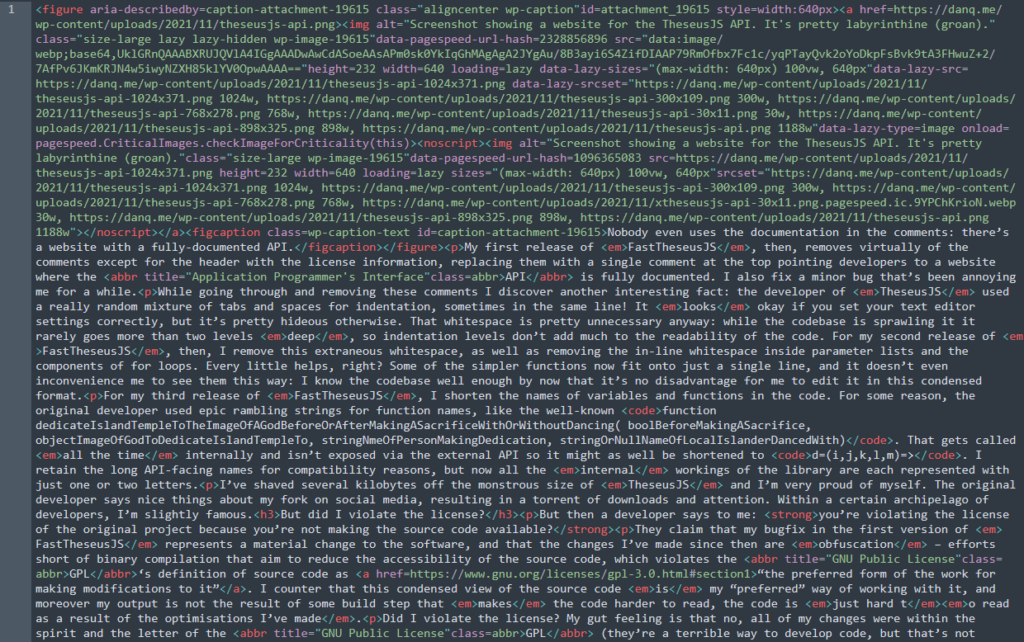
Nobody even uses the documentation in the comments: there’s a website with a fully-documented API.
My first release of FastTheseusJS, then, removes virtually of the comments, replacing them with a single comment at the top pointing developers to a website where the
API is fully documented. While I’m in there anyway, I also fix a minor bug that’s been annoying me for a while.
v1.1.0 changes
Forked from TheseusJS v1.0.4
Fixed issue #1071 (running mazeSolver() without first connecting <String> component results in endless loop)
Removed all comments: improves performance considerably
I discover another interesting fact: the developer of TheseusJS used a really random mixture of tabs and spaces for indentation, sometimes in the same line! It looks…
okay if you set your editor up just right, but it’s pretty hideous otherwise. That whitespace is unnecessary anyway: the codebase is sprawling but it seldom goes more than two
levels deep, so indentation levels don’t add much readability. For my second release of FastTheseusJS, then, I remove this extraneous whitespace, as well as removing
the in-line whitespace inside parameter lists and the components of for loops. Every little helps, right?
v1.1.1 changes
Standardised whitespace usage
Removed unnecessary whitespace
Some of the simpler functions now fit onto just a single line, and it doesn’t even inconvenience me to see them this way: I know the codebase well enough by now that it’s no
disadvantage for me to edit it in this condensed format.
Personally, I’ve given up on the tabs-vs-spaces debate and now I indent my code using semicolons. (That’s clearly a joke. Don’t flame me.)
In the next version, I shorten the names of variables and functions in the code.
For some reason, the original developer used epic rambling strings for function names, like the well-known function
dedicateIslandTempleToTheImageOfAGodBeforeOrAfterMakingASacrificeWithOrWithoutDancing( boolBeforeMakingASacrifice, objectImageOfGodToDedicateIslandTempleTo,
stringNmeOfPersonMakingDedication, stringOrNullNameOfLocalIslanderDancedWith). That one gets called all the time internally and isn’t exposed via the external
API so it might as well be shortened to d=(i,j,k,l,m)=>. Now all the internal workings of the library
are each represented with just one or two letters.
v1.1.2 changes
Shortened/standarised non-API variable and function names – improves performance
I’ve shaved several kilobytes off the monstrous size of TheseusJS and I’m very proud. The original developer says nice things about my fork on social media, resulting in a
torrent of downloads and attention. Within a certain archipelago of developers, I’m slightly famous.
But did I violate the license?
But then a developer says to me: you’re violating the license of the original project because you’re not making the source code available!
This happens every day. Probably not to this same guy every time though, but you never know. Original photo by Andrea Piacquadio.
They claim that my bugfix in the first version of FastTheseusJS represents a material change to the software, and that the changes I’ve made since then are
obfuscation: efforts short of binary compilation that aim to reduce the accessibility of the source code. This fails to meet the GPL‘s definition of source code as “the preferred form of the work for making modifications to
it”. I counter that this condensed view of the source code is my “preferred” way of working with it, and moreover that my output is not the result of some build step that
makes the code harder to read, the code is just hard to read as a result of the optimisations I’ve made. In ambiguous cases, whose “preference” wins?
Did I violate the license? My gut feeling is that no, all of my changes were within the spirit and the letter of the GPL (they’re a
terrible way to write code, but that’s not what’s in question here). Because I manually condensed the code, did so with the intention that this condensing was a feature, and
continue to work directly with the code after condensing it because I prefer it that way… that feels like it’s “okay”.
But if I’d just run the code through a minification tool, my opinion changes. Suppose I’d run minify --output fasttheseus.js theseus.js and then deleted my copy of
theseus.js. Then, making changes to fasttheseus.js and redistributing it feels like a violation to me… even if the resulting code is the same as I’d have
gotten via the “manual” method!
I don’t know the answer (IANAL), but I’ll tell you this: I feel hypocritical for saying one piece of code would not violate
the license but another identical piece of code would, based only on the process the developer followed to produce it. If I replace one piece of code at a time with
less-readable versions the license remains intact, but if I replace them all at once it doesn’t? That doesn’t feel concrete nor satisfying.
Sure, I can write a blog post in just one line of code. It’ll just be a really, really, really long line… (Still perfectly readable, though!)
This isn’t an entirely contrived example
This example might seem highly contrived, and that’s because it is. But the grey area between the extremes is where the real questions are. If you agree that redistribution of (only)
minified source code violates the GPL, you’re left asking: at what point does the change occur? Code isn’t necessarily minified or
not-minified: there are many intermediate steps.
If I use a correcting linter to standardise indentation and whitespace – switching multiple spaces for the appropriate number of tabs, removing excess line breaks etc. (or do the same
tasks manually) I’m sure you’d agree that’s fine. If I have it replace whole-function if-blocks with hoisted return statements, that’s probably fine too. If I replace if blocks with
ternery operators or remove or shorten comments… that might be fine, but probably depends upon context. At some point though, some way along the process, minification goes “too
far” and feels like it’s no longer within the limitations of the license. And I can’t tell you where that point is!
This issue’s even more-complicated with some other licenses, e.g. the AGPL, which extends the requirement to share source code to hosted applications. Suppose I implement a web application that uses an AGPL-licensed library. The person who redistributed it to me only gave me the minified version, but they gave me a web address from which
to acquire the full source code, so they’re in the clear. I need to make a small patch to the library to support my service, so I edit it right into the minified version I’ve already
got. A user of my hosted application asks for a copy of the source code, so I provide it, including the edited minified library… am I violating the license for not providing the full,
unminified version, even though I’ve never even seen it? It seems absurd to say that I would be, but it could still be argued to be the case.
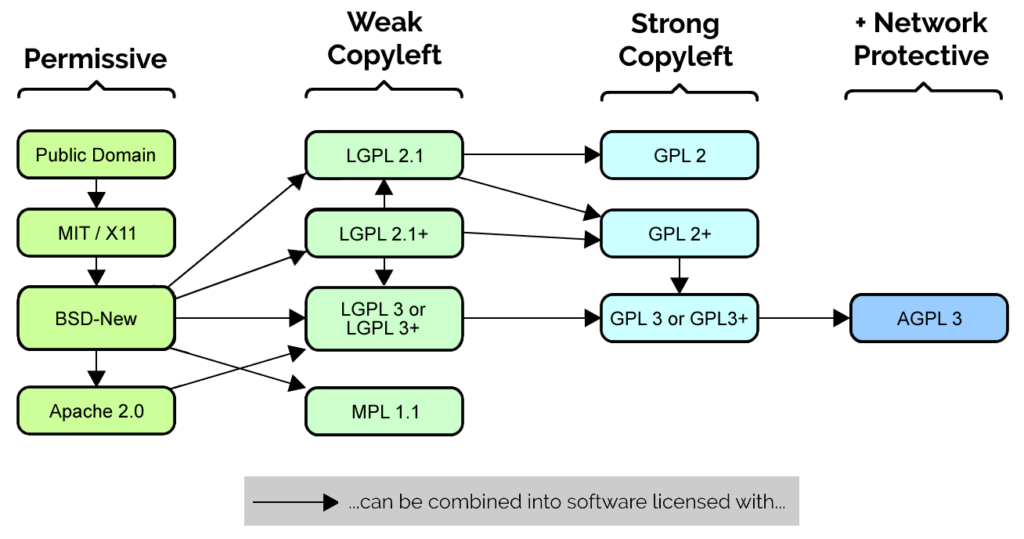
I love diagrams like this, which show license compatibility of different open source licenses. Adapted from a diagram by Carlo Daffara,
in turn adapted from a diagram by David E. Wheeler, used under a CC-BY-SA license.
99% of the time, though, the answer’s clear, and the ambiguities shown above shouldn’t stop anybody from choosing to open-source their work
under GPL, AGPL (or any other open source license depending on their
preference and their community). Perhaps the question of whether minification violates the letter of a copyleft license is one of those Potter Stewart “I know it when I see it” things. It certainly goes against the spirit of the thing to do so deliberately or
unnecessarily, though, and perhaps it’s that softer, more-altruistic goal we should be aiming for.
I’ve been using Synergy for a long, long time. By the time I wrote about my
admiration of its notification icon back in 2010 I’d already been using it for some years. But this long love affair ended this week when I made the switch to its competitor,
Barrier.
I’m not certain exactly when I took this screenshot (which I shared with Kit while praising Synergy), but it’s clearly a pre-1.4 version
and those look distinctly like Windows Vista’s ugly rounded corners, so I’m thinking no later than 2009?
If you’ve not come across it before: Synergy was possibly the first multiplatform tool to provide seamless “edge-to-edge” sharing of a keyboard and mouse between multiple
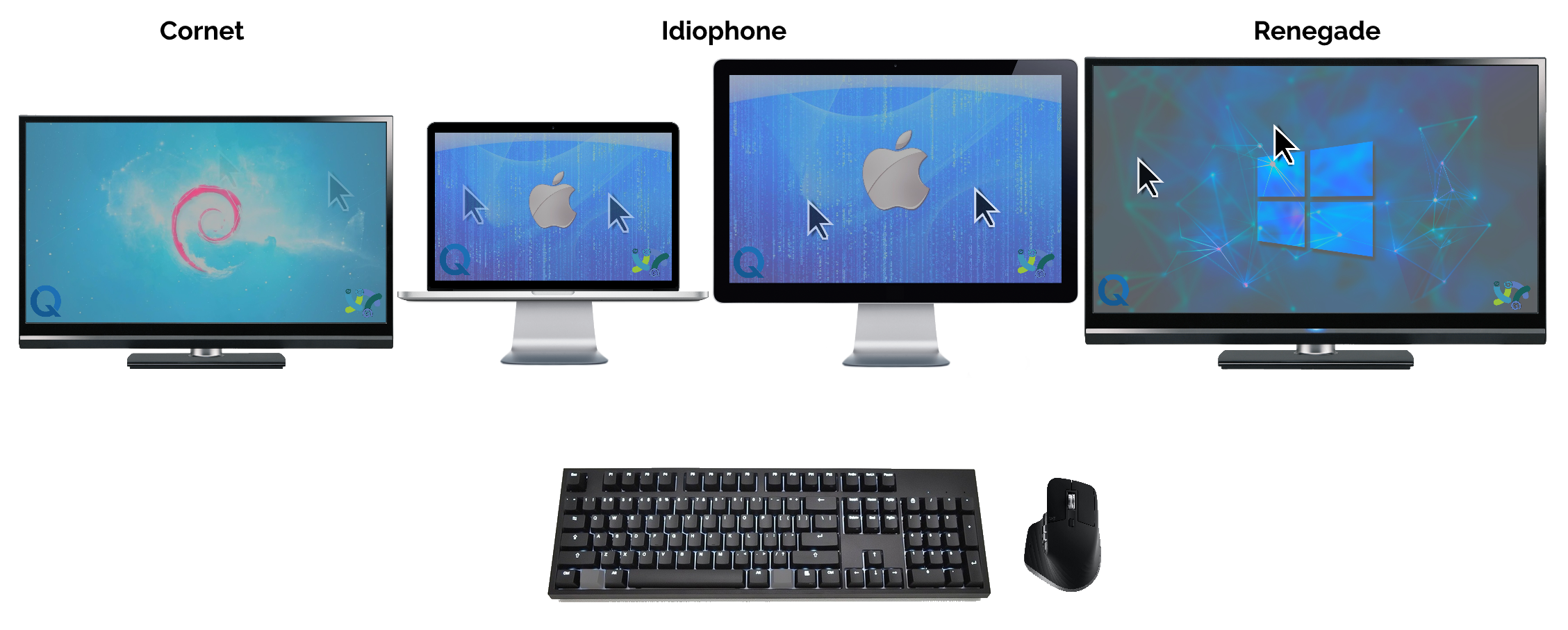
computers. Right now, for example, I’m sitting in front of Cornet, a Debian 11 desktop, Idiophone, a Macbook Pro docked to a desktop monitor, and Renegade, a
Windows desktop. And I can move my mouse cursor from one, to the other, to the next, interacting with them all as if I were connected directly to it.
There have long been similar technologies. KVM switches can do this, as
can some modern wireless mice (I own at least two such mice!). But none of them are as seamless as what Synergy does: moving from computer to computer as fast as you can move your mouse
and sharing a clipboard between multiple devices. I also love that I can configure my set-up around how I work, e.g. when I undock my Macbook it switches from ethernet to wifi, this
gets detected and it’s automatically removed from the cluster. So when I pick up my laptop, it magically stops being controlled by my Windows PC’s mouse and keyboard until I dock it
again.
Synergy’s published under a hybrid model: open-source components, with paid-for extra features. It used to provide more in the open-source offering: you could download a
fully-working copy of the software and use it without limitation, losing out only on a handful of features that for many users were unnecessary. Nontheless, early on I wanted to support
the development of this tool that I used so much, and so I donated money towards funding its development. In exchange, I gained access to Synergy Premium, and then when their business
model changed I got grandfathered-in to a lifetime subscription to Synergy Pro.
I continued using Synergy all the while. When their problem-stricken 2.x branch went into beta, I was among the
testers: despite the stability issues and limitations, I loved the fact that I could have what was functionally multiple co-equal “host” computers, and – when it worked – I liked the
slick new configuration interface it sported. I’ve been following with bated breath announcements about the next generation – Synergy 3 – and I’ve registered as an alpha tester for when the time comes.
If it sounds like I’m a fanboy… that’d probably be an accurate assessment of the situation. So why, after all these years, have I jumped ship?
Dear Future Dan. If you ever need a practical example of where open-source thinking provides a better user experience than arbritrarily closed-source products, please see above.
Yours, Past Dan.
I’ve been aware of Barrier since the project started, as a fork of the last open-source version of the core Synergy program. Initially, I didn’t consider Barrier to be a
suitable alternative for me, because it lacked features I cared about that were only available in the premium version of Synergy. As time went on and these features were implemented, I
continued to stick with Synergy and didn’t bother to try out Barrier… mostly out of inertia: Synergy worked fine, and the only thing Barrier seemed to offer would be a simpler set-up
(because I wouldn’t need to insert my registration details!).
This week, though, as part of a side project, I needed to add an extra computer to my cluster. For reasons that are boring and irrelevant and so I’ll spare you the details, the new
computer’s running the 32-bit version of Debian 11.
I went to the Symless download pages and discovered… there isn’t a Debian 11 package. Ah well, I think: the Debian 10 one can probably be made to work. But then I discover… there’s only
a 64-bit version of the Debian 10 binary. I’ll note that this isn’t a fundamental limitation – there are 32-bit versions of Synergy available for Windows and for ARMhf
Raspberry Pi devices – but a decision by the developers not to support that platform. In order to protect their business model, Synergy is only available as closed-source binaries, and
that means that it’s only available for the platforms for which the developers choose to make it available.
So I thought: well, I’ll try Barrier then. Now’s as good a time as any.
Setting up Barrier in place of Synergy was pretty familiar and painless.
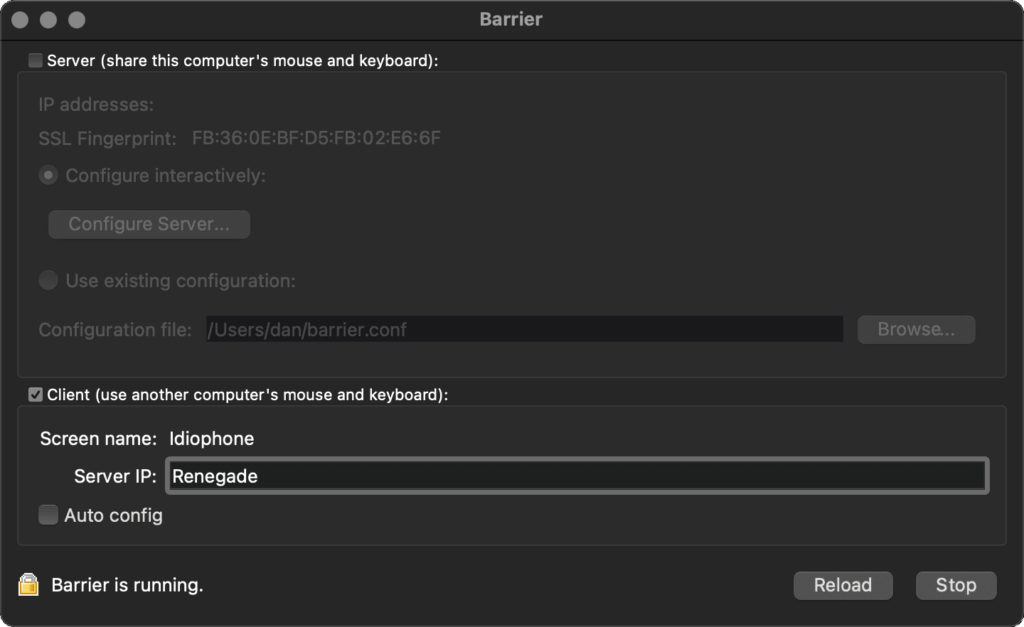
Barrier and Synergy aren’t cross-compatible, so first I had to disable Synergy on each machine in my cluster. Then I installed Barrier. Like most popular open-source software, this was
trivially easy compared to Synergy: I just used an appropriate package manager by running choco install barrier, brew install barrier, and apt install barrier to install on each of the Windows, Mac, and Debian computers, respectively.
Configuring Barrier was basically identical to configuring Synergy: set up the machine names, nominate one the server, and tell the server what the relative positions are of each of the
others’ screens. I usually bind the “scroll lock” key to the “lock my cursor to the current screen” function but I wasn’t permitted to do this in Barrier for some reason, so I remapped
my scroll lock key to some random high unicode character and bound that instead.
Getting Barrier to auto-run on MacOS was a little bit of a drag – in the end I had to use Automator to set up a shortcut that ran it and loaded the configuration, and set that to run on
login. These little touches are mostly solved in Synergy, but given its technical audience I don’t imagine that anybody is hugely inconvenienced by them. Nonetheless, Synergy clearly
retains a slightly more-polished experience.
Altogether, switching from Synergy to Barrier took me under 15 minutes and has so far offered me a functionally-identical experience, except that it works on more devices, can be
installed via my favourite package managers, and doesn’t ask me for registration details before it functions. Synergy 3’s going to have to be a big leap forward to beat that!
As you might know if you were paying close attention in Summer 2019, I run a “URL
shortener” for my personal use. You may be familiar with public URL shorteners like TinyURL
and Bit.ly: my personal URL shortener is basically the same thing, except that only
I am able to make short-links with it. Compared to public ones, this means I’ve got a larger corpus of especially-short (e.g. 2/3 letter) codes available for my personal use. It also
means that I’m not dependent on the goodwill of a free siloed service and I can add exactly the features I want to it.
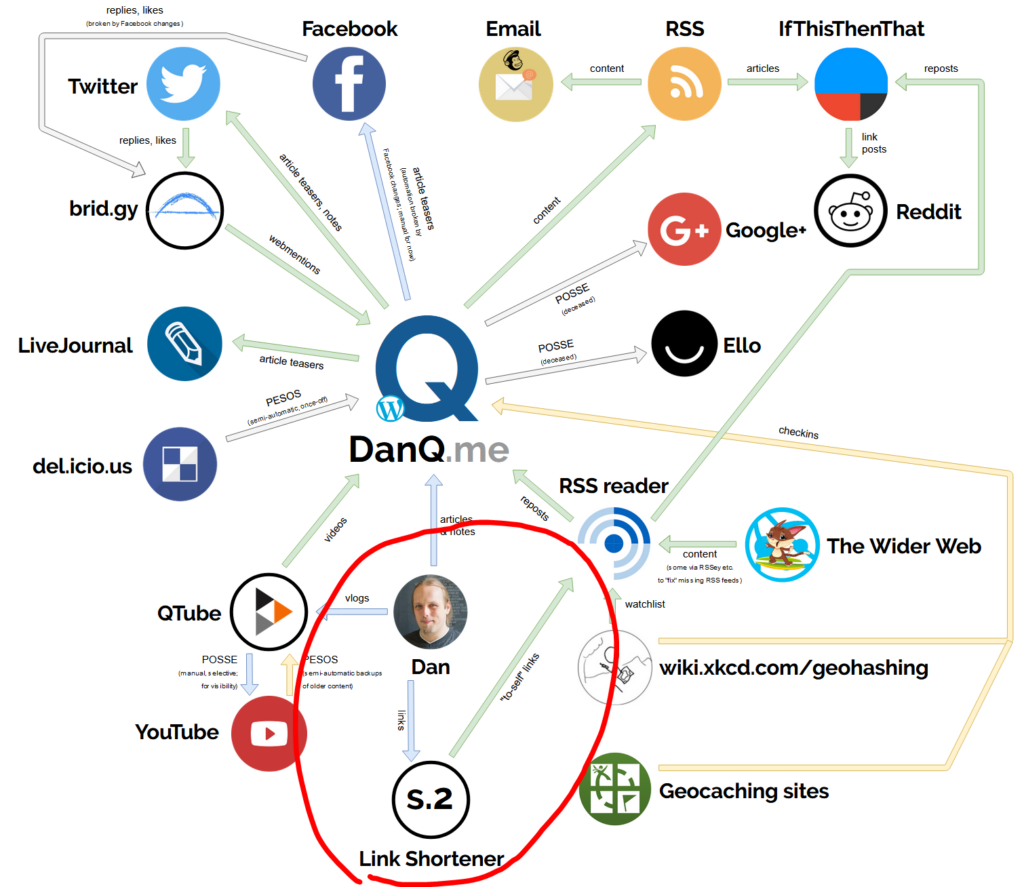
Little wonder then that my link shortener sat so close to me on my ecosystem diagram the other year.
For the last nine years my link shortener has been S.2, a tool I threw together in Ruby. It stores URLs in a
sequentially-numbered database table and then uses the Base62-encoding of the primary key as the “code” part of the short URL. Aside from the fact that when I create a short link it shows me a QR code to I can
easily “push” a page to my phone, it doesn’t really have any “special” features. It replaced S.1, from which it primarily differed by putting the code at the end of the URL rather than as part of the domain name, e.g. s.danq.me/a0 rather than a0.s.danq.me: I made the switch
because S.1 made HTTPS a real pain as well as only supporting Base36 (owing to the case-insensitivity of domain names).
But S.2’s gotten a little long in the tooth and as I’ve gotten busier/lazier, I’ve leant into using or adapting open source tools more-often than writing my own from scratch. So this
week I switched my URL shortener from S.2 to YOURLS.
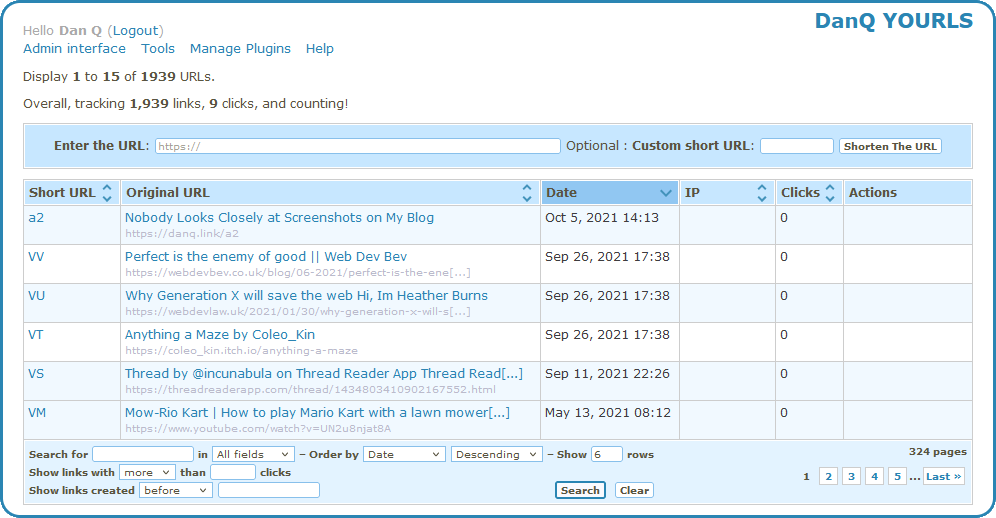
YOURLs isn’t the prettiest tool in the world, but then it doesn’t have to be: only I ever see the interface pictured above!
One of the things that attracted to me to YOURLS was that it had a ready-to-go Docker image. I’m not the biggest fan of Docker in general,
but I do love the convenience of being able to deploy applications super-quickly to my household NAS. This makes installing and maintaining my personal URL shortener much easier than it
used to be (and it was pretty easy before!).
Another thing I liked about YOURLS is that it, like S.2, uses Base62 encoding. This meant that migrating my links from S.2 into YOURLS could be done with a simple cross-database
INSERT... SELECT statement:
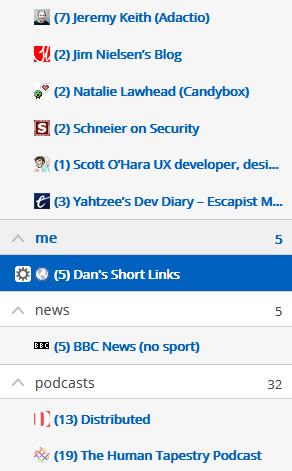
One of S.1/S.2’s features was that it exposed an RSS feed at a secret URL for my reader to ingest. This was great, because it meant I could “push” something to my RSS reader to read or repost to my blog later. YOURLS doesn’t have such a feature, and I couldn’t find anything in the (extensive) list of plugins that would do it for me. I needed to write my own.
In some ways, subscribing “to yourself” is a strange thing to do. In other ways… shut up, I’ll do what I like.
I could have written a YOURLS plugin. Or I could have written a stack of code in Ruby, PHP, Javascript or
some other language to bridge these systems. But as I switched over my shortlink subdomain s.danq.me to its new home at danq.link, another idea came to me. I
have direct database access to YOURLS (and the table schema is super simple) and the command-line MariaDB client can output XML… could I simply write an XML
Transformation to convert database output directly into a valid RSS feed? Let’s give it a go!
I wrote a script like this and put it in my crontab:
mysql --xml yourls -e \"SELECT keyword, url, title, DATE_FORMAT(timestamp, '%a, %d %b %Y %T') AS pubdate FROM yourls_url ORDER BY timestamp DESC LIMIT 30"\
| xsltproc template.xslt - \
| xmllint --format - \
> output.rss.xml
The first part of that command connects to the yourls database, sets the output format to XML, and executes an
SQL statement to extract the most-recent 30 shortlinks. The DATE_FORMAT function is used to mould the datetime into
something approximating the RFC-822 standard for datetimes as required by
RSS. The output produced looks something like this:
<?xml version="1.0"?><resultsetstatement="SELECT keyword, url, title, timestamp FROM yourls_url ORDER BY timestamp DESC LIMIT 30"xmlns:xsi="http://www.w3.org/2001/XMLSchema-instance"><row><fieldname="keyword">VV</field><fieldname="url">https://webdevbev.co.uk/blog/06-2021/perfect-is-the-enemy-of-good.html</field><fieldname="title"> Perfect is the enemy of good || Web Dev Bev</field><fieldname="timestamp">2021-09-26 17:38:32</field></row><row><fieldname="keyword">VU</field><fieldname="url">https://webdevlaw.uk/2021/01/30/why-generation-x-will-save-the-web/</field><fieldname="title">Why Generation X will save the web Hi, Im Heather Burns</field><fieldname="timestamp">2021-09-26 17:38:26</field></row><!-- ... etc. ... --></resultset>
We don’t see this, though. It’s piped directly into the second part of the command, which uses xsltproc to apply an XSLT to it. I was concerned that my XSLT
experience would be super rusty as I haven’t actually written any since working for my former employer SmartData back in around 2005! Back then, my coworker Alex and I spent many hours doing XML
backflips to implement a system that converted complex data outputs into PDF files via an XSL-FO intermediary.
I needn’t have worried, though. Firstly: it turns out I remember a lot more than I thought from that project a decade and a half ago! But secondly, this conversion from MySQL/MariaDB
XML output to RSS turned out to be pretty painless. Here’s the
template.xslt I ended up making:
<?xml version="1.0"?><xsl:stylesheetxmlns:xsl="http://www.w3.org/1999/XSL/Transform"version="1.0"><xsl:templatematch="resultset"><rssversion="2.0"xmlns:atom="http://www.w3.org/2005/Atom"><channel><title>Dan's Short Links</title><description>Links shortened by Dan using danq.link</description><link> [ MY RSS FEED URL ]</link><atom:linkhref=" [ MY RSS FEED URL ] "rel="self"type="application/rss+xml"/><lastBuildDate><xsl:value-ofselect="row/field[@name='pubdate']"/> UTC</lastBuildDate><pubDate><xsl:value-ofselect="row/field[@name='pubdate']"/> UTC</pubDate><ttl>1800</ttl><xsl:for-eachselect="row"><item><title><xsl:value-ofselect="field[@name='title']"/></title><link><xsl:value-ofselect="field[@name='url']"/></link><guid>https://danq.link/<xsl:value-ofselect="field[@name='keyword']"/></guid><pubDate><xsl:value-ofselect="field[@name='pubdate']"/> UTC</pubDate></item></xsl:for-each></channel></rss></xsl:template></xsl:stylesheet>
That uses the first (i.e. most-recent) shortlink’s timestamp as the feed’s pubDate, which makes sense: unless you’re going back and modifying links there’s no more-recent
changes than the creation date of the most-recent shortlink. Then it loops through the returned rows and creates an <item> for each; simple!
The final step in my command runs the output through xmllint to prettify it. That’s not strictly necessary, but it was useful while debugging and as the whole command takes
milliseconds to run once every quarter hour or so I’m not concerned about the overhead. Using these native binaries (plus a little configuration), chained together with pipes, had
already resulted in way faster performance (with less code) than if I’d implemented something using a scripting language, and the result is a reasonably elegant “scratch your
own itch”-type solution to the only outstanding barrier that was keeping me on S.2.
All that remained for me to do was set up a symlink so that the resulting output.rss.xml was accessible, over the web, to my RSS reader. I hope that next time I’m tempted to write a script to solve a problem like this I’ll remember that sometimes a chain of piped *nix
utilities can provide me a slicker, cleaner, and faster solution.
Update: Right as I finished writing this blog post I discovered that somebody had already solved this
problem using PHP code added to YOURLS; it’s just not packaged as a plugin so I didn’t see it earlier! Whether or not I
use this alternate approach or stick to what I’ve got, the process of implementing this YOURLS-database ➡ XML
➡ XSLT ➡ RSS chain was fun and
informative.
But sometimes, they disappear slowly, like this kind of web address:
http://username:password@example.com/somewhere
If you’ve not seen a URL like that before, that’s fine, because the answer to the question “Can I still use HTTP Basic Auth in URLs?” is, I’m afraid: no, you probably can’t.
But by way of a history lesson, let’s go back and look at what these URLs were, why they died out, and how web
browsers handle them today. Thanks to Ruth who asked the original question that inspired this post.
Basic authentication
The early Web wasn’t built for authentication. A resource on the Web was theoretically accessible to all of humankind: if you didn’t want it in the public eye, you didn’t put
it on the Web! A reliable method wouldn’t become available until the concept of state was provided by Netscape’s invention of HTTP
cookies in 1994, and even that wouldn’t see widespread for several years, not least because implementing a CGI (or
similar) program to perform authentication was a complex and computationally-expensive option for all but the biggest websites.
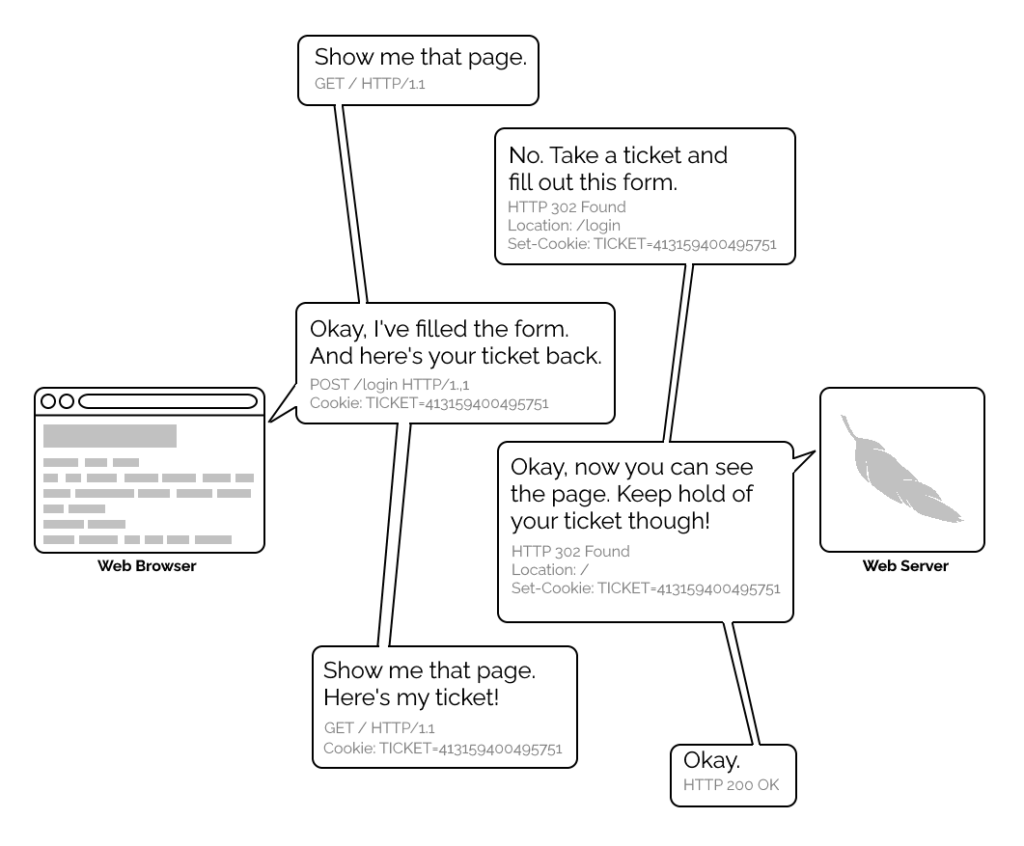
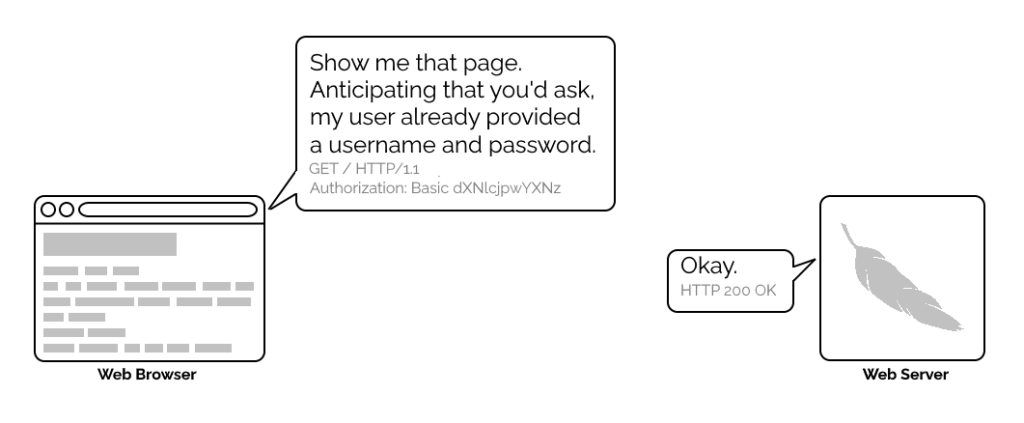
A simplified view of the form-and-cookie based authentication system used by virtually every website today, but which was too computationally-expensive for many sites in the 1990s.
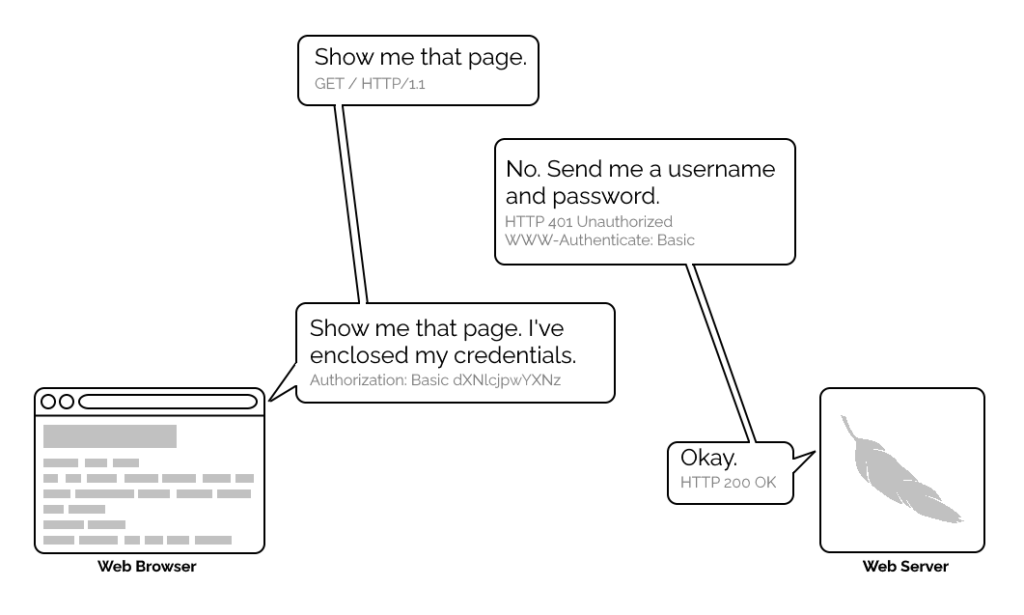
1996’s HTTP/1.0 specification tried to simplify things, though, with the introduction of the WWW-Authenticate header. The idea was that when a browser tried to access something that required
authentication, the server would send a 401 Unauthorized response along with a WWW-Authenticate header explaining how the browser could authenticate
itself. Then, the browser would send a fresh request, this time with an Authorization: header attached providing the required credentials. Initially, only “basic
authentication” was available, which basically involved sending a username and password in-the-clear unless SSL (HTTPS) was in use, but later, digest authentication and a host of others would appear.
For all its faults, HTTP Basic Authentication (and its near cousins) are certainly elegant.
Webserver software quickly added support for this new feature and as a result web authors who lacked the technical know-how (or permission from the server administrator) to implement
more-sophisticated authentication systems could quickly implement HTTP Basic Authentication, often simply by adding a .htaccessfile to the relevant directory.
.htaccess files would later go on to serve many other purposes, but their original and perhaps best-known purpose – and the one that gives them their name – was access
control.
Credentials in the URL
A separate specification, not specific to the Web (but one of Tim Berners-Lee’s most important contributions to it), described the general structure of URLs as follows:
At the time that specification was written, the Web didn’t have a mechanism for passing usernames and passwords: this general case was intended only to apply to protocols that
did have these credentials. An example is given in the specification, and clarified with “An optional user name. Some schemes (e.g., ftp) allow the specification of a user
name.”
But once web browsers had WWW-Authenticate, virtually all of them added support for including the username and password in the web address too. This allowed for
e.g. hyperlinks with credentials embedded in them, which made for very convenient bookmarks, or partial credentials (e.g. just the username) to be included in a link, with the
user being prompted for the password on arrival at the destination. So far, so good.
Encoding authentication into the URL provided an incredible shortcut at a time when Web round-trip times were much longer owing to higher latencies and no keep-alives.
This is why we can’t have nice things
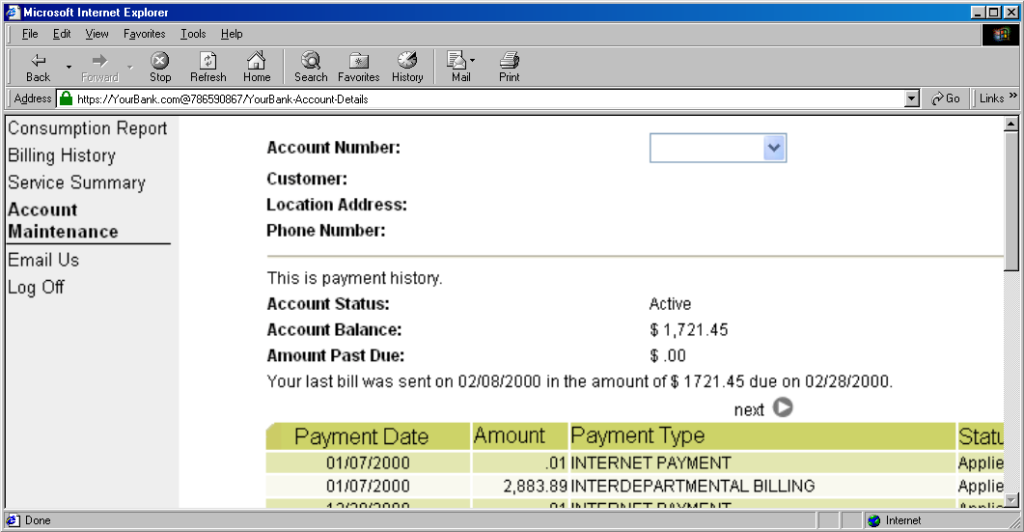
The technique fell out of favour as soon as it started being used for nefarious purposes. It didn’t take long for scammers to realise that they could create links like this:
https://YourBank.com@HackersSite.com/
Everything we were teaching users about checking for “https://” followed by the domain name of their bank… was undermined by this user interface choice. The poor victim would
actually be connecting to e.g. HackersSite.com, but a quick glance at their address bar would leave them convinced that they were talking to YourBank.com!
Theoretically: widespread adoption of EV certificates coupled with sensible user interface choices (that were never made) could
have solved this problem, but a far simpler solution was just to not show usernames in the address bar. Web developers were by now far more excited about forms and
cookies for authentication anyway, so browsers started curtailing the “credentials in addresses” feature.
Users trained to look for “https://” followed by the site they wanted would often fall for scams like this one: the real domain name is after the @-sign. (This attacker is
also using dword notation to obfuscate their IP address; this
dated technique wasn’t often employed alongside this kind of scam, but it’s another historical oddity I enjoy so I’m shoehorning it in.)
(There are other reasons this particular implementation of HTTP Basic Authentication was less-than-ideal, but this reason is the big one that explains why things had to change.)
One by one, browsers made the change. But here’s the interesting bit: the browsers didn’t always make the change in the same way.
How different browsers handle basic authentication in URLs
Let’s examine some popular browsers. To run these tests I threw together a tiny web application that outputs
the Authorization: header passed to it, if present, and can optionally send a 401 Unauthorized response along with a WWW-Authenticate: Basic realm="Test Site" header in order to trigger basic authentication. Why both? So that I can test not only how browsers handle URLs containing credentials when an authentication request is received, but how they handle them when one is not. This is relevant because
some addresses – often API endpoints – have optional HTTP authentication, and it’s sometimes important for a user agent (albeit typically a library or command-line one) to pass credentials without
first being prompted.
In each case, I tried each of the following tests in a fresh browser instance:
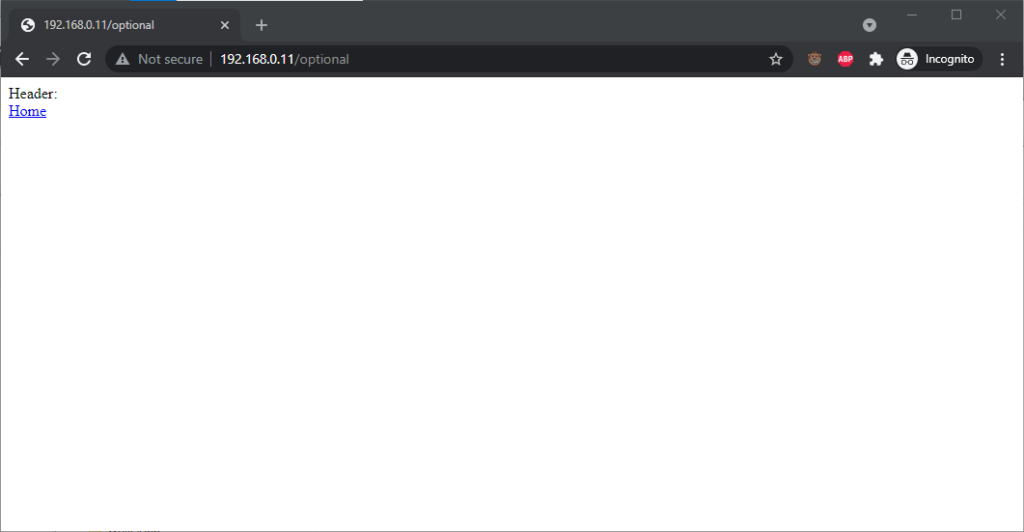
Go to http://<username>:<password>@<domain>/optional (authentication is optional).
Go to http://<username>:<password>@<domain>/mandatory (authentication is mandatory).
Experiment 1, then f0llow relative hyperlinks (which should correctly retain the credentials) to /mandatory.
Experiment 2, then follow relative hyperlinks to the /optional.
I’m only testing over the http scheme, because I’ve no reason to believe that any of the browsers under test treat the https scheme differently.
Chromium desktop family
Chrome 93 and Edge 93 both immediately suppressed the username and password from the address bar, along with the “http://” as we’ve come to expect of them. Like the “http://”, though,
the plaintext username and password are still there. You can retrieve them by copy-pasting the entire address.
Opera 78 similarly suppressed the username, password, and scheme, but didn’t retain the username and password in a way that could be copy-pasted out.
Authentication was passed only when landing on a “mandatory” page; never when landing on an “optional” page. Refreshing the page or re-entering the address with its credentials did not
change this.
Navigating from the “optional” page to the “mandatory” page using only relative links retained the username and password and submitted it to the server when it became mandatory,
even Opera which didn’t initially appear to retain the credentials at all.
Navigating from the “mandatory” to the “optional” page using only relative links, or even entering the “optional” page address with credentials after visiting the “mandatory” page, does
not result in authentication being passed to the “optional” page. However, it’s interesting to note that once authentication has occurred on a mandatory page, pressing enter at
the end of the address bar on the optional page, with credentials in the address bar (whether visible or hidden from the user) does result in the credentials being passed to
the optional page! They continue to be passed on each subsequent load of the “optional” page until the browsing session is ended.
Firefox desktop
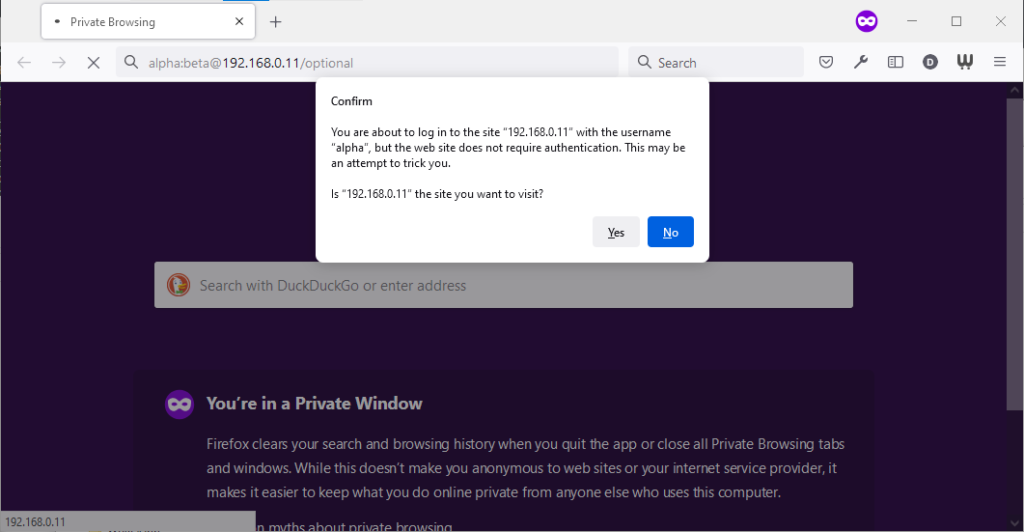
Firefox 91 does a clever thing very much in-line with
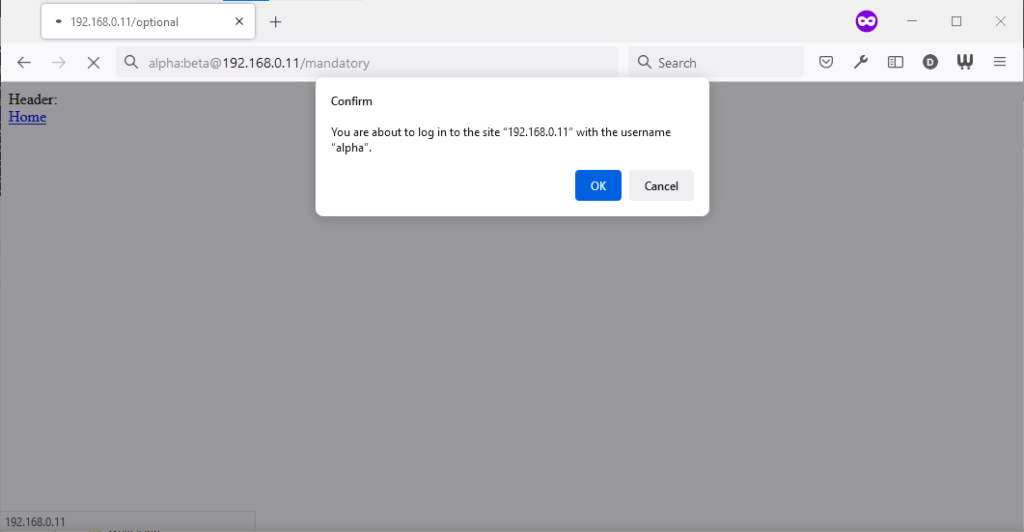
its image as a browser that puts decision-making authority into the hands of its user. When going to the “optional” page first it presents a dialog, warning the user that they’re going
to a site that does not specifically request a username, but they’re providing one anyway. If the user says that no, navigation ceases (the GET request for the page takes place the same
either way; this happens before the dialog appears). Strangely: regardless of whether the user selects yes or no, the credentials are not passed on the “optional” page. The credentials
(although not the “http://”) appear in the address bar while the user makes their decision.
Similar to Opera, the credentials do not appear in the address bar thereafter, but they’re clearly still being stored: if the refresh button is pressed the dialog appears again. It does
not appear if the user selects the address bar and presses enter.
Similarly, going to the “mandatory” page in Firefox results in an informative dialog warning the user
that credentials are being passed. I like this approach: not only does it help protect the user from the use of authentication as a tracking technique (an old technique that I’ve not
seen used in well over a decade, mind), it also helps the user be sure that they’re logging in using the account they mean to, when following a link for that purpose. Again, clicking
cancel stops navigation, although the initial request (with no credentials) and the 401 response has already occurred.
Visiting any page within the scope of the realm of the authentication after visiting the “mandatory” page results in credentials being sent, whether or not they’re included in the
address. This is probably the most-true implementation to the expectations of the standard that I’ve found in a modern graphical browser.
Safari desktop
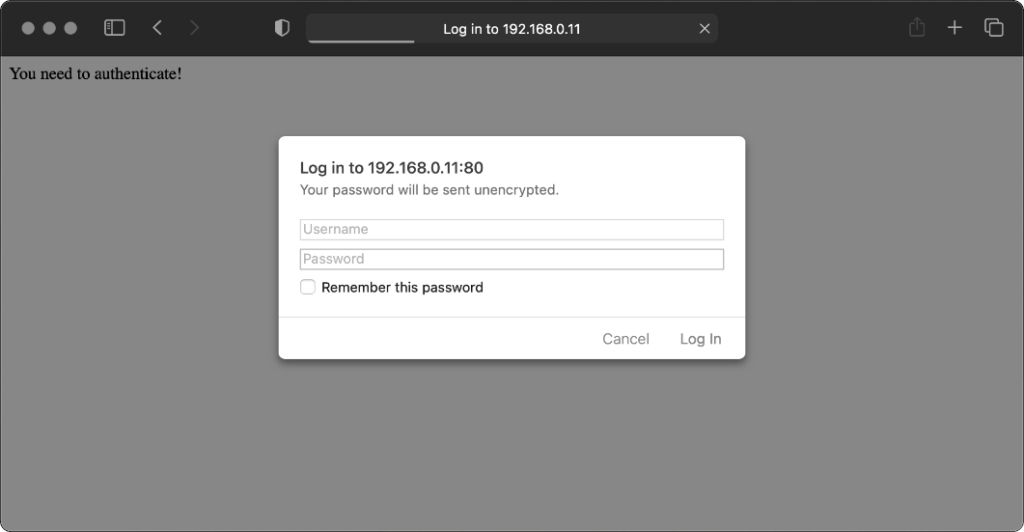
Safari 14 never displays or uses credentials provided via the web address, whether or not
authentication is mandatory. Mandatory authentication is always met by a pop-up dialog, even if credentials were provided in the address bar. Boo!
Once passed, credentials are later provided automatically to other addresses within the same realm (i.e. optional pages).
Older browsers
Let’s try some older browsers.
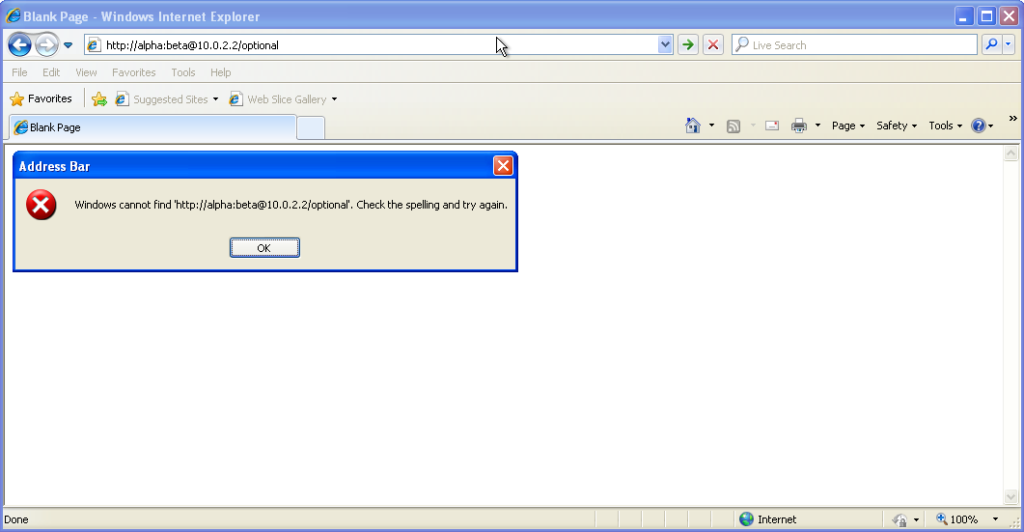
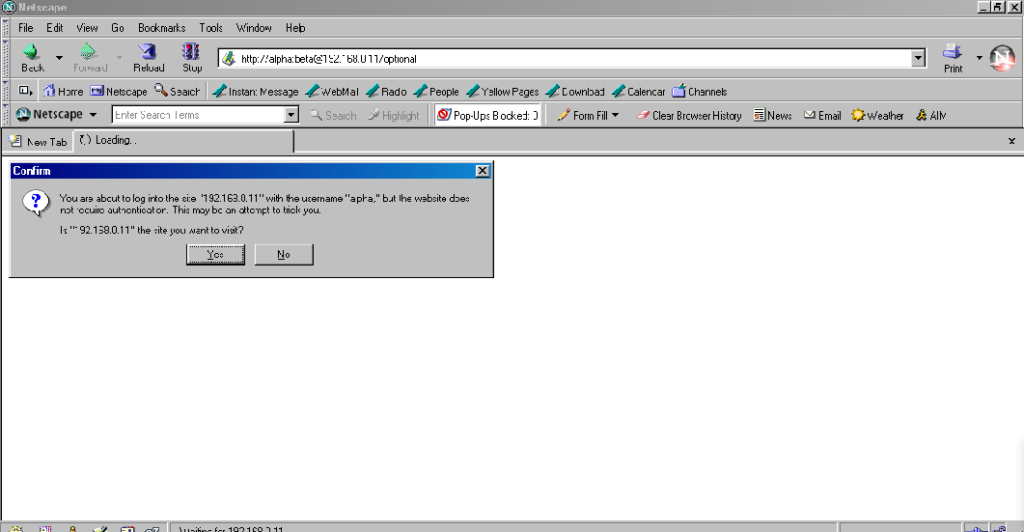
From version 7 onwards – right up to the final version 11 – Internet Explorer fails to even recognise
addresses with authentication credentials in as legitimate web addresses, regardless of whether or not authentication is requested by the server. It’s easy to assume that this is yet
another missing feature in the browser we all love to hate, but it’s interesting to note that credentials-in-addresses is permitted for ftp:// URLs…
…and if you go back a little way, Internet Explorer 6 and below supported credentials in the address bar pretty
much as you’d expect based on the standard. The error message seen in IE7 and above is a deliberate design
decision, albeit a somewhat knee-jerk reaction to the security issues posed by the feature (compare to the more-careful approach of other browsers).
These older versions of IE even (correctly) retain the credentials through relative hyperlinks, allowing them to be passed when
they become mandatory. They’re not passed on optional pages unless a mandatory page within the same realm has already been encountered.
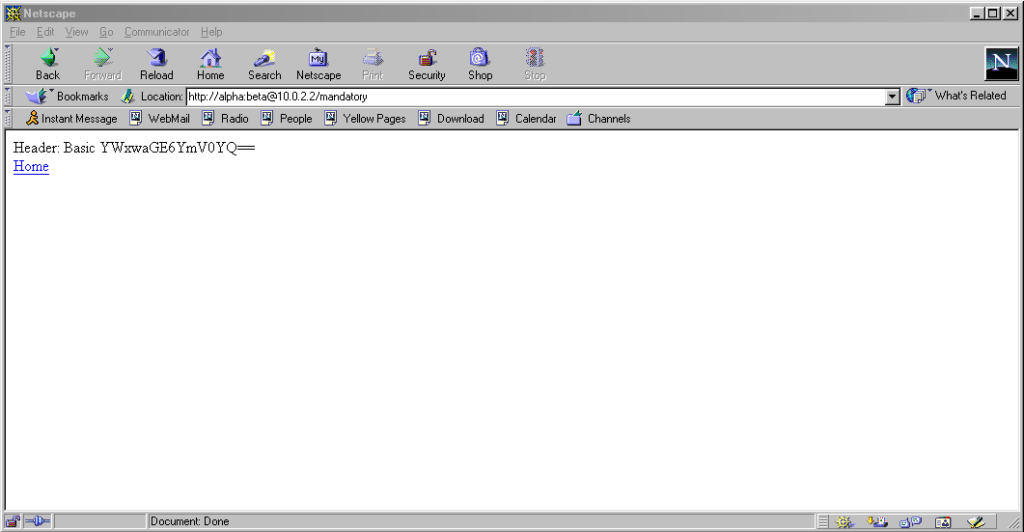
Pre-Mozilla Netscape behaved the same way. Truly this was the de facto standard for a long period on the Web, and the varied approaches we see today are the
anomaly. That’s a strange observation to make, considering how much the Web of the 1990s was dominated by incompatible implementations of different Web features (I’ve written about the <blink> and <marquee> tags before, which was perhaps the most-visible division between
the Microsoft and Netscape camps, but there were many, many more).
Interestingly: by Netscape 7.2 the browser’s behaviour had evolved
to be the same as modern Firefox’s, except that it still displayed the credentials in the address bar for all to see.
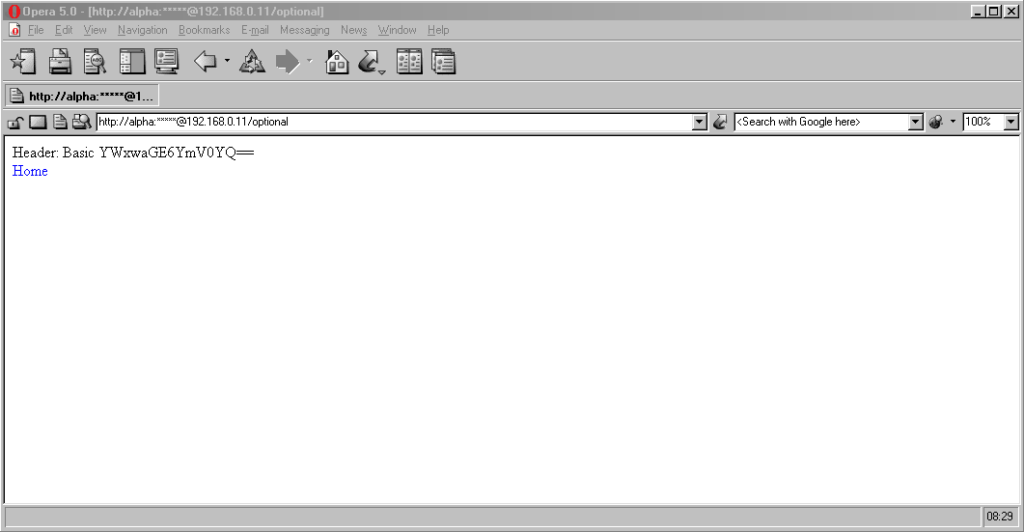
Now here’s a real gem: pre-Chromium Opera. It would send credentials to “mandatory” pages and remember them for the
duration of the browsing session, which is great. But it would also send credentials when passed in a web address to “optional” pages. However, it wouldn’t remember
them on optional pages unless they remained in the address bar: this feels to me like an optimum balance of features for power users. Plus, it’s one of very few browsers that
permitted you to change credentials mid-session: just by changing them in the address bar! Most other browsers, even to this day, ignore changes to HTTP Authentication credentials, which was sometimes be a source of frustration back in the day.
Finally, classic Opera was the only browser I’ve seen to mask the password in the address bar, turning it into a series of asterisks. This ensures the user knows that a
password was used, but does not leak any sensitive information to shoulder-surfers (the length of the “masked” password was always the same length, too, so it didn’t even leak the
length of the password). Altogether a spectacular design and a great example of why classic Opera was way ahead of its time.
The Command-Line
Most people using web addresses with credentials embedded within them nowadays are probably working with code, APIs,
or the command line, so it’s unsurprising to see that this is where the most “traditional” standards-compliance is found.
I was unsurprised to discover that giving curl a username and password in the URL meant that
username and password was sent to the server (using Basic authentication, of course, if no authentication was requested):
However, wgetdid catch me out. Hitting the same addresses with wget didn’t result in the credentials being sent
except where it was mandatory (i.e. where a HTTP 401 response and a WWW-Authenticate: header was received on the initial attempt). To force wget to
send credentials when they haven’t been asked-for requires the use of the --http-user and --http-password switches:
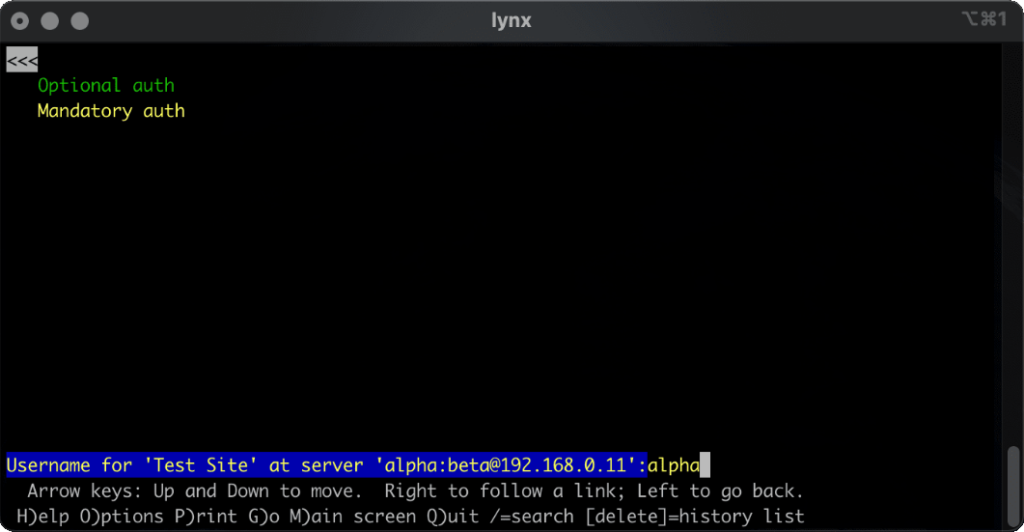
lynx does a cute and clever thing. Like most modern browsers, it does not submit credentials unless specifically requested, but if
they’re in the address bar when they become mandatory (e.g. because of following relative hyperlinks or hyperlinks containing credentials) it prompts for the username and password,
but pre-fills the form with the details from the URL. Nice.
What’s the status of HTTP (Basic) Authentication?
HTTP Basic Authentication and its close cousin Digest Authentication (which overcomes some of the security limitations of running Basic Authentication over an
unencrypted connection) is very much alive, but its use in hyperlinks can’t be relied upon: some browsers (e.g. IE, Safari)
completely munge such links while others don’t behave as you might expect. Other mechanisms like Bearer see widespread use in APIs, but nowhere else.
The WWW-Authenticate: and Authorization: headers are, in some ways, an example of the best possible way to implement authentication on the Web: as an
underlying standard independent of support for forms (and, increasingly, Javascript), cookies, and complex multi-part conversations. It’s easy to imagine an alternative
timeline where these standards continued to be collaboratively developed and maintained and their shortfalls – e.g. not being able to easily log out when using most graphical browsers!
– were overcome. A timeline in which one might write a login form like this, knowing that your e.g. “authenticate” attributes would instruct the browser to send credentials using an
Authorization: header:
In such a world, more-complex authentication strategies (e.g. multi-factor authentication) could involve encoding forms as JSON. And single-sign-on systems would simply involve the browser collecting a token from the authentication provider and passing it on to the
third-party service, directly through browser headers, with no need for backwards-and-forwards redirects with stacks of information in GET parameters as is the case today.
Client-side certificates – long a powerful but neglected authentication mechanism in their own right – could act as first class citizens directly alongside such a system, providing
transparent second-factor authentication wherever it was required. You wouldn’t have to accept a tracking cookie from a site in order to log in (or stay logged in), and if your
browser-integrated password safe supported it you could log on and off from any site simply by toggling that account’s “switch”, without even visiting the site: all you’d be changing is
whether or not your credentials would be sent when the time came.
The Web has long been on a constant push for the next new shiny thing, and that’s sometimes meant that established standards have been neglected prematurely or have failed to evolve for
longer than we’d have liked. Consider how long it took us to get the <video> and <audio> elements because the “new shiny” Flash came to dominate,
how the Web Payments API is only just beginning to mature despite over 25 years of ecommerce on the Web, or how we still can’t
use Link: headers for all the things we can use <link> elements for despite them being semantically-equivalent!
The new model for Web features seems to be that new features first come from a popular JavaScript implementation, and then eventually it evolves into a native browser feature: for
example HTML form validations, which for the longest time could only be done client-side using scripting languages. I’d love
to see somebody re-think HTTP Authentication in this way, but sadly we’ll never get a 100% solution in JavaScript alone: (distributed SSO is almost certainly off the table, for example, owing to cross-domain limitations).
Or maybe it’s just a problem that’s waiting for somebody cleverer than I to come and solve it. Want to give it a go?
There was a discussion this week in the Abnib WhatsApp group about whether a particular illustration of a farm was full of phallic imagery (it was).
This left me wondering if anybody had ever tried to identify the most-priapic buildings in the world. Of course towers often look at least a little bit like their architects
were compensating for something, but some – like the Ypsilanti Water Tower in Michigan pictured above – go further than
others.
Anyway: a shot tower in Bristol – a part of the UK with a long history of leadworking – was among the latecomer entrants to the competition, and seeing this curious building reminded me about something I’d read, once, about the
manufacture of lead shot. The idea (invented in Bristol by a plumber called William Watts) is that you pour molten lead
through a sieve at the top of a tower, let surface tension pull it into spherical drops as it falls, and eventually catch it in a cold water bath to finish solidifying it. I’d seen an
animation of the process, but I’d never seen a video of it, so I went about finding one.
The animation I saw might have been this one, or perhaps one that wasn’t so obviously-made-in-MS-Paint.
British Pathé‘s YouTube Channel provided me with this 1950 film, and if you follow only one hyperlink from this article, let it be this one! It’s a well-shot (pun intended, but there’s
a worse pun in the video!), and while I needed to translate all of the references to “hundredweights” and “Fahrenheit” to measurements that I can actually understand, it’s thoroughly
informative.
But there’s a problem with that video: it’s been badly cut from whatever reel it was originally found on, and from about 1 minute and 38 seconds in it switches to what is clearly a very
different film! A mother is seen shepherding her young daughter off to bed, and a voiceover says:
Bedtime has a habit of coming round regularly every night. But for all good parents responsibility doesn’t end there. It’s just the beginning of an evening vigil, ears attuned to cries
and moans and things that go bump in the night. But there’s no reason why those ears shouldn’t be your neighbours ears, on occasion.
“Off to bed, you little monster. And no watching TikTok when you should be trying to sleep!”
Now my interest’s piqued. What was this short film going to be about, and where could I find it? There’s no obvious link; YouTube doesn’t even make it easy to find the video
uploaded “next” by a given channel. I manipulated some search filters on British Pathé’s site until I eventually hit upon the right combination of magic words and found a clip called
Radio Baby Sitter. It starts off exactly where the misplaced prior clip cut out, and tells the story of “Mr.
and Mrs. David Hurst, Green Lane, Coventry”, who put a microphone by their daughter’s bed and ran a wire through the wall to their neighbours’ radio’s speaker so they can babysit
without coming over for the whole evening.
It’s a baby monitor, although not strictly a radio one as the title implies (it uses a signal wire!), nor is it groundbreakingly innovative: the first baby monitor predates it by over a decade, and it actually did use
radiowaves! Still, it’s a fun watch, complete with its contemporary fashion, technology, and social structures. Here’s the full thing, re-merged for your convenience:
Wait, what was I trying to do when I started, again? What was I even talking about…
It’s harder than it used to be
It used to be easier than this to get lost on the Web, and sometimes I miss that.
Obviously if you go back far enough this is true. Back when search engines were much weaker and Internet content was much less homogeneous and more distributed, we used to engage in
this kind of meandering walk all the time: we called it “surfing” the Web. Second-generation
Web browsers even had names, pretty often, evocative of this kind of experience: Mosaic, WebExplorer, Navigator, Internet Explorer, IBrowse. As people started to engage in the
noble pursuit of creating content for the Web they cross-linked their sources, their friends, their affiliations (remember webrings? here’s a reminder; they’re not quite as dead as you think!), your favourite sites etc. You’d follow links to other pages, then follow their links to others
still, and so on in that fashion. If you went round the circles enough times you’d start seeing all those invariably-blue hyperlinks turn purple and know you’d found your way home.
Some parts of the Web are perhaps best forgotten, though?
But even after that era, as search engines started to become a reliable and powerful way to navigate the wealth of content on the growing Web, links still dominated our exploration.
Following a link from a resource that was linked to by somebody you know carried the weight of a “web of trust”, and you’d quickly come to learn whose links were consistently valuable
and on what subjects. They also provided a sense of community and interconnectivity that paralleled the organic, chaotic networks of acquaintances people form out in the real world.
In recent times, that interpersonal connectivity has, for many, been filled by social networks (let’s ignore their failings in this regard for now). But linking to resources “outside” of the big
social media silos is hard. These advertisement-funded services work hard to discourage or monetise activity
that takes you off their platform, even at the expense of their users. Instagram limits the number of external links by profile; many social networks push
for resharing of summaries of content or embedding content from other sources, discouraging engagement with the wider Web, Facebook and Twitter both run external links
through a linkwrapper (which sometimes breaks); most large social networks make linking to the profiles of other users
of the same social network much easier than to users anywhere else; and so on.
The net result is that Internet users use fewer different websites today than they did 20 years ago,
and spend most of their “Web” time in app versions of
websites (which often provide a better experience only because site owners strategically make it so to increase their lock-in and data harvesting potential). Truly exploring the Web now
requires extra effort, like exercising an underused muscle. And if you begin and end your Web experience on just one to three services,
that just feels kind of… sad, to me. Wasted potential.
I suppose nowadays we don’t get lost as often outside of the Internet, either. Photo by Leah Kelly.
It sounds like I’m being nostalgic for a less-sophisticated time on the Web (that would certainly be in character!). A time before we’d
fully-refined the technology that would come to connect us in an instant to the answers we wanted. But that’s not exactly what I’m pining for. Instead, what I miss is something
we lost along the way, on that journey: a Web that was more fun-and-weird, more interpersonal, more diverse. More Geocities, less Facebook; there’s a surprising thing to find myself saying.
Somewhere along the way, we ended up with the Web we asked for, but it wasn’t the Web we wanted.
tl;dr? Just want instructions on how to solve Jigidi puzzles really fast with the help of your browser’s dev tools? Skip to that bit.
This approach doesn’t work any more. Want to see one that still does (but isn’t quite so automated)? Here you go!
I don’t enjoy jigsaw puzzles
I enjoy geocaching. I don’t enjoy jigsaw puzzles. So mystery caches that require you to solve an online jigsaw puzzle in order to get the coordinates really
don’t do it for me. When I’m geocaching I want to be outdoors exploring, not sitting at my computer gradually dragging pixels around!
Many of these mystery caches use Jigidi to host these jigsaw puzzles. An earlier version of Jigidi was auto-solvable with a userscript, but the service has continued to be developed and evolve and the current version works quite hard to
make it hard for simple scripts to solve. For example, it uses a WebSocket connection to telegraph back to the server how pieces are moved around and connected to one another and the
server only releases the secret “you’ve solved it” message after it detects that the pieces have been arranged in the appropriate relative configuration.
If there’s one thing I enjoy more than jigsaw puzzles – and as previously established there are about a billion things I enjoy more than jigsaw puzzles – it’s reverse-engineering a
computer system to exploit its weaknesses. So I took a dive into Jigidi’s client-side source code. Here’s what it does:
Get from the server the completed image and the dimensions (number of pieces).
Cut the image up into the appropriate number of pieces.
Shuffle the pieces.
Establish a WebSocket connection to keep the server up-to-date with the relative position of the pieces.
Start the game: the player can drag-and-drop pieces and if two adjacent pieces can be connected they lock together. Both pieces have to be mostly-visible (not buried under other
pieces), presumably to prevent players from just making a stack and then holding a piece against each edge of it to “fish” for its adjacent partners.
I spent some time tracing call stacks to find this line… only to discover that it’s one of only four lines to actually contain the word “shuffle” and I could have just searched for
it…
Looking at that process, there’s an obvious weak point – the shuffling (point 3) happens client-side, and before the WebSocket sync begins. We could override the
shuffling function to lay the pieces out in a grid, but we’d still have to click each of them in turn to trigger the connection. Or we could skip the shuffling entirely and just leave
the pieces in their default positions.
An unshuffled jigsaw appears as a stack, as if each piece from left to right and then top to bottom were placed one at a time into a pile.
And what are the default positions? It’s a stack with the bottom-right jigsaw piece on the top, the piece to the left of it below it, then the piece to the left of that and son on
through the first row… then the rightmost piece from the second-to-bottom row, then the piece to the left of that, and so on.
That’s… a pretty convenient order if you want to solve a jigsaw. All you have to do is drag the top piece to the right to join it to the piece below that. Then move those two to the
right to join to the piece below them. And so on through the bottom row before moving back – like a typewriter’s carriage return – to collect the second-to-bottom row and so on.
How can I do this?
If you’d like to cheat at Jigidi jigsaws, this approach works as of the time of writing. I used Firefox, but the same basic approach should work with virtually any modern desktop web
browser.
Go to a Jigidi jigsaw in your web browser.
Pop up your browser’s developer tools (F12, usually) and switch to the Debugger tab. Open the file game/js/release.js and uncompress it by pressing the
{} button, if necessary.
Find the line where the code considers shuffling; right now for me it’s like 3671 and looks like this:
return this.j ? (V.info('board-data-bytes already exists, no need to send SHUFFLE'), Promise.resolve(this.j)) : new Promise(function (d, e) {
I spent some time tracing call stacks to find this line… only to discover that it’s one of only four lines to actually contain the word “shuffle” and I could have just searched
for it…
Set a breakpoint on that line by clicking its line number.
Restart the puzzle by clicking the restart button to the right of the timer. The puzzle will reload but then stop with a “Paused on breakpoint” message. At this point the
application is considering whether or not to shuffle the pieces, which normally depends on whether you’ve started the puzzle for the first time or you’re continuing a saved puzzle from
where you left off.
In the developer tools, switch to the Console tab.
Type: this.j = true (this ensures that the ternary operation we set the breakpoint on will resolve to the true condition, i.e. not shuffle the pieces).
Press the play button to continue running the code from the breakpoint. You can now close the developer tools if you like.
Solve the puzzle as described/shown above, by moving the top piece on the stack slightly to the right, repeatedly, and then down and left at the end of each full row.
Update 2021-09-22:Abraxas observes that Jigidi have changed
their code, possibly in response to this shortcut. Unfortunately for them, while they continue to perform shuffling on the client-side they’ll always be vulnerable to this kind of
simple exploit. Their new code seems to be named not release.js but given a version number; right now it’s 14.3.1977. You can still expand it in the same way,
and find the shuffling code: right now for me this starts on line 1129:
Put a breakpoint on line 1129. This code gets called twice, so the first time the breakpoint gets hit just hit continue and play on until the second time. The second time it gets hit,
move the breakpoint to line 1130 and press continue. Then use the console to enter the code d = a.G and continue. Only one piece of jigsaw will be shuffled; the rest will
be arranged in a neat stack like before (I’m sure you can work out where the one piece goes when you get to it).
Update 2023-03-09: I’ve not had time nor inclination to re-“break” Jigidi’s shuffler, but on the rare ocassions I’ve
needed to solve a Jigidi, I’ve come up with a technique that replaces a jigsaw’s pieces with ones that each
show the row and column number they belong to, as well as colour-coding the rows and columns and drawing horizontal and vertical bars to help visual alignment. It makes the process
significantly less-painful. It’s still pretty buggy code though and I end up tweaking it each and every time I use it, but it certainly works and makes jigsaws that lack clear visual
markers (e.g. large areas the same colour) a lot easier.
As I mentioned last year, for several years I’ve collected pretty complete historic location data from GPSr devices I carry with me everywhere, which I collate in a personal μlogger server.
Going back further, I’ve got somewhat-spotty data going back a decade, thanks mostly to the fact that I didn’t get around to opting-out of Google’s location tracking until only a few years ago (this data is now
also housed in μlogger). More-recently, I now also get tracklogs from my smartwatch, so I’m managing to collate more personal
location data than ever before.
The blob around my house, plus some of the most common routes I take to e.g. walk or cycle the children to school.
A handful of my favourite local walking and cycling routes, some of which stand out very well: e.g. the “loop” just below the big blob represents a walk around the lake at Dix Pit;
the blob on its right is the Devils Quoits, a stone circle and henge that I thought were sufficiently interesting that
I made a virtual geocache out of them.
The most common highways I spend time on: two roads into Witney, the road into and around Eynsham, and routes to places in Woodstock and North Oxford where the kids have often had
classes/activities.
I’ve unsurprisingly spent very little time in Oxford City Centre, but when I have it’s most often been at the Westgate Shopping Centre,
on the roof of which is one of the kids’ favourite restaurants (and which we’ve been able to go to again as Covid restrictions have lifted, not least thanks to their outdoor seating!).
One to eight years ago
Let’s go back to the 7 years prior, when I lived in Kidlington. This paints a different picture:
For the seven years I lived in Kidlington I moved around a lot more than I have since: each hotspot tells a story, and some tell a few.
This heatmap highlights some of the ways in which my life was quite different. For example:
Most of my time was spent in my village, but it was a lot larger than the hamlet I live in now and this shows in the size of my local “blob”. It’s also possible to pick out common
destinations like the kids’ nursery and (later) school, the parks, and the routes to e.g. ballet classes, music classes, and other kid-focussed hotspots.
I worked at the Bodleian from early 2011 until late in 2019, and so I spent a lot of time in
Oxford City Centre and cycling up and down the roads connecting my home to my workplace: Banbury Road glows the brightest, but I spent some time on Woodstock Road too.
For some of this period I still volunteered with Samaritans in Oxford, and their branch – among other volunteering hotspots
– show up among my movements. Even without zooming in it’s also possible to make out individual venues I visited: pubs, a cinema, woodland and riverside walks, swimming pools etc.
Less-happily, it’s also obvious from the map that I spent a significant amount of time at the John Radcliffe Hospital, an unpleasant reminder of some challenging times from that
chapter of our lives.
The data’s visibly “spottier” here, mostly because I built the heatmap only out of the spatial data over the time period, and not over the full tracklogs (i.e. the map it doesn’t
concern itself with the movement between two sampled points, even where that movement is very-guessable), and some of the data comes from less-frequently-sampled sources like Google.
Eight to ten years ago
Let’s go back further:
Back when I lived in Kennington I moved around a lot less than I would come to later on (although again, the spottiness of the data makes that look more-significant than it is).
Before 2011, and before we bought our first house, I spent a couple of years living in Kennington, to the South of Oxford. Looking at
this heatmap, you’ll see:
I travelled a lot less. At the time, I didn’t have easy access to a car and – not having started my counselling qualification yet – I
didn’t even rent one to drive around very often. You can see my commute up the cyclepath through Hinksey into the City Centre, and you can even make out the outline of Oxford’s Covered
Market (where I’d often take my lunch) and a building in Osney Mead where I’d often deliver training courses.
Sometimes I’d commute along Abingdon Road, for a change; it’s a thinner line.
My volunteering at Samaritans stands out more-clearly, as do specific venues inside Oxford: bars, theatres, and cinemas – it’s the kind of heatmap that screams “this person doesn’t
have kids; they can do whatever they like!”
Every map tells a story
I really love maps, and I love the fact that these heatmaps are capable of painting a picture of me and what my life was like in each of these three distinct chapters of my life over
the last decade. I also really love that I’m able to collect and use all of the personal data that makes this possible, because it’s also proven useful in answering questions like “How
many times did I visit Preston in 2012?”, “Where was this photo taken?”, or “What was the name of that place we had lunch when we got lost during our holiday in Devon?”.
There’s so much value in personal geodata (that’s why unscrupulous companies will try so hard to steal it from you!), but sometimes all you want to do is use it to draw pretty heatmaps.
And that’s cool, too.
How these maps were generated
I have a μlogger instance with the relevant positional data in. I’ve automated my process, but the essence of it if you’d like to try it yourself is as follows:
First, write some SQL to extract all of the position data you need. I round off the latitude and longitude to 5 decimal places to help “cluster” dots for frequency-summing, and I raise
the frequency to the power of 3 to help make a clear gradient in my heatmap by making hotspots exponentially-brighter the more popular they are:
This data needs converting to JSON. I was using Ruby’s mysql2 gem to
fetch the data, so I only needed a .to_json call to do the conversion – like this:
db =Mysql2::Client.new(host: ENV['DB_HOST'], username: ENV['DB_USERNAME'], password: ENV['DB_PASSWORD'], database: ENV['DB_DATABASE'])
db.query(sql).to_a.to_json
Approximately following this guide and leveraging my Mapbox
subscription for the base map, I then just needed to include leaflet.js, heatmap.js, and leaflet-heatmap.js before writing some JavaScript code
like this:
body.innerHTML ='<div id="map"></div>';
let map = L.map('map').setView([51.76, -1.40], 10);
// add the base layer to the map
L.tileLayer('https://api.mapbox.com/styles/v1/{id}/tiles/{z}/{x}/{y}?access_token={accessToken}', {
maxZoom:18,
id:'itsdanq/ckslkmiid8q7j17ocziio7t46', // this is the style I defined for my map, using Mapbox
tileSize:512,
zoomOffset:-1,
accessToken:'...'// put your access token here if you need one!
}).addTo(map);
// fetch the heatmap JSON and render the heatmap
fetch('heat.json').then(r=>r.json()).then(json=>{
let heatmapLayer =new HeatmapOverlay({
"radius":parseFloat(document.querySelector('#radius').value),
"scaleRadius":true,
"useLocalExtrema":true,
});
heatmapLayer.setData({ data: json });
heatmapLayer.addTo(map);
});