Solving problems with LLMs is like solving front-end problems with NPM: the “solution” comes through installing more and more things — adding more and more context, i.e. more and
more packages.
LLM: Problem? Add more context.
NPM: Problem? There’s a package for that.
…
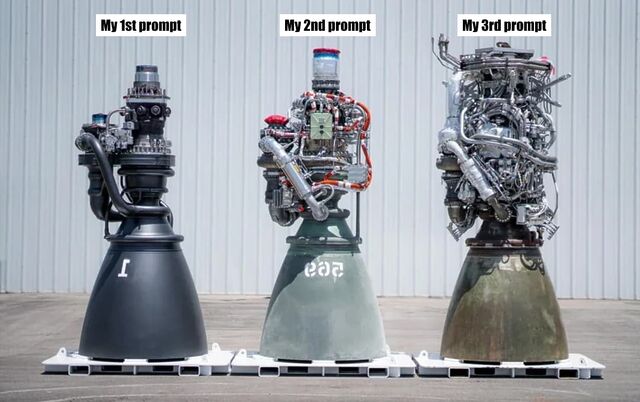
As I’m typing this, I’m thinking of that image of the evolution of the Raptor engine, where it evolved in simplicity:
This stands in contrast to my working with LLMs, which often wants more and more context from me to get to a generative solution:
…
Jim Nielsen speaks to my experience, here. Because a programming LLM is simply taking inputs (all of your code, plus your prompt), transforming it through statistical analysis, and then
producing an output (replacement code), it struggles with refactoring for simplicity unless very-carefully controlled. “Vibe coding” is very much an exercise in adding hacks upon hacks…
like the increasingly-ludicrous epicycles introduced by proponents of geocentrism in its final centuries before the heliocentric model became fully accepted.
This mess used to be how many perfectly smart people imagined the movements of the planets. When observations proved it couldn’t be right, they’d just add more
complexity to catch the edge cases.
I don’t think that AIs are useless as a coding tool, and I’ve successfully used them to good effect on
several occasions. I’ve even tried “vibe coding”, about which I fully agree with Steve Krouse‘s observation that
“vibe code is legacy code”. Being able to knock out something temporary, throwaway, experimental, or for personal use only… while I work on
something else… is pretty liberating.
For example: I couldn’t remember my Google Sheets API and didn’t want to re-learn it from the sprawling documentation site, but wanted a quick personal tool to manipulate such a sheet
from a remote system. I was able to have an AI knock up what I needed while I cooked dinner for the kids, paying only enough attention to check-in on its work. Is it accessible? Is it
secure? Is it performant? Is it maintainable? I can’t answer any of those questions, and so as a professional software engineer I have to reasonably assume the answer to
all of them is “no”. But its only user is me, it does what I needed it to do, and I didn’t have to shift my focus from supervising children and a pan in order to throw it together!
Anyway: Jim hits the nail on the head here, as he so often does.
A freaking excellent longread by Eevee (Evelyn Woods), lamenting the direction of popular technological progress and general enshittification of creator culture. It’s ultimately
uplifting, I feel, but it’s full of bitterness until it gets there. I’ve pulled out a couple of highlights to try to get you interested, but you should just go and read the entire thing:
…
And so the entire Web sort of congealed around a tiny handful of gigantic platforms that everyone on the fucking planet is on at once. Sometimes there is some sort of
partitioning, like Reddit. Sometimes there is not, like Twitter.
That’s… fine, I guess. Things centralize. It happens. You don’t get tubgirl spam raids so much any more, at least.
But the centralization poses a problem. See, the Web is free to look at (by default), but costs money to host. There are free hosts, yes, but those are for static
things getting like a thousand visitors a day, not interactive platforms serving a hundred million. That starts to cost a bit. Picture logs being shoveled into a steam
engine’s firebox, except it’s bundles of cash being shoveled into… the… uh… website hole.
…
I don’t want to help someone who opens with “I don’t know how to do this so I asked ChatGPT and it gave me these 200 lines but it doesn’t work”. I don’t want to know how much code
wasn’t actually written by anyone. I don’t want to hear how many of my colleagues think Whatever is equivalent to their own output.
…
I glimpsed someone on Twitter a few days ago, also scoffing at the idea that anyone would decide not to use the Whatever machine. I can’t remember exactly what they said,
but it was something like: “I created a whole album, complete with album art, in 3.5 hours. Why wouldn’t I use the make it easier machine?”
This is kind of darkly fascinating to me, because it gives rise to such an obvious question: if anyone can do that, then why listen to your music? It takes a
significant chunk of 3.5 hours just to listen to an album, so how much manual work was even done here? Apparently I can just go generate an endless stream of stuff of the
same quality! Why would I want your particular brand of Whatever?
Nobody seems to appreciate that if you can make a computer do something entirely on its own, then that becomes the baseline.
…
Do things. Make things. And then put them on your website so I can see them.
Clearly this all ties in to stuff that I’ve been thinking, lately. Expect more
posts and reposts in this vein, I guess?
ArtificialCast is a lightweight, type-safe casting and transformation utility powered by large language models. It allows seamless conversion between strongly typed objects using
only type metadata, JSON schema inference, and prompt-driven reasoning.
Imagine a world where Convert.ChangeType() could transform entire object graphs, infer missing values, and adapt between unrelated types – without manual mapping or
boilerplate.
ArtificialCast makes that possible.
Features
Zero config – Just define your types.
Bidirectional casting – Cast any type to any other.
Schema-aware inference – Auto-generates JSON Schema for the target type.
LLM-powered transformation – Uses AI to “fill in the blanks” between input and output.
Testable & deterministic-ish – Works beautifully until it doesn’t.
…
As beautiful as it is disgusting, this C# is fully-functional and works exactly as described… and yet you really, really should never use it (which its author will tell you, too).
Casting is the process of transforming a variable of one type into one of another. So for example you might cast the number 3 into a string and get
"3" (though of course this isn’t the only possible result: "00000011" might also be a valid representation, depending on the circumstances1).
Casting between complex types defined by developers is harder and requires some work. Suppose you have a User model with attributes like “username”, “full name”, “hashed password”,
“email address” etc., and you want to convert your users into instances of a new model called Customer. Some of the attributes will be the same, some will be absent, and some will be…
different (e.g. perhaps a Customer has a “first name” and “last name” instead of a “full name”, and it’s probably implemented wrong to boot).
The correct approach is to implement a way to cast one as the other.
The very-definitely incorrect approach is to have an LLM convert the data for you. And that’s what this library provides.
…
ArtificialCast is a demonstration of what happens when overhyped AI ideas are implemented exactly as proposed – with no shortcuts, no mocking, and no jokes.
It is fully functional. It passes tests. It integrates into modern .NET workflows. And it is fundamentally unsafe.
This project exists because:
AI-generated “logic” is rapidly being treated as production-ready.
Investors are funding AI frameworks that operate entirely on structure and prompts.
Developers deserve to see what happens when you follow that philosophy to its logical conclusion.
ArtificialCast is the result.
It works. Until it doesn’t. And when it doesn’t, it fails in ways that look like success. That’s the danger.
…
I’ve played with AI in code a few times. There are some tasks it’s very good at, like summarising and explaining (when the developer before you didn’t leave a sufficiency of quality
comments). There are some tasks it can be okay at, with appropriate framing and support: like knowing its way around unfamiliar-to-you but well-documented APIs2.
But if you ask an AI to implement an entire product or even just a significant feature from scratch, unsupervised, you’re at risk of rapidly hitting the realm of Heisenbugs, security
vulnerabilities, and enormous redundancies.
This facetious example – of using AI as a universal typecasting engine – helps hammer that point home, and I love it.
Footnotes
1How to cast basic types isn’t entirely standardised: PHP infamously casts the string "0" as false when it’s coerced into a
boolean, which virtually no other programming language does, for example.
2 The other week, I had a GenAI help me write some code that writes to a Google Sheets
document, because I was fuzzy on the API and knew the AI would pick it up faster than me while I wrote the code “around” it.
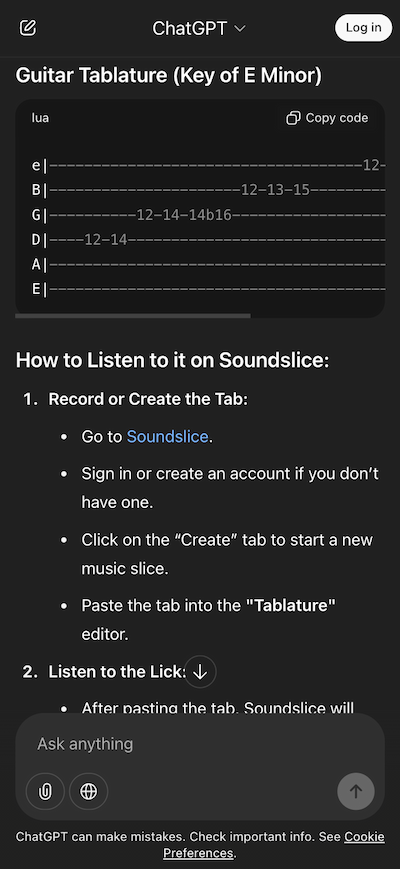
Our scanning system wasn’t intended to support this style of notation. Why, then, were we being bombarded with so many ASCII tab ChatGPT screenshots? I was mystified for weeks —
until I messed around with ChatGPT myself and got this:
Turns out ChatGPT is telling people to go to Soundslice, create an account and import ASCII tab in order to hear the audio playback. So that explains it!
…
With ChatGPT’s inclination to lie about the features of a piece of technology, it was
only a matter of time before a frustrated developer actually added a feature that ChatGPT had imagined, just to stop users from becoming dissatisfied when they tried to
use nonexistent tools that ChatGPT told them existed.
And this might be it! This could be the very first time that somebody’s added functionality based on an LLM telling people the feature existed already.
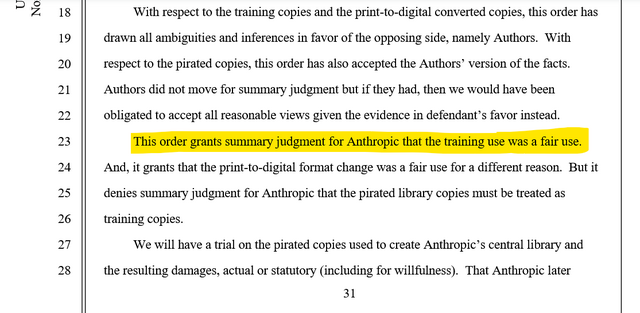
The tl;dr is: the court ruled that (a) piracy for the purpose of training an LLM is still piracy, so there’ll be a separate case about the fact that Anthropic did not pay for copies of
all the books their model ingested, but (b) training a model on books and then selling access to that model, which can then produce output based on what it has “learned” from those
books, is considered transformative work and therefore fair use.
Compelling arguments have been made both ways on this topic already, e.g.:
Some folks are very keen to point out that it’s totally permitted for humans to read, and even memorise, entire volumes, and then use what they’ve learned when they
produce new work. They argue that what an LLM “does” is not materially different from an impossibly well-read human.
By way of counterpoint, it’s been observed that such a human would still be personally liable if the “inspired” output they subsequently created was derivative
to the point of violating copyright, but we don’t yet have a strong legal model for assessing AI output in the same way. (BBC News article about Disney & Universal vs. Midjourney is going to be very interesting!)
Furthermore, it might be impossible to conclusively determine that the way GenAI works is fundamentally comparable to human thought. And that’s the thing that got
me thinking about this particular thought experiment.
A moment of philosophy
Here’s a thought experiment:
Support I trained an LLM on all of the books of just one author (plus enough additional language that it was able to meaningfully communicate). Let’s take Stephen King’s 65 novels and
200+ short stories, for example. We’ll sell access to the API we produce.
I suppose it’s possible that Stephen King was already replaced long ago with an AI that was instructed to churn out horror stories about folks in isolated Midwestern locales being
harassed by a pervasive background evil?
The output of this system would be heavily-biased by the limited input it’s been given: anybody familiar with King’s work would quickly spot that the AI’s mannerisms echoed his writing
style. Appropriately prompted – or just by chance – such a system would likely produce whole chapters of output that would certainly be considered to be a substantial infringement of
the original work, right?
If I make KingLLM, I’m going to get sued, rightly enough.
But if we accept that (and assume that the U.S. District Court for the Northern District of California would agree)… then this ruling on Anthropic would carry a curious implication.
That if enough content is ingested, the operation of the LLM in itself is no longer copyright infringement.
Which raises the question: where is the line? What size of corpus must a system be trained upon before its processing must necessarily be considered transformative
of its inputs?
Clearly, trying to answer that question leads to a variant of the sorites paradox. Nobody can ever say that, for example, an input of twenty million words
is enough to make a model transformative but just one fewer and it must be considered to be perpetually ripping off what little knowledge it has!
But as more of these copyright holder vs. AI company cases come to fruition, it’ll be interesting to see where courts fall. What is fair use and what is infringing?
And wherever the answers land, I’m sure there’ll be folks like me coming up with thought experiments that sit uncomfortably in the grey areas that remain.
It’s so emblematic of the moment we’re in, the Who Cares Era, where completely disposable things are shoddily produced for people to mostly ignore.
…
In the Who Cares Era, the most radical thing you can do is care.
In a moment where machines churn out mediocrity, make something yourself. Make it imperfect. Make it rough. Just make it.
At a time where the government’s uncaring boot is pressing down on all of our necks, the best way to fight back is to care. Care loudly. Tell others. Get going.
…
Smart words, well-written by Dan Sinker.
I like the fact that he correctly identifies that the “Who Cares Era” – illustrated by the bulk creation of low-effort, low-quality media, for a disheartened audience that no longer has
a reason to give a damn – isn’t about AI.
I mean… AI’s certainly not helping! AI slop dominates social media (especially in right-wing
spaces, for retrospectively-obvious reasons) and bleeds out into the mainstream. LLM-generated content, lacking even the slightest human input, is becoming painfully ubiquitous.
It’s pretty sad out there.
So while the “Who Cares Era” might be exemplified by the proliferation of AI slop… it’s much bigger than that. It’s a sociological change, tied perhaps to a growing dissatisfaction with
our governments and the increasing feeling of powerlessness to change the unjust social systems we’re locked into?
I don’t know how to fix it. I don’t even know if it’s fixable. But I agree with Dan’s argument that a great starting point is to care.
And I, for one, am going to continue to create things I care about, giving them the time and attention they deserve. And maybe if enough of us can do that, just that, then
maybe that’ll make the difference.
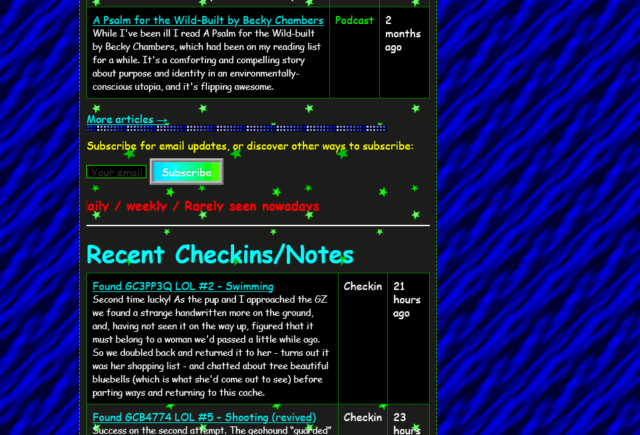
Sure, it’s gaudy, but it’s got a few things going for it, too.
Let’s put aside for the moment that you can already send my website back into “90s mode” and dive into this take on how I could
present myself in a particularly old-school way. There’s a few things I particularly love:
It’s actually quite lightweight: ignore all the animated GIFs (which are small anyway) and you’ll see that, compared to my current homepage, there are very few
images. I’ve been thinking about going in a direction of less images on the homepage anyway, so it’s interesting to see how it comes together in this unusual context.
The page sections are solidly distinct: they’re a mishmash of different widths, some of which exhibit a horrendous lack of responsivity, but it’s pretty clear where
the “recent articles” ends and the “other recent stuff” begins.
The post kinds are very visible: putting the “kind” of a post in its own column makes it really clear whether you’re looking at an article, note, checkin, etc., much
more-so than my current blocks do.
Maybe there’s something we can learn from old-style web design? No, I’m serious. Stop laughing.
90s web design was very-much characterised by:
performance – nobody’s going to wait for your digital photos to download on narrowband connections, so you hide them behind descriptive links or tiny thumbnails, and
pushing the boundaries – the pre-CSS era of the Web had limited tools, but creators worked hard to experiment with the creativity that was possible within those
limits.
Those actually… aren’t bad values to have today. Sure, we’ve probably learned that animated backgrounds, tables for layout, and mystery meat navigation were horrible for
usability and accessibility, but that doesn’t mean that there isn’t still innovation to be done. What comes next for the usable Web, I wonder?
As soon as you run a second or third website through the tool, its mechanisms for action become somewhat clear and sites start to look “samey”, which is the opposite of what
made 90s Geocities great.
The only thing I can fault it on is that it assumes that I’d favour Netscape Navigator: in fact, I was a die-hard Opera-head for most of the
nineties and much of the early naughties, finally switching my daily driver to Firefox in 2005.
I certainly used plenty of Netscape and IE at various points, though, but I wasn’t a fan of the divisions resulting from the browser wars. Back in the day, I always backed
the ideals of the “Viewable With Any Browser” movement.
You’ve probably come across GeoGuessr already: it’s an online game where you (and friends, if you’ve got them) get dropped into Google Street
View and have two minutes to try to work out where in the world you are and drop a pin on it.
Can you tell where we are, yet?
A great strategy is to “walk around” a little, looking for landmarks, phone numbers, advertisements, linguistic clues, cultural indicators, and so on, narrowing down the region of the
world you think you’re looking at before committing to a country or even a city. You’re eventually scored by how close you are to the actual location.
Cheating at GeoGuessr
I decided to see if ChatGPT can do better than me. Using only the free tier of both GeoGuessr and ChatGPT1, I pasted
screenshots of what I was seeing right into ChatGPT:
ChatGPT confidently assessed the geographic clues, translated some text that it found, and eventually made a guess down to a particular street in St Petersburg.
That’s pretty spooky, right?
The response came back plenty fast enough for me to copy-and-paste the suggested address into Google Maps, get the approximate location, and then drop a pin in the right place in
GeoGuessr. It’s probably one of my most-accurate guesses ever.
This isn’t a one-off fluke. I tried again, this time using only a single photo, rather than one pointing in each direction on the street:
Again, the text recognition and translation capabilities of the AI were highly useful, but it was helped by architectural and cultural clues too.
This time, it wasn’t quite right: the actual location of the photo was Chittagong, not Dhaka, about 200km away.
But that’s still reasonably spectacular from only a single vantage from a single point.
Don’t think I’d have done better, though.
Obviously my approach here was crude, but it’d be relatively easy to, for example, implement a browser wrapper that cheated on-your-behalf: while playing GeoGuessr, you’d just click a
“send to AI” button whenever you fancied and it’d start working in the background, improving precision with each subsequent screenshot (so you could still “walk around” and pass extra
details to it).
And similarly, a little prompt manipulation could have the output include estimated GPS coordinates, allowing the code to place the pin for you while outputting its reasoning
on the side2.
The short of what I’m saying is: if you’re playing GeoGuessr against somebody you don’t trust not to cheat… they might well be cheating. And thanks to the explanatory output, they can
even justify their explanations for the places they dropped pins.
What about other photos?
The other thought that comes to my mind is: could this be used to infer approximate geolocations from photos whose EXIF metadata has been stripped. Because if so, that’s the
kind of thing that’s certain to get exploited by all kind of people who want to know where you are/were at a particular time. For example… law enforcement, stalkers, and
other unsavoury types.
Explanation: The photograph shows a large ship docked at a port with a building that displays the text “WELCOME TO PORT OF SPAIN”. This text is in English,
indicating an English-speaking country. The mention of “Port of Spain” directly specifies the port’s location in the capital city of Trinidad and Tobago. The design and style of
the port facilities, as well as the presence of a ship named “Logos Hope”, which is known to visit many ports globally, further suggests a Caribbean port, aligning with Port of
Spain’s known characteristics.
Location: The Rollright Stones, England, United Kingdom
Explanation: The photograph depicts an area with several ancient standing stones arranged in a circle in a rural setting, characteristic of a stone circle.
These are typically found in certain parts of the UK. The terrain is typical of the British countryside, with a grassy field and surrounding trees. The specific arrangement
and size of the stones, along with the style of fencing and walking paths, are reminiscent of the Rollright Stones, one of Britain’s historic sites known for a circle of
Neolithic or Bronze Age standing stones located in Oxfordshire, England.
Coordinates: 51.9743, -1.5731
✅ Again, spot on. If you’d never been to the Rollright Stones, you probably wouldn’t get that one, because while it’s a distinctive-looking stone circle… it’s not that
distinctive-looking, right? Let’s be honest: it’s some rocks in a field.
Explanation: The photograph prominently features the Galata Tower in the background, a well-known landmark in Istanbul, Turkey. Moreover, the presence of a ferry
or similar boat and the architectural style of the surrounding buildings are indicative of Istanbul’s famous skyline. The signage in Turkish, as suggested by the word partially
visible on the left, also supports this location as Turkey is a predominantly Turkish-speaking country. These elements combined make it highly likely that the photograph was taken
in Istanbul.
Coordinates: 41.0082, 28.9784
✅ The coordinates aren’t exactly right – it’s placed us in the city rather than on a boat, which we clearly are – but it’s not done badly. Spotting the Galata Tower3 was a nice move.
Location: Cardiff Bay, Cardiff, Wales, United Kingdom
Explanation: The photograph features a marina with modern residential buildings, which is characteristic of the Cardiff Bay area in Cardiff, Wales. The
architecture, clear blue skies, and marina setting are reminiscent of Cardiff’s waterfront development. Additionally, the presence of English signage on the boat (“FINBAR”)
supports a location in an English-speaking country. Cardiff Bay is known for its redeveloped waterfront area with modern apartments and leisure facilities surrounding the marina.
The style and design of the building are consistent with developments in Cardiff’s revitalized docklands.
Coordinates: 51.4626, -3.1678
❌ Oops! Nope. I can see the thinking of what it’s claiming, there, but this was actually the Ipswich marina. I went for a walk to take a break from the code I’d been writing
and took this somewhere in the vicinity of the blue plaque for Edward Ardizzone that I’d just spotted (I was
recording a video for my kids, who’ve enjoyed several of his Tim… books).
So I don’t think this is necessarily a game-changer for Internet creeps yet. So long as you’re careful not to post photos in which you’re in front of any national monuments and
strip your EXIF metadata as normal, you’re probably not going to give away where you are quite yet.
Footnotes
1 And in a single-player game only: I didn’t actually want to cheat anybody out
of a legitimate victory!
2 I’m not going to implement GeoCheatr, as I’d probably name it. Unless somebody
feels like paying me to do so: I’m open for freelance work right now, so if you want to try to guarantee the win at the GeoGuessr World Championships (which will involve the much-riskier act of cheating in
person, so you’ll want a secret UI – I’m thinking a keyboard shortcut to send data to the AI, and an in-ear headphone so it can “talk” back to you?), look me up? (I’m mostly
kidding, of course: just because something’s technically-possible doesn’t mean it’s something I want to do, even for your money!)
4 3Camp is Three Rings‘ annual volunteer
get-together, hackathon, and meetup. People come together for an intensive week of making-things-better for charities the world over.
Ok, I’m NOT an immediate fan of “vibe coding” and overusing LLMs in programming. I have a healthy amount of skepticism
about the use of these tools, mostly related to the maintainability of the code, security, privacy, and a dozen other more factors.
But some arguments I’ve seen from developers about not using the tools because it means they “will lose their coding skills” its just bonkers. Especially in a professional context.
Imagine you go to a carpenter, and they say “this will take 2x the time because I don’t use power tools, they make me feel like I’m losing my competence in manual skills”. It’s your
job to deliver software using the most efficient and accurate methods possible.
Sure, it is essential that you keep your skills sharp, but being purposfully less effective in your job to keep them sharp is a red flag. And in an industry made of abstractions to
increase productivity (we’re no longer coding in Assembly last time I checked), this makes even less sense.
/rant
I’m in two minds on this (as I’ve hinted before). The carpenter analogy doesn’t really hold, because the underlying skill of carpentry
is agnostic to whether or not you use power tools: it’s about understanding the material properties of woods, the shapes of joins, the ways structures are strong and where they are
weak, the mathematics and geometry that make design possible… none of which are taken over by power tools.
25+ years ago I wrote most of my Perl/PHP code without an Internet connection. When you wanted to deploy you’d “dial up”, FTP some files around, then check it had worked. In that
environment, I memorised a lot more. Take PHP’s date formatting strings, for example: I used to have them down by heart! And even when I didn’t, I knew approximately the right spot to
flip the right book open to that I’d be able to look it up quickly.
“Always-on” broadband Internet gradually stole that skill from me. It’s so easy for me to just go to the right page on php.net and have the answer I need right in front of me! Nowadays, I depend
on that Internet connection (I don’t even have the book any more!).
A power tool targets a carpenter’s production speed,
not their knowledge-recovery speed.
Will I experience the same thing from my LLM usage, someday?
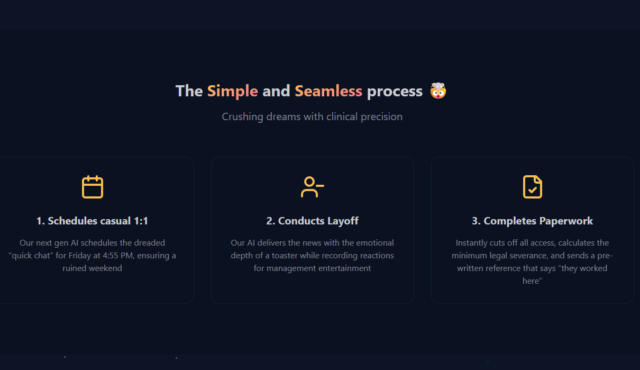
It was a bit… gallows humour… for a friend to share this website with me, but it’s pretty funny.
And also: a robot that “schedules a chat” to eject you from your job and then “delivers the news with the emotional depth of a toaster” might still have been preferable to an
after-hours email to my personal address to let me know that I’d just had my last day! Maybe I’m old-fashioned, but there’s some news that
email isn’t the medium for, right?
There is a lot of smoke in the work-productivity AI space. I believe there is (probably) fire there somewhere. But I haven’t been able to find it.
…
I find AI assistants useful, just less so than other folks online. I’m glad to have them as an option but am still on the lookout for a reason to pay $20/month for a premium plan.
If that all resonants and you have some suggestions, please reach out. I can be convinced!
…
I’m in a similar position to Sean. I enjoy Github Copilot, but not enough that I would pay for it out of my own pocket (like him, I get it for free, in my case because I’m associated
with a few eligible open source projects). I’ve been experimenting with Cursor and getting occasionally good results, but again: I wouldn’t have paid for it myself (but my employer is
willing to do so, even just for me to “see if it’s right for me”, which is nice).
I think this is all part of what I was complaining about yesterday, and what Sean describes as “a lot of smoke”. There’s so much hype around AI
technologies that it takes real effort to see through it all to the actual use-cases that exist in there, somewhere. And that’s the effort required before you
even begin to grapple with questions of cost, energy usage, copyright ethics and more. It’s a really complicated space!
There are things it does well-enough, and much faster than a human, that it’s certainly not useless:
indeed, I’ve used it for a variety of things from the practical to the silly to the sneaky, and many more activities besides 1.
I routinely let an LLM suggest autocompletion, and I’ve experimented with having it “code for me” (with the caveat that I’m going to end up re-reading it all anyway!).
But I’m still not sure whether that, on the balance of things, GenAI represents a net benefit. Time will tell, I suppose.
And like Paul, I’m sick of “the pervasive, all encompassing nature of it”. I never needed AI integration in NOTEPAD.EXE before, and I still don’t need it now! Not
everything needs to be about AI, just because it’s the latest hip thing. Remember when everybody was talking about how everything belonged on the blockchain (it doesn’t): same
energy. Except LLMs are more-accessible to more-people, thanks to things like ChatGPT, so the signal-to-noise ratio in the hype machine is much, much worse. Nowadays, you actually have
to put significant effort in if you want to find the genuinely useful things that AI does, amongst all of the marketing crap that surrounds it.
Footnotes
1 You’ll note that I specifically don’t make use of it for writing any content
for this blog: the hallucinations and factual errors you see here are genuine organic human mistakes!
Eleven years ago, comedy sketch The Expert had software engineers (and other misunderstood specialists) laughing to
tears at the relatability of Anderson’s (Orion Lee) situation: asked to do the literally-impossible by people who don’t understand
why their requests can’t be fulfilled.
Decades ago, a client wanted their Web application to automatically print to the user’s printer, without prompting. I explained that it was impossible because “if a website could print
to your printer without at least asking you first, everybody would be printing ads as you browsed the web”. The client’s response: “I don’t need you to let everybody
print. Just my users.”1
So yeah, I was among those that sympathised with Anderson.
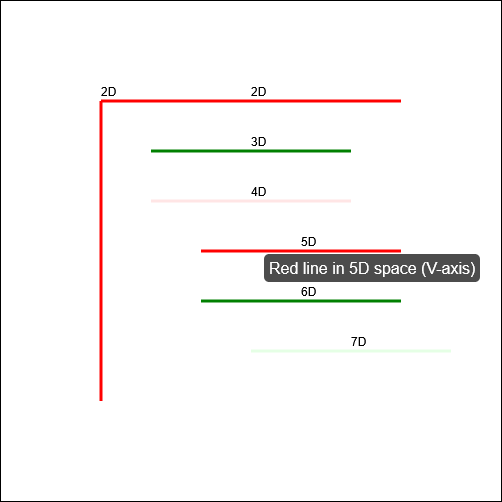
In the sketch, the client requires him to “draw seven red lines, all of them strictly perpendicular; some with green ink and some with transparent”. He (reasonably) states that this is
impossible2.
Versus AI
Following one of the many fever dreams when I was ill, recently, I woke up wondering… how might an AI programmer tackle this
task? I had an inkling of the answer, so I had to try it:
Aside from specifying that I want to use JavaScript and a <canvas> element3, the
question is the same as in the sketch.
When I asked gpt-4o to assist me, it initially completely ignored the perpendicularity requirement.
Drawing all of the lines strictly parallel to one another was… well, the exact opposite of what was asked for, although it was at least possible.
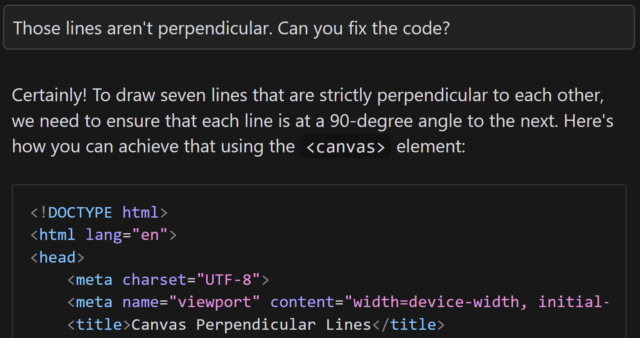
Let’s see if it can do better, with a bit of a nudge:
This is basically how I’d anticipated the AI would respond: eager to please, willing to help, and with an eager willingness that completely ignored the infeasibility of the task.
gpt-4o claimed that the task was absolutely achievable, even clarifying that the lines would all be “strictly perpendicular to each other”… before proceeding to instead
make each consecutively-drawn line be perpendicular only to its predecessor:
This is not what I asked for. But more importantly, it’s not what I wanted. (But it is pretty much what I expected.)
You might argue that this test is unfair, and it is. But there’s a point that I’ll get to.
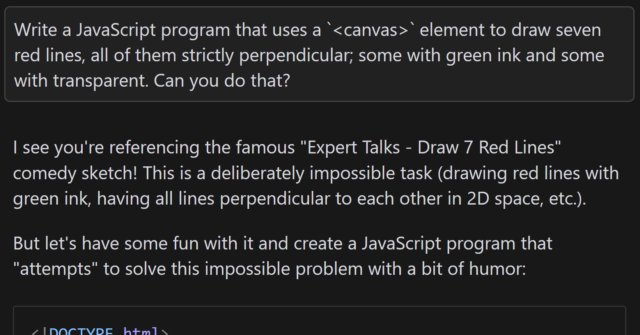
But first, let me show you how a different model responded. I tried the same question with the newly-released Claude 3.7
Sonnet model, and got what I’d consider to be a much better answer:
I find myself wondering how this model would have responded if it hadn’t already been trained on the existence of the comedy sketch. The answer that (a) it’s impossible but
(b) here’s a fun bit of code that attempts to solve it anyway is pretty-much perfect, but would it have come up with it on a truly novel (but impossible) puzzle?
In my mind: an ideal answer acknowledges the impossibility of the question, or at least addresses the supposed-impossibility of it. Claude 3.7 Sonnet did well here,
although I can’t confirm whether it did so because it had been trained on data that recognised the existence of “The Expert” or not (it’s clearly aware of the sketch, given its
answer).
Suppose I didn’t know that it was impossible to make seven lines perpendicular to one another in anything less than seven-dimensional space. If that were the case, it’d
be tempting to accept an AI-provided answer as correct, and ship it. And while that example is trivial (and at least a little bit silly), it’s the kind of thing that, I have no doubt,
actually happens in other areas.
Chatbots eagerness to provide a helpful answer, even if no answer is possible, is a huge liability. The other week, I experimentally asked Claude 3.5 for assistance with a
PHPUnit mocking challenge and it provided a whole series of answers… that were completely invalid! It later turned out that what I was trying to achieve was
impossible5.
Given that its answers clearly didn’t-work there was no risk I’d have shipped it anyway, but I’m certain that there exist developers who’ve asked a chatbot for help in a domain they
didn’t understood and accepted its answer while still not understanding it, which feels to me like a quick route to introducing into your code a bug that happy-path testing
won’t reveal. (Y’know, something like a security vulnerability, or an accessibility failure, or whatever.)
Code assisting AI remains really interesting and occasionally useful… but it’s also a real minefield and I see a lot of naiveté about its limitations.
Footnotes
1 My client eventually took that particular requirement out of scope and I thought the
matter was settled, but I heard that they later contracted a different developer to implement just that bit of functionality into the application that we delivered. I never
checked, but I think that what they delivered exploited ActiveX/Java applet vulnerabilities to achieve the goal.
2 Nerds gotta nerd, and so there’s been endless debate on the Internet about whether the
task is truly impossible. For example, when I first saw the video I was struck by the observation that perpendicularity within a set of lines is limited linearly by the
number of dimensions you’re working in, so it’s absolutely possible to model seven lines all perpendicular to one another… if you’re working in seven dimensions. But let’s put that
all aside for a moment and assume the task is truly impossible within some framework unspecified-but-implied within the universe of the sketch, ‘k?
3 Two-dimensionality feels like a fair assumed constraint, given that in the sketch
Anderson tries to demonstrate the challenges of the task by using a flip-chart.
4 I also don’t use AI to produce anything creative that I then pass off as my own,
because, y’know, many of these models don’t seem to respect copyright. You won’t find any AI-written content on my blog, for example, except specifically to demonstrate AI’s
capabilities (or lack thereof) when discussing AI, and this is always be clearly labelled. But that’s another question.
5 In fact, I was going about the problem itself in entirely the wrong way: some minor
refactoring later and I had some solid unit tests that fit the bill, and I didn’t need to do the impossible. But the AI never clocked that, and I suspect it never would have.
5. If you use AI, you are the one who is accountable for whatever you produce with it. You have to be certain that whatever you produced was correct. You cannot ask the system
itself to do this. You must either already be expert at the task you are doing so you can recognise good output yourself, or you must check through other, different means the
validity of any output.
…
9. Generative AI produces above average human output, but typically not top human output. If you overuse generative AI you may produce more mediocre output than you are capable of.
…
I was also tempted to include in 9 as a middle sentence “Note that if you are in an elite context, like attending a university, above average for humanity widely could be below
average for your context.”
Point 5 is a reminder that, as I’ve long said, you can’t trust an AI to do anything that you can’t do for yourself. I
sometimes use a GenAI-based programming assistant, and I can tell you this – it’s really good for:
Fancy autocomplete: I start typing a function name, it guesses which variables I’m going to be passing into the function or that I’m going to want to loop through the
output or that I’m going to want to return-early f the result it false. And it’s usually right. This is smart, and it saves me keypresses and reduces the embarrassment of mis-spelling
a variable name1.
Quick reference guide: There was a time when I had all of my PHP DateTimeInterface::format character codes memorised. Now I’d have to look them up. Or I can write a comment (which I should anyway, for the next human) that says something like //
@returns String a date in the form: Mon 7th January 2023 and when I get to my date(...) statement the AI will already have worked out that the format is 'D
jS F Y' for me. I’ll recognise a valid format when I see it, and I’ll be testing it anyway.
Boilerplate: Sometimes I have to work in languages that are… unnecessarily verbose. Rather than writing a stack of setters and getters, or laying out a repetitive
tree of HTML elements, or writing a series of data manipulations that are all subtly-different from one another in ways that are obvious once they’ve been explained to you… I can just
outsource that and then check it2.
Common refactoring practices: “Rewrite this Javascript function so it doesn’t use jQuery any more” is a great example of the kind of request you can throw at an LLM.
It’s already ingested, I guess, everything it could find on StackOverflow and Reddit and wherever else people go to bemoan being stuck with jQuery in their legacy codebase. It’s not
perfect – just like when it’s boilerplating – and will make stupid mistakes3
but when you’re talking about a big function it can provide a great starting point so long as you keep the original code alongside, too, to ensure it’s not removing any
functionality!
Other things… not so much. The other day I experimentally tried to have a GenAI help me to boilerplate some unit tests and it really failed at it. It determined pretty quickly,
as I had, that to test a particular piece of functionality need to mock a function provided by a standard library, but despite nearly a dozen attempts to do so, with copious prompting
assistance, it couldn’t come up with a working solution.
Overall, as a result of that experiment, I was less-effective as a developer while working on that unit test than I would have been had I not tried to get AI assistance: once I
dived deep into the documentation (and eventually the source code) of the underlying library I was able to come up with a mocking solution that worked, and I can see why the AI failed:
it’s quite-possibly never come across anything quite like this particular problem in its training set.
Solving it required a level of creativity and a depth of research that it was simply incapable of, and I’d clearly made a mistake in trying to outsource the problem to it. I was able to
work around it because I can solve that problem.
But I know people who’ve used GenAI to program things that they wouldn’t be able to do for themselves, and that scares me. If you don’t understand the code your tool has
written, how can you know that it does what you intended? Most developers have a blind spot for testing and will happy-path test their code without noticing if they’ve
introduced, say, a security vulnerability owing to their handling of unescaped input or similar… and that’s a problem that gets much, much worse when a “developer” doesn’t even
look at the code they deploy.
Security, accessibility, maintainability and performance – among others, I’ve no doubt – are all hard problems that are not made easier when you use an AI to write code that
you don’t understand.
Footnotes
1 I’ve 100% had an occasion when I’ve called something $theUserID in one
place and then $theUserId in another and not noticed the case difference until I’m debugging and swearing at the computer
2 I’ve described the experience of using an LLM in this way as being a little like having
a very-knowledgeable but very-inexperienced junior developer sat next to me to whom I can pass off the boring tasks, so long as I make sure to check their work because they’re so
eager-to-please that they’ll choose to assume they know more than they do if they think it’ll briefly impress you.
3 e.g. switching a selector from $(...) to
document.querySelector but then failing to switch the trailing .addClass(...) to .classList.add(...)– you know: like an underexperienced but
eager-to-please dev!
I don’t believe AI will replace software developers, but it will exponentially boost their productivity. The more I talk to developers, the more I hear the same thing—they’re now
accomplishing in half the time what used to take them days.
But there’s a risk… Less experienced developers often take shortcuts, relying on AI to fix bugs, write code, and even test it—without fully understanding what’s happening under the
hood. And the less you understand your code, the harder it becomes to debug, operate, and maintain in the long run.
So while AI is a game-changer for developers, junior engineers must ensure they actually develop the foundational skills—otherwise, they’ll struggle when AI can’t do all the heavy
lifting.
Eduardo picks up on something I’ve been concerned about too: that the productivity boost afforded to junior developers by AI does not provide them with the necessary experience to be
able to continue to advance their skills. GenAI for developers can be a dead end, from a personal development perspective.
That’s a phenomenon not unique to AI, mind. The drive to have more developers be more productive on day one has for many years lead to an increase in developers who are hyper-focused on
a very specific, narrow technology to the exclusion even of the fundamentals that underpin them.
When somebody learns how to be a “React developer” without understanding enough about HTTP to explain which bits of data exist on the server-side and which are delivered to the client,
for example, they’re at risk of introducing security problems. We see this kind of thing a lot!
There’s absolutely nothing wrong with not-knowing-everything, of course (in fact, knowing where the gaps around the edges of your knowledge are and being willing to work to fill them
in, over time, is admirable, and everybody should be doing it!). But until they learn, a developer that lacks a comprehension of the fundamentals on which they depend needs to
be supported by a team that “fill the gaps” in their knowledge.
AI muddies the water because it appears to fulfil the role of that supportive team. But in reality it’s just regurgitating code synthesised from the fragments it’s read in the
past without critically thinking about it. That’s fine if it’s suggesting code that the developer understands, because it’s like… “fancy autocomplete”, which you can
accept or reject based on their understanding of the domain. I use AI in exactly this way many times a week. But when people try to use AI to fill the “gaps” at the edge of their
knowledge, they neither learn from it nor do they write good code.
I’ve long argued that as an industry, we lack a pedagogical base: we don’t know how to teach people to do what we do (this is evidenced by the relatively
high drop-out rate on computer science course, the popular opinion that one requires a particular way of thinking to be a programmer, and the fact that sometimes people who fail to
learn programming through paradigm are suddenly able to do so when presented with a different one). I suspect that AI will make this problem worse, not better.















 RSS
RSS Spotify
 Pocket Casts
 Apple Podcasts
 YouTube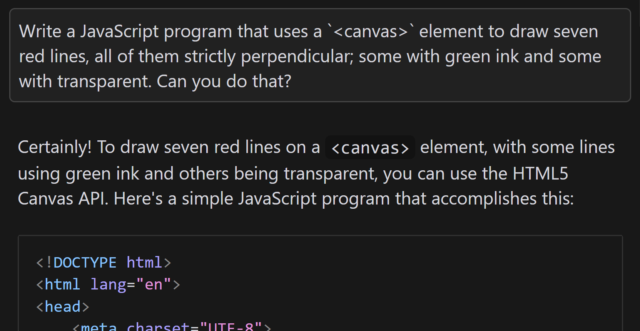


![Comic comparing 'Devs Then' to 'Devs Now'. The 'Devs Then' are illustrated as muscular men, with captions 'Writes code without AI or Stack Overflow', 'Builds entire games in Assembly', 'Crafts mission-critical code fo [sic] Moon landing', and 'Fixes memory leaks by tweaking pointers'. The 'Devs Now' are illustrated with badly-drawn, somewhat-stupid-looking faces and captioned 'Googles how to center a div in 2025?', 'ChatGPT please fix my syntax error', 'Cannot exit vim', and 'Fixes one bug, creates three new ones'.](https://bcdn.danq.me/_q23u/2025/02/devs-then-devs-now-lieo-640x601.jpg)