This weekend, I received my copy of DOCTYPE, and man: it feels like a step back to yesteryear to type in a computer program from a
magazine: I can’t have done that in at least thirty years.
So yeah, DOCTYPE is a dead-tree (only) medium magazine containing the source code to 10 Web pages which, when typed-in to your computer, each provide you with some kind of fun and
interactive plaything. Each of the programs is contributed by a different author, including several I follow and one or two whom I’m corresponded with at some point or another, and each
brings their own personality and imagination to their contribution.
I opted to start with Stuart Langridge‘s The Nine Pyramids, a puzzle game about trying to connect all nodes in a 3×3 grid in a
continuous line bridging adjacent (orthogonal or diagonal) nodes without visiting the same node twice nor moving in the same direction twice in a row (that last provision is described
as “not visiting three in a straight line”, but I think my interpretation would have resulted in simpler code: I might demonstrate this, down the line!).
The puzzle actually made me stop to think about it for a bit, which was unexpected and pleasing!

Per tradition with this kind of programming, I made a couple of typos, the worst of which was missing an entire parameter in a CSS conic-gradient() which resulted in the
majority of the user interface being invisible: whoops! I found myself reminded of typing-in the code for Werewolves and
Wanderer from The Amazing Amstrad Omnibus, whose data section – the part most-liable to be affected by a typographic bug without introducing a syntax error – had
a helpful “checksum” to identify if a problem had occurred, and wishing that such a thing had been possible here!
But thankfully a tiny bit of poking in my browser’s inspector revealed the troublesome CSS and I was able to complete the code, and then the puzzle.
I’ve really been enjoying DOCTYPE, and you can still buy a copy if you’d like one of your own. It manages to simultaneously feel both fresh and nostalgic,
and that’s really cool.
But I’m pretty sure there are some people who’d rather receive updates to my blog via WhatsApp. And
now, they can. Here’s how I set up an RSS-to-WhatsApp gateway, in case you want to run one of your own2.
A Whapi account connected to your WhatsApp account3
– when you set up an account you’ll get a free trial; when it ends you need to find the link to say that you want to carry on with the free tier (or upgrade to the paid tier if you
expect to send more messages than the free tier’s limit)
A WhatsApp channel to which you want to push your RSS feed: I’d recommend that you make a newsletter (from the Updates tab in WhatsApp, press the kekab menu then
Create Channel) rather than a traditional group: groups are designed for multiple people to talk and discuss and everybody can see one another’s identity, but a newsletter
keeps everybody’s identity private and only allows the administrator(s) permission to post updates.
You probably want to use the kind of channel that’s for one-to-many ‘push’ communication, not a discussion group.
In Settings > Secrets and Variables > Actions, add two new Repository Secrets:
WHATSAPP_API_TOKEN: set to the token on your Whapi dashboard
WHATSAPP_CHANNEL: set to your newsletter ID (will look like 123456789012345678@newsletter) or group ID (will look
like 123456789012345678@g.us): you can get this from the Newsletters or Groups section of Whapi by executing a test GET /newsletters or GET /groups request4.
Do a test run: from the Actions tab select the “Process feeds” action and click “Run workflow”. If it finishes successfully (and you get the WhatsApp message), you’re done! If it
fails, click on the failed action and drill-in to the failed task to see the error message and correct accordingly.
By default, the processor will run on-demand and every 30 minutes, but you can modify that in.github/workflows/process-feeds.yml. It’s configured to send the single oldest
un-sent item in any of the RSS feeds it’s subscribed to, on each run (it tracks which ones it’s sent already by their guids, in a "seen": [...] array in
feeds.json): sending a single link per run ensures that WhatsApp’s link previews work as expected. At that rate, you could theoretically run it once every 10 minutes and
never hit the 150-messages-per-day limit of Whapi’s free tier5), but you’ll want to work out your own optimal rate based on the
anticipated update frequency of your feeds and the number of RSS-to-WhatsApp channels you’re running.
You can, of course, run it on your own infrastructure in a similar way. Just check out the repository to your local system with Ruby 3.2+ running, run bundle to install the
dependencies, then set up a cron job or some other automation to run ./process_feeds.rb. Doing this could be used to hook it up to your RSS feed updating pipeline, for
example, to check for new feed items right after a new post is published.
Footnotes
1 Their own incomprehensible, illogical, weird reasons.
2 I hope that the title gives it away, but you can do this completely for free.
So long as you keep your fork of the GitHub repository open-source then you can run GitHub Actions for free, and so long as you’re pushing out no more than 150 updates per day to no
more than 5 different channels in a month then you can do it within Whapi’s free tier: that’s probably fine for a personal blogger, and there’s a reasonable pricing structure (plus
some value-added extras) for companies that want to use this same workflow as part of a grander WhatsApp offering.
3 Setting this up requires giving Whapi access to your WhatsApp account. If you don’t like
the security implications of that, you could get a cheap eSIM, set that up with WhatsApp, and use that account: if you do this, just remember to “warm up” your new WhatsApp
account with some conversations with yourself so it doesn’t look so much like a spammer! Also note that the way Whapi works “uses up” one of the ~4 devices on which you can
simultaneously use WhatsApp Web/WhatsApp Desktop etc.
4 Prefer the command-line? So long as you’ve got curl and jq
then you can get a list of your newsletters (or groups) and their IDs with curl -H 'Authorization: Bearer YOUR_API_TOKEN' -H 'accept: application/json'
https://gate.whapi.cloud/newsletters?count=100 | jq '.newsletters[] | { id: .id, name: .name }' or curl -H 'Authorization: Bearer YOUR_API_TOKEN' -H 'accept:
application/json' https://gate.whapi.cloud/groups?count=100 | jq '.groups[] | { id: .id, name: .name }', respectively.
5 Going beyond the free tier would require sending one message, on average, every 9
minutes and 36 seconds.
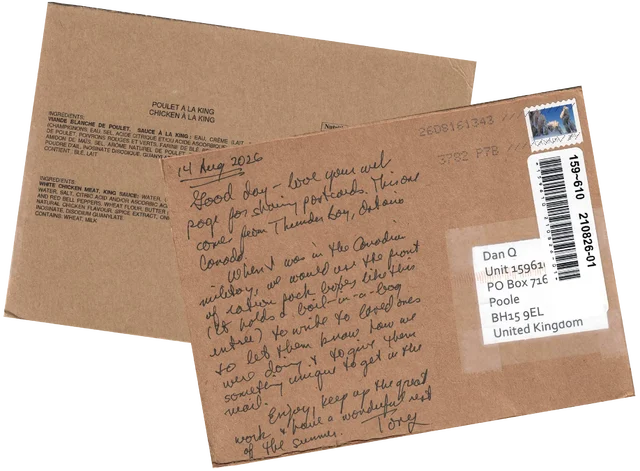
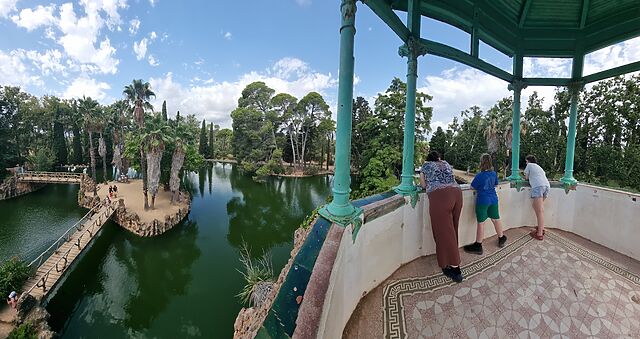
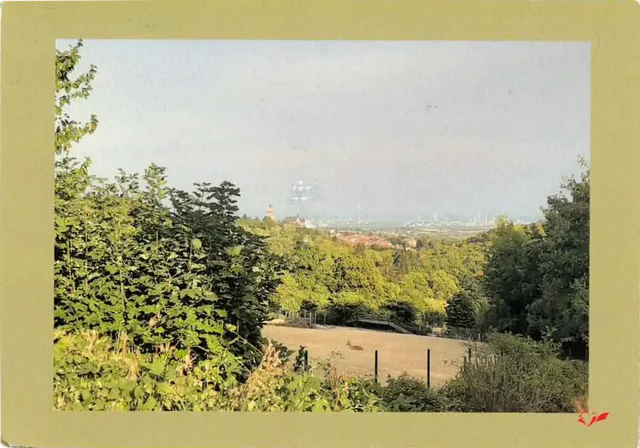
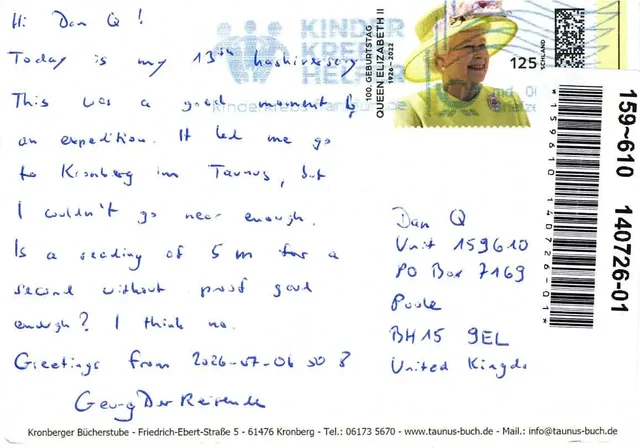
A couple of weeks ago I blogged about setting up a PO Box and adding postal mail to the ways you can
contact me. I went for a “pay as you go” PO Box because I didn’t know if anybody would actually use it, but I’ve already received two delightful postcards and I couldn’t be more
thrilled.
The PO Box worked very well: I’m using UK Postbox principally because of their “pay as you go” rate (with a free tier in case you don’t receive
any mail at all, which I figured was a risk) but I was later pleased to discover they’re a nice company in other ways,
too. They scan the outside/one side of my mail as it arrives and I can optionally pay to scan the whole thing and/or to bundle and forward it on to me3.
I’ve started a new page to collect all the cards, including a (hopefully pretty-accessible) CSS-powered interactive “flipper” so you can turn them over, and
I’m hopeful that I might attract a few more as time goes on. Getting physical mail from “Internet friends” helps make the digital world feel a little bit smaller, and I
love it.
1 Florence’s RSS feed was missing a <![CDATA[ ... ]]> block around some
embedded HTML, which was causing the HTML to be evaluated “as if” it were XML, which – not being XHTML – it failed to do.
2 My suggestion was a variation of Derek Dingle’s Too Many Cards that I’ve been performing all over the place: it’s an immensely satisfying trick to perform, requiring a challenging but achievable set of sleights and
suitable to do without preparation and using a borrowed deck, which is pretty much the gold standard in card magic.
3 I’ve opted to have it forwarded: I’m wondering if I can combine all the postcards I get
into a single poster frame or something: maybe a double-sided one so the whole thing can be flipped to show the text, not just the fronts?
About twenty years ago, after a a tumultuouslife, Big.McLargeHuge – the shared server of several other Abnibbers and I – finally and fatally kicked the bucket. I spun up its replacement, New.McLargeHuge, on hosting company DreamHost, and this blog (and many other sites) moved over to it1.
Wow, I’d forgotten half of these websites existed.
I only stayed with DreamHost for a few years before switching to Bytemark, with whom I was a loyal customer right up until a few years
ago2, but in that time I took advantage of DreamHost’s “Refer & Earn” program, which
allowed me to create referral codes that, if redeemed by others who went on to become paying customers, would siphon off a fraction of the profits as a “kickback” against my server
bills. Neat!3
DreamHost’s referrals had a certain “pyramid scheme” feel in that you could get credit for the people referred by the people you referred.
A year or so after I switched to ByteMark, DreamHost decided I owed them money: probably because of a
“quirk” in their systems. I disagreed with their analysis, so I ignored their request. They “suspended” my account (which I wasn’t using anyway), and that was the end of it.
Right?
But the referral fees continued to trickle in. For the last seventeen years, I’ve received a monthly email advising me that my account had been credited, off the back of a
referral.
I have no explanation as to why the amount of the referral reward fluctuates, but I can only assume that it’s the result of different people on different payment schedules?
About once a year I log in and check the balance. I was quite excited to discover that, at current rates, they’d consider me “paid-up” for my (alleged) debt by around Spring 2026!
I had this whole plan that I’d write a blog post about it when the time came. It could’ve been funny!
But it’s not to be: DreamHost emailed me last night to tell me that they’re killing their “Refer & Earn” program; replacing it with something different-but-incompatible (social media’s
already having a grumble about this, I gather).
So I guess this is the only blog post you’ll get about “that time DreamHost decided I owed them money and I opted to pay them back in my referral fees over the course of eighteen
years”.
No big loss.
Footnotes
1 At about the same time I moved Three
Rings over from its previous host, Easily, to DreamHost too, in order to minimise the number of systems I had to keep an eye on. Oh, how different things are now, when I’ve
got servers and domain registrations and DNS providers all over the damn place!
2 Bytemark have rapidly gone downhill since their acquisition by Iomart a while back, IMHO.
3 Nowadays, this blog (and several of my other projects) is hosted by Linode, whose acquisition by Akamai seems not to have caused any problems with, so that’s fab.
Back before PCs were black, they were beige. And even further back, they’d have not only “Reset” and “Power” buttons, but also a “Turbo” button.
I’m not here to tell you what it did1. No, I’m here to show you how to re-live
those glory days with a Turbo button of your very own, implemented as a reusable Web Component that you can install on your very own website:
Go on, press the Turbo button and see what happens.
(Don’t press the Reset button; other people are using this website!)
If you’d like some beige buttons of your own, you can get them at Beige-Buttons.DanQ.dev. Two lines of code and you can
pop them on any website you like. Also, it’s open-source under the Unlicense so you can take it, break it, or do what you like with it.
I’ve been slumming it in some Web Revivalist circles lately, and it might show. Best Resolution (with all its 88×31s2),
which I launched last month, for example.
You might anticipate seeing more retro fun-and-weird going on here. You might be right.
2 I guess that’s another “if you know, you know”, but at least you’ll get fewer
conflicting answers if you search for an explanation than you will if you try to understand the turbo button.
The younger child and I were talking about maths on the school run this morning, and today’s topic was geometry. I was pleased to discover that he’s already got a reasonable
comprehension of the Pythagorean Theorem1:
I was telling him that I was about his age when I first came across it, but in my case I first had a practical, rather than theoretical, impetus to learn it.
It was the 1980s, and I was teaching myself Dr. Logo, Digital Research‘s implementation of the Logo programming language (possibly from this book). One day, I was writing a program to draw an indoor scene, including a window
through which a mountain would be visible. My aim was to produce something like this:
My window was 300 “steps”2
tall by 200 steps wide and bisected in both directions when I came to make my first attempt at the mountain.
And so, naively, starting from the lower-left, I thought I’d need some code like this:
RIGHT 45
FORWARD 100
RIGHT 90
FORWARD 100
But what I ended up with was this:
Hypotenuse? More like need-another-try-potenuse.
I instantly realised my mistake: of course the sides of the mountain would need to be longer so that the peak would reach the mid-point of the window and the far side
would hit its far corner. But how much longer ought it to be.
I intuited that the number I’d be looking for must be greater than 100 but less than 250: these were, logically, the bounds I was working within. 100 would be correct if my
line were horizontal (a “flat” mountain?), and 250 was long enough to go the “long way” to the centrepoint of the window (100 along, and 150 up). So I took a guess at 150 and… it was
pretty close… but still wrong:
I remember being confused and frustrated that the result was so close but still wrong. The reason, of course, is that the relationship between the lengths of the sides of a triangle
don’t scale in a 1:1 way, but this was the first time I found myself having to think about why.
So I found my mother and asked her what I was doing wrong. I’m sure it must have delighted her to dust-off some rarely-accessed knowledge from her own school years and teach me about
Pythagoras’!
The correct answer, of course, is given by:
I so rarely get to use MathML that I had to look up the syntax.
The answer, therefore, is… 141.421 (to three decimal places). So I rounded to 141 and my diagram worked!3
What made this maths lesson from my mother so memorable was that it fed a tangible goal. I had something I wanted to achieve, and I learned the maths that I
needed to get there. And now it’s impermeably etched onto my brain.
I learned the quadratic equation formula and how to perform algebraic integration by rote, and I guarantee that it’s less well-established in my long-term memory than, say, the sine and
cosine rules or how to solve a simultaneous equation because I’ve more-often needed to do those things outside of the classroom!
So I guess the lesson is that I should be trying to keep an eye out for practical applications of maths that I can share with my kids. Real problems that are interesting to solve, to
help build the memorable grounding that latter supports the more-challenging and intangible abstract maths that they may wish to pursue later.
Both kids are sharp young mathematicians, and the younger one seems especially to enjoy it, so feeding that passion feels well-worthwhile. Perhaps I should show them TRRTL.COM so they can try their hand at Logo!
2 Just one way that Logo is/was a cute programming language was its use of “steps” – as
in, turtle-steps – to measure distances. You might approximate them as pixels, but a “step” has meaning even for lines that don’t map linearly to pixels because they’re at wonky
angles, for example.
3 I’d later become unstuck by rounding, while trying to make a more-complex diagram with a
zig-zag pattern running along a ribbon: a small rounding error became compounded over a long time and lead to me being a couple of pixels off where I intended. But that’s another
story.
I nerdsniped myself today when, during a discussion on the potential location of a taekwondo tournament organised by our local martial arts school, somebody claimed that Scotland would be “nearer”
than Ireland.
I don’t dispute that somebody living near me can get to Scotland faster than Ireland, unless they can drive at motorway speeds across Wales… and the Irish Sea. But the word
they used was nearer, and I can be a pedantic arse.
But the question got me thinking:
Could I plot a line across Great Britain, showing which parts are closer to Scotland and which parts are closer to Ireland?
If the England-facing Irish and Scottish borders were completely straight, one could simply extend the borders until they meet, bisect the angle, and we’d be done.
Of course, the borders aren’t straight. They also don’t look much like this. I should not draw maps.
In reality, the border between England and Scotland is a winding mess, shaped by 700 years of wars and treaties1.
Treating the borders as straight lines is hopelessly naive.
Voronoi diagrams are pretty, and cool, and occasionally even useful! This one expands from points, but there’s no reason you can’t expand from a line (line a border!) instead.
My Python skills are pretty shit, but it’s the best tool for the job for geohacking2. And so, through a
combination of hacking, tweaking, and crying, I was able to throw together a script that produces a wonderful
slightly-wiggly line up the country.
The entire island of Ireland is used here to determine boundaries (you can tell because otherwise parts of County Antrim, in Northern Ireland, would be marked as closer to Scotland
than the Republic of Ireland: which they are, of course, but the question was about England!).
Once you’ve bisected England in this way – into parts that are “closer to Ireland” versus parts that are “closer to Scotland”, you start to spot all kinds of interesting
things3.
Like: did you know that the entire subterranean part of the Channel Tunnel is closer to Scotland than it is to Ireland… except for the ~2km closest to the UK exit.
A little further North: London’s six international airports are split evenly across the line, with Luton, Stansted and Southend closer to Scotland… and City, Heathrow and Gatwick closer
to Ireland.
The line then pretty-much bisects Milton Keynes, leaving half its population closer to Scotland and half closer to Ireland, before doing the same to Daventry, before – near Sutton
Coldfield – it drives right through the middle of the ninth hole of the golf course at the Lea Marston Hotel.
Players tee off closer to Ireland and – unless they really slice it – their ball lands closer to Scotland:
In Cannock, it bisects the cemetery, dividing the graves into those on the Scottish half and those in the Irish half:
The line crosses the Welsh border at the River Dee, East of Wrexham, leaving a narrow sliver of Wales that’s technically closer to Scotland than it is to Ireland, running up the
coastline from Connah’s Quay to Prestatyn and going as far inland as Mold before – as is the case in most of Wales – you’re once again closer to Ireland:
If you live in Flint or Mold, ask your local friends whether they live closer to Ireland or Scotland. The answer’s Scotland, and I’m confident that’ll surprise them.
I’d never have guessed that there were any parts of Wales that were closer to Scotland than they were to Ireland, but the map doesn’t lie4
Anyway: that’s how I got distracted, today. And along the way I learned a lot about geodata encoding, a little about Python, and a couple of surprising things about geography5.
2 Or, at least: it’s the one that’s most-widely used and so I could find lots of helpful
StackOverflow answers when I got stuck!
3 Interesting… if you’re specifically looking for some geographical trivia, that is!
4 Okay, the map lies a little. My program was only simple so it plotted
everything on a flat plane, failing to accommodate for Earth’s curvature. The difference is probably marginal, but if you happen to live on or very close to the red line, you might
need to do your own research!
5 Like: Chester and Rugby are closer to Scotland than they are to Ireland, and Harpenden
and Towcester are closer to Ireland than they are to Scotland! Who knew?
Last month I was on em’s personal site, where I discovered their contact page
lists not only the usual methods (email addresses, socials, contact forms etc.) but also a postal address1: how cool is that‽ I could have written in
their guestbook… but obviously I took the option to send a postcard instead!
Now I’ve set up a PO Box of my own, and I’ve love it if you feel up to saying “hi” via a postcard2.
As a bonus, it’s more-likely to get through than anything that has to face-off against my spam filter!
So, if you want to send me a letter or postcard (no parcels, nothing that needs a signature), my address is:
Dan Q
Unit 159610
PO Box 7169
Poole
BH15 9EL
United Kingdom
I may have raved about other concept albums in the meantime (this one, for example…), but The Signal and the Noise still makes my top 101.
I’ve listened to it twice this week, and I still love it.
But I probably love it differently than I used to.
Spy Numbers / One Time Pad remains my favourite pair of tracks on the album, as it always was: like so much of Andy’s music it tells a story that feels almost
like it belongs to a parallel universe… but that’s still relatable and compelling and delightful. And a fun little bop, too.
But In Potential, which I initially declared “a little weaker than the rest” of the album, has grown on me immensely over the course of the last decade. It presents an
optimistic, humanistic conclusion to the album that I look forward to every time. After John Frum Will Return and Checker Charlie open the album in a way that
warns us, almost prophetically, about the dangers of narrow target-lock thinking and AI dependence2, In Potential provides a beautiful and hopeful introspective
about humanity and encourages an attitude of… just being gentle and forgiving with ourselves, I guess.
So yeah, the whole thing remains fantastic. And better yet: Andy announced about six weeks ago that all of his
music is now available under a free/pay-what-you-like model, so if you missed it the first time around, now’s your opportunity to play catch-up!3
This has been doing the rounds; I last saw it on Kev’s blog. I like that the social blogosphere’s doing this kind
of fun activity again, these days1.
1. Do you floss your teeth?
Umm… sometimes? Not as often as I should. Don’t tell my dentist!
Usually at least once a month, never more than once a week. I really took to heart some advice that if you’re using a fluoridated mouthwash then you shouldn’t do it close to when you
brush your teeth (or you counteract the benefits), so my routine is that… when I remember and can be bothered to floss… I’ll floss and mouthwash, but like in the middle of the day.
And since I moved my bedroom (and bathroom) one floor further up our house, it’s harder to find the motivation to do so! So I’m probably flossing less. The unanticipated knock-on effect
of extending your house!
2. Tea, coffee, or water?
I love a coffee to start a workday, but I have to be careful how much I consume because caffeine hits me pretty hard, even after a concentrated effort over the last 10 years or so to
gradually increase my tolerance. I can manage a couple of mugs in the morning and be fine, now, but three coffees… or any in the mid-afternoon onwards… and I’m at risk of
throwing off my ability to sleep later2.
I wear holes in footwear (and everything else I wear) faster than anybody I know, so nowadays I go for good-value comfort over any other considerations when buying shoes.
One time it was the dog’s fault that my footwear fell apart, but usually they do so by themselves.
4. Favourite dessert?
Varies, but if we’re eating out, I’m probably going to be ordering the most-chocolatey dessert on the menu.
5. The first thing you do when you wake up?
The very first thing I do when I wake up is check how long it is before I need to get up, and make a decision about when I’m going to do so. I almost never need my alarm
to wake me: I routinely wake up half an hour or so before my alarm would go off, most mornings. But exactly how early I wake directly impacts what I do next. If I’m
well-rested and it’s early enough, I’ll plan on getting up and doing something productive: an early start to work, or some voluntary work for Three Rings, or some correspondence. If it’s close to the time I need to get up I’ll more-often just stay in bed and spend longer doing
the actual answer I should give…
…because the “real” answer is probably: pick up my phone, and open up FreshRSS – almost always the
first and last thing I do online in a day! I’ll skim the news and blogosphere and “set aside” for later anything I’d like to re-read or look at later on.
6. Age you’d like to stick at?
Honestly, I’m good where I am, thanks.
Sure, I was fitter and healthier in my 20s, and I had more free time in my early 30s… and there are certainly things I miss and get nostalgic about in any era of my life. But
conversely: it took me a long, long time to “get my shit together” to the level I have now, and I wouldn’t want to have to go through all of the various bits of
self-growth, therapy, etc. all over again!
So… sure, I’d be happy to transplant my intellect into 20-year-old me and take advantage of my higher energy level of the time for an extra decade or so3. But I wouldn’t go back even a
decade if it meant that I had to go relearn and go through everything from that decade another time, no thanks!
7. How many hats do you own?
Four. Ish.
They are:
A bandana. Actually, I own maybe half a dozen bandanas, mostly in Pride rainbow colours. Bandanas are amazingly versatile: they fold small which suits my love of travelling light these last few years, they can function as headgear, dust mask, neckerchief,
flannel, etc.4, and they do a pretty good job of
keeping my head cool and protecting my growing bald spot from the fierce rays of the summer sun.
A “geek” hat. Okay, I’ve actually got three of these, too, in slightly different designs. When they first started appearing at Oxford Geek Nights, I just kept winning them! I’m not a huge fan of caps, so mostly the kids wear them… although
I do put one on when I’m collecting takeaway food so I can get away with just putting e.g. “geek hat” in the “name” field, rather than my name5.
A warm hat that comes out only when the weather is incredibly cold, or when I’m skiing. As I was reminded while skiing on my recent trip to Finland, I should probably switch to wearing a helmet when I ski, but I’ve been skiing for three to four decades without one
and I find the habit hard to break.6
A wooly hat that I was given by a previous employer at a meetup in Mexico last year. I wore it a couple of times last winter
but it’s otherwise not seen much use.
8. Describe the last photo you took?
The last photo I took was of myself wearing a “geek” hat. You’ve seen it, it’s above!
But the one before that was this picture of an extremely large bottle of champagne, with a banana for scale, that was delivered to my house earlier today:
A 6-litre champagne bottle is properly-termed a Methuselah, after Noah’s grandad I guess.
Ruth and JTA celebrate their anniversary every few years with the “next size up” of champagne bottle, and this is the one they’re up to. This
year, merely asking me to help them drink it probably won’t be sufficient (that’d still be two litres each!) so we’re probably going to have to get some friends over.
I took the photo to send to Ruth to reassure her that the bottle had arrived safely, after the previous attempt went… less well. I added the banana “for scale” before sharing the photo with some other friends, too.
The previous delivery… didn’t go so well. 😱
9. Worst TV show?
PAW Patrol. No doubt.
You know all those 1980s kids TV shows that basically existed for no other purpose than as a marketing vehicle for a range of toys? I’m talking He-Man (and
She-Ra), Transformers, G.I. Joe, Care Bears, M.A.S.K., Rainbow Brite, and My Little Pony. Well,
those shows look good compared to PAW Patrol.
Six pups, each endowed with exactly one personality trait7
but a plethora of accessories and vehicles which expands every season so that no matter how many toys you’ve got, y0u’re always behind the curve.
10. As a child, what was your aspiration for adulthood?
This is the single most-boring thing about me, and I’ve doubtless talked about it before. At some point between the age of about six and eight years old, I decided that I
wanted to grow up and become… a computer programmer.
And then I designed the entirety of the rest of my education around that goal. I learned a variety of languages and paradigms under my own steam while setting myself up for a GCSE in
IT, and then A-Levels in Maths and Computing, and then a Degree in Computer Science, and by the time I’d done all of that I was already working in the industry: self-actualised by 21.
Like I said: boring!

Your turn!
You should give this pointless quiz a go too. Ping/Webmention me if you do (or comment below, I suppose); I’d love to read what you write.
Footnotes
1 They’re internet memes, in the traditional sense, but sadly people usually use
“meme” nowadays exclusively to describe image memes, and not other kinds of memetic Internet content. Just another example of our changing
Internet language, which I’ve written about before. Sometimes they were silly quizzes (wanna know what Meat Loaf song I
am?); sometimes they were about you and your friends. But images, they weren’t: that came later.
2 Or else I’ll get a proper jittery heart-flutter going!

3 I wouldn’t necessarily even miss the always-on, in-your-pocket, high-speed Internet of
today: the Internet was pretty great back then, too!

4 Obviously an intergalactic hitch-hiker should include a bandana, perhaps as
well as an equally-versatile towel, in their toolkit.
5 It’s not about privacy, although that’s a fringe benefit I suppose: mostly it’s about
getting my food quicker! If I walk into Dominos wearing a geek hat and they’ve got pizza on the counter with a label on it that says it’s for “geek hat”, they’ll just hand it over, no
questions, and I’m in-and-out in seconds.
6JTA observed that similar excuses
were used by people who resisted the rollout of mandatory seatbelt usage in cars, so possibly I’m the “bad guy” here.
7 From left to right, the single personality traits for each of the pups are (a) doesn’t
like water, (b) is female, (c) likes naps, (d) is allergic to cats, (e) is clumsy, and (f) is completely fucking pointless.
Way back in the day, websites sometimes had banners or buttons (often 88×31 pixels, for complicated historical reasons) to indicate what screen
resolution would be the optimal way to view the site. Just occasionally, you still see these today.
Folks who were ahead of the curve on what we’d now call “responsive design” would sometimes proudly show off that you could use any resolution, in the same way as they’d
proudly state that you could use any browser1!
I saw a “best viewed at any size” 88×31 button recently, and it got me thinking: could we have a dynamic button that always
shows the user’s current resolution as the “best” resolution. So it’s like a “best viewed at any size” button… except even more because it says “whatever
resolution you’re at… that’s perfect; nice one!”
Anyway, I’ve made a website: best-resolution.danq.dev. If you want a “Looks best at [whatever my visitor’s screen
resolution is]” button, you can get one there.
1 I was usually in the camp that felt that you ought to be able to access my site with any
browser, at any resolution and colour depth, and get an acceptable and satisfactory experience. I guess I still am.
2 If you’re reading this via RSS or have JavaScript disabled then you’ll probably see an
“any size” button, but if you view it on the original page with JavaScript enabled then you should see your current browser inner width and height shown on the button.
Hey, let’s set up an account with Hive. After the security scares they faced in the mid-2010s, I’m sure they’ll be competent at
making a password form, right?
Your password must be at least 8 characters; okay.
Just 8 characters would be a little short in this day and age, I reckon, but what do I care: I’m going to make a long and random one with my password safe anyway. Here we go:
I’ve unmasked the password field so I can show you what I tried. Obviously the password I eventually chose is unrelated to any of my screenshots.
Now my password must be at least 12 characters long, not 8 as previously indicated. That’s still not a problem.
Oh, and must contain at least one of four different character classes: uppercase, lowercase, numbers, and special characters. But wait… my proposed password already does
contain all of those things!
Let’s
simplify.
The password 1111AAAAaaaa!!!! is valid… but S1dfCeg7!Ex;C$Ngban9-A is not. I guess my password is too
strong?
Composition rules are bullshit already. I’d already checked to make sure my surname didn’t appear in the password in case that was the problem (on a few occasions services have forbidden me from using the letter “Q” in random passwords
because they think that would make them easier to guess… wot?). So there must be something else amiss. Something that the error message is misleading about…
A normal person might just have used the shit password that Hive accepted, but I decided to dig deeper.
Using the previously-accepted password again but with a semicolon in it… fails. So clearly the problem is that some special characters are forbidden. But we’re
not being told which ones, or that that’s the problem. Which is exceptionally sucky user experience, Hive.
At this point it’s worth stressing that there’s absolutely no valid reason to limit what characters are used in a password. Sometimes well-meaning but ill-informed
developers will ban characters like <, >, ' and " out of a misplaced notion that this is a good way to protect against XSS and
injection attacks (it isn’t; I’ve written about this before…), but banning ; seems especially obtuse (and inadequately explaining that in
an error message is just painfully sloppy). These passwords are going to be hashed anyway (right… right!?) so there’s really no reason to block any character, but anyway…
I wondered what special characters are forbidden, and ran a quick experiment. It turns out… it’s a lot:
Characters Hive forbids use of in passwords include-,.+="£^#'(){}*|<>:` – also space
“Special” characters Hive they allow:!@$%&?
What the fuck, Hive. If you require that users add a “special” character to their password but there are only six special characters you’ll accept (and they don’t even include the most
common punctuation characters), then perhaps you should list them when asking people to choose a password!
Or, better yet, stop enforcing arbitrary and pointless restrictions on passwords. It’s not 1999 any more.
I eventually found a password that would be
accepted. Again, it’s not the one shown above, but it’s more than a little annoying that this approach – taking the diversity of punctuation added by my password safe’s generator and
swapping them all for exclamation marks – would have been enough to get past Hive’s misleading error message.
Having eventually found a password that worked and submitted it…
…it turns out I’d taken too long to do so, so I got treated to a different misleading error message. Clearly the problem was that the CSRF token had expired, but instead they told me
that the activation URL was invalid.
If I, a software engineer with a quarter of a century of experience and who understands what’s going wrong, struggle with setting a password on your site… I can’t begin to image the
kinds of tech support calls that you must be fielding.
It makes me sad to see the gradual disappearance of the contact form from personal websites. They generally feel more convenient than email addresses, although this is
perhaps part of the reason that they come under attack from spammers in the first place! But also, they provide the potential for a new and different medium: the comments
area (and its outdated-but-beautiful cousin the guestbook).
Comments are, of course, an even more-obvious target for spammers because they can result in immediate feedback and additional readers for your message. Plus – if they’re allowed to
contain hyperlinks – a way of leeching some of the reputability off a legitimate site and redirecting it to the spammers’, in the eyes of search engines. Boo!
Well this was painful to write.
But I’ve got to admit: there have been many times that I’ve read an interesting article and not interacted with it simply because the bar to interaction (what… I have
to open my email client!?) was too high. I’d prefer to write a response on my blog and hope that webmention/pingback/trackback do their thing, but will they? I don’t know in
advance, unless the other party says so openly or I take a dive into their source code to check.
Your Experience May Vary
I’ve had both contact/comment forms and exposed email addresses on my website for many years… and I feel like I get aproximately the same amount
of spam on both, after filtering. The vast majority of it gets “caught”. Here’s what works for me:
My contact/comments forms use one of a variety of unobtrustive “honeypot”-style traps. These “reverse CAPTCHAs” attempt to trick bots into interacting with them in some
particular way while not inconveniencing humans.
Antispam Bee provides the first line of defence, but I’ve got a few tweaks of my own to help counteract the efforts of
determined spammers.
Once you’ve fallen into a honeypot it becomes much easier to block subsequent contacts with the same/similar content, address, (short-term) IP, or the poisoned cookie you’re given.
Keyword filtering provides a further line of defence. E.g. for contact forms that post directly back to the Web (i.e. comment forms, and perhaps a future guestbook form), content
with links goes into a moderation queue unless it shares a sender email with a previously-approved sender. For contact forms that result in an email, I’ve just got a few “scorer” rules
relating to geo IP, keywords, number and density of links, etc. that catch the most-insidious of spam to somehow slip through.
I also publish email addresses all over the place, but they’re content-specific. Like Kev, I anticipated spam and so use unique email addresses on
different pieces of content: if you want to reply-by-email to this post, for example, you’re encouraged to use the address
b27404@danq.me. But this approach has actually provided secondary benefits that are more-valuable:
The “scrapers” that spam me by email would routinely send email to multiple different @danq.me addresses at the same time. Humans don’t send the same identical message
to me to different addresses published on my site and from different senders, so my spam filter picks up on this rightaway.
As a fringe benefit, this helps me determine the topic on an email where it’s unclear. E.g. I’ve had humans email me to say “I tried to follow the guide on your page but it didn’t
work for me” and I wouldn’t have had a clue which page had they not reached out via a page-specific email alias.
I enjoy the potential offered by rotating the email address generation mechanism and later treating all previously-exposed addresses as email honeypots.
They’ve all got different “sender” addresses, but that fact that this series of emails were identical except for the different recipient aliases meant that catching them was very easy
for my spam filters.
Works For Me!
This strategy works for me: I get virtually no comment/contact form spam (though I do occasionally get a false positive and a human gets blocked as-if they were a robot), and very
little email spam (after my regular email filters have done their job, although again I sometimes get false positives, often where humans choose their subject lines poorly).
It might sound like my approach is complicated, but it’s really not. Adding a contact form honeypot is not significantly more-difficult than exposing automatically-rotating email
aliases, and for me it’s worth it: I love the convenience and ease-of-use of a good contact/comments form, and want to make that available to my visitors too!
(I also allow one-click reactions with emoji: did you see? Scroll down and send me a bumblebee! Nobody seems to have found a way to spam me with these, yet: it’s not a very expressive
medium, I guess!)
Or: Sometimes You Don’t Need a Computer, Just a Brain
I was watching an episode of 8 Out Of 10 Cats Does Countdown the other night1
and I was wondering: what’s the hardest hand you can be dealt in a Countdown letters game?
Or maybe I was just looking for an excuse to open an image editor, I don’t know.
Sometimes it’s possible to get fixated on a particular way of solving a problem, without having yet fully thought-through it. That’s what happened to me, because the first thing I did
was start to write a computer program to solve this question. The program, I figured, would permute through all of the legitimate permutations of letters that could be drawn in a game
of Countdown, and determine how many words and of what length could be derived from them2.
It’d repeat in this fashion, at any given point retaining the worst possible hands (both in terms of number of words and best possible score).
When the program completed (or, if I got bored of waiting, when I stopped it) it’d be showing the worst-found deals both in terms of lowest-scoring-best-word and fewest-possible-words.
Easy.
Here’s how far I got with that program before I changed techniques. Maybe you’ll see why:
At this point in writing out some constants I’d need to define the rules, my brain was already racing ahead to find optimisations.
For example: given that you must choose at least four cards from the consonants deck, you’re allowed no more than five vowels… but no individual vowel appears in the vowel deck fewer
than five times, so my program actually had free-choice of the vowels.
Knowing that3, I figured that there must exist Countdown deals that contain no valid words, and
that finding one of those would be easier than writing a program to permute through all viable options. My head’s full of useful heuristics about English words, after all, which leads
to rules like:
None of the vowels can be I or A, because they’re words in their own right.
Five letter Us is a strong starting point, because it’s very rarely used in two-letter words (and this set of tiles is likely to be hard enough that three-letter words are already
an impossibility).
This eliminates the consonants M (mu, um: the Greek letter and the “I’m thinking” sound), N (nu, un-: the Greek letter and the inverting prefix), H (uh: another sound for when
you’re thinking or hesitating), P (up: the direction of ascension), R (ur-: the prefix for “original”), S (us: the first-person-plural pronoun), and X (xu: the unit of currency). So as
long as we can find four consonants within the allowable deck letter frequency that aren’t those five… we’re sorted.
I came up with U J Y U Q V U U Z, but there are definitely many other tile-sets that are completely valid within the rules of Counddown (albeit insanely unlikely to turn
up organically) but for which there are no valid words to be found.
I enjoyed getting “Q” into my proposed letter set. I like to image a competitor, having already drawn two “U”s, a “J”, and a Y”, being briefly happy to draw a “Q” and already thinking
about all those “QU-” words that they’re excited to be able to use… before discovering that there aren’t any of them and, indeed, aren’t actually any words at all.
Even up to the last letter they were probably hoping for some consonant that could make it work. A K (juku), maybe?
But the moral of the story is: you don’t always have to use a computer. Sometimes all you need is a brain and a few minutes while you eat your breakfast on a slow Sunday morning, and
that’s plenty sufficient.
Update: As soon as I published this, I spotted my mistake. A “yuzu” is a kind of East
Asian plum, but it didn’t show up in this countdown solver! So my impossible deal isn’t quite so impossible after
all. Perhaps U J Y U Q V U U C would be a better “impossible” set of tiles, where that “C” makes it briefly look like there might be a word in there, even if it’s just a three
or four-letter one… but there isn’t. Or is there…?
Footnotes
1 It boggles my mind to realise that show’s managed 28 seasons, now. Sure, I know that
Countdown has managed something approaching 9,000 episodes by now, but Cats Does Countdown was always supposed to be a silly one-off, not a show in it’s own
right. Anyway: it’s somehow better than both 8 Out Of 10 Cats and Countdown, and if you disagree then we can take this outside.
2 Herein lay my first challenge, because it turns out that the letter frequencies and even
the rules of Countdown have changed on several occasions, and short of starting a conversation on what might be the world’s nerdiest
surviving phpBB installation I couldn’t necessarily determine a completely up-to-date ruleset.
3 And having, y’know, a modest knowledge of the English language
This week, I spent two days on a shoestring Internet connection, and it was pretty shit.
I’m not saying that these telecomms engineers, who were doing something in some of the nearby utility cabinets at the very moment our Internet connection dropped, were
responsible… but it’d make an amusing irony of their company name – Zero Loss – if they were.
As you might anticipate, we run a complicated network at our house, and so when my connection dropped a quarter of an hour into the beginning of three and a half hours of scheduled
meetings on a busy afternoon, my first thought was to check that everything was working locally. Internal traffic all seemed to be going the right way, so then I checked the primary
router and discovered that the problem was further upstream. I checked our fibre terminator, and sure enough: it said it wasn’t getting a signal.
I checked the status page for our ISP – no reported problems. So I called them up. I was pleased that (after I relayed what tests I’d done so far) they treated me like a network
specialist rather than somebody who needed hand-holding and we skipped over the usual “have you tried turning it off and on again” and got straight to some diagnosis and scheduling an
engineer for the next day. That’d do.
Our village has pretty weak cellular reception, and what little there is struggles to penetrate our walls, some of which are made of stone. And so for a little while, “leaning out of
the window” was the only way to get Internet access while (mostly) dodging the rain.
The end of a workday being ruined was a bit of a drag, but for Ruth it was definitely worse, as she was overseeing a major project the
following morning (from 5am!) and so needed to arrange for emergency out-of-hours access to her office for the next day to be able to make it work. As for me: I figured I’d be back
online by lunchtime, and working a little into the evening would give me a rare opportunity for an increased overlap with my team – many of which are on the Pacific coast of the US – so
it’d all work out.
The engineer arrived the next morning, just as a storm hit. He traced the problem, waited for the rain to ease off, then stomped off up the street to get it fixed. Only a matter of time
now, I thought.
But nope: he came back to say that wherever the fault had occurred was found somewhere under the road that he couldn’t access by himself: it’d need a team of two engineers
to get down there and fix it, and they wouldn’t be able to come… until tomorrow.
So I went up to the attic to work, which is just about the only place in the house where – by balancing my phone against a window – I can consistently tether at 4G/5G. Well…
semi-consistently. Inconsistently enough to be immensely frustrating.
Earlier efforts to tether from downstairs were even less successful.
There’s this thing, I find: no Internet access is annoying, but tolerable.
Slow Internet access is similar.
But intermittent Internet access is, somehow, a nightmare. Applications hang or fail in unpredictable ways, their developers not having planned for the possibility that the
connection they detected for when they were opened might come and go at random. Shitty modern “web applications” that expect to download multiple megabytes of JavaScript before they
work show skeleton loaders and dehydrated <div>s that might one day grow up to be something approximating a button, link, or image. It’s just generally a pretty crap
experience.
It’s funny how we got so dependent upon the Internet. 26+ years ago, I used to
write most of my Web-destined PHP and Perl code “offline”! I’d dial-up to the Internet to download documentation or upload code, then work from my memory, from books, and what I’d
saved from the Web. Can you imagine asking a junior Web developer to do that today?
The second team of engineers were fortunate enough to arrive on a less-torrential day.
In a second ironic twist, a parcel arrived for me during our downtime which contained new network hardware with which I planned to eliminate a couple of WiFi weak spots at the edges of
our house. The new hardware worked perfectly and provided a wonderful improvement to signal strength between our computers… but of course not to computers outside of the
network.
There’s another interesting thing that’s changed over the decades. When I first started installing (bus!) networks, there was no assumption that the network would necessarily
provide Internet access. The principal purpose of the network was to connect the computers within the LAN to one another. This meant that staff could access one another’s
files more easily and make use of a shared printer without walking around carrying floppy disks, for example… or could frag one another at Doom and Quake at the LAN parties that I’d
sometimes run from my mum’s living room!
But nowadays, if you connect to a network (whether wired or wireless) there’s an expectation that it’ll provide Internet access. So much so, that if you join a wireless
network using your mobile phone and it doesn’t provide Internet access, your phone probably won’t route any traffic across it unless you specifically say that it should.
That’s a reasonable default, these days, but it’s an annoyance when – for example – I wanted my phone to continue using Syncthing to back up my photos
to my NAS even though the network that my NAS was on would no longer provide Internet access to my phone!
The second team of engineers quickly found and repaired a break in the fibre – apparently it was easier than the first engineer had expected – and normalcy returned to our household.
But for a couple of days, there, I was forcibly (and unpleasantly) reminded about how the world has changed since the time that “being on a network” wasn’t assumed to be
synonymous with “has Internet access”.