
I've recently been experimenting with where I host my small and open-source static sites. In my latest experiment, I wanted to try a low-maintenance selfhosting solution1. Here's what I wanted:
- Pushing to the
mainbranch of my GitHub/Codeberg/wherever repo would send a webook to my server. - Upon receiving the webhook, my server would pull the latest changes2.
- Using a wildcard certificate, my webserver automatically mounts each project at a subdomain matching its project name3.
Here's what I came up with:
Step 1: webhook handler
I'm using Caddy as my webserver, because despite its considerable power and versatility it's a breeze
to set up. To sort wildcard DNS later I'll want to swap in a custom build, but to get started I just ran apt install caddy. Then I used apt install webhook
to install Adnan Hajdarević's webhook endpoint, and tied the two together in my Caddyfile:
webhook.duckling.danq.me {
  reverse_proxy localhost:9000
}
duckling.danq.me, so you'll see that turn up a lot in these configs.
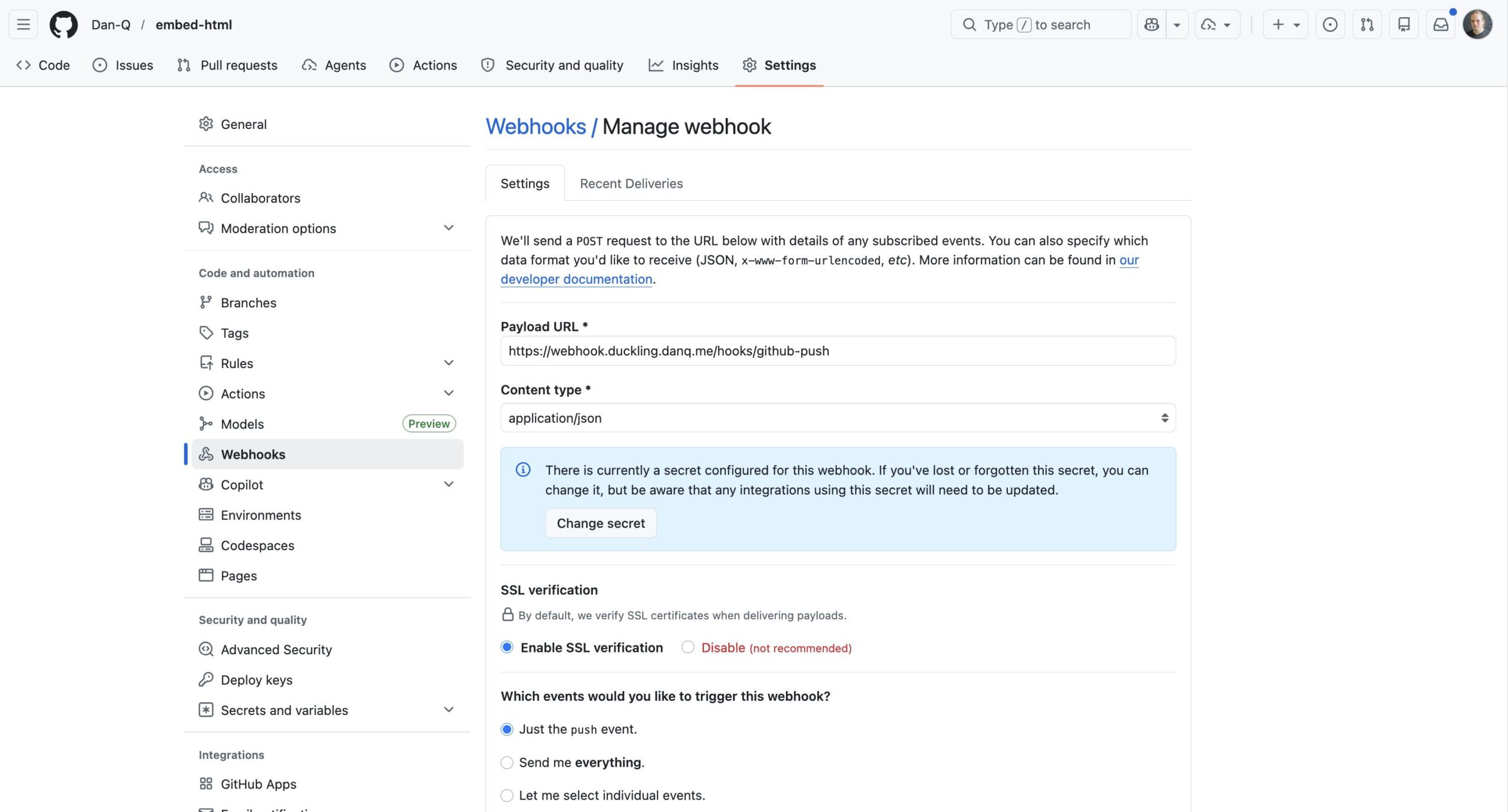
Then I created a webhook in a GitHub repository:
Alt
GitHub webhook pointing to https://webhook.duckling.danq.me/hooks/github-push, with a secret set and SSL verification enabled, triggered by a push event.
When you create a webhook in GitHub it immediately sends a test event, but it doesn't quite look like a real push event so I pushed an inconsequential change to the repo to trigger another. Once you've got a "real" one sent, you can re-send it via the "Recent Deliveries" tab as many times as you like, to help with testing.
Then, on the server, I checked-out a copy of the code (anonymously: this is a public repository so I don't need keys to read from it anyway) and set up my /etc/webhook.conf to expect these calls:
[
    {
      "id": "github-push",
      "execute-command": "/var/www/github-push/webhook.sh",
      "command-working-directory": "/var/www/github-push/",
      "pass-arguments-to-command": [
        {
          "source": "payload",
          "name": "repository.name"
        }
      ],
      "trigger-rule": {
        "and": [
          {
            "match": {
              "type": "payload-hash-sha256",
              "secret": "[MY SECRET KEY HERE]",
              "parameter": {
                "source": "header",
                "name": "X-Hub-Signature-256"
              }
            }
          },
          {
            "match": {
              "type": "value",
              "value": "refs/heads/main",
              "parameter": {
                "source": "payload",
                "name": "ref"
              }
            }
          }
        ]
      }
    }
  ]
trigger-rule directives ensure that (a) the secret key is correct (it uses a HMAC hash across the entire JSON request, so it prevents payload tampering too) and
(b) the event only triggers on pushes to the main branch. The execute-command specifies the Bash script I want to run when the webhook is triggered. The
pass-arguments-to-command configuration says to send the repo name on to that script.
Now all I needed to do was write the /var/www/github-push/webhook.sh Bash script so that it pulled the latest copy of the code when triggered:
#!/bin/bash
cd /var/www/github-push/$1 && git pull
I was able to test this by pushing inconsequential changes to my codebase and watching them get replicated down to my webserver. Neat!
Step 2: low-maintenance webserver
After pointing the DNS for *.static.duckling.danq.me at my static server, I set about configuring Caddy to be able to use DNS-01 challenges to get itself wildcard SSL
certificates4.
Caddy can't do DNS-01 challenges out of the box, so you either need to write your own renewal script or compile Caddy with plugins corresponding to your DNS provider. My domains' DNS
are managed by a mixture of AWS Route 53, Gandi, and Namecheap, so my xcaddy build step looked like this:
xcaddy build \
  --with github.com/caddy-dns/route53 \
  --with github.com/caddy-dns/gandi \
  --with github.com/caddy-dns/namecheap
Of course, if I'd have preferred somebody else build it for me, CaddyServer's download configurator would have done it for me on-demand.
For Gandi and Namecheap I just need a personal access token or API key, respectively, but Route 53's configuration is slightly more-involved: I needed to create a new user via IAM and give it permission to write DNS TXT records for the appropriate hosted zone. Fortunately the guide for the caddy-dns/route53 repo had an almost copy-pastable example.
I added the AWS access key and secret key as environment variables (like this!) into my
/etc/systemd/system/multi-user.target.wants/caddy.service service definition, and then told my Caddyfile to make use of them when renewing the wildcard certificate:
*.static.duckling.danq.me {
    tls {
        dns route53 {
          access_key_id {env.AWS_ACCESS_KEY_ID}
          secret_access_key {env.AWS_SECRET_ACCESS_KEY}
        }
      }
      root * /var/www/github-push/{http.request.host.labels.4}
      file_server
    }
}
{http.request.host.labels.4} refers to the fourth part of the domain name, when separated at the dots and counted from the right, so 0 = me, 1 =
danq, 2 = duckling, 3 = static, and 4 = the part that we're interested in. So long as I don't store any other directories in the
/var/www/github-push/ directory then this will simply map each subdomain onto its git repository name and return a 404 for any other request.
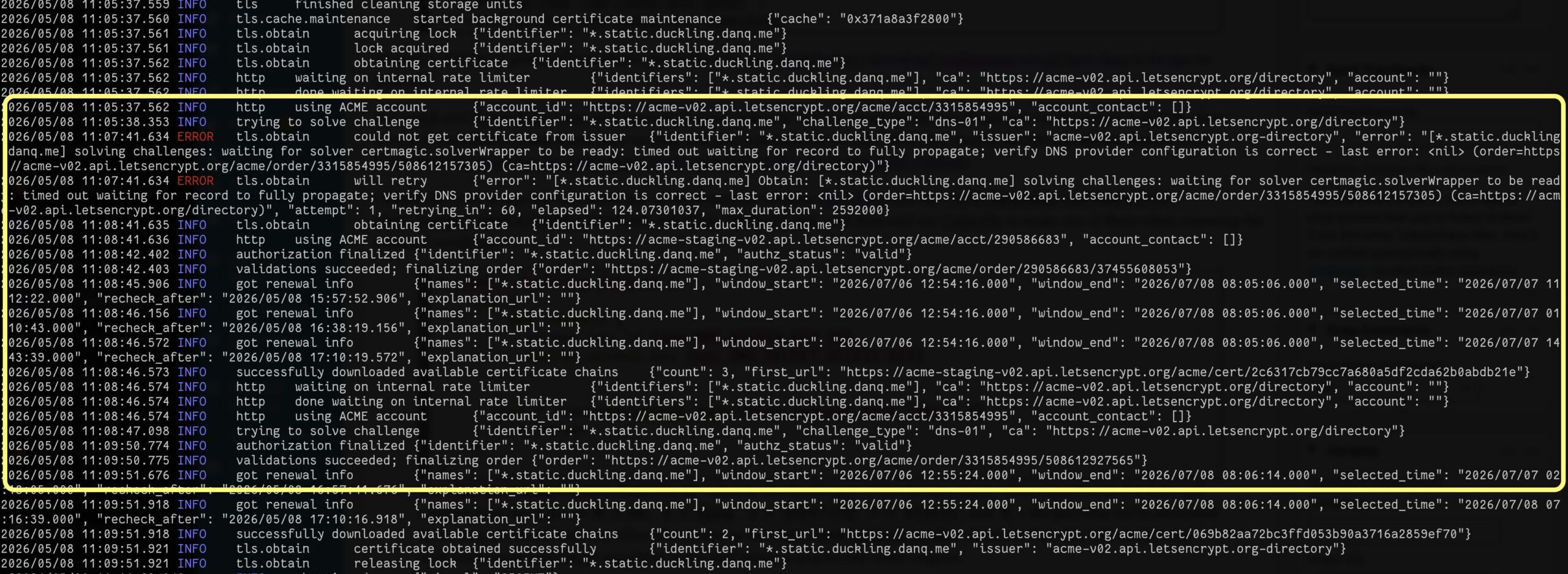
DNS-01 challenges are necessarily slower than HTTP-01/ALPN challenges, because they're limited by DNS propogation, so it took a while before the
certificate was issued. I ran Caddy in the foreground to watch the logs while it did so:
Alt
Caddy webserver logs, with a highlighted section showing a DNS-01 challenge for *.static.duckling.danq.me repeatedly fail and then eventually succeed, then a certificate chain being installed.
You can see the whole thing working (for now at least; I don't know if I'm keeping this approach!) by going to e.g. embed-html.static.duckling.danq.me, which dynamically tracks the main branch of the embed-html repo on GitHub.
I don't yet know if this is going to be the future forever-home of my many static site side projects, but it's certainly been the most-satisfying experiment to run so-far.
Footnotes
1 I've drifted away from selfhosting simple static sites lately because I've accidentally broken them with configuration changes too many times! But I figured I'd be open to in-housing them again if I had a single simple architecture for them all, so I spun up a VPS and gave it a go
2 Running a build script or some other static site generation tool is out of scope for now, but I want to be able to confirm that it would be possible in the future.
3 It also needs to be possible for me to map other domain names to it, but that's a triviality.
4 It's absolutely possible to use tls { on_demand } to do this, but it's better to use a wildcard
certificate which can be pre-generated and doesn't let people trick your server into making ludicrous numbers of certificate requests by hammering random subdomain names.
0 comments