A Selfhosted Static Site Editor

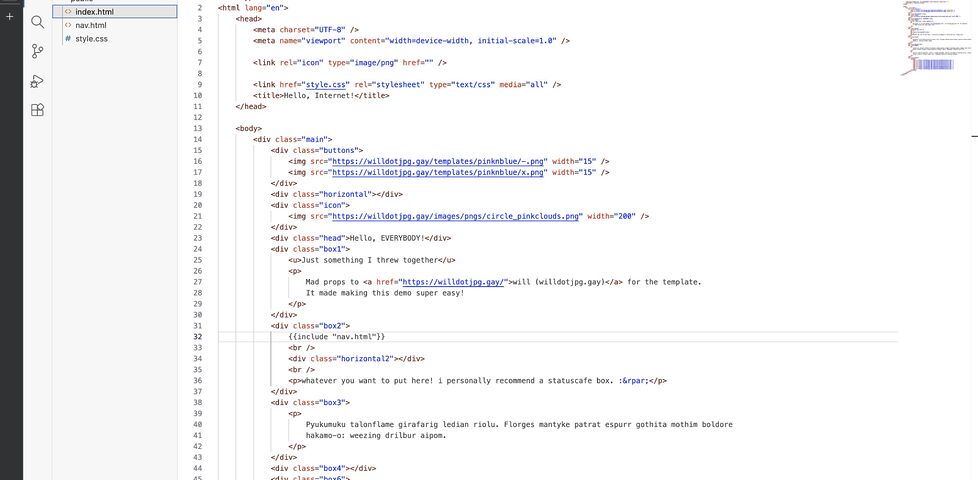
My 12-year-old was interested in learning some HTML and CSS and making her own website. If she were anybody else I’d point her at something like Nekoweb as a starter host because their web-based (VSCode-based) “Nekode” text editor makes writing your first static site simple.

But I’ve got a NAS sitting at home on a fibre connection, so I figured: I might as well just host something similar here.

Here’s how I did it:

1. DNS

I pointed her domain at my static IP, plus a subdomain for the “backend” interface. Suppose her site would be at example.net (and www.example.net) with the admin interface at admin.example.net: my DNS configuration might look like this:

@     10800 IN     A 172.66.147.243
www   10800 IN CNAME example.net.
admin 10800 IN CNAME example.net.

2. Caddy

I’ve got a Caddy webserver acting as a static server and a reverse proxy already, so I just added a new static site with a configuration like this:

example.net, www.example.net {
  root /volumes/example.net/public
  encode gzip
  templates
  file_server
}
The templates directive means that, if/when she wants to, she could use Caddy’s built-in SSI-like features. Or if she decides someday she’d prefer a static site generator then I can sort her out with shell access or something.

It probably wouldn’t be much harder to set up something like this from scratch on e.g. a Raspberry Pi: Caddy’s fast and easy to get set up.

3. Editor

I used the OpenVSCode Server Docker image to provide a browser-based VSCode interface in which she could edit HTML, CSS and JavaScript and drag-drop files from her local machine. I’m using Unraid on my NAS so I didn’t have to think much about running a new Docker container, but I guess that if I did then I’d have typed something like:

docker run -d \
  # 7890 is the port on my NAS that I'll proxy Caddy to:
  -p 7890:3000
  # /mnt/user/example.net is the path on my NAS;
  # /example.net is where it'll appear within VSCode:
  -v "/mnt/user/example.net:/example.net" \
  # this tells OpenVSCode-Server to mount the directory to begin with:
  -e OPENVSCODE_SERVER_ROOT=/example.net \
  gitpod/openvscode-server

Now all I needed to do was point Caddy at it. For the time being I simply restricted access to only “computers on my local LAN”, but it’d be easy enough to add authentication using basic auth and/or client certificates if she wanted to be able to work on her site from elsewhere:

admin.example.net {
  # Restrict access to 192.168.* LAN:
  @allowed {
    remote_ip 192.168.0.0/16
  }
  # Proxy permitted folks to the container:
  handle @allowed {
    reverse_proxy http://nas:7890
  }
  # Block everybody else:
  handle {
    abort
  }
}

That’s literally all it took to put together a web-based editing environment that publishes directly to a static website. And because it’s on my own infrastructure, it’d be trivially easy to modify it in the future if she decided to go in a different direction, e.g. a PHP site, or continuous deployment from a repo, or static site generation from a shell.

That’s all!

Here’s a test site I threw together using exactly this stack, demonstrating the entirely browser-based editing workflow (not shown is drag-and-drop to upload, but I promise that works too!):

Dynamically-Deployed Static Site Subdomains on Caddy

I’ve recently been experimenting with where I host my small and open-source static sites. In my latest experiment, I wanted to try a low-maintenance selfhosting solution1. Here’s what I wanted:

  • Pushing to the main branch of my GitHub/Codeberg/wherever repo would send a webook to my server.
  • Upon receiving the webhook, my server would pull the latest changes2.
  • Using a wildcard certificate, my webserver automatically mounts each project at a subdomain matching its project name3.

Here’s what I came up with:

Step 1: webhook handler

I’m using Caddy as my webserver, because despite its considerable power and versatility it’s a breeze to set up. To sort wildcard DNS later I’ll want to swap in a custom build, but to get started I just ran apt install caddy. Then I used apt install webhook to install Adnan Hajdarević’s webhook endpoint, and tied the two together in my Caddyfile:

webhook.duckling.danq.me {
  reverse_proxy localhost:9000
}
My static server’s called duckling.danq.me, so you’ll see that turn up a lot in these configs.

Then I created a webhook in a GitHub repository:

GitHub webhook pointing to https://webhook.duckling.danq.me/hooks/github-push, with a secret set and SSL verification enabled, triggered by a push event.
I generated a long random string to use as the secret, and kept a copy for later.

When you create a webhook in GitHub it immediately sends a test event, but it doesn’t quite look like a real push event so I pushed an inconsequential change to the repo to trigger another. Once you’ve got a “real” one sent, you can re-send it via the “Recent Deliveries” tab as many times as you like, to help with testing.

Then, on the server, I checked-out a copy of the code (anonymously: this is a public repository so I don’t need keys to read from it anyway) and set up my /etc/webhook.conf to expect these calls:

[
    {
      "id": "github-push",
      "execute-command": "/var/www/github-push/webhook.sh",
      "command-working-directory": "/var/www/github-push/",
      "pass-arguments-to-command": [
        {
          "source": "payload",
          "name": "repository.name"
        }
      ],
      "trigger-rule": {
        "and": [
          {
            "match": {
              "type": "payload-hash-sha256",
              "secret": "[MY SECRET KEY HERE]",
              "parameter": {
                "source": "header",
                "name": "X-Hub-Signature-256"
              }
            }
          },
          {
            "match": {
              "type": "value",
              "value": "refs/heads/main",
              "parameter": {
                "source": "payload",
                "name": "ref"
              }
            }
          }
        ]
      }
    }
  ]
  
The trigger-rule directives ensure that (a) the secret key is correct (it uses a HMAC hash across the entire JSON request, so it prevents payload tampering too) and (b) the event only triggers on pushes to the main branch. The execute-command specifies the Bash script I want to run when the webhook is triggered. The pass-arguments-to-command configuration says to send the repo name on to that script.

Now all I needed to do was write the /var/www/github-push/webhook.sh Bash script so that it pulled the latest copy of the code when triggered:

#!/bin/bash
cd /var/www/github-push/$1 && git pull

I was able to test this by pushing inconsequential changes to my codebase and watching them get replicated down to my webserver. Neat!

Step 2: low-maintenance webserver

After pointing the DNS for *.static.duckling.danq.me at my static server, I set about configuring Caddy to be able to use DNS-01 challenges to get itself wildcard SSL certificates4. Caddy can’t do DNS-01 challenges out of the box, so you either need to write your own renewal script or compile Caddy with plugins corresponding to your DNS provider. My domains’ DNS are managed by a mixture of AWS Route 53, Gandi, and Namecheap, so my xcaddy build step looked like this:

xcaddy build \
  --with github.com/caddy-dns/route53 \
  --with github.com/caddy-dns/gandi \
  --with github.com/caddy-dns/namecheap

Of course, if I’d have preferred somebody else build it for me, CaddyServer’s download configurator would have done it for me on-demand.

For Gandi and Namecheap I just need a personal access token or API key, respectively, but Route 53’s configuration is slightly more-involved: I needed to create a new user via IAM and give it permission to write DNS TXT records for the appropriate hosted zone. Fortunately the guide for the caddy-dns/route53 repo had an almost copy-pastable example.

I added the AWS access key and secret key as environment variables (like this!) into my /etc/systemd/system/multi-user.target.wants/caddy.service service definition, and then told my Caddyfile to make use of them when renewing the wildcard certificate:

*.static.duckling.danq.me {
    tls {
        dns route53 {
          access_key_id {env.AWS_ACCESS_KEY_ID}
          secret_access_key {env.AWS_SECRET_ACCESS_KEY}
        }
      }
      root * /var/www/github-push/{http.request.host.labels.4}
      file_server
    }
}
The {http.request.host.labels.4} refers to the fourth part of the domain name, when separated at the dots and counted from the right, so 0 = me, 1 = danq, 2 = duckling, 3 = static, and 4 = the part that we’re interested in. So long as I don’t store any other directories in the /var/www/github-push/ directory then this will simply map each subdomain onto its git repository name and return a 404 for any other request.

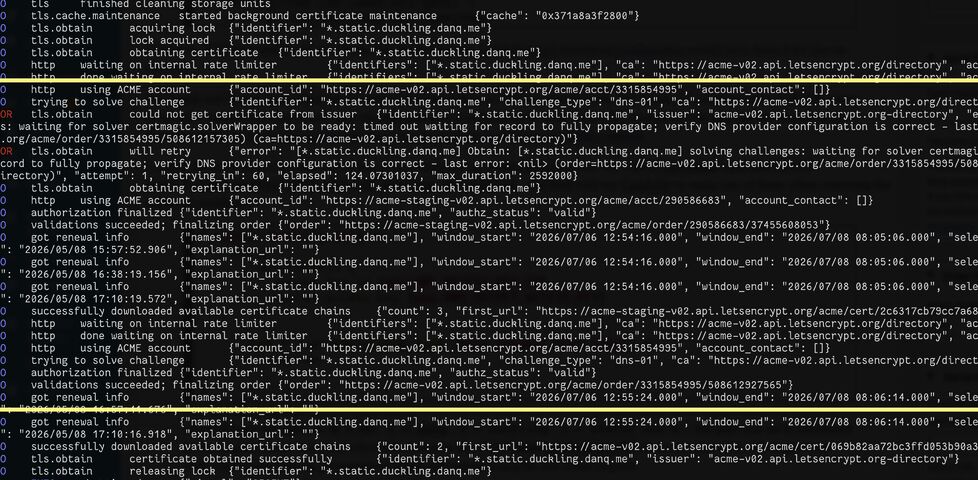
DNS-01 challenges are necessarily slower than HTTP-01/ALPN challenges, because they’re limited by DNS propogation, so it took a while before the certificate was issued. I ran Caddy in the foreground to watch the logs while it did so:

Caddy webserver logs, with a highlighted section showing a DNS-01 challenge for *.static.duckling.danq.me repeatedly fail and then eventually succeed, then a certificate chain being installed.

You can see the whole thing working (for now at least; I don’t know if I’m keeping this approach!) by going to e.g. embed-html.static.duckling.danq.me, which dynamically tracks the main branch of the embed-html repo on GitHub.

I don’t yet know if this is going to be the future forever-home of my many static site side projects, but it’s certainly been the most-satisfying experiment to run so-far.

Footnotes

1 I’ve drifted away from selfhosting simple static sites lately because I’ve accidentally broken them with configuration changes too many times! But I figured I’d be open to in-housing them again if I had a single simple architecture for them all, so I spun up a VPS and gave it a go

2 Running a build script or some other static site generation tool is out of scope for now, but I want to be able to confirm that it would be possible in the future.

3 It also needs to be possible for me to map other domain names to it, but that’s a triviality.

4 It’s absolutely possible to use tls { on_demand } to do this, but it’s better to use a wildcard certificate which can be pre-generated and doesn’t let people trick your server into making ludicrous numbers of certificate requests by hammering random subdomain names.

× ×

I Am Experimenting with Blocking HTTP1.1

This is a repost promoting content originally published elsewhere. See more things Dan's reposted.

Most of the traffic I get on this site is bots – it isn’t even close. And, for whatever reason, almost all of the bots are using HTTP1.1 while virtually all human traffic is using later protocols.

I have decided to block v1.1 traffic on an experimental basis. This is a heavy-handed measure and I will probably modify my approach as I see the results.

# Return an error for clients using http1.1 or below - these are assumed to be bots
@http-too-old {
    not protocol http/2+
    not path /rss.xml /atom.xml # allow feeds
}
respond @http-too-old 400 {
    body "Due to stupid bots I have disabled http1.1. Use more modern software to access this site"
    close
}

This is quick, dirty, and will certainly need tweaking but I think it is a good enough start to see what effects it will have on my traffic.

A really interesting experiment by Andrew Stephens! And love that he shared the relevant parts of his Caddyfile: nice to see how elegantly this can be achieved.

I decided to probe his server with cURL:

~ curl --http0.9 -sI https://sheep.horse/ | head -n1
HTTP/2 200
~ curl --http1.0 -sI https://sheep.horse/ | head -n1
HTTP/1.0 400 Bad Request
~ curl --http1.1 -sI https://sheep.horse/ | head -n1
HTTP/1.1 400 Bad Request
~ curl --http2 -sI https://sheep.horse/ | head -n1
HTTP/2 200

Curiously, while his configuration blocks both HTTP/1.1 and HTTP/1.0, it doesn’t seem to block HTTP/0.9! Whaaa?

It took me a while to work out why this was. It turns out that cURL won’t do HTTP/0.9 over https:// connections. Interesting! Though it presumably wouldn’t have worked anyway – HTTP/1.1 requires (and HTTP/1.0 permits) the Host: header, but HTTP/0.9 doesn’t IIRC, and sheep.horse definitely does require the Host: header (I tested!).

I also tested that my RSS reader FreshRSS was still able to fetch his content. I have it configured to pull not only the RSS feed, which is specifically allowed to bypass his restriction, but – because his feed contains only summary content – I also have it fetch the linked page too in order to get the full content. It looks like FreshRSS is using HTTP/2 or higher, because the content fetcher still behaves properly.

Andrew’s approach definitely excludes Lynx, which is a bit annoying and would make this idea a non-starter for any of my own websites. But it’s still an interesting experiment.

PHP 8.4 on Caddy on Debian 13… in Three Minutes

I just needed to spin up a new PHP webserver and I was amazed how fast and easy it was, nowadays. I mean: Caddy already makes it pretty easy, but I was delighted to see that, since the last time I did this, the default package repositories had 100% of what I needed!

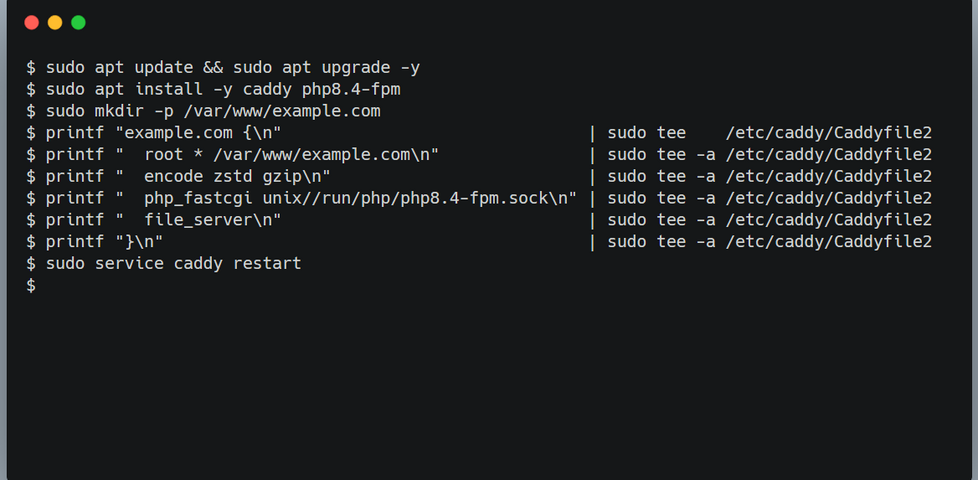
Apart from setting the hostname, creating myself a user and adding them to the sudo group, and reconfiguring sshd to my preference, I’d done nothing on this new server. And then to set up a fully-functioning PHP-powered webserver, all I needed to run (for a domain “example.com”) was:

sudo apt update && sudo apt upgrade -y
sudo apt install -y caddy php8.4-fpm
sudo mkdir -p /var/www/example.com
printf "example.com {\n"                               | sudo tee    /etc/caddy/Caddyfile
printf "  root * /var/www/example.com\n"               | sudo tee -a /etc/caddy/Caddyfile
printf "  encode zstd gzip\n"                          | sudo tee -a /etc/caddy/Caddyfile
printf "  php_fastcgi unix//run/php/php8.4-fpm.sock\n" | sudo tee -a /etc/caddy/Caddyfile
printf "  file_server\n"                               | sudo tee -a /etc/caddy/Caddyfile
printf "}\n"                                           | sudo tee -a /etc/caddy/Caddyfile
sudo service caddy restart

After that, I was able to put an index.php file into /var/www/example.com and it just worked.

And when I say “just worked”, I mean with all the bells and whistles you ought to expect from Caddy. HTTPS came as standard (with a solid QualSys grade). HTTP/3 was supported with a 0-RTT handshake.

Mind blown.

Reply to Vika, re: Content-Security-Policy

This is a reply to a post published elsewhere. Its content might be duplicated as a traditional comment at the original source.

Vika said:

Had a fight with the Content-Security-Policy header today. Turns out, I won, but not without sacrifices.
Apparently I can’t just insert <style> tags into my posts anymore, because otherwise I’d have to somehow either put nonces on them, or hash their content (which would be more preferrable, because that way it remains static).

I could probably do the latter by rewriting HTML at publish-time, but I’d need to hook into my Markdown parser and process HTML for that, and, well, that’s really complicated, isn’t it? (It probably is no harder than searching for Webmention links, and I’m overthinking it.)

I’ve had this exact same battle.

Obviously the intended way to use nonces in a Content-Security-Policy is to have the nonce generated, injected, and served in a single operation. So in PHP, perhaps, you might do something like this:

<?php
  $nonce = bin2hex(random_bytes(16));
  header("Content-Security-Policy: script-src 'nonce-$nonce'");
?>
<!DOCTYPE html>
<html lang="en">
<head>
  <meta charset="UTF-8">
  <title>PHP CSP Nonce Test</title>
</head>
<body>
  <h1>PHP CSP Nonce Test</h1>
  <p>
    JavaScript did not run.
  </p>

  <!-- This JS has a valid nonce: -->
  <script nonce="<?php echo $nonce; ?>">
    document.querySelector('p').textContent = 'JavaScript ran successfully.';
  </script>

  <!-- This JS does not: -->
  <script nonce="wrong-nonce">
    alert('The bad guys won!');
  </script>
</body>
</html>
Viewing this page in a browser (with Javascript enabled) should show the text “JavaScript ran successfully.”, but should not show an alertbox containing the text “The bad guys won!”.

But for folks like me – and you too, Vika,, from the sounds of things – who serve most of their pages, most of the time, from the cache or from static HTML files… and who add the CSP header on using webserver configuration… this approach just doesn’t work.

I experimented with a few solutions:

  • A long-lived nonce that rotates.
    CSP allows you to specify multiple nonces, so I considered having a rotating nonce that was applied to pages (which were then cached for a period) and delivered by the header… and then a few hours later a new nonce would be generated and used for future page generations and appended to the header… and after the cache expiry time the oldest nonces were rotated-out of the header and became invalid.
  • Dynamic nonce injection.
    I experimented with having the webserver parse pages and add nonces: randomly generating a nonce, putting it in the header, and then basically doing a s/<script/<script nonce="..."/ to search-and-replace it in.

Both of these are terrible solutions. The first one leaves a window of, in my case, about 24 hours during which a successfully-injected script can be executed. The second one effectively allowlists all scripts, regardless of their provenance. I realised that what I was doing was security theatre: seeking to boost my A-rating to an A+-rating on SecurityHeaders.com without actually improving security at all.

But the second approach gave me an idea. I could have a server-side secret that gets search-replaced out. E.g. if I “signed” all of my legitimate scripts with something like <script nonce="dans-secret-key-goes-here" ...> then I could replace s/dans-secret-key-goes-here/actual-nonce-goes-here/ and thus have the best of both worlds: static, cacheable pages, and actual untamperable nonces. So long as I took care to ensure that the pages were never delivered to anybody with the secret key still intact, I’d be sorted!

Alternatively, I was looking into whether Caddy can do something like mod_asis does for Apache: that is, serve a file “as is”, with headers included in the file. That way, I could have the CSP header generated with the page and then saved into the cache, so it’s delivered with the same none every time… until the page changes. I’d love more webservers to have an “as is” mode, but I appreciate that might be a big ask (Apache’s mechanism, I suspect, exploits the fact that HTTP/1.0 and HTTP/1.1 literally send headers, followed by two CRLFs, then content… but that’s not what happens in HTTP/2+).

So yeah, I’ll probably do a server-side-secret approach, down the line. Maybe that’ll work for you, too.

Caddy

I’m pretty impressed with running WordPress on Caddy so far.

It took a little jiggerypokery to configure it with an equivalent of the Nginx configuration I use for DanQ.me. But off the back of it I get the capability for HTTP/3, 103 Early Hints, and built-in “batteries included” infrastructure for things like certificate renewal and log rotation.
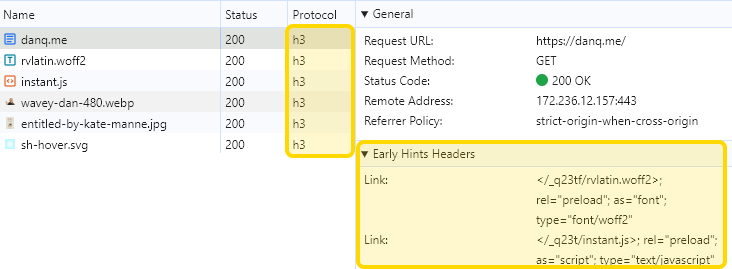
Browser network debugger showing danq.me being served over protocol 'h3' (HTTP/3) and an 'Early Hints Headers' section loading a WOFF2 font and a JavaScript file.

(why yes, I am celebrating my birthday by doing selfhosting server configuration, why do you ask? 😅)

×