Wake Me Up When September Ends

Mastodon’s Eternal September begins

In the light of the so-called “Twitter migration”, I’ve spent a lot of the last week helping people new to Mastodon/the Fediverse in general to understand it. Or at least, to understand how it’s different from Twitter.1

If you’re among those jumping ship, by the way, can I recommend that you do two things:

  1. Don’t stop after reading an article about what Mastodon is and how it works (start here!); please also read about the established etiquette, and
  2. Don’t come in with the expectation that it’s “like Twitter but…”, because the ways it’s not like Twitter are more-important (and nobody wants it to be more like Twitter).

The experience has filled me with feelings, for which I really appreciated that Hugh Rundle found such great words to share, comparing the surge of new users to September(ish) 1993:

The tools, protocols and culture of the fediverse were built by trans and queer feminists. Those people had already started to feel sidelined from their own project when people like me started turning up a few year ago. This isn’t the first time fediverse users have had to deal with a significant state change and feeling of loss. Nevertheless, the basic principles have mostly held up to now: the culture and technical systems were deliberately designed on principles of consent, agency, and community safety.

If the people who built the fediverse generally sought to protect users, corporate platforms like Twitter seek to control their users… [Academics and advertisers] can claim that legally Twitter has the right to do whatever it wants with this data, and ethically users gave permission for this data to be used in any way when they ticked “I agree” to the Terms of Service.

This attitude has moved with the new influx. Loudly proclaiming that content warnings are censorship, that functionality that has been deliberately unimplemented due to community safety concerns are “missing” or “broken”, and that volunteer-run servers maintaining control over who they allow and under what conditions are “exclusionary”. No consideration is given to why the norms and affordances of Mastodon and the broader fediverse exist, and whether the actor they are designed to protect against might be you.

I’d highly recommend you read the whole thing because it’s excellent.

Photo showing fragile dewey spiderwebs on blades of grass.

Part of the solution

I genuinely believe that the fediverse is among our best bets for making a break from the silos of the corporate Web, and to do that it has to scale – it’s only the speed at which it’s being asked to do so that’s problematic.

Aside from what I’m already doing – trying to tutor (tootor?) new fediversians about how to integrate in an appropriate and respectful manner and doing a little to supporting the expansion of the software that makes it tick… I wonder what more I could/should be doing.

Would my effort be best-spent be running a server (one not-just-for-me, I mean: abnib.social, anyone?), or should I use that time and money to support existing instances directly? Should I brush up on my ActivityPub spec so I can be a more-useful developer, or am I better-placed to focus on tending my own digital garden first? Or maybe I’m looking at it all wrong and I should be trying to dissuade people from piling-on to a system that might well not be right for them (nor they for it!)?

I don’t know the answers to these questions, but I’m hoping to work them out soon.

Addendum

It only occurred to me after the fact that I should mention that you can find me at @dan@danq.me.

Footnotes

1 Important: I’m no expert. I’ve been doing fediverse things for about 3 years but I’m relatively quiet on Mastodon. Also, I’ve never really understood or gotten along with Twitter, so I’m even less an expert on that. Don’t assume that I’m an authority on anything at all, and especially not social media.

×

XPath Scraping with FreshRSS

I’ve been spending a while running on reduced brain capacity lately so, to ease myself back into thinking like a programmer, I upgraded my preferred feed reader FreshRSS to version 1.20.0 – which was released a couple of weeks ago – and tried out what I believe is its killer new feature: HTML + XPath scraping.

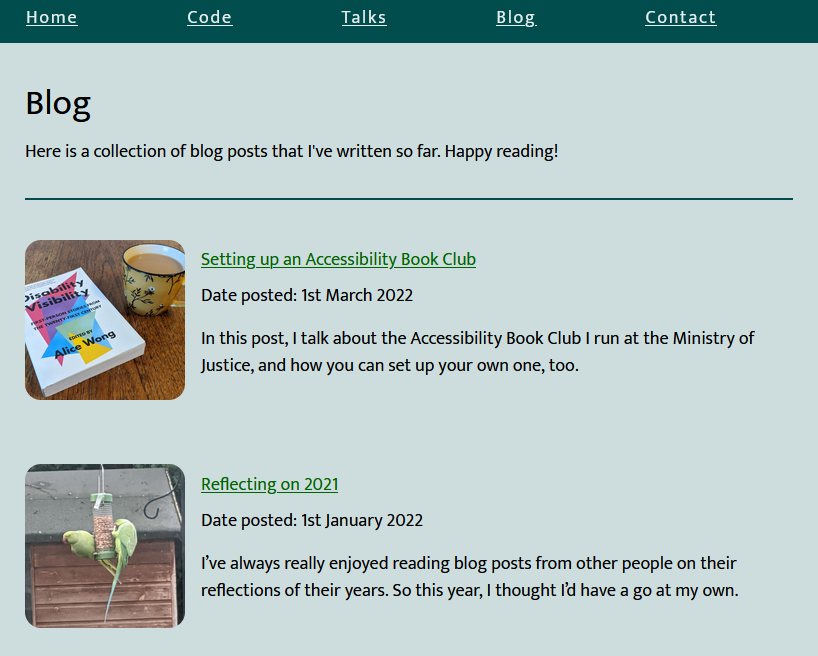
Screenshot showing Beverley Newing's weblog; two articles are visible - Paperback copy of 'Disability Visibility', edited by Alice Wong, next to a cup of tea Setting up an Accessibility Book Club, published on 1 March 2022, and Reflecting on 2021, published on 1 January 2022.
I like to keep up-to-date with my friend Bev’s blog, but they don’t have an RSS feed.

I’ve been using RSS1 for about 20 years and I love it. It feels great to be able to curate my updates based on “what I care about”, and not on “what some social network thinks I should care about”, to keep things to read later, to prioritise effectively based on my own categorisation, to consume content offline and have my to-read list synchronise later, etc.

RSS never went away, of course (what do you think a podcast is?), but it got steamrollered out of the public eye by big companies who make their money out of keeping your eyes on their platforms and off the open Web. But it feels like it’s slowly coming back: even Substack – whose entire thing is that an email client is more-convenient than a feed reader for most people – launched an RSS reader this week!

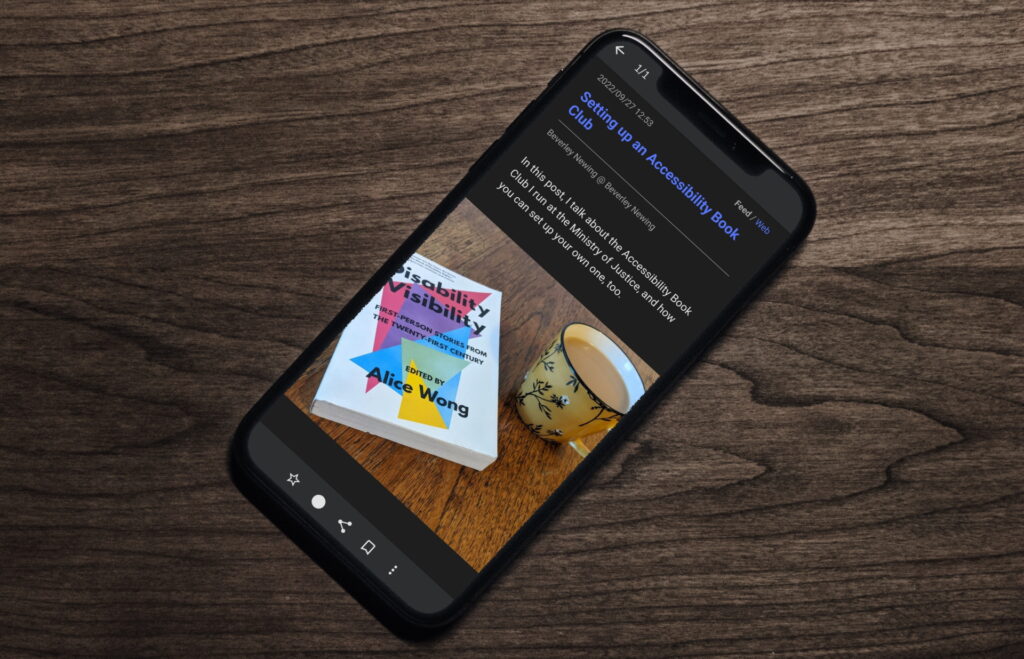
A smartphone on a wooden surface. The screen shows the FeedMe app, showing the most-recent blog post from Beverley's blog.
My day usually starts in my feed reader, accessed via the FeedMe app from my mobile (although FreshRSS provides a reasonably good responsive interface out-of-the-box!)

I love RSS so much that I routinely retrofit other people’s websites with feeds just so I can subscribe to them: I even published the tool I use to do so! Whether filtering sports headlines out of BBC News, turning retro webcomics into “reading lists” so I can track my progress, or just working around sites that really should have feeds but refuse to, I just love sidestepping these “missing feeds”. My friend Beverley has a blog without any kind of feed, so I added one so I could subscribe to it. Magic.

But with FreshRSS 1.20.0, I no longer have to maintain my own tool to get this brilliant functionality, and I’m overjoyed. Let’s look at how it works by re-subscribing to Beverley’s blog but without a middleware tool.

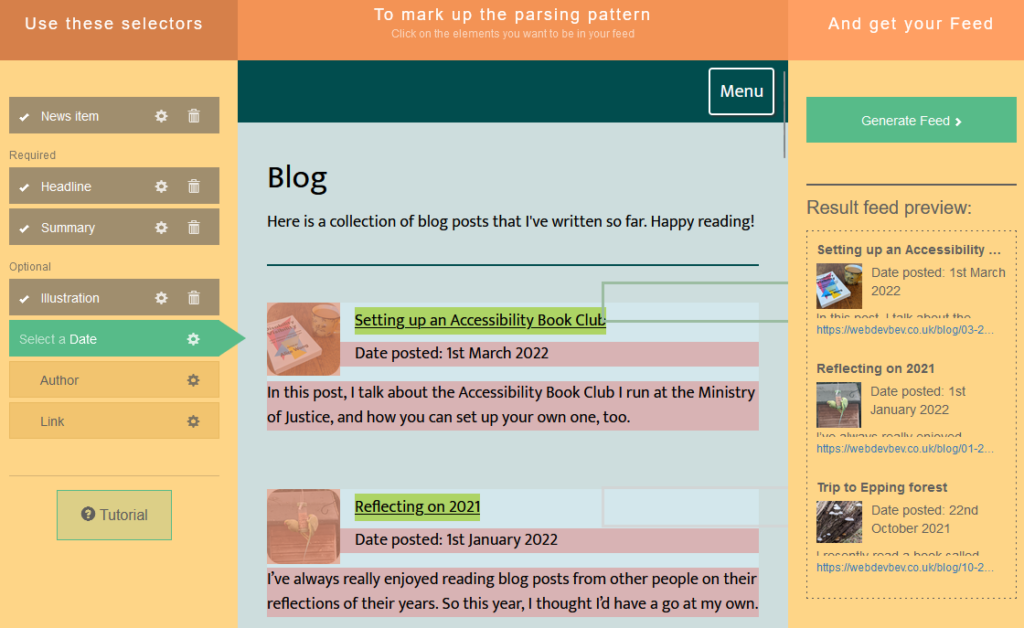
Screenshot showing FetchRSS being used to graphically create a feed from Beverley's blog.
This post is about to get pretty technical. If you don’t want to learn some XPath but just want to make a feed out of a web page, use a graphical tool like FetchRSS.

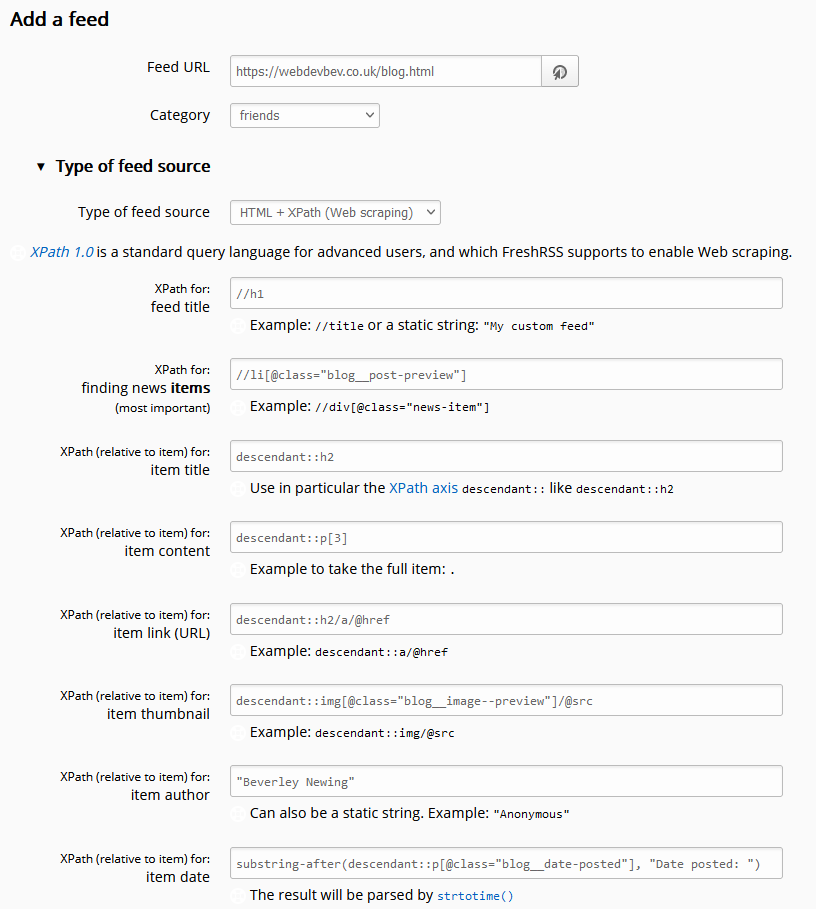
In the latest version of FreshRSS, when you add a new feed to your reader, a new section “Type of feed source” is available. Unfold it, and you can change from the default (“RSS / Atom”) to the new option “HTML + XPath (Web scraping)”. Put a human-readable page address rather than a feed address into the “Feed URL” field and fill these fields to tell FreshRSS how to parse the page to get the content you want. Note that it doesn’t matter if the web page isn’t valid XML (e.g. missing closing tags) because it’s going to get run through PHP’s DOMDocument anyway which will “correct” for some really sloppy code if needed.

Browser debugger running document.evaluate('//li[@class="blog__post-preview"]', document).iterateNext() on Beverley's weblog and getting the first blog entry.
You can use your browser’s debugger to help check your XPath rules: here I’ve run  document.evaluate('//li[@class="blog__post-preview"]', document).iterateNext() and got back the first blog post on the page, so I know I’m on the right track.
You’ll need to use XPath to express how to find a “feed item” on the page. Here’s the rules I used for https://webdevbev.co.uk/blog.html (many of these fields were optional – I didn’t have to do this much work):

  • Feed title: //h1
    I override this anyway in FreshRSS, so I could just have used the a string, but I wanted the XPath practice. There’s only one <h1> on the page, and it can be considered the “title” of the feed.
  • Finding items: //li[@class="blog__post-preview"]
    Each “post” on the page is an <li class="blog__post-preview">.
  • Item titles: descendant::h2
    Each post has a <h2> which is the post title. The descendant:: selector scopes the search to each post as found above.
  • Item content: descendant::p[3]
    Beverley’s static site generator template puts the post summary in the third paragraph of the <li>, which we can select like this.
  • Item link: descendant::h2/a/@href
    This expects a URL, so we need the /@href to make sure we get the value of the <h2><a href="...">, rather than its contents.
  • Item thumbnail: descendant::img[@class="blog__image--preview"]/@src
    Again, this expects a URL, which we get from the <img src="...">.
  • Item author: "Beverley Newing"
    Beverley’s blog doesn’t host any guest posts, so I just use a string literal here.
  • Item date: substring-after(descendant::p[@class="blog__date-posted"], "Date posted: ")
    This is the only complicated one: the published dates on Beverley’s blog aren’t explicitly marked-up, but part of a string that begins with the words “Date posted: “, so I use XPath’s substring-after function to strtip this. The result gets passed to PHP’s strtotime(), which is pretty tolerant of different date formats (although not of the words “Date posted:” it turns out!).
Screenshot: Adding a "HTML + XPath (Web scraping)" feed via FreshRSS.
I’d love one day for FreshRSS to provide some kind of “preview” feature here so you can see what you’ll expect to get back, as you work. That, and support for different input types (JSON, perhaps?), perhaps other selectors (I find CSS-style selectors much simpler than XPath), and maybe even an option to execute Javascript on the page before scraping (I use this in my own toolchain, but that’s just because I want to have my cake and eat it too). But this is still all pretty awesome.

I hope that this is just the beginning for this new killer feature in FreshRSS: there’s so much more it can be and do. But for now, I’m still mighty impressed that I can begin to phase-out my use of my relatively resource-intensive feed-building middleware and use my feed reader to do more and more of the heavy lifting for which I love it so much.

I also love that this functionally adds h-feed support in by the back door. I’d still prefer there to be a “h-feed” option in the “Type of feed source” drop-down, but at least I can add such support manually, now!

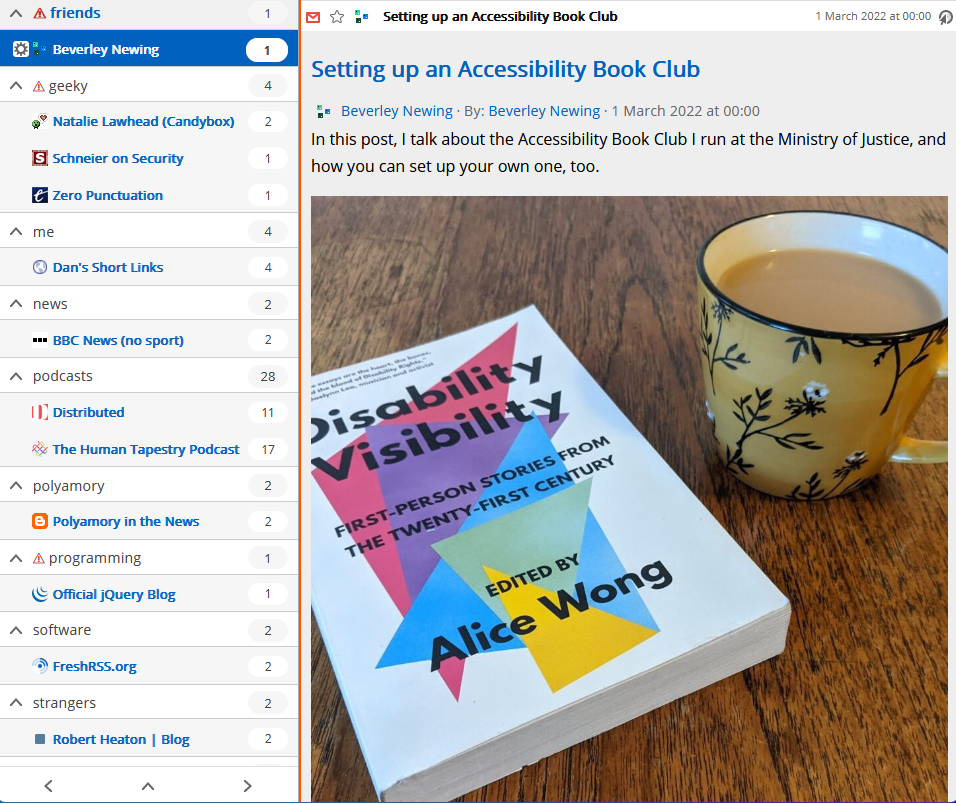
Beverley's blog post "Setting up an Accessibility Book Club" in FreshRSS.
The finished result: Bev’s blog posts appear directly in my feed reader, even though they don’t have a feed, and now without going through the middleware I’d set up for that purpose.

Footnotes

1 When I say RSS, I mean feed. Most of the feeds I subscribe to are RSS feeds, but some are Atom feeds, h-feed, etc. But I can’t get over the old-fashioned name, and I don’t care to try.

× × × × × ×

.well-known/links in WordPress

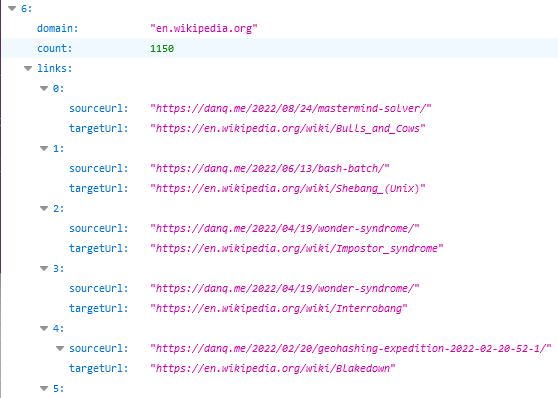
Via Jeremy Keith I today discovered Jim Nielsen‘s suggestion for a website’s /.well-known/links to be a place where it can host a JSON-formatted list of all of its outgoing links.

That’s a really useful thing to have in this new age of the web, where Refererer: headers are no-longer commonly passed cross-domain and Google Search no longer provides the link: operator. If you want to know if I’ve ever linked to your site, it’s a bit of a drag to find out.

JSON output from DanQ.me's .well-known/links, showing 1,150 outbound links to en.wikipedia.org domains, for topics like "Bulls and Cows", "Shebang (Unix)", "Imposter syndrome", "Interrobang", and "Blakedown".
To nobody’s surprise whatsoever, I’ve made a so many links to Wikipedia that I might be single-handedly responsible for their PageRank.

So, obviously, I’ve written an implementation for WordPress. It’s really basic right now, but the source code can be found here if you want it. Install it as a plugin and run wp outbound-links to kick it off. It’s fast: it takes 3-5 seconds to parse the entirety of danq.me, and I’ve got somewhere in the region of 5,000 posts to parse.

You can see the results at https://danq.me/.well-known/links – if you’ve ever wondered “has Dan ever linked to my site?”, now you can find the answer.

If this could be useful to you, let’s collaborate on making this into an actually-useful plugin! Otherwise it’ll just languish “as-is”, which is good enough for my purposes.

Making an RSS feed of YOURLS shortlinks

As you might know if you were paying close attention in Summer 2019, I run a “URL shortener” for my personal use. You may be familiar with public URL shorteners like TinyURL and Bit.ly: my personal URL shortener is basically the same thing, except that only I am able to make short-links with it. Compared to public ones, this means I’ve got a larger corpus of especially-short (e.g. 2/3 letter) codes available for my personal use. It also means that I’m not dependent on the goodwill of a free siloed service and I can add exactly the features I want to it.

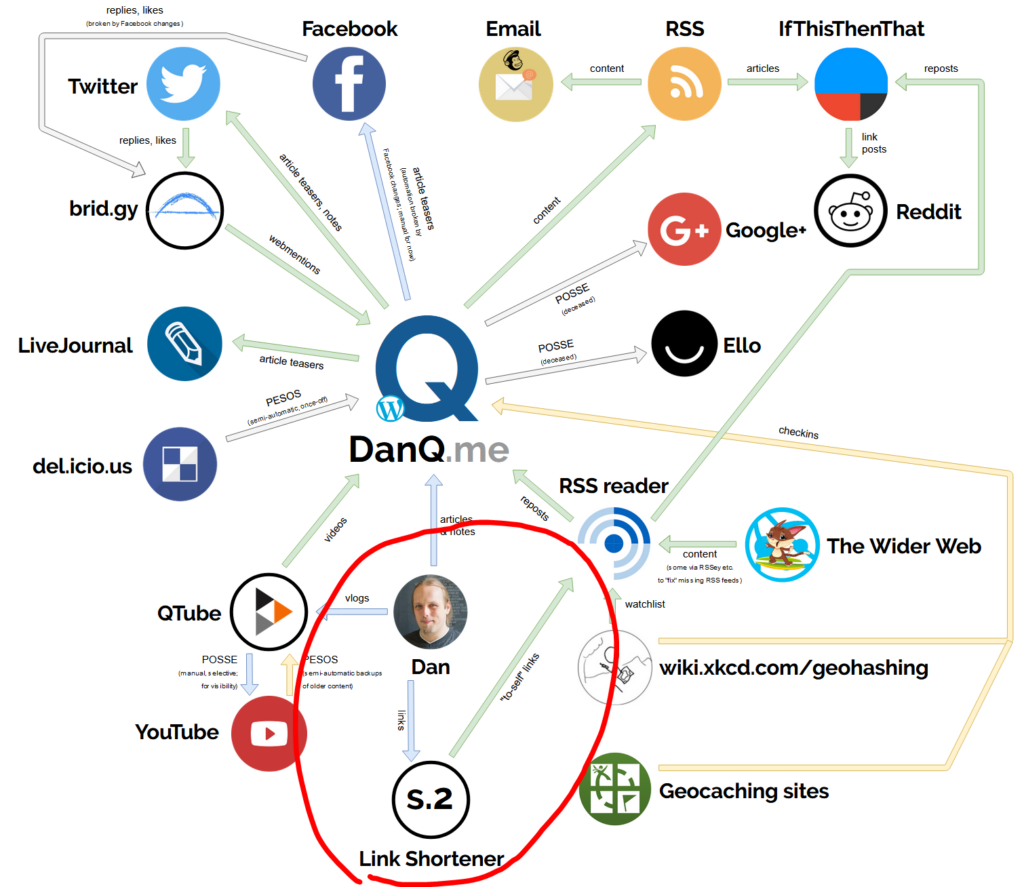
Diagram showing the relationships of the DanQ.me ecosystem. Highlighted is the injection of links into the "S.2" link shortener and the export of these shortened links by RSS into FreshRSS.
Little wonder then that my link shortener sat so close to me on my ecosystem diagram the other year.

For the last nine years my link shortener has been S.2, a tool I threw together in Ruby. It stores URLs in a sequentially-numbered database table and then uses the Base62-encoding of the primary key as the “code” part of the short URL. Aside from the fact that when I create a short link it shows me a QR code to I can easily “push” a page to my phone, it doesn’t really have any “special” features. It replaced S.1, from which it primarily differed by putting the code at the end of the URL rather than as part of the domain name, e.g. s.danq.me/a0 rather than a0.s.danq.me: I made the switch because S.1 made HTTPS a real pain as well as only supporting Base36 (owing to the case-insensitivity of domain names).

But S.2’s gotten a little long in the tooth and as I’ve gotten busier/lazier, I’ve leant into using or adapting open source tools more-often than writing my own from scratch. So this week I switched my URL shortener from S.2 to YOURLS.

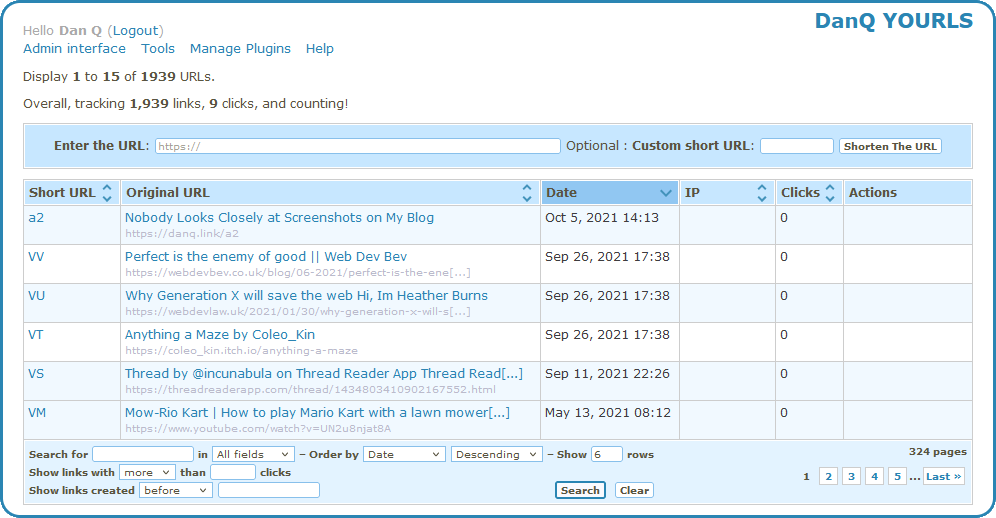
Screenshot of YOURLS interface showing Dan Q's list of shortened links. Six are shown of 1,939 total.
YOURLs isn’t the prettiest tool in the world, but then it doesn’t have to be: only I ever see the interface pictured above!

One of the things that attracted to me to YOURLS was that it had a ready-to-go Docker image. I’m not the biggest fan of Docker in general, but I do love the convenience of being able to deploy applications super-quickly to my household NAS. This makes installing and maintaining my personal URL shortener much easier than it used to be (and it was pretty easy before!).

Another thing I liked about YOURLS is that it, like S.2, uses Base62 encoding. This meant that migrating my links from S.2 into YOURLS could be done with a simple cross-database INSERT... SELECT statement:

INSERT INTO yourls.yourls_url(keyword, url, title, `timestamp`, clicks)
  SELECT shortcode, url, title, created_at, 0 FROM danq_short.links

But do you know what’s a bigger deal for my lifestack than my URL shortener? My RSS reader! I’ve written about it a lot, but I use RSS for just about everything and my feed reader is my first, last, and sometimes only point of contact with the Web! I’m so hooked-in to my RSS ecosystem that I’ll use my own middleware to add feeds to sites that don’t have them, or for which I’m not happy with the feed they provide, e.g. stripping sports out of BBC News, subscribing to webcomics that don’t provide such an option (sometimes accidentally hacking into sites on the way), and generating “complete” archives of series’ of posts so I can use my reader to track my progress.

One of S.1/S.2’s features was that it exposed an RSS feed at a secret URL for my reader to ingest. This was great, because it meant I could “push” something to my RSS reader to read or repost to my blog later. YOURLS doesn’t have such a feature, and I couldn’t find anything in the (extensive) list of plugins that would do it for me. I needed to write my own.

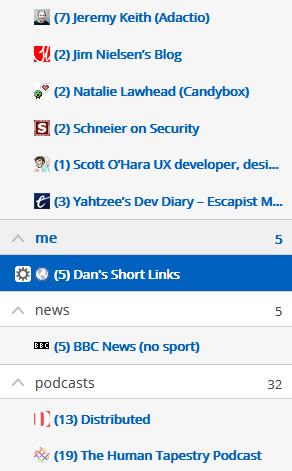
Partial list of Dan's RSS feed subscriptions, including Jeremy Keith, Jim Nielson, Natalie Lawhead, Bruce Schneier, Scott O'Hara, "Yahtzee", BBC News, and several podcasts, as well as (highlighted) "Dan's Short Links", which has 5 unread items.
In some ways, subscribing “to yourself” is a strange thing to do. In other ways… shut up, I’ll do what I like.

I could have written a YOURLS plugin. Or I could have written a stack of code in Ruby, PHP, Javascript or some other language to bridge these systems. But as I switched over my shortlink subdomain s.danq.me to its new home at danq.link, another idea came to me. I have direct database access to YOURLS (and the table schema is super simple) and the command-line MariaDB client can output XML… could I simply write an XML Transformation to convert database output directly into a valid RSS feed? Let’s give it a go!

I wrote a script like this and put it in my crontab:

mysql --xml yourls -e                                                                                                                     \
      "SELECT keyword, url, title, DATE_FORMAT(timestamp, '%a, %d %b %Y %T') AS pubdate FROM yourls_url ORDER BY timestamp DESC LIMIT 30" \
    | xsltproc template.xslt -                                                                                                            \
    | xmllint --format -                                                                                                                  \
    > output.rss.xml

The first part of that command connects to the yourls database, sets the output format to XML, and executes an SQL statement to extract the most-recent 30 shortlinks. The DATE_FORMAT function is used to mould the datetime into something approximating the RFC-822 standard for datetimes as required by RSS. The output produced looks something like this:

<?xml version="1.0"?>
<resultset statement="SELECT keyword, url, title, timestamp FROM yourls_url ORDER BY timestamp DESC LIMIT 30" xmlns:xsi="http://www.w3.org/2001/XMLSchema-instance">
  <row>
        <field name="keyword">VV</field>
        <field name="url">https://webdevbev.co.uk/blog/06-2021/perfect-is-the-enemy-of-good.html</field>
        <field name="title"> Perfect is the enemy of good || Web Dev Bev</field>
        <field name="timestamp">2021-09-26 17:38:32</field>
  </row>
  <row>
        <field name="keyword">VU</field>
        <field name="url">https://webdevlaw.uk/2021/01/30/why-generation-x-will-save-the-web/</field>
        <field name="title">Why Generation X will save the web  Hi, Im Heather Burns</field>
        <field name="timestamp">2021-09-26 17:38:26</field>
  </row>

  <!-- ... etc. ... -->
  
</resultset>

We don’t see this, though. It’s piped directly into the second part of the command, which  uses xsltproc to apply an XSLT to it. I was concerned that my XSLT experience would be super rusty as I haven’t actually written any since working for my former employer SmartData back in around 2005! Back then, my coworker Alex and I spent many hours doing XML backflips to implement a system that converted complex data outputs into PDF files via an XSL-FO intermediary.

I needn’t have worried, though. Firstly: it turns out I remember a lot more than I thought from that project a decade and a half ago! But secondly, this conversion from MySQL/MariaDB XML output to RSS turned out to be pretty painless. Here’s the template.xslt I ended up making:

<?xml version="1.0"?>
<xsl:stylesheet xmlns:xsl="http://www.w3.org/1999/XSL/Transform" version="1.0">
  <xsl:template match="resultset">
    <rss version="2.0" xmlns:atom="http://www.w3.org/2005/Atom">
      <channel>
        <title>Dan's Short Links</title>
        <description>Links shortened by Dan using danq.link</description>
        <link> [ MY RSS FEED URL ] </link>
        <atom:link href=" [ MY RSS FEED URL ] " rel="self" type="application/rss+xml" />
        <lastBuildDate><xsl:value-of select="row/field[@name='pubdate']" /> UTC</lastBuildDate>
        <pubDate><xsl:value-of select="row/field[@name='pubdate']" /> UTC</pubDate>
        <ttl>1800</ttl>
        <xsl:for-each select="row">
          <item>
            <title><xsl:value-of select="field[@name='title']" /></title>
            <link><xsl:value-of select="field[@name='url']" /></link>
            <guid>https://danq.link/<xsl:value-of select="field[@name='keyword']" /></guid>
            <pubDate><xsl:value-of select="field[@name='pubdate']" /> UTC</pubDate>
          </item>
        </xsl:for-each>
      </channel>
    </rss>
  </xsl:template>
</xsl:stylesheet>

That uses the first (i.e. most-recent) shortlink’s timestamp as the feed’s pubDate, which makes sense: unless you’re going back and modifying links there’s no more-recent changes than the creation date of the most-recent shortlink. Then it loops through the returned rows and creates an <item> for each; simple!

The final step in my command runs the output through xmllint to prettify it. That’s not strictly necessary, but it was useful while debugging and as the whole command takes milliseconds to run once every quarter hour or so I’m not concerned about the overhead. Using these native binaries (plus a little configuration), chained together with pipes, had already resulted in way faster performance (with less code) than if I’d implemented something using a scripting language, and the result is a reasonably elegant “scratch your own itch”-type solution to the only outstanding barrier that was keeping me on S.2.

All that remained for me to do was set up a symlink so that the resulting output.rss.xml was accessible, over the web, to my RSS reader. I hope that next time I’m tempted to write a script to solve a problem like this I’ll remember that sometimes a chain of piped *nix utilities can provide me a slicker, cleaner, and faster solution.

Update: Right as I finished writing this blog post I discovered that somebody had already solved this problem using PHP code added to YOURLS; it’s just not packaged as a plugin so I didn’t see it earlier! Whether or not I use this alternate approach or stick to what I’ve got, the process of implementing this YOURLS-database ➡ XML ➡  XSLTRSS chain was fun and informative.

× × ×

Note #19508

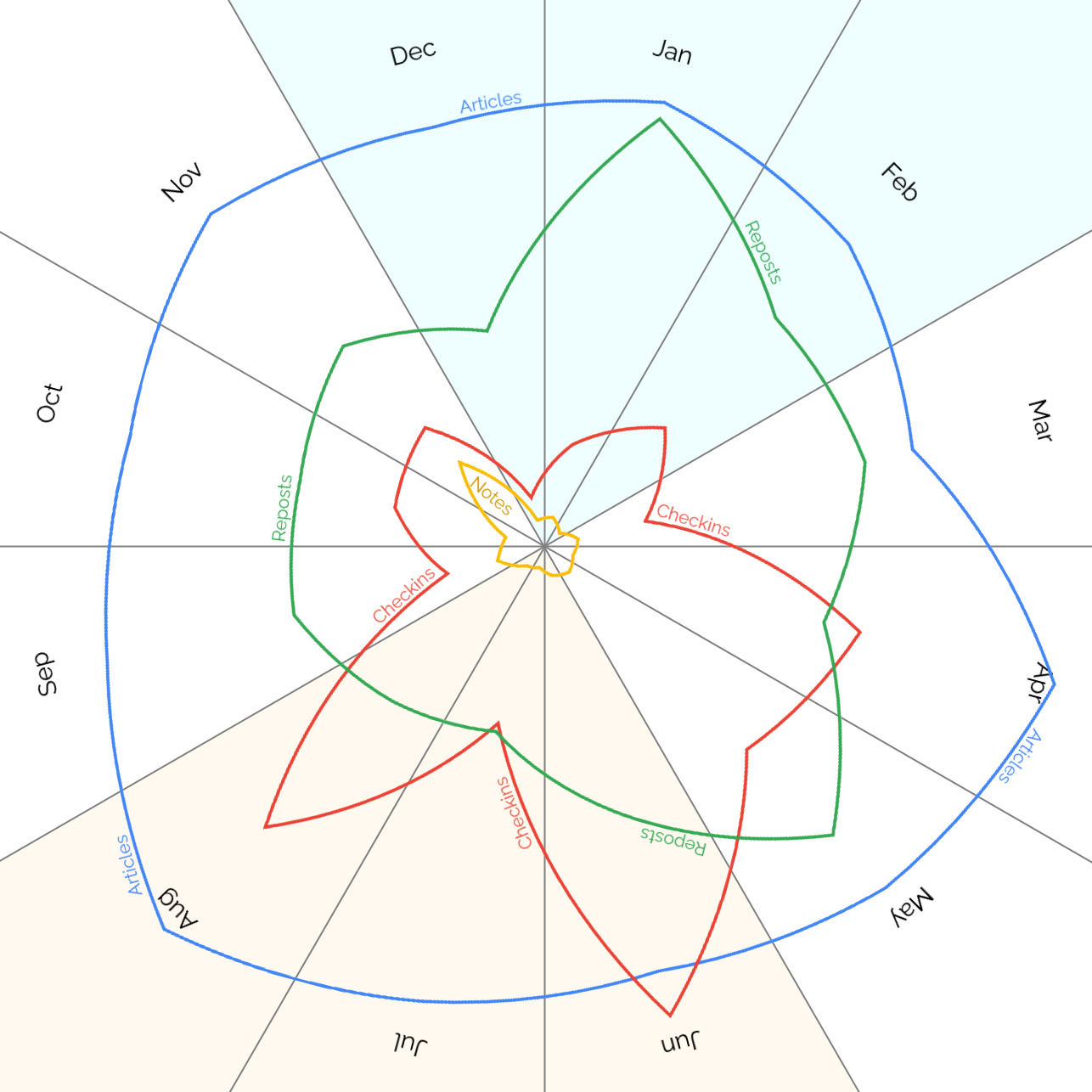
When do I #blog? A breakdown of my top four #indieweb content types – articles, reposts, checkins and notes – by month.

Blog posts by type and month, a graph showing how articles barely change throughout the year but reposts are highest in the first half of the year, checkins peak in the spring and summer, and notes get a big boost in November.

Unsurprisingly my checkins, which represent #geocaching/#geohashing activity, grow in the spring and peak in the summer when the weather’s better!

At first I assumed the notes peak in November might have been thrown off by a single conference, e.g. musetech, but it turns out I’ve just done more note-friendly things in Novembers, like Challenge Robin II and my Cape Town meetup, which are enough to throw the numbers off.

×

Reply to “I was permanently banned by Facebook”

This is a reply to a post published elsewhere. Its content might be duplicated as a traditional comment at the original source.

Donncha Ó Caoimh said:

My Facebook account was permanently banned on Wednesday along with all the people who take care of the Cork Skeptics page. We’re still not sure why but it might have something to do with the Facebook algorithm used to detect far-right conspiracy groups.

If you have a Facebook account you should download your information too because it could happen to you too, even though you did nothing wrong. Go here and click the “Create File” button now.

Yeah, I know you won’t do it but you really should.

Great advice.

After I got banned from Facebook in 2011 (for using a “fake name”, which is actually my real name) I took a similar line of thinking: I can’t trust Facebook (or Twitter, or Instagram, or whoever else) to be responsible custodians of my content, so I shan’t. Now, virtually all content I create is hosted on my WordPress-powered blog, at my own domain, first and foremost… and syndicated copies may appear on various social media.

In a very few instances I go the other way around, producing content in silos and then copying it back to my blog: e.g. my geocaching/geohashing expeditions are posted first to their respective sites (because it’s easiest and most-practical to do that using their apps, especially “in the field”), but then they get imported into my blog using a custom plugin. If any of these sites closes, deletes my data, adds paid tiers I’m not happy with, or just bans me from my own account… I’m still set.

Backing up all your social content is a good strategy. Owning it all to begin with is an even better one, IMHO. See also: Indieweb.

An app can be a home-cooked meal

This is a repost promoting content originally published elsewhere. See more things Dan's reposted.

Have you heard about this new app called BoopSnoop?

It launched in the first week of 2020, and almost immediately, it was downloaded by four people in three different time zones. In the months since, it has remained steady at four daily active users, with zero churn: a resounding success, exceeding every one of its creator’s expectations.

:)

I made a messaging app for, and with, my family. It is ruthlessly simple; we love it; no one else will ever use it. I wanted to jot down some notes about how and why I made it, both to (a) offer a nudge to anyone else out there considering a similar project and (b) suggest something a little larger about software.

Robin Sloan (yes, this one) talks about an app that he wrote exclusively for his family. He likens the experience to a making a home-cooked meal. And I totally get it.

I do this kind of thing all the time. Our new home NAS device, Fox, performs a handful of functions (and I plan to expand it to many more) based on a mixture of open-source and homegrown code, just for my immediate family. Our “family wiki” does the same thing. And the spreadsheet we use for our finances. I’ve written apps for small groups of friends before, too (e.g. 1, 2, 3, 4, 5, 6, 7, 8…). And that’s not to mention the countless “meals for one” I’ve cooked: small applications written entirely for my own benefit – I’m using one right now to pull this article from the list of “things I’ve read and enjoyed recently” into my blog.

A home-cooked meal benefits from being tailored to its audience (if the recipe calls for mustard, I might use less or omit it because it makes my nose feel funny). It benefits from being tailored to its purpose. And it benefits from the love that goes into it. My only superstition – that I’m aware of – is that I believe that food tastes better if the chef smiled during its production… I’m beginning to think that the same might be true for software, too.

First among the reasons I think that learning the basics of programming should be in the school curriculum is that it teaches people how computers work and so, by proxy, what they are (and are not) capable of. The most digitally-literate non-programmers I know are people who have the strongest understanding about how and why computers do what they do. But a close second among my reasons is that those with an inclination can go a step further and, without even necessarily pushing their skills to a level at which they could or would want to work as software developers, build their own tools to “scratch their own itches”. Solving a problem for yourself is enormously empowering, and the versatility of software lends itself to solving a huge array of relatively-tiny problems: problems that affect individuals, families, or small communities but that aren’t big enough to warrant commercial attention.

(Sometimes these projects explode into something bigger, but usually they remain just as they are: a tool for the benefit of oneself and one’s immediate tribe. And that’s just great.)

Identifying Post Kinds in WordPress RSS Feeds

I use the Post Kinds plugin to streamline the management of the different types of posts I make on my blog, based on the IndieWeb post types list: articles, like this one, are “conventional” blog posts, but I also publish notes (which are analogous to “tweets”), reposts (“shares” of things I’ve found online, sometimes with commentary), checkins (mostly chronicling my geocaching/geohashing), and others: I’ve extended Post Kinds to facilitate comics and reviews, for example.

But for people who subscribe (either directly or indirectly) to everything I post, I imagine it must be a little frustrating to sometimes be unable to identify the type of a post before clicking-through. So I’ve added the following code, which I’m sharing here and on GitHub in case it’s of any use to anybody else, to my theme’s functions.php:

// Make titles in RSS feed be prefixed by the Kind of the post.
function add_kind_to_rss_post_title(){
        $kinds = wp_get_post_terms( get_the_ID(), 'kind' );
        if( ! isset( $kinds ) || empty( $kinds ) ) return get_the_title(); // sanity-check.
        $kind = $kinds[0]->name;
        $title = get_the_title();
        return trim( "[{$kind}] {$title}" );
}
add_filter( 'the_title_rss', 'add_kind_to_rss_post_title', 4 ); // priority 4 to ensure it happens BEFORE default escaping filters.

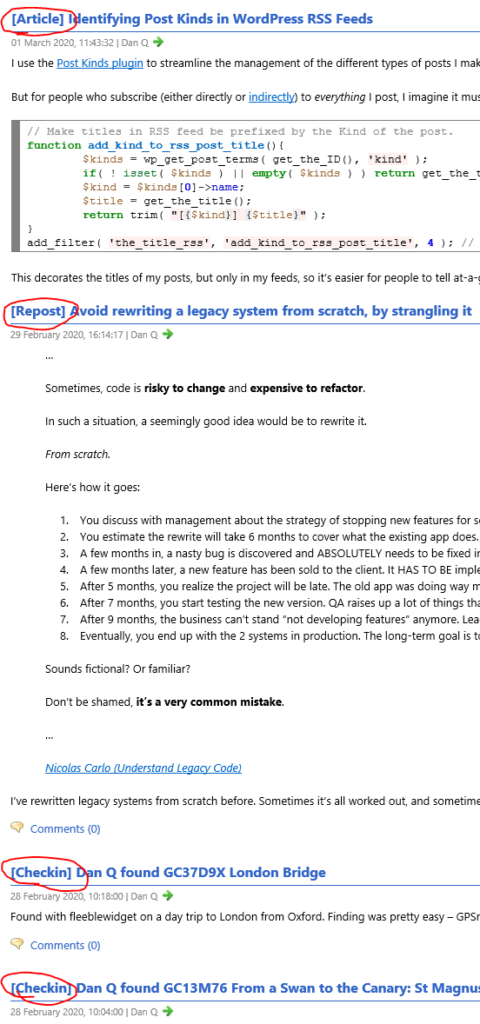
This decorates the titles of my posts, but only in my feeds, so it’s easier for people to tell at-a-glance what’s going on:

Rendered RSS feed showing Post Kinds prefixes

Down the line I might expand this so that it doesn’t show if the subscriber is, for example, asking only for articles (e.g. via this feed); I’m coming up with a huge list of things I’d like to do at IndieWebCamp London! But for now, this feels like a nice simple improvement to a plugin I love that helps it to fit my specific needs.

×

Retro-PESOSing my Reviews

When I arrived at this weekend’s IndieWebCamp I still wasn’t sure what it was that I would be working on. I’d worked recently to better understand the ecosystem surrounding DanQ.me and had a number of half-formed ideas about tightening it up. But instead, I ended up expanding the reach of my “personal web” considerably by adding reviews as a post type to my site and building tools to retroactively-reintegrate reviews I’d written on other silos.

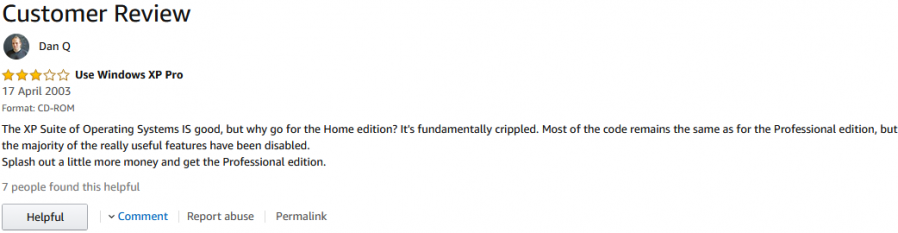
Amazon customer review
The oldest surviving review I found was my grumbling about Windows XP Home edition being just a crippled version of Pro edition. And now it’s immortalised here.

Over the years, I’ve written reviews of products using Amazon and Steam and of places using Google Maps and TripAdvisor. These are silos and my content there is out of my control and could, for example, be deleted at a moment’s notice. This risk was particularly fresh in my mind as my friend Jen‘s Twitter account was suspended this weekend for allegedly violating the platform’s rules (though Twitter have so far proven unwilling to tell her which rules she’s broken or even when she did so, and she’s been left completely in the dark).

My mission for the weekend was to:

  1. Come up with a mechanism for the (microformat-friendly) display of reviews on this site, and
  2. Reintegrate my reviews from Amazon, Steam, Google Maps and TripAdvisor
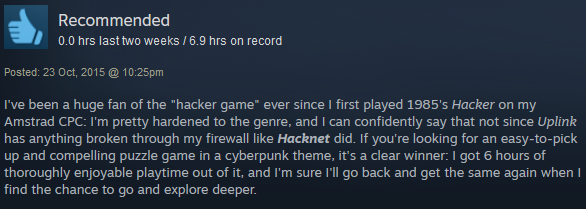
Steam review for Hacknet
Steam reviews use a “thumbs up/thumbs down” rating system rather than a “5-star” style, but h-review is capable of expressing both and more.

I opted not to set up an ongoing POSSE nor PESOS process at this point; I’ll do this manually in the short term (I don’t write reviews on third-party sites often). Also out of scope were some other sites on which I’ve found that I’ve posted reviews, for example BoardGameGeek. These can both be tasks for a future date.

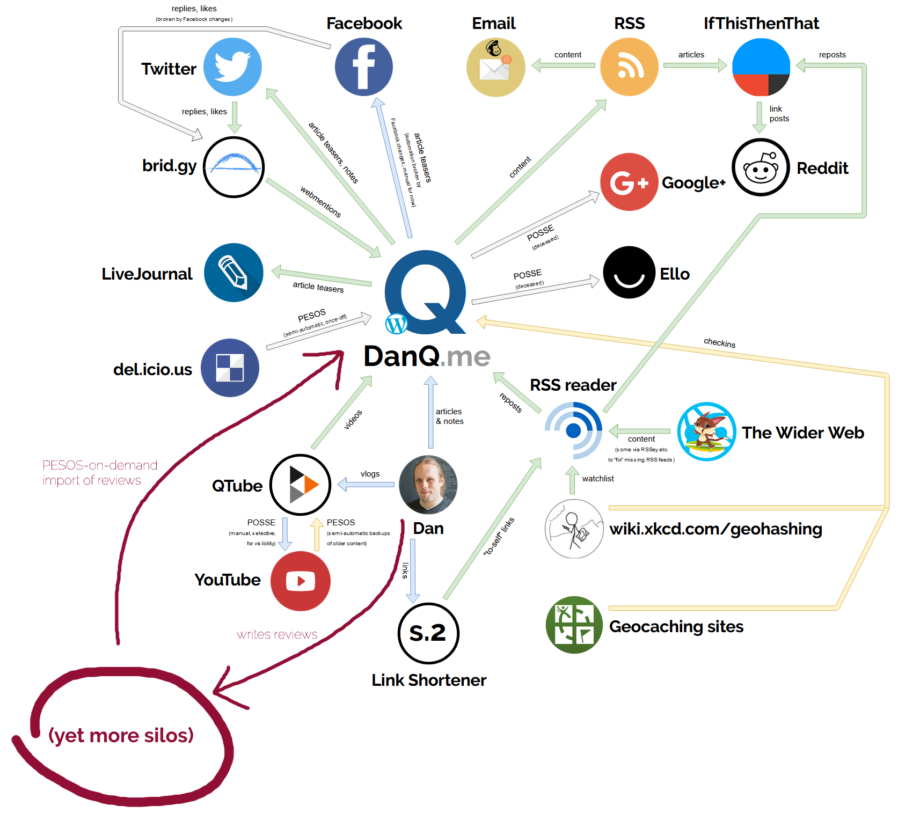
DanQ.me ecosystem map showing Dan Q writing reviews and these being re-imported on demand back into DanQ.me.
The lovely diagram I drew earlier this year? Here it is with the new loop drawn on.

I used Google Takeout to export my Google Maps reviews, which comprised the largest number of reviews of the sites I targetted and which is the least screen-scraper friendly. I wrote a bookmarklet-based screen-scraper to get the contents of my reviews on each of the other sites. Meanwhile, I edited by WordPress theme’s functions.php to extended the Post Kinds plugin with an extra type of post, Review, and designed a content template which wrapped reviews in appropriate microformat markup, using metadata attached to each review post to show e.g. a rating, embed a h-product (for products) or h-card (for places). I also leveraged my existing work from last summer’s effort to reintegrate my geo*ing logs to automatically add a map when I review a “place”. Finally, I threw together a quick WordPress plugin to import the data and create a stack of draft posts for proofing and publication.


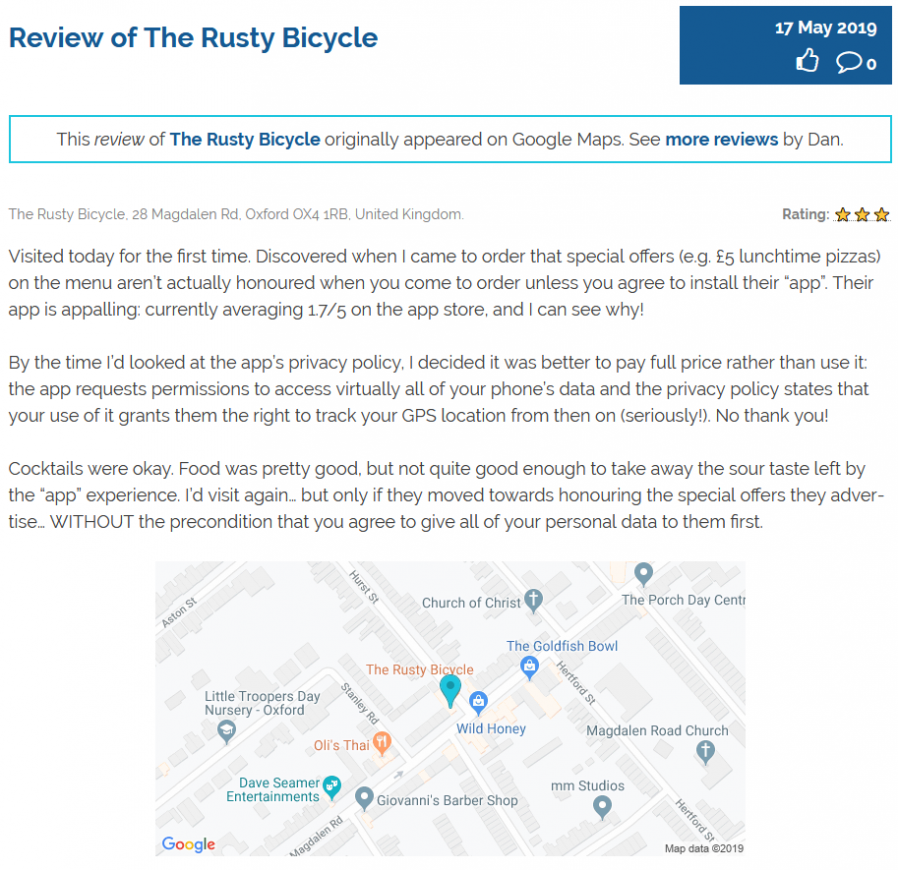
My review of The Rusty Bicycle as it now appears on this site.
I was moderately unimpressed by Oxford pub The Rusty Bicycle. I originally said so on Google Maps, and now I can say so here, too!

So now you can read all of the reviews I’ve ever posted to any of those four sites, right here, alongside any other reviews I subsequently reintegrate and any I write directly to my blog in the future. The battle to own all of my own content after 25 years of scattering it throughout the Internet isn’t always easy, but it remains worthwhile.

(I haven’t open-sourced my work this time because it’s probably useful only to me and my very-specific set-up, but if anybody wants a copy they can get in touch.)

×

Note #15464

Arrived early for @indiewebcamp #oxford at @oxonlibraries. @garrettc still filling up on coffee.

Makerspace at Oxford Library

×