
This week, GlitchyZorua brought to my attention the Ibiblio Icon Browser, a collection of many thousands of GIF icons curated in the 1990s by Gioacchino La Vecchia. Glitchy's goal was to archive a copy of all of the icons, which was turning out to be... challenging.
It looks pretty simple: (a) an index page, leading to (b) 24 sub-index pages, leading to (c) 57 icon directory pages, representing (d) 114 icon collections, containing anywhere up to (e) 7,296 icons, mostly but not always 32×32 pixels. Right?
But the challenge comes when you try to go from a directory page to an icon file. It looks like you're clicking a link, but really you're clicking... an imagemap.
I've talked about imagemaps before, but the essence of them is that you define areas of an image that, when clicked, hyperlink to different places. The most-common way of doing these was always client-side imagemaps, where the HTML code itself contained all of the coordinates and, crucially, the resulting destinations. But that's not what kind of imagemap this is.
Alt
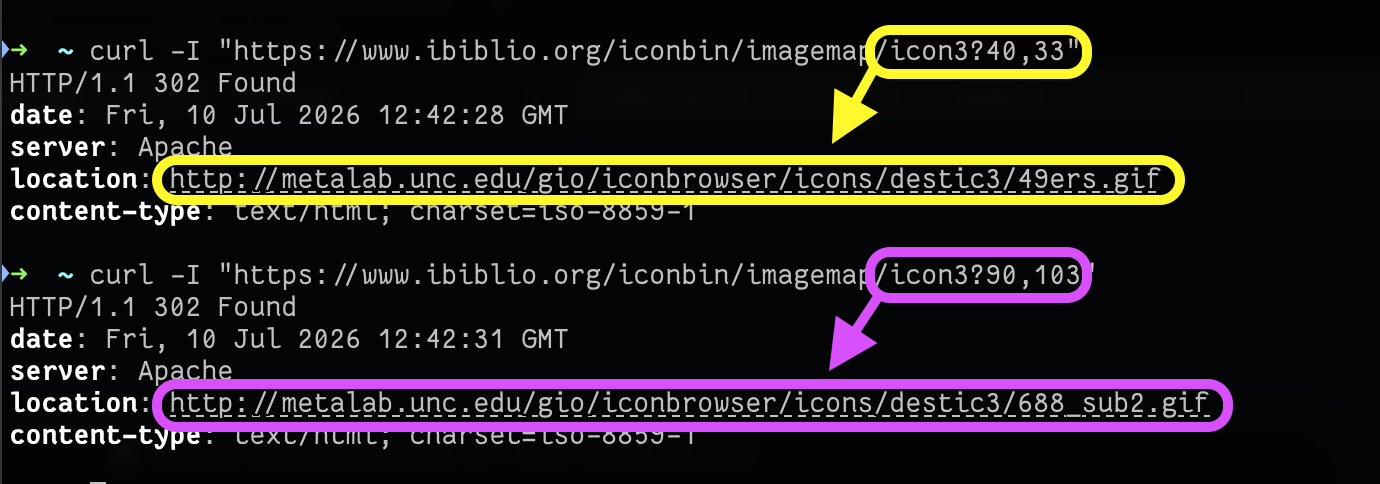
Demonstration using curl of a request to an image map URL, including a pair of coordinates as the query string, resulting in two different redirects as a result of two different coordinate pairs.
This one's a server-side imagemap. The HTML code looks like this... and there are no URLs for the resulting library of GIF files anywhere to be seen:
<a href="/iconbin/imagemap/icon3">
  <img src="destic3/icons.gif" ismap>
</a>
That ismap attribute is what tells your browser to send the coordinates that you clicked-at.
Directory indexing is disabled, so we can't just knock the image filename off the end of the URL and inspect. So how are we to get these images, short of manually, painstakingly, clicking on each one of them? That's what GlitchyZorua was wondering when I turned up with some bright ideas...
(We're clearly not the only people who struggled: archive.org hadn't managed to collect a full set of the icons either.)
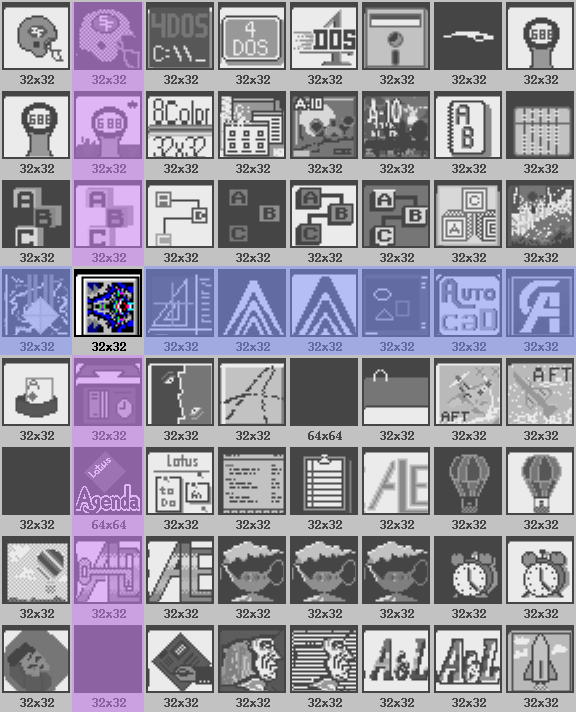
Fortunately, we can work out a little something about the gallery images. Exploration of the site shows that they're always laid out in a grid of up to 8×8, with each (including its size information) occupying a space of 72×89 pixels:
Alt
Gallery of 64 images with a particular row and column highlighted to show the boundaries of what's believed to be a particular 'hit target' within it.
The webserver seems to be running Apache, so it's probably using something like mod_imagemaps to manage its server-side imagemaps. We can imagine that somewhere on the server there's probably a file that looks a bit like this, mapping rectangular coordinate pairs to redirect URLs:
# icon3 images:
base destic3/
#    filename  |  top left  |  bottom right
# -------------+------------+----------------
rect 49ers.gif         0,0            72,89
rect 49ers1.gif       73,0           145,89
rect 4dos.2.gif      146,0           217,89
rect 4dos.gif        218,0           289,89
# ... and so on for all 64 images in this collection!


We don't have access to those configuration files, but we can infer what hit areas they might have. If each hit area is 72×89 pixels, we can hit the centre of the top-left one at 36×44 and then just keep adding on 72 and 89 pixels to permute the centrepoints of all the hit areas.
In pseudocode, what we'd need to do is:
- For each library from
1to113,- For each X coordinate from the set
{36, 108, 180, 252, 324, 396, 468, 540}- For each Y coordinate from the set
{44, 133, 222, 311, 400, 489, 578, 667}- Generate a URL of the form:
https://www.ibiblio.org/iconbin/imagemap/icon{library}?{x},{y} - Make a HTTP
HEADrequest to that URL - If you get a HTTP
302(redirect) response code, record the resultingLocation:
- Generate a URL of the form:
- For each Y coordinate from the set
- For each X coordinate from the set
That gets us the URL of every one of the thousands of GIFs on the service. Next, we can use wget to download each of them. Sorted!
But we can do one better: once we've got all the icons, we can present them in a new website. One without server-side image maps, and with a working search. So that's what I did. I hacked together a very basic static site generator using Ruby and ERB templates, that produces a gallery with pagination (mirroring the page numbers from the original), plus client-side search. And of course the whole repository can be cloned if you just want a copy of the icons for yourself:
Anyway: if you'd like to browse the library in its new form, it's at ibiblio-icon-archive.danq.dev. It... looks its age, but at least now it's accessible to the world and able to be archived for posterity.
It's hilarious to use a 72x89 pixel imagemap to link to 32x32 pixel images. That's a 6x increase in size (although it must compress like a sleeping bag in a stuff sack). Why do this instead of a TABLE with the original images? I'm remembering the agony of watching images load top-to-bottom on a 56k modem. Was it more important to reduce the number of server requests, even if the total page size was larger?
Is the license for these icons known, or are they archived under fair use?
Some of the images are bigger than 32x32, and the composite images share a color table which saves a little space in GIF format, but I imagine that the biggest saving comes from the fact that HTTP round-trips, especially in pre-Connection:-header HTTP 1.x, are relatively expensive: every single image requires a complete IP connection, TCP handshake, HTTP request, etc. On such a connection, a single large image will download much faster than a composite of 64 smaller ones.
I've currently got no answer to the licensing question. I'm reaching out to the original site owner, but it seems to have been originally published (and widely mirrored) under the same fair-use doctrine that was prevalent across the Web at its point in time.
Comments [https://lobste.rs/s/pdbktp/today_i_rescued_7_234_old_gifs]
Read more →
Nice work, since you mentioned Ruby I’d plug middleman which is a nice static site generator
I love Middleman and use it all over the place: it's my favourite SSG! But it would have been way overkill for this, so I just used plain old Ruby and two ERB templates.