Contactless Transport in London vs Paris

Paris’s public transport tickets suck… for now!

In his blog post yesterday, Terence Eden observed that of all the cities he’s travelled to over the last year, Paris had the most-ridiculously-unhelpful public transport ticketing system:

Fuck Paris. The only way to buy a metro ticket is to download an app. Fair enough. But, after downloading the app it tells you to install another app!

Navigo app saying I have to install another app.

What the actual fuck? A convoluted, messy, and frustrating situation which has resulted in awful reviews for them.

Trains and metro travel require separate tickets at different prices. You can’t easily hop from one to another. You need to think carefully about the route you’re taking. A more convoluted route may be significantly cheaper because it doesn’t involve swapping between services.

This absolutely parallels my experience of hopping around the Paris’s metro area, last time I was there.

Dan, a white man with a ponytail and a goatee, site in a Parisian cafe sipping a glass of white wine.
If I’ve got to navigate my way through Paris’s public transport network… I’m going to need a drink first.

I was interested to hear, though, that by 2030 virtually all of Paris’s public transport will accept contactless payment, bringing its convenience level to a similar level to that of London. Cool.1

From the sounds of things, this is clearly designed as a convenience for visitors to the city, not regulars and locals:

Dès le 30 juin 2026, les touristes et les voyageurs hyperoccasionnels pourront opter pour valider leur titre en sortie de l’aéroport d’Orly sur la ligne 14 avec la carte bancaire.2

Paris’s relationship with tourists is different from London’s

But the bit that surprised me is Paris’s pricing for the parts they’ve deployed so far:

Les prix des titres de transport via les bornes d’achat sont les suivants :

  • Bus/tram/funiculaire : 2,55 € (soit + 0,50 € sur le prix classique) ;
  • Métro/train/RER : 3,35 € (soit + 0,80 € sur le prix classique) ;
  • Aéroports : 14,80 € (soit + 0,80 € sur le prix classique).

Buying transport tickets in Paris using a contactless card… costs 0.50 € to 0.80 € more. Paris will charge you for the convenience of tapping in and out with your carte bancaire.

A row of ticket gates in a London Underground station.
Tap in, tap out. Unless you’re eligible for discounted travel, you probably might as well use your debit card to get around London. Photo by Luca Sammarco.

Contactless is clearly more-convenient for city visitors, but I think the difference between London and Paris’s attitude to it says something about the relationship both cities have with their tourists. In London, most travellers can use whatever bank card and mobile wallet they’ve already got… and they’ll get as good a deal as possible. But in Paris, doing the same will invariably cost more than a conventional ticket would. You pay a convenience-tax.

Both cities get tens of millions of annual visitors and extract billions of euros worth of financial benefit from their tourist economies. Paris doing slightly better overall, but they’re closely-comparable enough that differences like this probably mean something.

Crowds file down the escalator into Charles de Gaulle-Étoile station.
Tap in, pay a premium for the privilege. Thanks, Paris! Photo by Candelario Benítez.

I’m not saying that London loves tourists and Paris hates them! It’s not so simple as that. But I think perhaps the cites try to present themselves in a different way.

London’s public transport says: we’ll work around you. You can learn the rules as you go; you don’t have to “learn London” to get around. Just use your usual contactless card wherever you go; we’ll work out the details, and your daily cost will get capped just the same as if you chose to pick up an Oyster card. Visiting the city as a tourist is an ordinary use-case for the transport network.

Paris’s public transport says: you should learn the rules. You’re welcome to visit, but you either need to do the work to be a “temporary Parisian”… or you can just use your usual contactless card but we’ll charge you a premium for the convenience. Visiting the city as a tourist is a special case that the transport network sees differently from being a local.

Neither approach is “wrong”… but I think it’s interesting. And now I’m wondering what the approach is like across other European cities.

Footnotes

1 I’ll almost-certainly have to tackle the current-generation of Paris’s public transport at some point before then, but I’ll look forward to the improved version once it rolls-out.

2 “From 30 June 2026, tourists and hyper-ocassional travellers will be able to pay by bank card on Line 14 out of Orly Airport.” Emphasis mine.

× × ×

Reply to: This blog is written in en-GB

This is a reply to a post published elsewhere. Its content might be duplicated as a traditional comment at the original source.

Terence Eden said:

So if you see a reference to Count Duckula, or hear me exclaim “Accrington Stanley!”, or even blush as I describe an utter wanker – please take it as a sign that the hegemony is not universal and some people exist in a cultural milieu different to your own.

I feel like this is an even-more specific dialect than en-GB. What is this, en-GB-1980s? 🤣

“You saved my life!” (or: how my kids briefly thought I was a superhero)

This weekend, my friend Liz arranged for some other Abnibbers and I to gather, with our families, for a camping/glamping weekend East of Oxford.

Here’s a story of something that transpired there, presented in three parts:

  1. The fire
  2. The battery pack
  3. “You saved my life!”
Adults and children mill around a firepit, some of them holding marshmallows on skewers.
The campsite provided our large group with an entire field to ourselves, including spaces for socialising, a fire pit (at which the kids enjoyed toasting marshmallows), and a wood-fired hot tub.

The entire weekend would have surely been a memorable experience already, but one particular event will probably stick in the minds of everybody in attendance: the fire.

The fire

The UK’s in its unprecedented third heatwave of the year: the grass is all dying and everything is tinder dry. And so it was that, on Friday night as the kids and I slept in our glamping “dome”, I was woken by the distant beep-beep-beep of a domestic smoke alarm. A few seconds later, I heard a second such alarm with a different tone, and it became clear that this wasn’t just somebody’s toast on fire.

Not recorded: the sound of the occupant of this static caravan/cabin – having jumped through the window to safety as the front door was blocked by flames – on the phone to the fire brigade.

I went back into the dome to check on the children, which is when Penny knocked on my door to ensure I was aware of what was going on. The kids were sound asleep, so I ran out to the car park to move the car (which was parked in such a position that embers were raining down on it!) and to check on the situation.

A static caravan is engulfed in flames behind a dome tent, at night.
The fire intensity of the fire grew particularly intense as the sound of fire engine sirens began to be heard from the valley below. Photo copyright Rory Prior.

I returned to the dome and got the children dressed. We evacuated to a safer distance and watched as the firefighters arrived and began to tackle the blaze. Short of water, they had one pump dousing the flaming building while two others relayed water from the nearest fire hydrant, way down the hill.

Firefighters pull hoses from a fire engine towards the inferno of a flaming cabin.
There was a brief faux pas when one of the Abnib kids exclaimed “this is so cool“… without realising that he was standing right next to the people whose home was being destroyed in front of us.

Eventually the situation came under control and we were all able to return to bed.

The battery pack

I spoke to Mike, whose holiday home was the building that was destroyed. He’d managed to escape with some shorts and his mobile phone, but little else: in particular, his car keys remained inside and were probably destroyed, which rendered him unable to drive back to his regular home.

A group of adults and older children stand out in a field at night, while in the distance thick smoke is illuminated by flashing blue lights.
The firefighters worked quickly, but it still took over three hours before they were able to finish spreading out and drenching everything that had caught light. We watched from a distance, and sheltered all the children (including those of a non-Abnib family on-site) in one of our tents.

Mike had been turning his phone on only in bursts in order to conserve battery for all of the essential calls he’d have to make (e.g. his bank, to extract some money without his cards, and a locksmith, to get him back into his car). His phone charger – an awkward USB-B-Micro one – hadn’t survived the fire.

But conveniently… I happened to have such a cable in my bag. Plus a fully-charged battery pack. So I lent both to Mike, in the hope that it’d make it easier for him to do all of the necessary administration1.

A handful of metal frame struts stick out from an ash pile that was clearly once a static caravan.
It’s got to be a pretty-devastating thing to happen to your holiday home and everything in it. Mike was surprisingly chill about it when I spoke to him, taking soft-of an attitude of “well, there’s no point fretting about it after the fact!”

“You saved my life!”

Anyway: on Saturday night, shortly after the kids and I had turned-in, there was a knock on the door. It was Mike, come to return the battery pack I’d lent him.

The kids didn’t know who he was, so I explained: “This is Mike; he’s the fella who lived in the home that burned down last night.”

Mike handed over the battery pack and charging cable and, grateful for them, used a metaphor that. “Thanks,” he said, passing the hardware to me, “You saved my life!”

Several beds laid-out in a darkened glamping pod.
I hadn’t told Mike which glamping pod was ours, and just figured I’d see him around. Or else if I didn’t get my battery pack back, that’d be fine: it’ll have been more-useful to him than to me in the days to come! But there we were, in our pyjamas, when he appeared at our door.

He turned and left, and both kids sprung out of bed and exclaimed “You saved the life of the guy whose house burned down‽”

I’m sure they had in their minds the idea that, during the period between the fire starting and me waking and evacuating them, I’d singlehandedly dragged this dude out of a burning building. Y’know, instead of just lending him a phone charger after-the-fact.

I only let them hold the misapprehension for a few minutes, but for a moment it lightened the mood.

Footnotes

1 I was already using my phone to call our insurance company before our flood, earlier this year, had finished. I can only imagine how inconvenient it is to suffer a disaster and lose your communications lifeline at the same time!

× × × ×

Can’t sleep, too much fire

An unexpected start to the kids’ and I’s glamping weekend last night when the static caravan behind our dome burned to the ground. We spent most of our night half way down a field watching the fire crews tackle the blaze.

A static caravan is engulfed in flames behind a dome tent, at night.

(Nobody was injured; the residents were able to escape out of a window.)

×

Hashcard #2

Six years and four months ago to the day, I received my first hashcard – an achievement-earning postcard sent while out on a geohashing expedition, to another geohasher. This experience went some way to my acquisition last year of a PO Box through which anybody on the Internet is invited to send me a postcard! (I’ve collected a few!)

Photo postcard showing a valley flanked by deciduous woodlands.

Well: today I received my second hashcard (and tenth “postcard from the Internet”)! This one came from GeorgDerReisende, whose 800+ expeditions are more than a little intimidating! He’d spent his 13th hashiversary on an expedition to a location outside Frankfurt earlier this month, where he narrowly failed to reach the hashpoint because it was just slightly too far into somebody’s private property.

Postcard reading: Hi Dan Q! / Today is my 13th hashiversary. This was a good moment & an expedition. It let me go to Kronberg am Taunus, but I couldn't go near enough. Is a reading of 5m for a second without proof good enough? I think no. / Greetings from 2026-07-06 50 8 / GeorgDerReisende

But at least he was able to claim the hashcard achievement (although not for the first time)! Well done, GeorgDerReisende!

× ×

Reply to: Deleting Systems You Don’t Understand

This is a reply to a post published elsewhere. Its content might be duplicated as a traditional comment at the original source.

Those .ini files seemed unimportant to a child, but they are configuration files used by several applications, including the operating system. While the Windows Registry did exist in Windows 95, .ini files were still commonly used. When I deleted them, any application or process that relied on them failed to load and simply crashed.

Anyone who had anything of importance on that computer lost it. Everyone except my father, who carefully kept copies of his documents on floppy disks. He knew I was up to no good.

Throughout my career, I’ve seen many people make this same mistake. When something doesn’t look important to them, they delete it. Whether it’s a programmer deleting a function that “looks stupid,” or a DBA dropping a table or a single field they assume no one will miss. It’s all the result of the same mindset: “I don’t think this is important.”

Not the same thing at all, but once, early in my career, I needed to use a colleague’s computer because mine was tied-up doing something-or-other. He was off for his lunch, so I asked if I could borrow his and carry on testing the system I’d been developing from there.

My tests involved making a ton of CSV files, uploading them into a tool, getting the mutated results back, and comparing them. Dull stuff, and it made a load of temporary files. So I dutifully dumped all the mess I made into the Recycle Bin and, when I was finished and returned to my own desk, I emptied the Recycle Bin.

My colleague returned and he was furious. “Did you empty my Recycle Bin?” he fumed.

“Yes,” I said, “Sorry; was that a problem?”

“I was keeping all kinds of important documents in there!” he replied.

Turns out that the software he was using to measure how much disk space he had left didn’t include the Recycle Bin in its count; after all, that could be freed-up in a moment! And so, to “save space”, he’d taken to storing large (but important) files… in the Recycle Bin so that they didn’t take up space (at least, according to the tool he was using: obviously they were taking up space in reality).

This guy wasn’t 10 years old. He was over twice that, a recent university graduate with a software engineering degree.

Everybody can make these mistakes!

The secret API I used to tell LeShuttle about different outbound and return passengers

I’ve got an upcoming trip to France: I’ll be driving there through the Channel Tunnel, via LeShuttle. But owing to a quirk in our family travel arrangements, we’ve have a slightly different set of passengers in the car for the outbound leg than for the return journey.

LeShuttle’s broken website

This is something that LeShuttle’s Advance Passenger Information registration form ought to be able to handle… but it very-much can’t.

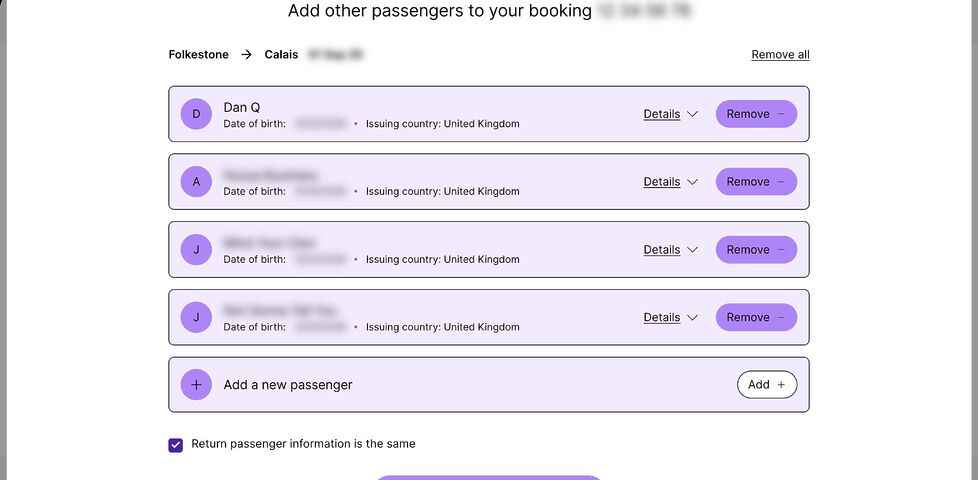
Screenshot showing a web form with Dan Q and three other passengers on the outbound leg of a journey. Personal details appear to be blurred, but are actually spoofed AND blurred, per Dan's tradition. A 'Return passenger information is the same' checkbox is checked.
You’d think that to specify different passengers for the return leg, all I’d have to do is uncheck that checkbox, right? Wrong!

I was able to provide all of the personal and passport details of everybody on the outbound leg, but un-checking the “Return passenger information is the same” checkbox did… nothing. In fact, when saving the form and logging in again, the checkbox would be automatically re-checked.1

This is the point at which a normal person would either:

  1. Add the details of all passengers, both outbound and returning, to the form, and just hope they can sort out the confusion at the terminal, or,
  2. Try to get hold of a human Help Centre/Contact Us system (good luck!) who can sort it out.

Fortunately, I am not a normal person. I… am a software security engineer.

API reverse-engineering

My browser debug tools quickly indicated how this entire process works, and gave a clue as to what was broken in LeShuttle’s systems.

  1. When you log in, it makes a POST request to https://nextus-api-prod.leshuttle.com/b2c-api/GuestApi/Read?bookRef=...&surname=..., including your booking reference and surname (which acts as your password) in the relevant parameters.
  2. This returns all of your details in a JSON document. Prettified, and with all of the actual data replaced with explanatory comments, it looks something like this:
{
  "loginDetails": {
    /* credentials you used and other metadata */
  },
  "bookingDetails": {
    "outboundTravelDetails": {
      /* details about your outbound train and vehicle */
    },
    "returnTravelDetails": {
      /* details about your return train and vehicle */
    },
    "leadName": {
      /* details of the person who booked the trip */
    },
    "outboundPaxDetails": {
      /* For the outbound journey: */
      "paxLine": [
        /* First passenger: */
        {
          "paxDets": {
            /* - name, nationality, gender, DOB */
          },
          "docDets": {
            /* - passort number, expiry, issuing country */
          }
        },
        /* Second passenger: */
        {
          /* ... and so on .... */
        },
      ],
      /* Total number of passengers: */
      "noOfPax": "4"
    },
    "returnPaxDetails": {
      /* For the return journey: */
      "paxLine": [
        /* ... each passenger: same format as outbound... */
      ],
      /* Total number of passengers: */
      "noOfPax": "5"
    },
    "storedPaxDetails": {
      /* Pre-saved details? All blank for me */
    },
    /* More metadata */
  },
  "status": {
    /* Yet more metadata */
  },
  /* Even more metadata */
}
  1. Once you’ve made some changes, you press “Save”. This triggers a POST request to https://nextus-api-prod.leshuttle.com/b2c-api/GuestApi/Save with Content-Type: application/json and the entire JSON document from before, with your modifications, passed back.2

If you’re a programmer, you’re probably already making a guess as to what the underlying problem is. And you’re probably right:

  • The “Return passenger information is the same” checkbox value is not stored in the data that gets passed back and forth.
  • Instead, it’s derived by looking at the outbound and return passenger information. If it matches, it gets checked.
  • If it’s initially checked… the form doesn’t bother loading the UI that allows return passenger details to be modified.
  • But… this means that it never loads that UI:
    • the first time you visit the page the passenger list is empty both ways, which matches: anything you enter will necessarily be recorded into both the outbound and return fields, so
    • the next time you visit, it also matches… so it still doesn’t load the fields,
    • and so on.3

“Fixing” the problem

Knowing how the API worked, I was able to simply take the JSON document from the /Read endpoint, modify it so that the outboundPaxDetails and returnPaxDetails each contained the correct details for that leg of the journey (being sure also to update the total number of passengers noOfPax, which is for some reason a stored value rather than a derived one), and then submit it back via the /Save endpoint.

Having done this, I hit the /Read endpoint again to confirm that the data had, indeed, retained the data I submitted. When logging in again to the Web interface, I noticed that the checkbox now doesn’t automatically check itself. The correct data gets passed back and forth4.

Obviously LeShuttle need to fix their damn site. But at least – thanks to a little API reverse-engineering – I was able to submit the details they wanted from us.

Footnotes

1 Before anybody asks: yes, I tried all of the obvious things like using different browsers, clearing caches, disabling plugins, etc. I even had another passenger, using a different computer and operating system, give it a go. This one’s definitely a bug in LeShuttle’s systems.

2 I choose to assume that they’re doing some kind of server-side validation to ensure that a customer can’t, for example, modify details they’re not permitted to without a charge, such as which train they’re booked onto or the registration plate of the vehicle they’re bringing. But obviously I haven’t tested this, because it’s not among the information that I’m authorised to modify. Ethical hackers get permission before they poke at things they’re not sure whether they’re supposed to… especially if it’s a travel-related system and they’re somebody who has an unusual name that routinely gets them stopped and questioned at the UK border in general. 🤭

3 It occurs to me that possibly LeShuttle provide access to the relevant form only after the outbound journey has been made? Which would be a terrible design for the system and would represent terrible UI (why provide the checkbox if it doesn’t do anything?). I decided not to chance that this could be the expected approach, though, and just “fixed” the data up-front.

4 I haven’t tried modifying any of the outbound details to see if this re-breaks the return details. I suspect it would be fine, based on my analysis that the bug exists only in the front-end. But I can’t be sure without testing, and proper testing is something that LeShuttle’s own techies are getting paid to do. I don’t care enough about their website to do it for free!

×

How I (Don’t) Collect Blog Statistics

Inspired by Becky‘s post How I Collect Blog Statistics, Respectfully,1 I thought I’d share what I do.2

tl;dr: I collect virtually nothing and I use even less.

Let me take you on a journey through the different kinds of analytics tools I’ve used:

1996 —1999: Hit counters!

My original websites used a hit counter that I wrote in Perl based on a sample from Matt’s Script Archive. Because I was edgy and dark, I made it look like this:

"Flaming" black-on-black digits 0-9.
I made the flaming digits using a stock effect in Corel Photo-Paint; this is an attempt to replicate the “feel” of them.

Hit counters are pretty dumb for a variety of reasons. Counting “hits” was never a terribly-representative reflection of the popularity of your pages. But also: because they’re a public representation of your popularity, there was every incentive to “game” them… even just by hitting refresh a couple of times. Making them untrustworthy and pointless.

1998 — 2006: Webalizer

Screenshot from The Webalizer, showing a bar chart of web stats covering September 2005.
Who can forget The Webalizer? Those Microsoft Excel ’97-grade barcharts!

Back in the day, “proper” web stats was something you did on your log files. Take log files, pump them through a program, get amalgamated output. And the king of these tools was The Webalizer.3

On a few of my websites – and some that I helped host for my friends – I’d have The Webalizer run daily, collating an archive of monthly stats plus “month-so-far” for the current month.

The Webalizer attempted to differentiate “hits” from “visitors”. And it tried to distinguish between browsers, and isolated bots, and tracked pulled referrer-data, and could even try to geolocate IP addresses. It was pretty magical for its time.

2006 2016 Google Analytics

I was an early adopter of Google Analytics: my site ID (“UA code”) was only five digits long!

Screenshot from an early version of Google Analytics, featuring a line graph covering visitors between April and May 2009, showing a 1,064.1% higher visitor counter than 'sites of a similar size' on one date.
Those graphs were slick for the Web technology of the day. A product of that period in the mid-naughties when Google made products that actually impressed users and didn’t just make them roll their eyes?

Google Analytics works via a JavaScript snippet which collects a variety of information about the visitor and sends it to Google’s mothership.

A third-party cookie that connected all Google Analytics-powered sites, plus everybody’s activity on other Google products, provided a wealth of data that you couldn’t get any other way. Want a gender breakdown of your visitors or their interests? Google can “help” you with that… and all the while, “helping” themselves to copies of all the data too.

If your website runs Google Analytics, it’s part of Google’s massive data-harvesting machine, monitoring people as they move around the Web. Webmasters trading away their visitors’ identities for some pretty charts seems pretty disgusting to me; it saddens me that I was ever “part of the problem”.

2015 2023 Piwik

Since around 2010, I’d been actively blocking Google Analytics, which made me feel a bit like a hypocrite to be inflicting it upon others. I looked for an alternative and found it in Piwik (now Matomo), an open-source and self-hosted analytics tool.

Screenshot from Piwik, showing a world map, graphs, and search keywords.
A self-hosted Piwik/Matomo installation provides almost the same level of useful depth as Google Analytics, but you get to keep your soul.

I ran Google Analytics and Piwik side-by-side to validate the latter, and found it to be excellent. Not only was it collecting data in a much more-ethical and respectful way, but it was also producing more-accurate results for my readership who, leaning somewhat “techie”, would sometimes block Google Analytics outright for all of the same reasons I did.

It was pretty good, but…

2023 — … (Almost) nothing?

…I don’t like the kind of blogger I am when I’m collecting stats!

It’s like… being a teenager again and having that hit counter, and getting excited when it goes up.  So what if a number went up? What does “popularity” mean? Isn’t the impact more important than the number of eyeballs?4

So in 2023, after winding my analytics down by instalments for many years, I just… stopped.5 I realised that so long as I was able to easily “watch the stats”, I’d be temped to write for the stats. To treat it as a score. To make the hit counter go up.6

That, in essence, is why I don’t really “do” any webstats any more. Analytics don’t serve me and the blogger I want to be, and they didn’t represent anything that I would consider a useful metric of success.

If somebody’s moved by what I do, that’s great: but a hit counter going up by one doesn’t tell me that; and it never did. Now if they leave a comment or drop me an email or even send me a postcardthat’s how I know that I made a difference!

Exception to the rule: GoAccess!

While I don’t actively watch the stats any more, I suppose I can still generate them, from my webserver logs, Webalizer-style. Except nowadays I’d probably use GoAccess:

GoAccess dashboard for the last week, showing 1.9M requests by 350K visitors, pulling 160GB of data, with a big of a jump in traffic on 14 July.
There’s a bit of a “hump” where last week’s blog post about apps started trending on Bubbles, HackerNews, Lobste.rs and the like. But I knew that already because people sent me lots of comments!

There’s a script that I’m able to run, if I feel like it, to parse the most-recent of my Caddy logfiles. It takes about one minute to run per day of logs to process, and outputs a perfectly attractive self-contained HTML file.

Here’s that script:

#!/bin/bash
readonly LOG_DIR="/var/log/www/danq.me/"
readonly DAYS=7
readonly OUTPUT_HTML="/var/log/goaccess/danq.me.html"

sudo bash -c "{ find '$LOG_DIR' -maxdepth 1 -name 'access*.gz' -mtime -$DAYS -print0 | sort -z | xargs -0 zcat; cat '$LOG_DIR/access.log'; } | goaccess --log-format CADDY --output '$OUTPUT_HTML' -"

It’s not clever. It’s not sophisticated. It doesn’t use cookies or JavaScript or, indeed, anything other than what my webserver gives me for free.

I barely use it: maybe once every 18 months or so (today was the first time in well over a year). It’s there if I need it. And it’s inconvenient-enough to use that I’m not tempted to.

Footnotes

1 And perhaps also inspired to a lesser extent by Terence Eden‘s Reasonably accurate, privacy conscious, cookieless, visitor tracking for WordPress, which I’ve been thinking about on-and-off ever since I read it last year.

2 By “blog stats”, here, I mean statistics about visitors to my blog, not stats about my blogging (which I track and share in excruciating detail).

3 Did you know that the last point release of The Webalizer was in 2013 and the last feature release was in 2010: much later than I thought was the case!

4 Also, how do we even count “eyeballs”. Right now, about a fifth to a quarter of my visitors are bots. Amazonbot alone accounts for over 2% of my traffic. (I should probably tighten my robots.txt.)

5 Nowadays, there’s no tracking scripts whatsoever on my site. I don’t set a cookie unless you ask me to (and then it’s “transparent”: you can see exactly what it contains and what it’s for), I don’t try to fingerprint you in any way, I don’t even keep server logs longer than 60 days! Back when I used Jetpack I actively nerfed its stats-collection “features”. I don’t want your personal data!

6 Last week, I wrote a blog post about breaking into somebody’s “app” to make a web page that does the same things, but better. It attracted lots of comments, emails, and other feedback, so I can see it had impact. I have no idea how many eyeballs (or bots) saw it. That’s not the important bit.

× ×

F-Day plus 151

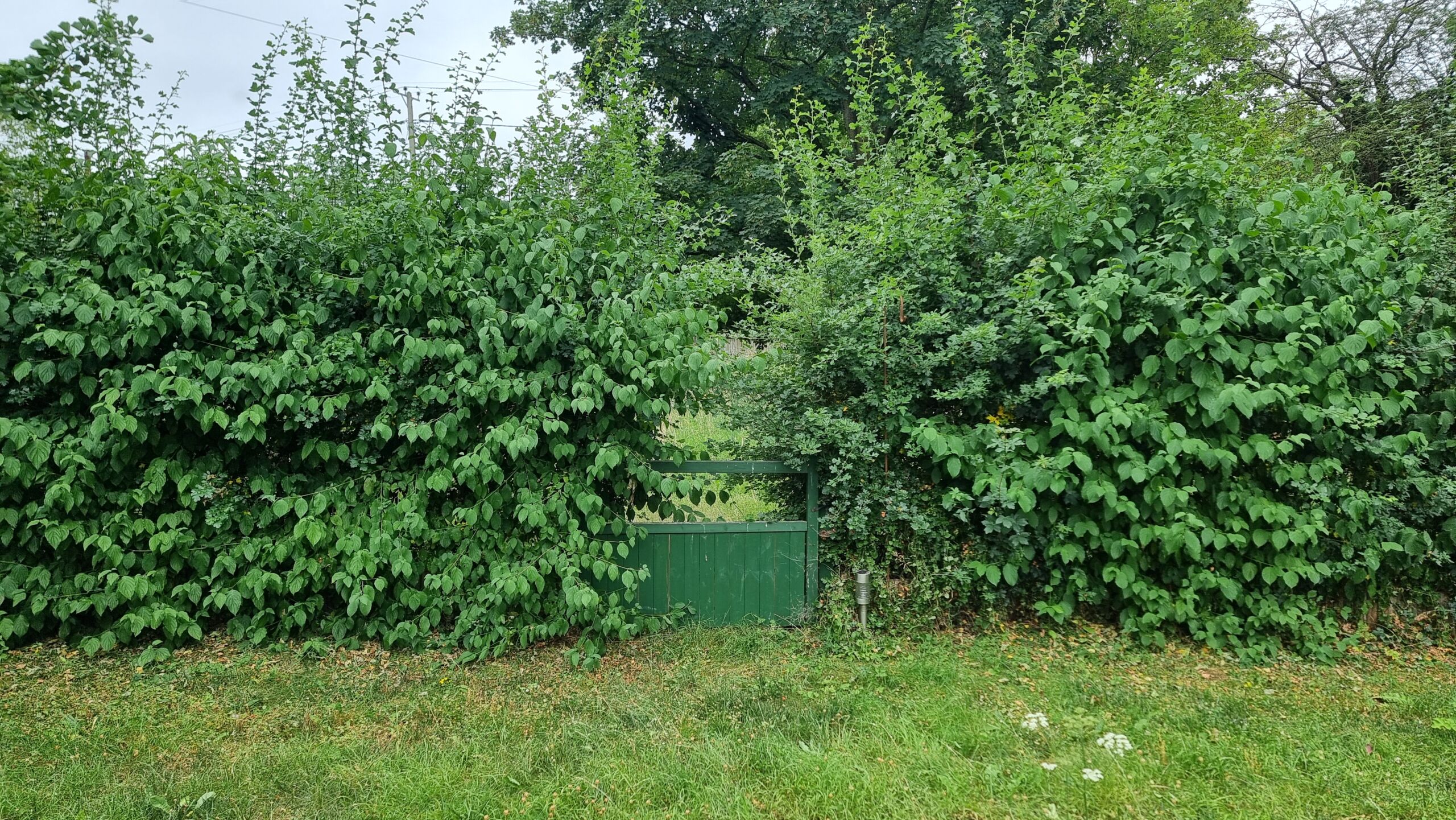
A hundred and fifty one days since we were flooded out of our house, and I needed to visit to meet a contractor. The garden’s starting to get a little wild, this summer: we’ve been periodically visiting to mow the lawn, but our hedge seems to have decided that this could be the year that it will consume the gate once and for all…

In a verdant garden, an unkempt hedge of various species grows into the space of a green-painted wooden gate, beginning to hide it.

×

I Regret To Say That GMail is Now a Spam Farm, or, Why You Should Really Get That Dedicated Email Address Now

This is a repost promoting content originally published elsewhere. See more things Dan's reposted.

Aside from their predictable subject lines and verbiage, there’s also one other thing that these [recent, AI generated] spam emails have in common: 99.9% come from GMail accounts. Once in a blue moon one will come from yahoo or aol or some other general mail service, but they are a rarity. Almost all of them are GMail. One one hand, congrats to Google, I suppose, for cornering the stand-alone email market so completely that even scammers are impressed with its ease of use. Surely that is some sort of sign of success.

On the other hand, if you are a person who relies on GMail as your primary email, this means that if you are trying to send me mail, you now run a much higher chance of being deposited into my spam folder. So much of the email I get from GMail accounts at this point is spam that an actual Gmail email, from an actual person, is statistically relatively rare. To be fair, if you write that email to me yourself with your own little fingers, your chances of hitting my actual inbox are pretty decent. But if you used GMail’s onboard “AI” to “help” you write that email, you are likely going directly to the spam folder. The GMail spam filter is now trained to recognize “AI” slop sentences, even those written by GMail itself. Yes, there is probably irony there.

GMail’s been going gradually downhill for many years. It’s been a slow decline, compared to many enshittified services, but it’s still very-clearly happening. Aside from the long-established privacy/big data concerns – especially if you use any other Google services, or fail to block their Web trackers – they’ve just devolved into a service that doesn’t “wow” like it did when it was launched. It’s slow, it’s clunky, and it increasingly shovels AI down your throat, whether you want it or not.

If you own a domain name, you should already be using that as the domain of your email address, of course. This detaches your email address from any specific provider, which makes it much easier to change your email provider whenever you like: it puts the power in your hands. You can do this whether you’re using GMail or any other provider.

(If you don’t own a domain name, then perhaps you should.)

But beyond that: if you’re using GMail as your primary personal email service, you should shop around. Don’t let the weight of the inertia of your inbox stop you: there are plenty of ways to back that up, move it around, or just retain it as an archive in-place if you have no other choice.

I switched to Proton about ten or eleven years ago and I haven’t looked back. Are they perfect? No. Are they better than GMail? Absolutely; for me at least. But there are plenty of other options available for those for whom Proton is, perhaps, too-security-conscious. And switching to almost any of them reduces the risk that your messages start going to your recipients’ spam folders, as more and more spammers move to GMail for its AI features, which produce junk mail faster than ever before.

Why aren’t AI companies competing directly with their customers?

If the chatbot can do the job, and if the chatbot costs less than the worker who does the job today, then the chatbot company can profitably sell services more cheaply than anyone who presently employs that worker, because the chatbot company already owns the chatbot. If you were really on a glide path to creating an all-powerful deity and just needed cash to keep the venture going until the cancer-curing word-guesser awoke from its long slumber, then wouldn’t you want as much cash as possible?

An excellent counterpoint for anybody who claims that AI will become profitable eventually, and agrees with the hype assertion that the things that it’s capable of automating always represent better value than human workers doing the same tasks.

Why sell picks and shovels if you’ve already struck gold?

But of course you already know the answer. The big AI companies are currently funded by moving-money-around. They do not have a clear path to profitability, and it’s not certain whether or not they ever will. So selling their service, rather than competing with their customers, allows them to hedge their bets for as long as possible.

Maybe in that time they’ll find a way to bring their costs down. Maybe they won’t. But they’re clearly not confident enough that they will that they’ll bet on their own long-term future.

Recreating a 1990 Book Cover (in HTML + CSS)

At the weekend, I became briefly obsessed with the cover of the manual for GoScript Plus, a 1990 software tool for converting PostScript output into a format that’s compatible with a wider array of IBM-compatible printers.

I’ve never used this piece of software. I can’t even remember how I found my way to archive.org’s copy of its documentation. Just one of those mysteries.

Anyway: here’s what it looks like:

Computer manual cover printed in blue, black, and white. The title 'GoScript Plus' is askew at one angle, and everything else is askew at a right angle to that.
I can see why, if you were making software like this, you’d want to show off the number of typefaces your tool could support. And look: we can print text at wonky angles! Buy this and you can too!

The design is very much a product of its era. That two-colour print, the strange angles, those smallcaps, the excessive use of title case, and the use of “ink jet” as two words rather than one.

Anyway: I decided I’d attempt to re-create the cover in pure HTML + CSS. No SVGs; no images. Here’s what I came up with:

Somehow mine looks slightly less-dated? But still very “90s”.

I’m not entirely happy with the fonts: in the short while I was working on this, I couldn’t find anything that was quite “right” for the main title, with its stencil-style Rs and Ps, super-rounded Os and Cs, and narrow Ss. In the end I just used Ubuntu Sans almost everywhere.

The white “stripe” with font samples is all just system fonts from your computer! So that’s not accurate either. But my aim was to capture the feel of the manual rather than necessarily make a 100% faithful recreation of it, so I guess it’s okay.

I was quite pleased with the LaserGo logo in the top left. The main “striped circle with one corner a different color” was implemented like this:

/* The <address> element contains the text "LaserGo, Inc" */
address {
  /* Before AND after it are two virtual elements: */
  &:before,
  &:after {
    content: '';
    display: block;
    position: absolute;
    /* Both are offset to where I want the "circle" to be. */
    /* (note use of container query units for responsive sizing!) */
    top: -8cqw;
    left: 3cqw;
    width: 8cqw;
    height: 8cqw;
    /* Make it circular: */
    border-radius: 50%;
    /* The background is striped, with a color specified in --logo-color: */
    background: repeating-linear-gradient(var(--logo-color) 0cqw, transparent 0.2cqw, transparent 0.3cqw);
    /* Then that gets masked; two variables control which part is shown: */
    mask-image: conic-gradient(var(--logo-corner-mask) 0deg, var(--logo-corner-mask) 90deg, var(--logo-remainder-mask) 90deg, var(--logo-remainder-mask) 360deg);
  }

  &:before {
    /* The "before" circle uses white stripes: */
    --logo-color: var(--white);
    /* And masks so that three-quarters of the circle is shown: */
    --logo-corner-mask: transparent;
    --logo-remainder-mask: black;
  }

  &:after {
    /* The "after" circle uses black stripes: */
    --logo-color: var(--black);
    /* And masks so that one-quarter of the circle is shown: */
    --logo-corner-mask: black;
    --logo-remainder-mask: transparent;
  }
}
I was pleased to be able to share 90% of the CSS code between the white-striped three-quarters-circle and the black-striped one-quarter-circle. All that remained after this was to “bite” a corner out of it with a background-coloured overlay.

Anyway; there’s probably nothing more to say about this, apart from a reminder than HTML + CSS is absolutely a an art medium. Take a look at the source code of my fake book cover, if you like (or inspect its DOM, if you prefer): it’s all self-contained and should be reasonably readable.

×

How to Set Up Windows 11 Without a Microsoft Account in 2026

This is a repost promoting content originally published elsewhere. See more things Dan's reposted.

When you reach the “Let’s sign in” screen (or any network/account screen during setup), press Shift + F10. This opens a Command Prompt window. Type the following and press Enter:

start ms-cxh:localonly

I hope to never need to install Windows again – I hope that part of my life has passed – but should I need to install Windows then, as usual, I’ll want to do so without a Microsoft account. And as that’s apparently become more-difficult now, I’ll be consulting this guide.

My piano came home from the hospital

When my house flooded 149 days ago, a lot of things were damaged. The oak floors, for one, were completely wrecked, as the ground floor electrical ring, the skirting boards, one internal wall, a few hundred books and small items, and a load of furniture. Since then we’ve lived in a few places – but mostly at the “Chicory House” – while the insurance company has been working on repairing and replacing everything that we’ve lost.

This week, we got back the piano.

Two men move an upright piano across a driveway and through a door, with the help of a small trolley and some boards.
Professional piano movers make this job look easy. But having tried to move a piano before, it’s definitely not.

Our insurance policy is “new for old”, but we own a handful of pieces of furniture whether it’s impractical or impossible to replace them like-for-like and we’ve instead petitioned for restoration. For example: our dining table is a bit of a family heirloom, a mahogany reading room desk formerly from the libraries of the University of Cambridge, adapted by Ruth‘s (carpenter) father into a dining table1.

Another example turns out to be our upright piano, which turns out to be a bit of a musical oddity: it’s got features, like it’s peculiar gravity-controlled overdampers that, among other characteristics, are pretty distinct to the Edwardian or perhaps inter-war construction techniques that were in vogue at the time2.

Post-flood photo of the body of an upright piano alongside a cabinet with a clear tide mark up to about a foot from the ground.
Follow the line of the tide mark fromt he glasses cabinet to the piano and it’s clear that the body of the instrument sat full of water for some time. 😢

In any case: after a piano specialist wrote us a statement explaining that it simply wasn’t possible to “new-for-old” this because they don’t make them like this any more, the insurance company signed-off on us sending it away to what I lovingly called a “piano hospital”, where she’s enjoyed a complete overhaul.

And now, at last, it’s back with us: we could have kept it in storage until we’re ready to move back “home” (there’s still a lot of repair work to be done!), but having it moved twice is cheaper… plus it means we get it back sooner.

The pristine inside of an upright piano.
There was clearly a lot of TLC available at the “piano hospital”: it’s got a whole new set of strings, new felt, and even her internal metalwork has been polished to a shine.

Personally, I’ve found it an enormous psychological relief to have the piano back, because I’ve missed it!

I started teaching myself to play the piano during the second Covid lockdown, looking for something to distract me from my inability to go outdoors and do things, and wanting to try to engage a different part of my brain. I was quickly hooked: I’d never learned any musical instrument before3, and I enjoyed having something I was (and still am!) pretty bad at which I could make slow incremental progress.

And so for several years, most days, I’d play about 10 minutes of piano. Not much: just a little each day usually while my lunch warmed up. But slowly but surely I reached the point that I could tolerate – or even enjoy! – hearing myself play4.

And then after the flood… I couldn’t. I’d get up from work to stretch my legs and my fingers would twitch in anticipation of fulfilling a routine that… I just didn’t get to, any more. I tried playing the electric piano at the local library but its headphones were damaged and the action didn’t feel right and… it just wasn’t the same. I wanted our piano back!

Dan, a white man with a beard and a blue-dyed ponytail, sits in a plain hallway at a polished upright piano, looking happy.
It feels a bit weird playing the piano between the bottom of the stairs and the front door, but space is short in the Chicory House so we make do with where we can put things.

And now I’ve got it. And it feels fantastic. It’s a little different – the sustain pedal’s response is a lot better, but more nuanced, and I’m not used to it yet, for example. But it’s still a wonderful thing: like a family member coming home after a long period away.

Also: it feels like a small victory to have something back, following the flood, because the entire insurance/assessment/repair process continues to be so slow.

Our house may still be stuck with no floors and missing walls… but, five months later, the first things to be repaired are coming back to us. Maybe soon we’ll have, I don’t know, a working kitchen or the plumbing re-connected. Here’s hoping!

Footnotes

1 The transformation of the reading room desk – which once sported integrated reading lights – into a general-purpose table has been done so-effectively that you wouldn’t know to look at it that our largest piece of furniture had ever had another life… unless you lift the secret panel in its centre foot, at which point you’d discover a BS 546 plug still wired-in to it!

2 Don’t ask me to enumerate the particular features or how we know: JTA, plus our piano tuner, did the research that ultimately underpinned the argument that you couldn’t possibly acquire a like-for-like replacement for it. I just know how it feels and sounds.

3 I didn’t even play a recorder at school!

4 I fully appreciate that I will never be as good a pianist as, say, the average 8-year old who plays for their YouTube channel. I am fine with this. Like my blogging, my piano-playing is, first and foremost, for me and not for anybody else.

× × × ×

Today I Rescued 7,234 Old GIFs

This week, GlitchyZorua brought to my attention the Ibiblio Icon Browser, a collection of many thousands of GIF icons curated in the 1990s by Gioacchino La Vecchia. Glitchy’s goal was to archive a copy of all of the icons, which was turning out to be… challenging.

A more-90s website you’re unlikely to see today.

It looks pretty simple: (a) an index page, leading to (b) 24 sub-index pages, leading to (c) 57 icon directory pages, representing (d) 114 icon collections, containing anywhere up to (e) 7,296 icons, mostly but not always 32×32 pixels. Right?

But the challenge comes when you try to go from a directory page to an icon file. It looks like you’re clicking a link, but really you’re clicking… an imagemap.

I’ve talked about imagemaps before, but the essence of them is that you define areas of an image that, when clicked, hyperlink to different places. The most-common way of doing these was always client-side imagemaps, where the HTML code itself contained all of the coordinates and, crucially, the resulting destinations. But that’s not what kind of imagemap this is.

Demonstration using curl of a request to an image map URL, including a pair of coordinates as the query string, resulting in two different redirects as a result of two different coordinate pairs.
A server-side imagemap asks your browser to send the pixel coordinates that were clicked-on, as the query string. In the case of this server, that gets decoded server-side and you’re redirected based on where you clicked.

This one’s a server-side imagemap. The HTML code looks like this… and there are no URLs for the resulting library of GIF files anywhere to be seen:

<a href="/iconbin/imagemap/icon3">
  <img src="destic3/icons.gif" ismap>
</a>

That ismap attribute is what tells your browser to send the coordinates that you clicked-at.

Directory indexing is disabled, so we can’t just knock the image filename off the end of the URL and inspect. So how are we to get these images, short of manually, painstakingly, clicking on each one of them? That’s what GlitchyZorua was wondering when I turned up with some bright ideas…

(We’re clearly not the only people who struggled: archive.org hadn’t managed to collect a full set of the icons either.)

Fortunately, we can work out a little something about the gallery images. Exploration of the site shows that they’re always laid out in a grid of up to 8×8, with each (including its size information) occupying a space of 72×89 pixels:

Gallery of 64 images with a particular row and column highlighted to show the boundaries of what's believed to be a particular 'hit target' within it.
A little experimentation shows that clicking anywhere within the intersection area results in a redirect to the same image.

The webserver seems to be running Apache, so it’s probably using something like mod_imagemaps to manage its server-side imagemaps. We can imagine that somewhere on the server there’s probably a file that looks a bit like this, mapping rectangular coordinate pairs to redirect URLs:

# icon3 images:
base destic3/
#    filename  |  top left  |  bottom right
# -------------+------------+----------------
rect 49ers.gif         0,0            72,89
rect 49ers1.gif       73,0           145,89
rect 4dos.2.gif      146,0           217,89
rect 4dos.gif        218,0           289,89
# ... and so on for all 64 images in this collection!
I sincerely hope that La Vecchia had some automated process that he used to produce the thousands of lines of configuration that he needed, and he didn’t write his files by hand!

We don’t have access to those configuration files, but we can infer what hit areas they might have. If each hit area is 72×89 pixels, we can hit the centre of the top-left one at 36×44 and then just keep adding on 72 and 89 pixels to permute the centrepoints of all the hit areas.

In pseudocode, what we’d need to do is:

  • For each library from 1 to 113,
    • For each X coordinate from the set {36, 108, 180, 252, 324, 396, 468, 540}
      • For each Y coordinate from the set {44, 133, 222, 311, 400, 489, 578, 667}
        1. Generate a URL of the form:
          https://www.ibiblio.org/iconbin/imagemap/icon{library}?{x},{y}
        2. Make a HTTP HEAD request to that URL
        3. If you get a HTTP 302 (redirect) response code, record the resulting Location:

That gets us the URL of every one of the thousands of GIFs on the service. Next, we can use wget to download each of them. Sorted!

But we can do one better: once we’ve got all the icons, we can present them in a new website. One without server-side image maps, and with a working search. So that’s what I did. I hacked together a very basic static site generator using Ruby and ERB templates, that produces a gallery with pagination (mirroring the page numbers from the original), plus client-side search. And of course the whole repository can be cloned if you just want a copy of the icons for yourself:

I think my modernised version of this icon library is, while basic, a huge improvement upon the original… (thanks in large part to the advancement of Web technologies in the intervening years!).

Anyway: if you’d like to browse the library in its new form, it’s at ibiblio-icon-archive.danq.dev. It… looks its age, but at least now it’s accessible to the world and able to be archived for posterity.

× ×