Why is this an “app”?
This summer, the kids’ performing arts school are singing and dancing in a show at Disneyland. We’re all very excited, but my excitement, at least, was muted a little when I was told to install the “Travelbound” app in order to get access to the itinerary, travel arrangements, and accommodation details.
Fuck that noise. This should have been a webpage. Why do you want me to install a(nother) shitty app just to tell me something that could have been a (smaller, faster, more universally-accessible) document?

There only seem to be two things that this “app” does, that a webpage might not have, and they’re both anti-features:
- It reports tracking data associated with your Google Account back to the developers.
- It shows you advertisements (which they call “inspirations”) for other trips organised by the same agency.
Fuck. Everything. About. That.
A webpage would have been so much better. Unlike this app, a webpage can be…1
- Copy-pastable
- Printable
- Saveable
- Bookmarkable
- Searchable
- Usable on virtually any device
- (Potentially) more-accessible
I’m annoyed enough… that I’m going to “fix” this app. Hold my beer.
Intercepting app traffic
It’s been a while since the last time I reverse-engineered an Android app from its network traffic, so I had to brush-up on the best way. Here’s what I ended up doing.
- Created a new virtual device in Android Studio’s Virtual Device Manager.
- Tested
adb shellwas working and used rootAVD to root it:./rootAVD.sh system-images/android-33/google_apis_playstore/x86_64/ramdisk.img.2 - Performed a cold boot, ran Magisk, and tweaked its settings to automatically grant
suaccess to any app that asked.3
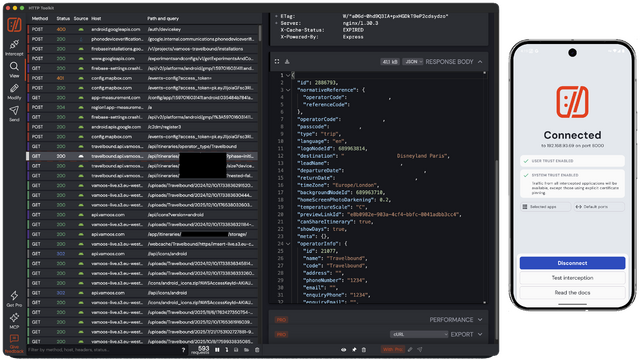
- Ran HTTP Toolkit and told it to intercept AVD traffic. It installed a (fake) VPN provider, routing the phone’s traffic through the proxy.4
- Installed the Travelbound app from the Play Store.
- Configured HTTP Toolkit to proxy only the Travelbound app (more signal, less noise).
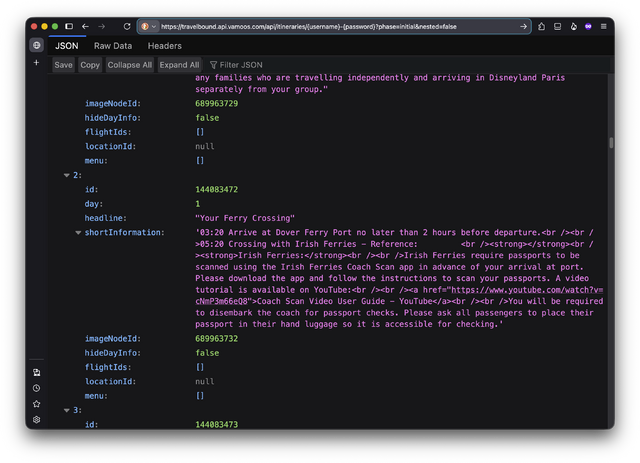
With only a couple of minutes experimentation I discovered that the app works by concatenating the username and password5 and using it in a URL of the form:
https://travelbound.api.vamoos.com/api/itineraries/{username}-{password}
This returns a pile of JSON which, with a little interpretation, can be seen to represent all of the content the app “shows”. E.g., there’s:
- an array containing each leg of the itinerary,
- an array containing all of the
“inspirations”advertisements to show you, - a cross-referenced array containing all of the files (images etc.) that are referenced by the other sections, etc.
A little experimentation showed me that the S3 image URLs were being delivered with moderately-short expiration times, so the JSON needs re-fetching periodically even if the content hasn’t been changed.6
Turning it into something better
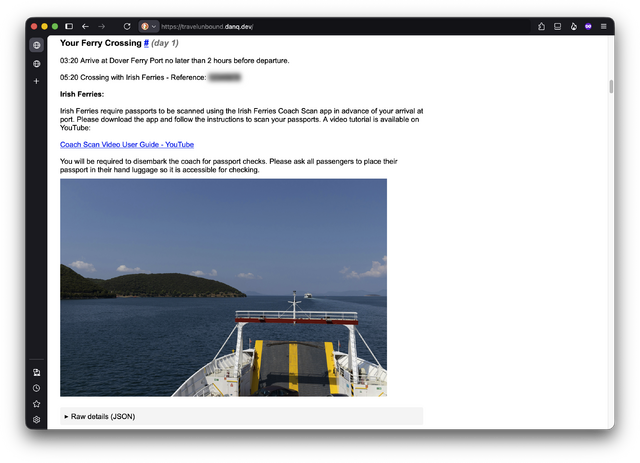
Now I had everything I needed to make something… better. I wrote a Ruby script that runs on a Cron schedule to pull the latest JSON and use it to build a HTML page.
I chose to have it completely skip over the “inspirations” (“overlayRows” in the data schema) and just list:
- the items from the itinerary and
- all of the files not referenced by the inspirations nor itinerary, (a lazy way to collate the PDF download links).
Then I hosted the page, protected by a password: the same one my tour group were given in the first place. I included the raw JSON it used in <details> elements so it
can be checked if e.g. there are bits of the schema I didn’t see but that might appear later.
Some people like an “app”, and that’s… fine, I guess. But some apps could have been a webpage. And especially where, like this one, the content they deliver is already written in HTML and delivered over HTTP… they should be a webpage, right?
I can’t understand how we got to this place with “app culture”! Software companies are happy to make their lives harder (and more expensive: deploying to the big app stores isn’t free!), in order to deliver HTML content to fewer people and with fewer features7 than if they just published directly to the Web in the first place!
There are (some) tasks for which an “app” is absolutely the right choice of medium. Travelbound is not one of them.
But at least I (and the rest of our group, whom I’ve shared it with) now get the choice about how we access this content. Either a 43MB app (ballooning to 124MB when it’s finished downloading extra content) with tracking and advertisements… or a 0.05MB web page (with an optional extra 35MB of images) that provides more features and works on more devices. I know which one I’ll be using!
Footnotes
1 And these are just the features that everybody can get behind. The webpage I ultimately ended up making to replace the app also has some user-friendly/developer-hostile features, like the fact that it removes the tracking code and doesn’t show advertisements.
2 You need to root the device in order to force applications that use Certificate Pinning to trust your man-in-the-middle proxy server. Without this, some applications – including the one I wanted to reverse-engineer – will recognise your self-signed TLS certificate as invalid and refuse to communicate.
3 Without changing this setting in Magisk, I found that HTTP Toolkit would
request su access but not wait for the response, and go on to run in unprivileged mode before I had a chance to grant it!
4 Owing to Android security considerations I needed to manually install the root CA certificate it installed for me, but the instructions “just worked”.
5 The username and password is shared by an entire tour group. I’m guessing they don’t have a plan for if some credentials get leaked? Or possibly they consider all of the data they hold to be low-sensitivity enough that it doesn’t matter if it does… in which case I return to my original point: why the hell wasn’t it just a webpage in the first place?
6 Or else the images need caching locally, which seems to be what the app does, in the bloatiest possible way.
7 And, often, with worse accessibility. I’ve not audited the accessibility of this app, but there are things about it that suggest that it’d be harder to use using accessibility technologies than my plain, simple Web version.