Generative AI use and human agency

This is a repost promoting content originally published elsewhere. See more things Dan's reposted.

5. If you use AI, you are the one who is accountable for whatever you produce with it. You have to be certain that whatever you produced was correct. You cannot ask the system itself to do this. You must either already be expert at the task you are doing so you can recognise good output yourself, or you must check through other, different means the validity of any output.

9. Generative AI produces above average human output, but typically not top human output. If you overuse generative AI you may produce more mediocre output than you are capable of.

I was also tempted to include in 9 as a middle sentence “Note that if you are in an elite context, like attending a university, above average for humanity widely could be below average for your context.”

In this excellent post, Joanna says more-succinctly what I was trying to say in my comments on “AI Is Reshaping Software Engineering — But There’s a Catch…” a few days ago. In my case, I was talking very-specifically about AI as a programmer’s assistant, and Joanna’s points 5. and 9. are absolutely spot on.

Point 5 is a reminder that, as I’ve long said, you can’t trust an AI to do anything that you can’t do for yourself. I sometimes use a GenAI-based programming assistant, and I can tell you this – it’s really good for:

  • Fancy autocomplete: I start typing a function name, it guesses which variables I’m going to be passing into the function or that I’m going to want to loop through the output or that I’m going to want to return-early f the result it false. And it’s usually right. This is smart, and it saves me keypresses and reduces the embarrassment of mis-spelling a variable name1.
  • Quick reference guide: There was a time when I had all of my PHP DateTimeInterface::format character codes memorised. Now I’d have to look them up. Or I can write a comment (which I should anyway, for the next human) that says something like // @returns String a date in the form: Mon 7th January 2023 and when I get to my date(...) statement the AI will already have worked out that the format is 'D jS F Y' for me. I’ll recognise a valid format when I see it, and I’ll be testing it anyway.
  • Boilerplate: Sometimes I have to work in languages that are… unnecessarily verbose. Rather than writing a stack of setters and getters, or laying out a repetitive tree of HTML elements, or writing a series of data manipulations that are all subtly-different from one another in ways that are obvious once they’ve been explained to you… I can just outsource that and then check it2.
  • Common refactoring practices: “Rewrite this Javascript function so it doesn’t use jQuery any more” is a great example of the kind of request you can throw at an LLM. It’s already ingested, I guess, everything it could find on StackOverflow and Reddit and wherever else people go to bemoan being stuck with jQuery in their legacy codebase. It’s not perfect – just like when it’s boilerplating – and will make stupid mistakes3 but when you’re talking about a big function it can provide a great starting point so long as you keep the original code alongside, too, to ensure it’s not removing any functionality!

Other things… not so much. The other day I experimentally tried to have a GenAI help me to boilerplate some unit tests and it really failed at it. It determined pretty quickly, as I had, that to test a particular piece of functionality need to mock a function provided by a standard library, but despite nearly a dozen attempts to do so, with copious prompting assistance, it couldn’t come up with a working solution.

Overall, as a result of that experiment, I was less-effective as a developer while working on that unit test than I would have been had I not tried to get AI assistance: once I dived deep into the documentation (and eventually the source code) of the underlying library I was able to come up with a mocking solution that worked, and I can see why the AI failed: it’s quite-possibly never come across anything quite like this particular problem in its training set.

Solving it required a level of creativity and a depth of research that it was simply incapable of, and I’d clearly made a mistake in trying to outsource the problem to it. I was able to work around it because I can solve that problem.

But I know people who’ve used GenAI to program things that they wouldn’t be able to do for themselves, and that scares me. If you don’t understand the code your tool has written, how can you know that it does what you intended? Most developers have a blind spot for testing and will happy-path test their code without noticing if they’ve introduced, say, a security vulnerability owing to their handling of unescaped input or similar… and that’s a problem that gets much, much worse when a “developer” doesn’t even look at the code they deploy.

Security, accessibility, maintainability and performance – among others, I’ve no doubt – are all hard problems that are not made easier when you use an AI to write code that you don’t understand.

Footnotes

1 I’ve 100% had an occasion when I’ve called something $theUserID in one place and then $theUserId in another and not noticed the case difference until I’m debugging and swearing at the computer

2 I’ve described the experience of using an LLM in this way as being a little like having a very-knowledgeable but very-inexperienced junior developer sat next to me to whom I can pass off the boring tasks, so long as I make sure to check their work because they’re so eager-to-please that they’ll choose to assume they know more than they do if they think it’ll briefly impress you.

3 e.g. switching a selector from $(...) to document.querySelector but then failing to switch the trailing .addClass(...) to .classList.add(...)– you know: like an underexperienced but eager-to-please dev!

Reply to Vika, re: Content-Security-Policy

This is a reply to a post published elsewhere. Its content might be duplicated as a traditional comment at the original source.

Vika said:

Had a fight with the Content-Security-Policy header today. Turns out, I won, but not without sacrifices.
Apparently I can’t just insert <style> tags into my posts anymore, because otherwise I’d have to somehow either put nonces on them, or hash their content (which would be more preferrable, because that way it remains static).

I could probably do the latter by rewriting HTML at publish-time, but I’d need to hook into my Markdown parser and process HTML for that, and, well, that’s really complicated, isn’t it? (It probably is no harder than searching for Webmention links, and I’m overthinking it.)

I’ve had this exact same battle.

Obviously the intended way to use nonces in a Content-Security-Policy is to have the nonce generated, injected, and served in a single operation. So in PHP, perhaps, you might do something like this:

<?php
  $nonce = bin2hex(random_bytes(16));
  header("Content-Security-Policy: script-src 'nonce-$nonce'");
?>
<!DOCTYPE html>
<html lang="en">
<head>
  <meta charset="UTF-8">
  <title>PHP CSP Nonce Test</title>
</head>
<body>
  <h1>PHP CSP Nonce Test</h1>
  <p>
    JavaScript did not run.
  </p>

  <!-- This JS has a valid nonce: -->
  <script nonce="<?php echo $nonce; ?>">
    document.querySelector('p').textContent = 'JavaScript ran successfully.';
  </script>

  <!-- This JS does not: -->
  <script nonce="wrong-nonce">
    alert('The bad guys won!');
  </script>
</body>
</html>
Viewing this page in a browser (with Javascript enabled) should show the text “JavaScript ran successfully.”, but should not show an alertbox containing the text “The bad guys won!”.

But for folks like me – and you too, Vika,, from the sounds of things – who serve most of their pages, most of the time, from the cache or from static HTML files… and who add the CSP header on using webserver configuration… this approach just doesn’t work.

I experimented with a few solutions:

  • A long-lived nonce that rotates.
    CSP allows you to specify multiple nonces, so I considered having a rotating nonce that was applied to pages (which were then cached for a period) and delivered by the header… and then a few hours later a new nonce would be generated and used for future page generations and appended to the header… and after the cache expiry time the oldest nonces were rotated-out of the header and became invalid.
  • Dynamic nonce injection.
    I experimented with having the webserver parse pages and add nonces: randomly generating a nonce, putting it in the header, and then basically doing a s/<script/<script nonce="..."/ to search-and-replace it in.

Both of these are terrible solutions. The first one leaves a window of, in my case, about 24 hours during which a successfully-injected script can be executed. The second one effectively allowlists all scripts, regardless of their provenance. I realised that what I was doing was security theatre: seeking to boost my A-rating to an A+-rating on SecurityHeaders.com without actually improving security at all.

But the second approach gave me an idea. I could have a server-side secret that gets search-replaced out. E.g. if I “signed” all of my legitimate scripts with something like <script nonce="dans-secret-key-goes-here" ...> then I could replace s/dans-secret-key-goes-here/actual-nonce-goes-here/ and thus have the best of both worlds: static, cacheable pages, and actual untamperable nonces. So long as I took care to ensure that the pages were never delivered to anybody with the secret key still intact, I’d be sorted!

Alternatively, I was looking into whether Caddy can do something like mod_asis does for Apache: that is, serve a file “as is”, with headers included in the file. That way, I could have the CSP header generated with the page and then saved into the cache, so it’s delivered with the same none every time… until the page changes. I’d love more webservers to have an “as is” mode, but I appreciate that might be a big ask (Apache’s mechanism, I suspect, exploits the fact that HTTP/1.0 and HTTP/1.1 literally send headers, followed by two CRLFs, then content… but that’s not what happens in HTTP/2+).

So yeah, I’ll probably do a server-side-secret approach, down the line. Maybe that’ll work for you, too.

UK’s secret Apple iCloud backdoor order is a global emergency, say critics

This is a repost promoting content originally published elsewhere. See more things Dan's reposted.

In its latest attempt to erode the protections of strong encryption, the U.K. government has reportedly secretly ordered Apple to build a backdoor that would allow British security officials to access the encrypted cloud storage data of Apple customers anywhere in the world.

The secret order — issued under the U.K.’s Investigatory Powers Act 2016 (known as the Snoopers’ Charter) — aims to undermine an opt-in Apple feature that provides end-to-end encryption (E2EE) for iCloud backups, called Advanced Data Protection. The encrypted backup feature only allows Apple customers to access their device’s information stored on iCloud — not even Apple can access it.

Sigh. A continuation of a long-running saga of folks here in the UK attempting to make it easier for police to catch a handful of (stupid) criminals1… at the expense of making millions of people more-vulnerable to malicious hackers2.

If we continue on this path, it’ll only be a short number of years before you see a headline about a national secret, stored by a government minister (in the kind of ill-advised manner we know happens) on iCloud or similar and then stolen by a hostile foreign power who merely needed to bribe, infiltrate, or in the worst-case hack their way into Apple’s datacentres. And it’ll be entirely our own fault.

Meanwhile the serious terrorist groups will continue to use encryption that isn’t affected by whatever “ban” the UK can put into place (Al Qaeda were known to have developed their own wrapper around PGP, for example, decades ago), the child pornography rings will continue to tunnel traffic around whatever dark web platform they’ve made for themselves (I’m curious whether they’re actually being smart or not, but that’s not something I even remotely want to research), and either will still only be caught when they get sloppy and/or as the result of good old-fashioned police investigations.

Weakened and backdoored encryption in mainstream products doesn’t help you catch smart criminals. But it does help smart criminals to catch regular folks.

Footnotes

1 The smart criminals will start – or more-likely will already be using – forms of encryption that aren’t, and can’t, be prevented by legislation. Because fundamentally, cryptography is just maths. Incidentally, I assume you know that you can send me encrypted email that nobody else can read?

2 Or, y’know, abuse of power by police.

Endless SSH Tarpit on Debian

Tarpitting SSH with Endlessh

I had a smug moment when I saw security researcher Rob Ricci and friends’ paper empirically analysing brute-force attacks against SSH “in the wild”.1 It turns out that putting all your SSH servers on “weird” port numbers – which I’ve routinely done for over a decade – remains a pretty-effective way to stop all that unwanted traffic2, whether or not you decide to enhance that with some fail2ban magic.

But then I saw a comment about Endlessh. Endlessh3 acts like an SSH server but then basically reverse-Slow-Loris’s the connecting client, very gradually feeding it an infinitely-long SSH banner and hanging it for… well, maybe 15 seconds or so but possibly up to a week.

Installing an Endlessh tarpit on Debian 12

I was just setting up a new Debian 12 server when I learned about this. I’d already moved the SSH server port away from the default 224, so I figured I’d launch Endlessh on port 22 to slow down and annoy scanners.

Installation wasn’t as easy as I’d hoped considering there’s a package. Here’s what I needed to do:

  1. Move any existing SSH server to a different port, if you haven’t already, e.g. as shown in the footnotes.
  2. Install the package, e.g.: sudo apt update && sudo apt install -y endlessh
  3. Permit Endlessh to run on port 22: sudo setcap 'cap_net_bind_service=+ep' /usr/bin/endlessh
  4. Modify /etc/systemd/system/multi-user.target.wants/endlessh.service in the following ways:
    1. uncomment AmbientCapabilities=CAP_NET_BIND_SERVICE
    2. comment PrivateUsers=true
    3. change InaccessiblePaths=/run /var into InaccessiblePaths=/var
  5. Reload the modified service: sudo systemctl daemon-reload
  6. Configure Endlessh to run on port 22 rather than its default of 2222: echo "Port 22" | sudo tee /etc/endlessh/config
  7. Start Endlessh: sudo service endlessh start

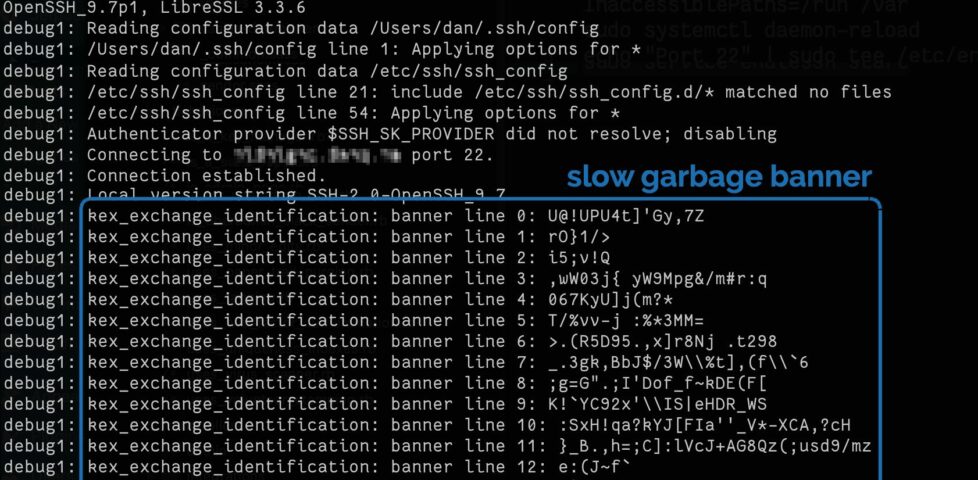
To test if it’s working, connect to your SSH server on port 22 with your client in verbose mode, e.g. ssh -vp22 example.com and look for banner lines full of random garbage appearing at 10 second intervals.

Screenshot showing SSH connection being established to an Endlessh server, which is returning line after line of randomly-generated text as a banner.

It doesn’t provide a significant security, but you get to enjoy the self-satisfied feeling that you’re trolling dozens of opportunistic script kiddies a day.

Footnotes

1 It’s a good paper in general, if that’s your jam.

2 Obviously you gain very little security by moving to an unusual port number, given that you’re already running your servers in “keys-only” (PasswordAuthentication no) configuration mode already, right? Right!? But it’s nice to avoid all the unnecessary logging that wave after wave of brute-force attempts produce.

3 Which I can only assume is pronounced endle-S-S-H, but regardless of how it’s said out loud I appreciate the wordplay of its name.

4 To move your SSH port, you might run something like echo "Port 12345" | sudo tee /etc/ssh/sshd_config.d/unusual-port.conf and restart the service, of course.

×

Note #25343

As well as the programming tasks I’m working on for Three Rings this International Volunteer Day, I’m also doing a little devops. We’ve got a new server architecture rolling out next week, and I’m tasked with ensuring that the logging on them meets our security standards.
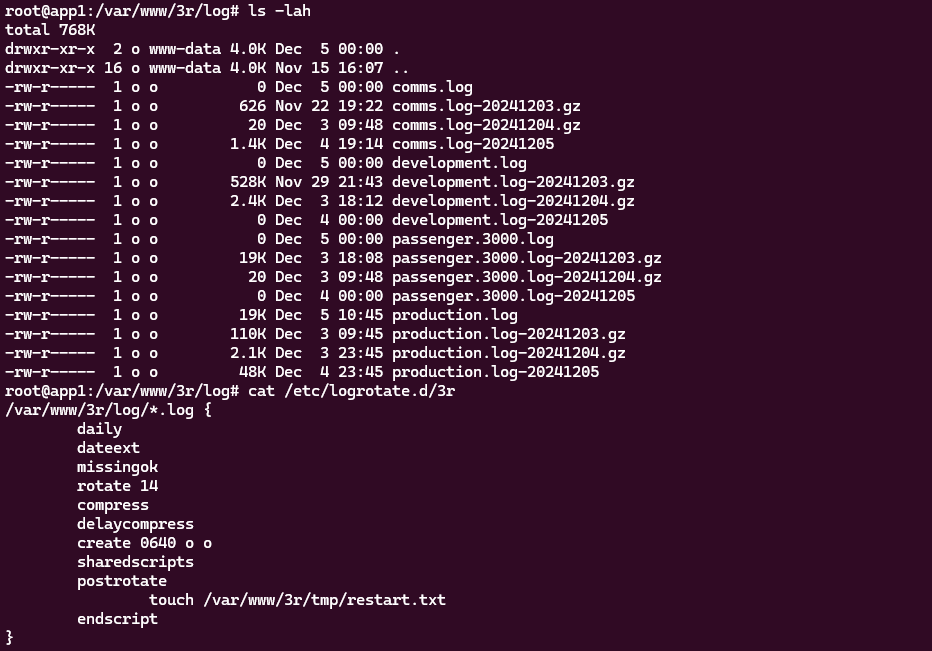
Terminal screenshot showing a directory listing of a logs directory with several gzipped logfiles with different date-stamped suffixes, and the contents of the logrotate configuration file that produced them.

Each server’s on-device logs are retained in date-stamped files for 14 days, but they’re also backed-up offsite daily.

Those bits all seem to be working, so next I need to work out a way to add a notification to our monitoring platform if any server doesn’t successfully push a log to the offsite backup in a timely manner.

×

Good Food, Bad Authorisation

I was browsing (BBC) Good Food today when I noticed something I’d not seen before: a “premium” recipe, available on their “app only”:

Screenshot showing recipes, one of which is labelled "App only" and "Premium".

I clicked on the “premium” recipe and… it looked just like any other recipe. I guess it’s not actually restricted after all?

Just out of curiosity, I fired up a more-vanilla web browser and tried to visit the same page. Now I saw an overlay and modal attempting1 to restrict access to the content:

Overlay attempting to block content to the page beneath, saying "Try 1 year for just £9.99 and save 81%".

It turns out their entire effort to restrict access to their premium content… is implemented in client-side JavaScript. Even when I did see the overlay and not get access to the recipe, all I needed to do was open my browser’s debugger and run document.body.classList.remove('tp-modal-open'); for(el of document.querySelectorAll('.tp-modal, .tp-backdrop')) el.remove(); and all the restrictions were lifted.

What a complete joke.

Why didn’t I even have to write my JavaScript two-liner to get past the restriction in my primary browser? Because I’m running privacy-protector Ghostery, and one of the services Ghostery blocks by-default is one called Piano. Good Food uses Piano to segment their audience in your browser, but they haven’t backed that by any, y’know, actual security so all of their content, “premium” or not, is available to anybody.

I’m guessing that Immediate Media (who bought the BBC Good Food brand a while back and have only just gotten around to stripping “BBC” out of the name) have decided that an ad-supported model isn’t working and have decided to monetise the site a little differently2. Unfortunately, their attempt to differentiate premium from regular content was sufficiently half-hearted that I barely noticed that, too, gliding through the paywall without even noticing were it not for the fact that I wondered why there was a “premium” badge on some of their recipes.

Screenshot from OpenSourceFood.com, circa 2007.
You know what website I miss? OpenSourceFood.com. It went downhill and then died around 2016, but for a while it was excellent.

Recipes probably aren’t considered a high-value target, of course. But I can tell you from experience that sometimes companies make basically this same mistake with much more-sensitive systems. The other year, for example, I discovered (and ethically disclosed) a fault in the implementation of the login forms of a major UK mobile network that meant that two-factor authentication could be bypassed entirely from the client-side.

These kinds of security mistakes are increasingly common on the Web as we train developers to think about the front-end first (and sometimes, exclusively). We need to do better.

Footnotes

1 The fact that I could literally see the original content behind the modal was a bit of a giveaway that they’d only hidden it, not actually protected it in any way.

2 I can see why they’d think that: personally, I didn’t even know there were ads on the site until I did the experiment above: turns out I was already blocking them, too, along with any anti-ad-blocking scripts that might have been running alongside.

× × ×

Brainfart

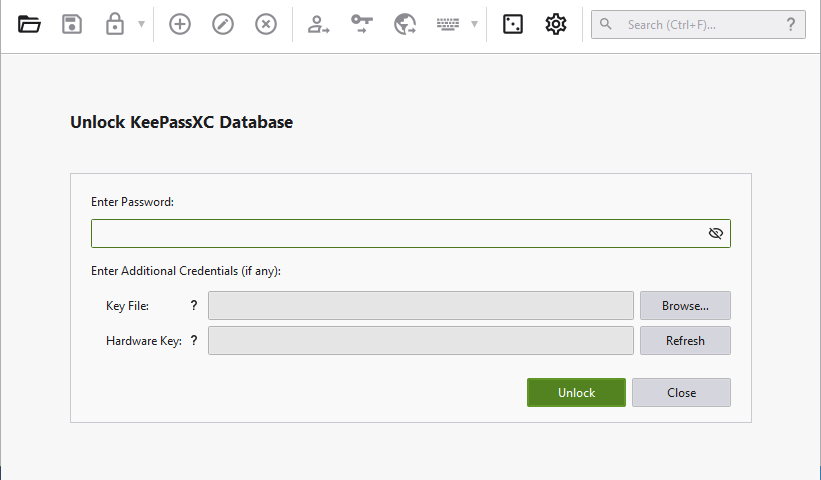
Brainfart moment this morning when my password safe prompted me to unlock it with a password, and for a moment I thought to myself “Why am I having to manually type in a password? Don’t I have a password safe to do this for me?” 🤦

KeePassXC authentication screen on Windows; no password has been entered.

×

Length Extension Attack Demonstration (Video)

This post is also available as an article. So if you'd rather read a conventional blog post of this content, you can!

This is a video version of my blog post, Length Extension Attack. In it, I talk through the theory of length extension attacks and demonstrate an SHA-1 length extension attack against an (imaginary) website.

The video can also be found on:

Length Extension Attack Demonstration

This post is also available as a video. If you'd prefer to watch/listen to me talk about this topic, give it a look.

Prefer to watch/listen than read? There’s a vloggy/video version of this post in which I explain all the key concepts and demonstrate an SHA-1 length extension attack against an imaginary site.

I understood the concept of a length traversal attack and when/how I needed to mitigate them for a long time before I truly understood why they worked. It took until work provided me an opportunity to play with one in practice (plus reading Ron Bowes’ excellent article on the subject) before I really grokked it.

Would you like to learn? I’ve put together a practical demo that you can try for yourself!

Screenshot of vulnerable site with legitimate "download" link hovered.
For the demonstration, I’ve built a skeletal stock photography site whose download links are protected by a hash of the link parameters, salted using a secret string stored securely on the server. Maybe they let authorised people hotlink the images or something.

You can check out the code and run it using the instructions in the repository if you’d like to play along.

Using hashes as message signatures

The site “Images R Us” will let you download images you’ve purchased, but not ones you haven’t. Links to the images are protected by a SHA-1 hash1, generated as follows:

Diagram showing SHA1 being fed an unknown secret key and the URL params "download=free" and outputting a hash as a "download key".
The nature of hashing algorithms like SHA-1 mean that even a small modification to the inputs, e.g. changing one character in the word “free”, results in a completely different output hash which can be detected as invalid.

When a “download” link is generated for a legitimate user, the algorithm produces a hash which is appended to the link. When the download link is clicked, the same process is followed and the calculated hash compared to the provided hash. If they differ, the input must have been tampered with and the request is rejected.

Without knowing the secret key – stored only on the server – it’s not possible for an attacker to generate a valid hash for URL parameters of the attacker’s choice. Or is it?

Changing download=free to download=valuable invalidates the hash, and the request is denied.

Actually, it is possible for an attacker to manipulate the parameters. To understand how, you must first understand a little about how SHA-1 and its siblings actually work:

SHA-1‘s inner workings

  1. The message to be hashed (SECRET_KEY + URL_PARAMS) is cut into blocks of a fixed size.2
  2. The final block is padded to bring it up to the full size.3
  3. A series of operations are applied to the first block: the inputs to those operations are (a) the contents of the block itself, including any padding, and (b) an initialisation vector defined by the algorithm.4
  4. The same series of operations are applied to each subsequent block, but the inputs are (a) the contents of the block itself, as before, and (b) the output of the previous block. Each block is hashed, and the hash forms part of the input for the next.
  5. The output of running the operations on the final block is the output of the algorithm, i.e. the hash.
Diagram showing message cut into blocks, the last block padded, and then each block being fed into a function along with the output of the function for the previous block. The first function, not having a previous block, receives the IV as its secondary input. The final function outputs the hash.
SHA-1 operates on a single block at a time, but the output of processing each block acts as part of the input of the one that comes after it. Like a daisy chain, but with cryptography.

In SHA-1, blocks are 512 bits long and the padding is a 1, followed by as many 0s as is necessary, leaving 64 bits at the end in which to specify how many bits of the block were actually data.

Padding the final block

Looking at the final block in a given message, it’s apparent that there are two pieces of data that could produce exactly the same output for a given function:

  1. The original data, (which gets padded by the algorithm to make it 64 bytes), and
  2. A modified version of the data, which has be modified by padding it in advance with the same bytes the algorithm would; this must then be followed by an additional block

Illustration showing two blocks: one short and padded, one pre-padded with the same characters, receiving the same IV and producing the same output.
A “short” block with automatically-added padding produces the same output as a full-size block which has been pre-populated with the same data as the padding would add.5
In the case where we insert our own “fake” padding data, we can provide more message data after the padding and predict the overall hash. We can do this because we the output of the first block will be the same as the final, valid hash we already saw. That known value becomes one of the two inputs into the function for the block that follows it (the contents of that block will be the other input). Without knowing exactly what’s contained in the message – we don’t know the “secret key” used to salt it – we’re still able to add some padding to the end of the message, followed by any data we like, and generate a valid hash.

Therefore, if we can manipulate the input of the message, and we know the length of the message, we can append to it. Bear that in mind as we move on to the other half of what makes this attack possible.

Parameter overrides

“Images R Us” is implemented in PHP. In common with most server-side scripting languages, when PHP sees a HTTP query string full of key/value pairs, if a key is repeated then it overrides any earlier iterations of the same key.

Illustration showing variables in a query string: "?one=foo&two=bar&one=baz". When parsed by PHP, the second value of "one" ("baz") only is retained.
Many online sources say that this “last variable matters” behaviour is a fundamental part of HTTP, but it’s not: you can disprove is by examining $_SERVER['QUERY_STRING'] in PHP, where you’ll find the entire query string. You could even implement your own query string handler that instead makes the first instance of each key the canonical one, if you really wanted.6
It’d be tempting to simply override the download=free parameter in the query string at “Images R Us”, e.g. making it download=free&download=valuable! But we can’t: not without breaking the hash, which is calculated based on the entire query string (minus the &key=... bit).

But with our new knowledge about appending to the input for SHA-1 first a padding string, then an extra block containing our payload (the variable we want to override and its new value), and then calculating a hash for this new block using the known output of the old final block as the IV… we’ve got everything we need to put the attack together.

Putting it all together

We have a legitimate link with the query string download=free&key=ee1cce71179386ecd1f3784144c55bc5d763afcc. This tells us that somewhere on the server, this is what’s happening:

Generation of the legitimate hash for the (unknown) secret key a string download=free, with algorithmic padding shown.
I’ve drawn the secret key actual-size (and reflected this in the length at the bottom). In reality, you might not know this, and some trial-and-error might be necessary.7
If we pre-pad the string download=free with some special characters to replicate the padding that would otherwise be added to this final8 block, we can add a second block containing an overriding value of download, specifically &download=valuable. The first value of download=, which will be the word free followed by a stack of garbage padding characters, will be discarded.

And we can calculate the hash for this new block, and therefore the entire string, by using the known output from the previous block, like this:

The previous diagram, but with the padding character manually-added and a second block containing "&download=valuable". The hash is calculated using the known output from the first block as the IV to the function run over the new block, producing a new hash value.
The URL will, of course, be pretty hideous with all of those special characters – which will require percent-encoding – on the end of the word ‘free’.

Doing it for real

Of course, you’re not going to want to do all this by hand! But an understanding of why it works is important to being able to execute it properly. In the wild, exploitable implementations are rarely as tidy as this, and a solid comprehension of exactly what’s happening behind the scenes is far more-valuable than simply knowing which tool to run and what options to pass.

That said: you’ll want to find a tool you can run and know what options to pass to it! There are plenty of choices, but I’ve bundled one called hash_extender into my example, which will do the job pretty nicely:

$ docker exec hash_extender hash_extender \
    --format=sha1 \
    --data="download=free" \
    --secret=16 \
    --signature=ee1cce71179386ecd1f3784144c55bc5d763afcc \
    --append="&download=valuable" \
    --out-data-format=html
Type: sha1
Secret length: 16
New signature: 7b315dfdbebc98ebe696a5f62430070a1651631b
New string: download%3dfree%80%00%00%00%00%00%00%00%00%00%00%00%00%00%00%00%00%00%00%00%00%00%00%00%00%00%00%00%00%00%00%00%00%00%e8%26download%3dvaluable

I’m telling hash_extender:

  1. which algorithm to use (sha1), which can usually be derived from the hash length,
  2. the existing data (download=free), so it can determine the length,
  3. the length of the secret (16 bytes), which I’ve guessed but could brute-force,
  4. the existing, valid signature (ee1cce71179386ecd1f3784144c55bc5d763afcc),
  5. the data I’d like to append to the string (&download=valuable), and
  6. the format I’d like the output in: I find html the most-useful generally, but it’s got some encoding quirks that you need to be aware of!

hash_extender outputs the new signature, which we can put into the key=... parameter, and the new string that replaces download=free, including the necessary padding to push into the next block and your new payload that follows.

Unfortunately it does over-encode a little: it’s encoded all the& and = (as %26 and %3d respectively), which isn’t what we wanted, so you need to convert them back. But eventually you end up with the URL: http://localhost:8818/?download=free%80%00%00%00%00%00%00%00%00%00%00%00%00%00%00%00%00%00%00%00%00%00%00%00%00%00%00%00%00%00%00%00%00%00%e8&download=valuable&key=7b315dfdbebc98ebe696a5f62430070a1651631b.

Browser at the resulting URL, showing the "valuable" image (a pile of money).
Disclaimer: the image you get when you successfully exploit the test site might not actually be valuable.

And that’s how you can manipulate a hash-protected string without access to its salt (in some circumstances).

Mitigating the attack

The correct way to fix the problem is by using a HMAC in place of a simple hash signature. Instead of calling sha1( SECRET_KEY . urldecode( $params ) ), the code should call hash_hmac( 'sha1', urldecode( $params ), SECRET_KEY ). HMACs are theoretically-immune to length extension attacks, so long as the output of the hash function used is functionally-random9.

Ideally, it should also use hash_equals( $validDownloadKey, $_GET['key'] ) rather than ===, to mitigate the possibility of a timing attack. But that’s another story.

Footnotes

1 This attack isn’t SHA1-specific: it works just as well on many other popular hashing algorithms too.

2 SHA-1‘s blocks are 64 bytes long; other algorithms vary.

3 For SHA-1, the padding bits consist of a 1 followed by 0s, except the final 8-bytes are a big-endian number representing the length of the message.

4 SHA-1‘s IV is 67452301 EFCDAB89 98BADCFE 10325476 C3D2E1F0, which you’ll observe is little-endian counting from 0 to F, then back from F to 0, then alternating between counting from 3 to 0 and C to F. It’s considered good practice when developing a new cryptographic system to ensure that the hard-coded cryptographic primitives are simple, logical, independently-discoverable numbers like simple sequences and well-known mathematical constants. This helps to prove that the inventor isn’t “hiding” something in there, e.g. a mathematical weakness that depends on a specific primitive for which they alone (they hope!) have pre-calculated an exploit. If that sounds paranoid, it’s worth knowing that there’s plenty of evidence that various spy agencies have deliberately done this, at various points: consider the widespread exposure of the BULLRUN programme and its likely influence on Dual EC DRBG.

5 The padding characters I’ve used aren’t accurate, just representative. But there’s the right number of them!

6 You shouldn’t do this: you’ll cause yourself many headaches in the long run. But you could.

7 It’s also not always obvious which inputs are included in hash generation and how they’re manipulated: if you’re actually using this technique adversarily, be prepared to do a little experimentation.

8 In this example, the hash operates over a single block, but the exact same principle applies regardless of the number of blocks.

9 Imagining the implementation of a nontrivial hashing algorithm, the predictability of whose output makes their HMAC vulnerable to a length extension attack, is left as an exercise for the reader.

× × × × × × × ×

WCEU23 – Day 1

The first “full” day of WordCamp Europe 2023 (which kicked-off at Contributor Day) was busy and intense, but I loved it.

This post is basically a live-blog of everything I got up to, and it’s mostly for my own benefit/notetaking. If you don’t read it, nobody will blame you.

Seen from behind, a very long queue runs through a conference centre.
Six minutes after workshop registration opened its queue snaked throughout an entire floor of the conference centre.

Here’s what I got up to:


10 things that all WordPress plugin developers should avoid

David Artiss took the courageous step of installing 36 popular plugins onto a fresh WordPress site and was, unsurprisingly, immediately bombarded by a billion banners on his dashboard. Some were merely unhelpful (“don’t forget to add your API key”), others were annoying (“thanks for installing our plugin”), and plenty more were commercial advertisements (“get the premium version”) despite the fact that WordPress.org guidelines recommend against this. It’s no surprise that this kind of “aggressive promotion” is the single biggest annoyance that people reported when David asked around on social media.

Similarly, plugins which attempt to break the standard WordPress look-and-feel by e.g. hoisting themselves to the top of the menu, showing admin popovers, putting settings sections in places other than the settings submenu, and so on are a huge annoyance to everybody. I get sufficiently frustrated by these common antifeatures of plugins I use that I actually maintain a plugin for my own use that “fixes” the ones that aggrivate me the most!

A man wearing glasses and a t-shirt with a WordPress logo stands on a stage.
David raised lots of other common gripes with WordPress plugins, too: data validation failures, leaving content behind after uninstallation (and “deactivation surveys”, ugh!), and a failure to account for accessibility.

David’s promised to put his slides online, plus to write articles about everything that came up in his Q&A.

I’m unconvinced that we can rely on plugin developers to independently fix the kinds of problems that come high on David’s list. I wonder if there’s mileage in WordPress Core reimplementing the way that the main navigation menu works such that all items in it can be (easily) re-arranged by users to their own preference? This would undermine the perceived value to plugin developers of “hoisting” their own to the top by allowing users to counteract it, and would provide a valuable feature to allow site admins to streamline their workflow: use WooCommerce but only in a way that’s secondary to your blog? Move “Products” below “Posts”! Etc.

Screenshot showing a WordPress admin interface writing this blog post, with the stage in the background.
Why yes, I’m liveblogging this. And yes, I’m not using Gutenberg yet (that’s a whole other story…)

Where did we come from?

Aaron Reimann from ClockworkWP gave us a tour of how WordPress has changed over the course of its 20-year history, starting even slightly before I started using WordPress; my blog (previously powered by some hacky PHP, previouslier powered by some hackier Perl, previousliest written in static HTML) switched to WordPress in 2004, when it hit version 1.2, so it was fun to get the opportunity to see some even older versions illustrated.

A WordPress site, circa 2004, simulated in a virtual machine.
A WordPress site from 2004 would, of course, still be perfectly usable today. How many JS-heavy/API-driven websites of today do you reckon will still function in 20 years time?

It was great to be reminded how far the Core code has come over that time. Early versions of WordPress – as was common among PHP applications at the time! – had very few files and each could reliably be expected to be a stack of SQL, wrapped in a stack of code, wrapped in what’s otherwise a HTML file: no modularity!

A man wearing a flat cap strides across a stage.
Aaron’s passion for this kind of digital archaeology really shows. I dig it.

There were very few surprises for me in this talk, as you might expect for such an “old hand”, but I really enjoyed the nostalgia of exploring WordPress history through his eyes.

I enjoyed putting him on the spot with a “spicy” question at the end of his talk, by asking him if, alongside everything we’ve gained over the years, whether there’s anything we lost along the way. He answered well, pointing out that the somewhat bloated stack of plugins that are commonplace on big sites nowadays and the ease with which admins can just “click and install” more of them. I agree with him, although personally I miss built-in XFN support…

Dan, smiling, wearing a purple t-shirt with a WordPress logo and a Pride flag, hugs a cut-out of a Wappu (itself hugging a "WP 20" balloon and wearing a party hat).
If you’d have told me in advance that hugging a Wapuu would have been a highlight of the day… yeah, that wouldn’t have been a surprise!

Networking And All That

There’s a lot of exhibitors with stands, but I tried to do a circuit or so and pay attention at least to those whose owners I’ve come into contact with in a professional capacity. Many developers who make extensions for WooCommerce, of course, sell those extensions through WooCommerce.com, which means they come into routine direct contact with my code (and it can mean that when their extension’s been initially rejected by our security scanners or linters, it’s me their developers first want to curse!).

A WordCamp Europe Athens 2023 lanyard and name badge for Dan Q, Attendee, onto which a "Woo" sticker has been affixed.
After a while, to spare some of that awkward exchange where somebody tries to sell me their product before I explain that I already sell their product for them, I slapped a “Woo” sticker on my lanyard.

It’s been great to connect with people using WordPress to power the Web in a whole variety of different contexts, but it somehow still feels strange to me that WordPress has such a commercial following! Even speaking as somebody who’s made their living at least partially out of WordPress for the last decade plus, it still feels to me like its greatest value comes from its use for personal publishing.

The feel of a WordCamp with its big shiny sponsors is enormously different from, say, the intimacy and individuality of a Homebrew Website Club meeting, and I think that’s something I still need to come to terms with. WordPress’s success story comes from many different causes, but perhaps chief among them is the fact that it’s versatile enough to power the website of a government, multinational, or household-name brand… but also to run the smallest personal indie blog. I struggle to comprehend that, even with my background.

(Side note, Sophie Koonin says that building a personal website is a radical act in 2023, and I absolutely agree.)

A "Woo" booth, staffed with a variety of people, with Dan at the centre.
My division of Automattic had a presence, of course.

I was proud of my colleagues for the “gimmick” they were using to attract people to the Woo stand: you could pick up a “credit card” and use it to make a purchase (of Greek olive oil) using a website, see your order appear on the app at the backend in real-time, and then receive your purchase as a giveaway. The “credit card” doubles as a business card from the stand, the olive oil is a real product from a real, local producer (who really uses WooCommerce to sell online!), and when you provide an email address at the checkout you can opt-in to being contacted by the team afterwards. That’s some good joined-up thinking by my buddies in marketing!


WordPress extended: build unique websites on top of WP

Petya Petkova observed that it’s commonplace to take the easy approach and make a website look like… well, every other website.  “Web deja-vu” is a real thing, and it’s fed not only by the ebbs and flows of trends in web design but by the proliferation of indistinct themes that people just install-and-use.

A woman with long hair, wearing a green t-shirt, stands before a screen on a stage.
How can we break free from web deja-vu, asks Petya. It almost makes me sad that her slides had been coalesced into the conference’s slidedeck design rather than being her own… although on second though maybe that just helps enhance the point!

Choice of colours and typography can be used to tell a story, to instil a feeling, to encourage engagement. Scrolling can be used as a metaphor for storytelling (“scrolly-telling”, Petya calls it). Animation flow can be used to direct a user’s attention and drive focus and encourage interaction.

A lot of the technical concepts she demonstrated – parts of a page that scroll at different speeds, typography that shifts or changes, videos used in a subtle way to accentuate other content, etc. – can be implemented in the frontend with WebGL, Three.js and the like. Petya observes that moving this kind of content interactivity into the frontend can produce an illusion of a performance improvement, which is an argument I’ve heard before, but personally I think it’s only valuable if it’s built as a progressive enhancement: otherwise, you’re always at risk that your site won’t look like you’d hope.

I note, for example, that Petya’s agency’s site shows only an “endless spinner” when viewed in my browser (which blocks the code.jQuery CDN by default, unless allowlisted for specific sites). All of the content is there, on the page, if you View Source, but it’s completely invisible if an external JavaScript fails to load. That doesn’t just happen when weirdos like me disable JavaScript in their browsers: it can happen if the browser interacts badly with the script, or if the user’s Internet connection is ropey, or a malware scanner misfires, or if government censorship blocks the CDN, or in any number of other conditions.

Screenshot from acceler8design.com, showing an "endless spinner" and no content.
While I agree with Petya about the value of animation and interactivity to make sites awesome, I don’t think it can take second-place to ensuring the most-widespread access and accessibility for your audience. Otherwise we’d still be making Flash sites, right?

So yeah: uniqueness and creativity are great, and I like what she’s proposing, but not the way she goes about it. The first person to ask a question wisely brought up accessibility, and Petya answered well that accessibility technologies can bridge the gap, but I’d counter that it’s preferable to build accessible in the first instance: if you have to use an aria- attribute it’s a good sign that you probably already did something wrong (not always, but it’s certainly a pointer that you ought to take a step back and check!).

Several other good questions and great answers followed: about how to showcase a preliminary design when they design is dependent upon animation and interactivity (which I’ve witnessed before!), on the value of server-side rendering of components, and about how to optimise for smaller screens. Petya clearly knows her stuff in all of these areas and had confident responses.


State of WordPress security – insights from 2022

Oliver Sild is the kind of self-taught hacker, security nerd, and community builder that I love, so I wasn’t going to miss his talk.

A man in a literal black hat stands in the centre of a large theatre stage.
The number of security vulnerability reports in the WordPress ecosystem is up +328%, Oliver opened. But the bugs being reported are increasingly old, so we’re not talking about new issues being created. And only 0.3% of bugs were in WordPress Core (and were patched before they were exploitable).

It’s good news in general in WordPress Security-land… but CSRF is on the up-and-up (overtaking XSS) in the plugin space. That, and all the broken access control we see in the admin area, are things I’ll be keeping in mind next time I’m arguing with a vendor about the importance of using nonces and security checks in their extension (I have this battle from time to time!).

But an interesting development is the growth of the supply chains in the WordPress plugin ecosystem. Nowadays a plugin might depend upon another plugin which might depend upon a library… and a patch applied to the latter of those might take time to be propagated through the chain, providing attackers with a growing window of opportunity.

Sankey chart showing 1160 submitted bugs being separated into pending, accepted, invalid, and (eventually) patched. 26% of critical bugs in 2022 received no timely patch.
I love a good Sankey chart. Even when it says scary things.

A worrying thought is that while plugin directory administrators will pull and remove plugins that have longstanding unactioned security issues. But that doesn’t help the sites that already have that plugin installed and are still using it! There’s a proposal to allow WordPress to notify admins if a plugin used on a site has been dropped for security reasons, but it was opened 9 years ago and hasn’t seen any real movement, soo…

I like that Oliver plugged for security researchers being acknowledged as equal contributors to developers on your software. But then, I would say that, as somebody who breaks into things once in a while and then tells the affected parties how to fix the problem that allowed me to do so! He also provided a whole wealth of tips for site owners and agencies to try to keep their sites safe, but little that I wasn’t aware of already.

A large audience of a few hundred people, seen from above, facing left.
Still, good to see this talk get as good an audience as it did, given the importance of the topic!

It was about this point in the day, glancing at my schedule and realising that at any given time there were up to four other sessions running simultaneously, that I really got a feel for the scale of this conference. Awesome. Meanwhile, Oliver was fielding the question that I’m sure everybody was thinking: with Gutenberg blocks powered by JavaScript that are often backed by a supply-chain of the usual billion-or-so files you find in your .node_modules directory, isn’t the risk of supply chain attacks increasing?

Spoiler: yes. Did you notice earlier in this post I mentioned that I don’t use Gutenberg on this site yet?

Animation showing Dan, wearing a pilot's hat, surrounded by cotton wool clouds, as the camera pans back and forth.
When the Jetpack team told me that they’ve been improving their cloud offering, this wasn’t what I expected.

Typographic readability in theme design & development

My first “workshop” was run by Giulia Laco, on the topic of readable content and design.

A title slide encourages designers to sit on the left (to the right of the speaker), developers to the right (on her left), and "no-coders" in the centre.
Designers to the left of me, coders to the right: here I am, stuck in the middle with you.

Giulia began by reminding us how short the attention span of Web readers is, and how important the right typographic choices are in ensuring that people actually read your content. I fully get this – I think that very few people will have the attention span to read this part of this very blog post, for example! – but I loved that she hammered the point home by presenting every slide of her presentation twice (or more), “improving” the typographic choices as she went along: an excellent and memorable quirk.

Our capacity to read and comprehend a text is affected by a combination of common (distance, lighting, environment, concentration, mood, etc.), personal (age, proficiency, motiviation, accessibility requirements, etc.), and typographic (face, style, size, line length and spacing, contrast, width, rhythm etc.) factors. To explore the impact of the typographic factors, the group dived into a pre-prepared Codepen and a shared Figma diagram. (I immediately had a TIL moment over the font-synthesis: CSS property!)

A presentation of the typography playground, in which the font is being changed.
I appreciated that Giulia stressed the importance of a fallback font. Just like the CDN issues I described above while talking about JavaScript dependencies, not specifying a fallback font puts your design at the mercy of the browser’s defaults. We don’t like to think about what happens when websites partially fail, but they do, and we should.

Things get interesting at the intersection of readability and accessibility. For example, WCAG accessibility requirements demand that you don’t use images of text (we used to do this a lot back before we could reliably use fonts on the web, and before we could easily have background images on e.g. buttons for navigation). But this accessibility requirement also aids screen readability when accounting for e.g. “retina” screens with virtual pixel ratios.

Slide showing a physical pixel and a "virtual pixel" representing a real pixel of a different size.
Do you remember when a pixel was the size of a pixel? Those days are long gone. True story.

Giulia provided a great explanation of why we may well think in pixels (as developers or digital designers) but we’re unlikely to use them everywhere: I’d internalised this lesson long ago but I appreciated a well-explained justification. The short of it is: screen zoom (that fancy zoom feature you use in your browser all the time, especially on mobile) and text zoom (the one you probably don’t use, or don’t use so much) are different things, and setting a pixel-based font size in the root node wrecks the latter, forcing some people with accessibility needs to use the former, which is likely to result in vertical scrolling. Boo!

I also enjoyed seeing this demo of how the different hyphenation-points in different languages (because of syllable stress) can impact on your wrapping points/line lengths when content is translated. This can affect any website, of course, because any website can be the target of automatic translation.

Plus, Giulia’s thoughts on the value of serifed fonts (even on digital displays) for improving typographic readability of the letters d, b, p and q which are often mirror- or rotationally-symmetric to one another in sans-serif fonts. It’s amazing to have something – in this case, a psychological letter transposition – pointed out that I’ve experienced but never pinned down the reason for, before. Neat!

It was a shame that this workshop took place late in the day, because many of the participants (including me) seemed to have flagging energy levels!


Altogether a great (but intense) day. Boggles my mind that there’s another one like it tomorrow.

× × × × × × × × × × × × × × × × ×

Keeping 2FA Secrets in a Password Safe?

The two most important things you can do to protect your online accounts remain to (a) use a different password, ideally a randomly-generated one, for every service, and (b) enable two-factor authentication (2FA) where it’s available.

If you’re not already doing that, go do that. A password manager like 1Password, Bitwarden, or LastPass will help (although be aware that the latter’s had some security issues lately, as I’ve mentioned).

Diagram showing a password safe on a desktop computer being used to fill the username and password parts of a login form, and a mobile phone providing the information for the second factor.
For many people, authentication looks like this: put in a username and password from a password safe (or their brain), and a second factor from their phone.

I promised back in 2018 to talk about what this kind of authentication usually1 looks like for me, because my approach is a little different:

Diagram showing a password safe on a desktop computer being used to fill the username, password, AND second factor parts of the form.
My password manager fills the username, password, and second factor parts of most login forms for me. It feels pretty magical.

I simply press my magic key combination, (re-)authenticate with my password safe if necessary, and then it does the rest. Including, thanks to some light scripting/hackery, many authentication flows that span multiple pages and even ones that ask for randomly-selected characters from a secret word or similar2.

Animated GIF showing a login form requesting a username, password, and "Google Authenticator Code". An auto-typer fills all three fields with the username "2fa-autotype-demo", a long password, and the code 676032. The "Remember Me" checkbox is left unticked.
I love having long passwords and 2FA enabled. But I also love being able to log in with the convenience of a master password and my fingerprint.

My approach isn’t without its controversies. The argument against it broadly comes down to this:

Storing the username, password, and the means to provide an authentication code in the same place means that you’re no-longer providing a second factor. It’s no longer e.g. “something you have” and “something you know”, but just “something you have”. Therefore, this is equivalent to using only a username and password and not enabling 2FA at all.

I disagree with this argument. I provide two counter-arguments:

1. For most people, they’re already simplifying down to “something you have” by running the authenticator software on the same device, protected in the same way, as their password safe: it’s their mobile phone! If your phone can be snatched while-unlocked, or if your password safe and authenticator are protected by the same biometrics3, an attacker with access to your mobile phone already has everything.

Repeat of the diagram in which a PC provides all authentication, except the PC has been replaced with a phone.
If your argument about whether it counts as multifactor is based on how many devices are involved, this common pattern also isn’t multifactor.

2. Even if we do accept that this is fewer factors, it doesn’t completely undermine the value of time-based second factor codes4. Time-based codes have an important role in protecting you from authentication replay!

For instance: if you use a device for which the Internet connection is insecure, or where there’s a keylogger installed, or where somebody’s shoulder-surfing and can see what you type… the most they can get is your username, password, and a code that will stop working in 30 seconds5. That’s still a huge improvement on basic username/password-based system.6

Note that I wouldn’t use this approach if I were using a cloud-based password safe like those I linked in the first paragraph! For me personally: storing usernames, passwords, and 2FA authentication keys together on somebody else’s hardware feels like too much of a risk.

But my password manager of choice is KeePassXC/KeePassDX, to which I migrated after I realised that the plugins I was using in vanilla KeePass were provided as standard functionality in those forks. I keep the master copy of my password database encrypted on a pendrive that attaches to my wallet, and I use Syncthing to push secondary copies to a couple of other bits of hardware I control, such as my phone. Cloud-based password safes have their place and they’re extremely accessible to people new to password managers or who need organisational “sharing” features, but they’re not the right tool for me.

As always: do your own risk assessment and decide what’s right for you. But from my experience I can say this: seamless, secure logins feel magical, and don’t have to require an unacceptable security trade-off.

Footnotes

1 Not all authentication looks like this, for me, because some kinds of 2FA can’t be provided by my password safe. Some service providers “push” verification checks to an app, for example. Others use proprietary TOTP-based second factor systems (I’m looking at you, banks!). And some, of course, insist on proven-to-be-terrible solutions like email and SMS-based 2FA.

2 Note: asking for a username, password, and something that’s basically another-password is not true multifactor authentication (I’m looking at you again, banks!), but it’s still potentially useful for organisations that need to authenticate you by multiple media (e.g. online and by telephone), because it can be used to help restrict access to secrets by staff members. Important, but not the same thing: you should still demand 2FA.

3 Biometric security uses your body, not your mind, and so is still usable even if you’re asleep, dead, uncooperative, or if an attacker simply removes and retains the body part that is to be scanned. Eww.

4 TOTP is a very popular mechanism: you’ve probably used it. You get a QR code to scan  into the authenticator app on your device (or multiple devices, for redundancy), and it comes up with a different 6-digit code every 30 seconds or so.

5 Strictly, a TOTP code is likely to work for a few minutes, on account of servers allowing for drift between your clock and theirs. But it’s still a short window.

6 It doesn’t protect you if an attacker manages to aquire a dump of the usernames, inadequately-hashed passwords, and 2FA configuration from the server itself, of course, where other forms of 2FA (e.g. certificate-based) might, but protecting servers from bad actors is a whole separate essay.

× × × ×

I’d Like to Change my Mother’s Maiden Name

Following their security incident last month, many users of LastPass are in the process of cycling their security credentials for many of their accounts1. I don’t use LastPass2, but I’ve had ocassion to cycle credentials before, so I appreciate the pain that people are going through.

It’s not just passwords, though: it may well be your “security question” answers you need to rotate too. Your passwords quickly become worthless if an attacker can guess the answers to your “security questions” at services that use them. If you’re using a password safe anyway, you should either:

  1. Answer security questions with long strings of random garbage3, or
  2. Ensure that you use different answers for every service you use, as you would with passwords.4

In the latter case, you’re probably storing your security answers in a password safe5. If the password safe they’re stored in is compromised, you need to change the answers to those security questions in order to secure the account.

This leads to the unusual situation where you can need to call up your bank and say: “Hi, I’d like to change my mother’s maiden name.” (Or, I suppose, father’s middle name, first pet’s name, place of birth, or whatever.) Banks in particular are prone to disallowing you from changing your security answers over the Internet, but all kinds of other businesses can also make this process hard… presumably because a well-meaning software engineer couldn’t conceive of any reason that a user might want to.

I sometimes use a pronouncable password generator to produce fake names for security question answers. And I’ll tell you what: I get some bemused reactions when I say things like “I’d like to change my mother’s maiden name from Tuyiborhooniplashon to Mewgofartablejuki.”

But at least it forestalls them asking me “So why did you change your surname to ‘Q’?”

Footnotes

1 If you use LastPass, you should absolutely plan to do this. IMHO, LastPass’s reassurances about the difficulty in cracking the encryption on the leaked data is a gross exaggeration. I’m not saying you need to panic – so long as your master password is reasonably-long and globally-unique – but perhaps cycle all your credentials during 2023. Oh, and don’t rely on your second factor: it doesn’t help with this particular incident.

2 I used to use LastPass, until around 2016, and I still think it’s a good choice for many people, but nowadays I carry an encrypted KeePassXC password safe on a pendrive (with an automated backup onto an encrypted partition on our household NAS). This gives me some security and personalisation benefits, at the expense of only a little convenience.

3 If you’re confident that you could never lose your password (or rather: that you could never lose your password without also losing the security question answers because you would store them in the same place!), there’s no value in security questions, and the best thing you can do might be to render them unusable.

4 If you’re dealing with a service that uses the security questions in a misguided effort to treat them as a second factor, or that uses them for authentication when talking to them on the telephone, you’ll need to have usable answers to the questions for when they come up.

5 You can, of course, use a different password safe for your randomly-generatred security question answers than you would for the password itself; perhaps a more-secure-but-less-convenient one; e.g. an encrypted pendrive kept in your fire safe?

Reply to Decentralization and verification

This is a reply to a post published elsewhere. Its content might be duplicated as a traditional comment at the original source.

In “Decentralization and verification”, Derek Kedziora said:

…Mastodon by its very nature as a decentralized service can’t verify accounts.

We’d still need some trusted third party to do offline verifications and host them in a centralized repository.

Let’s not sell Mastodon short here. The service you compare it to – Twitter – solves this problem… but only if you trust Twitter as an authority on the identity of people. Mastodon also solves the problem, but it puts the trust in a different place: domain names and account pages.

If you want to “verify” yourself on Mastodon, you can use a rel=”me” link from a page or domain you control. It looks like this:

Screenshot showing @dan@danq.me's Mastodon account as the verified owner of website DanQ.me.
The tick is green, not blue, but I can’t imagine anybody complains.

A great thing about this form of verification is you don’t have to trust my server (and you probably shouldn’t): you can check it for yourself to ensure that the listed website really does state that this is the official Mastodon account of “me”.

You can argue this just moves the problem further down the road – instead of trusting a corporation that have shown that they’re not above selling the rights to your identity you have to trust that a website is legitimate – and you’d be right. But in my case for example you can use years of history, archive.org, cross-links etc. to verify that the domain is “me”, and from that you can confirm the legitimacy of my Mastodon account. Anybody who can spoof multiple decades of my history and maintain that lie for a decade of indepdendent web archiving probably deserves to be able to pretend to be me!

There are lots of other distributed methods too: web-of-trust systems, signed keys, even SSL certificates would be a potential solution. Looking again at my profile, you’ll see that I list the fingerprint of my GPG key, which you can compare to ones in public directories (which are co-signed by other people). This way you’d know that if you sent an encrypted DM to my Mastodon inbox it could only be decrypted if I were legitimately me. Or I could post a message signed with that key to prove my identity, insofar as my web-of-trust meets your satisfaction.

If gov.uk’s page about 10 Downing Street had profile pages for cabinet members with rel=”me” links to their social profiles I’d be more-likely to trust the legitimacy of those social profiles than I would if they had a centralised verification such as a Twitter “blue tick”.

Fediverse identify verification isn’t as hard a problem to solve as Derek implies, and indeed it’s already partially-solved. Not having a single point of authority is less convenient, sure, but it also protects you from some of the more-insidious identity problems that systems like Twitter’s have.

×

How to date a recording using background electrical noise

This is a repost promoting content originally published elsewhere. See more things Dan's reposted.

Matching a target ENF series with a section of a reference series

We’re going to use ENF matching to answer the question “here’s a recording, when was it was (probably) taken?” I say “probably” because all that ENF matching can give us is a statistical best guess, not a guarantee. Mains hum isn’t always present on recordings, and even when it is, our target recording’s ENF can still match with the wrong section of the reference database by statistical misfortune.

Still, even though all ENF matching gives us is a guess, it’s usually a good one. The longer the recording, the more reliable the estimate; in the academic papers that I’ve read 10 minutes is typically given as a lower bound for getting a decent match.

To make our guess, we’ll need to:

  1. Extract the target recording’s ENF values over time
  2. Find a database of reference ENF values, taken directly from the electrical grid serving the area where the recording was made
  3. Find the section of the reference ENF series that best matches the target. This section is our best guess for when the target recording was taken

We’ll start at the top.

About a year after Tom Scott did a video summarising how deviation over time (and location!) of the background electrical “hum” produced by AC power can act as a forensic marker on audio recordings, Robert Heaton’s produced an excellent deep-dive into how you can play with it for yourself, including some pretty neat code.

I remember first learning about this technique a few years ago during my masters in digital forensics, and my first thought was about how it might be effectively faked. Faking the time of recording of some audio after the fact (as well as removing the markers) is challenging, mostly because you’ve got to ensure you pick up on the harmonics of the frequencies, but it seems to me that faking it at time-of-recording ought to be reasonably easy: at least, so long as you’re already equipped with a mechanism to protect against recording legitimate electrical hum (isolated quiet-room, etc.):

Taking a known historical hum-pattern, it ought to be reasonably easy to produce a DC-to-AC converter (obviously you want to be running off a DC circuit to begin with, e.g. from batteries, so you don’t pick up legitimate hum) that regulates the hum frequency in a way that matches the historical pattern. Sure, you could simply produce the correct “noise”, but doing it this way helps ensure that the noise behaves appropriately under the widest range of conditions. I almost want to build such a device, perhaps out of an existing portable transformer (they come in big battery packs nowadays, providing a two-for-one!) but of course: who has the time? Plus, if you’d ever seen my soldering skills you’d know why I shouldn’t be allowed to work on anything like this.

×

Note #20176

Hey @VOXI_UK! There’s a security #vulnerability in your website. An attacker can (a) exfiltrate mobile numbers and (b) authenticate bypassing OTP.

Not sure who to talk to about ethical disclosure. Let me know?