That’s a really useful thing to have in this new age of the web, where Refererer: headers are no-longer commonly passed cross-domain and Google Search no longer provides the link: operator. If you want to know if I’ve ever
linked to your site, it’s a bit of a drag to find out.
To nobody’s surprise whatsoever, I’ve made a so many links to Wikipedia that I might be single-handedly responsible for their PageRank.
So, obviously, I’ve written an implementation for WordPress. It’s really basic right now, but the source code can be
found here if you want it. Install it as a plugin and run wp outbound-links to kick it off. It’s fast: it takes 3-5 seconds to parse the entirety of danq.me,
and I’ve got somewhere in the region of 5,000 posts to parse.
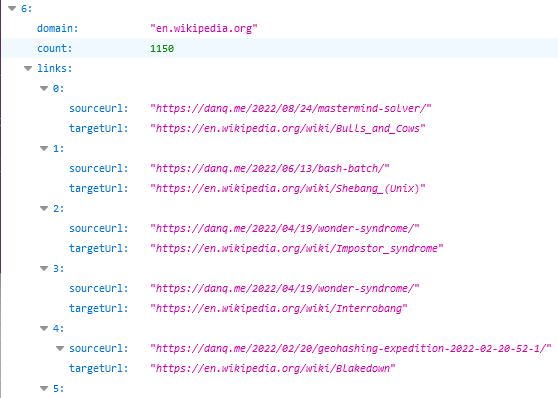
You can see the results at https://danq.me/.well-known/links – if you’ve ever wondered “has Dan ever linked to my site?”, now you can find the
answer.
If this could be useful to you, let’s collaborate on making this into an actually-useful plugin! Otherwise it’ll just languish “as-is”, which is good enough for my purposes.
I swear that I used to be good at Mastermind when I was a kid. But now, when it’s my turn to break
the code that one of our kids has chosen, I fail more often than I succeed. That’s no good!
If you didn’t have me pegged as a board gamer… where the hell have you been?
Mastermind and me
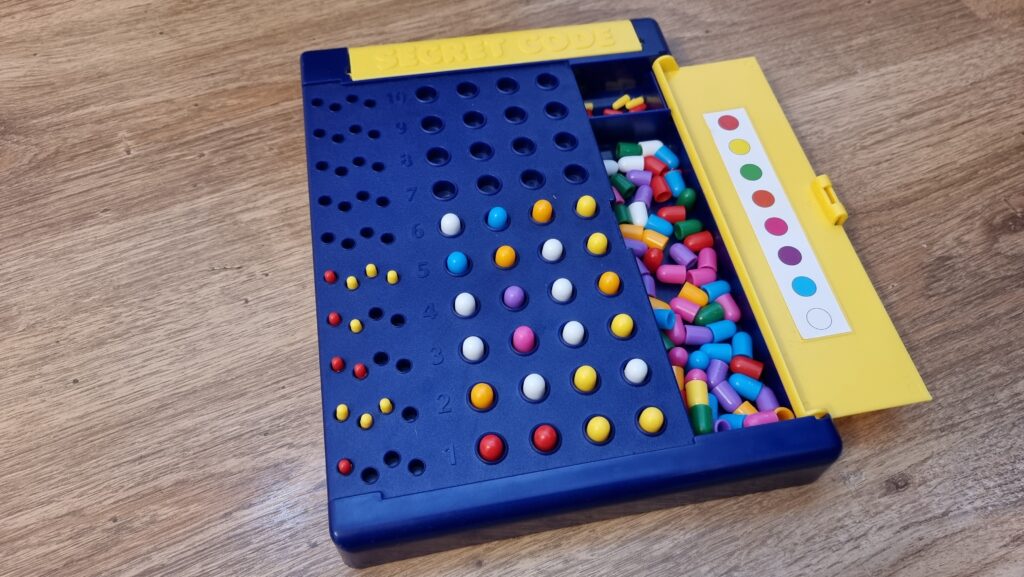
Maybe it’s because I’m distracted; multitasking doesn’t help problem-solving. Or it’s because we’re “Super” Mastermind, which differs from the one I had as a child in that
eight (not six) peg colours are available and secret codes are permitted to have duplicate peg colours. These changes increase the possible permutations from 360 to 4,096, but the
number of guesses allowed only goes up from 8 to 10. That’s hard.
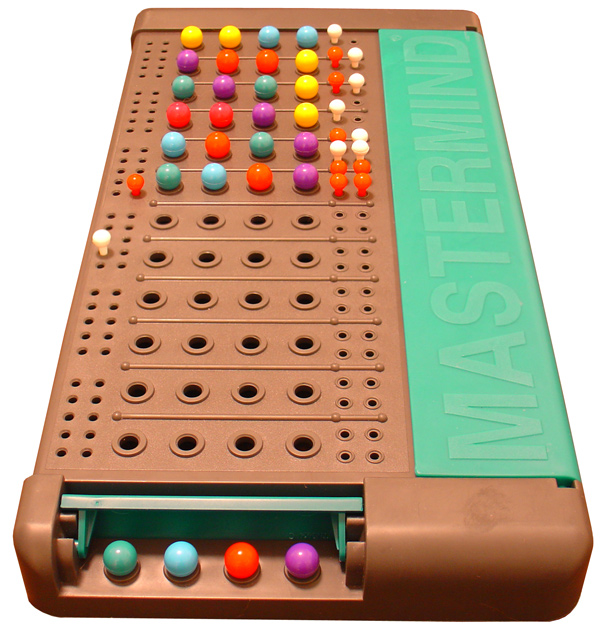
The set I had as a kid was like this, I think. Photo courtesy ZeroOne; CC-BY-SA license.
Hey, that’s an idea. Let’s crack the code… by writing some code!
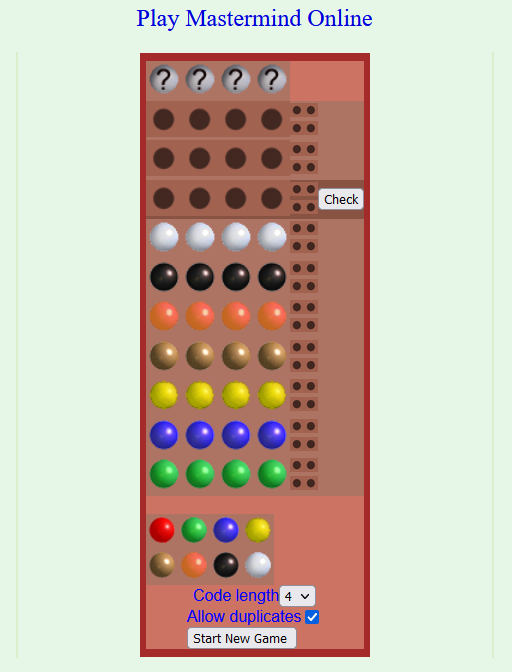
This online edition plays a lot like the version our kids play, although the peg colours are different. Next guess should be an
easy solve!
Representing a search space
The search space for Super Mastermind isn’t enormous, and it lends itself to some highly-efficient computerised storage.
There are 8 different colours of peg. We can express these colours as a number between 0 and 7, in three bits of binary, like this:
Decimal
Binary
Colour
0
000
Red
1
001
Orange
2
010
Yellow
3
011
Green
4
100
Blue
5
101
Pink
6
110
Purple
7
111
White
There are four pegs in a row, so we can express any given combination of coloured pegs as a 12-bit binary number. E.g. 100 110 111 010 would represent the
permutation blue (100), purple (110), white (111), yellow (010). The total search space, therefore, is the range of numbers from
000000000000 through 111111111111… that is: decimal 0 through 4,095:
Decimal
Binary
Colours
0
000000000000
Red, red, red, red
1
000000000001
Red, red, red, orange
2
000000000010
Red, red, red, yellow
…………
4092
111111111100
White, white, white, blue
4093
111111111101
White, white, white, pink
4094
111111111110
White, white, white, purple
4095
111111111111
White, white, white, white
Whenever we make a guess, we get feedback in the form of two variables: each peg that is in the right place is a bull; each that represents a peg in the secret code but
isn’t in the right place is a cow (the names come from Mastermind’s precursor, Bulls & Cows). Four bulls
would be an immediate win (lucky!), any other combination of bulls and cows is still valuable information. Even a zero-score guess is valuable- potentially very valuable! – because it
tells the player that none of the pegs they’ve guessed appear in the secret code.
If one of Wordle‘s parents was Scrabble, then this was the other. Just ask its Auntie Twitter.
Solving with Javascript
The latest versions of Javascript support binary literals and bitwise operations, so we can encode and decode between arrays of four coloured pegs (numbers 0-7) and the number 0-4,095
representing the guess as shown below. Decoding uses an AND bitmask to filter to the requisite digits then divides by the order of magnitude. Encoding is just a reduce
function that bitshift-concatenates the numbers together.
/** * Decode a candidate into four peg values by using binary bitwise operations. */function decodeCandidate(candidate){
return [
(candidate &0b111000000000) /0b001000000000,
(candidate &0b000111000000) /0b000001000000,
(candidate &0b000000111000) /0b000000001000,
(candidate &0b000000000111) /0b000000000001
];
}
/** * Given an array of four integers (0-7) to represent the pegs, in order, returns a single-number * candidate representation. */function encodeCandidate(pegs) {
return pegs.reduce((a, b)=>(a <<3) + b);
}
With this, we can simply:
Produce a list of candidate solutions (an array containing numbers 0 through 4,095).
Choose one candidate, use it as a guess, and ask the code-maker how it scores.
Eliminate from the candidate solutions list all solutions that would not score the same number of bulls and cows for the guess that was made.
Repeat from step #2 until you win.
Step 3’s the most important one there. Given a function getScore( solution, guess ) which returns an array of [ bulls, cows ] a given guess would
score if faced with a specific solution, that code would look like this (I’m convined there must be a more-performant way to eliminate candidates from the list with XOR
bitmasks, but I haven’t worked out what it is yet):
/** * Given a guess (array of four integers from 0-7 to represent the pegs, in order) and the number * of bulls (number of pegs in the guess that are in the right place) and cows (number of pegs in the * guess that are correct but in the wrong place), eliminates from the candidates array all guesses * invalidated by this result. Return true if successful, false otherwise. */function eliminateCandidates(guess, bulls, cows){
const newCandidatesList = data.candidates.filter(candidate=>{
const score = getScore(candidate, guess);
return (score[0] == bulls) && (score[1] == cows);
});
if(newCandidatesList.length ==0) {
alert('That response would reduce the candidate list to zero.');
returnfalse;
}
data.candidates = newCandidatesList;
chooseNextGuess();
returntrue;
}
I continued in this fashion to write a full solution (source code). It uses ReefJS for
component rendering and state management, and you can try it for yourself right in your web browser. If you
play against the online version I mentioned you’ll need to transpose the colours in your head: the physical version I play with the
kids has pink and purple pegs, but the online one replaces these with brown and black.
Testing the solution
Let’s try it out against the online version:
As expected, my code works well-enough to win the game every time I’ve tried, both against computerised and in-person opponents. So – unless you’ve been actively thinking about the
specifics of the algorithm I’ve employed – it might surprise you to discover that… my solution is very-much a suboptimal one!
My code has only failed to win a single game… and that turned out to because my opponent, playing overexcitedly, cheated in the third turn. To be fair, my code didn’t lose
either, though: it identified that a mistake must have been made and we declared the round void when we identified the problem.
My solution is suboptimal
A couple of games in, the suboptimality of my solution became pretty visible. Sure, it still won every game, but it was a blunt instrument, and anybody who’s seriously thought about
games like this can tell you why. You know how when you play e.g. Wordle (but not in “hard mode”) you sometimes want to type in a word that can’t possibly be the
solution because it’s the best way to rule in (or out) certain key letters? This kind of strategic search space bisection reduces the mean number of guesses you need to solve the
puzzle, and the same’s true in Mastermind. But because my solver will only propose guesses from the list of candidate solutions, it can’t make this kind of improvement.
My blog post about Break Into Us used a series of visual metaphors to show search space dissection, including this one. If you missed
it, it might be worth reading.
Search space bisection is also used in my adverserial hangman game, but in this case the aim is to split the search space in such a way that no
matter what guess a player makes, they always find themselves in the larger remaining portion of the search space, to maximise the number of guesses they have to make. Y’know, because
it’s evil.
A great first guess, assuming you’re playing against a random code and your rules permit the code to have repeated colours, is a “1122” pattern.
There are mathematically-derived heuristics to optimise Mastermind strategy. The first
of these came from none other than Donald Knuth (legend of computer science, mathematics, and pipe organs) back in 1977. His solution,
published at probably the height of the game’s popularity in the amazingly-named Journal of Recreational Mathematics, guarantees a solution to the six-colour version of the
game within five guesses. Ville [2013] solved an
optimal solution for a seven-colour variant, but demonstrated how rapidly the tree of possible moves grows and the need for early pruning – even with powerful modern computers – to
conserve memory. It’s a very enjoyable and readable paper.
But for my purposes, it’s unnecessary. My solver routinely wins within six, maybe seven guesses, and by nonchalantly glancing at my phone in-between my guesses I can now reliably guess
our children’s codes quickly and easily. In the end, that’s what this was all about.
My mum has made pets of one or both of dogs or cats for most of her life. She puts the difference between the two in a way that really resonates for me. To paraphrase her:
When you’re feeling down and you’ve had a shitty day and you just need to wallow in your despair for a little bit… a pet dog will try to cheer you up. It’ll jump up at you, bring
you toys, suggest that you go for a walk, try to pull your focus away from your misery and bring a smile to your face. A cat, though, will just come and sit and be melancholy with you.
Its demeanour just wordlessly says: “You’re feeling crap? Me too: I only slept 16 hours today. Let’s feel crap together.”
“I hate Mondays. Also any other day of the week with a ‘Y’ in it.”
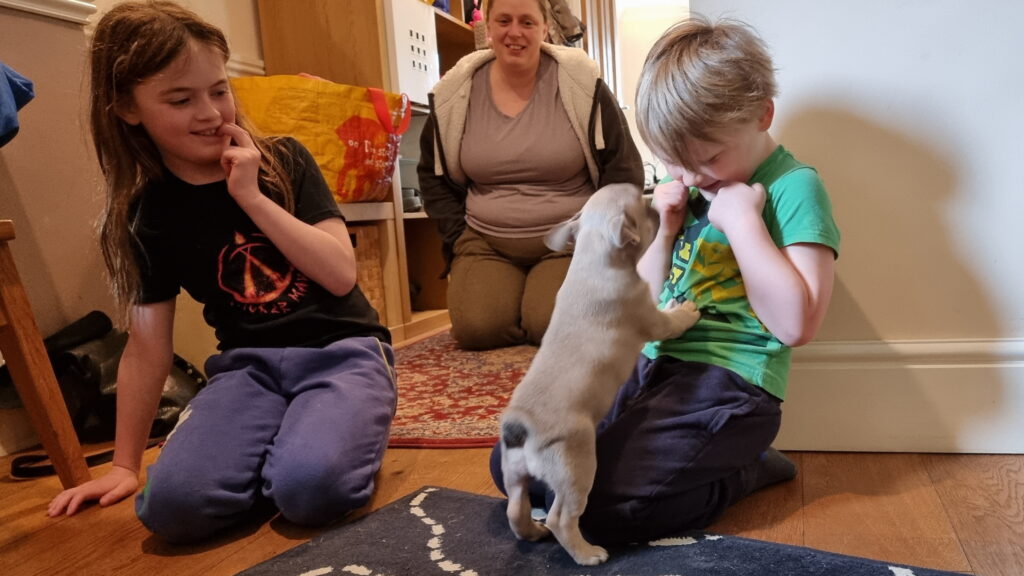
So it surprised many when, earlier this year, our family was expanded with the addition of a puppy called Demmy. I guess we collectively figured that now we’d solved all the hard
problems and the complexities of our work, volunteering, parenting, relationships, money etc. and our lives were completely simple, plain sailing, and stress-free, all of the time… that
we now had the capacity to handle adding another tiny creature into our midst. Do you see the mistake in that logic? Maybe we should have, too.
The kids were, and continue to be, absolutely delighted, especially our eldest who’s been mad about dogs now for well over half her life.
It turns out that getting a puppy is a lot like having a toddler all over again. Your life adjusts around when they need
to sleep, eat, and poop. You need to put time, effort, and thought into how to make and keep your house safe both for and from them. And, of course, they bring with
them a black hole that eats disposable income.
Sure they’re cute when they’re asleep, but the rest of the time they’re probably destroying things, pooping, or both. #PuppyOrToddler?
They need to be supervised and entertained and educated (the latter of which may require some education yourself). They need to be socialised so they can interact nicely with others,
learn the boundaries of their little world, and behave appropriately (even when they’re noton camera).
At the end of elementary “puppy school”, we tried some agility course obstacles. Jumps were a success, even for Demmy’s little legs, but she’d far rather hang out inside a tunnel than
run through one.
Even as they grow, their impact is significant. You need to think more-deeply about how, when and where you travel, work out who’s responsible for ensuring they’re walked (or carried!) and fed (not eaten!) and watched. You’ve got to keep them safe and healthy and stimulated.
Thankfully they’re not as tiring to play with as children, but as with kids, the level of effort required is hard to anticipate until you
have one.
Whether you’re a human pup or a canine pup, there’s fun to be had in leaping out of long grass to pounce one another.
But do you know what else they have in common with kids? You can’t help learning to love them.
It doesn’t matter what stupid thing they’re illicitly putting in their mouth, how many times you have to clean up after them, how frustrating it is that they can’t understand what you
need from them in order to help them, or how much they whine about something that really isn’t that big a deal (again: #PuppyOrToddler?). It doesn’t even matter how much you’re “not a
dog person”, whatever that means. They become part of your family, and you fall in love with them.
Panting and too hot from a long run under the hot summer sun, but loving the opportunity to get out and enjoy the sights and smells of the world. #PuppyOrDan?
I’m not a “dog person”. But: while I ocassionally resent the trouble she causes, I still love our dog.
I’ve been playing with a Flic Hub LR and some Flic 2 buttons. They’re “smart home” buttons, but for me they’ve got a killer selling point: rather than
locking you in to any particular cloud provider (although you can do this if you want), you can directly program the hub. This means you can produce smart integrations
that run completely within the walls of your house.
Here’s some things I’ve been building:
Prerequisite: Flic Hub to Huginn connection
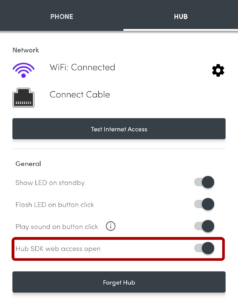
Step 1. Enable SDK access. Check!
I run a Huginn instance on our household NAS. If
you’ve not come across it before, Huginn is a bit like an open-source IFTTT: it’s got a steep
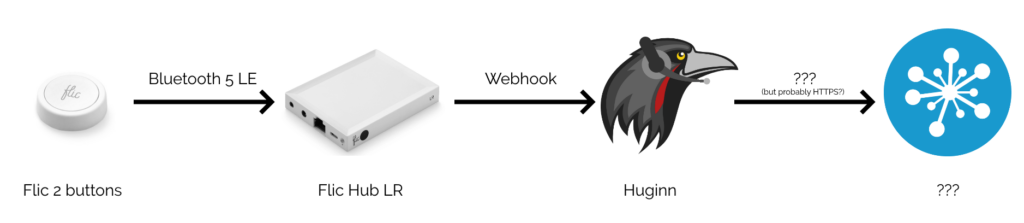
learning curve, but it’s incredibly powerful for automation tasks. The first step, then, was to set up my Flic Hub LR to talk to Huginn.
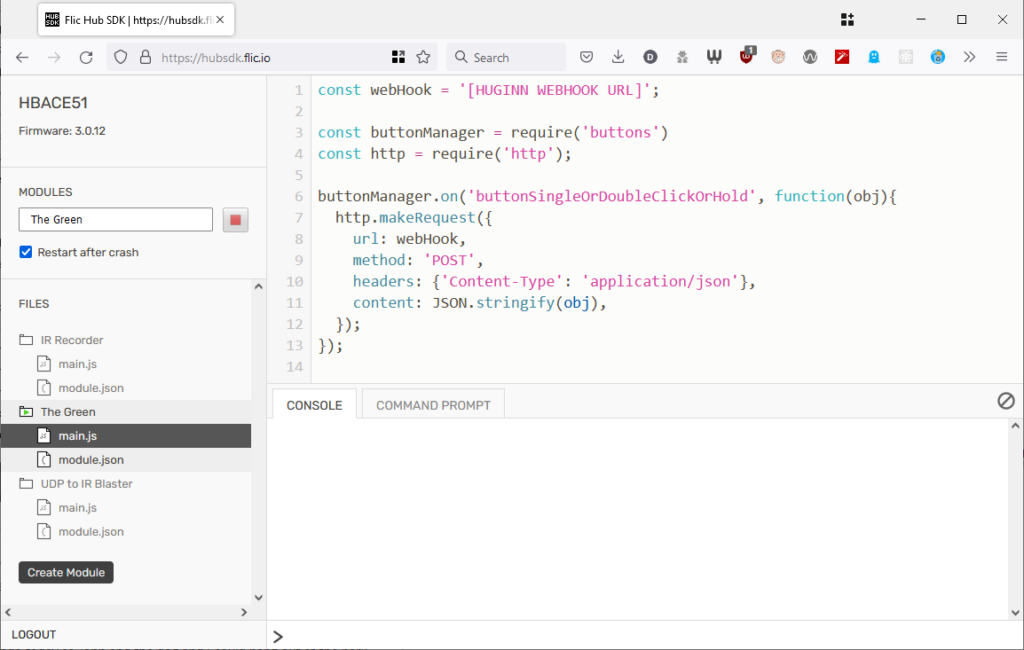
Checking ‘Restart after crash’ seems to help ensure that the script re-launches after e.g. a power cut. Need
the script?
This was pretty simple: all I had to do was switch on “Hub SDK web access open” for the hub using the Flic app,
then use the the web SDK to add this script to the hub. Now whenever a
button was clicked, double-clicked, or held down, my Huginn installation would receive a webhook ping.
Depending on what you have Huginn do “next”, this kind of set-up works completely independently of “the cloud”. (Your raven can fly into the clouds if you really want.)
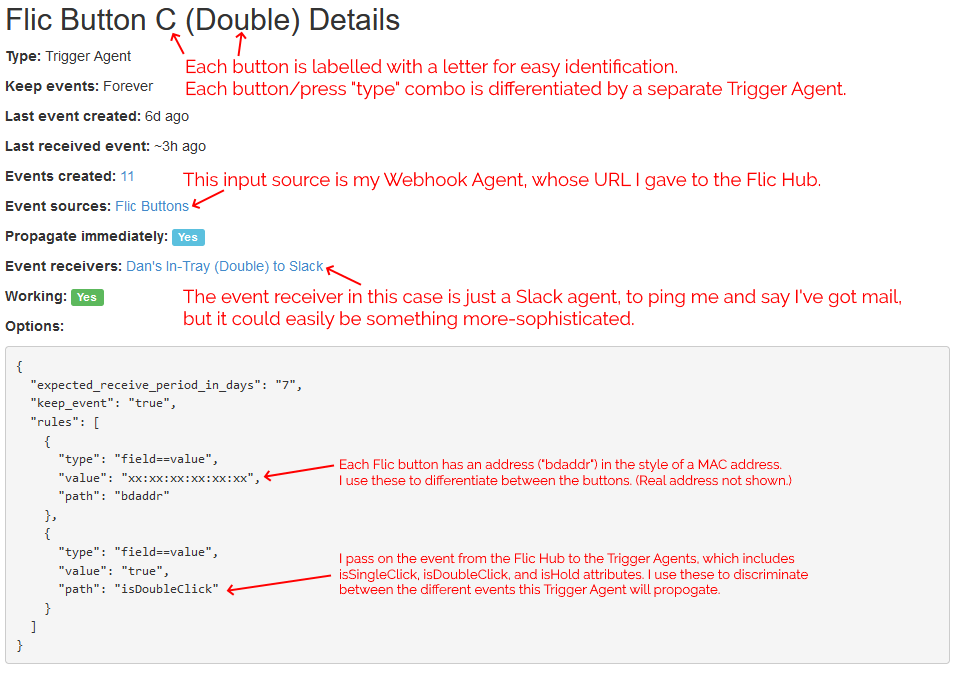
For convenience, I have all button-presses sent to the same Webhook, and use Trigger Agents to differentiate between buttons and press-types. This means I can re-use
functionality within Huginn, e.g. having both a button press and some other input trigger a particular action.
You’ve Got Mail!
By our front door, we have “in trays” for each of Ruth, JTA and I, as well as one for the
bits of Three Rings‘ post that come to our house. Sometimes post sits in the in-trays for a long time because people don’t think to check
them, or don’t know that something new’s been added.
I configured Huginn with a Trigger Agent to receive events from my webhook and filter down to just single clicks on specific buttons. The events emitted by these triggers are used to
notify in-tray owners.
Once you’ve made three events for your first button, you can copy-paste from then on.
In my case, I’ve got pings being sent to mail recipients via Slack, but I could equally well be integrating to other (or additional) endpoints or even
performing some conditional logic: e.g. if it’s during normal waking hours, send a Pushbullet notification to the recipient’s phone, otherwise
send a message to an Arduino to turn on an LED strip along the top of the recipient’s in-tray.
I’m keeping it simple for now. I track three kinds of events (click = “post in your in-tray”, double-click = “I’ve cleared my in-tray”, hold = “parcel wouldn’t fit in your in-tray: look
elsewhere for it”) and don’t do anything smarter than send notifications. But I think it’d be interesting to e.g. have a counter running so I could get a daily reminder (“There
are 4 items in your in-tray.”) if I don’t touch them for a while, or something?
Remember the Milk!
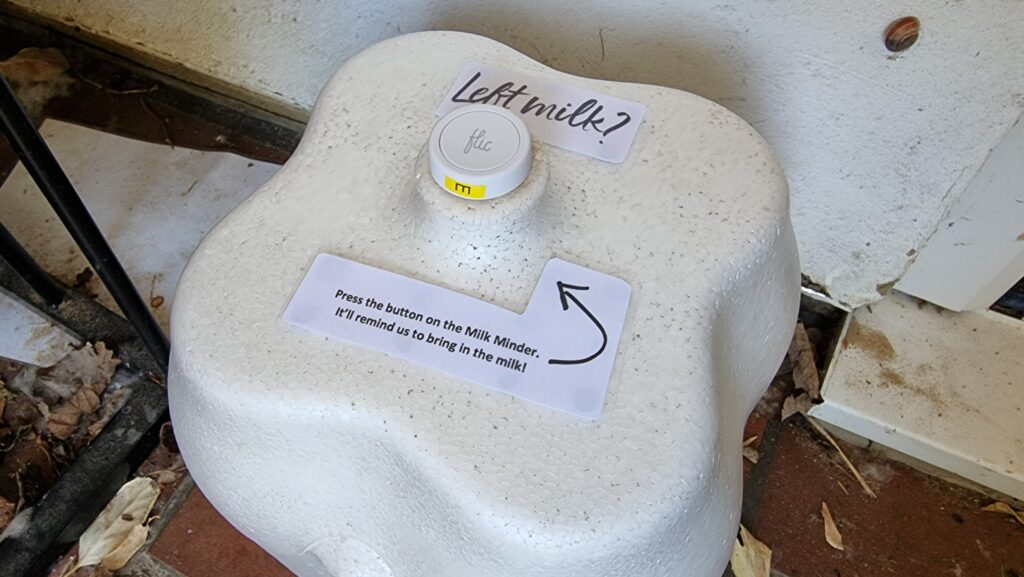
Following the same principle, and with the hope that the Flic buttons are weatherproof enough to work in a covered outdoor area, I’ve fitted one… to the top of the box our milkman
delivers our milk into!
The handle on the box was almost exactly the right size to stick a Flic button to! But it wasn’t flat enough until I took a file to it.
Most mornings, our milkman arrives by 7am, three times a week. But some mornings he’s later – sometimes as late as 10:30am, in extreme cases. If he comes during the school run the milk
often gets forgotten until much later in the day, and with the current weather that puts it at risk of spoiling. Ironically, the box we use to help keep the milk cooler for longer on
the doorstep works against us because it makes the freshly-delivered bottles less-visible.
Now that I had the technical infrastructure already in place, honestly the hardest part of this project was matching the font used in Milk &
More‘s logo.
I’m yet to see if the milkman will play along and press the button when he drops off the milk, but if he does: we’re set! A second possible bonus is that the kids love doing anything
that allows them to press a button at the end of it, so I’m optimistic they’ll be more-willing to add “bring in the milk” to their chore lists if they get to double-click the button to
say it’s been done!
Future Plans
I’m still playing with ideas for the next round of buttons. Could I set something up to streamline my work status, so my colleagues know when I’m not to be disturbed, away from my desk,
or similar? Is there anything I can do to simplify online tabletop roleplaying games, e.g. by giving myself a desktop “next combat turn” button?
My Flic Hub is mounted behind a bookshelf in the living room, with only its infrared transceiver exposed. 20p for scale: we don’t keep a 20p piece stuck to the side of the bookcase
all the time.
I’m quite excited by the fact that the Flic Hub can interact with an infrared transceiver, allowing it to control televisions and similar devices: I’d love to be able to use the volume
controls on our media centre PC’s keyboard to control our TV’s soundbar: and because the Flic Hub can listen for UDP packets, I’m hopeful that something as simple as AutoHotkey can make this possible.
Or perhaps I could make a “universal remote” for our house, accessible as a mobile web app on our internal Intranet, for those occasions when you can’t even be bothered to stand up to
pick up the remote from the other sofa. Or something that switched the TV back to the media centre’s AV input when consoles were powered-down, detected by their network activity? (Right
now the TV automatically switches to the consoles when they’re powered-on, but not back again afterwards, and it bugs me!)
It feels like the only limit with these buttons is my imagination, and that’s awesome.
Today I wanted to write a script that I could execute from both *nix (using Bash or a similar shell) and on Windows (from a command prompt, i.e. a batch file). I found Max Norin’s solution which works, but has a few limitations, e.g. when run it outputs either the
word “off” when run in *nix or the word “goto” when run on Windows. There’s got to be a sneaky solution, right?
Here’s my improved version:
 1
 2
 3
 4
 5
 6
 7
 8
 9
10
11
12
@goto(){
# Linux code here
uname -o
}
@goto $@
exit
:(){
@echooffrem Windows script hereecho%OS%
Mine exploits the fact that batch files can prefix commands with @ to suppress outputting them as they execute. So @goto can be a valid function name in
bash/zsh etc. but is interpreted as a literal goto command in a Windows Command Prompt. This allows me to move the echo off command –
which only has meaning to Windows – into the Windows section of the script and suppress it with @.
The file above can be saved as e.g. myfile.cmd and will execute in a Windows Command Prompt (or in MS-DOS) or your favourite *nix OS. Works in MacOS/BSD too, although
obviously any more-sophisticated script is going to have to start working around the differences between GNU and non-GNU versions of core utilities, which is always a bit of a pain!
Won’t work in sh because you can’t define functions like that.
But the short of it is you can run this on a stock *nix OS and get:
$ ./myfile.cmd
GNU/Linux
And you can run it on Windows and get:
> .\myfile.cmd
Windows_NT
You can’t put a shebang at the top because Windows hates it, but there might be a solution using PowerShell scripts (which use
hashes for comments: that’s worth thinking about!). In any case: if the interpreter strictly matters you’ll probably want to shell to it on line 3 with e.g. bash -c.
Why would you want such a thing? I’m not sure. But there is is, if you do.
There are a great number of things that I’m bad at. One thing I’m bad at (but that I’m trying to get better at) is being more-accepting of the fact that there are things that I am bad
at.
I’ve also been thinking about how I’m bad at thinking about how I’m bad at thinking about how I’m bad at thinking about…
I’m also particularly bad at choosing suitable stock photos for use in blog posts.
Being Bad
As a young kid, I was a smart cookie. I benefited from being an only child and getting lots of attention from a pair of clever parents, but I was also pretty bright and a quick learner
with an interest in just about anything I tried. This made me appear naturally talented at a great many things, and – pushed-on by the praise of teachers, peers, and others – I
discovered that I could “coast” pretty easily.
But a flair for things will only carry you so far, and a problem with not having to work hard at your education means that you don’t learn how to learn. I got bitten
by this when I was in higher education, when I found that I actually had to work at getting new information to stick in my head (of course, being older makes learning harder
too, as became especially obvious to me during my most-recent qualification)!
Ignore the fact that you’ve now seen me trying to sledge uphill and just accept that I was a clever kid (except at
photography), okay?
A side-effect of these formative experiences is that I grew into an adult who strongly differentiated between two distinct classes of activities:
Things I was good at, either because of talent or because I’d thoroughly studied them already. I experienced people’s admiration and respect when I practised these
things, and it took little effort to stay “on top” of these fields, and
Things I was bad at, because I didn’t have a natural aptitude and hadn’t yet put the time in to learning them. We don’t often give adults external
reinforcement for “trying hard”, and I’d become somewhat addicted to being seen as awesome… so I shied away from things I was “bad at”.
The net result: I missed out on opportunities to learn new things, simply because I didn’t want to be seen as going through the “amateur” phase. In hindsight, that’s
really disappointing! And this “I’m bad at (new) things” attitude definitely fed into the imposter syndrome I felt when I first
started at Automattic.
Being Better
Leaving the Bodleian after 8½ years might have helped stimulate a change in me. I’d carved out a role for myself defined by the fields I knew
best; advancing my career would require that I could learn new things. But beyond that, I benefited from my new employer whose “creed
culture” strongly promotes continuous learning (I’ve vlogged about this before), and from my coach who’s been great at encouraging me towards a growth mindset.
“Good Luck Dan”, my Bodleian buddies said. But perhaps they should’ve said “Keep Learning Dan”.
But perhaps the biggest stimulus to remind me to keep actively learning, even (especially?) when it’s hard, might have been the pandemic. Going slightly crazy with cabin fever during
the second lockdown, I decided to try and teach myself how to play the piano. Turns out I wasn’t alone, as I’ve mentioned before: the pandemic did strange things to us all.
I have no real experience of music; I didn’t even get to play recorder in primary school. And I’ve certainly got no talent for it (I can hear well enough to tell how awful my
singing is, but that’s more a curse than a blessing). Also, every single beginners’ book and video course I looked at starts from the assumption that you’re going to want to “feel” your
way into it, and that just didn’t sit well with the way my brain works.
90% of what I do in front of a piano might be described as “Dan Mucks About (in B Minor)”, but that’s fine by me.
I wanted a theoretical background before I even sat down at a keyboard, so I took a free online course in music theory. Then I started working through a
“beginners’ piano” book we got for the kids. Then I graduated to “first 50 Disney songs”, because I know how virtually all of them sound well enough that I’d be able to hear where I was
going wrong. Since then, I’ve started gradually making my way through a transcription of Einaudi’s Islands. Feeling like I’d got a good handle on what I was supposed to be
doing, I then took inspiration from a book JTA gave me and started trying to improvise.
Most days, I get no more than about 10 minutes on the piano. But little by little, day by day, that’s enough to learn. Nowadays even my inner critic perfectionist can
tolerate hearing myself play. And while I know that I’ll probably never be as good as, say, the average 8-year-old on YouTube, I’m content in my limited capacity.
Let’s start at the very beginning. (A very good place to start.)
If I’m trying to cultivate my wonder syndrome, I need to stay alert for “things I’m bad at” that I could conceivably be better at if
I were just brave enough to try to learn. I’m now proudly an “embarrassingly amateur” pianist, which I’m at-long-last growing to see as better than a being non-pianist.
Off the back of that experience, I’m going to try to spend more time doing things that I’m bad at. And I’d encourage you to do the same.
I love my electric car, but sometimes – like when I need to transport five people and a week’s worth of their luggage 250 miles and need to get there before the kids’ bedtime! – I still
use our big ol’ diesel-burning beast. And it was while preparing for such a journey that I recently got to thinking about the mathematics of refuelling.
I don’t know why you’d measure range in millilitres in the first place, but I’m hearing that I ought to fill up the car before we go.
It’s rarely worth travelling out-of-your-way to get the best fuel
prices. But when you’re on a long road trip anyway and you’re likely to pass dozens of filling stations as a matter of course, you might as well think at least a
little about pulling over at the cheapest.
You could use one of the many online services to help with this, of course… but assuming you didn’t do this and you’re already on the road, is there a better strategy than just trusting
your gut and saying “that’s good value!” when you see a good price?
If you can’t decide which nozzle is best, mix up a cocktail of them all. #TerribleProTip
Here’s how you do it:
Estimate your outstanding range R: how much further can you go? Your car might be able to help you with this. Let’s say we’ve got 82 miles in the tank.
Estimate the average distance between filling stations on your route, D. You can do this as-you-go by counting them over a fixed distance and continue from
step #4 as you do so, and it’ll only really mess you up if there are very few. Maybe we’re on a big trunk road and there’s a filling station about every 5 miles.
Divide R by D to get F: the number of filling stations you expect to pass before you completely run out of fuel. Round down,
obviously, unless you’re happy to push your vehicle to the “next” one when it breaks down. In our example above, that gives us 16 filling stations we’ll probably see before we’re
stranded.
Divide F by e to get T (use e = 2.72 if you’re having to do this in your head). Round down again, for the same reason as before.
This gives us T=5.
Drive past the next T filling stations and remember the lowest price you see. Don’t stop for fuel at any of these.
Keep driving, and stop at the first filling station where the fuel is the same price or cheaper than the cheapest you’ve seen so far.
Obviously you should take care doing maths on the road. Don’t drink and derive!
This is a modified variant of the Secretary Problem because it’s possible for two filling stations to have the same price, and that’s reflected in the algorithm above by the
allowance for stopping for fuel at the same price as the best you saw during your sampling phase. It’s probably preferable to purchase sub-optimally than to run completely dry, right?
Of course, you’re still never guaranteed a good solution with this approach, but it maximises your odds. Your own risk-assessment might rank “not breaking down” over pure mathematical
efficiency, and that’s on you.
Ruth wrote an excellent post this month entitled Wonder Syndrome.
It attempts to reframe imposter syndrome (which is strongly, perhaps disproportionately, present in tech fields) as a
positive indicator that there’s still more to learn:
Being aware of the boundaries of our knowledge doesn’t make us imposters, it makes us explorers. I’m going to start calling mine “Wonder Syndrome”, and allowing myself to be awed by
how much I still have to learn, and then focusing in and carrying on with what I’m doing because although I may not reach the stars, I’ve come a long way up the mountain. I can learn
these things, I can solve these problems, and I will.
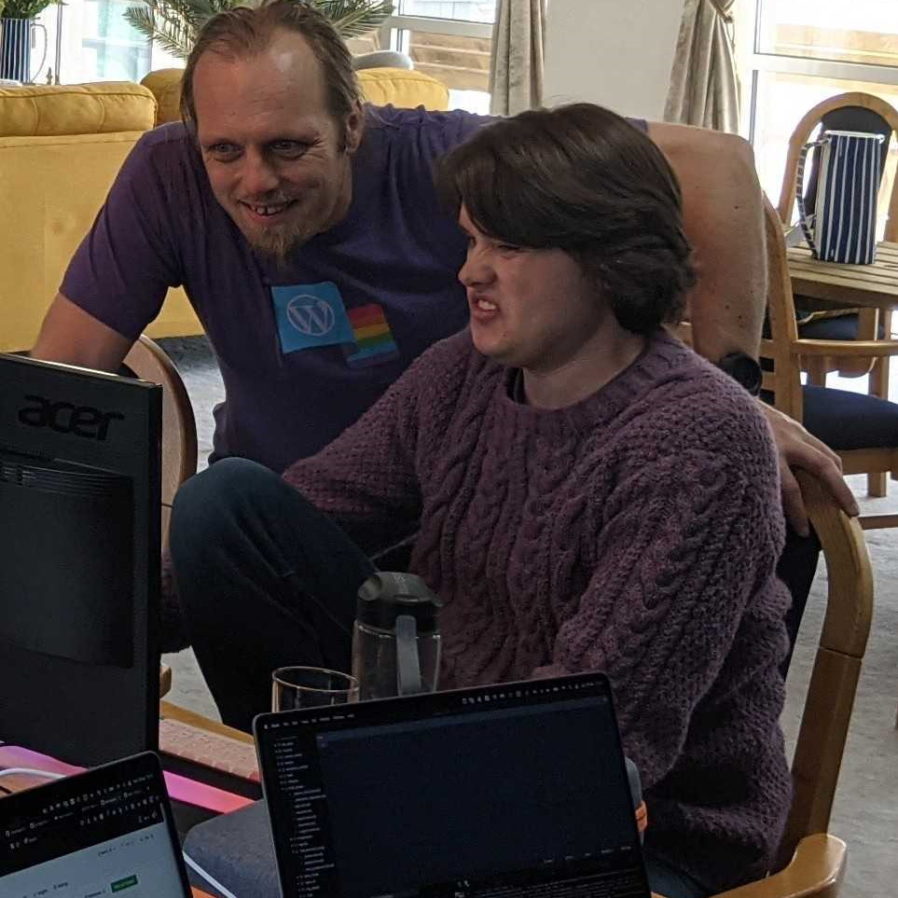
I don’t recall exactly what I’m advising a fellow Three Rings developer to do, here, but I don’t think he’s happy about it.
I just spent a week at a Three Rings DCamp (a “hackathon”, kinda), and for the umpteenth time had the experience of feeling like
everybody thinks I know everything, while on the inside I still feel like I’m still guessing a third of the time (and on StackOverflow for another third!).
The same’s true at work: people ask me questions about things that I suppose, objectively, are my “specialist subjects” – web standards, application security, progressive enhancement,
VAT for some reason – and even where I’m able to help, I often get that nagging feeling like
there must be somebody better than me they could have gone to?
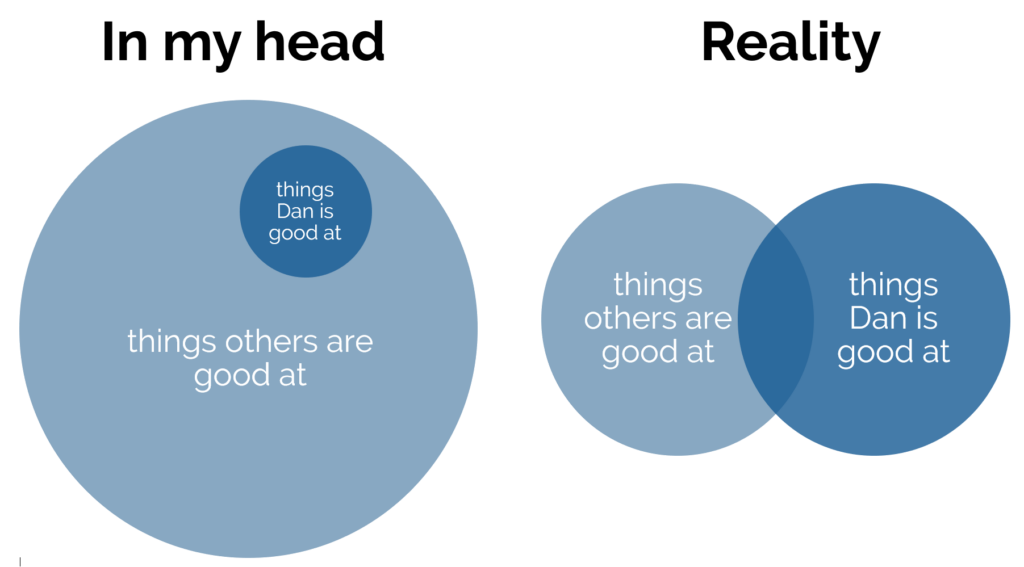
You’ve probably seen diagrams like this before. After all: I’m not smart or talented enough to invent anything like this and I don’t know why you’d listen to anything I have to say on
the subject anyway. 😂
You might assume that I love Ruth’s post principally because it plays to my vanity. The post describes two kinds of knowledgeable developers, who are differentiated primarily by their
attitude to learning. One is satisfied with the niche they’ve carved out for themselves and the status that comes with it and are content to rest on their laurels; the other is driven
to keep pushing and learning more and always hungry for the next opportunity to grow. And the latter category… Ruth’s named after me.
Wait, what if I’m not‽ Have I been faking it this entire blog post?
Bnd while I love the post, my gut feeling to being named after such an ideal actually makes me slightly uncomfortable. The specific sentence that gets me is (emphasis mine):
Dans have no interest in being better than other people, they just want to know more than they did yesterday.
I wish that was me, but I’m actually moderately-strongly motivated by a desire to feel like I’m the smartest person in the room! I’m getting this urge under control (I’m pretty
sure I was intolerable as a child and have been improving by instalments since then!). Firstly, because it’s an antisocial pattern to foster, but also because it limits my ability to
learn new things to have to go through the awkward, mistake-filled “I’m a complete amateur at this!” phase. But even as I work on this I still get that niggling urge, more often than
I’d like, to “show off”.
Of course, it could well be that what I’m doing right now is catastrophising. I’m taking a nice thing somebody’s said about me, picking the one part of it that I find hardest to feel
represents me, and deciding that I must be a fraud. Soo… imposter syndrome, I guess. Damn.
Or to put it a better way: Wonder Syndrome. I guess this is another area for self-improvement.
(I’m definitely adopting Wonder Syndrome into my vocabulary, as an exercise in mitigating imposter syndrome. If you’ve not read Ruth’s post in full, you should go and do that next.)
Taking a photo of our kids isn’t too hard: their fascination with screens means you just have to switch to “selfie mode” and they lock-on to the camera like some kind of narcissist
homing pigeon. Failing that, it’s easy enough to distract them with something that gets them to stay still for a few seconds and not just come out as a blur.
“On the school run” probably isn’t a typical excuse for a selfie, but the light was good.
But compared to the generation that came before us, we have it really easy. When I was younger than our youngest is , I was obsessed with pressing buttons. So pronounced was my
fascination that we had countless photos, as a child, of my face pressed so close to the lens that it’s impossible for the camera to focus, because I’d rushed over at the last second to
try to be the one to push the shutter release button. I guess I just wanted to “help”?
Oh wait… is there something on that camera I can press?
In theory, exploiting this enthusiasm should have worked out well: my parents figured that if they just put me behind the camera, I could be persuaded to take a good picture
of others. Unfortunately, I’d already fixated on another aspect of the photography experience: the photographer’s stance.
When people were taking picture of me, I’d clearly noticed that, in order to bring themselves down to my height (which was especially important given that I’d imminently try to
be as close to the photographer as possible!) I’d usually see people crouching to take photos. And I must have internalised this, because I started doing it too.
Another fantastic photo by young Dan: this one shows around 80% of my mum’s face and around 100% of my dad’s manspreading.
Unfortunately, because I was shorter than most of my subjects, this resulted in some terrible framing, for example slicing off the tops of their heads or worse. And because this was a
pre-digital age, there was no way to be sure exactly how badly I’d mucked-up the shot until days or weeks later when the film would be developed.
I imagine that my dad hoped to see more of whatever bus that is, in this photo, but he’s probably just grateful that I didn’t crop off any parts of his body this time.
In an effort to counteract this framing issue, my dad (who was always keen for his young assistant to snap pictures of him alongside whatever article of public transport history he was
most-interested in that day) at some point started crouching himself in photos. Presumably it proved easier to just duck when I did rather than to try to persuade me not to crouch in
the first place.
As you look forward in time through these old family photos, though, you can spot the moment at which I learned to use a viewfinder, because people’s heads start to feature close to the
middle of pictures.
This is a “transitional period” photo, evidenced by the face that my dad is clearly thinking about whether or not he needs to crouch.
Unfortunately, because I was still shorter than my subjects (especially if I was also crouching!), framing photos such that the subject’s face was in the middle of the frame resulted in
a lot of sky in the pictures. Also, as you’ve doubtless seem above, I was completely incapable of levelling the horizon.
This is the oldest photo I can find that was independently taken by our youngest child, then aged 3. I’m the subject, and I’m too close to the lens, blurred because I’m in motion, and
clearly on my way to try to “help” the photographer. Our ages might as well be reversed.
I’d like to think I’ve gotten better since, but based on the photo above… maybe the problem has been me, all along!
For lunch today I taste-tested five different plant-based vegan “cheeses” from Honestly Tasty. Let’s see if they’re any good.
Prefer video?
This blog post is available as a video (here or on YouTube), for those who like that sort of thing. The content’s slightly different, but you
do get to see my face when I eat the one that doesn’t agree with me.
Background
I’ve been vegetarian or mostly-vegetarian to some degree or another for a little over ten years (for
those who have trouble keeping up: I currently eat meat only on weekends, and not including beef or lamb), principally for the environmental benefits of a reduced-meat lifestyle. But if
I’m really committed to reducing the environmental impact of my diet, the next “big” thing I still consume is dairy products.
My milk consumption is very low nowadays, but – like many people who might aspire towards dropping dairy – it’s quitting cheese that poses the biggest challenge. I’m not even the
biggest fan of cheese, and I don’t know how I’d do without it: there’s just, it seems, no satisfactory substitute.
It’s possible, though, that my thinking on this is outdated. Especially in recent years, we’re getting better and better at making convincing (or, at least, tasty!) plant-based
substitutes to animal based foods. And so, inspired by a conversation with some friends, I thought I’d try a handful of new-generation plant-based cheeses and see how I got on. I
ordered a variety pack from Honestly Tasty (who’ll give you 20% off your first order if you subscribe your favourite throwaway email address to
their newsletter) and gave it a go.
It’s supposed to taste like Brie, I guess, but it’s not convincing. The texture of the rind is surprisingly good, but the inside is somewhat homogeneous and flat. They’ve tried to use
mustard powder to provide Brie’s pepperiness and acetic acid for its subtle sourness, but it feels like there might be too much of the former (or perhaps I’m just a little oversensitive
to mustard) and too little of the latter. It’s okay, but I wouldn’t buy it again.
This was surprisingly flavoursome and really quite enjoyable. It spreads with about the consistency of pâté and has a sharp tang that really stands out. You wouldn’t mistake it for
cheese, but you might mistake it for a cheese spread: there’s a real “cheddary” flavour buried in there.
This is supposed to be modelled after Gorgonzola, and it might as well be because I don’t like either it or the cheese it’s based on. I might loathe Blue slightly less than
most blue cheeses, but that doesn’t mean I’d willingly subject myself to this again in a hurry. It’s matured with real Penicillium Roqueforti, apparently, along with seaweed, and it
tastes like both of these things are true. So yeah: I hated this one, but you shouldn’t take that as a condemnation of its quality as a cheese substitute because I’d still rather eat it
than the cheese that it’s based on. Try for yourself, I guess.
This was probably my favourite of the bunch. It’s reminiscent of garlic & herb Boursin, and feels like somebody in the
kitchen where they cooked it up said to themselves, “how about we do the Ched Spread, but with less onion and a whole load of herbs mixed-through”. It seems that it must be easier to
make convincingly-cheesy soft cheeses than hard cheeses, but I’m not complaining: this would be great on toast.
If you’d served me this and told me it was a baked Camembert… I wouldn’t be fooled. But I wouldn’t be disappointed either. It moves a lot like Camembert and it tastes… somewhat like it.
But whether or not that’s “enough” for you, it’s perfectly delicious and I’d be more than happy to eat it or serve it to others.
In summary…
Honestly Tasty’s Ched Spread, Herbi, and Shamembert are perfectly acceptable (vegan!) substitutes for cheese. Even where they don’t accurately reflect the cheese they attempt to model,
they’re still pretty good if you take them on their own merits: instead of comparing them to their counterparts, consider each as if it were a cheese spread or soft cheese in its own
right and enjoy accordingly. I’d buy them again.
Their Bree failed to capture the essence of a good ripe Brie and its flavour profile wasn’t for me something to enjoy outside of its attempts at emulation. And their “Veganzola” Blue
cheese… was pretty grim, but then that’s what I think of Gorgonzola too, so maybe it’s perfect and I just haven’t the palate for it.
Suppose you’re running an application on a Passenger + Nginx powered server and you want to add caching.
Perhaps your application has a dynamic, public endpoint but the contents don’t change super-frequently or it isn’t critically-important that the user always gets up-to-the-second
accuracy, and you’d like to improve performance with microcaching. How would you do that?
Where you’re at
Not pictured: the rest of the Internet.
Your configuration might look something like this:
1
2
3
4
5
6
7
server {
# listen, server_name, ssl, logging etc. directives go here# ...root/your/application;
passenger_enabledon;
}
What you’re looking for is proxy_cache and its sister directives, but you can’t just
insert them here because while Passenger does act act like an upstream proxy (with parallels like e.g. passenger_pass_header which mirrors the behaviour of proxy_pass_header), it doesn’t provide any of the functions you need to implement proxy caching
of non-static files.
Where you need to be
Instead, what you need to to is define a second server, mount Passenger in that, and then proxy to that second server. E.g.:
# Set up a cacheproxy_cache_path/tmp/cache/my-app-cachekeys_zone=MyAppCache:10mlevels=1:2inactive=600smax_size=100m;
# Define the actual webserver that listens for Internet traffic:server {
# listen, server_name, ssl, logging etc. directives go here# ...# You can configure different rules by location etc., but here's a simple microcache:location/ {
proxy_passhttp://127.0.0.1:4863; # Proxy all traffic to the application server defined belowproxy_cacheMyAppCache; # Use the cache defined aboveproxy_cache_valid2003s; # Treat HTTP 200 responses as valid; cache them for 3 secondsproxy_cache_use_staleupdating; # (Optional) send outdated response while background-updating cacheproxy_cache_lock on; # (Optional) only allow one process to update cache at once
}
}
# (Local-only) application server on an arbitrary port number to act as the upstream proxy:server {
listen 127.0.0.1:4863;
root/your/application;
passenger_enabledon;
}
The two key changes are:
Passenger moves to a second server block, localhost-only, on an arbitrary port number (doesn’t need HTTPS, of course, but if your application detects/”expects” HTTPS you
might need to tweak your headers).
Your main server block proxies to the second as its upstream, and you can add whatever caching directives you like.
Obviously you’ll need to be smarter if you host a mixture of public and private content (e.g. send Vary: headers from your application) and if you want different cache
durations on different addresses or types of content, but there are already great guides to help with that. I only wrote this post because I spent some time searching for (nonexistent!)
passenger_cache_ etc. rules and wanted to save the next person from the same trouble!
I really love Dungeondraft, an RPG battle map generator. It’s got great compatibility with
online platforms like Foundry VTT and Roll20, but if you’re looking to make maps for tabletop play,
there’s a few tips I can share:
Tabletop players can’t zoom in and will appreciate you printing with good contrast.
Planning and designing
Dungeondraft has (or can be extended with) features to support light levels and shadow-casting obstructions, openable doors and windows, line-of sight etc… great to have when you’re
building for Internet-enabled tabletops, but pointless when you’re planning to print out your map! Instead:
Think about scale: I’m printing to A4 sheets and using inch-size squares, so every 11 x 8 squares equates to one sheet of paper. Knowing this, I can multiply-up to a
whole number of sheets of paper and this informs my decisions about how to best make use of the maps (and what will and won’t fit on my dining table!).
Focus on legibility: Your printer probably won’t have the same kind of resolution as your screen, and your players can’t “zoom in” to get details. Play with the grid
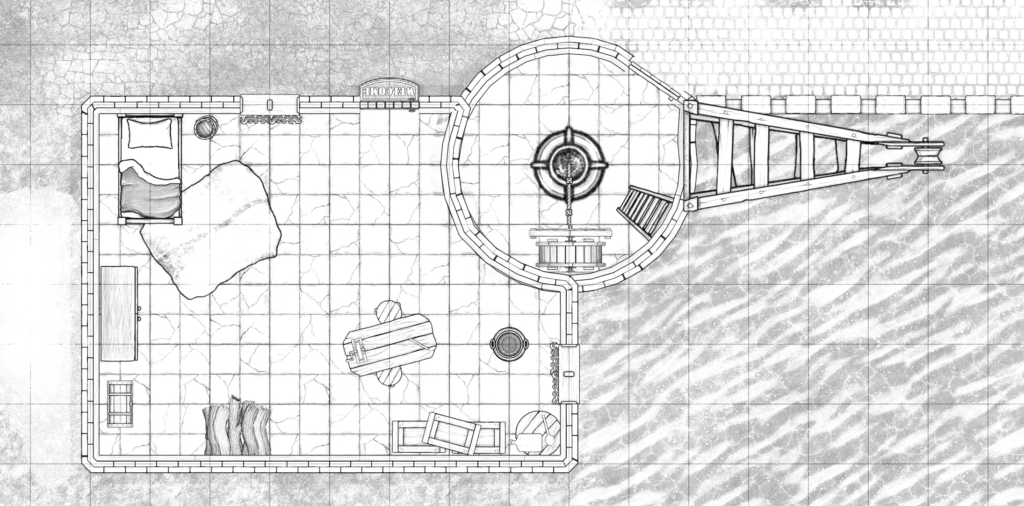
styles (under Map Settings) to find what works best for you, and try not to clash with your floor patterns. If you’re printing in monochrome, use the “Printer-Friendly” camera filter
(also under Map Settings, or in the Export Options dialog) to convert to gorgeous line-art. Make sure critical elements have sufficient contrast that they’ll stand out when printed or
your players might walk right over that chest, campfire, or bookshelf.
Think about exposure: You don’t get digital “fog of war” on the tabletop! Think about how you’re going to reveal the map to your players: plan to print in multiple
sections to put together, jigsaw style, or have card to “cover” bits of the map. Think about how the tool can help you here: e.g. if you’ve got multiple buildings the players can
explore, use a higher “level” or roof layer to put roofs on your buildings, then print the relevant parts of that level separately: now you’ve got a thematic cover-up that you can
remove to show the insides of the building. Go the other way around for secret doors: print the empty wall on your main map (so players can’t infer the location of the secret door by
the inclusion of a cover-up) and the secret door/passage on the overlay, so you can stick it onto the map when they find it.
If you’re printing in black and white, line art can be a gorgeous look.
Printing it out
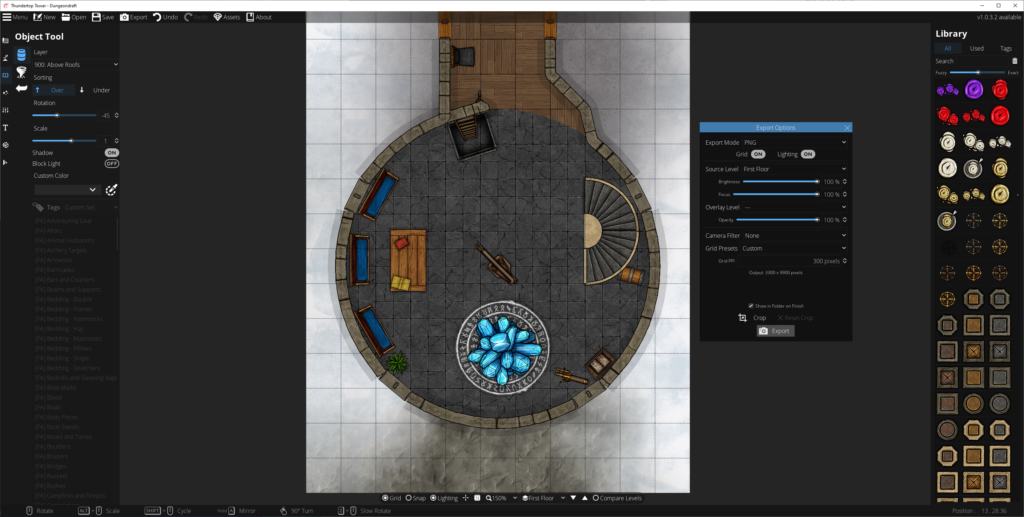
There’s no “print” option in Dungeondraft, so – especially if your map spans multiple “pages” – you’ll need a multi-step process to printing it out. With a little practice, it’s not too
hard or time-consuming, though:
Gimp makes light work of converting a PNG into a PDF.
Export your map (level by level) from Dungeondraft as PNG files. The default settings are fine, but pay attention to the
“Overlay level” setting if you’re using smart or complex cover-ups as described above.
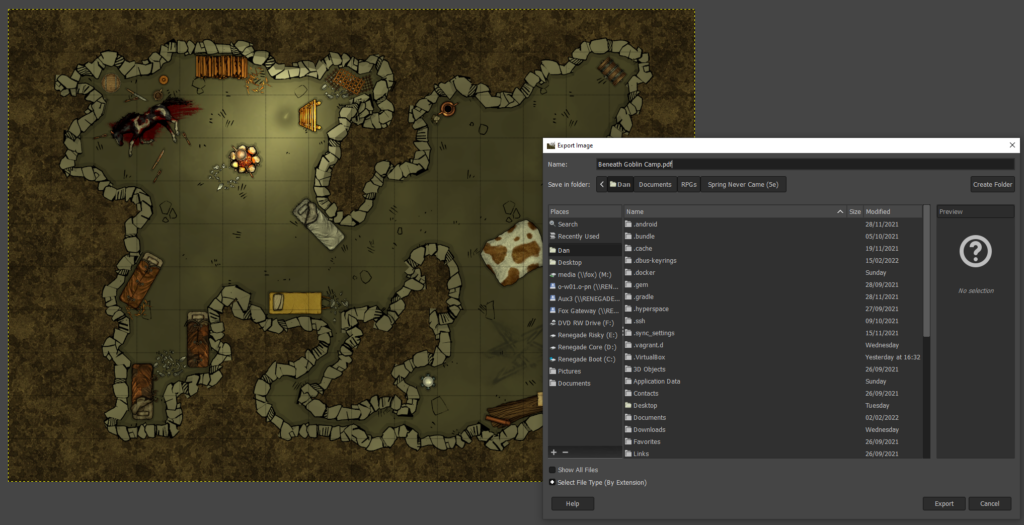
To easily spread your map across multiple pages, you’ll need to convert it to a PDF. I’m using Gimp to do this. Simply open the PNG in Gimp, make any post-processing/last minute changes that you couldn’t manage in Dungeondraft, then click File >
Export As… and change the filename to have a .pdf extension. You could print directly from Gimp, but in my experience PDF reader software does a much better job at multi-page printing.
Check the print preview before you click the button!
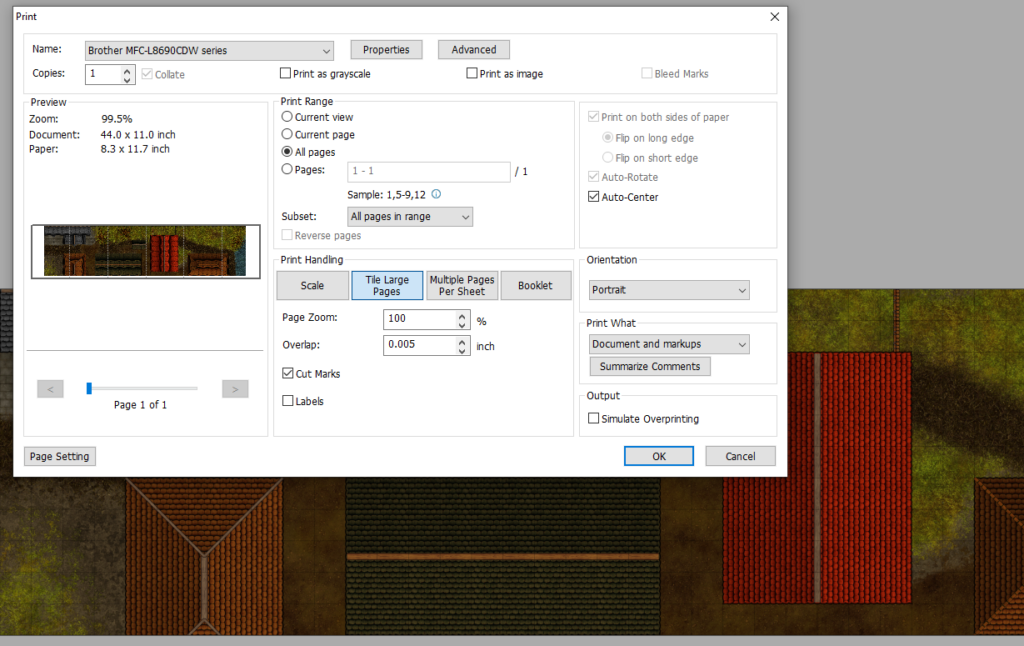
Open your PDF in an appropriate reader application with good print management. I’m using Foxit, which is… okay? Print it, selecting “tile large pages” to tell it to print across multiple sheets. Assuming you’ve produced a map an appropriate size
for your printer’s margins, your preview should be perfect. If not, you can get away with reducing the zoom level by up to a percent or two without causing trouble for your miniatures.
If you’d like the page breaks to occur at specific places (for exposure/reveal reasons), go back to Gimp and pad one side of the image by increasing the canvas size.
Check the level of “overlap” specified: I like to keep mine low and use the print margins as the overlapping part of my maps when I tape them together, but you’ll want to see how your
printer behaves and adapt accordingly.
The overlap provides stability, rigidity, and an explanation as to exactly what that character tripped over when they rolled a critical fail on a DEX check.
If you’re sticking together multiple pages to make a single large map, trim off the bottom and right margins of each page: if you printed with cut marks, this is easy enough even
without a guillotine. Then tape them together on the underside, taking care to line-up the features on the map (it’s not just your players who’ll appreciate a good, visible grid: it’s
useful when lining-up your printouts to stick, too!).
I keep my maps rolled-up in a box. If you do this too, just be ready with some paperweights to keep the edges from curling when you unfurl them across your gaming table. Or cut into
separate rooms and mount to stiff card for that “jigsaw” effect! Whatever works best for you!
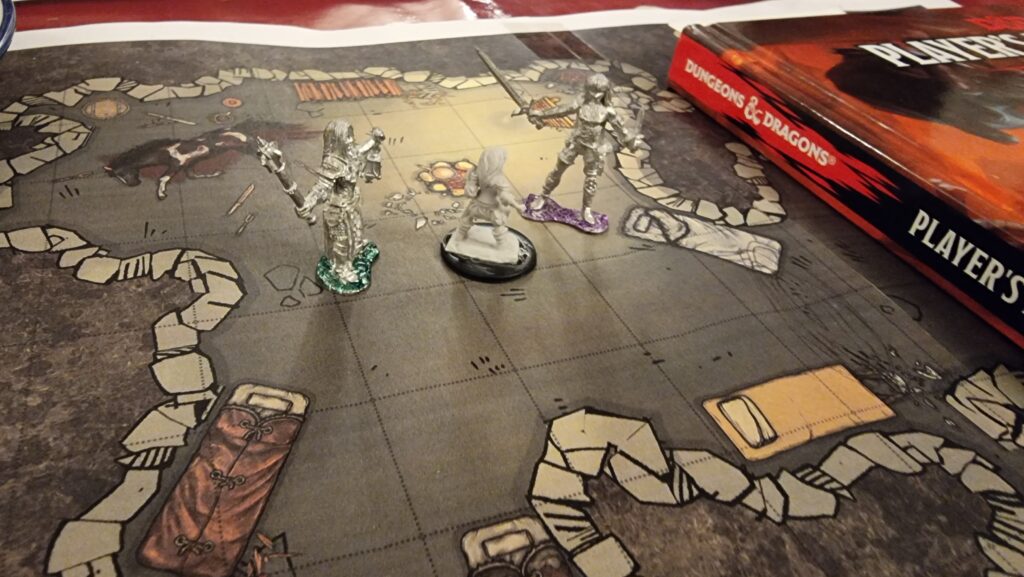
Any hefty tome, e.g. the 5e Player’s Handbook, can act as a paperweight.
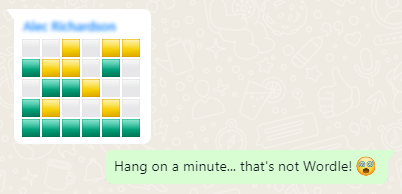
Different games in the same style (absurdle plays adversarially like my cheating hangman
game, crosswordle involves reverse-engineering a wordle colour grid into a crossword, heardle
is like Wordle but sounding out words using the IPA…)
I’m sure that by now all your social feeds are full of people playing Wordle. But the cool nerds are playing something new…
Now, a Wordle clone for D&D players!
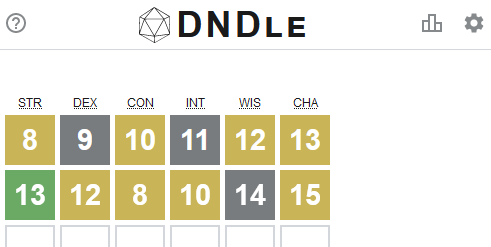
But you know what hasn’t been seen before today? A Wordle clone where you have to guess a creature from the Dungeons & Dragons (5e) Monster Manual by putting numeric values into a
character sheet (STR, DEX, CON, INT, WIS, CHA):
Just because nobody’s asking for a game doesn’t mean you shouldn’t make it anyway.
What are you waiting for: go give DNDle a try (I pronounce it “dindle”, but you can pronounce it however you like). A new monster
appears at 10:00 UTC each day.
And because it’s me, of course it’s open source and works offline.
The boring techy bit
Like Wordle, everything happens in your browser: this is a “backendless” web application.
I’ve used ReefJS for state management, because I wanted something I could throw together quickly but I didn’t want to drown myself (or my players)
in a heavyweight monster library. If you’ve not used Reef before, you should give it a go: it’s basically like React but a tenth of the footprint.
A cache-first/background-updating service worker means that it can run completely offline: you can install it to your homescreen in the
same way as Wordle, but once you’ve visited it once it can work indefinitely even if you never go online again.
I don’t like to use a buildchain that’s any more-complicated than is absolutely necessary, so the only development dependency is rollup. It
resolves my import statements and bundles a single JS file for the browser.
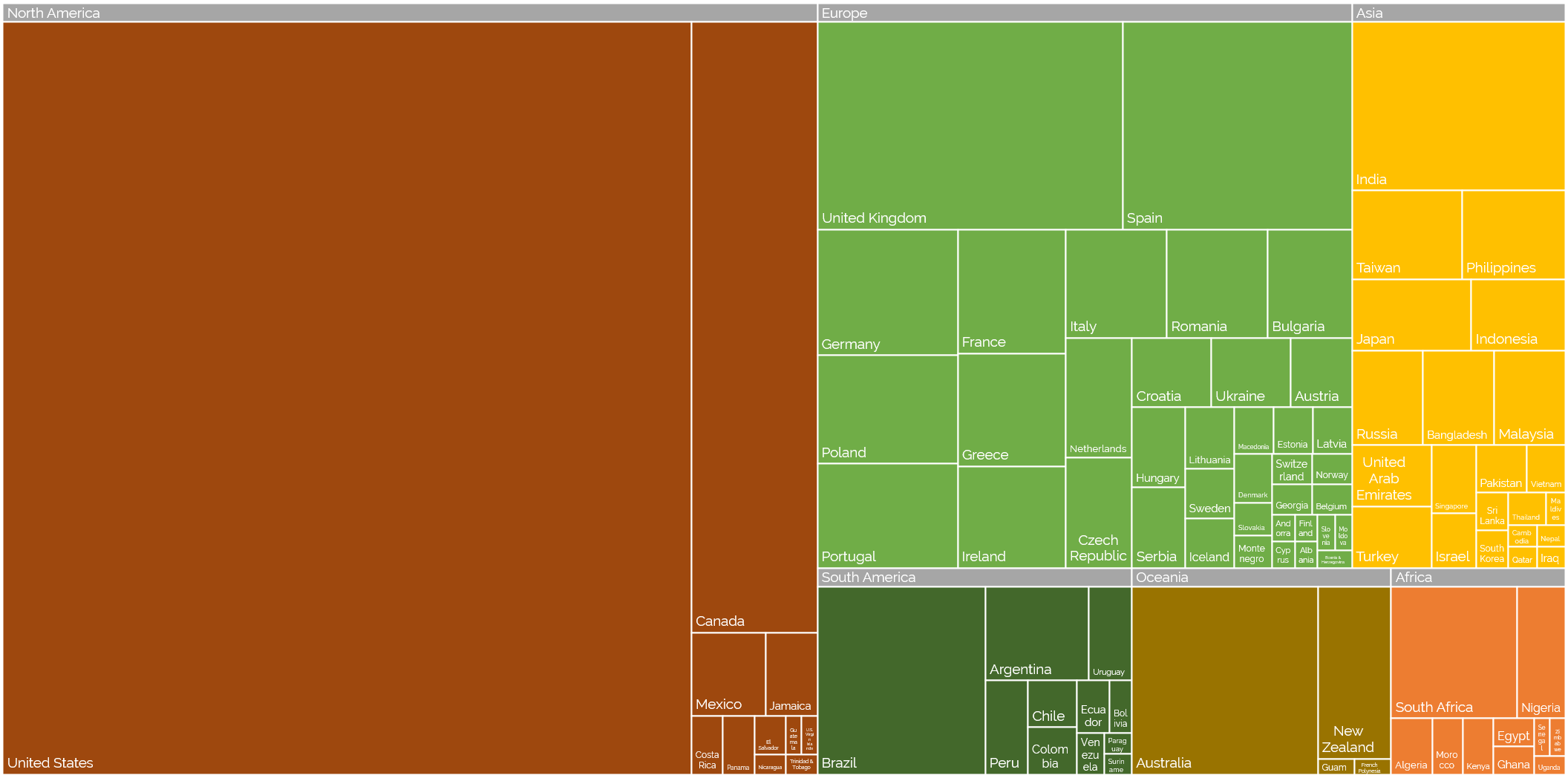
Off the back of my recent post about privileges I enjoy as a result of my location and first language, even at my highly-multinational employer, and inspired by my colleague Atanas‘ data-mining into where Automatticians are
located, I decided to do another treemap, this time about which countries Automatticians call home:
Where are the Automatticians?
If raw data’s your thing (or if you’re just struggling to make out the names of the countries with fewer Automatticians), here’s a CSV file for you.
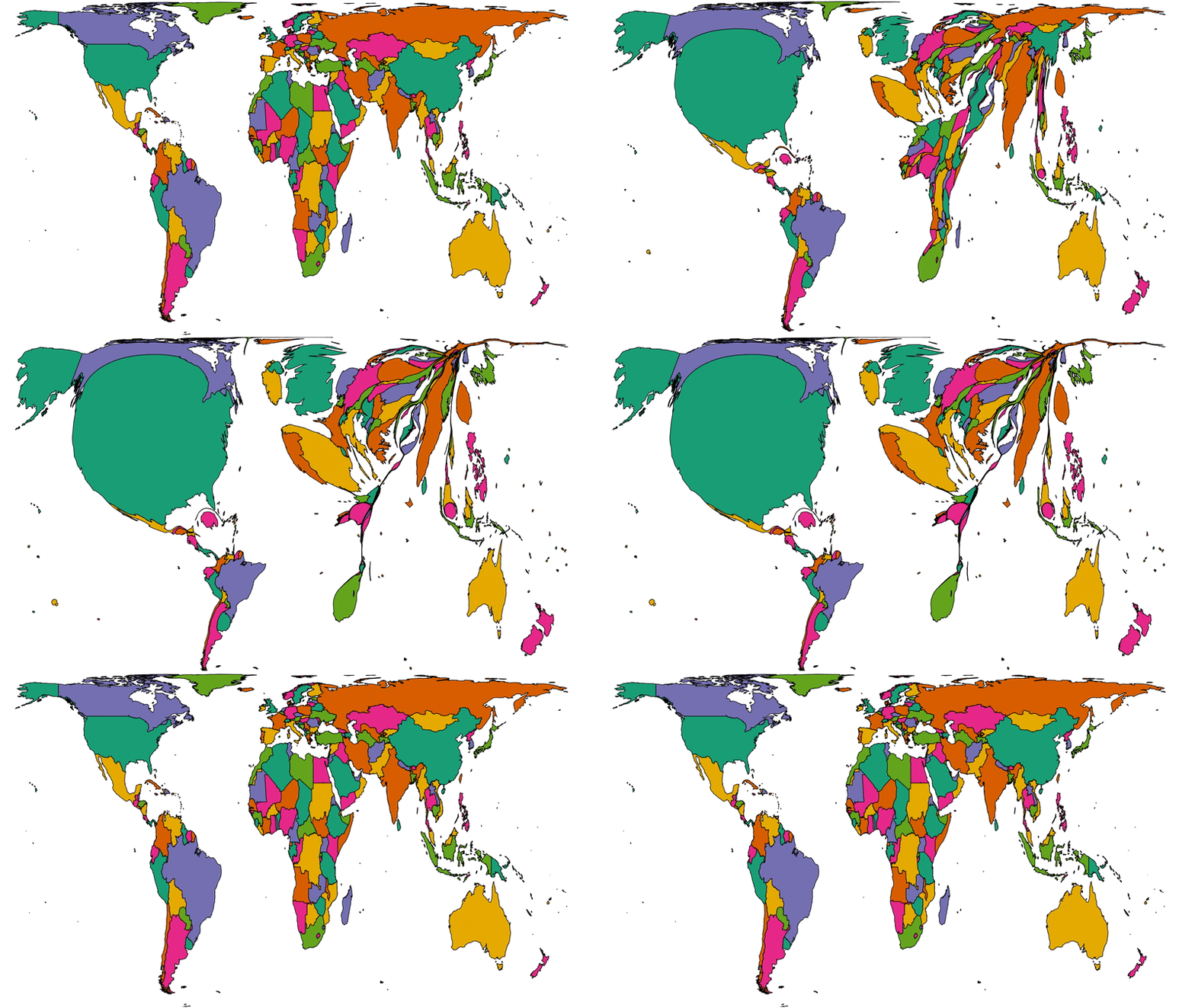
To get a better picture of that, let’s plot a couple of cartograms. This animation cycles between showing countries at (a) their
actual (landmass) size and (b) approximately proportional to the number of Automatticians based in each country:
This animation alternates between showing countries at “actual size” and proportional to the number of Automatticians based there. North America and Europe dominate the map, but there
are other quirks too: look at e.g. how South Africa, New Zealand and India balloon.
Another way to consider the data would be be comparing (a) the population of each country to (b) the number of Automatticians there. Let’s try that:
Here we see countries proportional to their relative population change shape to show number of Automatticians, as seen before. Notice how countries with larger populations like China
shrink away to nothing while those with comparatively lower population density like Australia blow up.
There’s definitely something to learn from these maps about the cultural impact of our employee diversity, but I can’t say more about that right now… primarily because I’m not smart
enough, but also at least in part because I’ve watched the map animations for too long and made myself seasick.
A note on methodology
A few quick notes on methodology, for the nerds out there who’ll want to argue with me:
Country data was extracted directly from Automattic’s internal staff directory today and is based on self-declaration by employees (this is relevant because we employ a relatively
high number of “digital nomads”, some of whom might not consider any one country their home).
Countries were mapped to continents using this dataset.
Maps are scaled using Robinson projection. Take your arguments about this over here.
The treemaps were made using Excel. The cartographs were produced based on work by Gastner MT, Seguy V, More P. [Fast flow-based algorithm for creating density-equalizing map
projections. Proc Natl Acad Sci USA 115(10):E2156–E2164 (2018)].
Some countries have multiple names or varied name spellings and I tried to detect these and line-up the data right but apologies if I made a mess of it and missed yours.
There’s a bird feeder in my garden. I’ve had it for about a decade now – Ruth got it for me, I think, as a thirtiethbirthday present – and it’s still going strong and mostly-intact, despite having been uprooted on several
occasions to move house.
I like that I can see it from my desk.
A woodpecker’s been a regular visitor this winter.
This month, though, it lost a piece, when one of its seed cages was stolen in a daring daylight heist by a duo of squirrels who climbed up the (“climb-proof”) pole, hung upside-down
from the hooks, and unscrewed the mechanism that held the feeder in place.
Not content to merely pour out and devour the contents, the miscreants made off with the entire feeder cage. It hasn’t been seen since. I’ve scoured the lawn, checked behind
the bushes, peered around bins and fence posts… it’s nowhere to be found. It’s driving me a little crazy that it’s vanished so-thoroughly.
Artists’ recreation of one of the culprits. (Courtesy @mikebirdy.)
I can only assume that the squirrels, having observed that the feeder would routinely be refilled once empty, decided that it’d be much more-convenient for them if it the feeder were
closer to their home:
“Hey, Coco!”
“Yeah, Peanut?”
“Every time we steal the nuts in this cage, more nuts appear…”
“Yeah, it’s a magic cage. Everysquirrel knows that, Peanut!”
“…but we have to come all the way down here to eat them…”
“It’s a bit of a drag, isn’t it?”
“…so I’ve been thinking, Coco: wouldn’t it be easier if the cage was… in our tree?”
Scene of the crime.
I like to imagine that the squirrels who live in whatever-tree the feeder’s now hidden in are in the process of developing some kind of cargo cult around it. Once a week, squirrels sit
and pray at the foot of the cage, hoping to appease the magical god who refills it. Over time, only the elders will remember seeing the feeder ever being full, and admonish their
increasingly-sceptical youngers ones to maintain their disciplined worship. In decades to come, squirrel archaeologists will rediscover the relics of this ancient (in squirrel-years)
religion and wonder what inspired it.
Or maybe they dumped the feeder behind the shed. I’d better go check.