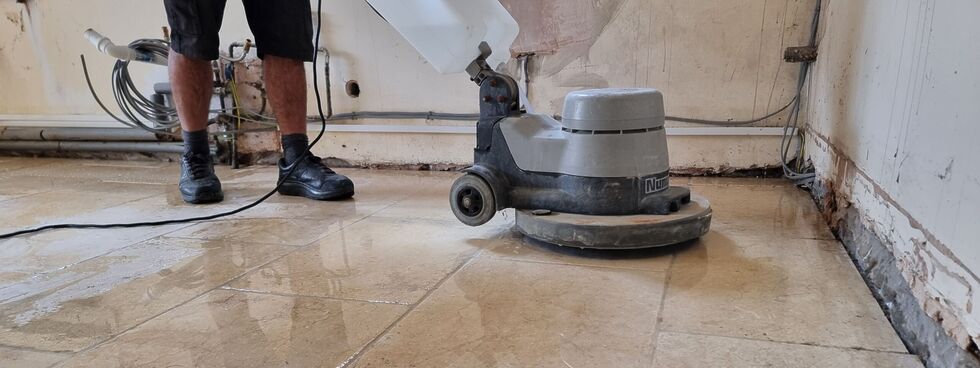
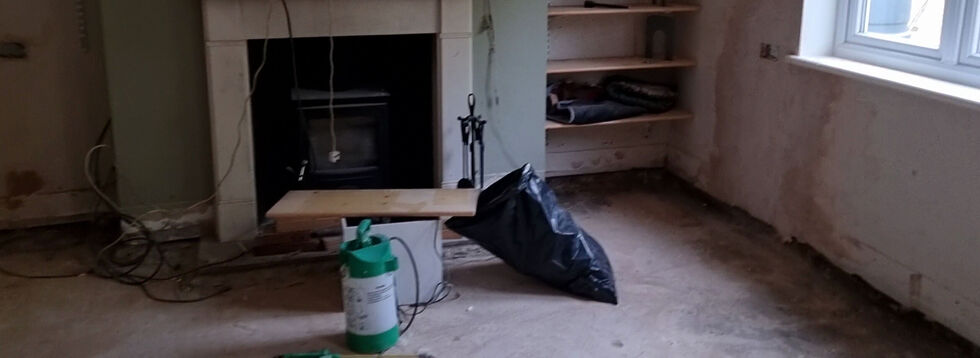
The insurance loss adjusters came around this morning, accompanied by damage assessors and electricians and whatnot.
The process continues to feel painfully slow. We’re still one to two weeks from confirmation that the insurance company will accept liability and be ready to start paying for, y’know,
the immediate concerns like where we’re going to live.
“How long should we plan on renting another house to live in?” I asked, warily.
“Six to twelve months?” guessed the loss adjusters.
As I’ll demonstrate, it’s surprisingly easy to spin up your own VPN provider on a virtual machine hosted by your choice of the cloud providers. You pay for the hours you need
it2,
and then throw it away afterwards.
If you’d prefer to use GCP, AWS Azure, or whomever else you like: all you need is a Debian 13 VM with a public IP address (the cheapest one available is usually plenty!)
and this bash script.
If you prefer the command-line, Linode’s got an API. But we’re going for ‘easy’ today, so it’ll all be clicking buttons and things.
First, spin up a VM and run my script3.
If you’re using Linode, you can do this by going to my StackScript and clicking ‘Deploy New Linode’.
You might see more configuration options than this, but you can ignore them.
Choose any region you like (I’m putting this one in Paris!), select the cheapest “Shared CPU” option – Nanode 1GB – and enter a (strong!) root password, then click Create Linode.
It’ll take a few seconds to come up. Watch until it’s running.
Don’t like SCP? You can SSH in and ‘cat’ the configuration or whatever else you like.
My script automatically generates configuration for your local system. Once it’s up and running you can use the machine’s IP address to download wireguard.conf locally. For
example, if your machine has the IP address 172.239.9.151, you might type scp -o StrictHostKeyChecking=no root@172.239.9.151:wireguard.conf ./ – note that I
disable StrictHostKeyChecking so that my computer doesn’t cache the server’s SSH key (which feels a bit pointless for a “throwaway” VM that I’ll never connect to a second time!).
If you’re on Windows and don’t have SSH/SCP, install one. PuTTY remains a solid choice.
File doesn’t exist? Give it a minute and try again; maybe my script didn’t finish running yet! Still nothing? SSH into your new VM and inspect
stackscript.log for a complete log of all the output from my script to see what went wrong.
Not got WireGuard installed on your computer yet? Better fix that.
Open up WireGuard on your computer, click the “Import tunnel(s) from file” button, and give it the file you just downloaded.
You can optionally rename the new connection. Or just click “Activate” to connect to your VPN!
If you see the ‘data received’ and ‘data sent’ values changing, everything’s probably working properly!
You can test your Internet connection is being correctly routed by your VPN by going to e.g. icanhazip.com or ipleak.net: you should see the IP address of your new virtual machine and/or geolocation data that indicates that you’re in your selected region.
When you’re done with your VPN, just delete the virtual machine. Many providers use per-minute or even per-second fractional billing, so you can easily end up spending only a handful of
cents in order to use a VPN for a reasonable browsing session.
Again, you can script this from your command-line if you’re the kind of person who wants a dozen different locations/IPs in a single day. (I’m not going to ask why.)
When you’re done, just disconnect and – if you’re not going to use it again immediately – delete the virtual machine so you don’t have to pay for it for a minute longer than you
intend4.
I stopped actively paying for VPN subscriptions about a decade ago and, when I “need” the benefits of a VPN, I’ve just done things like what I’ve described above. Compared to a
commercial VPN subscription it’s cheap, (potentially even-more) private, doesn’t readily get “detected” as a VPN by the rare folks who try to detect such things, and I can enjoy my
choice of either reusable or throwaway IP addresses from wherever I like around the globe.
And if the government starts to try to age-gate commercial VPNs… well then that’s just one more thing going for my approach, isn’t it?
Footnotes
1 If you’re a heavy, “always-on” VPN user, you might still be best-served by one of the
big commercial providers, but if you’re “only” using a VPN for 18 hours a day or less then running your own on-demand is probably cheaper, and gives you some fascinating
benefits.
2 Many providers have coupons equivalent to hundreds of hours of free provision, so as
long as you’re willing to shuffle between cloud providers you can probably have a great and safe VPN completely for free; just sayin’.
3 Obviously, you shouldn’t just run code that strangers give you on the Internet unless
you understand it. I’ve tried to make my code self-explanatory and full of comments so you can understand what it does – or at least understand that it’s harmless! – but if you don’t
know and trust me personally, you should probably use this as an excuse to learn what you’re doing. In fact, you should do that anyway. Learning is fun.
4 Although even if you forget and it runs for an entire month before your billing cycle
comes up, you’re out, what… $5 USD? Plenty of commercial VPN providers would have charged you more than that!
It feels inconceivable to me that we’re only at F-Day plus three; that is, three days since a flash flood rushed through the ground floor of our house and forced us to
evacuate. We’ve been able to visit since and start assessing the damage, but for now I figured that what you’d want would be the kinds of horrible pictures that make you say “wow; I’m
glad that didn’t happen to me”.
These pictures are all from F-Day itself (which happened to be Friday the 13th; delightful, eh?):
A particularly horrifying moment was when the seals on the patio doors gave way and the dining room began to flood, and we had to pivot to laying sandbags to protect the kitchen from
the dining room rather than to protect the house as a whole. (Eventually, every ground floor room would be affected.)
The water came in so quickly! An hour earlier, a deliveryperson had to wade carefully through a puddle to reach our front door. But by this point, the entire ground floor was under a
foot of dirty water.
It’s heartbreaking to see a house that you love and cherish as it starts to look like a scene from Titanic.
Soon enough we had to pivot from trying to hold back the waters to trying to save what we could. By the time the water level reached the air bricks and vents, we were having to make
split-second choices about what we had time to save.
Not all of the books made it, but most of them did.
The fire brigade wisely had us switch off our electricity supply before the first row of sockets went underwater.
The dog was incredibly brave; retreating slowly up the stairs (while barking at the rising water!). But eventually she, too, required rescue.
In one of the few moment of levity, Ruth got to ‘play firefighter’ by carrying the poor pupper out of the building. By this point, the water depth was taller than the dog is.
We’ve had a few nights in Premier Inns, but it’s a new week and it’s time to hassle the insurance company to come and have a look around. And then, maybe, we can start working out where
we’ll live so the repair work can start.
I appreciate that it’s only 40-ish hours since my house flooded and we had to move out. But with all the stress and activity that’s necessarily followed, it feels like it’s been so much
longer.
Unrelated note: why has the person in the room above me at this hotel been using a pogo stick since around 05:30?
This morning, from my Premier Inn window, the skies are clear. I could almost forget that, just 4 miles away, my house is full of water.
Today may well be a day of waders and damage assessment, conversations with insurance companies and of working out where we’ll be living for the near future.
But strangely, what’s thrown me first this morning was that I couldn’t make this post submit.
Turns out my crosspost-to-mastodon checkbox was checked. Because my Mastodon server… runs on my homelab. Which is currently unplugged and in one of the highest rooms of a house with no
electricity or Internet access. (Or, probably, running water… although that matters less to a homelab.)
I think I moved it before it got wet, but yesterday is such a blur that I just don’t know. I remember we spent some time fighting back the water with sandbags and barricades. I remember
the moments each room began to fail, one by one, and we started moving whatever we could carry to higher floors (max props to folks from Eynsham Fire Bridade for helping with the heavy
stuff). But if you ask me what order we rescued things in, I just don’t know.
I guess we’ll find out when the waters recede, and it’s safe to go check.
James van der Beek died this week of bowel cancer; he was only a couple of years older than I am. I guess I’m at that
point of my life where unexpectedly-early celebrity deaths might start being “around my age”.
“They’re super tight. But if you want your ass to rock, your plums’ gotta pay the price.”
My dear friend Boro raises this curious provocation, which I really enjoyed musing upon this evening. His choice of words are excellent.
Fragmentation is about context-switching. About disfocus. About the scattering of ideas. We think of defragmentation – the “re-ordering” of data – as a necessary good: bringing
management and logic to how our information is arranged. But it’s Boro’s third question that reminds us that that’s not necessarily true.1
2
Anyway: Boro’s post is a reminder that a human brain is not a magnetic drum, and fragmentation is not necessarily something to fear. What’s an extra millisecond or two of psychological
“seek time” as you aim to remember the date of your friend’s birthday… if the mental journey takes you past memories of parties long-ago? How bad, really, is a few moments of seeking
the right word if, on the way, you discover the perfect metaphor for that blog post?3
What Boro accidentally touches on, for me, is the concept of premature optimisation. We talk about this being bad in software engineering circles, but it’s also bad for
us psychologically. Taking shortcuts weakens our ability to think things through “the hard way”. Earlier today, I had a thought about… something inconsequential about
heart rates… and chose to use mental arithmetic, over the course of several minutes, to estimate an answer to my query. My phone – with its built-in calculator app – sat in my pocket
the whole time. I chose the less-efficient route, and I felt better for it. Efficiency is not always the goal.
Or, as folks in my circles are saying a lot lately: inconvenience is counterculture. I quite like that.
Anyway: thanks, Boro, for the thought.
Footnotes
1 Brief side-note #1: if you’re wondering why you haven’t had to “defrag your hard drive”
for the last decade or so: the biggest reason is that SSDs don’t suffer fragmentation in the same kind of way (and, indeed, trying to defragment them probably reduces their
lifespan!). Fragmentation on physical media is a problem only because the magnetic heads need to jump back and forth between “parts” of a file or stream of data, which introduces wear
and slows down seeking. But on solid state media, where data is referenced directly by memory address, fragmentation is no impediment.
2 Brief side-note #2, with the understanding that the side notes are now getting to be
longer than the actual content: one of my favourite features of late-stage HDD defragmentation utilities was that they were smart about what they defragmented where.
Not only could they group individual files “together”, they could also group frequently-used-together files close to one another (minimising head movement) and could even cluster
frequently-accessed files like operating system data very close to the edge of physical media, where the angular rotation of the heads would be smallest (because the track
length was greatest). Mind-boggling how these things, like e.g. screen savers as a mechanism to prevent CRT burn-in, become completely obsolete but still live on in popular
consciousness.
It’s the year 2101. Corporations have taken over the world. The only way to be free is to join a pirate crew and start plundering the galaxy. The only means of survival is to play
basketball.
Now it’s your turn to go out there and make a name for yourself. Create your crew and start wandering the galaxy in search of worthy basketball opponents.
The game is under heavy development and breaking changes are often introduced. If you can’t continue an old game because the save file is invalid, you probably need to start a new
one or open an issue to check if the save file can be migrated.
…
Just try it out!
Connect via SSH to try the game.
ssh rebels.frittura.org -p 3788
Save files are deleted after 2 days of inactivity.
…
I feel like I’m reading a lot about SSH lately and how it can be used for exotic and unusual tasks. Tarpitting‘s fun, of course, but really what inspires me is all these dinky projects like ssh tiny.christmas that subvert the usual authentication-then-terminal flow that you expect when you connect to an SSH server.
These kinds of projects feel more like connecting to a BBS. And that’s pretty retro (and cool!).
Anyway: Rebels in the Sky is a networked multiplayer terminal-based game about exploring the galaxy with a team of basketball-loving space pirates. I met the main
developer on a forum and they seem cool; I’m interested to see where this quirky little project ends up going!
Mostly as a note to myself, but here’s what to do if you’re running linuxserver/syncthing via Docker on Unraid and it keeps saying:
ERR Database error when getting previous version (error="getkv: database disk image is malformed (11)" log.pkg=syncthing)
The problem is that Syncthing’s index has been corrupted. I was able to fix it by getting a shell into the relevant Docker container and moving the index: Syncthing detected it as
absent and re-created it, re-indexing everything. Here’s what I did:
My partner and her husband (my metamour) have a tradition that every 5th wedding anniversary they get the “next size up” of champagne bottle.
This meant that on yesterday, when we celebrated their 15th, we needed to get through a Methuselah: a massive 6 litre bottle equivalent to nine standard bottles of champagne (rightmost
in the attached picture).
It’s times like these you’re glad of friends you can call on to help you drink such a monster!
One last cache on this afternoon’s walk before I had to take the geopup off for a doggy bath! We tried a couple of obvious hosts near the GZ before expanding our search and quickly
finding its hidey-hole. TFTC!