
When you buy a domain name, your registrar will typically offer to provide you with a collection of DNS nameservers. For most people, most of the time, that's plenty sufficient.
A trip back to 2006
Alt
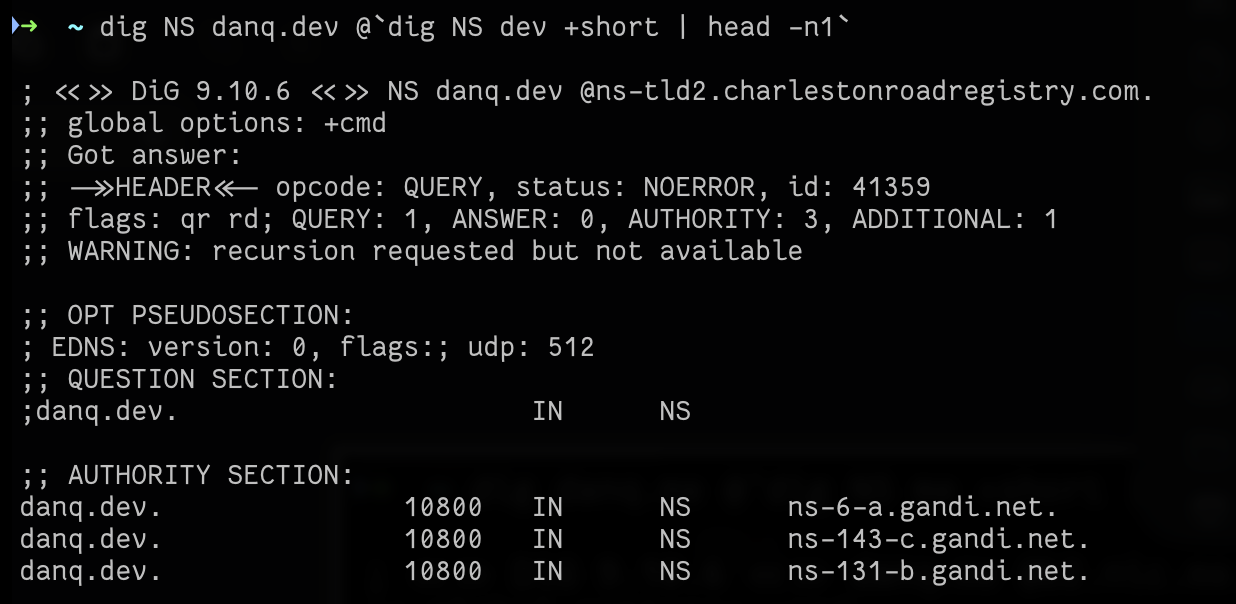
Terminal in which 'dig danq.dev @`dig NS dev +short | head -n1`' has been run, outputting NS responses representing three Gandi nameservers.
danq.dev has three nameservers, operated by its registrar Gandi.
This wasn't always the case. In the long-distant past, I've registered domains for which I've had to run my own nameservers. Or else, where I've chosen to run my own
nameservers in order to gain more control, or power, or just to play about with the technology inevitably break things.
When I transitioned to using third-party DNS around 2006, I used to be a big fan of vanity nameservers. "Vanity nameservers" (or "white-label DNS") is where your nameservers are hosted at subdomains of the domain for which they're the nameserver.
So instead of the nameservers for danq.me being, say, looking like ns-48-a.gandi.net and ns-228-b.gandi.net, they might look like, say,
ns1.danq.me and ns2.danq.me. They might still be provided by the same third-party (or might not!), but you don't get to see that. DNS protocol doesn't
care about the hostname it's connecting to, it just needs the right A/AAAA records and it's good to go!
Well, once you solve the bootstrapping problem, anyway!
If the nameservers for a domain are at a subdomain of that domain, you've got a circular dependency. To solve that, you have the servers one level
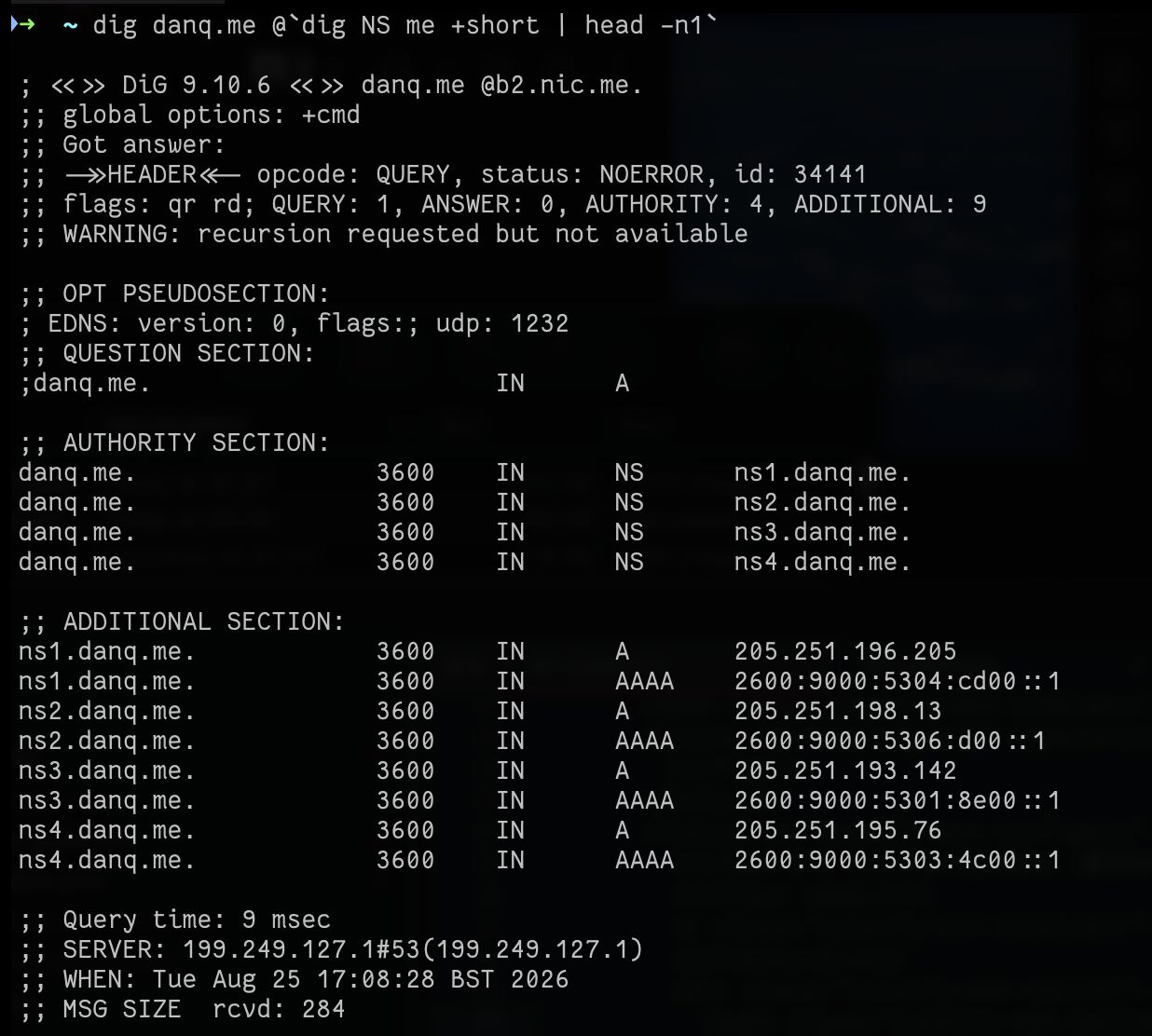
higher provide "glue records" in addition to the list of nameservers. The glue records, which are shown in the "additional section:" of dig's output, above, solve
the circular dependency. Now, the nameservers can be found without first having to... find the nameservers!
Alt
Terminal in which 'dig danq.me @`dig NS me +short | head -n1`' has been run, outputting NS responses ns1.danq.me through ns4.danq.me, with additional section records for A and AAAA records for each.
danq.me's nameservers are now called ns1.danq.me, ns2.danq.me,
ns3.danq.me and ns4.danq.me.
Vanity nameservers in 2026
The essential steps for setting up vanity nameservers are fundamentally the same as they always were. Propagation times are much shorter now and I was able to have the whole thing done and dusted within a couple of hours. In case you're looking to follow-along, here's the broad steps (the specifics depends on your registrar, DNS provider, etc.):
- Set up
A(andAAAA, it's 2026 you know!) records pointingns1.example.com(or whatever your domain is) to their IP addresses.1 - Change the
NSrecords for your domain to point to your new vanity nameservers. - Change the
SOArecord for your domain to point to the first vanity nameserver2. Bump your serial. - Have your registrar create glue records mirroring those you created in step 1.
- Have your registrar change the authoritative nameservers for your domain to those you created in step 1.
- (Optional) 😰 Frantically and repeatedly poke the registry's DNS servers with
diguntil you're confident that you didn't just make a hideous typo and broke your domain in a way that would have been a pain in the arse to unpick when you last did this, in 2006. Calm down when you remember that it's 2026 and nowadays it's gonna be easy to fix via some API or web portal of your registrar!
That's all there is to it.
But... why would anybody do this?
For most folks, this is pointless. Larger companies, especially in tech fields, sometimes do it as a branding exercise, especially if they're re-selling services atop somebody else's infrastructure and don't want to so-clearly lampshade that3. But I took a look and... I don't think people bother any more.
Hit up a handful of corporate domains you know and, with the exception of the few that run their own DNS, you'll see the same big providers keep cropping up: Cloudflare, Amazon, Google, Microsoft... I experimentally probed a hundred or so domains that I thought might use "vanity DNS" in front of a third-party DNS service... and found... none4.
Nobody cares any more. You're either running your own, or you tell the world who's running it for you, with no in-between.
Bringing back an old tradition
Vanity DNS is a dying art.
Soo... I'm now doing vanity DNS on danq.me; it's the first time I've run vanity DNS on a personal domain since... I want to say
2010‽ The journey started when Jacob asked me about my DNS setup, and it made me nostalgic for a time when nerdy techies whose nameservers were
provided by a third party would just "do" vanity DNS as a matter of course.
Vanity DNS felt nerdy and fun back in 2006. And I guess that nowadays... it still feels nerdy and fun. It's still as pointless as it ever was, but I don't care. I'm doing something that I thought was cool when I first learned about it in 2001, just for the fun of it.
Type dig NS danq.me in your terminal to see the result: four nameservers, all with a .danq.me suffix5.
Cute!
Footnotes
1 There's a convention of naming nameservers
ns1, ns2, ns3 etc., but if you want "fun" names then that's fine too. Cloudflare's nameservers have cute names, if you haven't seen already!
2 Check your dotted-notation hostmaster email while you're there; everybody forgets to look at these and so they're often outdated.
3 Using vanity nameservers to conceal an underlying DNS
provider does not conceal the third-party's identity because you can always use the IP address of those nameservers to work out who's behind them. For example, if you're interested in
seeing who's really providing the DNS for danq.me, you might run NS_NAME=`dig NS danq.me +short | head -n1` to get the name of a random one of my
nameservers, then NS_IP=`dig ${NS_NAME} +short | head -n1` to get its IP address, and finally do an reverse DNS lookup on that with e.g. dig -x $NS_IP.
Often, this canonical name will be a giveaway and you won't even have to look at the lists of who owns which blocks of IP addresses. It's not a secret. (Gotta admit, though I'm not
entirely happy with my provider... maybe it's time to switch... or even go back to selfhosting DNS once more!)
4 whatsapp.com appears to have its own
nameservers a.ns.whatsapp.com through d.ns.whatsapp.com, but their A records point to IP addresses whose reverse DNS names are a.ns.facebook.com
through d.ns.facebook.com. Not terribly exciting, nor surprising, that Meta are running their own DNS services for their various properties (the same thing happens with
instagram.com). paypal.com seems to have both its own DNS servers and some replicas provided by Digicert UltraDNS, which for a moment excited me
when I thought that they might be part-way through a white-labelling exercise, but no: they're two different services. I thought I'd find something interesting via one of the big
blog, eccomerce, or VPS providers that offer free subdomains: folks like Bearblog, Dreamwidth, Substack or Medium. But nope; some seem to run their own DNS, and others just sit on top
of a big third-party. Sigh.
5 Want to see the glue records? Run dig NS me
+short to get the names of the authoritative nameservers for the .me TLD, e.g. a0.nic.me, and then query it directly with e.g. dig NS danq.me
@a0.nic.me: you'll see not just that I have four nameservers under .danq.me but also their IP addresses (in the "additional section") - that's
the glue doing its thing!
Ok I have thoughts about this one.
First, be aware that transferring domains on which there are subordinate hosts has implications. They're probably the implications you want (if the domain is transferred, the hosts go too), but they are worth knowing about. Also, fun fact, if there are hosts subordinate to a domain, that domain can't be deleted. That, again, is probably the effect you want.
You're ok to put glue on your own hosts, but be aware that since the cache poisoning issues of the recent past most resolvers will no longer pay attention to any glue you might create for in-bailiwick hosts on domains you don't own (e.g. if you, as the owner of danq.me, create a nameserver on your domain called ns1.danp.me, the resolver will ignore any glue records).
Finally, be aware that although adding layers of CNAMEs might seem like harmless fun, it annoys the root operators when everyone does it. https://pretalx.ripe.net/media/ripe-92/submissions/ATVK7Z/resources/DNS_Transitive_Trus_2ntoCpt.pdf is an example of why.
Hello Ruth,
I heard from Dan that you have experience in specifically in administering root name servers, and I thought I would ask some questions:
- How does the root name service seemingly have no outages? It's not that it's impossible, but it seems that there is such redundancy involved that outages might seem hyper-local rather than widespread (with the exception of BGP routing table-related outages, of course - not always is that internal, and can be external of course - like Pakistan's hijack of YouTube being a notable BGP hijack).
- How does the root name system prevent censorship? I know that 13 total resolvers exist, however only 2 are outside of direct influence of the US - if the US deteriorates further and starts attacking root resolvers, is the internet community ready to handle it? How would that look?
- What kind of engineering is involved to ensure redundancy beyond having presence in multiple PoPs and IXPs around the world? Is there ever a single point of failure (besides BGP)? Surely the records have to propagate from some sort of central authority - if that system goes down, would anyone notice outside operators and those with domains who need to update records?
- If there is a central system like that, what kind of processes and procedures go into ensuring that downtime is either minimal or not widespread?
I would love to know more about this, as I have begun to learn about more the deeper details about the internet, and learning about this might help me in my future endeavors to maybe make super reliable systems myself. I don't plan on making anything with the scale of this anytime at all for the indefinite future (#broke), but learning about it is nonetheless interesting to me.
Thanks!
I'm afraid you heard wrong - I've never worked on a root server, although I know several people who do. I work at Nominet, which runs the authoritative DNS servers for .UK and a bunch of other TLDs. My team is involved in running the Registry, which is the data source that powers DNS, so although I know some things about DNS I'm not an expert. I'll have a go at your questions anyway but there are almost certainly better sources out there.
The first thing to be aware of regarding the root servers is that they're networks, not single machines. Each of the 13 'servers' is actually a series of authoritative resolvers all around the world, often located in peering exchanges or other infrastructural hubs. They achieve their uptime through massive scale redundancy - the system is designed to cope with orders of magnitude more traffic than they actually receive, and is continually being refined and updated. TLD authoritative resolvers such as the ones Nominet run are also over-engineered and geographically distributed in this way - on the rare occasion that they have an outage it's much more likely to be a software or process error, such as the recent massive outage affecting .de, which was caused by a DNSSEC problem (https://blog.denic.de/en/denic-reports-resolved-dnssec-disruption-affecting-de-domains/).
The biggest defence that the root system has is its radical openness, IMO. Almost everything about how the root operates is done in public, and verified using split key cryptography (and yes, everyone is working like crazy on post-quantum DNS verification algorithms although we're not really there yet). You can also do a dig against any of the root resolvers at any time and compare what they're all serving, and people do. Also, they're not as US-centric as they appear - many of the organisations which run root servers are international and the people with the expertise don't all live or work in the US. The big risk really is the Key Signing Keys for the root zone - these are the keys that cryptographically verify the root zone, and therefore ultimately the entirety of DNS, and they're both in the US. There's a huge amount of security around them and any access to the KSKs is live-streamed over the Internet, but that'd be the one to worry about if you were going to worry about political interference in the system.
I'm not certain about propagation. ICANN are ultimately responsible and updates to the root go through them, so I suppose if there's a single point of failure it probably sits there.
If you're interested in the Internet Engineering world, I would strongly suggest checking out both IETF and ICANN. Both communities are extremely open, and you can attend their events freely remotely (in the case of ICANN it's just straight-up free, in the case of IETF they'll give you a rebate for the remote fee no questions asked). They also have community outreach programmes which include grant schemes to cover the cost of going to their events in person, ICANN's I think is better funded and offers more places. In very broad terms, IETF is where the technical work happens, and ICANN is where policy and strategy are discussed, but there's a huge amount of overlap.