
Old-school computing has a term “molly guard”: it’s the little plastic safety cover you have to move out of the way before you press some button of significance.
Anecdotally, this is named after Molly, an engineer’s daughter who was invited to a datacenter and promptly pressed a big red button, as one would.
Then she did it again later the same day.
...
This article from UX expert Marcin Wichary is intended to be a vehicle to talk about the thoughtful design that goes into "reverse molly guards": pieces of user interface that will proceed by themselves if you do nothing, but can be stopped by user interaction. He provides the example of MacOS's "Are you sure you want to restart your computer?" dialog, which includes a countdown to automatically going ahead with the restart in 60 seconds unless told not to.
From my perspective, though: this was the first time I've ever come across the term "molly guard", and I love it (especially with its accompanying anecdote). I've seen them all over the place, though. In fact, I'd love to share with you a particularly-aggressive molly guard I implemented into Three Rings a couple of years ago:
A problem we occasionally faced in Three Rings was administrators - especially new administrators, gaining lots of powers for the first time - managing to delete entire rotas, without realising that this would delete all of the shifts (and the signups) within those rotas too. This is a hard operation to un-do, so we added a basic molly guard: an "are you sure?" interstitial page that explained exactly how much damage would be done.
But it didn't work well enough! We watched users who would see a blocker and rush straight to the big, red, delete button on the other side of all the warnings. I guess that the dark patterns that are now everywhere in software have trained users to click-through every wall that gets in their way as fast as possible and with the minimum interaction. But now that "training" was working against the safety of charity data!
So we came up with something stronger:
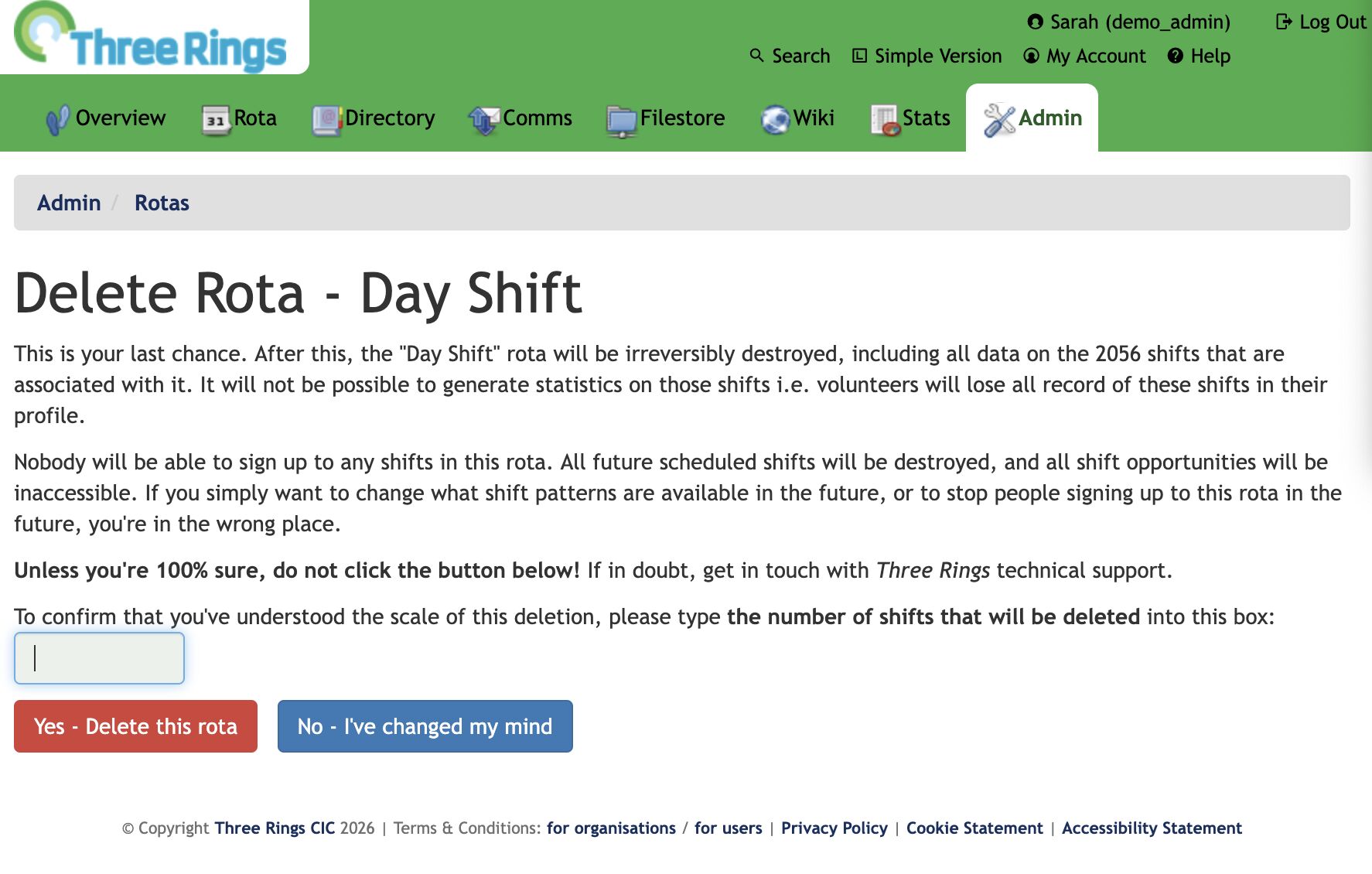
Alt
Screenshot of a pre-deletion warning page that says on the first line how many shifts will be deleted and then asks on the last line for the user to repeat that number back.
Now, the interstitial page not only says what the scale of the damage is... it asks the user to repeat it back to them. Looking at that screenshot, you'll see that the first line says that 2,056 will be deleted... and then the last line contains a text box to type that number back in again (this page only appears if it looks like a lot of "real" data will be deleted; otherwise we use the old page so as not to scare off people who are throwing together temporary test rotas).
If you read the page, it's easy to answer the question. But if you just rush to the red button... you're stuck. You'll be given a user interface nudge to tell you to fill the box, but until you first line of the page, you won't be able to answer it.
This molly guard works: since it was implemented, we've never had an instance of an accidentally-deleted rota that required us to pull data from the backups on behalf of a charity.
But it's possible we've swung too far the other way and caused some collateral damage to usability: we've twice had technical support queries from users who couldn't work out what they had to type into the box!
This is an acceptable outcome, we decided: it gives us the chance to check that they really mean what they were asking to do (of the two queries: one user did, the other meant to do something else) and point them in the direction the number they need. It works!
Anyway, the key thing I wanted to share was that great article by Marcin Wichary with some great photos of various hardware and software molly guards (and reverse molly guards) for your amusement.
0 comments