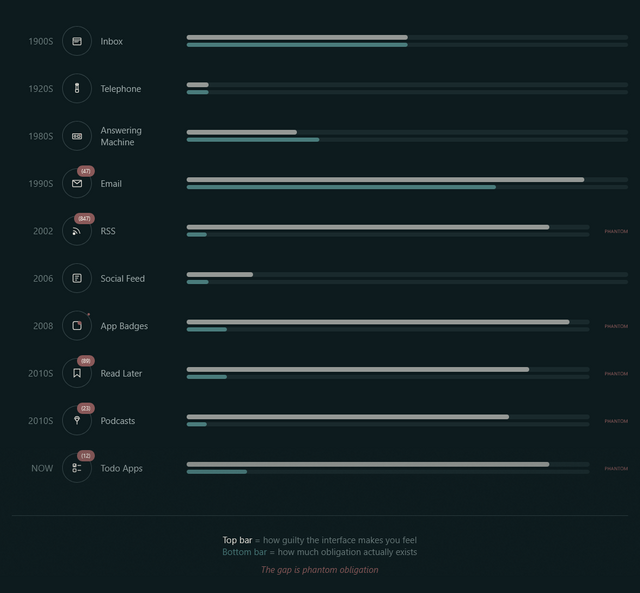
A week or so ago, Terry Godier – who’s been thinking a lot about UX assumptions lately – argued that the design of most feed readers produces an effect called “phantom obligation”.
He observes that the design of feed readers – which still lean on the design of the earliest feed readers, which adopted the design of email software to minimise the learning curve – makes us feel obligated to stay on top of all our incoming content with its “unread counts”.
Phantom obligation
Email’s unread count means something specific: these are messages from real people who wrote to you and are, in some cases, actively waiting for your response. The number isn’t neutral information. It’s a measure of social debt.
But when we applied that same visual language to RSS (the unread counts, the bold text for new items, the sense of a backlog accumulating) we imported the anxiety without the cause.
…
RSS isn’t people writing to you. It’s people writing, period. You opted to be notified of their existence. The interface implied debt where none existed. The obligation became phantom.
For a while now I’ve been encouraging people to see their feed reader as something distinct from email, and Terry’s expertly summarised exactly why. When people think of RSS as being like email, they’re encouraged to idolise “inbox zero” for both. But that’s not the right metaphor for RSS at all.
From where I’m sitting
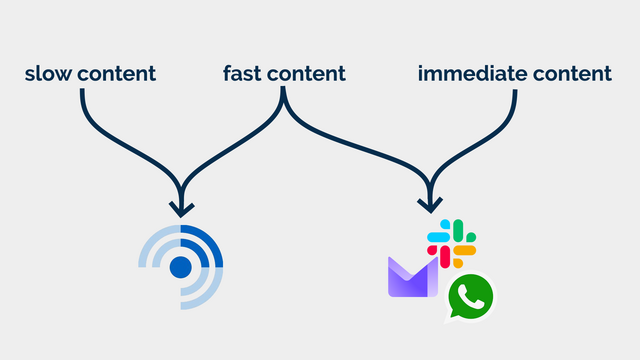
I use FreshRSS as my feed reader, and I love it. But here’s the thing: I use the same application for two different kinds of feeds. I call them slow content and fast content.2
Slow content
Blogs, news, podcasts, webcomics, vlogs, etc. I want to know that there is unread content, but I don’t need to know how much.
In some cases, I configure my reader to throw away stuff that’s gotten old and stale; in other cases, I want it to retain it indefinitely so that I can dip in when I want to. There are some categories in which I’ll achieve “inbox zero” most days3… but many more categories where the purpose of my feed reader is to gather and retain a library of things I’m likely to be interested in, so that I can enjoy them at my leisure.
I also use my RSS reader to subscribe to a few mailing lists (where an RSS feed isn’t available for some reason). These – like blogs – are often “people writing, period” content and shouldn’t have been sent by email in the first place!4
Fast content
Some of the things I subscribe to, though, I do want to know about. Not necessarily immediately, but “same day” for sure! This includes things like when it’s a friend’s birthday (via the Abnib Birthdays feed) or when there’s an important update to some software I selfhost.
This is… things I want to know about promptly, but that I don’t want to be interrupted for! I appreciate that this kind of subscription isn’t an ideal use for a feed reader… but I use my feed reader with an appropriate frequency that it’s the best way for me to put these notifications in front of my eyeballs.
I agree with Terry that unread counts and notification badges are generally a UX antipattern in feed readers… but I’d like to keep them for some purposes. So that’s exactly what I do.
How I use FreshRSS (to differentiate slow and fast content)
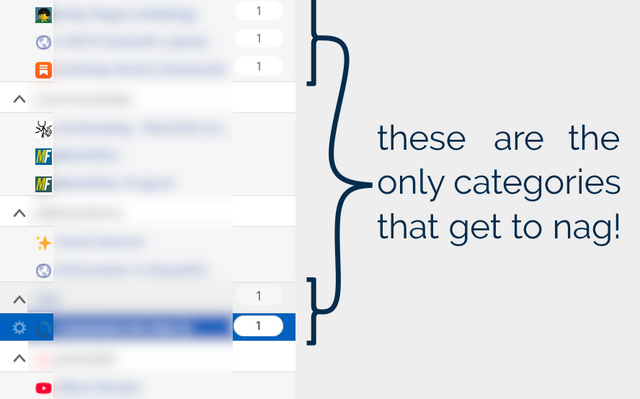
FreshRSS already provides categories. But what I do is simply… not show unread counts except for designated feeds and categories. To do that, I use the CustomCSS extension for FreshRSS (which nowadays comes as-standard!), giving it the following code (note that I want to retain unread count badges only for feed #1 and categories #6 and #8 and their feeds):
.aside.aside_feed {
  /* Hide all 'unread counts' */
  .category, .feed {
    .title:not([data-unread="0"])::after,
    .item-title:not([data-unread="0"])::after {
      display: none;
    }
  }

  /* Re-show unread counts only within:
   * - certain numbered feeds (#f_*) and
   * - categories (#c_*)
   */
  #f_1, #c_6, #c_8 {
    &, .feed {
    .title:not([data-unread="0"])::after,
    .item-title:not([data-unread="0"])::after {
      display: block;
    }
  }
}
That’s how I, personally, make my feed reader feel less like an inbox and more like a… I don’t know… a little like a library, a little like a newsstand, a little like a calendar… and a lot like a tool that serves me, instead of another oppressive “unread” count.
Maybe it’ll help you too.
Footnotes
1 Or whenever you like. It’s ‘slow content’. I’m not the boss of you.
2 A third category, immediate content, is stuff where I might need to take action as soon as I see it, usually because there’s another human involved – things like this come to me by email, Slack, WhatsApp, or similar. It doesn’t belong in a feed reader.
3 It’s still slow content even if I inbox-zero it most days… because I don’t inbox-zero it every day! I don’t feel bad ignoring or skipping it if I’m, for example, not feeling the politics news right now (and can you blame me?). This is fundamentally different than ignoring an incoming phone call or a knock at the door (although you’re absolutely within your rights to do that too, if you don’t have the spoons for it).
4 I’m yet to see a mailing list that wouldn’t be better as either a blog (for few-to-many communication) or a forum (for many-to-many communication), frankly. But some people are very wedded to their email accounts as “the way” to communicate!
Adding a checkbox at category and feed levels to control whether to show or not the number of unread articles could be nice. PR welcome :-)
Thanks for sharing! I appreatiate it very much. I am using FreshRSS too.
Do you have experiences with the “important feeds” feature?
Nope, never tried it, sorry!
I think email clients would benefit from this as well. Email also has the fast/slow distinction (for those of us that don’t use dedicated email addresses consistently for newsletters). For instance, getting to inbox zero for me requires marking huge swaths of server monitoring messages and mailing lists as read.
I think you’re right! Ought to be relatively easy to patch-in to Thunderbird (based on my experience of writing plugins for it). And many webmail systems might be similarly achievable using userscripts. Don’t know about others, though. (I wrote an Outlook plugin back in ~2000, but I can’t imagine those skills are transferable to modern versions!)
love the CSS tweak. I’d love to figure out a way to include something like this in Capy.
Thanks for sharing Dan, glad to learn I’m not the only one. I hate the unread counts!
I want my RSS to be more like a chronological timeline, not an inbox. You login, you read whatever is in there, and you move on. I have a folder/list for “Must Reads” to not miss important items.
Thanks to AI agents I was able to build one for my own liking: https://feedzen.app/.
I kept saying to myself “I wonder if Dan would like this?”
It’s a fun technical problem. Keeping up with hundreds of feeds is difficult.