Way back in the day, websites sometimes had banners or buttons (often 88×31 pixels, for complicated historical reasons) to indicate what screen
resolution would be the optimal way to view the site. Just occasionally, you still see these today.
Folks who were ahead of the curve on what we’d now call “responsive design” would sometimes proudly show off that you could use any resolution, in the same way as they’d
proudly state that you could use any browser1!
I saw a “best viewed at any size” 88×31 button recently, and it got me thinking: could we have a dynamic button that always
shows the user’s current resolution as the “best” resolution. So it’s like a “best viewed at any size” button… except even more because it says “whatever
resolution you’re at… that’s perfect; nice one!”
Anyway, I’ve made a website: best-resolution.danq.dev. If you want a “Looks best at [whatever my visitor’s screen
resolution is]” button, you can get one there.
1 I was usually in the camp that felt that you ought to be able to access my site with any
browser, at any resolution and colour depth, and get an acceptable and satisfactory experience. I guess I still am.
2 If you’re reading this via RSS or have JavaScript disabled then you’ll probably see an
“any size” button, but if you view it on the original page with JavaScript enabled then you should see your current browser inner width and height shown on the button.
This post advocates minimizing dependencies in web pages that you do not directly control. It conflates dependencies during build time and dependencies in the browser. I maintain
that they are essentially the same thing, that both have the same potential problems, and that the solution is the snappy new acronym HtDTY – Host the Damn Thing Yourself.
…
If your resources are large enough to cause a problem if you Host the Damn Things Yourself then consider finding ways to cut back on their size. Or follow my related advice –
HtDToaSYHaBRW IMCYMbT(P)WDWYD : Host the Damn Thing on a Service You Have A Business Relationship With, It May Cost You Money But They (Probably) Won’t Dick With Your Data.
…
Host the Damn Thing Yourself (HtDTY) is an excellent suggestion; I’ve been a huge fan of the philosophy for ages, but I like this acronym. (I wish it was pronounceable, but you can’t
have everything.)
Andrew’s absolutely right, but I’m not even sure he’s expressed all the ways in which he’s right. Here are my reasons to HtDTY, especially for frontend resources:
Security: As Andrew observes, you can’t protect against supply chain attacks if your supply chain wide open to exploitation. And I’m glad that he points out that
version pinning doesn’t protect you from this (although subsource integrity can).
Privacy: Similarly, Andrew nailed this one. If you host your fonts on Google Fonts, for example, you’re telling one of the biggest data-harvesting companies on the
Internet who’s accessing your website. Don’t do that (in that specific example, google-webfonts-helper is your friend).
Performance: Andrew rightly deconstructs the outdated argument that CDN caching improves your site’s performance. Edge caching might, in some
circumstances, but still has the problems listed above. But this argument can go further than Andrew’s observation that CDNs aren’t that much of a benefit… because sticking to just
one domain name means (a) fewer DNS lookups, (b) fewer TLS handshakes, (c) better compression, if e.g. your JavaScript assets are bundled or at least delivered in the same pipeline,
and (d) all the benefits of HTTP/2 and HTTP/3, like early hints, pipelining, etc. Nowadays, it can often be faster to not-use a CDN (depending on lots of factors), in
addition to all the above benefits.
I’d love to write a longer review to praise the art style and the concept, but there’s not much to say. Just… go and give it a shot; it’ll improve your day, I’m sure.
A special level of accessibility failure on Egencia‘s mailing list subscription management page: the labels for choosing
which individual mailing lists to subscribe to are properly-configured, but the “unsubscribe all” one isn’t. Click the words “unsubscribe all” and… nothing happens.
But it gets better: try keyboard-navigating through the form, and it’s hard not to unsubscribe from everything, even if you didn’t want to! As soon as the
“unsubscribe all” checkbox gets focus, you get instantly unsubscribed: no interaction necessary.
Developers just love to take what the Web gives them for free, throw it away, and replace it with something worse.
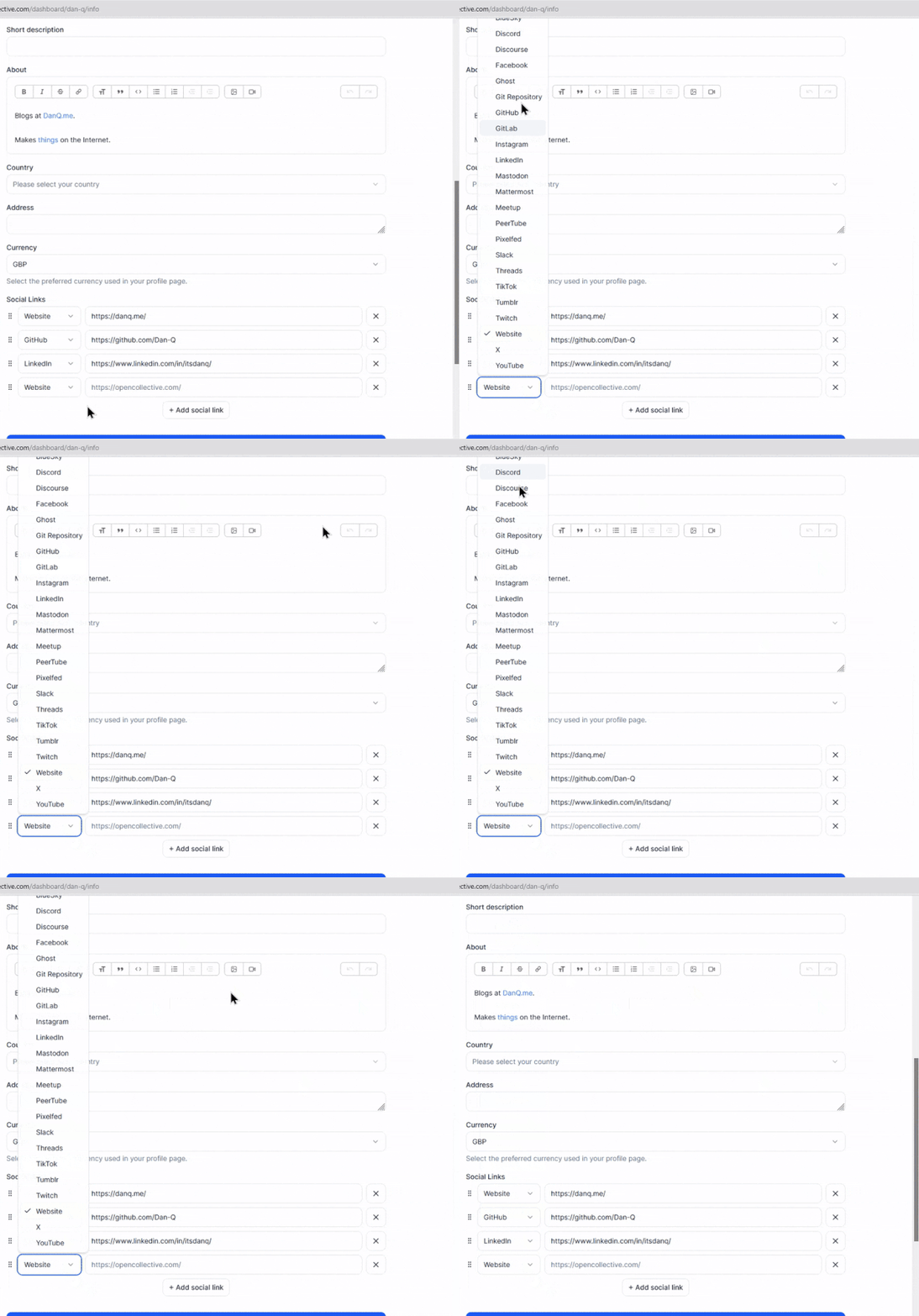
Today’s example, from Open Collective, is a dropdown box: standard functionality provided by the <select> element. Except
they’ve replaced it with a JS component that, at some screen resolutions, “goes off the top” of the page… while simultaneously disabling the scrollbars so that you can’t reach it. 🤦♂️
Last month, my friend Gareth observed that the numbered lists in my blog posts “looked wrong” in his feed reader. I checked, and I
decided I was following the standards correctly and it must have been his app that was misbehaving.
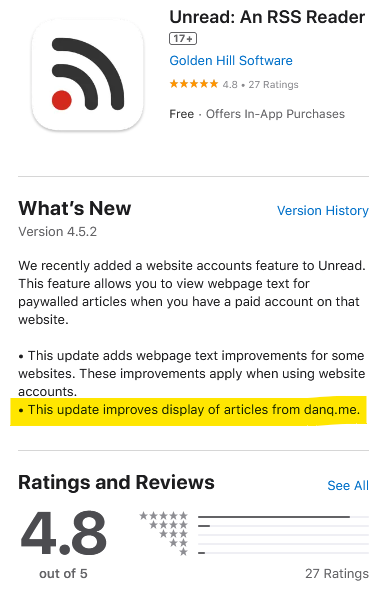
So he contacted the authors of Unread, his feed reader, and they fixed it. Pretty fast, I’ve got to say. And I was amused to
see that I’m clearly now a test case because my name’s in their release notes!
A few years ago I implemented a pure HTML + CSS solution for lightbox images, which I’ve been using on my blog ever since. It works by
pre-rendering an invisible <dialog> for each lightboxable image on the page, linking to the anchor of those dialogs, and exploiting the :target selector
to decide when to make the dialogs visible. No Javascript is required, which means low brittleness and high performance!
It works, but it’s got room for improvement.
One thing I don’t like about it is that it that it breaks completely if the CSS fails for any reason. Depending upon CSS is safer than depending upon JS (which breaks all
the time), but it’s still not great: if CSS is disabled in your browser or just “goes wrong” somehow then you’ll see a hyperlink… that doesn’t seem to go anywhere (it’s an
anchor to a hidden element).
A further thing I don’t like about it is it’s semantically unsound. Linking to a dialog with the expectation that the CSS parser will then make that dialog visible isn’t really
representative of what the content of the page means. Maybe we can do better.
🚀 Wired: <details>-based HTML+CSS lightboxes?
Here’s a thought I had, inspired by Patrick Chia’s <details> overlay trick and by
the categories menu in Eevee’s blog: what if we used a <details> HTML element for a lightbox? The thumbnail image would go in the
<summary> and the full image (with loading="lazy" so it doesn’t download until the details are expanded) beneath, which means it “just works” with or
without CSS… and then some CSS enhances it to make it appear like a modal overlay and allow clicking-anywhere to close it again.
Let me show you what I mean. Click on one of the thumbnails below:
Each appears to pop up in a modal overlay, but in reality they’re just unfolding a <details> panel, and some CSS is making the contents display as if if were
an overlay, complete click-to-close, scroll-blocking, and a blur filter over the background content. Without CSS, it functions as a traditional <details> block.
Accessibility is probably improved over my previous approach, too (though if you know better, please tell me!).
The code’s pretty tidy, too. Here’s the HTML:
<detailsclass="details-lightbox"aria-label="larger image">
<summary>
<imgsrc="thumb.webp"alt="Alt text for the thumbnail image.">
</summary>
<div>
<imgsrc="full.webp"alt="Larger image: alt text for the full image."loading="lazy">
</div>
</details>
The CSS is more-involved, but not excessive (and can probably be optimised a little further):
Native CSS nesting is super nice for this kind of thing. Being able to use :has on the body to detect whether there exists an open lightbox and prevent
scrolling, if so, is another CSS feature I’m appreciating today.
I’m not going to roll this out anywhere rightaway, but I’ll keep it in my back pocket for the next time I feel a blog redesign coming on. It feels tidier and more-universal than my
current approach, and I don’t think it’s an enormous sacrifice to lose the ability to hotlink directly to an open image in a post.
Some time in the last 25 years, ISPs stopped saying they made you “part of” the Internet, just that they’d help you “connect to” the Internet.
Most people don’t need a static IP, sure. But when ISPs stopped offering FTP and WWW hosting as a standard feature (shit though it often was), they became part of the tragic process by
which the Internet became centralised, and commoditised, and corporate, and just generally watered-down.
The amount of effort to “put something online” didn’t increase by a lot, but it increased by enough that millions probably missed-out on the opportunity to create
their first homepage.
The fundamental difference between streaming and downloading is what your device does with those frames of video:
Does it show them to you once and then throw them away? Or does it re-assemble them all back into a video file and save it into storage?
When you’re streaming on YouTube, the video player running on your computer retains a buffer of frames ahead and behind of your current position, so you can skip around easily: the
darker grey part of the timeline shows which parts of the video are stored on – that is, downloaded to – your computer.
Buffering is when your streaming player gets some number of frames “ahead” of where you’re watching, to give you some protection against connection issues. If your WiFi wobbles
for a moment, the buffer protects you from the video stopping completely for a few seconds.
But for buffering to work, your computer has to retain bits of the video. So in a very real sense, all streaming is downloading! The buffer is the part
of the stream that’s downloaded onto your computer right now. The question is: what happens to it next?
All streaming is downloading
So that’s the bottom line: if your computer deletes the frames of video it was storing in the buffer, we call that streaming. If it retains them in a file, we
call that downloading.
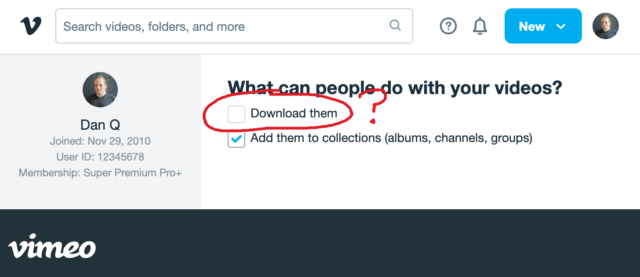
That definition introduces a philosophical problem. Remember that Vimeo checkbox that lets a creator decide whether people can (i.e. are allowed to) download their videos? Isn’t
that somewhat meaningless if all streaming is downloading.
Because if the difference between streaming and downloading is whether their device belonging to the person watching the video deletes the media when they’re done. And in
virtually all cases, that’s done on the honour system.
This kind of conversation happens, over the HTTP protocol, all the time. Probably most of the time the browser is telling the truth, but there’s no way to know for certain.
When your favourite streaming platform says that it’s only possible to stream, and not download, their media… or when they restrict “downloading” as an option to higher-cost paid plans…
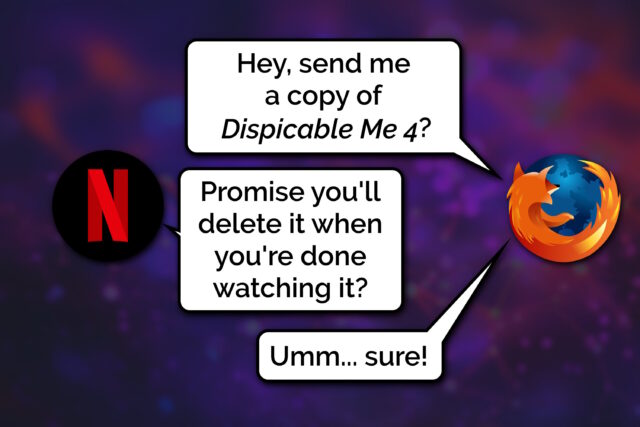
they’re relying on the assumption that the user’s device can be trusted to delete the media when the user’s done watching it.
But a user who owns their own device, their own network, their own screen or speakers has many, many opportunities to not fulfil the promise of deleting media it after they’ve consumed
it: to retain a “downloaded” copy for their own enjoyment, including:
Intercepting the media as it passes through their network on the way to its destination device
Using client software that’s been configured to stream-and-save, rather than steam-and-delete, the content
Modifying “secure” software (e.g. an official app) so that it retains a saved copy rather than deleting it
Capturing the stream buffer as it’s cached in device memory or on the device’s hard disk
Outputting the resulting media to a different device, e.g. using a HDMI capture device, and saving it there
Exploiting the “analogue4
hole”5:
using a camera, microphone, etc. to make a copy of what comes out of the screen/speakers6
Okay, so I oversimplified (before you say “well, actually…”)
It’s not entirely true to say that streaming and downloading are identical, even with the caveat of “…from the server’s perspective”. There are three big exceptions worth
thinking about:
Exception #1: downloads can come in any order
When you stream some linear media, you expect the server to send the media in strict chronological order. Being able to start watching before the whole file has
downloaded is a big part of what makes steaming appealing, to the end-user. This means that media intended for streaming tends to be stored in a way that facilitates that
kind of delivery. For example:
Media designed for streaming will often be stored in linear chronological order in the file, which impacts what kinds of compression are available.
Media designed for streaming will generally use formats that put file metadata at the start of the file, so that it gets delivered first.
Video designed for streaming will often have frequent keyframes so that a client that starts “in the middle” can decode the buffer without downloading too much data.
No such limitation exists for files intended for downloading. If you’re not planning on watching a video until it’s completely downloaded, the order in which the chunks arrives is
arbitrary!
But these limitations make the set of “files suitable for streaming” a subset of the set of “files suitable for downloading”. It only makes it challenging or impossible to
stream some media intended for downloading… it doesn’t do anything to prevent downloading of media intended for streaming.
Exception #2: streamed media is more-likely to be transcoded
A server that’s streaming media to a client exists in a sort-of dance: the client keeps the server updated on which “part” of the media it cares about, so the server can jump ahead,
throttle back, pause sending, etc. and the client’s buffer can be kept filled to the optimal level.
This dance also allows for a dynamic change in quality levels. You’ve probably seen this happen: you’re watching a video on YouTube and suddenly the quality “jumps” to something more
(or less) like a pile of LEGO bricks7. That’s the result of your device realising that the rate
at which it’s receiving data isn’t well-matched to the connection speed, and asking the server to send a different quality level8.
The server can – and some do! – pre-generate and store all of the different formats, but some servers will convert files (and particularly livestreams) on-the-fly, introducing
a few seconds’ delay in order to deliver the format that’s best-suited to the recipient9. That’s not necessary for downloads, where the
user will often want the highest-quality version of the media (and if they don’t, they’ll select the quality they want at the outset, before the download begins).
Exception #3: streamed media is more-likely to be encumbered with DRM
And then, of course, there’s DRM.
As streaming digital media has become the default way for many people to consume video and audio content, rights holders have engaged in a fundamentally-doomed10
arms race of implementing copy-protection strategies to attempt to prevent end-users from retaining usable downloaded copies of streamed media.
Take HDCP, for example, which e.g. Netflix use for their 4K streams. To download these streams, your device has to be running some decryption code that only works if it can trace a path
to the screen that it’ll be outputting to that also supports HDCP, and both your device and that screen promise that they’re definitely only going to show it and not make it
possible to save the video. And then that promise is enforced by Digital Content Protection LLC only granting a decryption key and a license to use it to manufacturers.11
The real hackers do stuff with software, but people who just want their screens to work properly in spite of HDCP can just buy boxes like this (which I bought for a couple of quid on
eBay). Obviously you could use something like this and a capture card to allow you to download content that was “protected” to ensure that you could only stream it, I suppose, too.
Anyway, the bottom line is that all streaming is, by definition, downloading, and the only significant difference between what people call “streaming” and
“downloading” is that when “streaming” there’s an expectation that the recipient will delete, and not retain, a copy of the video. And that’s it.
Footnotes
1 This isn’t the question I expected to be answering. I made the animation in this post
for use in a different article, but that one hasn’t come together yet, so I thought I’d write about the technical difference between streaming and downloading as an excuse to
use it already, while it still feels fresh.
2 I’m using the example of a video, but this same principle applies to any linear media
that you might stream: that could be a video on Netflix, a livestream on Twitch, a meeting in Zoom, a song in Spotify, or a radio show in iPlayer, for example: these are all examples
of media streaming… and – as I argue – they’re therefore also all examples of media downloading because streaming and downloading are fundamentally the same thing.
3 There are a few simplifications in the first half of this post: I’ll tackle them later
on. For the time being, when I say sweeping words like “every”, just imagine there’s a little footnote that says, “well, actually…”, which will save you from feeling like you have to
say so in the comments.
4 Per my style guide, I’m using the British English
spelling of “analogue”, rather than the American English “analog” which you’ll often find elsewhere on the Web when talking about the analog hole.
5 The rich history of exploiting the analogue hole spans everything from bootlegging a
1970s Led Zeppelin concert by smuggling recording equipment
in inside a wheelchair (definitely, y’know, to help topple the USSR and not just to listen to at home while you get high)
to “camming” by bribing your friendly local projectionist to let you set up a video camera at the back of the cinema for their test screening of the new blockbuster. Until some
corporation tricks us into installing memory-erasing DRM chips into our brains (hey, there’s a dystopic sci-fi story idea in there somewhere!) the analogue hole will always be
exploitable.
6 One might argue that recreating a piece of art from memory, after the fact, is a
very-specific and unusual exploitation of the analogue hole: the one that allows us to remember (or “download”) information to our brains rather than letting it “stream” right
through. There’s evidence to suggest that people pirated Shakespeare’s plays this way!
7 Of course, if you’re watching The LEGO Movie, what you’re seeing might already
look like a pile of LEGO bricks.
8 There are other ways in which the client and server may negotiate, too: for example,
what encoding formats are supported by your device.
9My NAS does live transcoding when Jellyfin streams to devices on my network, and it’s magical!
10 There’s always the analogue hole, remember! Although in practice this isn’t even
remotely necessary and most video media gets ripped some-other-way by clever pirate types even where it uses highly-sophisticated DRM strategies, and then ultimately it’s only
legitimate users who end up suffering as a result of DRM’s burden. It’s almost as if it’s just, y’know, simply a bad idea in the first place, or something. Who knew?
11 Like all these technologies, HDCP was cracked almost immediately and every
subsequent version that’s seen widespread rollout has similarly been broken by clever hacker types. Legitimate, paying users find themselves disadvantaged when their laptop won’t let
them use their external monitor to watch a movie, while the bad guys make pirated copies that work fine on anything. I don’t think anybody wins, here.
The video below is presented in portrait orientation, because your screen is taller than it is wide.
The video below is presented in landscape orientation, because your screen is wider than it is tall.
The video below is presented in square orientation (the Secret Bonus Square Video!), because your screen has approximately the same width as as its height. Cool!
This is possible (with a single <video> element, and without any Javascript!) thanks to some cool HTML features you might not be aware of, which I’ll briefly explain
in the video. Or scroll down for the full details.
<videocontrols><sourcesrc="squareish.mp4"media="(min-aspect-ratio: 0.95) and (max-aspect-ratio: 1.05)"/><sourcesrc="portrait.mp4"media="(orientation: portrait)"/><sourcesrc="landscape.mp4"/></video>
This code creates a video with three sources: squareish.mp4 which is shown to people on “squareish” viewports, failing that portrait.mp4 which is shown to
people whose viewports are taller than wide, and failing that landscape.mp4 which is shown to anybody else.
That’s broadly-speaking how the video above is rendered. No JavaScript needed.
Browsers only handle media queries on videos when they initially load, so you can’t just tip your phone over or resize the window: you’ll need to reload the page, too. But it works!
Give it a go: take a look at the video in both portrait and landscape modes and let me know what you think1.
Adding adaptive bitrate streaming with HLS
Here’s another cool technology that you might not have realised you could “just use”: adaptive bitrate streaming with HLS!
You’ve used adaptive bitrate streaming before, though you might not have noticed it. It’s what YouTube, Netflix, etc. are doing when your network connection degrades and you quickly get
dropped-down, mid-video, to a lower-resolution version2.
Turns out you can do it on your own static hosting, no problem at all. I used this guide (which has a great
description of the parameters used) to help me:
This command splits the H.264 video landscape.mp4 into three different resolutions: the original “v1” (1920×1080, in my case, with 96kbit audio), “v2” (1280×720, with
96kbit audio), and “v3” (640×360, with 48kbit audio), each with a resolution-appropriate maximum bitrate, and forced keyframes every 48th frame. Then it breaks each of those into HLS
segments (.ts files) and references them from a .m3u8 playlist.
The output from this includes:
Master playlist landscape.m3u8, which references the other playlists with reference to their resolution and bandwidth, so that browsers can make smart choices,
Playlists landscape_0.m3u8 (“v1”), landscape_1.m3u8 (“v2”), etc., each of which references the “parts” of that video,
Directories landscape_0/, landscape_1/ etc., each of which contain
data00.ts, data01.ts, etc.: the actual “chunks” that contain the video segments, which can be downloaded independently by the browser as-needed
Bringing it all together
We can bring all of that together, then, to produce a variable-aspect, adaptive bitrate, HLS-streamed video player… in pure HTML and suitable for static hosting:
<videocontrols><sourcesrc="squareish.m3u8"type="application/x-mpegURL"media="(min-aspect-ratio: 0.95) and (max-aspect-ratio: 1.05)"/><sourcesrc="portrait.m3u8"type="application/x-mpegURL"media="(orientation: portrait)"/><sourcesrc="landscape.m3u8"type="application/x-mpegURL"/></video>
You could, I suppose, add alternate types, poster images, and all kinds of other fancy stuff, but this’ll do for now.
One solution is to also provide the standard .mp4 files as an alternate <source>, and that’s fine I guess, but you lose the benefit of HLS (and
you have to store yet more files). But there’s a workaround:
Polyfill full functionality for all browsers
If you’re willing to use a JavaScript polyfill, you can make the code above work on virtually any device. I gave this a go, here, by:
Adding some JavaScript code that detects affected `<video>` elements and applying the fix if necessary:
// Find all <video>s which have HLS sources:for( hlsVideo of document.querySelectorAll('video:has(source[type="application/x-mpegurl"]), video:has(source[type="vnd.apple.mpegurl"])') ) {
// If the browser has native support, do nothing:if( hlsVideo.canPlayType('application/x-mpegurl') || hlsVideo.canPlayType('application/vnd.apple.mpegurl') ) continue;
// If hls.js can't help fix that, do nothing:if ( ! Hls.isSupported() ) continue;
// Find the best source based on which is the first one to match any applicable CSS media queriesconst bestSource =Array.from(hlsVideo.querySelectorAll('source')).find(source=>window.matchMedia(source.media).matches)
// Use hls.js to attach the best source:const hls =new Hls();
hls.loadSource(bestSource.src);
hls.attachMedia(hlsVideo);
}
It makes me feel a little dirty to make a <video>depend on JavaScript, but if that’s the route you want to go down while we wait for HLS support to become
more widespread (rather than adding different-typed sources) then that’s fine, I guess.
This was a fun dive into some technologies I’ve not had the chance to try before. A fringe benefit of being a generalist full-stack developer is that when you’re “between jobs”
you get to play with all the cool things when you’re brushing up your skills before your next big challenge!
(Incidentally: if you think you might be looking to employ somebody like me, my CV is over there!)
Footnotes
1 There definitely isn’t a super-secret “square” video on this page, though. No
siree. (Shh.)
2 You can tell when you get dropped to a lower-resolution version of a video because
suddenly everybody looks like they’re a refugee from Legoland.
I’m keeping an eye out for my next career move (want to hire me?). Off the back of that I’ve been brushing up on the kinds of skills that I might be asked to showcase
in any kind of “tech test”.
Not the kind of stuff I can do with one hand tied behind my back1,
but the things for which I’d enjoy feeling a little more-confident2.
Stuff that’s on my CV that I’ve done and can do, but where I’d like to check before somebody asks me about it in an interview.
React? Sure, I can do that…
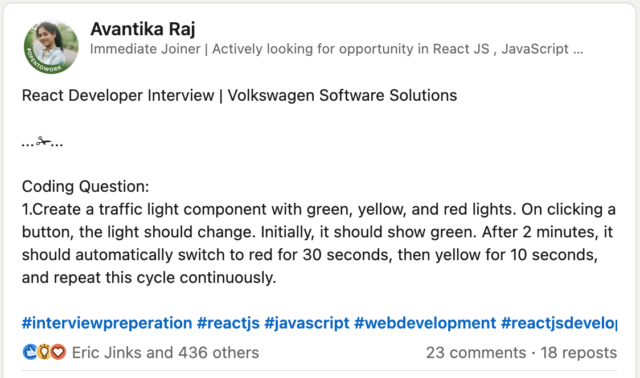
LinkedIn, GlassDoor, and bits of the Fediverse are a gold mine for the kinds of things that people are being asked to demonstrate in tech tests these days. Like this post:
I’d describe myself as a “stack-agnostic senior/principal full-stack/backend web developer/security engineer”3,
and so this question – which feels like it’s a filter for a junior developer with a React specialisation – isn’t really my wheelhouse. Which makes it a perfect excuse for an hour of
playing about with React.
My recent React experience has mostly involved Gutenberg blocks and WordPress theme component. This seemed like an excuse to check that I can wrangle a non-WordPress React stack.
This isn’t particularly sophisticated. I added customisable durations for each light, but otherwise it’s pretty basic.
Half an hour later, I’d proven to myself that yes, I could throw together a fresh application with React DOM and implement some React components, pass state around and whatnot.
Time to move on to the next thing, right? That’s what a normal person would do.
But that’s not the kind of person I am.
Let’s reimplement this as Web Components
What I found myself thinking was… man, this is chunky. React is… not the right tool for this job.
(Or, increasingly, any job. But I’ll get back to that.)
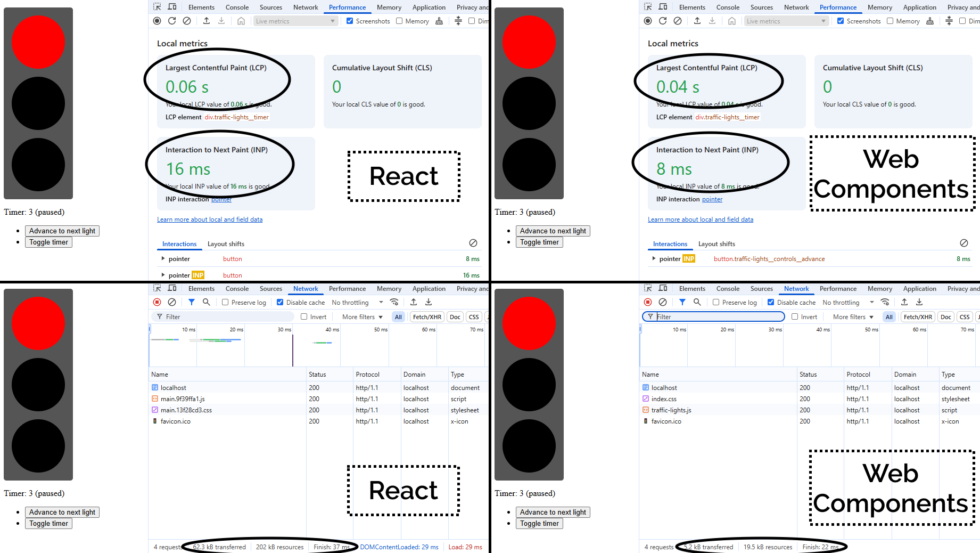
A minified production build of my new component and its dependencies came in at 202kB (62.3kB compressed). That feels pretty massive for something that does so-little.
So as an experiment, I re-implemented my new React component as a vanilla JS Web Component using a custom element. Identical functionality, but no third-party library dependencies.
Here’s what I got:
This one’s interactive. Press a button or two!
The Web Component version of this control has no dependency chain and uses no JSX, and so it has no transpilation step: the source version is production-ready. You could minify it, but
modern HTTP compression makes the impact of that negligible anyway: the whole thing weighs in at 19.5kB (5.2kB compressed) without minification.
And while I appreciate of course that there’s much more to JavaScript complexity and performance than file sizes… and beyond that I appreciate that there’s a lot more to making great
components than the resulting bundle size… it’s hard to argue that delivering the same functionality (and less fragility) in a twelfth of the payload isn’t significant.
By any metric you like, the Web Components version outperforms the React version of my traffic light component. And while it’s a vastly-simplified example, it scales. Performance is a
UX concern, and if you favour “what we’re familiar with” over “what’s best for our users”, that has to be a conscious choice.
But there’s a bigger point here:
React is the new jQuery
I’m alarmed by the fact that I’m still seeing job ads for “React developers”, with little more requirement than an ability to “implement things in React”.
From where I’m sitting, React is the new jQuery. It:
Was originally built to work around missing or underdeveloped JavaScript functionality
e.g. React’s components prior to Web Components
e.g. jQuery’s manipulation prior to document.querySelectorAll
Continued to be valuable as a polyfill and as a standard middleware while that functionality become commonplace
e.g. jQuery’s $.ajax until the Fetch API was a reliable replacement to XMLHttpRequest
No longer provides enough value to be worth using in a new project
And yet somehow gets added “out of habit” for many years
If you’ve got a legacy codebase with lots of React in it, you’re still going to need React for a while. Just like how you’re likely to continue to need jQuery for a while until you can
tidy up all those edge-cases where you’re using it.
(You might even be locked-in to using both React and jQuery for some time, if say you’ve got a plugin architecture that demands backwards-compatibility: I’m looking at you,
WordPress!)
But just as you’re already (hopefully) working to slowly extricate your codebases from any now-unnecessary jQuery dependencies they have… you should be working on an exit plan for your
React code, too. It’s done its time; it’s served its purpose: now it’s just a redundant dependency making your bundles cumbersome and harder to debug.
Everything React gives you on the client-side – components, state/hooks, routing4,
etc. – is possible (and easy) in modern JavaScript supported in all major browsers. And if you still really want an abstraction layer, there are plenty of options (and they’re
all a lot lighter than React!).
The bottom line is, I suppose…
You shouldn’t be hiring “React developers”!
If you’re building a brand new project, you shouldn’t be using React. It should be considered deprecated.
If you’ve got an existing product that depends on React… you should be thinking about how you’ll phase it out over time. And with that in mind, you want to be hiring versatile
developers. They’ll benefit from some experience with React, sure, but unless they can also implement for the modern Web of tomorrow, they’ll just code you deeper into
your dependency on React.
It’s time you started recruiting “Front-End Developers (React experience a plus)”. Show some long-term thinking! Or else the Web is going to move on without you, and in 5-10 years
you’ll struggle to recruit people to maintain your crumbling stack.
1 Exploiting or patching an injection vulnerability, optimising an SQL query, implementing
a WordPress plugin, constructing a CircleCI buildchain, expanding test coverage over a Rubygem, performing an accessibility audit of a web application, extending a set of
high-performance PHP-backed REST endpoints, etc. are all – I’d hope! – firmly in the “hold my beer” category of tech test skills I’d ace, for example. But no two tech stacks are
exactly alike, so it’s possible that I’ll want to brush up on some of the adjacent technologies that are in the “I can do it, but I might need to hit the docs pages”
category.
2 It’s actually refreshing to be learning and revising! I’ve long held that I should learn
a new programming language or framework every year or two to stay fresh and to keep abreast of what’s going on in world. I can’t keep up with every single new front-end JavaScript
framework any more (and I’m not sure I’d want to!)! But in the same way as being multilingual helps unlock pathways to more-creative thought and expression even if you’re only working
in your native tongue, learning new programming languages gives you a more-objective appreciation of the strengths and weaknesses of what you use day-to-day. tl;dr: if you haven’t
written anything in a “new” (to you) programming language for over a year, you probably should.
3 What do job titles even mean, any more? 😂 A problem I increasingly find is that I don’t
know how to describe what I do, because with 25+ years of building stuff for the Web, I can use (and have used!) most of the popular stacks, and could probably learn a new
one without too much difficulty. Did I mention I’m thinking about my next role? If you think we might “click”, I’d love to hear from you…
4 Though if you’re doing routing only on the client-side, I already hate you.
Consider for example the SlimJS documentation which becomes completely unusable if a third-party JavaScript CDN fails: that’s pretty
fragile!
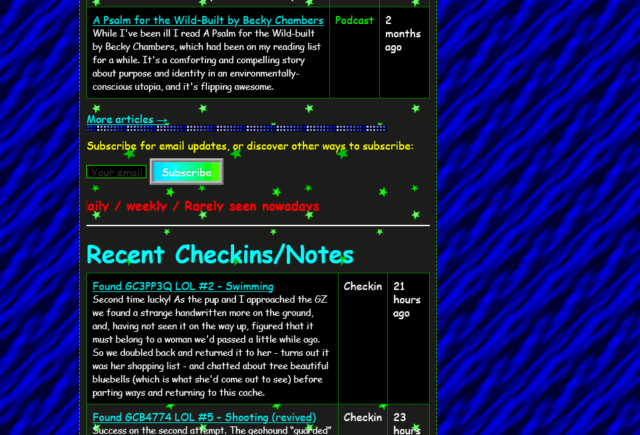
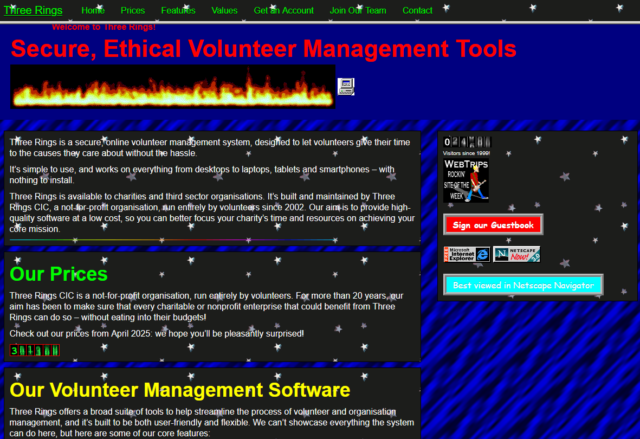
Sure, it’s gaudy, but it’s got a few things going for it, too.
Let’s put aside for the moment that you can already send my website back into “90s mode” and dive into this take on how I could
present myself in a particularly old-school way. There’s a few things I particularly love:
It’s actually quite lightweight: ignore all the animated GIFs (which are small anyway) and you’ll see that, compared to my current homepage, there are very few
images. I’ve been thinking about going in a direction of less images on the homepage anyway, so it’s interesting to see how it comes together in this unusual context.
The page sections are solidly distinct: they’re a mishmash of different widths, some of which exhibit a horrendous lack of responsivity, but it’s pretty clear where
the “recent articles” ends and the “other recent stuff” begins.
The post kinds are very visible: putting the “kind” of a post in its own column makes it really clear whether you’re looking at an article, note, checkin, etc., much
more-so than my current blocks do.
Maybe there’s something we can learn from old-style web design? No, I’m serious. Stop laughing.
90s web design was very-much characterised by:
performance – nobody’s going to wait for your digital photos to download on narrowband connections, so you hide them behind descriptive links or tiny thumbnails, and
pushing the boundaries – the pre-CSS era of the Web had limited tools, but creators worked hard to experiment with the creativity that was possible within those
limits.
Those actually… aren’t bad values to have today. Sure, we’ve probably learned that animated backgrounds, tables for layout, and mystery meat navigation were horrible for
usability and accessibility, but that doesn’t mean that there isn’t still innovation to be done. What comes next for the usable Web, I wonder?
As soon as you run a second or third website through the tool, its mechanisms for action become somewhat clear and sites start to look “samey”, which is the opposite of what
made 90s Geocities great.
The only thing I can fault it on is that it assumes that I’d favour Netscape Navigator: in fact, I was a die-hard Opera-head for most of the
nineties and much of the early naughties, finally switching my daily driver to Firefox in 2005.
I certainly used plenty of Netscape and IE at various points, though, but I wasn’t a fan of the divisions resulting from the browser wars. Back in the day, I always backed
the ideals of the “Viewable With Any Browser” movement.
The W3C‘s WebDX Community Group this week announced that they’ve reached a milestone with their web-features project. The project is an effort to catalogue browser support for Web features, to establish an
understanding of the baseline feature set that developers can rely on.
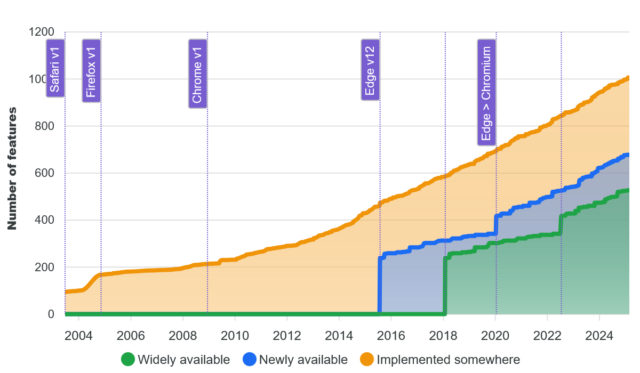
That’s great, and I’m in favour of the initiative. But I wonder about graphs like this one:
The graph shows the increase in time of the number of features available on the Web, broken down by how widespread they are implemented across the browser corpus.
The shape of that graph sort-of implies that… more features is better. And I’m not entirely convinced that’s true.
Does “more” imply “better”?
Don’t get me wrong, there are lots of Web features that are excellent. The kinds of things where it’s hard to remember how I did without them. CSS grids are for many purposes an
improvement on flexboxes; flexboxes were massively better than floats; and floats were an enormous leap forwards compared to using tables for layout! The “new” HTML5 input types are
wonderful, as are the revolutionary native elements for video, audio, etc. I’ll even sing the praises of some of the new JavaScript APIs (geolocation, web share, and push are
particular highlights).
But it’s not some kind of universal truth that “more features means better developer experience”. It’s already the case, for example, that getting started as a Web developer is
harder than it once was, and I’d argue harder than it ought to be. There exist complexities nowadays that are barriers to entry. Like the places where the promise of a
progressively-enhanced Web has failed (they’re rare, but they exist). Or the sheer plethora of features that come with caveats to their use that simply must be learned (yes, you need a
<meta name="viewport">; no, you can’t rely on JS to produce content).
Meanwhile, there are technologies that were standardised, and that we did need, but that never took off. The <keygen> element never got
implemented into the then-dominant Internet Explorer (there were other implementation problems too, but this one’s the killer). This made it functionally useless, which meant that its
standard never evolved and grew. As a result, its implementation in other browsers stagnated and it was eventually deprecated. Had it been implemented properly and iterated on, we’d
could’ve had something like WebAuthn over a decade earlier.
Which I guess goes to show that “more features is better” is only true if they’re the right features. Perhaps there’s some way of tracking the changing landscape of developer
experience on the Web that doesn’t simply count enumerate a baseline of widely-available features? I don’t know what it is, though!
A simple web
Mostly, the Web worked fine when it was simpler. And while some of the enhancements we’ve seen over the decades are indisputably an advancement, there are also plenty of places
where we’ve let new technologies lead us astray. Third-party cookies appeared as a naive consequence of first-party ones, but came to be used to undermine everybody’s privacy. Dynamic
DOM manipulation started out as a clever idea to help with things like form validation and now a significant number of websites can’t even show their images – or sometimes their text –
unless their JavaScript code gets downloaded and interpreted successfully.
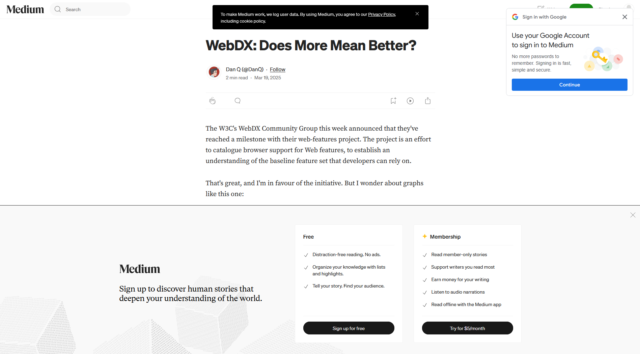
Were you reading this article on Medium, you’d have downloaded ~5MB of data including 48 JS files and had 7 cookies set, just so you could… have most of the text covered with
popovers? (for comparison, reading it here takes about half a megabyte and the cookies are optional delicious)
A blog post, news article, or even an eCommerce site or social networking platform doesn’t need the vast majority of the Web’s “new” features. Those features are important for some Web
applications, but most of the time, we don’t need them. But somehow they end up being used anyway.
Whether or not the use of unnecessary new Web features is a net positive to developer experience is debatable. But it’s certainly not often to the benefit of user experience.
And that’s what I care about.
My love of the yesterweb forced me to teach myself just-enough Blender to make an animation for a stupid thing: an 88×31 button representing “me” (and, I suppose, my blog, whenever I
next end up redesigning its theme).