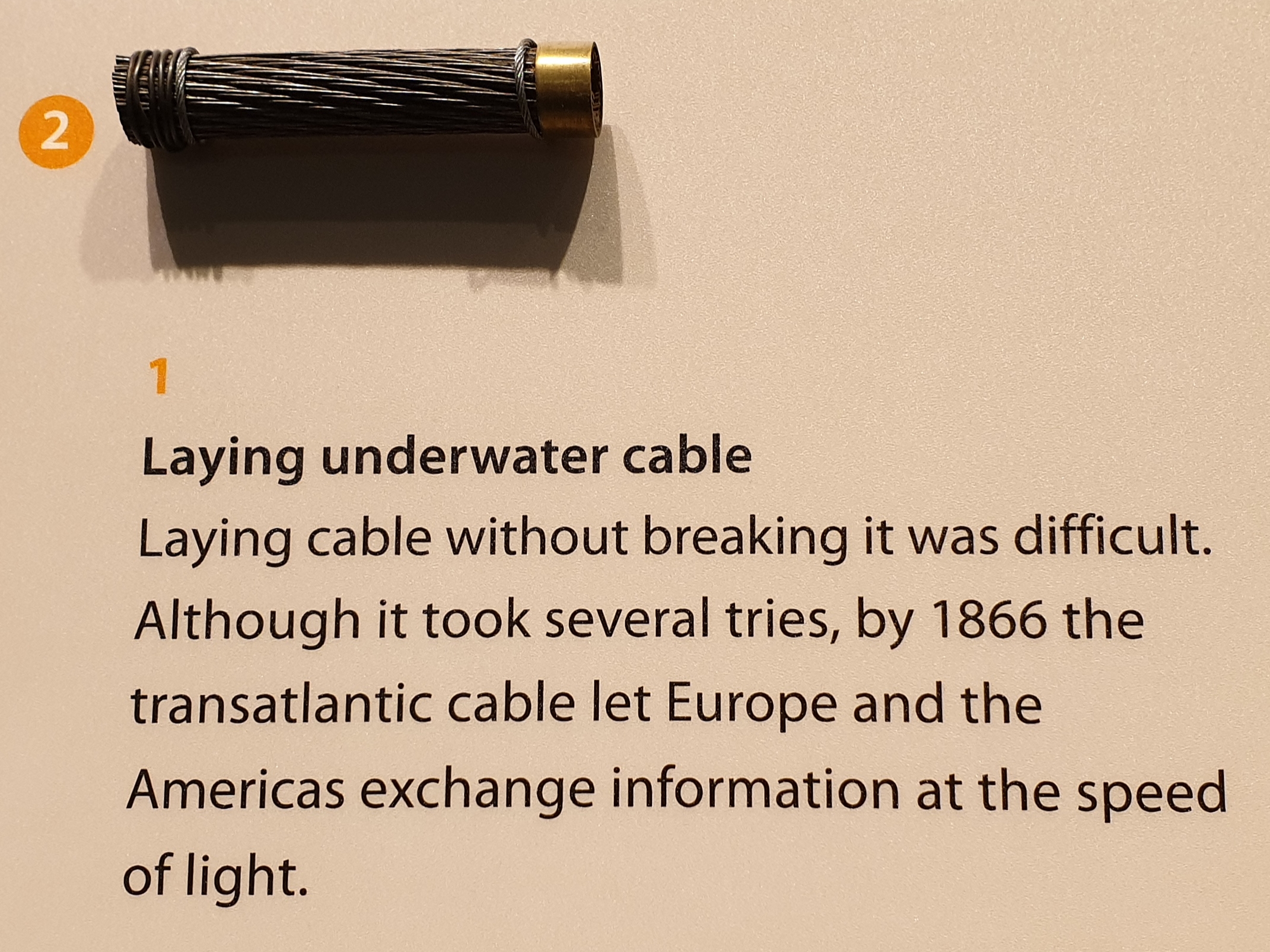
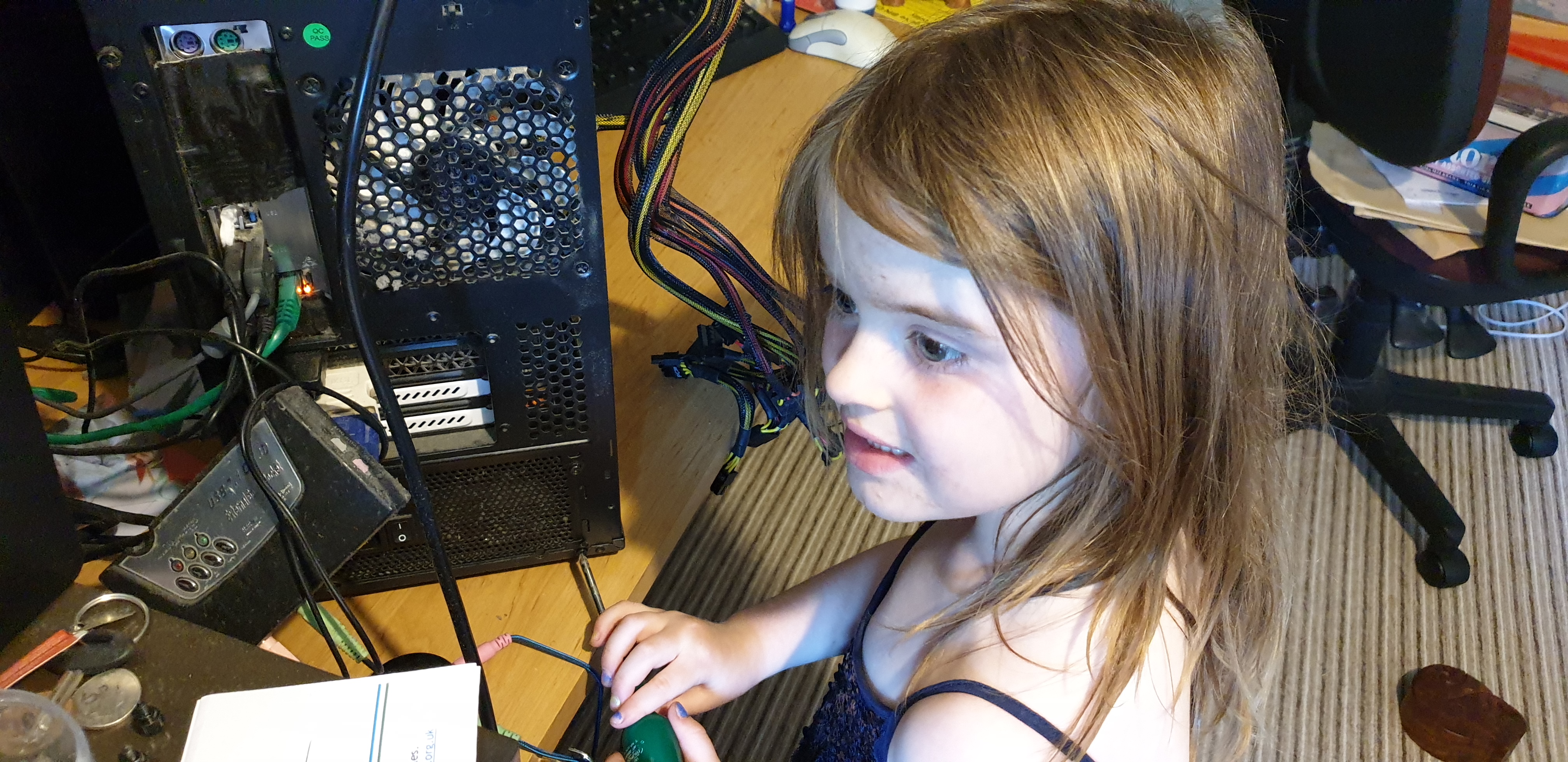
My hardware engineering is a little rusty, @ComputerHistory, but wouldn’t signals propogate along this copper cable at “only” somewhere between 0.64c and 0.95c, not 1c as you claim?
Hi @avapoet, I’m the author of the JavaScript for the WorldWideWeb project, and I did read your thread on the user-agent missing and I thought I’d land the fix ;-)
The original WorldWideWeb browser that we based our work on was 0.12 with screenshots from 0.16. Both browsers supported HTTP 0.9 which didn’t send headers. Obviously unintentional
that I send the `request` user-agent, so I spent some painful hours trying to get my emulator running NeXT with a networked connection _and_ the WorldWideWeb version 1.0 – which
_did_ use HTTP 1.0 and would send a User-Agent, so I could copy it accurately into the emulator code base.
So now metafilter.com renders in the emulator, and the User Agent sent is: CERN-NextStep-WorldWideWeb.app/1.1 libwww/2.07
This comment on the MetaFilter thread, which I only just noticed, is by Remy Sharp, who was part of the team that reimplemented WorldWideWeb as part
of that hackathon (his blog posts about the experience: 1, 2,
3, 4, 5),
and acknowledges my contribution. Squee!
We’ll start with a step-by-step guide to decrypting a known message. You can see the result of these steps in CyberChef here. Let’s say that our message is as follows:
And that we’ve been told that a German service Enigma is in use with the following settings:
Rotors III, II, and IV, reflector B, ring settings (Ringstellung in German) KNG, plugboard (Steckerbrett)AH CO
DE GZ IJ KM LQ NY PS TW, and finally the rotors are set to OPM.
Enigma settings are generally given left-to-right. Therefore, you should ensure the 3-rotor Enigma is selected in the first dropdown menu, and then use the dropdown menus to put rotor
III in the 1st rotor slot, II in the 2nd, and IV in the 3rd, and pick B in the reflector slot. In the ring setting and initial
value boxes for the 1st rotor, put K and O respectively, N and P in the 2nd, and G and M in the 3rd. Copy
the plugboard settings AH CO DE GZ IJ KM LQ NY PS TW into the plugboard box. Finally, paste the message into the input window.
The Enigma machine doesn’t support any special characters, so there’s no support for spaces, and by default unsupported characters are removed and output is put into the traditional
five-character groups. (You can turn this off by disabling “strict input”.) In some messages you may see X used to represent space.
Encrypting with Enigma is exactly the same as decrypting – if you copy the decrypted message back into the input box with the same recipe, you’ll get the original ciphertext back.
Plugboard, rotor and reflector specifications
The plugboard exchanges pairs of letters, and is specified as a space-separated list of those pairs. For example, with the plugboard AB CD, A will be
exchanged for B and vice versa, C for D, and so forth. Letters that aren’t specified are not exchanged, but you can also specify, for example,
AA to note that A is not exchanged. A letter cannot be exchanged more than once. In standard late-war German military operating practice, ten pairs were
used.
You can enter your own components, rather than using the standard ones. A rotor is an arbitrary mapping between letters – the rotor specification used here is the letters the rotor
maps A through Z to, so for example with the rotor ESOVPZJAYQUIRHXLNFTGKDCMWB, A maps to E, B to S, and so forth. Each
letter must appear exactly once. Additionally, rotors have a defined step point (the point or points in the rotor’s rotation at which the neighbouring rotor is stepped) – these are
specified using a < followed by the letters at which the step happens.
Reflectors, like the plugboard, exchange pairs of letters, so they are entered the same way. However, letters cannot map to themselves.
How to encrypt/decrypt with Typex
The Typex machine is very similar to Enigma. There are a few important differences from a user perspective:
Five rotors are used.
Rotor wirings cores can be inserted into the rotors backwards.
The input plugboard (on models which had one) is more complicated, allowing arbitrary letter mappings, which means it functions like, and is entered like, a rotor.
There was an additional plugboard which allowed rewiring of the reflector: this is supported by simply editing the specified reflector.
Like Enigma, Typex only supports enciphering/deciphering the letters A-Z. However, the keyboard was marked up with a standardised way of representing numbers and symbols using only
the letters. You can enable emulation of these keyboard modes in the operation configuration. Note that this needs to know whether the message is being encrypted or decrypted.
How to attack Enigma using the Bombe
Let’s take the message from the first example, and try and decrypt it without knowing the settings in advance. Here’s the message again:
Let’s assume to start with that we know the rotors used were III, II, and IV, and reflector B, but that we know no other settings.
Put the ciphertext in the input window and the Bombe operation in your recipe, and choose the correct rotors and reflector. We need one additional piece of information to attack the
message: a “crib”. This is a section of known plaintext for the message. If we know something about what the message is likely to contain, we can guess possible cribs.
We can also eliminate some cribs by using the property that Enigma cannot encipher a letter as itself. For example, let’s say our first guess for a crib is that the message begins
with “Hello world”. If we enter HELLO WORLD into the crib box, it will inform us that the crib is invalid, as the W in HELLO WORLD corresponds
to a W in the ciphertext. (Note that spaces in the input and crib are ignored – they’re included here for readability.) You can see this in CyberChef here
Let’s try “Hello CyberChef” as a crib instead. If we enter HELLO CYBER CHEF, the operation will run and we’ll be presented with some information about the run, followed
by a list of stops. You can see this here. Here you’ll notice that it says Bombe run on menu with 0 loops (2+ desirable)., and there are a large number of stops listed. The menu is built
from the crib you’ve entered, and is a web linking ciphertext and plaintext letters. (If you’re maths inclined, this is a graph where letters – plain or ciphertext – are nodes and
states of the Enigma machine are edges.) The machine performs better on menus which have loops in them – a letter maps to another to another and eventually returns to the first – and
additionally on longer menus. However, menus that are too long risk failing because the Bombe doesn’t simulate the middle rotor stepping, and the longer the menu the more likely this
is to have happened. Getting a good menu is a mixture of art and luck, and you may have to try a number of possible cribs before you get one that will produce useful results.
In this case, if we extend our crib by a single character to HELLO CYBER CHEFU, we get a loop in the menu (that U maps to a Y in the ciphertext,
the Y in the second cipher block maps to A, the A in the third ciphertext block maps to E, and the E in the second
crib block maps back to U). We immediately get a manageable number of results. You can see this here. Each result gives a set of rotor initial values and a set of identified plugboard wirings. Extending the crib further to HELLO CYBER CHEFU SER
produces a single result, and it has also recovered eight of the ten plugboard wires and identified four of the six letters which are not wired. You can see this here.
We now have two things left to do:
Recover the remaining plugboard settings.
Recover the ring settings.
This will need to be done manually.
Set up an Enigma operation with these settings. Leave the ring positions set to A for the moment, so from top to bottom we have rotor III at initial value
E, rotor II at C, and rotor IV at G, reflector B, and plugboard DE AH BB CO FF GZ LQ NY PS RR TW
UU.
You can see this here. You will immediately notice that the output is not the same as the decryption preview from the Bombe operation! Only the first three characters –
HEL – decrypt correctly. This is because the middle rotor stepping was ignored by the Bombe. You can correct this by adjusting the ring position and initial value on the
right-hand rotor in sync. They are currently A and G respectively. Advance both by one to B and H, and you’ll find that now only
the first two characters decrypt correctly.
Keep trying settings until most of the message is legible. You won’t be able to get the whole message correct, but for example at F and L, which you can see
here, our message now looks like:
At this point we can recover the remaining plugboard settings. The only letters which are not known in the plugboard are J K V X M I, of which two will be unconnected and
two pairs connected. By inspecting the ciphertext and partially decrypted plaintext and trying pairs, we find that connecting IJ and KM results, as you can
see here, in:
which is the best we can get with only adjustments to the first rotor. You now need to adjust the second rotor. Here, you’ll find that anything from D and F
to Z and B gives the correct decryption, for example here. It’s not possible to determine the exact original settings from only this message. In practice, for the real Enigma and real Bombe, this step was achieved via
methods that exploited the Enigma network operating procedures, but this is beyond the scope of this document.
What if I don’t know the rotors?
You’ll need the “Multiple Bombe” operation for this. You can define a set of rotors to choose from – the standard WW2 German military Enigma configurations are provided or you can
define your own – and it’ll run the Bombe against every possible combination. This will take up to a few hours for an attack against every possible configuration of the four-rotor
Naval Enigma! You should run a single Bombe first to make sure your menu is good before attempting a multi-Bombe run.
You can see an example of using the Multiple Bombe operation to attack the above example message without knowing the rotor order in advance here.
What if I get far too many stops?
Use a longer or different crib. Try to find one that produces loops in the menu.
What if I get no stops, or only incorrect stops?
Are you sure your crib is correct? Try alternative cribs.
What if I know my crib is right, but I still don’t get any stops?
The middle rotor has probably stepped during the encipherment of your crib. Try a shorter or different crib.
How things work
How Enigma works
We won’t go into the full history of Enigma and all its variants here, but as a brief overview of how the machine works:
Enigma uses a series of letter->letter conversions to produce ciphertext from plaintext. It is symmetric, such that the same series of operations on the ciphertext recovers the
original plaintext.
The bulk of the conversions are implemented in “rotors”, which are just an arbitrary mapping from the letters A-Z to the same letters in a different order. Additionally, to enforce
the symmetry, a reflector is used, which is a symmetric paired mapping of letters (that is, if a given reflector maps X to Y, the converse is also true). These are combined such that
a letter is mapped through three different rotors, the reflector, and then back through the same three rotors in reverse.
To avoid Enigma being a simple Caesar cipher, the rotors rotate (or “step”) between enciphering letters, changing
the effective mappings. The right rotor steps on every letter, and additionally defines a letter (or later, letters) at which the adjacent (middle) rotor will be stepped. Likewise,
the middle rotor defines a point at which the left rotor steps. (A mechanical issue known as the double-stepping anomaly means that the middle rotor actually steps twice when the left
hand rotor steps.)
The German military Enigma adds a plugboard, which is a configurable pair mapping of letters (similar to the reflector, but not requiring that every letter is exchanged) applied
before the first rotor (and thus also after passing through all the rotors and the reflector).
It also adds a ring setting, which allows the stepping point to be adjusted.
Later in the war, the Naval Enigma added a fourth rotor. This rotor does not step during operation. (The fourth rotor is thinner than the others, and fits alongside a thin reflector,
meaning this rotor is not interchangeable with the others on a real Enigma.)
There were a number of other variants and additions to Enigma which are not currently supported here, as well as different Enigma networks using the same basic hardware but different
rotors (which are supported by supplying your own rotor configurations).
How Typex works
Typex is a clone of Enigma, with a few changes implemented to improve security. It uses five rotors rather than three, and the rightmost two are static. Each rotor has more
stepping points. Additionally, the rotor design is slightly different: the wiring for each rotor is in a removable core, which sits in a rotor housing that has the ring setting and
stepping notches. This means each rotor has the same stepping points, and the rotor cores can be inserted backwards, effectively doubling the number of rotor choices.
Later models (from the Mark 22, which is the variant we simulate here) added two plugboards: an input plugboard, which allowed arbitrary letter mappings (rather than just pair
switches) and thus functioned similarly to a configurable extra static rotor, and a reflector plugboard, which allowed rewiring the reflector.
How the Bombe works
The Bombe is a mechanism for efficiently testing and discarding possible rotor positions, given some ciphertext and known plaintext. It exploits the symmetry of Enigma and the
reciprocal (pairwise) nature of the plugboard to do this regardless of the plugboard settings. Effectively, the machine makes a series of guesses about the rotor positions and
plugboard settings and for each guess it checks to see if there are any contradictions (e.g. if it finds that, with its guessed settings, the letter A would need to be
connected to both B and C on the plugboard, that’s impossible, and these settings cannot be right). This is implemented via careful connection of electrical
wires through a group of simulated Enigma machines.
A full explanation of the Bombe’s operation is beyond the scope of this document – you can read the source code, and the authors also recommend Graham Ellsbury’s Bombe explanation, which is very clearly diagrammed.
Implementation in CyberChef
Enigma/Typex
Enigma and Typex were implemented from documentation of their functionality.
Enigma rotor and reflector settings are from GCHQ’s documentation of known Enigma wirings. We currently simulate all basic versions of the German Service Enigma; most other versions
should be possible by manually entering the rotor wirings. There are a few models of Enigma, or attachments for the Service Enigma, which we don’t currently simulate. The operation
was tested against some of GCHQ’s working examples of Enigma machines. Output should be letter-for-letter identical to a real German Service Enigma. Note that some Enigma models used
numbered rather than lettered rotors – we’ve chosen to stick with the easier-to-use lettered rotors.
There were a number of different Typex versions over the years. We implement the Mark 22, which is backwards compatible with some (but not completely with all, as some early variants
supported case sensitivity) older Typex models. GCHQ also has a partially working Mark 22 Typex. This was used to test the plugboards and mechanics of the machine. Typex rotor
settings were changed regularly, and none have ever been published, so a test against real rotors was not possible. An example set of rotors have been randomly generated for use in
the Typex operation. Some additional information on the internal functionality was provided by the Bombe Rebuild Project.
The Bombe
The Bombe was likewise implemented on the basis of documentation of the attack and the machine. The Bombe Rebuild Project at the National Museum of Computing answered a number of
technical questions about the machine and its operating procedures, and helped test our results against their working hardware Bombe, for which the authors would like to extend our
thanks.
Constructing menus from cribs in a manner that most efficiently used the Bombe hardware was another difficult step of operating the real Bombes. We have chosen to generate the menu
automatically from the provided crib, ignore some hardware constraints of the real Bombe (e.g. making best use of the number of available Enigmas in the Bombe hardware; we simply
simulate as many as are necessary), and accept that occasionally the menu selected automatically may not always be the optimal choice. This should be rare, and we felt that manual
menu creation would be hard to build an interface for, and would add extra barriers to users experimenting with the Bombe.
The output of the real Bombe is optimised for manual verification using the checking machine, and additionally has some quirks (the rotor wirings are rotated by, depending on the
rotor, between one and three steps compared to the Enigma rotors). Therefore, the output given is the ring position, and a correction depending on the rotor needs to be
applied to the initial value, setting it to W for rotor V, X for rotor IV, and Y for all other rotors. We felt that this would require
too much explanation in CyberChef, so the output of CyberChef’s Bombe operation is the initial value for each rotor, with the ring positions set to A, required to decrypt
the ciphertext starting at the beginning of the crib. The actual stops are the same. This would not have caused problems at Bletchley Park, as operators working with the Bombe would
never have dealt with a real or simulated Enigma, and vice versa.
By default the checking machine is run automatically and stops which fail silently discarded. This can be disabled in the operation configuration, which will cause it to output all
stops from the actual Bombe hardware instead. (In this case you only get one stecker pair, rather than the set identified by the checking machine.)
Optimisation
A three-rotor Bombe run (which tests 17,576 rotor positions and takes about 15-20 minutes on original Turing Bombe hardware) completes in about a fifth of a second in our tests. A
four-rotor Bombe run takes about 5 seconds to try all 456,976 states. This also took about 20 minutes on the four-rotor US Navy Bombe (which rotates about 30 times faster than the
Turing Bombe!). CyberChef operations run single-threaded in browser JavaScript.
We have tried to remain fairly faithful to the implementation of the real Bombe, rather than a from-scratch implementation of the underlying attack. There is one small deviation from
“correct” behaviour: the real Bombe spins the slow rotor on a real Enigma fastest. We instead spin the fast rotor on an Enigma fastest. This means that all the other rotors in the
entire Bombe are in the same state for the 26 steps of the fast rotor and then step forward: this means we can compute the 13 possible routes through the lower two/three rotors and
reflector (symmetry means there are only 13 routes) once every 26 ticks and then save them. This does not affect where the machine stops, but it does affect the order in which those
stops are generated.
The fast rotors repeat each others’ states: in the 26 steps of the fast rotor between steps of the middle rotor, each of the scramblers in the complete Bombe will occupy each state
once. This means we can once again store each state when we hit them and reuse them when the other scramblers rotate through the same states.
Note also that it is not necessary to complete the energisation of all wires: as soon as 26 wires in the test register are lit, the state is invalid and processing can be aborted.
The above simplifications reduce the runtime of the simulation by an order of magnitude.
If you have a large attack to run on a multiprocessor system – for example, the complete M4 Naval Enigma, which features 1344 possible choices of rotor and reflector configuration,
each of which takes about 5 seconds – you can open multiple CyberChef tabs and have each run a subset of the work. For example, on a system with four or more processors, open four
tabs with identical Multiple Bombe recipes, and set each tab to a different combination of 4th rotor and reflector (as there are two options for each). Leave the full set of eight
primary rotors in each tab. This should complete the entire run in about half an hour on a sufficiently powerful system.
To celebrate their centenary, GCHQ have open-sourced
very-faithful reimplementations of Enigma, Typex, and Bombe that you can run in your browser. That’s pretty cool, and a really
interesting experimental toy for budding cryptographers and cryptanalysts!
I’m a big believer in the idea that the hardware I lay my hands on all day, every day, needs to be the best for its purpose. On my primary desktop, I type on a Das Keyboard 4 Professional (with Cherry MX brown switches) because it looks, feels, and sounds spectacular. I use
the Mac edition of the keyboard because it, coupled with a few tweaks, gives me the best combination of features and compatibility across all of the Windows, MacOS, and Linux (and
occasionally other operating systems) I control with it. These things matter.
I don’t know what you think these buttons do, but if you’re using my keyboard, you’re probably wrong. Also, they need a clean. I swear they don’t look this grimy
when I’m not doing macro-photography.
I also care about the mouse I use. Mice are, for the most part, for the Web and for gaming and not for use in most other applications (that’s what keyboard shortcuts are for!) but
nonetheless I spend plenty of time holding one and so I want the tool that feels right to me. That’s why I was delighted when, in replacing my four year-old Logitech MX1000 in 2010 with my first Logitech Performance MX, I felt
able to declare it the best mouse in the world. My Performance MX lived for about four years, too – that seems to be how long a mouse can stand the kind of use that I give it –
before it started to fail and I opted to replace it with an identical make and model. I’d found “my” mouse, and I was sticking with it. It’s a great shape (if you’ve got larger hands),
is full of features including highly-configurable buttons, vertical and horizontal scrolling (or whatever you want to map them to), and a cool “flywheel” mouse wheel that can
be locked to regular operation or unlocked for controlled high-speed scrolling at the touch of a button: with practice, you can even use it as a speed control by gently depressing the
switch like it was a brake pedal. Couple all of that with incredible accuracy on virtually any surface, long battery life, and charging “while you use” and you’ve a recipe for success,
in my mind.
My second Performance MX stopped properly charging its battery this week, and it turns out that they don’t make them any more, so I bought its successor, the Logitech MX Master 2S.
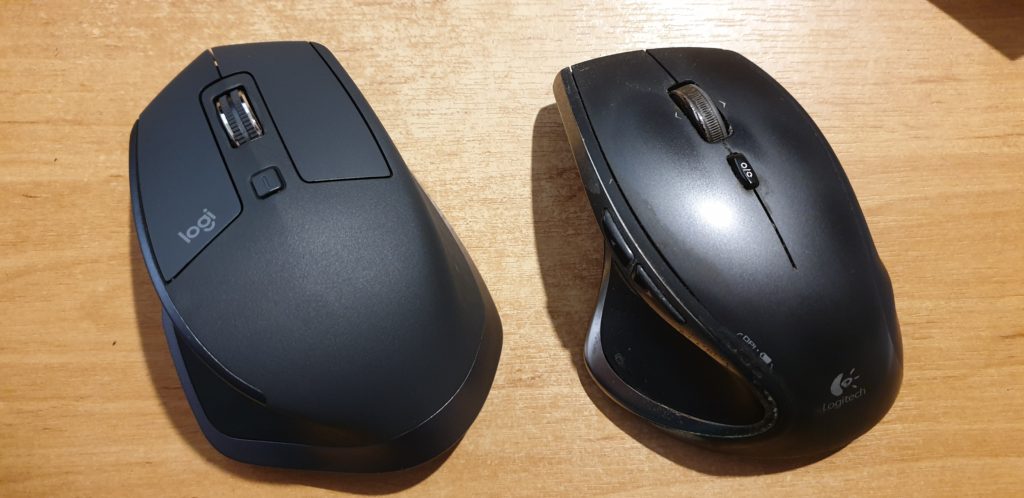
On the left, the (new) Logitech MX Master 2S. On the right, my (old) Logitech Performance MX.
The MX Master 2S is… different… from its predecessor. Mostly in good ways, sometimes less-good. Here’s the important differences:
Matte coating: only the buttons are made of smooth plastic; the body of the mouse is now a slightly coarser plastic: you’ll see in the photo above how much less light
it reflects. It feels like it would dissipate heat less-well.
Horizontal wheel replaces rocker wheel: instead of the Performance MX’s “rocker” scroll wheel that can be pushed sideways for horizontal scroll, the MX Master 2S adds
a dedicated horizontal scroll (or whatever you reconfigure it to) wheel in the thumb well. This is a welcome change: the rocker wheel in both my Performance MXes became less-effective
over time and in older mice could even “jam on”, blocking the middle-click function. This seems like a far more-logical design.
New back/forward button shape: to accommodate the horizontal wheel, the “back” and “forward” buttons in the thumb well have been made smaller and pushed closer
together. This is the single biggest failing of the MX Master 2S: it’s clearly a mouse designed for larger hands, and yet these new buttons are slightly, but noticeably, harder to
accurately trigger with a large thumb! It’s tolerable, but slightly annoying.
Bluetooth support: one of my biggest gripes about the Performance MX was its dependence on Unifying, Logitech’s proprietary wireless protocol. The MX Master 2S
supports Unifying but also supports Bluetooth, giving you the best of both worlds.
Digital flywheel: the most-noticable change when using the mouse is the new flywheel and braking mechanism, which is comparable to the change in contemporary cars
from a mechanical to a digital handbrake. The flywheel “lock” switch is now digital, turning on or off the brake in a single stroke and so depriving you of the satisfaction of using
it to gradually “slow down” a long spin-scroll through an enormous log or source code file. But in exchange comes an awesome feature called SmartShift, which dynamically
turns on or off the brake (y’know, like an automatic handbrake!) depending on the speed with which you throw the wheel. That’s clever and intuitive and “just works” far better than
I’d have imagined: I can choose to scroll slowly or quickly, with or without the traditional ratchet “clicks” of a wheel mouse, with nothing more than the way I flick my finger (and
all fully-configurable, of course). And I’ve still got the button to manually “toggle” the brake if I need it. It took some getting used to, but this change is actually really cool!
(I’m yet to get used to the sound of the digital brake kicking in automatically, but that’s true of my car too).
Basic KVM/multi-computing capability: with a button on the underside to toggle between different paired Unifying/Bluetooth transceivers and software support for
seamless edge-of-desktop multi-computer operation, Logitech are clearly trying to target folks who, like me, routinely run multiple computers simultaneously from a single keyboard and
mouse. But it’s a pointless addition in my case because I’ve been quite happy using Synergy to do this for
the last 7+ years, which does it better. Still, it’s a harmless “bonus” feature and it might be of value to others, I suppose.
All in all, the MX Master 2S isn’t such an innovative leap forward over the Performance MX as the Performance MX was over the MX1000, but it’s still great that this spectacular series
of heavyweight workhouse feature-rich mice continues to innovate and, for the most part, improve upon the formula. This mouse isn’t cheap, and it isn’t for everybody, but if you’re a
big-handed power user with a need to fine-tune all your hands-on hardware to get it just right, it’s definitely worth a look.
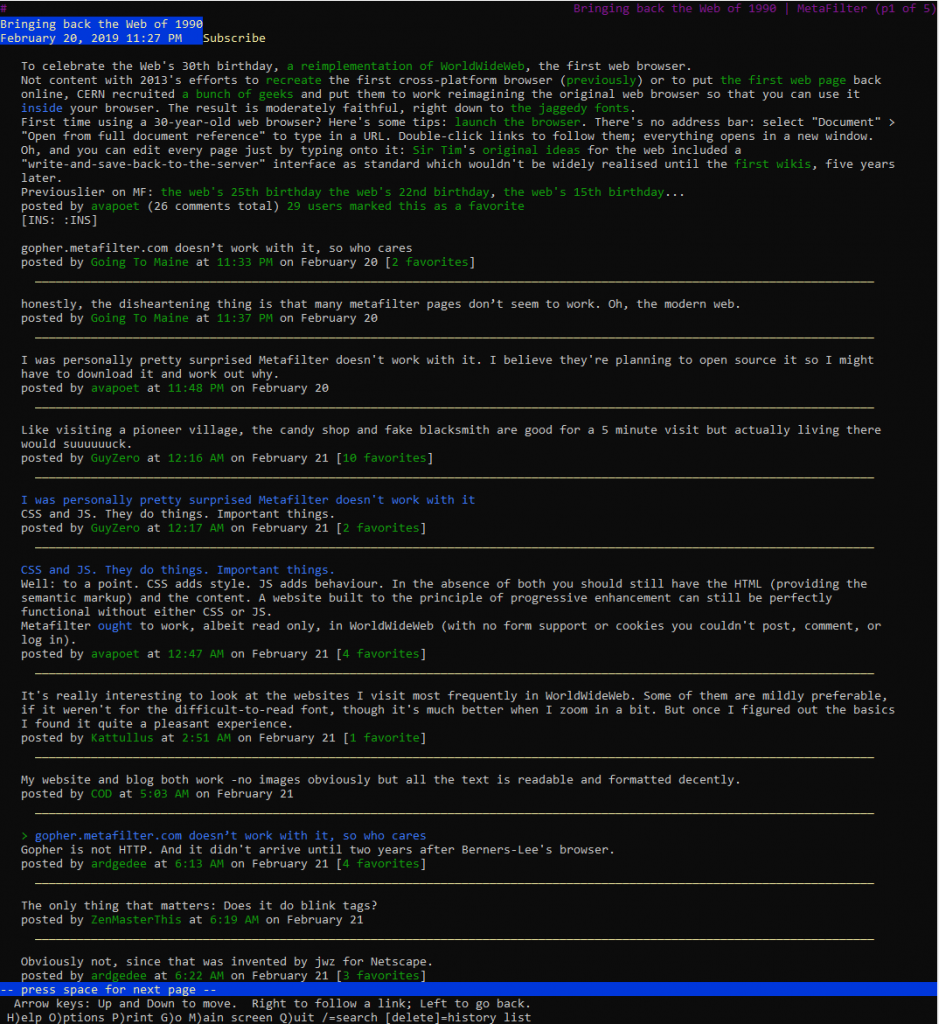
People were quick to point this out and assume that it was something to do with the modernity of MetaFilter:
honestly, the disheartening thing is that many metafilter pages don’t seem to work. Oh, the modern web.
Some even went so far as to speculate that the reason related to MetaFilter’s use of CSS and JS:
CSS and JS. They do things. Important things.
This is, of course, complete baloney, and it’s easy to prove to oneself. Firstly, simply using the View Source tool in your browser on a MetaFilter page reveals source code that’s quite
comprehensible, even human-readable, without going anywhere near any CSS or JavaScript.
As late as the early 2000s I’d occasionally use Lynx for serious browsing, but any time I’ve used it since it’s been by necessity.
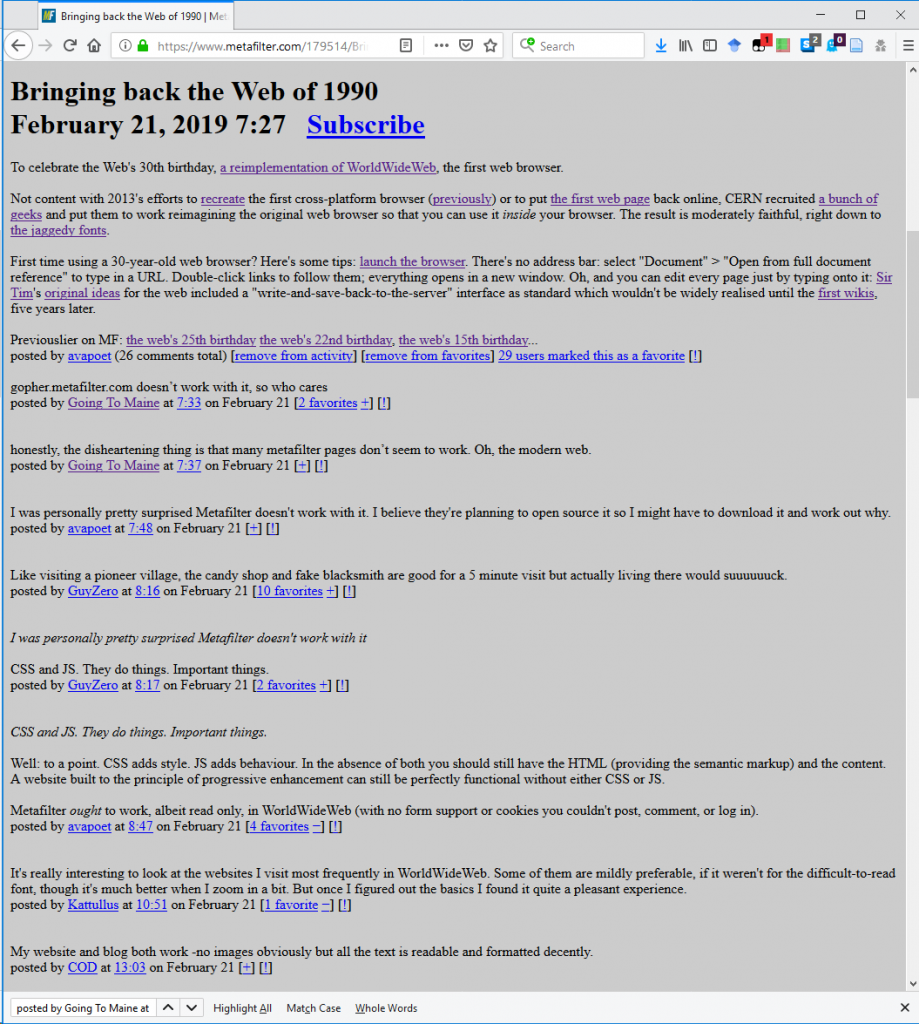
Secondly, it’s pretty simple to try browsing MetaFilter without CSS or JavaScript enabled! I tried in two ways: first,
by using Lynx, a text-based browser that’s never supported either of those technologies. I also tried by using
Firefox but with them disabled (honestly, I slightly miss when the Web used to look like this):
It only took me three clicks to disable stylesheets and JavaScript in my copy of Firefox… but I’ll be the first to admit that I don’t keep my browser configured like “normal people”
probably do.
And thirdly: the error code being returned by the simulated WorldWideWeb browser is a HTTP code 500. Even if you don’t
know your HTTP codes (I mean, what kind of weirdo would take the time to memorise them all anyway <ahem>),
it’s worth learning this: the first digit of a HTTP response code tells you what happened:
1xx means “everything’s fine, keep going”;
2xx means “everything’s fine and we’re done”;
3xx means “try over there”;
4xx means “you did something wrong” (the infamous 404, for example, means you asked for a page that doesn’t exist);
5xx means “the server did something wrong”.
Simple! The fact that the error code begins with a 5 strongly implies that the problem isn’t in the (client-side) reimplementation of WorldWideWeb: if this had have been a
CSS/JS problem, I’d expect to see a blank page, scrambled content, “filler”
content, or incomplete content.
So I found myself wondering what the real problem was. This is, of course, where my geek flag becomes most-visible: what we’re talking about, let’s not forget, is a fringe
problem in an incomplete simulation of an ancient computer program that nobody uses. Odds are incredibly good that nobody on Earth cares about this except, right now, for me.
I searched for a “Geek Flag” and didn’t like anything I saw, so I came up with this one based on… well, if you recognise what it’s based on, good for you, you’re certainly allowed to
fly it. If not… well, you can too: there’s no geek-gatekeeping here.
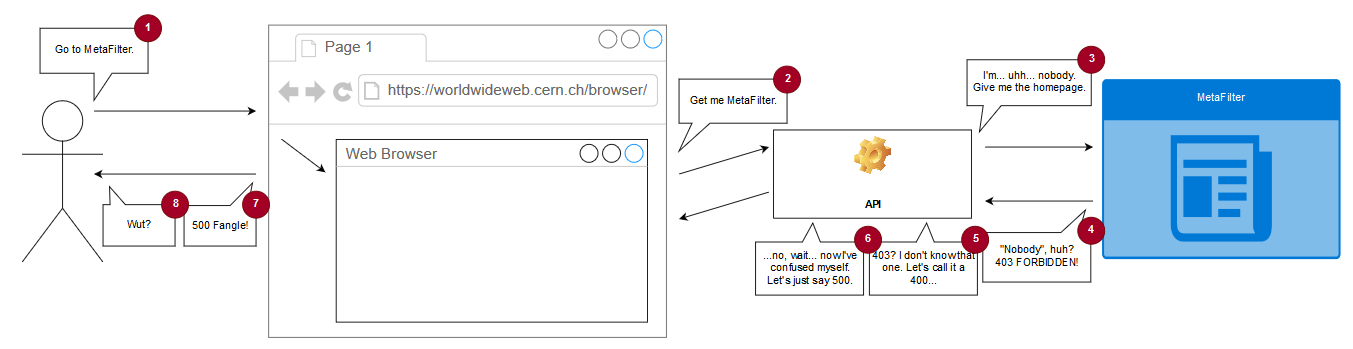
The (simulated) copy of WorldWideWeb is asked to open a document by reference, e.g. “https://www.metafilter.com/”.
To work around same-origin policy restrictions, the request is sent to an API which acts as a proxy server.
The API makes a request using the Node package “request” with this line of code: request(url, (error, response, body) =>
{ ... }). When the first parameter to request is a (string) URL, the module uses its default settings for all of
the other options, which means that it doesn’t set the User-Agent header (an optional part of a Web request where the computer making the request identifies the software
that’s asking).
MetaFilter, for some reason, blocks requests whose User-Agent isn’t set. This is weird! And nonstandard: while web browsers should – in RFC2119 terms – set their User-Agent: header, web servers shouldn’t require
that they do so. MetaFilter returns a 403 and a message to say “Forbidden”; usually a message you only see if you’re trying to access a resource that requires session authentication and
you haven’t logged-in yet.
The API is programmed to handle response codes 200 (okay!) and 404 (not found), but if it gets anything else back
it’s supposed to throw a 400 (bad request). Except there’s a bug: when trying to throw a 400, it requires that an error message has been set by the request module and if there
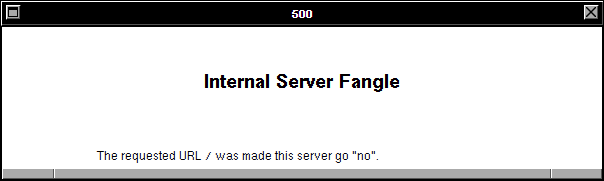
hasn’t… it instead throws a 500 with the message “Internal Server Fangle” and no clue what actually went wrong. So MetaFilter’s 403 gets translated by the proxy into a 400 which
it fails to render because a 403 doesn’t actually produce an error message and so it gets translated again into the 500 that you eventually see. What a knock-on effect!
If you’re having difficulty visualising the process, this diagram might help you to continue your struggle with that visualisation.
This then sets a User-Agent header and makes servers that require one, such as MetaFilter, respond appropriately. I don’t know whether WorldWideWeb originally set a User-Agent header
(CERN’s source file archive seems to be missing the relevant C sources so I can’t check) but I
suspect that it did, so this change actually improves the fidelity of the emulation as a bonus. A better fix would also add support for and appropriate handling of other HTTP response
codes, but that’s a story for another day, I guess.
I know the hackathon’s over, but I wonder if they’re taking pull requests…
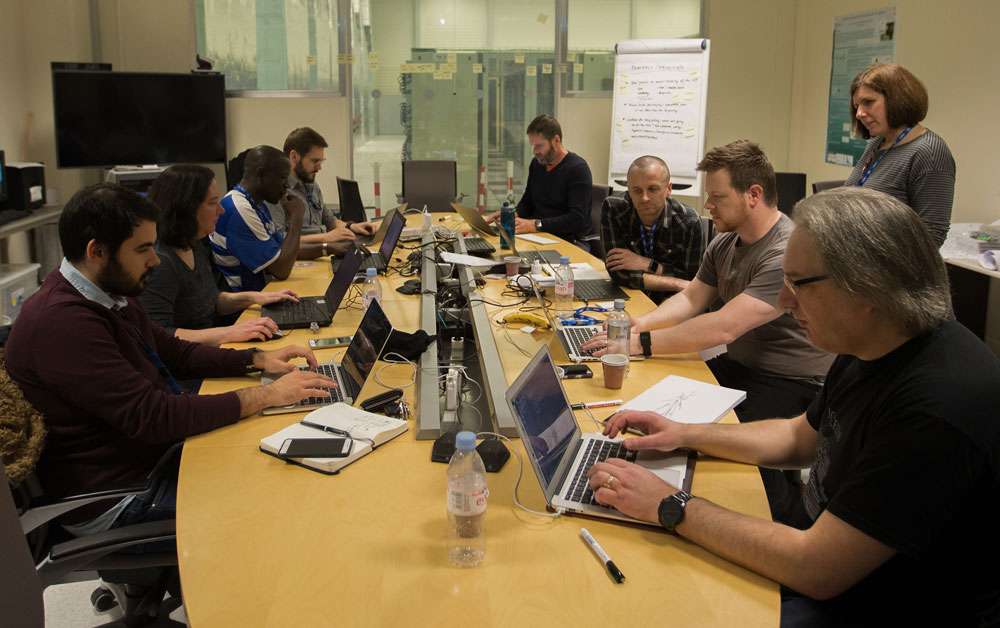
This month, a collection of some of my favourite geeks got invited to CERN in Geneva to
participate in a week-long hackathon with the aim of reimplementing WorldWideWeb –
the first web browser, circa 1990-1994 – as a web application. I’m super jealous, but I’m also really pleased with what they managed
to produce.
This represents a huge leap forward from their last similar project, which aimed to recreate the line mode browser: the first web browser that
didn’t require a NeXT computer to run it and so a leap forward in mainstream appeal. In some ways, you might expect
reimplementing WorldWideWeb to be easier, because its functionality is more-similar that of a modern browser, but there were doubtless some challenges too: this early browser predated the concept of the DOM and so there are distinct
processing differences that must be considered to get a truly authentic experience.
It’s just like any other hackathon, if you ignore the enormous particle collider underneath it.
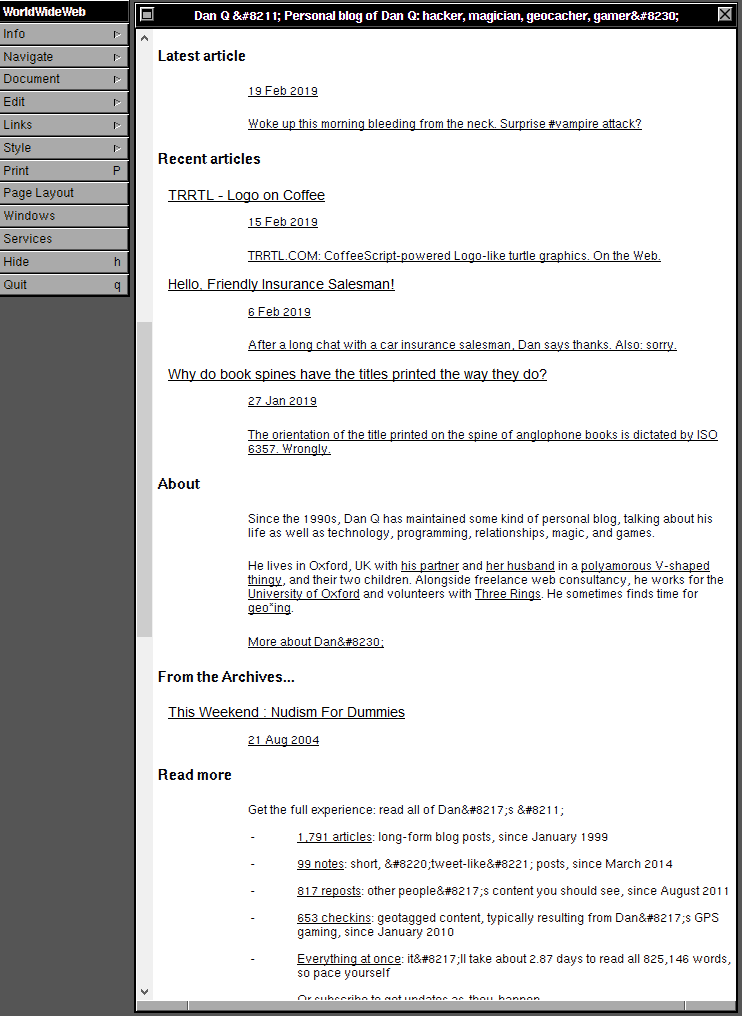
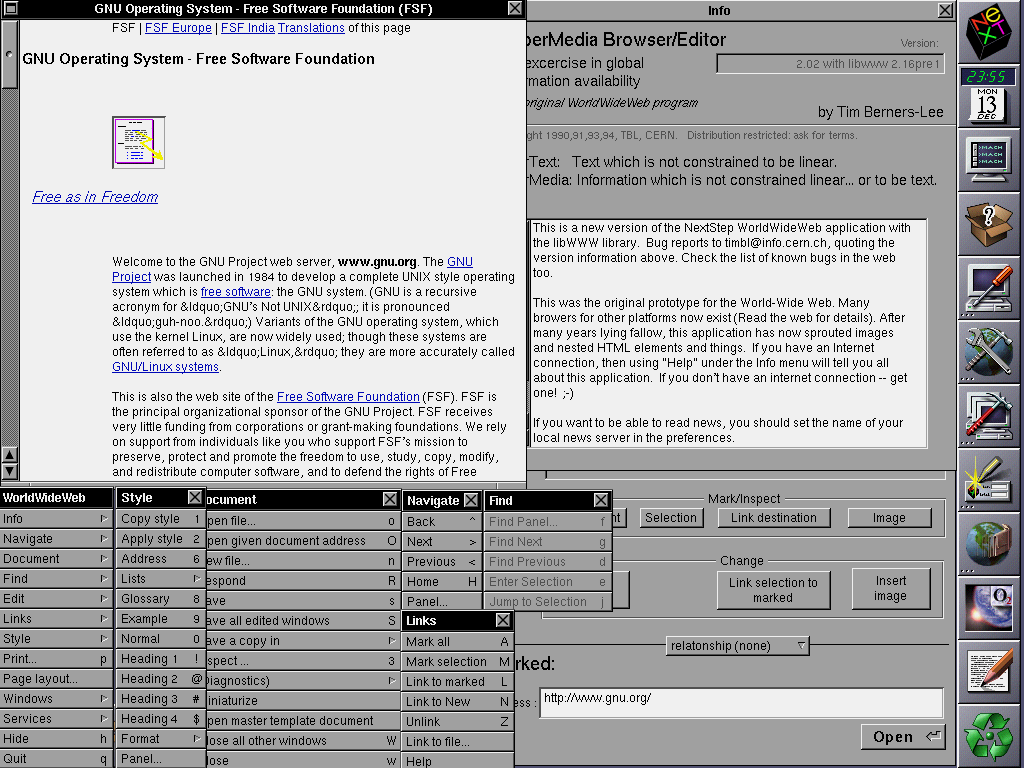
Among their outputs, the team also produced a cool timeline of the Web, which – thanks to some careful authorship – is as legible in WorldWideWeb as it is in a modern browser (if, admittedly, a little less pretty).
When Sir Tim took this screenshot, he could never have predicted the way the Web would change, technically, over the next
25-30 years. But I’m almost more-interested in how it’s stayed the same.
In an age of increasing Single Page Applications and API-driven sites and “apps”, it’s nice to be reminded that if you develop right for the Web, your content will be visible
(sort-of; I’m aware that there are some liberties taken here in memory and processing limitations, protocols and negotiation) on machines 30 years old, and that gives me hope that
adherence to the same solid standards gives us a chance of writing pages today that look just as good in 30 years to come. Compare that to a proprietary technology like Flash whose heyday 15 years ago is overshadowed by its imminent death (not to
mention Java applets or ActiveX <shudders>), iOS apps which stopped working when the operating system went 64-bit, and websites which only work
in specific browsers (traditionally Internet Explorer, though as I’ve complained before we’re getting more and more Chrome-only sites).
The Web is a success story in open standards, natural and by-design progressive enhancement, and the future-proof archivability of human-readable code. Long live the Web.
With each tap, a small electrical current passes from the screen to her hand. Because electricity flows easily through human bodies, sensors on the phone register a change in voltage
wherever her thumb presses against the screen. But the world is messy, and the phone senses random fluctuations in voltage across the rest of the screen, too, so an algorithm
determines the biggest, thumbiest-looking voltage fluctuations and assumes that’s where she intended to press.
Figure 0. Capacitive touch.
So she starts tap-tap-tapping on the keyboard, one letter at a time.
I-spacebar-l-o-v-e-spacebar-y-o-u.
…
I’ve long been a fan of “full story” examinations of how technology works. This one looks and the sending and receipt of an SMS text message from concept through touchscreen, encoding
and transmission, decoding and display. It’s good to be reminded that whatever technology you build, even a “basic” Arduino project, a “simple” website or a “throwaway” mobile app,
you’re standing on the shoulders of giants. Your work sits atop decades or more of infrastructure, standards, electronics and research.
Sometimes it feels pretty fragile. But mostly it feels like magic.
Computerphile at its best, here tackling the topic of additional (supplementary) processors, like FPUs, GPUs, sound processors, etc., to which CPUs outsource some of their work under
specific circumstances. Even speaking as somebody who’s upgraded a 386/SX to a 386/DX through the addition of a “math co-processor” (an FPU) and seeing the benefit in applications for
which floating point arithmetic was a major part (e.g. some early 3D games), I didn’t really think about what was really happening until I saw this video. There’s always more
to learn, fellow geeks!
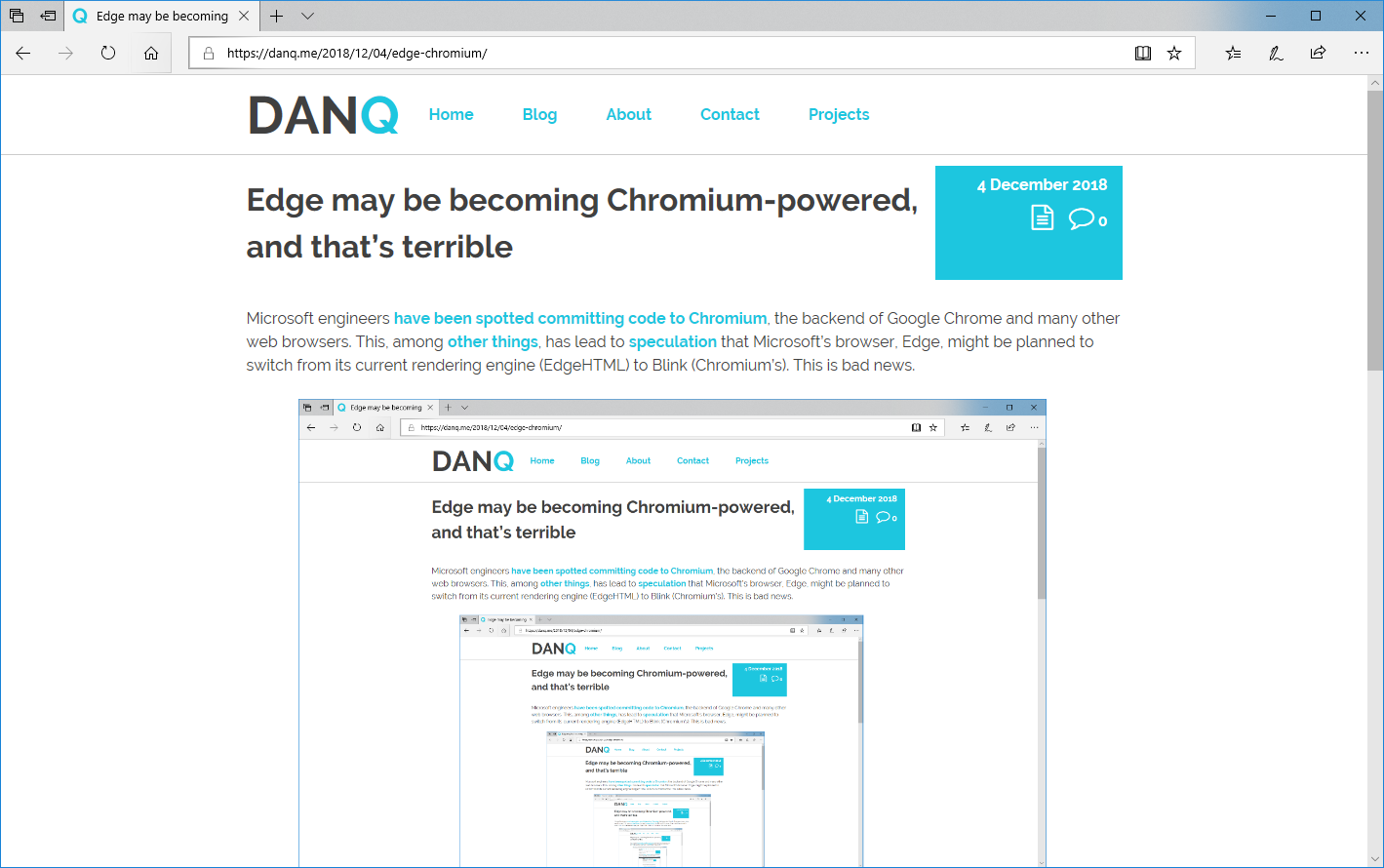
Microsoft engineers have been spotted committing code to Chromium, the backend of Google Chrome
and many other web browsers. This, among other things, has lead to speculation that Microsoft’s browser, Edge, might be planned to switch from its
current rendering engine (EdgeHTML) to Blink (Chromium’s). This is bad news.
This post, as it would appear if you were looking at it in Edge. Which you might be, I suppose.
The younger generation of web developers are likely to hail this as good news: one fewer engine to develop for and test in, they’re all already using Chrome or
something similar (and certainly not Edge) for development and debugging anyway, etc. The problem comes perhaps because they’re too young to remember the First Browser War and its aftermath. Let me summarise:
Once upon a time – let’s call it the mid-1990s – there were several web browsers: Netscape Navigator, Internet Explorer, Opera, etc. They all used different rendering
engines and so development was sometimes a bit of a pain, but only if you wanted to use the latest most cutting-edge features: if you were happy with the standard, established
features of the Web then your site would work anywhere, as has always been the case.
Then, everybody starting using just one browser: following some shady dealings and monopoly abuse, 90%+ of Web users started using just one web browser, Internet Explorer. By the time anybody took
notice, their rivals had been economically crippled beyond any reasonable chance of recovery, but the worst had yet to come…
Developers started targeting only that one browser: instead of making websites, developers started making “Internet Explorer sites” which were only tested in that one
browser or, worse yet, only worked at all in that browser, actively undermining the Web’s position as an open platform. As the grip of the monopoly grew tighter,
technological innovation was centred around this single platform, leading to decade-long knock-on
effects.
The Web ceased to grow new features: from the release of Internet Explorer 6 there were no significant developments in the technology of the Web for many years.
The lack of competition pushed us into a period of stagnation. A
decade and a half later, we’re only just (finally) finishing shaking off this unpleasant bit of our history.
History looks set to repeat itself. Substitute Chrome in place of Internet Explorer and update the references to other web browsers and the steps above could be our future history, too.
Right now, we’re somewhere in or around step #2 – Chrome is the dominant browser – and we’re starting to see the beginnings of step #3: more and more “Chrome only” sites.
More-alarmingly this time around, Google’s position in providing many major Web services allows them to “push” even harder for this kind of change, even just subtly: if you make the
switch from Chrome to e.g. Firefox (and you absolutely should) you might find that
YouTube runs slower for you because YouTube’s (Google) engineers favour Google’s web browser.
So these are the three browser engines we have: WebKit/Blink, Gecko, and EdgeHTML. We are unlikely to get any brand new bloodlines in the foreseeable future. This is it.
If we lose one of those browser engines, we lose its lineage, every permutation of that engine that would follow, and the unique takes on the Web it could allow for.
And it’s not likely to be replaced.
Imagine a planet populated only by hummingbirds, dolphins, and horses. Say all the dolphins died out. In the far, far future, hummingbirds or horses could evolve into something that
could swim in the ocean like a dolphin. Indeed, ichthyosaurs in the era of dinosaurs looked much like dolphins. But that creature would be very different from a true dolphin: even
ichthyosaurs never developed echolocation. We would wait a very long time (possibly forever) for a bloodline to evolve the traits we already have present in other bloodlines today.
So, why is it ok to stand by or even encourage the extinction of one of these valuable, unique lineages?
We have already lost one.
We used to have four major rendering engines, but Opera halted development of its own rendering engine Presto before adopting Blink.
Three left. Spend them wisely.
As much as I don’t like having to work-around the quirks in all of the different browsers I test in, daily, it’s way preferable to a return to the dark days of the Web circa
most of the first decade of this century. Please help keep browsers diverse: nobody wants to start seeing this shit –
I don’t know if this is genius or insanity, but either way it’s pretty remarkable. Lost my shit at “pop girl”. Lost it again at “I can poke the nipple”.
It takes a true engineer to think to themselves, “Hey, I wonder if I could use technology to tell me when I’m feeling aroused? That sounds like a useful project.” I love it.
Notes from #musetech18 presentations (with a strong “collaboration” theme). Note that these are “live notes” first-and-foremost for my own use and so are probably full of typos. Sorry.
Matt Locke (StoryThings, @matlocke):
Over the last 100 years, proportional total advertising revenue has been stolen from newspapers by radio, then television: scheduled media that is experienced
simultaneously. But we see a recent drift in “patterns of attention” towards the Internet. (Schedulers, not producers, hold the power in radio/television.)
The new attention “spectrum” includes things that aren’t “20-60 minutes” (which has historically been dominated by TV) nor “1-3 hours” (which has been film), but now there are
shorter and longer forms of popular medium, from tweets and blog posts (very short) to livestreams and binging (very long). To gather the full spectrum of attention, we need to span
these spectra.
Rhythm is the traditions and patterns of how work is done in your industry, sector, platforms and supply chains. You need to understand this to be most-effective (but this is
hard to see from the inside: newcomers are helpful). In broadcast television as a medium, the schedules dictate the rhythms… in traditional print publishing, the major
book festivals and “blockbuster release” cycles dominate the rhythm.
Then how do we collaborate with organisations not in our sector (i.e. with different rhythms)? There are several approaches, but think about the rhythmic impact.
Partnered with Google Arts & Heritage; Google’s first single-partner project and also their first project with a multi-site organisation.
This kind of tech can be used to increase access (e.g. street view of closed sites) and also support curatorial/research aims (e.g. ultra-high-resolution photography).
Aside from the tech access, working with a big company like Google provides basically “free” PR. In combination, these benefits boost reach.
Learnings: prepare to work hard and fast, multi-site projects are a logistical nightmare, you will need help, stay organised and get recordkeeping/planning in place early, be aware
that there’ll be things you can’t control (e.g. off-brand PR produced by the partner), don’t be afraid to stand your ground where you know your content better.
Decide what successw looks like at the outset and with all relevant stakeholders involved, so that you can stay on course. Make sure the project is integrated into contributors’
work streams.
Daria Cybulska (Wikimedia UK, @DCybulska):
Collaborative work via Wikimedians-in-residence not only provides a boost to open content but involves engagement with staff and opens further partnership opportunities.
Your audience is already using Wikipedia: reaching out via Wikipedia provides new ways to engage with them – see it as a medium as well as a platform.
Wikimedians-in-residence, being “external”, are great motivators to agitate processes and promote healthy change in your organisation.
Creative Collaborations ([1] Kate Noble @kateinoble, Ina Pruegel @3today, [2] Joanna Salter, [3] Michal Cudrnak, Johnathan Prior):
Digital making (learning about technology through making with it) can link museums with “maker culture”. Cambridge museums (Zoology, Fitzwilliam) used a “Maker in Residence”
programme and promoted “family workshops” and worked with primary schools. Staff learned-as-they-went and delivered training that they’d just done themselves (which fits maker culture
thinking). Unexpected outcomes included interest from staff and discovery of “hidden” resources around the museums, and the provision of valuable role models to participants. Tips: find
allies, be ambitious and playful, and take risks.
National Maritime Museum Greenwich/National Maritime Museum – “re.think” aimed to engage public with emotive topics and physically-interactive exhibits. Digital wing allowed leaving
of connections/memories, voting on hot issues, etc. This leads to a model in which visitors are actively engaged in shaping the future display (and interpretation) of exhibitions.
Stefanie Posavec appointed as a data artist in residence.
SoundWalk Strazky at Slovak National Gallery: audio-geography soundwalks as an immersive experiential exhibition; can be done relatively cheaply, at the basic end. Telling fictional
stories (based on reality) can help engage visitors with content (in this case, recreating scenes from artists’ lives). Interlingual challenges. Delivery via Phonegap app which provides
map and audio at “spots”; with a simple design that discourages staring-at-the-screen (only use digital to improve access to content!).
Lightning talks:
Maritime Museum Greenwich: wanted to find out how people engage with objects – we added both a museum interpretation and a community message to each object. Highly-observational
testing helped see how hundreds of people engage with content. Lesson: curators are not good judges of how their stuff will be received; audience ownership is amazing. Be reactive.
Visitors don’t mind being testers of super-rough paper-based designs.
Nordic Museum / Swedish National Heritage Board explored Generous Interfaces: show first, don’t ask, rich overviews, interobject relationships, encourage exploration etc. (Whitelaw,
2012). Open data + open source + design sprints (with coding in between) + lots of testing = a collaborative process. Use testing to decide between sorting OR filtering;
not both! As a bonus, generous interfaces encourage finding of data errors. bit.ly/2CNsNna
IWM on the centenary of WWI: thinking about continuing the crowdsourcing begun by the IWM’s original mission. Millions of assets have been created by users. Highly-collaborative
mechanism to explore, contribute to, and share a data space.
Lauren Bassam (@lswbassam) on LGBT History and co-opting of Instagram as an archival space: Instagram is an unconventional archival source, but provides a few benefits in
collaboration and engagement management, and serves as a viable platform for stories that are hard to tell using the collections in conventional archives. A suitably-engaged community
can take pride in their accuracy and their research cred, whether or not you strictly approve of their use of the term “archivist”. With closed stacks, we sometimes forget how important
engagement, touch, exploration and play can be.
Owen Gower (@owentg) from Dr. Jenner’s House Museum and Garden: they received EU REVEAL funding to look at VR as an engagement tool. Their game is for PSVR and has a commercial
release. The objects that interested the game designers the most weren’t necessarily those which the curators might have chosen. Don’t let your designers get carried away and fill the
game with e.g. zombies. But work with them, and your designers can help you find not only new ways to tell stories, but new stories you didn’t know you could
tell. Don’t be afraid to use cheap/student developers!
Rebecca Kahm @rebamex from Pelagios Commons (@Pelagiosproject): the problem with linked data is that it’s hard to show its value to end users (or even show museums “what you can do”
with it). Coins have great linked data, in collections. Peripleo was used to implement a sort-of “reverse Indiana Jones”: players try to recover information to find where an
artefact belongs.
Jon Pratty: There are lots of useful services (Flickr, Storify etc.) and many are free (which is great)… but this produces problems for us in terms of the long-term
life of our online content, not to mention the ethical issues with using services whose business model is built on trading personal data of our users. [Editor’s note: everything being
talked about here is the stuff that the Indieweb movement have been working on for some time!] We need to de-siloise and de-centralise our content
and services. redecentralize.org? responsibledata.io?
In-House Collaboration and the State of the Sector:
Rosie Cardiff @RosieCardiff, Serpentine Galleries on Mobile Tours. Delivered as web application via captive WiFi hotspot. Technical challenges were significant for a relatively
small digital team, and there was some apprehension among frontline staff. As a result of these and other problems, the mobile tours were underused. Ideas to overcome barriers: report
successes and feedback, reuse content cross-channel, fix bugs ASAP, invite dialogue. Interesting that they’ve gained a print guides off the back of the the digital. Learn lessons and
relaunch.
Sarah Younaf @sarahyounas, Tyne & Wear Museums. Digital’s job is to ask the questions the museum wouldn’t normally ask, i.e. experimentation (with a human-centric bias). Digital is
quietly, by its nature, “given permission” to take risks. Consider establishing relationships with (and inviting-in) people who will/want to do “mashups” or find alternative uses for
your content; get those conversations going about collections access. Experimental Try-New-Things afternoons had value but this didn’t directly translate into ideas-from-the-bottom,
perhaps as a result of a lack of confidence, a requirement for fully-formed ideas, or a heavy form in the application process for investment in new initiatives. Remember you can’t
change everyone, but find champions and encourage participation!
Kati Price @katiprice on Structuring for Digital Success in GLAM. Study showed that technical leadership and digital management/analysis is rated as vital, yet they’re also
underrepresented. Ambitions routinely outstrip budgets. Assumptions about what digital teams “look” like from an org-chart perspective don’t cover the full diversity: digital teams look
very different from one another! Forrester Research model of Digital Maturity seems to be the closest measure of digital maturity in GLAM institutions, but has flaws (mostly relating to
its focus in the commercial sector): what’s interesting is that digital maturity seems to correlate to structure – decentralised less mature than centralised less mature than
hub-and-spoke less mature than holistic.
Jennifer Wexler, Daniel Pett, Chiara Bonacchi on Diversifying Museum Audiences through Participation and stuff. Crowdsourcing boring data entry tasks is sometimes easier than asking
staff to do it, amazingly. For success, make sure you get institutional buy-in and get press on board. Also: make sure that the resulting data is open so everybody can
explore it. Crowdsourcing is not implicitly democratisating, but it leads to the production of data that can be. 3D prints (made from 3D cutouts generated by crowdsourcing) are a useful
accessibility feature for bringing a collection to blind or partially-sighted visitors, for example. Think about your audiences: kids might love your hip VR, but if their parents hate
it then you still need a way to engage with them!
So, I am a professional system administrator. It says it on my business cards and everything. Every couple of months, when I have to explain to the receptionist at the London office
that yes, I do work here, and so
(My first hard drive for the Amiga 600 was second hand from my dad’s old laptop. It was SIXTY MEGABYTES. It held DOZENS of games. I would need over EIGHT HUNDRED of those drives to
hold a 50Gb World of Warcraft install).
…
I remember my first hard drive. It was 40Mb, and that felt flipping MASSIVE because I’d previously, like most people, been using floppy disks of no larger than 1.44Mb. My second hard
drive was 105Mb and it felt like a huge step-up; I ripped my first MP3s onto that drive, and didn’t care for a moment that they each consumed 2%-3% of the available space (and took
about 15 minutes each to encode).
Nowadays I look at my general-purpose home desktop’s 12TB RAID array and I think to myself… yeah, but it’s over half full… probably time to plan for the next upgrade. What happened‽
Somewhere along the line hard drive space became like mobile phone battery level became before it: something where you start to worry if you have less than half left. I don’t know how
we got here and I’m not sure I’m happy about it, but suffice to say: technology today is nuts.
Earlier this year I found a mystery cable. But today, I’ve got an even bigger mystery. What the hell is this?
It’s a… thing?
I found it in a meeting room at work, tucked away in a corner. Aside from the power cord, there are no obvious interfaces to it.
There are two keyhole-shaped “buttons” which can be pressed down about 2cm and which spring back up (except when they jam, but I think they’re not supposed to).
My best bet is that it’s some kind of induction-based charger? I imagine some kind of device like a radio microphone or walkie-talkie that can be pushed-in to these holes and the button
“spring” is just about closing the hole when it’s not in use. But the box is old, based on the style of plug, cable, and general griminess of the hardware… not to mention that
it’s got a stack of PAT test stickers going back at least 11 years.
No real markings anywhere on it: there’s a small hole in the (metal) base and PAT test stickers.
I’ve plugged it in and tried “pressing” the buttons but it doesn’t appear to do anything, which supports my “induction charger” hypothesis. But what does it charge? I must
know!
Edit:The only Electrak I can find make lighting control systems. Could it be
something to do with lighting control? I can’t find anything that looks like this on their website, though.
The plugs apparently look something like this, although I can’t find any here.
Edit 3: Hang on a minute… the most-recent PAT test sticker indicates that it was tested in… November 2019. Now my working hypothesis is that this is some kind
of power supply system for a time machine we haven’t yet built. I’ve asked a number of colleagues what it’s for (i.e. what plugs into it) and nobody seems to have a clue.