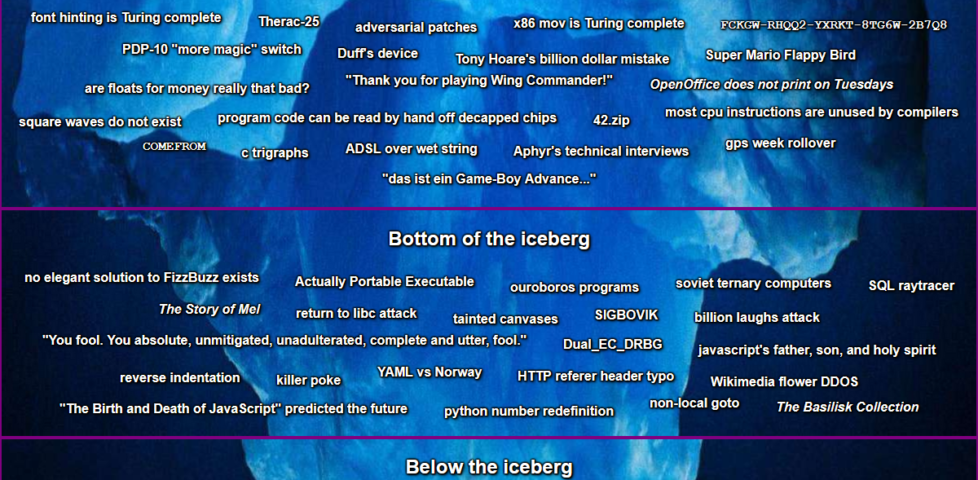
Plus many, many things that were new to me and that I’ve loved learning about these last few days.
It’s definitely not a competition; it’s a learning opportunity wrapped up in the weirdest bits of the field. Have an explore and feed your inner computer science geek.
I’m currently doing a course, through work, delivered by BetterOn Video. The aim of the course is to improve
my video presentation skills, in particular my engagement with the camera and the audience.
I made this video based on the week 2 prompt “make a video 60-90 seconds long about something you’re an expert on”. The idea came from a talk I used to give at the University of Oxford.
This weekend I announced and then hosted Homa Night II, an effort to use
technology to help bridge the chasms that’ve formed between my diaspora of friends as a result mostly of COVID. To a lesser extent
we’ve been made to feel distant from one another for a while as a result of our very diverse locations and lifestyles, but the resulting isolation was certainly compounded by lockdowns
and quarantines.
Long gone are the days when I could put up a blog post to say “Troma Night tonight?” and expect half a dozen friends to turn up at my house.
Back in the day we used to have a regular weekly film night called Troma Night, named after the studio
who dominated our early events and whose… genre… influenced many of our choices thereafter. We had over 300 such film
nights, by my count, before I eventually left our shared hometown of Aberystwyth ten years ago. I wasn’t the last one of the Troma Night
regulars to leave town, but more left before me than after.
Observant readers will spot a previous effort I made this year at hosting a party online.
Earlier this year I hosted Sour Grapes, a murder mystery party (an irregular highlight of our Aberystwyth social calendar,
with thanks to Ruth) run entirely online using a mixture of video chat and “second screen”
technologies. In some ways that could be seen as the predecessor to Homa Night, although I’d come up with most of the underlying technology to make Homa Night possible on a
whim much earlier in the year!
The idea spun out of a few conversations on WhatsApp but the final name – Homa Night – wasn’t agreed until early in November.
How best to make such a thing happen? When I first started thinking about it, during the first of the UK’s lockdowns, I considered a few options:
Streaming video over a telemeeting service (Zoom, Google Meet, etc.)
Very simple to set up, but the quality – as anybody who’s tried this before will attest – is appalling. Being optimised for speech rather than music and sound effects gives the audio
a flat, scratchy sound, video compression artefacts that are tolerable when you’re chatting to your boss are really annoying when they stop you reading a crucial subtitle, audio and
video often get desynchronised in a way that’s frankly infuriating, and everybody’s download speed is limited by the upload speed of the host, among other issues. The major benefit of
these platforms – full-duplex audio – is destroyed by feedback so everybody needs to stay muted while watching anyway. No thanks!
Teleparty or a similar tool Teleparty (formerly Netflix Party, but it now supports more services) is a pretty clever way to get almost exactly what I want:
synchronised video streaming plus chat alongside. But it only works on Chrome (and some related browsers) and doesn’t work on tablets, web-enabled TVs, etc., which would exclude some
of my friends. Everybody requires an account on the service you’re streaming from, potentially further limiting usability, and that also means you’re strictly limited to the media
available on those platforms (and further limited again if your party spans multiple geographic distribution regions for that service). There’s definitely things I can learn from
Teleparty, but it’s not the right tool for Homa Night.
“Press play… now!”
The relatively low-tech solution might have been to distribute video files in advance, have people download them, and get everybody to press “play” at the same time! That’s at least
slightly less-convenient because people can’t just “turn up”, they have to plan their attendance and set up in advance, but it would certainly have worked and I seriously
considered it. There are other downsides, though: if anybody has a technical issue and needs to e.g. restart their player then they’re basically doomed in any attempt to get back
in-sync again. We can do better…
A custom-made synchronised streaming service…?
A custom solution that leveraged existing infrastructure for the “hard bits” proved to be the right answer.
So obviously I ended up implementing my own streaming service. It wasn’t even that hard. In case you want to try your own, here’s how I did it:
Media preparation
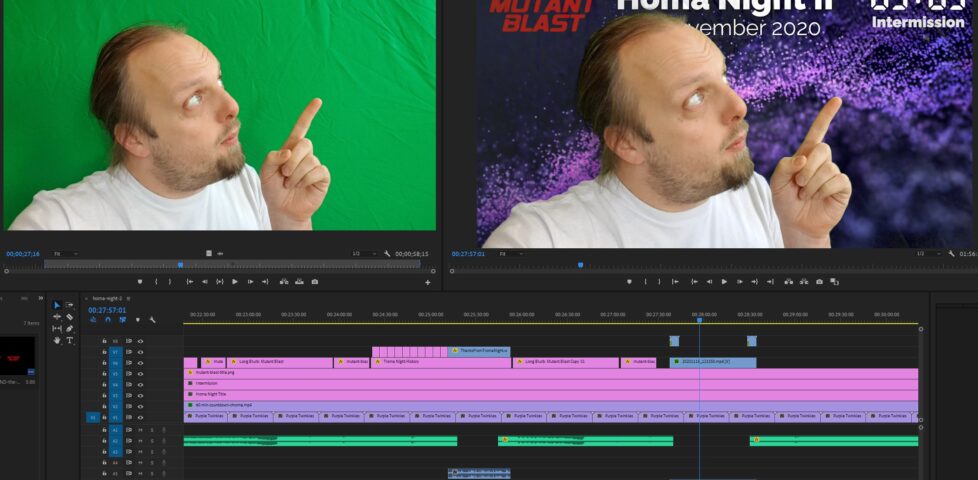
First, I used Adobe Premiere to create a video file containing both of the night’s films, bookended and separated by “filler” content to provide an introduction/lobby, an intermission,
and a closing “you should have stopped watching by now” message. I made sure that the “intro” was a nice round duration (90s) and suitable for looping because I planned to hold people
there until we were all ready to start the film. Thanks to Boris & Oliver for the background
music!
Honestly, the intermission was just an excuse to keep my chroma key gear out following its most-recent use.
Next, I ran the output through Handbrake to produce “web optimized” versions in 1080p and 720p output sizes. “Web optimized” in this case means that
metadata gets added to the start of the file to allow it to start playing without downloading the entire file (streaming) and to allow the calculation of what-part-of-the-file
corresponds to what-part-of-the-timeline: the latter, when coupled with a suitable webserver, allows browsers to “skip” to any point in the video without having to watch the intervening
part. Naturally I’m encoding with H.264 for the widest possible compatibility.
Even using my multi-GPU computer for the transcoding I had time to get up and walk around a bit.
Real-Time Synchronisation
To keep everybody’s viewing experience in-sync, I set up a Firebase account for the application: Firebase provides an easy-to-use Websockets
platform with built-in data synchronisation. Ignoring the authentication and chat features, there wasn’t much
shared here: just the currentTime of the video in seconds, whether or not introMode was engaged (i.e. everybody should loop the first 90 seconds, for now), and
whether or not the video was paused:
Firebase makes schemaless real-time databases pretty easy.
To reduce development effort, I never got around to implementing an administrative front-end; I just manually went into the Firebase database and acknowledged “my” computer as being an
administrator, after I’d connected to it, and then ran a little Javascript in my browser’s debugger to tell it to start pushing my video’s currentTime to the server every
few seconds. Anything else I needed to edit I just edited directly from the Firebase interface.
Other web clients’ had Javascript to instruct them to monitor these variables from the Firebase database and, if they were desynchronised by more than 5 seconds, “jump” to the correct
point in the video file. The hard part of the code… wasn’t really that hard:
// Rewind if we're passed the end of the intro loopfunction introModeLoopCheck() {
if (!introMode) return;
if (video.currentTime > introDuration) video.currentTime =0;
}
function fixPlayStatus() {
// Handle "intro loop" modeif (remotelyControlled && introMode) {
if (video.paused) video.play(); // always play
introModeLoopCheck();
return; // don't look at the rest
}
// Fix current timeconst desync =Math.abs(lastCurrentTime - video.currentTime);
if (
(video.paused && desync > DESYNC_TOLERANCE_WHEN_PAUSED) ||
(!video.paused && desync > DESYNC_TOLERANCE_WHEN_PLAYING)
) {
video.currentTime = lastCurrentTime;
}
// Fix play statusif (remotelyControlled) {
if (lastPaused &&!video.paused) {
video.pause();
} elseif (!lastPaused && video.paused) {
video.play();
}
}
// Show/hide paused notification
updatePausedNotification();
}
Web front-end
Finally, there needed to be a web page everybody could go to to get access to this. As I was hosting the video on S3+CloudFront anyway, I put the HTML/CSS/JS there too.
I decided to carry the background theme of the video through to the web interface too.
I tested in Firefox, Edge, Chrome, and Safari on desktop, and (slightly less) on Firefox, Chrome and Safari on mobile. There were a few quirks to work around, mostly to do with browsers
not letting videos make sound until the page has been interacted with after the video element has been rendered, which I carefully worked-around by putting a popup “over” the
video to “enable sync”, but mostly it “just worked”.
Delivery
On the night I shared the web address and we kicked off! There were a few hiccups as some people’s browsers got disconnected early on and tried to start playing the film before it was
time, and one of these even when fixed ran about a minute behind the others, leading to minor spoilers leaking via the rest of us riffing about them! But on the whole, it worked. I’ve
had lots of useful feedback to improve on it for the next version, and I might even try to tidy up my code a bit and open-source the results if this kind of thing might be useful to
anybody else.
I’ve been working as part of the team working on the new application framework called the Endpoint Encabulator and wanted to share with you what I think makes our project so
exciting: I promise it’ll make for two minutes of your time you won’t seen forget!
Naturally, this project wouldn’t have been possible without the pioneering work that preceded it by John Hellins Quick, Bud Haggart, and others. Nothing’s invented in a vacuum. However,
my fellow developers and I think that our work is the first viable encabulator implementation to provide inverse reactive data binding suitable for deployment in front of a
blockchain-driven backend cache. I’m not saying that all digital content will one day be delivered through Endpoint Encabulator, but… well; maybe it will.
If the technical aspects go over your head, pass it on to a geeky friend who might be able to make use of my work. Sharing is caring!
Over the last six years I’ve been on a handful of geohashing expeditions, setting out to functionally-random GPS coordinates to see if I can get there, and documenting what I find when I do. The comic that inspired the
sport was already six years old by the time I embarked on my first outing, and I’m far from the most-active member
of the ‘hasher community, but I’ve a certain closeness to them as a result of my work to resurrect and host the “official” website. Either way: I love the sport.
I even managed to drag-along Ruth and Annabel to a hashpoint (2014-04-21 51 -1) once.
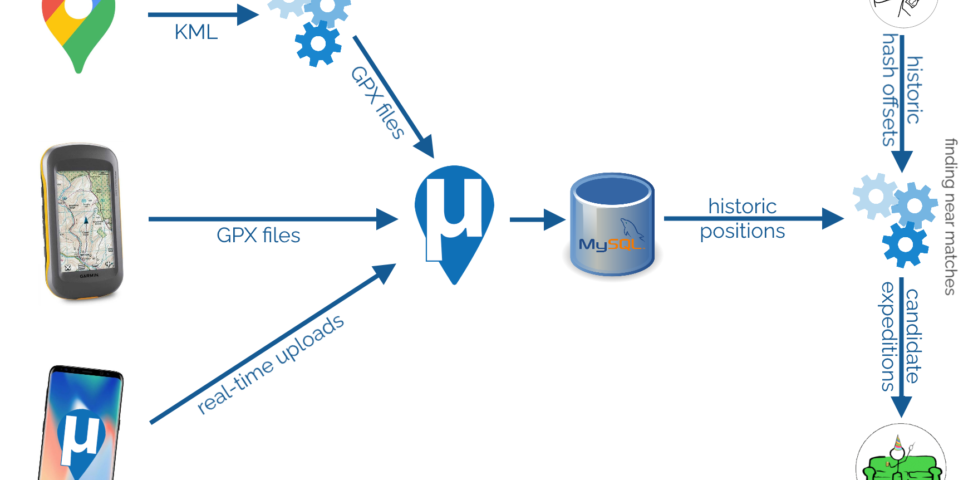
But even when I’ve not been ‘hashing, it occurs to me that I’ve been tracking my location a lot. Three mechanisms in particular dominate:
Google’s somewhat-invasive monitoring of my phones’ locations (which can be exported via Google Takeout)
My personal GPSr logs (I carry the device moderately often, and it provides excellent precision)
The personal μlogger server I’ve been running for the last few years (it’s like Google’s system, but – y’know –
self-hosted, tweakable, and less-creepy)
If I could mine all of that data, I might be able to answer the question… have I ever have accidentally visited a geohashpoint?
Let’s find out.
There’s a lot to my process, but it’s technically quite simple.
Data mining my own movements
To begin with, I needed to get all of my data into μLogger. The Android app syncs to it automatically and uploading from my GPSr was
simple. The data from Google Takeout was a little harder.
I found a setting in Google Takeout to export past location data in KML, rather than JSON, format. KML is understood by GPSBabel which
can convert it into GPX. I can “cut up” the resulting GPX file using a little grep-fu (relevant xkcd?) to get month-long files and import them into
μLogger. Easy!
It’s slightly hidden, but Google Takeout choose your geoposition output format (from a limited selection).
Well.. μLogger’s web interface sometimes times-out if you upload enormous files like a whole month of Google Takeout logs. So instead I wrote a Nokogiri script to convert the GPX into SQL
to inject directly into μLogger’s database.
Next, I got a set of hashpoint offsets. I only had personal positional data going back to around 2010, so I didn’t need to accommodate for the pre-2008 absence of the 30W time zone rule. I’ve had only one trip to the Southern hemisphere in that period, and I
checked that manually. A little rounding and grouping in SQL gave me each graticule I’d been in on every date.
Unsurprisingly, I spend most of my time in the 51 -1 graticule. Adding (or subtracting, for the Western
hemisphere) the offset provided the coordinates for each graticule that I visited for the date that I was in that graticule. Nice.
Preloading the offsets into a temporary table made light work of listing all the hashpoints in all the graticules I’d visited, by date. Note that some dates (e.g. 2011-08-04, above)
saw me visit multiple graticules.
The correct way to find the proximity of my positions to each geohashpoint is, of course, to use WGS84. That’s an
easy thing to do if you’re using a database that supports it. My database… doesn’t. So I just used Pythagoras’ theorem to find positions I’d visited that were within 0.15° of a that
day’s hashpoint.
Using Pythagoras for geopositional geometry is, of course, wrong. Why? Because the physical length of a “degree” varies dependent on latitude, and – more importantly – a degree of
latitude is not the same distance as a degree of longitude. The ratio varies by latitude: only an idealised equatorial graticule would be square!
But for this case, I don’t care: the data’s going to be fuzzy and require some interpretation anyway. Not least because Google’s positioning has the tendency to, for example, spot a
passing train’s WiFi and assume I’ve briefly teleported to Euston Station, which is apparently where Google thinks that hotspot “lives”.
I overlaid randomly-selected Google My Location and GPSr routes to ensure that they coincided, as an accuracy-test. It’s interesting to
note that my GPSr points cluster when I was moving slower, suggesting it polls on a timer. Conversely Google’s points cluster
when I was using data (can you see the bit where I used a chat app), suggesting that Google Location Services ramps up the accuracy and poll frequency when you’re actively
using your device.
I assumed that my algorithm would detect all of my actual geohash finds, and yes: all of these appeared as-expected in my results. This was a good confirmation that my approach
worked.
And, crucially: about a dozen additional candidate points showed up in my search. Most of these – listed at the end of this post – were 50m+ away from the hashpoint and
involved me driving or cycling past on a nearby road… but one hashpoint stuck out.
Hashing by accident
We all had our roles to play in our trip to Edinburgh. Tom… was our pack mule.
In August 2015 we took a trip up to Edinburgh to see a play of Ruth‘s brother Robin‘s. I don’t remember
much about the play because I was on keeping-the-toddler-entertained duty and so had to excuse myself pretty early on. After the play we drove South, dropping Tom off at Lanark station.
We exited Lanark via the Hyndford Bridge… which is – according to the map – tantalisingly-close to the 2015-08-22 55 -3
hashpoint: only about 23 metres away!
Google puts the centre of the road I drove down only 23m from the 2015-08-22 55 -3 hashpoint (of course, I was actually driving on the near side of the road and may have been closer
still).
That doesn’t feel quite close enough to justify retroactively claiming the geohash, tempting though it would be to use it as a vehicle to my easy geohash ribbon. Google doesn’t provide error bars for their exported location data so I can’t draw a circle of uncertainty,
but it seems unlikely that I passed through this very close hashpoint.
Pity. But a fun exercise. This was the nearest of my near misses, but plenty more turned up in my search, too:
2013-09-28 54 -2 (9,000m)
Near a campsite on the River Eden. I drove past on the M6 with Ruth on the way to Loch Lomond for a mini-break to celebrate our sixth anniversary. I was never more than 9,000 metres
from the hashpoint, but Google clearly had a moment when it couldn’t get good satellite signal and tries to trilaterate my position from cell masts and coincidentally guessed, for a
few seconds, that I was much closer. There are a few such erroneous points in my data but they’re pretty obvious and easy to spot, so my manual filtering process caught them.
2019-09-13 52 -0 (719m)
A600, near Cardington Airstrip, south of Bedford. I drove past on the A421 on my way to Three Rings‘ “GDPR Camp”, which was more fun than it sounds, I promise.
2014-03-29 53 -1 (630m)
Spen Farm, near Bramham Interchange on the A1(M). I drove past while heading to the Nightline Association Conference to talk about Three Rings. Curiously, I came much closer to the hashpoint the previous week when I drove a neighbouring road on my way to York for my friend
Matt’s wedding.
2020-05-06 51 -1 (346m)
Inside Kidlington Police Station! Short of getting arrested, I can’t imagine how I’d easily have gotten to this one, but it’s moot anyway because I didn’t try! I’d taken the day off
work to help with child-wrangling (as our normal childcare provisions had been scrambled by COVID-19), and at some point during the day we took a walk and came somewhat near to the
hashpoint.
2016-02-05 51 -1 (340m)
Garden of a house on The Moors, Kidlington. I drove past (twice) on my way to and from the kids’ old nursery. Bonus fact: the house directly opposite the one whose garden contained
the hashpoint is a house that I looked at buying (and visited), once, but didn’t think it was worth the asking price.
2017-08-30 51 -1 (318m)
St. Frieswide Farm, between Oxford and Kidlington. I cycled past on Banbury Road twice – once on my way to and once on my way from work.
2015-01-25 51 -1 (314m)
Templar Road, Cutteslowe, Oxford. I’ve cycled and driven along this road many times, but on the day in question the closest I came was cycling past on nearby Banbury Road while on the
way to work.
2018-01-28 51 -1 (198m)
Stratfield Brake, Kidlington. I took our youngest by bike trailer this morning to his Monkey Music class: normally at this point in history Ruth would have been the one to take him,
but she had a work-related event that she couldn’t miss in the morning. I cycled right by the entrance to this nature reserve: it could have been an ideal location for a geohash!
2014-01-24 51 -1 (114m)
On the Marston Cyclepath. I used to cycle along this route on the way to and from work most days back when I lived in Marston, but by 2014 I lived in Kidlington and so I’d only cycle
past the end of it. So it was that I cycled past the Linacre College of the path, around 114m away from the hashpoint, on this day.
2015-06-10 51 -1 (112m)
Meadow near Peartree Interchange, Oxford. I stopped at the filling station on the opposite side of the roundabout, presumably to refuel a car.
2020-02-27 51 -1 (70m)
This was a genuine attempt at a hashpoint that I failed to reach and was so sad about that I never bothered to finish writing up. The hashpoint was very close (but just out of sight
of, it turns out) a geocache I’d hidden in the vicinity, and I was hopeful that I might be able to score the most-epic/demonstrable déjà vu/hash collision
achievement ever, not least because I had pre-existing video evidence that I’d been at the
coordinates before! Unfortunately it wasn’t to be: I had inadequate footwear for the heavy rains that had fallen in the days that preceded the expedition and I was in a hurry to get
home, get changed, and go catch a train to go and see the Goo Goo Dolls in concert. So I gave up and quit the expedition. This turned out to be the right decision: going to
the concert one of the last “normal” activities I got to do before the COVID-19 lockdown made everybody’s lives weird.
2014-05-23 51 -1 (61m)
White Way, Kidlington, near the Bicester Road to Green Road footpath. I passed close by while cycling to work, but I’ve since walked through this hashpoint many times: it’s on a route
that our eldest sometimes used to take when walking home from her school! With the exception only of the very-near-miss in Lanark, this was my nearest “near miss”.
No silly grin, but coincidentally – perhaps by accident – I took a picture out of the car window shortly after we passed the hashpoint. This is what Lanark looks like when you drive
through it in the rain.
Needed new UPS batteries.
Almost bought from @insight_uk but they require registration to checkout.
Purchased from @SourceUPSLtd instead.
Moral: having no “guest checkout” costs you business.
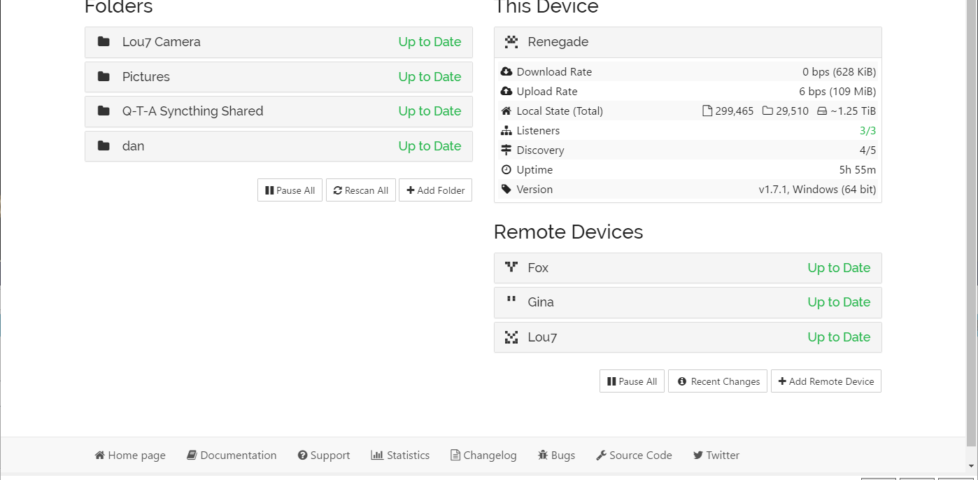
This last month or so, my digital life has been dramatically improved by Syncthing. So much so that I want to tell you about it.
1.25TiB of data is automatically kept in sync between (depending on the data in question) a desktop PC, NAS, media centre, and phone. This computer’s using the Synctrayzor system tray app.
I started using it last month. Basically, what it does is keeps a pair of directories on remote systems “in sync” with one another. So far, it’s like your favourite cloud
storage service, albeit self-hosted and much-more customisable. But it’s got a handful of killer features that make it nothing short of a dream to work with:
The unique identifier for a computer can be derived from its public key. Encryption comes free as part of the verification of a computer’s identity.
You can share any number of folders with any number of other computers, point-to-point or via an intermediate proxy, and it “just works”.
It’s super transparent: you can always see what it’s up to, you can tweak the configuration to match your priorities, and it’s open source so you can look at the engine if you like.
Here are some of the ways I’m using it:
Keeping my phone camera synced to my PC
I’ve tried a lot of different solutions for this over the years. Back in the way-back-when, like everybody else in those dark times, I used to plug my phone in using a cable to copy
pictures off and sort them. Since then, I’ve tried cloud solutions from Google, Amazon, and Flickr and never found any that really “worked” for me. Their web interfaces and apps tend to
be equally terrible for organising or downloading files, and I’m rarely able to simply drag-and-drop images from them into a blog post like I can from Explorer/Finder/etc.
At first, I set this up as a one-way sync, “pushing” photos and videos from my phone to my desktop PC whenever I was on an unmetered WiFi network. But then I switched it to a two-way
sync, enabling me to more-easily tidy up my phone of old photos too, by just dragging them from the folder that’s synced with my phone to my regular picture storage.
Centralising my backups
Now I’ve got a fancy NAS device with tonnes of storage, it makes sense to use it as a central
point for backups to run fom. Instead of having many separate backup processes running on different computers, I can just have each of them sync to the NAS, and the NAS can back everything up. Computers don’t need to be “on” at a particular
time because the NAS runs all the time, so backups can use the Internet connection when it’s quietest. And in the event of a
hardware failure, there’s an up-to-date on-site backup in the first instance: the cloud backup’s only needed in the event of accidental data deletion (which could be sync’ed already, of
course!). Plus, integrating the sync with ownCloud running on the NAS gives easy access to
my files wherever in the world I am without having to fire up a VPN or otherwise remote-in to my house.
Plus: because Syncthing can share a folder between any number of devices, the same sharing mechanism that puts my phone’s photos onto my main desktop can simultaneously be
pushing them to the NAS, providing redundant connections. And it was a doddle to set up.
Maintaining my media centre’s screensaver
Since the NAS, running Jellyfin, took on most of the media management jobs previously
shared between desktop computers and the media centre computer, the household media centre’s had less to do. But one thing that it does, and that gets neglected, is showing a
screensaver of family photos (when it’s not being used for anything else). Historically, we’ve maintained the photos in that collection via a shared network folder, but then you’ve got
credential management and firewall issues to deal with, not to mention different file naming conventions by different people (and their devices).
But simply sharing the screensaver’s photo folder with the computer of anybody who wants to contribute photos means that it’s as easy as copying the picture to a particular place. It
works on whatever device they care to (computer, tablet, mobile) on any operating system, and it’s quick and seamless. I’m just using it myself, for now, but I’ll be offering it to the
rest of the family soon. It’s a trivial use-case, but once you’ve got it installed it just makes sense.
In short: this month, I’m in love with Syncthing. And maybe you should be, too.
As we’ve mentioned in previous blog posts, the $FAMOUS_COMPANY backend has historically been developed in $UNREMARKABLE_LANGUAGE and architected on top of
$PRACTICAL_OPEN_SOURCE_FRAMEWORK. To suit our unique needs, we designed and open-sourced $AN_ENGINEER_TOOK_A_MYTHOLOGY_CLASS, a highly-available, just-in-time compiler for
$UNREMARKABLE_LANGUAGE.
…
Saagar Jha tells the now-familiar story of how a bunch of techbros solved their scaling problems by reinventing the wheel. And then, when that didn’t work out, moved the goalposts of
success. It’s a story as old as time; or at least as old as the modern Web.
(Should’a strangled the code. Or better yet, just refactored what they had.)
Normally this kind of thing would go into the ballooning dump of “things I’ve enjoyed on the Internet” that is my reposts archive. But sometimes something is
so perfect that you have to try to help it see the widest audience it can, right? And today, that thing is: Mackerelmedia
Fish.
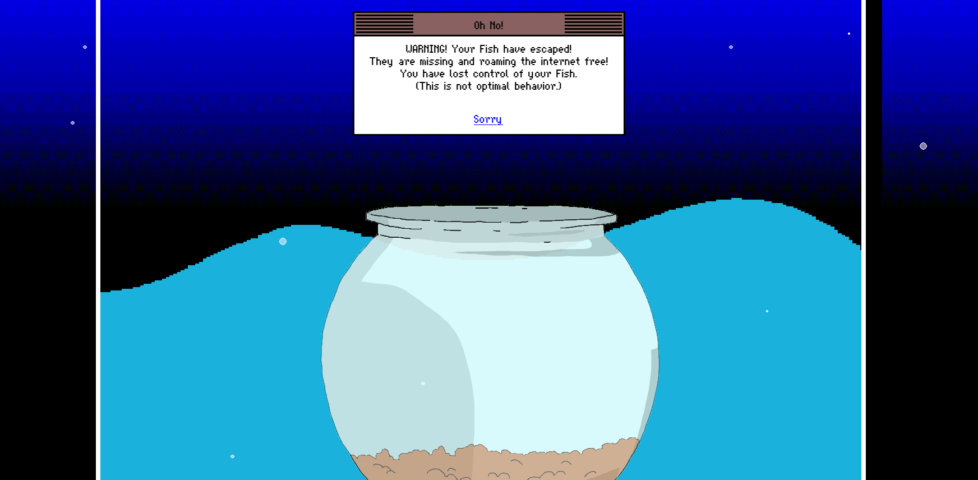
Historical fact: escaped fish was one of the primary reasons for websites failing in 1996.
What is Mackerelmedia Fish? I’ve had a thorough and pretty complete experience of it, now, and I’m still not sure. It’s one or more (or none)
of these, for sure, maybe:
A point-and-click, text-based, or hypertext adventure?
A statement about the fragility of proprietary technologies on the Internet?
An ARG set in a parallel universe in which the 1990s never ended?
A series of surrealist art pieces connected by a loose narrative?
Rock Paper Shotgun’s article about it opens with “I
don’t know where to begin with this—literally, figuratively, existentially?” That sounds about right.
This isn’t the reward for “winning” the “game”. But I was proud of it anyway.
What I can tell you with confident is what playing feels like. And what it feels like is the moment when you’ve gotten bored waiting for page 20 of Argon Zark to finish appear so you decide to reread your already-downloaded copy of the 1997 a.r.k bestof book, and for a moment you think to yourself: “Whoah; this must be what living in the future
feels like!”
Because back then you didn’t yet have any concept that “living in the future” will involve scavenging for toilet paper while complaining that you can’t stream your favourite shows in 4K on your pocket-sized
supercomputer until the weekend.
I was always more of a Bouncing Blocks than a Hamster Dance guy, anyway.
Mackerelmedia Fish is a mess of half-baked puns, retro graphics, outdated browsing paradigms and broken links. And that’s just part of what makes it great.
It’s also “a short story that’s about the loss of digital history”, its creator Nathalie Lawhead
says. If that was her goal, I think she managed it admirably.
Everything about this, right down to the server signature (Artichoke), is perfect.
If I wasn’t already in love with the game already I would have been when I got to the bit where you navigate through the directory indexes of a series of deepening folders,
choose-your-own-adventure style. Nathalie writes, of it:
One thing that I think is also unique about it is using an open directory as a choose your own adventure. The directories are branching. You explore them, and there’s text at the
bottom (an htaccess header) that describes the folder you’re in, treating each directory as a landscape. You interact with the files that are in each of these folders, and uncover the
story that way.
Back in the naughties I experimented with making choose-your-own-adventure games in exactly this way. I was experimenting with different media by which this kind of
branching-choice game could be presented. I envisaged a project in which I’d showcase the same (or a set of related) stories through different approaches. One was “print” (or at least
“printable”): came up with a Twee1-to-PDF
converter to make “printable” gamebooks. A second was Web hypertext. A third – and this is the one which was most-similar to what Nathalie has now so expertly made real – was
FTP! My thinking was that this would be an adventure game that could be played in a browser or even from the command line on any
(then-contemporary: FTP clients aren’t so commonplace nowadays) computer. And then, like so many of my projects, the half-made
version got put aside “for later” and forgotten about. My solution involved abusing the FTP protocol terribly, but it
worked.
(I also looked into ways to make Gopher-powered hypertext fiction and toyed with the idea of using YouTube
annotations to make an interactive story web [subsequently done amazingly by Wheezy Waiter, though the death of YouTube
annotations in 2017 killed it]. And I’ve still got a prototype I’d like to get back to, someday, of a text-based adventure played entirely through your web browser’s debug
console…! But time is not my friend… Maybe I ought to collaborate with somebody else to keep me on-course.)
My first batch of pet frogs died quite quickly, but these ones did okay.
In any case: Mackerelmedia Fish is fun, weird, nostalgic, inspiring, and surreal, and you should give it a go. You’ll need to be on a Windows
or OS X computer to get everything you can out of it, but there’s nothing to stop you starting out on your mobile, I imagine.
Sso long as you’re capable of at least 800 × 600 at 256 colours and have 4MB of RAM,
if you know what I mean.
Sometimes, code is risky to change and expensive to refactor.
In such a situation, a seemingly good idea would be to rewrite it.
From scratch.
Here’s how it goes:
You discuss with management about the strategy of stopping new features for some time, while you rewrite the existing app.
You estimate the rewrite will take 6 months to cover what the existing app does.
A few months in, a nasty bug is discovered and ABSOLUTELY needs to be fixed in the old code. So you patch the old code and the new one too.
A few months later, a new feature has been sold to the client. It HAS TO BE implemented in the old code—the new version is not ready yet! You need to go back to the old code but
also add a TODO to implement this in the new version.
After 5 months, you realize the project will be late. The old app was doing way more things than expected. You start hustling more.
After 7 months, you start testing the new version. QA raises up a lot of things that should be fixed.
After 9 months, the business can’t stand “not developing features” anymore. Leadership is not happy with the situation, you are tired. You start making changes to the old,
painful code while trying to keep up with the rewrite.
Eventually, you end up with the 2 systems in production. The long-term goal is to get rid of the old one, but the new one is not ready yet. Every feature needs to be implemented
twice.
Sounds fictional? Or familiar?
Don’t be shamed, it’s a very common mistake.
…
I’ve rewritten legacy systems from scratch before. Sometimes it’s all worked out, and sometimes it hasn’t, but either way: it’s always been a lot more work than I could have
possibly estimated. I’ve learned now to try to avoid doing so: at least, to avoid replacing a single monolithic (living) system in a monolithic way. Nicholas gives an even-better
description of the true horror of legacy reimplementation, and promotes progressive strangulation as a candidate solution.
A new email-based extortion scheme apparently is making the rounds, targeting Web site owners serving banner ads through Google’s AdSense program. In this scam, the
fraudsters demand bitcoin in exchange for a promise not to flood the publisher’s ads with so much bot and junk traffic that Google’s automated anti-fraud systems suspend the user’s
AdSense account for suspicious traffic.
…
The shape of our digital world grows increasingly strange. As anti-DoS techniques grow better and more and more uptime-critical
websites hide behind edge caches, zombie network operators remain one step ahead and find new and imaginative ways to extort money from their victims. In this new attack, the criminal
demands payment (in cryptocurrency) under threat that, if it’s not delivered, they’ll unleash an army of bots to act like the victim trying to scam their advertising network,
thereby getting the victim’s site demonetised.
This weekend, my sister Sarah challenged me to define the difference between Virtual Reality and Augmented Reality. And the more I talked about the differences between them, the more I
realised that I don’t have a concrete definition, and I don’t think that anybody else does either.
AR: the man sees simulated reality and, probably, the whiteboard.
VR: the man sees simulated reality only, which may or may not include a whiteboard.
Either way: what the hell is he doing?
After all: from a technical perspective, any fully-immersive AR system – for example a hypothetical future version of the Microsoft Hololens that solves the current edition’s FOV problems – exists in a theoretical
superset of any current-generation VR system. That AR augments
the reality you can genuinely see, rather than replacing it entirely, becomes irrelevant if that AR system could superimpose
a virtual environment covering your entire view. So the argument that compared to VR, AR only covers part of your vision is not a reliable definition of the difference.
The difference by how much of your view is occluded by machine-generated images fails to define where the boundary between AR and
VR lies. 5%? 50%? 99%?
This isn’t a new conundrum. Way back in 1994 back when the Sega VR-1 was our idea of cutting edge, Milgram et al. developed a series of metaphorical spectra to describe the relationship between
different kinds of “mixed reality” systems. The core difference, they argue, is whether or not the computer-generated content represents a “world” in itself (VR) is just an “overlay” (AR).
But that’s unsatisfying for the same reason as above. The HTC Vive headset can be configured to use its front-facing camera(s) to fade seamlessly from the game world to the real world
as the player gets close to the boundaries of their play space. This is a safety feature, but it doesn’t have to be: there’s no reason that a HTC Vive couldn’t be
adapted to function as what Milgram would describe as a “class 4” device, which is functionally the same as a headset-mounted AR
device. So what’s the difference?
You might argue that the difference between AR and VR is content-based:
that is, it’s the thing that you’re expected to focus on that dictates which is which. If you’re expected to look at the “real world”, it’s an augmentation, and if not then
it’s a virtualisation. But that approach fails to describe Google’s tech demo of putting artefacts in your living room via
augmented reality (which I’ve written about before), because your focus is expected to be on the artefact rather than the “real world” around it.
The real world only exists to help with the interpretation of scale: it’s not what the experience is about and your countertop is as valid a real world target as the Louvre:
Google doesn’t care.
Categories 3 and 4 would probably be used to describe most contemporary AR; categories 6 and 7 to describe contemporary
VR.
But even if we accept this explanation, the definition gets muddied by the wider field of “extended reality” (XR). Originally an
umbrella term to cover both AR and VR (and “MR“, if you believe that’s a separate and independent thing), XR gets used to describe interactive experiences
that cover other senses, too. If I play a VR game with real-world “props” that I can pick up and move around, but that appear
differently in my vision, am I not “augmenting” reality? Is my experience, therefore, more or less “VR” than if the
interactive objects exist only on my screen? What about if – as in a recent VR escape room I attended – the experience is enhanced by
fans to simulate the movement of air around you? What about smell? (You know already that somebody’s working on bridging virtual reality with Smell-O-Vision.)
Not sure if you’re real or if you’re dreaming? Don’t ask an XR researcher; they don’t know either.
Increasingly, then, I’m beginning to feel that XR itself is a spectrum, and a pretty woolly one. Just as it’s hard to specify
in a concrete way where the boundary exists between being asleep and being awake, it’s hard to mark where “our” reality gives way to the virtual and vice-versa.
It’s based upon the addition of information to our senses, by a computer, and there can be more (as in fully-immersive VR) or
less (as in the subtle application of AR) of it… but the edges are very fuzzy. I guess that the spectrum of the visual
experience of XR might look a little like this:
Honestly, I don’t know any more. But I don’t think my sister does either.