Blog

More than you expected?

You're reading everything on my blog - including, among other things:

  • notes (short, "Tweet-like" messages),
  • reposts (links to other people's work, sometimes with commentary),
  • checkins (records of places I've visited, often while geo*ing), and
  • videos ("vloggy" content).

That might be more than you wanted to see, if you're only interested in articles (traditional long-form blog posts). Click a link to filter.

How do people blog for thirty years without running out of things to say?

This is a repost promoting content originally published elsewhere. See more things Dan's reposted.

I have such an admiration for those who post so much without fear of reprisal; posting purely for the sake of loving writing and sharing their opinions and thoughts with the world, not because they’re trying to manipulate search engines or grift some ad revenue from whatever happens to be popular that week. Pure and simple posting for the love of the game. Take my Three Rings colleague Dan Q, whose blog spans multiple decades across countless topics. I’m sure he would shy away from such an accolade, but I think it’s truly a fantastic example of using the Internet as it was intended: having your own little corner of it and filling it with the things that interest you, regardless of whether anybody else particularly cares.

Aww.

I first met Oli shortly before a nonprofit I founded – Three Rings – took the necessary technical steps to formally adopt/rescued a piece of software he’d been working on – Portal – in order to continue to make it available to the voluntary organisations that depended upon it (and perhaps, hopefully, along the way make it suitable for use by a wider range of charitable enterprises to boot).

I’ve long known that Oli blogs well and his writings are worth seeing… but he does so at what one might call a “normal person” cadance. This is perhaps unlike my pace, which might be generously described as somewhere between “breakneck” and “obsessive”.

Anyway: Oli’s latest blog post, How do people blog for thirty years without running out of things to say?, touches on another difference between our respective blogs: mine is old. Not quite 30 years, as he hints, but next month it will be 28 days since my first blog post, and in January it’ll be 28 years since my oldest surviving contemporaneous blog post.

How do people blog for this long without running out of things to say, asks Oli. And then, over the course of his post and via a glimpse at a post-ideas spreadsheet (as well as a conversation with an LLM), he comes to a conclusion:

As for the question I started with – how do people blog for thirty years without running out of things to say? I think I was approaching it from the wrong direction. Nobody sits down with thirty years’ worth of material ready to go. They just keep finding things interesting for thirty years.

And that’s it: that’s it exactly. You don’t start a blog with three decades’ worth of ideas. Hell, if I could only write about things that I’ve got notes or drafts about, and at my current cadence, I’d be dry before the end of the year (and I have a lot of half-written ideas just waiting for polishing!).

If there is a secret to blogging for thirty straight years, I think it’s this. Stay curious. Never stop asking questions. Never stop learning. Try to look at your world as if you’re seeing it for the first time, and remember that what’s mundane to you could be fascinating to somebody else, or in the right light. And, crucially, the single-most important thing of all: find a motivation to keep writing for yourself. When you’re writing for yourself, first and foremost, you’ve always got a reason to keep going.

That’s what I think, anyway. You don’t have to blog like me, of course, but if you want to… the paragraph above represents all I know about how to do so!

The modern app

This is a repost promoting content originally published elsewhere. See more things Dan's reposted.

Today I’m introducing the next generation of code editor. A modern app to satiate the needs of the discerning coder. We’re talkin’ blazing fast collaboration between man and machine.

Static screenshot of David Bushell's (interactive) 'modern editor'

Yeah so um… have you noticed that all modern software is teetering on the enshitty cliff? Everything in my dock is an Electron-ified enshittybomb one update from disaster. There used to be alternatives. Now those suck too.

You probably saw this one already; I forgot to share it in July, but it’s done the rounds a-plenty. It’s worth experiencing on David’s website where the “Modern Editor” is interactive (kinda: it’s still about as much use as it looks like it’s gonna be… and that’s kind-of the point).

The enshittification of modern apps is very real. Simple tools that ought to work offline don’t start without an Internet connection (or, worse yet, a slow Internet connection means that they stall during their self-update check or phone-home analytics). AI “features” get stitched in to everything, whether you want them or not. Desktop applications are constructed using the same super-heavyweight React + Tailwind + whatever else stacks under which the Web creaks, but because they’re now long-running system tray/notification area processes their gradual memory leaks make them painfully slow. Updates change the UI without warning and you need to work to find where your favourite features have gone, if they even still exist. You’re nagged to “create an account” and “log in” even if you have no use for the connectivity “features”. Kebab menus everywhere make for a whole new level of mystery meat navigation, once you eventually find the right to click out of  the three that are typically visible at any given time. And every application acts like it’s the single-most important thing on your screen, competing for real estate and attention.

So yeah, I feel David’s pain.

Anyway: go play with his interactive modern editor.

we don’t shame smart glasses wearers enough

This is a repost promoting content originally published elsewhere. See more things Dan's reposted.

bro

Wombat sent me the above picture: A physical ad by Apple on a big canvas. Pictured is a person hiding their face with their iPhone, but therefore actually pointing the camera at the people seeing the ad. It says: “Safari. A browser that’s actually private.” and “Privacy. That’s iPhone.

It’s accidentally perfectly demonstrating the limitations in current popular privacy discourse and movement: The fact that devices or software may claim to keep the users private, but not people in general, especially not the people the users point these devices at.

Privacy, as it is commonly practiced and advertised, is for the person inflicting the damage onto their surroundings, not their surroundings.

A wonderful take on big tech privacy culture that’s better-expressed than I could have ever put it. That Apple poster shows a particularly ironic lack of self-awareness!

Techbros seem to want to sell individual privacy while simultaneously undermining society‘s privacy: you get “privacy settings”, but we’re still tracking-by-default everybody else. They deliberately turn a blind eye to the fact that the latter – in our age of big data processing – undermines the former: there are countless examples now of people finding new ways to interpret leaked corporate datasets in order to extract personally-identifiable information, and it’s a problem that only seems to get worse.

“Privacy settings” are important, but wouldn’t it be nicer if privacy was the default?

And yeah: smart glasses can get fucked. I don’t want a world in which having a conversation with somebody in specs requires that I allow Facebook to watch and listen-in as well. Just wear some Normal Fucking Sunglasses, ‘k?

×

Dan Q found GC9BHWG Watercress beds

This checkin to GC9BHWG Watercress beds reflects a geocaching.com log entry. See more of Dan's cache logs.

Despite immediately honing in on exactly the right host, it still took me an embarrassingly long time to find this cache. This, despite having found – and even hidden – cache contsibers of exactly this type before!

My usual technique for lazily finding them, which involves swooping my phone through likely hiding spots with the camera in ‘selfie’ mode, as a mirror, somehow didn’t help me spot this one and it took until I bothered to crouch down (in the rain, in my already-wet trousers) and felt around free host before I reached it!

TFTC.

Dan Q wrote note for GC4H2MB Church Micro 4008…Letcombe Regis

This checkin to GC4H2MB Church Micro 4008…Letcombe Regis reflects a geocaching.com log entry. See more of Dan's cache logs.

Found the grave, but this is now the second offset I’ve found here that’s asked me to double-back on my walk. Nope! I’m just going to save the calculated coordinates for the next time I’m in the area! Looking forward to returning!

Dan Q wrote note for GC9F5YC GIs in Letcombe

This checkin to GC9F5YC GIs in Letcombe reflects a geocaching.com log entry. See more of Dan's cache logs.

Found the clues and solved the coordinates, but I’ve JUST walked past the final location a while ago and don’t feel like doubling back today!

A=How many letters in the word underneath Knoxville?

B=A*2

C=Number of letters in place where “Beckett” came from.

D=C+1

E=F Number of letters in the word underneath Knoxville divided by 2

I should have worked out the likely location before I set out. Given that A must be a single digit number that can be doubled (B) to get a single digit number and halved (E, F) to get a second, there’s only one possible value for those four clues! The other two C and D are related to one another as well, resulting in a grand total of only 9 possible pairs of coordinates at which this cache could live (of which I’ll bet the “right” one stands out as the most-likely, even without making assumptions about the length of place names!). So yeah, I’m kicking myself slightly for not solving this before I visited.

But I’m glad I visited anyway. The historical connection is interesting and I enjoyed learning about it.

Maybe I’ll come find the actual cache next time I’m in the area!

Dan Q found GC9QWHD Plankton’s cache

This checkin to GC9QWHD Plankton's cache reflects a geocaching.com log entry. See more of Dan's cache logs.

Like many before me, from the looks of things, I didn’t find the cache at the published coordinates but about 11 metres away at N 51° 34.086′, W 001° 26.441′. Possibly worth the CO checking if those coordinates work better for them, too, during their next maintenance visit. TFTC!

Dan Q found GC93M2N Segsbury Fort

This checkin to GC93M2N Segsbury Fort reflects a geocaching.com log entry. See more of Dan's cache logs.

A challenging but worthwhile find during a walk along and around the Ridgeway.

A windswept and rolling rural landscape, with storm clouds brewing in the distance.

My initial attempt to collect the coordinates was way off because I misinterpreted some of the instructions and it yielded a point almost 2km away! My second attempt looked better, giving a likely-looking spot… but the checksum was out by one!

I triple-checked all the sources and was still out! I was most-confident in my calculated latitude, so I permuted all possible one-point longitude changes that would satisfy the checksum. This yielded two candidates: one a tenth of a minute out from my original calculation, and one a thousandth of a minute out.

The one that was a tenth of a minute out from my calculation “felt wrong”, being way off the path, so I merely glanced its way as I walked past to the other. The one that was a thousandth of a minute – which equates to only around a metre! – looked better, and sure enough when I got there I found a multitude of likely hiding spots.

Standing proud of dense green foliage, and with cropped fields behind, a wooden noticeboard describes the route and features of the Ridgeway.

The hide itself was sneaky too: I had to go further from the path than I expected in order to “look back” and spot the cache – very tricky in the thickening undergrowth! But find it I did, and duly signed the log before returning it to its snug little spot.

TFTC! FP awarded for the adventure.

× ×

Dan Q found GC46RY8 It really is about the (2 millionth) cache

This checkin to GC46RY8 It really is about the (2 millionth) cache reflects a geocaching.com log entry. See more of Dan's cache logs.

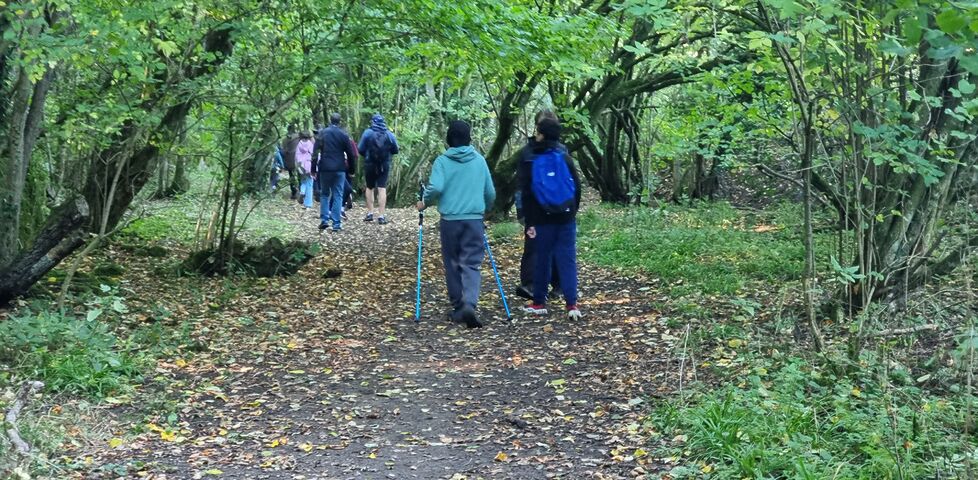
This morning I came up to explore the Ridgeway and escape from thinking about Life Stuff for a bit. (Although escaping from the rain wasn’t a possibility! It was real wet up here today!)

I was wandering this path in a bit of a reverie when I spotted something unusual and thought it a good candidate for a geocache to hide, having momentarily forgotten that this was in fact the reason I was on this particular footpath in the first place! But my geosense was solid, because when I took my phone out to check I discovered that, sure enough, I’d stopped right alongside the hiding area.

Dan, a white man with a goatee beard, wears a grey hooded jacket on a verdant rural footpath in moderate rain.

The cache was an easy find and I appreciated the proper-sized container! The lid is slightly damaged and no longer makes a complete seal but so long as it’s properly returned to its hiding place it doesn’t need any urgent attention.

SL, TNLN, TFTC!

×

Dan Q found GC39X1K GH #11 twisted tree

This checkin to GC39X1K GH #11 twisted tree reflects a geocaching.com log entry. See more of Dan's cache logs.

Found cache contents first, some of which I was only able to identify thanks to the photo in the previous log. Cache container, minus lid, was found a reasonable distance away, but this badly-damaged, nearly-destroyed cache is a goner, I feel.

A badly damaged geocache with a toy whistle falling out of it.

It’s seen no owner maintenance in most of a decade and CO doesn’t seem to have even logged in to GCCOM for 6½ years ,and it’s clearly getting wrecked in between every single attempted find. It should probably be put to rest.

×

Dan Q found GC39WVC G h # 10

This checkin to GC39WVC G h # 10 reflects a geocaching.com log entry. See more of Dan's cache logs.

A few attempts at hacking through the brambles to get near the hint location had me thinking that perhaps this was a wintertime only cache… before I realised that there was a different route by which I might approach it. Soon I was directly atop the coordinates and immediately sighted what I was looking for.

Unfortunately the cache was in the open, wide open, with a damaged clasp for its lid and its contents strewn about. Possibly somebody had put something ill-advised into the container and an animal had torn it open? Or else muggles, maybe?

Reassembled everything as best I could and returned it to its hiding place, but the cache container and contents would enjoy some maintenance.

Dan Q found GC4H2N6 Church Micro 4009 … Letcombe Bassett

This checkin to GC4H2N6 Church Micro 4009 ... Letcombe Bassett reflects a geocaching.com log entry. See more of Dan's cache logs.

A quick diversion before a hike up Gramp’s Hill and along the Ridgeway. After collecting the required information I pressed on to the cache, meeting some friendly ponies and horses on the way.

In a yard, a foal and a pony share some hay.

The coordinates were spot on, which surprised me as the location didn’t seem to be accessible! But it is, just a little overgrown! TFTC!

×

Vanity Nameservers (White-Label DNS) in 2026

When you buy a domain name, your registrar will typically offer to provide you with a collection of DNS nameservers. For most people, most of the time, that’s plenty sufficient.

A trip back to 2006

Terminal in which 'dig danq.dev @`dig NS dev +short | head -n1`' has been run, outputting NS responses representing three Gandi nameservers.
My secondary domain danq.dev has three nameservers, operated by its registrar Gandi.

This wasn’t always the case. In the long-distant past, I’ve registered domains for which I’ve had to run my own nameservers. Or else, where I’ve chosen to run my own nameservers in order to gain more control, or power, or just to play about with the technology inevitably break things.

When I transitioned to using third-party DNS around 2006, I used to be a big fan of vanity nameservers. “Vanity nameservers” (or “white-label DNS”) is where your nameservers are hosted at subdomains of the domain for which they’re the nameserver.

So instead of the nameservers for danq.me being, say, looking like ns-48-a.gandi.net and ns-228-b.gandi.net, they might look like, say, ns1.danq.me and ns2.danq.me. They might still be provided by the same third-party (or might not!), but you don’t get to see that. DNS protocol doesn’t care about the hostname it’s connecting to, it just needs the right A/AAAA records and it’s good to go!

Well, once you solve the bootstrapping problem, anyway!

If the nameservers for a domain are at a subdomain of that domain, you’ve got a circular dependency. To solve that, you have the servers one level higher provide “glue records” in addition to the list of nameservers. The glue records, which are shown in the “additional section:” of dig‘s output, above, solve the circular dependency. Now, the nameservers can be found without first having to… find the nameservers!

Terminal in which 'dig danq.me @`dig NS me +short | head -n1`' has been run, outputting NS responses ns1.danq.me through ns4.danq.me, with additional section records for A and AAAA records for each.
Tada! For the first time in about 20 years I’ve configured “vanity DNS”: danq.me‘s nameservers are now called ns1.danq.me, ns2.danq.me, ns3.danq.me and ns4.danq.me.

Vanity nameservers in 2026

The essential steps for setting up vanity nameservers are fundamentally the same as they always were. Propagation times are much shorter now and I was able to have the whole thing done and dusted within a couple of hours. In case you’re looking to follow-along, here’s the broad steps (the specifics depends on your registrar, DNS provider, etc.):

  1. Set up A (and AAAA, it’s 2026 you know!) records pointing ns1.example.com (or whatever your domain is) to their IP addresses.1
  2. Change the NS records for your domain to point to your new vanity nameservers.
  3. Change the SOA record for your domain to point to the first vanity nameserver2. Bump your serial.
  4. Have your registrar create glue records mirroring those you created in step 1.
  5. Have your registrar change the authoritative nameservers for your domain to those you created in step 1.
  6. (Optional) 😰 Frantically and repeatedly poke the registry’s DNS servers with dig until you’re confident that you didn’t just make a hideous typo and broke your domain in a way that would have been a pain in the arse to unpick when you last did this, in 2006. Calm down when you remember that it’s 2026 and nowadays it’s gonna be easy to fix via some API or web portal of your registrar!

That’s all there is to it.

But… why would anybody do this?

For most folks, this is pointless. Larger companies, especially in tech fields, sometimes do it as a branding exercise, especially if they’re re-selling services atop somebody else’s infrastructure and don’t want to so-clearly lampshade that3. But I took a look and… I don’t think people bother any more.

Hit up a handful of corporate domains you know and, with the exception of the few that run their own DNS, you’ll see the same big providers keep cropping up: Cloudflare, Amazon, Google, Microsoft…  I experimentally probed a hundred or so domains that I thought might use “vanity DNS” in front of a third-party DNS service… and found… none4.

Nobody cares any more. You’re either running your own, or you tell the world who’s running it for you, with no in-between.

Bringing back an old tradition

Vanity DNS is a dying art.

Soo…  I’m now doing vanity DNS on danq.me; it’s the first time I’ve run vanity DNS on a personal domain since… I want to say 2010‽ The journey started when Jacob asked me about my DNS setup, and it made me nostalgic for a time when nerdy techies whose nameservers were provided by a third party would just “do” vanity DNS as a matter of course.

Vanity DNS felt nerdy and fun back in 2006. And I guess that nowadays… it still feels nerdy and fun. It’s still as pointless as it ever was, but I don’t care. I’m doing something that I thought was cool when I first learned about it in 2001, just for the fun of it.

Type dig NS danq.me in your terminal to see the result: four nameservers, all with a .danq.me suffix5. Cute!

Footnotes

1 There’s a convention of naming nameservers ns1, ns2, ns3 etc., but if you want “fun” names then that’s fine too. Cloudflare’s nameservers have cute names, if you haven’t seen already!

2 Check your dotted-notation hostmaster email while you’re there; everybody forgets to look at these and so they’re often outdated.

3 Using vanity nameservers to conceal an underlying DNS provider does not conceal the third-party’s identity because you can always use the IP address of those nameservers to work out who’s behind them. For example, if you’re interested in seeing who’s really providing the DNS for danq.me, you might run NS_NAME=`dig NS danq.me +short | head -n1` to get the name of a random one of my nameservers, then NS_IP=`dig ${NS_NAME} +short | head -n1` to get its IP address, and finally do an reverse DNS lookup on that with e.g. dig -x $NS_IP. Often, this canonical name will be a giveaway and you won’t even have to look at the lists of who owns which blocks of IP addresses. It’s not a secret. (Gotta admit, though I’m not entirely happy with my provider… maybe it’s time to switch… or even go back to selfhosting DNS once more!)

4 whatsapp.com appears to have its own nameservers a.ns.whatsapp.com through d.ns.whatsapp.com, but their A records point to IP addresses whose reverse DNS names are a.ns.facebook.com through d.ns.facebook.com. Not terribly exciting, nor surprising, that Meta are running their own DNS services for their various properties (the same thing happens with instagram.com). paypal.com seems to have both its own DNS servers and some replicas provided by Digicert UltraDNS, which for a moment excited me when I thought that they might be part-way through a white-labelling exercise, but no: they’re two different services. I thought I’d find something interesting via one of the big blog, eccomerce, or VPS providers that offer free subdomains: folks like Bearblog, Dreamwidth, Substack or Medium. But nope; some seem to run their own DNS, and others just sit on top of a big third-party. Sigh.

5 Want to see the glue records? Run dig NS me +short to get the names of the authoritative nameservers for the .me TLD, e.g. a0.nic.me, and then query it directly with e.g. dig NS danq.me @a0.nic.me: you’ll see not just that I have four nameservers under .danq.me but also their IP addresses (in the “additional section”) – that’s the glue doing its thing!

× ×

Dan Q found GCBX0JC Church Micro 12106…Standlake

This checkin to GCBX0JC Church Micro 12106...Standlake reflects a geocaching.com log entry. See more of Dan's cache logs.

After a walk out with the dog to claim the FTF on nearby GCBX0R7, I figured that I still had a little a few minutes on my hands before the code I’d been writing for my day job finished deploying and testing itself, so I thought I’d try to go two-for-two with this, a second FTF!

Coordinate components A through D were easy to collect, but E posed us a problem: from the way it’s put forward in the cache description, the answer I came up with didn’t make any sense! I double-checked A through D and, confident in them, mathematically inferred a range of possible values for E, but couldn’t find any way to conceivably get any of them!1

A fawn-coloured French Bulldog on a lead sniffs at a metal boot scraper attached to the stonework at the side of a church door.
She’s no good at the counting, but she’s a big fan of getting her nose in to investigate clue objects.

In any case: of the handful of possible values for E, only one made sense/pointed anywhere believable, and it fit the checksum so we set out. The cache was easy to find, and what an excellent container! Amazing work! The container alone would have been worth a favourite point, if only I hadn’t been completely unable to parse that fifth coordinate component.

Signed log and returned the cache to its hiding place. Hoping the next cacher doesn’t get as confused as I did! TFTC!

Footnotes

1 I’ll message the CO to get to the bottom of my confusion!

×