Inspired by XKCD 3113 “Fix This Sign”, the site features marquee animations, poor font choices, wonky rotation and alignment, and more.
Like the comic, it aims to “extort” people offended by the design choices by allowing them to pay to fix them. Once fixed, a change is fixed for everybody… at least, until
somebody pays to “reset” the site back to its catastrophic mode.
I can’t criticise Humidity Studios for taking a stupid idea from XKCD and taking it way too far, because, well, there’s this site that I
run…
That’s cute and all, but the difference between a billboard and a web page is, of course, that a web page is under the viewer’s control. Once it’s left the server and
reached your computer, there’s nothing the designer can to do stop you editing a page in any way you like. That’s just how the Web works!
A great way to do this is with userscripts: Javascript content that is injected into pages by your browser when you visit particular pages. Mostly by way of demonstration,
I gave it a go. And now you can, too! All you need is a userscript manager plugin in your browser (my favourite is Violentmonkey!) and to
install my (open source) script.
Much better! (I mean, still not a pinnacle of design… but at least my eyes aren’t bleeding any more!)
I enjoyed the art of the joke that is PleaseFixThisSite.com. But probably more than that, I enjoyed the excuse to remind you that by the time you’re viewing a Web page, it’s
running on your computer, and you can change it any way you damn well please.
Don’t like the latest design of your favourite social network? Want to reinstate a feature of a popular video playing site? Need a dark mode to spare your eyes on a particular news
publication? Annoyed by artificial wait times before you’re “allowed” to click a download button? There’s probably a userscript for all of those. And if there isn’t, you can have a go
at writing one. Userscripts are great, and you should be using them.
It started with a fascination after discovering a little-known stone circle near my new house. It grew into an obsession with the history of the place.
Two years later, our eldest was at school and her class was studying the stone age. Each of three groups were tasked with researching a particular neolithic monument, and our eldest was
surprised when she heard my voice coming from a laptop elsewhere in the class. One of her classmates had, in their research into the Quoits, come across my video.
It turns out “local expert” just means “I read the only book ever written about the archaeology of the stones, and a handful of ancillary things.”
And so this year, when another class – this time featuring our youngest – went on a similar school trip, the school asked me to go along again.
I’d tweaked my intro a bit – to pivot from talking about the archaeology to talking about the human stories in the history of the place – and it went down well: the
children raised excellent observations and intelligent questions1,
and clearly took a lot away from their visit. As a bonus, our visit falling shortly after the summer solstice meant that local neopagans had left a variety of curious offerings – mostly
pebbles painted with runes – that the kids enjoyed finding (though of course I asked them to put each back where they were found afterwards).
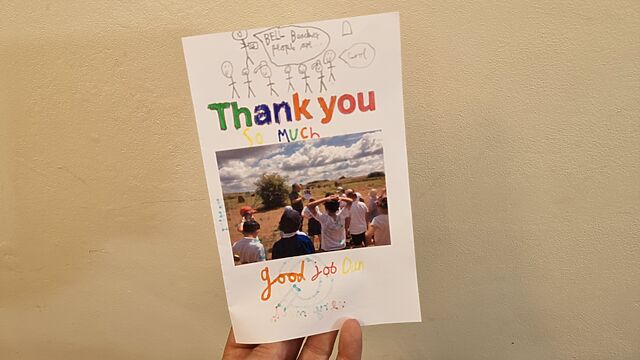
But the most heartwarming moment came when I later received an amazing handmade card, to which several members of the class had contributed:
I particularly enjoy the pencil drawing of me talking about the breadth of Bell Beaker culture, with a child
interrupting to say “cool!”.
I don’t know if I’ll be free to help out again in another two years, if they do it again2: perhaps I
should record a longer video, with a classroom focus, that shares everything I know about The Devil’s Quoits.
But I’ll certainly keep a fond memory of this (and the previous) time I got to go on such a fun school trip, and to be an (alleged) expert about a place whose history I find so
interesting!
Footnotes
1 Not every question the children asked was the smartest, but every one was gold.
One asked “is it possible aliens did it?” Another asked, “how old are you?”, which I can only assume was an effort to check if I remembered when this 5,000-year-old hengiform monument
was being constructed…
2 By lucky coincidence, this year’s trip fell during a period that I was between jobs, and
so I was very available, but that might not be the case in future!
In a little over a week I’ll be starting my new role at Firstup, who use some of my favourite Web technologies to deliver tools that streamline
employee communication and engagement.
I’m sure there’ll be more to say about that down the line, but for now: let’s look at my recruitment experience, because it’s probably the fastest and most-streamlined technical
recruitment process I’ve ever experienced! Here’s the timeline:
Firstup Recruitment Timeline
Day 0 (Thursday), 21:18 – One evening, I submitted an application via jobs listing site Welcome To The Jungle. For
comparison, I submitted an application for a similar role at a similar company at almost the exact same time. Let’s call them, umm… “Secondup”.
21:42 – I received an automated response to say “Firstup have received your application”. So far, so normal.
21:44 – I received an email from a human – only 26 minutes after my initial application – to invite me to an initial screener interview the following week,
and offering a selection of times (including a reminder of the relative timezone difference between the interviewer and I).
21:55 – I replied to suggest meeting on Wednesday the following week1.
Day 6 (Wednesday), 15:30 – Half-hour screener interview, mostly an introduction, “keyword check” (can I say the right keywords about my qualifications and experience
to demonstrate that, yes, I’m able to do the things they’ll need), and – because it’s 2025 and we live in the darkest timeline – a confirmation that I was a real human being and not
an AI2.
The TalOps person, Talia, says she’d like to progress me to an interview with the person who’d become my team lead, and arranges the interview then-and-there for Friday. She talked me
through all the stages (max points to any recruiter who does this), and gave me an NDA to sign so we could “talk shop” in interviews if applicable.
I only took the initial stages of my Firstup interviews in our library, moving to my regular coding desk for the tech tests, but I’ve got to say it’s a great space for a quiet
conversation, away from the chaos and noise of our kids on an evening!
Day 8 (Friday), 18:30 – My new line manager, Kirk, is on the Pacific Coast of the US, so rather than wait until next week to meet I agreed to this early-evening
interview slot. I’m out of practice at interviews and I babbled a bit, but apparently I had the right credentials because, at a continuing breakneck pace…
21:32 – Talia emailed again to let me know I was through that stage, and asked to set up two live coding “tech test” interviews early the following week. I’ve been
enjoying all the conversations and the vibes so far, so I try to grab the earliest available slots that I can make. This put the two tech test interviews back-to-back, to which
Ruth raised her eyebrows – but to me it felt right to keep riding the energy of this high-speed recruitment process and dive right in to
both!
Day 11 (Monday), 18:30 – Not even a West Coast interviewer this time, but because I’d snatched the earliest possible opportunity I spoke to Joshua early in the
evening. Using a shared development environment, he had me doing a classic data-structures-and-algorithms style assessment: converting a JSON-based logical inference description
sort-of reminiscent of a Reverse Polish Notation tree into something that looked more pseudocode of the underlying
boolean logic. I spotted early on that I’d want a recursive solution, considered a procedural approach, and eventually went with a functional one. It was all going well… until it
wasn’t! Working at speed, I made frustrating early mistake left me with the wrong data “down” my tree and needed to do some log-based debugging (the shared environment didn’t support
a proper debugger, grr!) to get back on track… but I managed to deliver something that worked within the window, and talked at length through my approach every step of the way.
19:30 – The second technical interview was with Kevin, and was more about systems design from a technical perspective. I was challenged to make an object-oriented
implementation of a car park with three different sizes of spaces (for motorbikes, cars, and vans); vehicles can only fit into their own size of space or larger, except vans which –
in the absence of a van space – can straddle three car spaces. The specification called for a particular API that could answer questions about the numbers and types of spaces
available. Now warmed-up to the quirks of the shared coding environment, I started from a test-driven development approach: it didn’t actually support TDD, but I figured I could work
around that by implementing what was effectively my API’s client, hitting my non-existent classes and their non-existent methods and asserting particular responses before going and
filling in those classes until they worked. I felt like I really “clicked” with Kevin as well as with the tech test, and was really pleased with what I eventually delivered.
Day 12 (Tuesday), 12:14 – I heard from Talia again, inviting me to a final interview with Kirk’s manager Xiaojun, the Director of Engineering. Again, I opted for
the earliest mutually-convenient time – the very next day! – even though it would be unusually-late in the day.
Day 13 (Wednesday), 20:00 – The final interview with Xiaojun was a less-energetic affair, but still included some fun technical grilling and, as it happens,
my most-smug interview moment ever when he asked me how I’d go about implementing something… that I’d coincidentally implemented for fun a few weeks earlier! So instead of spending time thinking about an answer to the question, I was able to
dive right in to my most-recent solution, for which I’d conveniently drawn diagrams that I was able to use to explain my architectural choices. I found it harder to read Xiaojun and
get a feel for how the interview had gone than I had each previous stage, but I was excited to hear that they were working through a shortlist and should be ready to appoint somebody
at the “end of the week, or early next week” at the latest.
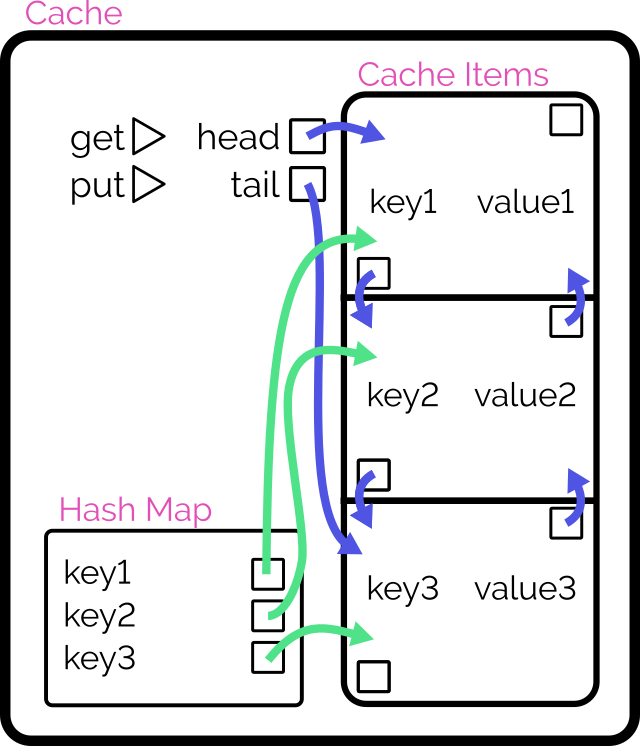
This. This is how you implement an LRU cache.
Day 14 (Thursday), 00:09 – At what is presumably the very end of the workday in her timezone, Talia emailed me to ask if we could chat at what must be the
start of her next workday. Or as I call it, lunchtime. That’s a promising sign.
13:00 – The sun had come out, so I took Talia’s call in the “meeting hammock” in the garden, with a can of cold non-alcoholic beer next to me (and the dog rolling
around on the grass). After exchanging pleasantries, she made the offer, which I verbally accepted then and there and (after clearing up a couple of quick queries) signed a contract
to a few hours later. Sorted.
Day 23 – You remember that I mentioned applying to another (very similar) role at the same time? This was the day that “Secondup” emailed to ask about my availability
for an interview. And while 23 days is certainly a more-normal turnaround for the start of a recruitment process, I’d already found myself excited by everything I’d learned about
Firstup: there are some great things they’re doing right; there are some exciting problems that I can be part of the solution to… I didn’t need another interview, so I turned down
“Secondup”. Something something early bird.
Wow, that was fast!
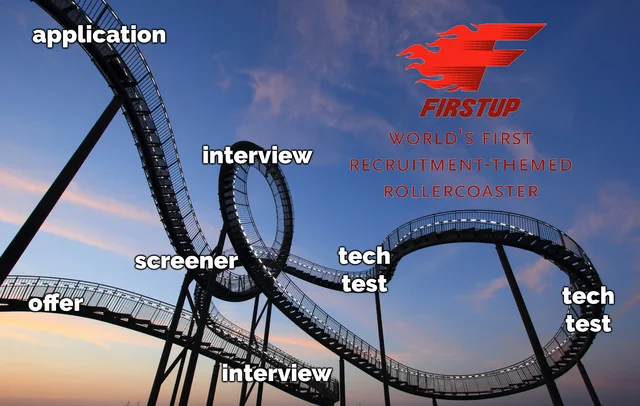
With only eight days between the screener interview and the offer – and barely a fortnight after my initial application – this has got to be the absolute fastest I’ve ever seen a tech
role recruitment process go. It felt like a rollercoaster, and I loved it.
Is it weird that I’d actually ride a recruitment-themed rollercoaster?
Footnotes
1 The earliest available slot for a screener interview, on Tuesday, clashed with my 8-year-old’s taekwondo class which I’d promised I’ll go along and join in with it as part of their “dads train free in June” promotion.
This turned out to be a painful and exhausting experience which I thoroughly enjoyed, but more on that some other time, perhaps.
2 After realising that “are you a robot” was part of the initial checks, I briefly
regretted taking the interview in our newly-constructed library because it provides exactly the kind of environment that looks like a fake background.
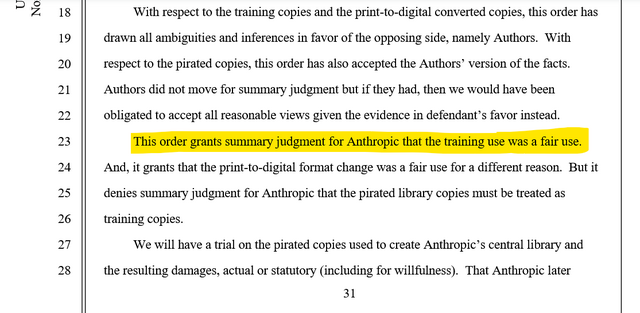
The tl;dr is: the court ruled that (a) piracy for the purpose of training an LLM is still piracy, so there’ll be a separate case about the fact that Anthropic did not pay for copies of
all the books their model ingested, but (b) training a model on books and then selling access to that model, which can then produce output based on what it has “learned” from those
books, is considered transformative work and therefore fair use.
Compelling arguments have been made both ways on this topic already, e.g.:
Some folks are very keen to point out that it’s totally permitted for humans to read, and even memorise, entire volumes, and then use what they’ve learned when they
produce new work. They argue that what an LLM “does” is not materially different from an impossibly well-read human.
By way of counterpoint, it’s been observed that such a human would still be personally liable if the “inspired” output they subsequently created was derivative
to the point of violating copyright, but we don’t yet have a strong legal model for assessing AI output in the same way. (BBC News article about Disney & Universal vs. Midjourney is going to be very interesting!)
Furthermore, it might be impossible to conclusively determine that the way GenAI works is fundamentally comparable to human thought. And that’s the thing that got
me thinking about this particular thought experiment.
A moment of philosophy
Here’s a thought experiment:
Support I trained an LLM on all of the books of just one author (plus enough additional language that it was able to meaningfully communicate). Let’s take Stephen King’s 65 novels and
200+ short stories, for example. We’ll sell access to the API we produce.
I suppose it’s possible that Stephen King was already replaced long ago with an AI that was instructed to churn out horror stories about folks in isolated Midwestern locales being
harassed by a pervasive background evil?
The output of this system would be heavily-biased by the limited input it’s been given: anybody familiar with King’s work would quickly spot that the AI’s mannerisms echoed his writing
style. Appropriately prompted – or just by chance – such a system would likely produce whole chapters of output that would certainly be considered to be a substantial infringement of
the original work, right?
If I make KingLLM, I’m going to get sued, rightly enough.
But if we accept that (and assume that the U.S. District Court for the Northern District of California would agree)… then this ruling on Anthropic would carry a curious implication.
That if enough content is ingested, the operation of the LLM in itself is no longer copyright infringement.
Which raises the question: where is the line? What size of corpus must a system be trained upon before its processing must necessarily be considered transformative
of its inputs?
Clearly, trying to answer that question leads to a variant of the sorites paradox. Nobody can ever say that, for example, an input of twenty million words
is enough to make a model transformative but just one fewer and it must be considered to be perpetually ripping off what little knowledge it has!
But as more of these copyright holder vs. AI company cases come to fruition, it’ll be interesting to see where courts fall. What is fair use and what is infringing?
And wherever the answers land, I’m sure there’ll be folks like me coming up with thought experiments that sit uncomfortably in the grey areas that remain.
I’ve been in a lot of interviews over the last two or three weeks. But there’s a moment that stands out and that I’ll remember forever as the most-smug I’ve ever felt during an
interview.
There’ll soon be news to share about what I’m going to be doing with the second half of this year…
This particular interview included a mixture of technical and non-technical questions, but a particular technical question stood out for reasons that will rapidly become apparent. It
went kind-of like this:
Interviewer: How would you go about designing a backend cache that retains in memory some number of most-recently-accessed items?
Dan: It sounds like you’re talking about an LRU cache. Coincidentally, I implemented exactly that just the other
week, for fun, in two of this role’s preferred programming languages (and four other languages). I wrote a blog post about my design
choices: specifically, why I opted for a hashmap for quick reads and a doubly-linked-list for constant-time writes. I’m sending you the links to it now: may I talk you through the
diagrams?
Interviewer:
That’s probably the most-overconfident thing I’ve said at an interview since before I started at the Bodleian, 13 years ago. In the interview for
that position I spent some time explaining that for the role they were recruiting for they were asking the wrong questions! I provided some better questions that I felt they
should ask to maximise their chance of getting the best candidate… and then answered them, effectively helping to write my own interview.
Anyway: even ignoring my cockiness, my interview the other week was informative and enjoyable throughout, and I’m pleased that I’ll soon be working alongside some of the people that I
met: they seem smart, and driven, and focussed, and it looks like the kind of environment in which I could do well.
As time has gone by, a great many rural English villages have been consumed by their nearest towns, or else become little more than dormitory villages: a place where people do little
more than eat and sleep in-between their commutes to-and-from their distant workplaces1.
And so it pleases me at least a little that the tiny village I’ve lived in for five years this week still shows great success in how well
it clings on to its individual identity.
Right now our village green is surrounded by flags, bunting, and thematic decorations.
Every summer since time immemorial, for example, it’s hosted a Village Festival, and this year it feels like the community’s gone all-out. The theme this year is A Century in
Television, and most of the festivities seem to tie-in to the theme.
If you recognise these characters from their first time around on British television, you’re probably older than I am. If you recognise them from their 2001 “reboot”, then you’re probably younger.
I’ve been particularly impressed this year by entrants into the (themed) scarecrow competition: some cracking scarecrows (and related decorations) have started popping up around the
village in advance of festival week!
Bob the Builder’s helping out with the reconstruction of the roof of one of the houses down towards the end of my hamlet, just outside the village proper.
There’s a clear bias towards characters from childrens’ television programmes, but that only adds to the charm. Not only does it amuse the kids when we walk by them, but it feeds into
the feeling of nostalgia that the festival theme seems to evoke (as well, perhaps, as a connection to the importance of this strange village tradition).
Well-played, Letterbox Cottage. Well-played.
If you took a wrong turning and found your way through our village when you meant to be somewhere else, you’d certainly be amused, bemused, or both by the plethora of figures standing
on street corners, atop hedgerows, and just generally around the place2.
Shaun the Sheep and what I believe must be his cousin Timmy stand atop a hedge looking down on a route used by many children on their way to school.
The festival, like other events in the local calendar, represents a collective effort by the “institutions” of the village – the parish council, the church, the primary school, etc.
But the level of time and emotional investment from individual households (whether they’re making scarecrows for the Summer festival… decorating windows as a Christmas advent calendar…
turning out for a dog show last week, I hear3…)
shows the heart of a collective that really engage with this kind of community. Which is really sweet.
An imaginative use of a coloured lampshade plus some excellent tinfoil work makes Zebedee here come to life. He could only have been more-thematic if he’d been installed on the
village’s (only) roundabout!
Anyway, the short of it is that I feel privileged to live in a village that punches above its weight class when it comes to retaining its distinctive personality. And seeing so many of
my neighbours, near and far, putting these strange scarecrows out, reminded me of that fact.
I’m sure I’m barely scraping the surface – there are definitely a few I know of that I’ve not managed to photograph yet – but there are a lot of scarecrows
around my way, right now.
Footnotes
1 The “village” in which our old house
resided certainly had the characteristic feel of “this used to be a place of its own, but now it’s only-barely not just a residential estate on the outskirts of Oxford, for example.
Kidlington had other features, of course, like Oxford’s short-lived zoological gardens… but it didn’t really feel like it had an identity in
its own right.
2 Depending on exactly which wrong turn you took, the first scarecrow you saw might well
be the one dressed as a police officer – from some nonspecific police procedural drama, one guesses? – that’s stood guard shortly after the first of the signs to advertise our new 20mph speed limit. Holding what I guess is supposed to be a radar gun (but is clearly actually a mini handheld
vacuum cleaner), this scarecrow might well be having a meaningful effect on reducing speeding through our village, and for that alone it might be my favourite.
3 I didn’t enter our silly little furball into the
village dog show, for a variety of reasons: mostly because I had other things to do at the time, but also because she’s a truculent little troublemaker who – especially in the heat of
a Summer’s day – would probably just try to boss-around the other dogs.
What can I possibly say about Bored Gay Werewolf, which caught my attention with the garish colours of its front cover when I saw it in
Waterstones and whose blurb suggested that it might, perhaps, be a queer fantasy romp with a Buffy-esque sense of humour.
Werewolf? Sure, it’s got a few of those. There’s even a bit of fun, offbeat humour each time the protagonist reflects on their curious monthly cycle and tries to work
out whether they attacked or even killed anybody this time around. But mostly it’s not a story about werewolf: it’s a story about a slacker who gets suckered into a pyramid scheme, with
just a hint of lycanthropy around the fringes.
Gay? I mean: the protagonist’s gay, and many of their friends are queer… and while the representation is good, sexuality doesn’t feel like it’s a particularly
significant issue to the storyline. I enjoyed the parallels that were drawn between Brian’s coming-out as gay versus his (for most of the story) closeted werewolf nature – which even
though I saw them coming from the first chapter onwards were still well-presented – but apart from that it almost felt like gayness wasn’t a central theme to the story. A smidge of
homophobia, some queer culture references, and a throwaway Grindr hookup with a closeted MSM dude do not contribute enough homosexuality to justify “gay” being the largest, pinkest word
on a novel’s cover, if you ask me.
Bored? I was, at some points in the book, but I’m not convinced that’s what was intended. The pacing’s a little inconsistent: a long and
drawn-out description of an exercise routines overshadows an exploration of the impact of werewolf super-senses, for example. And a long-foreshadowed fight scene finale feels like it’s
over in an instant (with a Van Helsing ex Machina twist that felt simultaneously like the brakes being slammed on and a set-up for an inevitable sequel).
I sound pretty negative about it, I’m sure. But it’s not actually bad. It’s just not actually good, either. It’s a passable, middle-of-the-road time-filler
with an interesting hook, a few funny set pieces (I laughed out loud a couple of times, for sure), and a set of misfit characters who spend most of the book feeling a little…
incomplete? Though it’s possible that latter point’s at-least partially deliberate, as this is without a doubt a “Gen-Z Grows Up” story. Maybe if I were younger and didn’t yet have my
shit together the story would appeal better.
I was updating my CV earlier this week in anticipation of applying for a handful of interesting-looking roles1
and I was considering quite how many different tech stacks I claim significant experience in, nowadays.
There are languages I’ve been writing in every single week for the last 15+ years, of course, like PHP, Ruby, and JavaScript. And my underlying fundamentals are solid.
But is it really fair for me to be able to claim that I can code in Java, Go, or Python: languages that I’ve not used commercially within the last 5-10 years?
What kind of developer writes the same program six times… for a tech test they haven’t even been asked to do? If you guessed “Dan”, you’d be correct!
Obviously, I couldn’t just let that question lie2.
Let’s find out!
I fished around on Glassdoor for a bit to find a medium-sized single-sitting tech test, and found a couple of different briefs that I mashed together to create this:
In an object-oriented manner, implement an LRU (Least-Recently Used) cache:
The size of the cache is specified at instantiation.
Arbitrary objects can be put into the cache, along with a retrieval key in the form of a string. Using the same string, you can get the objects back.
If a put operation would increase the number of objects in the cache beyond the size limit, the cached object that was least-recently accessed (by either a
put or get operation) is removed to make room for it.
putting a duplicate key into the cache should update the associated object (and make this item most-recently accessed).
Both the get and put operations should resolve within constant (O(1)) time.
Add automated tests to support the functionality.
My plan was to implement a solution to this challenge, in as many of the languages mentioned on my CV as possible in a single sitting.
But first, a little Data Structures & Algorithms theory:
The Theory
Simple case with O(n) complexity
The simplest way to implement such a cache might be as follows:
Use a linear data structure like an array or linked list to store cached items.
On get, iterate through the list to try to find the matching item.
If found: move it to the head of the list, then return it.
On put, first check if it already exists in the list as with get:
If it already exists, update it and move it to the head of the list.
Otherwise, insert it as a new item at the head of the list.
If this would increase the size of the list beyond the permitted limit, pop and discard the item at the tail of the list.
It’s simple, elegant and totally the kind of thing I’d accept if I were recruiting for a junior or graduate developer. But we can do better.
The problem with this approach is that it fails the requirement that the methods “should resolve within constant (O(1)) time”3.
Of particular concern is the fact that any operation which might need to re-sort the list to put the just-accessed item at the top
4. Let’s try another design:
Achieving O(1) time complexity
Here’s another way to implement the cache:
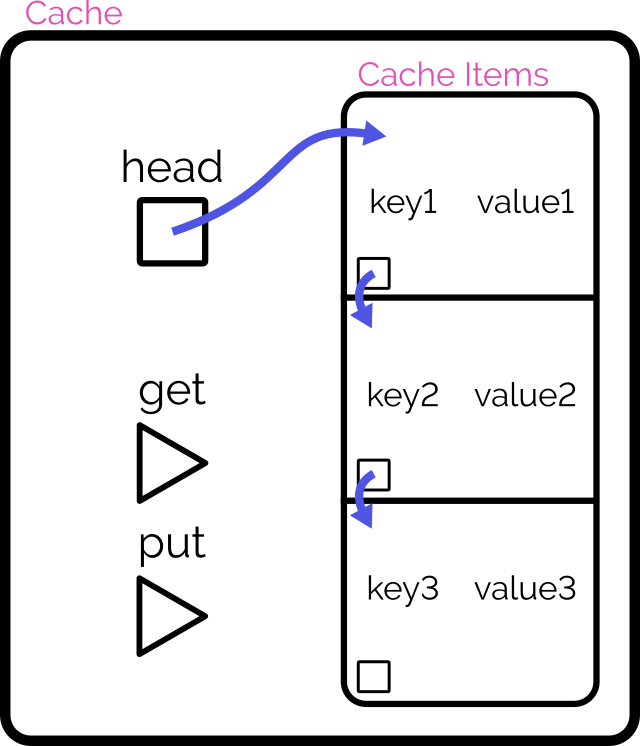
Retain cache items in a doubly-linked list, with a pointer to both the head and tail
Add a hash map (or similar language-specific structure) for fast lookups by cache key
On get, check the hash map to see if the item exists.
If so, return it and promote it to the head (as described below).
On put, check the hash map to see if the item exists.
If so, promote it to the head (as described below).
If not, insert it at the head by:
Updating the prev of the current head item and then pointing the head to the new item (which will have the old head item as its
next), and
Adding it to the hash map.
If the number of items in the hash map would exceed the limit, remove the tail item from the hash map, point the tail at the tail item’s prev, and
unlink the expired tail item from the new tail item’s next.
To promote an item to the head of the list:
Follow the item’s prev and next to find its siblings and link them to one another (removes the item from the list).
Point the promoted item’s next to the current head, and the current head‘s prev to the promoted item.
Point the head of the list at the promoted item.
Looking at a plate of pointer-spaghetti makes me strangely hungry.
It’s important to realise that this alternative implementation isn’t better. It’s just different: the “right” solution depends on the use-case5.
The Implementation
That’s enough analysis and design. Time to write some code.
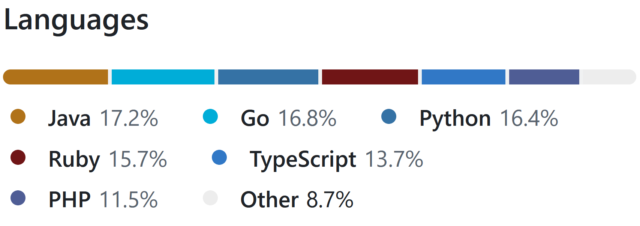
Turns out that if you use enough different languages in your project, GitHub begins to look like itwants to draw a rainbow.
Picking a handful of the more-useful languages on my CV6,
I opted to implement in:
Ruby (with RSpec for testing and Rubocop for linting)
PHP (with PHPUnit for testing)
TypeScript (running on Node, with Jest for testing)
Java (with JUnit for testing)
Go (which isn’t really an object-oriented language but acts a bit like one, amirite?)
Python (probably my weakest language in this set, but which actually ended up with quite a tidy solution)
Naturally, I open-sourced everything if you’d like to see for yourself. It all works, although if you’re actually in need of such a
cache for your project you’ll probably find an alternative that’s at least as good (and more-likely to be maintained!) in a third-party library somewhere!
What did I learn?
This was actually pretty fun! I might continue to expand my repo by doing the same challenge with a few of the other languages I’ve used professionally at some point or
another7.
And there’s a few takeaways I got from this experience –
Lesson #1: programming more languages can make you better at all of them
As I went along, one language at a time, I ended up realising improvements that I could make to earlier iterations.
For example, when I came to the TypeScript implementation, I decided to use generics so that the developer can specify what kind of objects they want to store in the cache,
rather than just a generic Object, and better benefit type-safety. That’s when I remembered that Java supports generics, too, so I went back and used them there as well.
In the same way as speaking multiple (human) languages or studying linguistics can help unlock new ways of thinking about your communication, being able to think in terms of multiple
different programming languages helps you spot new opportunities. When in 2020 PHP 8 added nullsafe operators, union types, and
named arguments, I remember feeling confident using them from day one because those features were already familiar to me from Ruby8, TypeScript9, and Python10,
respectively.
Lesson #2: even when I’m rusty, I can rely on my fundamentals
I’ve applied for a handful of jobs now, but if one of them had invited me to a pairing session on a language I’m rusty on (like Java!) I might’ve felt intimidated.
But it turns out I shouldn’t need to be! With my solid fundamentals and a handful of other languages under my belt, I understand when I need to step away from the code editor and hit
the API documentation. Turns out, I’m in a good position to demo any of my language skills.
I remember when I was first learning Go, I wanted to make use of a particular language feature that I didn’t know whether it had. But because I’d used that feature in Ruby, I knew what
to search for in Go’s documentation to see if it was supported (it wasn’t) and if so, what the syntax was11.
Lesson #3: structural rules are harder to gearshift than syntactic ones
Switching between six different languages while writing the same application was occasionally challenging, but not in the ways I expected.
I’ve had plenty of experience switching programming languages mid-train-of-thought before. Sometimes you just have to flit between the frontend and backend of your application!
But this time around I discovered: changes in structure are apparently harder for my brain than changes in syntax. E.g.:
Switching in and out of Python’s indentation caught me out at least once (might’ve been better if I took the time to install the language’s tools into my text editor first!).
Switching from a language without enforced semicolon line ends (e.g. Ruby, Go) to one with them (e.g. Java, PHP) had me make the compiler sad several times.
This gets even tougher when not writing the language but writing about the language: my first pass at the documentation for the Go version somehow ended up with
Ruby/Python-style #-comments instead of Go/Java/TypeScript-style //-comments; whoops!
I’m guessing that the part of my memory that looks after a language’s keywords, how a method header is structured, and which equals sign to use for assignment versus comparison… are
stored in a different part of my brain than the bit that keeps track of how a language is laid-out?12
Okay, time for a new job
I reckon it’s time I got back into work, so I’m going to have a look around and see if there’s any roles out there that look exciting to me.
If you know anybody who’s looking for a UK-based, remote-first, senior+, full-stack web developer with 25+ years experience and more languages than you can shake a stick at… point them at my CV, would you?
Footnotes
1 I suspect that when most software engineers look for a new job, they filter to the
languages, frameworks, they feel they’re strongest at. I do a little of that, I suppose, but I’m far more-motivated by culture, sector, product and environment than I am by the shape
of your stack, and I’m versatile enough that technology specifics can almost come second. So long as you’re not asking me to write VB.NET.
2 It’s sort-of a parallel to how I decided to check
the other week that my Gutenberg experience was sufficiently strong that I could write standard ReactJS, too.
3 I was pleased to find a tech test that actually called for an understanding of algorithm
growth/scaling rates, so I could steal this requirement for my own experiment! I fear that sometimes, in their drive to be pragmatic and representative of “real work”, the value of a
comprehension of computer science fundamentals is overlooked by recruiters.
4 Even if an algorithm takes the approach of creating a new list with the
inserted/modified item at the top, that’s still just a very-specific case of insertion sort when you think about it, right?
5 The second design will be slower at writing but faster at
reading, and will scale better as the cache gets larger. That sounds great for a read-often/write-rarely cache, but your situation may differ.
6 Okay, my language selection was pretty arbitrary. But if I’d have also come up with
implementations in Perl, and C#, and Elixir, and whatever else… I’d have been writing code all day!
7 So long as I’m willing to be flexible about the “object-oriented” requirement, there are
even more options available to me. Probably the language that I last wrote longest ago would be Pascal: I wonder how much of that I remember?
8 Ruby’s safe navigation/”lonely” operator did the same thing as PHP’s nullsafe operator
since 2015.
9 TypeScript got union types back in 2015, and apart from them being more-strictly-enforced they’re basically identical to
PHP’s.
10 Did you know that Python had keyword arguments since its very first public release
way back in 1994! How did it take so many other interpreted languages so long to catch up?
11 The feature was the three-way comparison or “spaceship operator”, in case you were wondering.
12 I wonder if anybody’s ever laid a programmer in an MRI machine while they code? I’d
be really interested to see if different bits of the brain light up when coding in functional programming languages than in procedural ones, for example!
The fundamental difference between streaming and downloading is what your device does with those frames of video:
Does it show them to you once and then throw them away? Or does it re-assemble them all back into a video file and save it into storage?
When you’re streaming on YouTube, the video player running on your computer retains a buffer of frames ahead and behind of your current position, so you can skip around easily: the
darker grey part of the timeline shows which parts of the video are stored on – that is, downloaded to – your computer.
Buffering is when your streaming player gets some number of frames “ahead” of where you’re watching, to give you some protection against connection issues. If your WiFi wobbles
for a moment, the buffer protects you from the video stopping completely for a few seconds.
But for buffering to work, your computer has to retain bits of the video. So in a very real sense, all streaming is downloading! The buffer is the part
of the stream that’s downloaded onto your computer right now. The question is: what happens to it next?
All streaming is downloading
So that’s the bottom line: if your computer deletes the frames of video it was storing in the buffer, we call that streaming. If it retains them in a file, we
call that downloading.
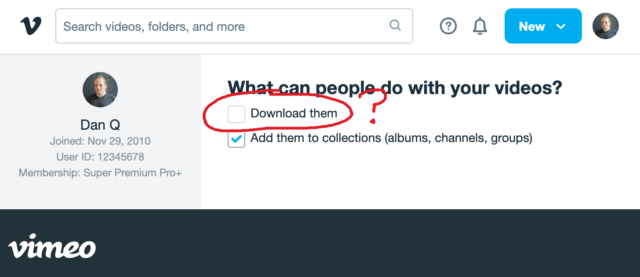
That definition introduces a philosophical problem. Remember that Vimeo checkbox that lets a creator decide whether people can (i.e. are allowed to) download their videos? Isn’t
that somewhat meaningless if all streaming is downloading.
Because if the difference between streaming and downloading is whether their device belonging to the person watching the video deletes the media when they’re done. And in
virtually all cases, that’s done on the honour system.
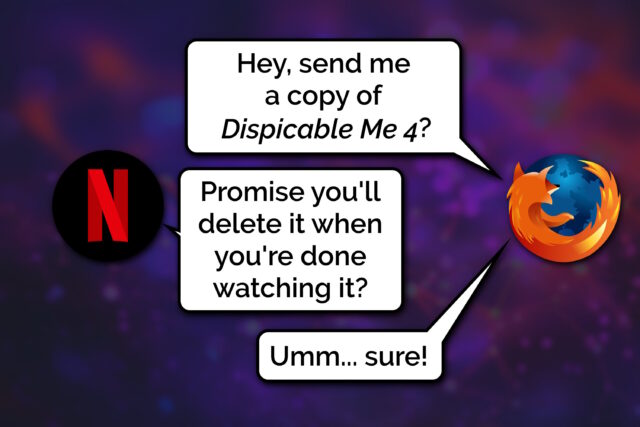
This kind of conversation happens, over the HTTP protocol, all the time. Probably most of the time the browser is telling the truth, but there’s no way to know for certain.
When your favourite streaming platform says that it’s only possible to stream, and not download, their media… or when they restrict “downloading” as an option to higher-cost paid plans…
they’re relying on the assumption that the user’s device can be trusted to delete the media when the user’s done watching it.
But a user who owns their own device, their own network, their own screen or speakers has many, many opportunities to not fulfil the promise of deleting media it after they’ve consumed
it: to retain a “downloaded” copy for their own enjoyment, including:
Intercepting the media as it passes through their network on the way to its destination device
Using client software that’s been configured to stream-and-save, rather than steam-and-delete, the content
Modifying “secure” software (e.g. an official app) so that it retains a saved copy rather than deleting it
Capturing the stream buffer as it’s cached in device memory or on the device’s hard disk
Outputting the resulting media to a different device, e.g. using a HDMI capture device, and saving it there
Exploiting the “analogue4
hole”5:
using a camera, microphone, etc. to make a copy of what comes out of the screen/speakers6
Okay, so I oversimplified (before you say “well, actually…”)
It’s not entirely true to say that streaming and downloading are identical, even with the caveat of “…from the server’s perspective”. There are three big exceptions worth
thinking about:
Exception #1: downloads can come in any order
When you stream some linear media, you expect the server to send the media in strict chronological order. Being able to start watching before the whole file has
downloaded is a big part of what makes steaming appealing, to the end-user. This means that media intended for streaming tends to be stored in a way that facilitates that
kind of delivery. For example:
Media designed for streaming will often be stored in linear chronological order in the file, which impacts what kinds of compression are available.
Media designed for streaming will generally use formats that put file metadata at the start of the file, so that it gets delivered first.
Video designed for streaming will often have frequent keyframes so that a client that starts “in the middle” can decode the buffer without downloading too much data.
No such limitation exists for files intended for downloading. If you’re not planning on watching a video until it’s completely downloaded, the order in which the chunks arrives is
arbitrary!
But these limitations make the set of “files suitable for streaming” a subset of the set of “files suitable for downloading”. It only makes it challenging or impossible to
stream some media intended for downloading… it doesn’t do anything to prevent downloading of media intended for streaming.
Exception #2: streamed media is more-likely to be transcoded
A server that’s streaming media to a client exists in a sort-of dance: the client keeps the server updated on which “part” of the media it cares about, so the server can jump ahead,
throttle back, pause sending, etc. and the client’s buffer can be kept filled to the optimal level.
This dance also allows for a dynamic change in quality levels. You’ve probably seen this happen: you’re watching a video on YouTube and suddenly the quality “jumps” to something more
(or less) like a pile of LEGO bricks7. That’s the result of your device realising that the rate
at which it’s receiving data isn’t well-matched to the connection speed, and asking the server to send a different quality level8.
The server can – and some do! – pre-generate and store all of the different formats, but some servers will convert files (and particularly livestreams) on-the-fly, introducing
a few seconds’ delay in order to deliver the format that’s best-suited to the recipient9. That’s not necessary for downloads, where the
user will often want the highest-quality version of the media (and if they don’t, they’ll select the quality they want at the outset, before the download begins).
Exception #3: streamed media is more-likely to be encumbered with DRM
And then, of course, there’s DRM.
As streaming digital media has become the default way for many people to consume video and audio content, rights holders have engaged in a fundamentally-doomed10
arms race of implementing copy-protection strategies to attempt to prevent end-users from retaining usable downloaded copies of streamed media.
Take HDCP, for example, which e.g. Netflix use for their 4K streams. To download these streams, your device has to be running some decryption code that only works if it can trace a path
to the screen that it’ll be outputting to that also supports HDCP, and both your device and that screen promise that they’re definitely only going to show it and not make it
possible to save the video. And then that promise is enforced by Digital Content Protection LLC only granting a decryption key and a license to use it to manufacturers.11
The real hackers do stuff with software, but people who just want their screens to work properly in spite of HDCP can just buy boxes like this (which I bought for a couple of quid on
eBay). Obviously you could use something like this and a capture card to allow you to download content that was “protected” to ensure that you could only stream it, I suppose, too.
Anyway, the bottom line is that all streaming is, by definition, downloading, and the only significant difference between what people call “streaming” and
“downloading” is that when “streaming” there’s an expectation that the recipient will delete, and not retain, a copy of the video. And that’s it.
Footnotes
1 This isn’t the question I expected to be answering. I made the animation in this post
for use in a different article, but that one hasn’t come together yet, so I thought I’d write about the technical difference between streaming and downloading as an excuse to
use it already, while it still feels fresh.
2 I’m using the example of a video, but this same principle applies to any linear media
that you might stream: that could be a video on Netflix, a livestream on Twitch, a meeting in Zoom, a song in Spotify, or a radio show in iPlayer, for example: these are all examples
of media streaming… and – as I argue – they’re therefore also all examples of media downloading because streaming and downloading are fundamentally the same thing.
3 There are a few simplifications in the first half of this post: I’ll tackle them later
on. For the time being, when I say sweeping words like “every”, just imagine there’s a little footnote that says, “well, actually…”, which will save you from feeling like you have to
say so in the comments.
4 Per my style guide, I’m using the British English
spelling of “analogue”, rather than the American English “analog” which you’ll often find elsewhere on the Web when talking about the analog hole.
5 The rich history of exploiting the analogue hole spans everything from bootlegging a
1970s Led Zeppelin concert by smuggling recording equipment
in inside a wheelchair (definitely, y’know, to help topple the USSR and not just to listen to at home while you get high)
to “camming” by bribing your friendly local projectionist to let you set up a video camera at the back of the cinema for their test screening of the new blockbuster. Until some
corporation tricks us into installing memory-erasing DRM chips into our brains (hey, there’s a dystopic sci-fi story idea in there somewhere!) the analogue hole will always be
exploitable.
6 One might argue that recreating a piece of art from memory, after the fact, is a
very-specific and unusual exploitation of the analogue hole: the one that allows us to remember (or “download”) information to our brains rather than letting it “stream” right
through. There’s evidence to suggest that people pirated Shakespeare’s plays this way!
7 Of course, if you’re watching The LEGO Movie, what you’re seeing might already
look like a pile of LEGO bricks.
8 There are other ways in which the client and server may negotiate, too: for example,
what encoding formats are supported by your device.
9My NAS does live transcoding when Jellyfin streams to devices on my network, and it’s magical!
10 There’s always the analogue hole, remember! Although in practice this isn’t even
remotely necessary and most video media gets ripped some-other-way by clever pirate types even where it uses highly-sophisticated DRM strategies, and then ultimately it’s only
legitimate users who end up suffering as a result of DRM’s burden. It’s almost as if it’s just, y’know, simply a bad idea in the first place, or something. Who knew?
11 Like all these technologies, HDCP was cracked almost immediately and every
subsequent version that’s seen widespread rollout has similarly been broken by clever hacker types. Legitimate, paying users find themselves disadvantaged when their laptop won’t let
them use their external monitor to watch a movie, while the bad guys make pirated copies that work fine on anything. I don’t think anybody wins, here.
Earlier this month, I received a phone call from a user of Three Rings, the volunteer/rota management
software system I founded1.
We don’t strictly offer telephone-based tech support – our distributed team of volunteers doesn’t keep any particular “core hours” so we can’t say who’s available at any given
time – but instead we answer email/Web based queries pretty promptly at any time of the day or week.
But because I’ve called-back enough users over the years, it’s pretty much inevitable that a few probably have my personal mobile number saved. And because I’ve been applying for a couple of
interesting-looking new roles, I’m in the habit of answering my phone even if it’s a number I don’t recognise.
Many of the charities that benefit from Three Rings seem to form the impression that we’re all just sat around in an office, like this. But in fact many of my fellow
volunteers only ever see me once or twice a year!
After the first three such calls this month, I was really starting to wonder what had changed. Had we accidentally published my phone number, somewhere? So when the fourth tech support
call came through, today (which began with a confusing exchange when I didn’t recognise the name of the caller’s charity, and he didn’t get my name right, and I initially figured it
must be a wrong number), I had to ask: where did you find this number?
“When I Google ‘Three Rings login’, it’s right there!” he said.
I almost never use Google Search2,
so there’s no way I’d have noticed this change if I hadn’t been told about it.
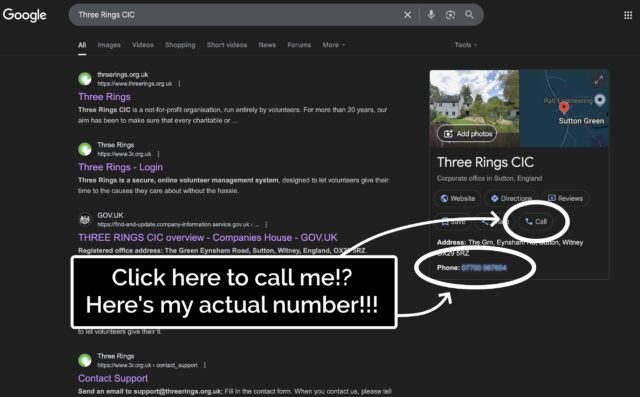
He was right. A Google search that surfaced Three Rings CIC’s “Google Business Profile” now featured… my personal mobile number. And a convenient “Call” button that connects you
directly to it.
Some years ago, I provided my phone number to Google as part of an identity verification process, but didn’t consent to it being shared publicly. And, indeed, they
didn’t share it publicly, until – seemingly at random – they started doing so, presumably within the last few weeks.
Concerned by this change, I logged into Google Business Profile to see if I could edit it back.
Apparently Google inserted my personal mobile number into search results for me, randomly, without me asking them to. Delightful.
I deleted my phone number from the business listing again, and within a few minutes it seemed to have stopped being served to random strangers on the Internet. Unfortunately deleting
the phone number also made the “Your phone number was updated by Google” message disappear, so I never got to click the “Learn more” link to maybe get a clue as to how and why this
change happened.
Don’t you hate it when you click the wrong button. Who reads these things, anyway, right?
Such feelings of rage.
Footnotes
1 Way back in 2002! We’re very nearly at the point where the Three Rings
system is older than the youngest member of the Three Rings team. Speaking of which, we’re seeking volunteers to help expand our support team: if you’ve got experience of
using Three Rings and an hour or two a week to spare helping to make volunteering easier for hundreds of thousands of people around the world, you should look us up!
2 Seriously: if you’re still using Google Search as your primary search engine, it’s past
time you shopped around. There are great alternatives that do a better job on your choice of one or more of the metrics that might matter to you: better privacy, fewer ads (or
more-relevant ads, if you want), less AI slop, etc.
While working on something else entirely1,
I had a random thought:
Could the :checked and and :has pseudo-classes and the subsequent-sibling (~) selector be combined to perform interactive filtering
without JavaScript?
Turns out, yes. Have a play with the filters on the side of this. You can either use:
“OR” mode, so you can show e.g. “all mammals and carnivores”, or
“AND” mode, so you can show e.g. “all mammals that are carnivores”.
Filter the animals!
(if it doesn’t work right where you are, e.g. in a feed reader, you can view it “standalone”)
There’s nothing particularly complicated here, although a few of the selectors are a little verbose.
First, we set the initial state of each animal. In “OR” mode, they’re hidden, because each selected checkbox is additive. In “AND” mode, they’re shown, because checking a checkbox can
only ever remove an animal from the result set:
The magic of the :has pseudo-class is that it doesn’t change the scope, which means that after checking whether “AND” or “OR” is checked within the #filters,
the #animals container is still an adjacent element.
Next time you’re implementing a filter interface, like this restaurant menu, perhaps ask whether you actually need JavaScript.
Then all we need to do is to use daisy-chain :has to show animals with a particular class if that class is checked in “OR” mode, or to hide animals that don’t have a
particular class in “AND” mode. Here’s what that looks like:
It could probably enjoy an animation effect to make it clearer when items are added and removed2, but that’s a consideration
for another day.
Many developers would be tempted to use JavaScript to implement the client-side version of a filter like this. And in some cases, that might be the right option.
But it’s always worth remembering that:
A CSS solution is almost-always more-performant than a JS one.
A JS solution is usually less-resilient than a CSS one: a CDN failure, unsupported API, troublesome content-blocker or syntax error will typically have a much larger
impact on JavaScript.
For the absolutely maximum compatibility, consider what you can do in plain HTML, or on the server-side, and treat anything on the client-side as progressive
enhancement.
Footnotes
1 The thing I was actually working on when I got distracted was an OAuth provider
implementation for Three Rings, connected with work that took place at this weekend’s hackathon to
(eventually) bring single-sign-on “across” Three Rings CIC’s products. Eventually being the operative word.
2 Such an animation should, of course, be wrapped in a @media
(prefers-reduced-motion: no-preference) media query!
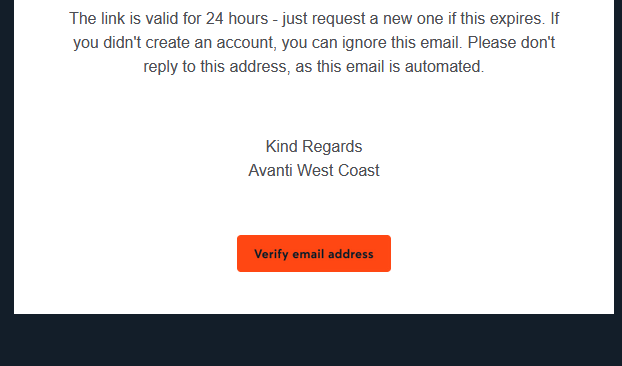
Clearly that certificate only applies to their website, though, and not to e.g. their emails. When you sign up an account with them, you need to verify your email address. They send you
a (HTML-only) email with a link to click. Here’s what that link looks like to a sighted person:
So far, so good. But here’s the HTML code they’re using to create that button. Maybe you’ll spot
the problem:
Despite specifying the font to use three times, they don’t actually have any alt text. So for somebody who can’t see that image, the link is
completely unusable1.
This made me angry enough that I gave up on my transaction and bought my train tickets from LNER instead.
Accessibility matters. And that includes emails. Do better, Avanti.
Footnotes
1 Incidentally, this also makes the email unusable for privacy-conscious people who, like
me, don’t routinely load remote images in emails. But that’s a secondary concern, really.
The video below is presented in portrait orientation, because your screen is taller than it is wide.
The video below is presented in landscape orientation, because your screen is wider than it is tall.
The video below is presented in square orientation (the Secret Bonus Square Video!), because your screen has approximately the same width as as its height. Cool!
This is possible (with a single <video> element, and without any Javascript!) thanks to some cool HTML features you might not be aware of, which I’ll briefly explain
in the video. Or scroll down for the full details.
<videocontrols><sourcesrc="squareish.mp4"media="(min-aspect-ratio: 0.95) and (max-aspect-ratio: 1.05)"/><sourcesrc="portrait.mp4"media="(orientation: portrait)"/><sourcesrc="landscape.mp4"/></video>
This code creates a video with three sources: squareish.mp4 which is shown to people on “squareish” viewports, failing that portrait.mp4 which is shown to
people whose viewports are taller than wide, and failing that landscape.mp4 which is shown to anybody else.
That’s broadly-speaking how the video above is rendered. No JavaScript needed.
Browsers only handle media queries on videos when they initially load, so you can’t just tip your phone over or resize the window: you’ll need to reload the page, too. But it works!
Give it a go: take a look at the video in both portrait and landscape modes and let me know what you think1.
Adding adaptive bitrate streaming with HLS
Here’s another cool technology that you might not have realised you could “just use”: adaptive bitrate streaming with HLS!
You’ve used adaptive bitrate streaming before, though you might not have noticed it. It’s what YouTube, Netflix, etc. are doing when your network connection degrades and you quickly get
dropped-down, mid-video, to a lower-resolution version2.
Turns out you can do it on your own static hosting, no problem at all. I used this guide (which has a great
description of the parameters used) to help me:
This command splits the H.264 video landscape.mp4 into three different resolutions: the original “v1” (1920×1080, in my case, with 96kbit audio), “v2” (1280×720, with
96kbit audio), and “v3” (640×360, with 48kbit audio), each with a resolution-appropriate maximum bitrate, and forced keyframes every 48th frame. Then it breaks each of those into HLS
segments (.ts files) and references them from a .m3u8 playlist.
The output from this includes:
Master playlist landscape.m3u8, which references the other playlists with reference to their resolution and bandwidth, so that browsers can make smart choices,
Playlists landscape_0.m3u8 (“v1”), landscape_1.m3u8 (“v2”), etc., each of which references the “parts” of that video,
Directories landscape_0/, landscape_1/ etc., each of which contain
data00.ts, data01.ts, etc.: the actual “chunks” that contain the video segments, which can be downloaded independently by the browser as-needed
Bringing it all together
We can bring all of that together, then, to produce a variable-aspect, adaptive bitrate, HLS-streamed video player… in pure HTML and suitable for static hosting:
<videocontrols><sourcesrc="squareish.m3u8"type="application/x-mpegURL"media="(min-aspect-ratio: 0.95) and (max-aspect-ratio: 1.05)"/><sourcesrc="portrait.m3u8"type="application/x-mpegURL"media="(orientation: portrait)"/><sourcesrc="landscape.m3u8"type="application/x-mpegURL"/></video>
You could, I suppose, add alternate types, poster images, and all kinds of other fancy stuff, but this’ll do for now.
One solution is to also provide the standard .mp4 files as an alternate <source>, and that’s fine I guess, but you lose the benefit of HLS (and
you have to store yet more files). But there’s a workaround:
Polyfill full functionality for all browsers
If you’re willing to use a JavaScript polyfill, you can make the code above work on virtually any device. I gave this a go, here, by:
Adding some JavaScript code that detects affected `<video>` elements and applying the fix if necessary:
// Find all <video>s which have HLS sources:for( hlsVideo of document.querySelectorAll('video:has(source[type="application/x-mpegurl"]), video:has(source[type="vnd.apple.mpegurl"])') ) {
// If the browser has native support, do nothing:if( hlsVideo.canPlayType('application/x-mpegurl') || hlsVideo.canPlayType('application/vnd.apple.mpegurl') ) continue;
// If hls.js can't help fix that, do nothing:if ( ! Hls.isSupported() ) continue;
// Find the best source based on which is the first one to match any applicable CSS media queriesconst bestSource =Array.from(hlsVideo.querySelectorAll('source')).find(source=>window.matchMedia(source.media).matches)
// Use hls.js to attach the best source:const hls =new Hls();
hls.loadSource(bestSource.src);
hls.attachMedia(hlsVideo);
}
It makes me feel a little dirty to make a <video>depend on JavaScript, but if that’s the route you want to go down while we wait for HLS support to become
more widespread (rather than adding different-typed sources) then that’s fine, I guess.
This was a fun dive into some technologies I’ve not had the chance to try before. A fringe benefit of being a generalist full-stack developer is that when you’re “between jobs”
you get to play with all the cool things when you’re brushing up your skills before your next big challenge!
(Incidentally: if you think you might be looking to employ somebody like me, my CV is over there!)
Footnotes
1 There definitely isn’t a super-secret “square” video on this page, though. No
siree. (Shh.)
2 You can tell when you get dropped to a lower-resolution version of a video because
suddenly everybody looks like they’re a refugee from Legoland.
I’m keeping an eye out for my next career move (want to hire me?). Off the back of that I’ve been brushing up on the kinds of skills that I might be asked to showcase
in any kind of “tech test”.
Not the kind of stuff I can do with one hand tied behind my back1,
but the things for which I’d enjoy feeling a little more-confident2.
Stuff that’s on my CV that I’ve done and can do, but where I’d like to check before somebody asks me about it in an interview.
React? Sure, I can do that…
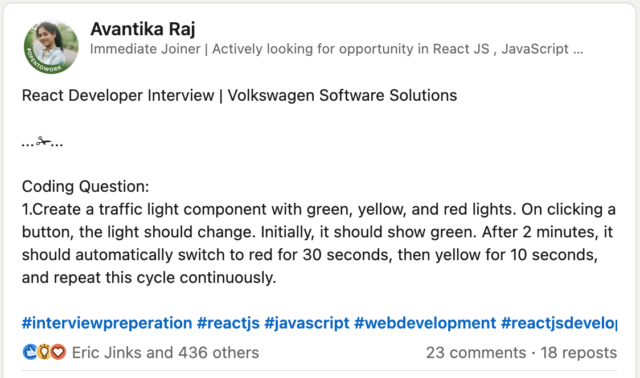
LinkedIn, GlassDoor, and bits of the Fediverse are a gold mine for the kinds of things that people are being asked to demonstrate in tech tests these days. Like this post:
I’d describe myself as a “stack-agnostic senior/principal full-stack/backend web developer/security engineer”3,
and so this question – which feels like it’s a filter for a junior developer with a React specialisation – isn’t really my wheelhouse. Which makes it a perfect excuse for an hour of
playing about with React.
My recent React experience has mostly involved Gutenberg blocks and WordPress theme component. This seemed like an excuse to check that I can wrangle a non-WordPress React stack.
This isn’t particularly sophisticated. I added customisable durations for each light, but otherwise it’s pretty basic.
Half an hour later, I’d proven to myself that yes, I could throw together a fresh application with React DOM and implement some React components, pass state around and whatnot.
Time to move on to the next thing, right? That’s what a normal person would do.
But that’s not the kind of person I am.
Let’s reimplement this as Web Components
What I found myself thinking was… man, this is chunky. React is… not the right tool for this job.
(Or, increasingly, any job. But I’ll get back to that.)
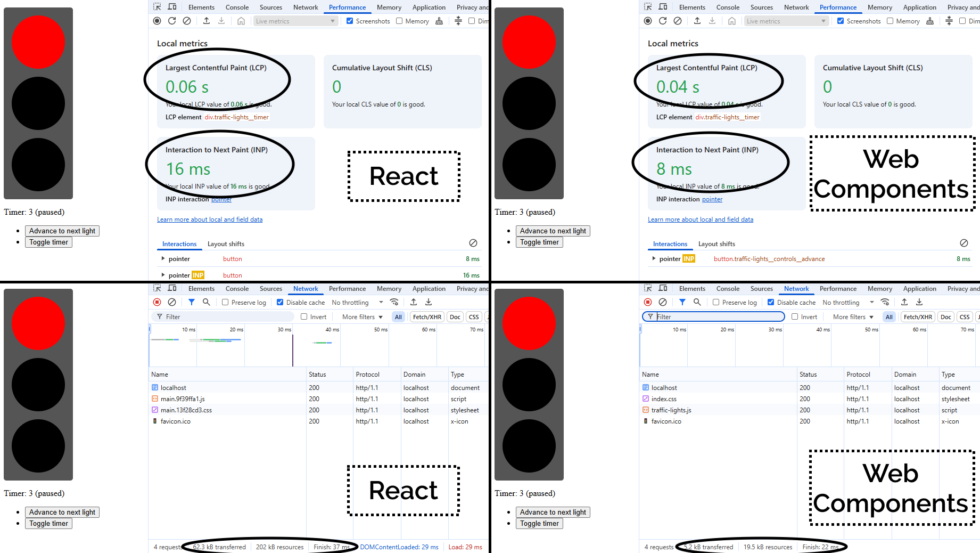
A minified production build of my new component and its dependencies came in at 202kB (62.3kB compressed). That feels pretty massive for something that does so-little.
So as an experiment, I re-implemented my new React component as a vanilla JS Web Component using a custom element. Identical functionality, but no third-party library dependencies.
Here’s what I got:
This one’s interactive. Press a button or two!
The Web Component version of this control has no dependency chain and uses no JSX, and so it has no transpilation step: the source version is production-ready. You could minify it, but
modern HTTP compression makes the impact of that negligible anyway: the whole thing weighs in at 19.5kB (5.2kB compressed) without minification.
And while I appreciate of course that there’s much more to JavaScript complexity and performance than file sizes… and beyond that I appreciate that there’s a lot more to making great
components than the resulting bundle size… it’s hard to argue that delivering the same functionality (and less fragility) in a twelfth of the payload isn’t significant.
By any metric you like, the Web Components version outperforms the React version of my traffic light component. And while it’s a vastly-simplified example, it scales. Performance is a
UX concern, and if you favour “what we’re familiar with” over “what’s best for our users”, that has to be a conscious choice.
But there’s a bigger point here:
React is the new jQuery
I’m alarmed by the fact that I’m still seeing job ads for “React developers”, with little more requirement than an ability to “implement things in React”.
From where I’m sitting, React is the new jQuery. It:
Was originally built to work around missing or underdeveloped JavaScript functionality
e.g. React’s components prior to Web Components
e.g. jQuery’s manipulation prior to document.querySelectorAll
Continued to be valuable as a polyfill and as a standard middleware while that functionality become commonplace
e.g. jQuery’s $.ajax until the Fetch API was a reliable replacement to XMLHttpRequest
No longer provides enough value to be worth using in a new project
And yet somehow gets added “out of habit” for many years
If you’ve got a legacy codebase with lots of React in it, you’re still going to need React for a while. Just like how you’re likely to continue to need jQuery for a while until you can
tidy up all those edge-cases where you’re using it.
(You might even be locked-in to using both React and jQuery for some time, if say you’ve got a plugin architecture that demands backwards-compatibility: I’m looking at you,
WordPress!)
But just as you’re already (hopefully) working to slowly extricate your codebases from any now-unnecessary jQuery dependencies they have… you should be working on an exit plan for your
React code, too. It’s done its time; it’s served its purpose: now it’s just a redundant dependency making your bundles cumbersome and harder to debug.
Everything React gives you on the client-side – components, state/hooks, routing4,
etc. – is possible (and easy) in modern JavaScript supported in all major browsers. And if you still really want an abstraction layer, there are plenty of options (and they’re
all a lot lighter than React!).
The bottom line is, I suppose…
You shouldn’t be hiring “React developers”!
If you’re building a brand new project, you shouldn’t be using React. It should be considered deprecated.
If you’ve got an existing product that depends on React… you should be thinking about how you’ll phase it out over time. And with that in mind, you want to be hiring versatile
developers. They’ll benefit from some experience with React, sure, but unless they can also implement for the modern Web of tomorrow, they’ll just code you deeper into
your dependency on React.
It’s time you started recruiting “Front-End Developers (React experience a plus)”. Show some long-term thinking! Or else the Web is going to move on without you, and in 5-10 years
you’ll struggle to recruit people to maintain your crumbling stack.
1 Exploiting or patching an injection vulnerability, optimising an SQL query, implementing
a WordPress plugin, constructing a CircleCI buildchain, expanding test coverage over a Rubygem, performing an accessibility audit of a web application, extending a set of
high-performance PHP-backed REST endpoints, etc. are all – I’d hope! – firmly in the “hold my beer” category of tech test skills I’d ace, for example. But no two tech stacks are
exactly alike, so it’s possible that I’ll want to brush up on some of the adjacent technologies that are in the “I can do it, but I might need to hit the docs pages”
category.
2 It’s actually refreshing to be learning and revising! I’ve long held that I should learn
a new programming language or framework every year or two to stay fresh and to keep abreast of what’s going on in world. I can’t keep up with every single new front-end JavaScript
framework any more (and I’m not sure I’d want to!)! But in the same way as being multilingual helps unlock pathways to more-creative thought and expression even if you’re only working
in your native tongue, learning new programming languages gives you a more-objective appreciation of the strengths and weaknesses of what you use day-to-day. tl;dr: if you haven’t
written anything in a “new” (to you) programming language for over a year, you probably should.
3 What do job titles even mean, any more? 😂 A problem I increasingly find is that I don’t
know how to describe what I do, because with 25+ years of building stuff for the Web, I can use (and have used!) most of the popular stacks, and could probably learn a new
one without too much difficulty. Did I mention I’m thinking about my next role? If you think we might “click”, I’d love to hear from you…
4 Though if you’re doing routing only on the client-side, I already hate you.
Consider for example the SlimJS documentation which becomes completely unusable if a third-party JavaScript CDN fails: that’s pretty
fragile!
Today, Ruth and JTA received a letter. It told them about an upcoming change to the
agreement of their (shared, presumably) Halifax credit card.
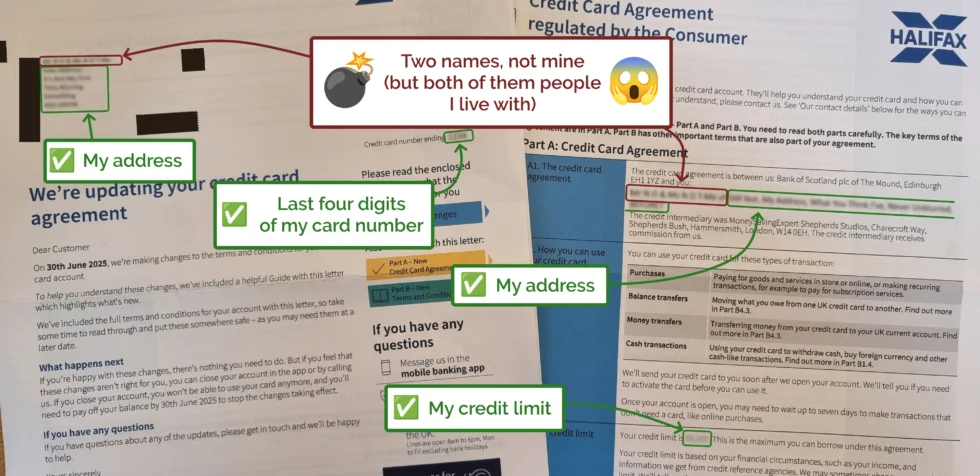
Except… they don’t have a shared Halifax credit card. Could it be a scam? Some sort of phishing attempt, maybe, or perhaps somebody taking out a credit card in their names?
I happened to be in earshot and asked to take a look at the letter, and was surprised to discover that all of the other details – the last four digits of the card, the credit
limit, etc. – all matched my Halifax credit card.
Halifax sent a letter to me, about my credit card… but addressed it to… two other people I live with‽
I spent a little over half an hour on the phone with Halifax, speaking to two different advisors, who couldn’t fathom what had happened or how. My credit card is not (and has never
been) a joint credit card, and the only financial connection I have to Ruth and JTA is that I share a mortgage with them. My guess is that some person or computer at Halifax tried to
join-the-dots from the mortgage outwards and re-assigned my credit card to them, instead?
Eventually I had to leave to run an errand, so I gave up on the phone call and raised a complaint with Halifax in writing. They’ve promised to respond within… eight weeks. Just
brilliant.

![XKCD comic. Transcript: [A single panel containing a large, elevated sign with Ponytail standing in front of it.] [Title, slightly off horizontal, more to the right than central and the character spacing is not entirely consistent/aesthetic:] Doanate[sic] to fix this sign! [To the left of the lower part of the sign there is an 'QR code', tilted slightly with a plaintext link beneath it:] https://[illegible].com [To the right are several dollar values, in one column, and 'fixes', in a second, some of which have their own self-demonstrating quirks.] [The letters "R" and "N" may be too close together:] $10 fix kerning [Both dollar value and fix text are shifted left of their respective columns:] $20 align columns [This line is in a smaller font:] $20 fix text size $50 fix typo $50 fix centering $100 fix rotation [Ponytail stands looking at the sign, apparently in the process of using a smartphone:] Grrr... [Caption below panel:] My new company's business model is based on extorting graphic designers.](https://bcdn.danq.me/_q23u/2025/07/fix_this_sign1.png)


















 RSS
RSS Spotify
 Pocket Casts
 Apple Podcasts
 YouTube

 Alpaca
 Anteater
 Bat
Bat
 Beetle
 Butterfly
 Camel
Camel
 Cat
Cat
 Chameleon
 Cobra
Cobra
 Cow
Cow
 Crab
Crab
 Crocodile
 Dog
Dog
 Duck
Duck
 Elephant
 Elk
Elk
 Fish
Fish
 Frog
Frog
 Giraffe
 Hippo
Hippo
 Husky
Husky
 Kangaroo
 Lion
Lion
 Macaw
Macaw
 Manatee
 Monkey
 Mouse
Mouse
 Octopus
 Ostrich
 Owl
Owl
 Panda
Panda
 Pelican
 Penguin
 Pig
Pig
 Rabbit
 Raccoon
 Ray
Ray
 Rhino
Rhino
 Rooster
 Shark
Shark
 Sheep
Sheep
 Sloth
Sloth
 Snake
Snake
 Spider
 Squirrel
 Swan
Swan
 Tiger
Tiger
 Toucan
 Turtle
 Whale
Whale