This review of Fairytale Farm originally appeared on Google Maps. See more reviews by Dan.
A bit weird, but if you’re looking for an eccentric (but good value) outing with young children, it fits the bill. Very good disabled accessibility.
This review of Fairytale Farm originally appeared on Google Maps. See more reviews by Dan.
A bit weird, but if you’re looking for an eccentric (but good value) outing with young children, it fits the bill. Very good disabled accessibility.
This review of Islip Village Shop originally appeared on Google Maps. See more reviews by Dan.
Remarkably good prices and friendly staff. Often a selection of local produce as well as a wide variety of the usual convenience store essentials. Plenty of space to park cars and bikes, but equally accessible by foot.
This is a repost promoting content originally published elsewhere. See more things Dan's reposted.
A11Y Nutrition Cards is an attempt to digest and simplify the accessibility expectations when it comes to component authoring. Based on the WAI ARIA Authoring Practices Guide.
…
This is a repost promoting content originally published elsewhere. See more things Dan's reposted.
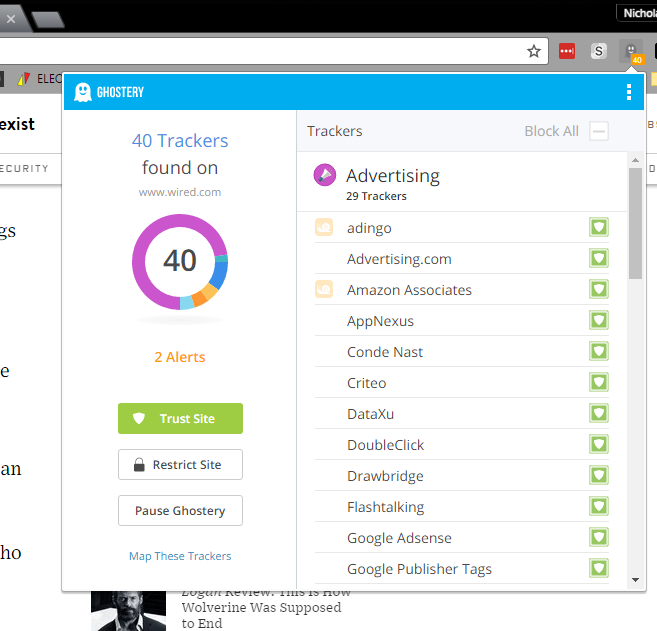
I’ve been, in the past, a firm distruster of ad blocking software. I still am, to a large extent. I don’t trust any company whose finance model is based on inserting exceptions for advertisers they like. But I installed Ghostery, whose model is to use the stats of what gets blocked to offer consultancy to companies to make their adverts less horrific. I like this idea, so I support it. My Ghostery install is fairly open, blocking only sites that offer page-takeover, popups, autoplaying videos, and other stuff that annoys me a lot. So I get a bit annoyed when I’m scrolling through a Wired article and get something like this:

Fine. I don’t disagree with the sentiment, but I don’t read Wired often enough to care about being a member, so yeah, ad supported isn’t unreasonable. Do you know what’s unreasonable, Wired? This is what happens when I whitelist your site:
…
I’ve gone full-nuclear these last few years and I just keep Javascript disabled for most domains, most of the time (I’m using uMatrix). The Web is a lot faster, for it, and I can just enable it for domains that “need” it as-and-when. I also keep a userscript to-hand that I can tweak as-and-when to block anti-ad-blocker scripts, so that enabling Javascript on your domain (but not the domains of your dozen trackers/advertisers) doesn’t mean that I see your anti-ad-blocker popups either.
If your site nags gently (e.g. by mentioning where ads would be that they’re blocked, perhaps with a sad face emoticon) I’ll consider adding the ads, if your site has value. But more likely, if your site’s good, I’ll be looking for the donate link. You can make more money out of me with donations than you ever would be showing me ads: I’m more than happy to pay for the Web… I’m not happy to have 75% of the work my computer does when I’m reading your content be about your advertising partners tracking me nor about trying to “block” me from seeing your content.
The full article helps show how bad the Web’s gotten. When it starts to get better again, perhaps I’ll stop blocking ads and trackers so aggressively.
This is a repost promoting content originally published elsewhere. See more things Dan's reposted.
JavaScript is like salt. If you add just enough salt to a dish, it’ll help make the flavour awesome. Add too much though, and you’ll completely ruin it.
Similarly, if you add just enough JavaScript to your website, it’ll help make it awesome. Add too much though, and you’ll completely ruin it.
This, this, a thousand times this.
This is a repost promoting content originally published elsewhere. See more things Dan's reposted.
From now on, when I try to engage junior programmers with the notion that they should make use of their general-purpose computers to answer questions for them… no matter how silly the question?… I’ll show them this video. It’s a moderately-concise explanation of the thought processes and programming practice involved in solving a simple, theoretical problem, and it does a great job at it.
This is a repost promoting content originally published elsewhere. See more things Dan's reposted.
…
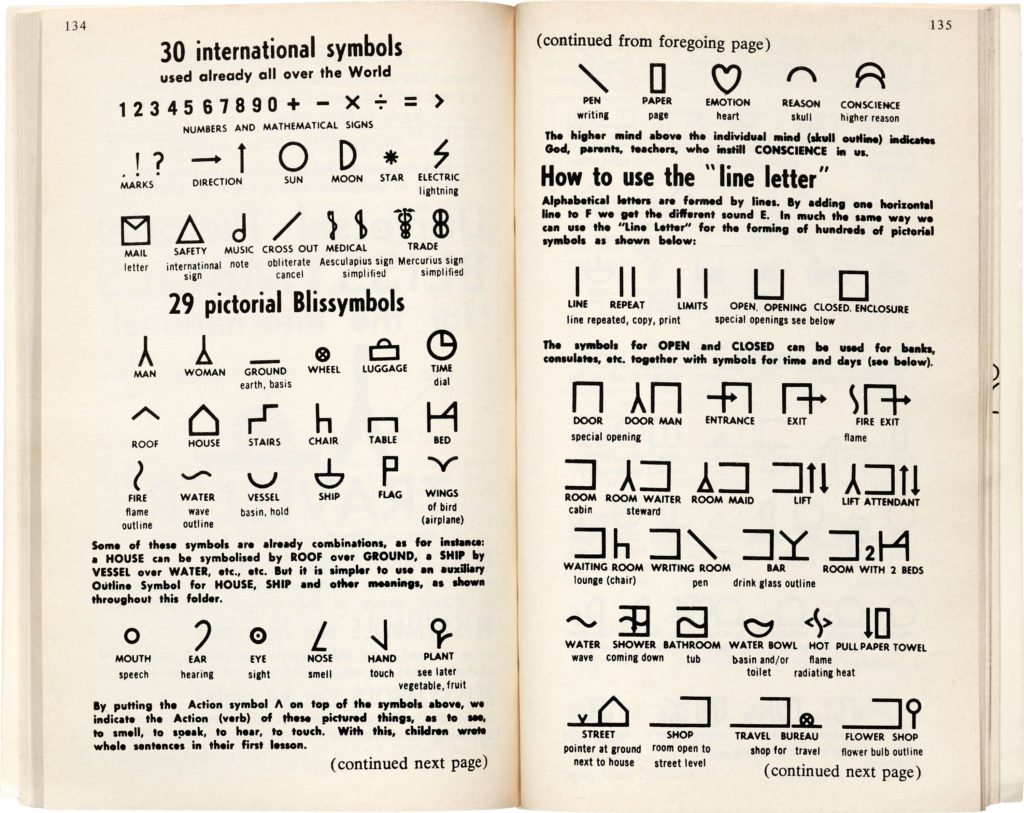
Blissymbolics was conceived by Austro-Hungarian expatriate Charles K. Bliss (1897–1985), born Karl Kasiel Blitz to a Jewish family in the town of Czernowitz (now Chernivtsi in modern-day Ukraine). He was introduced to signs and symbols at an early age in the form of circuit diagrams – his father’s many occupations included mechanic and electrician – which he understood immediately as a “logical language”. Bliss (then Blitz) attended the Vienna University of Technology for chemical engineering and went on to become chief of the patent department at the German TV and radio company Telefunken, a career that was cut short in early 1938 when the Third Reich annexed Austria.
Bliss was sent to Dachau concentration camp, and then to Buchenwald, before escaping to England in 1939. The eight-month German bombing offensive against Britain known as The Blitz began only months later, prompting him to change his surname “from the war-like Blitz to the peaceful Bliss”, as he recalled in a taped interview. Bliss fled to Shanghai by way of Canada and Japan, where he was reunited with his wife. Claire, a German Catholic, had used her connections to get Bliss out of Buchenwald, but her relatively privileged status was not enough to spare her a fraught journey to safety across Europe and Asia. Even in Shanghai, the couple was forced into the Hongkew ghetto following the Japanese occupation.
Bliss became enraptured with written Chinese, which he mistook initially for ideograms. (Chinese characters are, in fact, logograms.) Nevertheless, certain Chinese characters have pictographic qualities, and it was the symbol for “man”, that sparked Bliss’s epiphany. As he learned enough to read Chinese newspaper headlines and shop signage, he soon realized that he was reading the symbols not in Chinese, but in his native German. At the age of 45, Bliss was inspired to develop a non-alphabetic writing system that could be mastered in a short period of time and read by anyone regardless of their spoken language. This work remained the focus of his life, even after he and Claire emigrated to Australia in 1946 and despite the general apathy and indifference with which it was met.
…
Fascinating article about the little-known “language” of Blissymbolics: coming from a similar era and background to Esperanto, Blissymbolics failed even more to gain widespread traction but encompasses some really interesting ideas (about graphic notation and design, about linguistic concepts, about communication theory) that we can still learn from. Read the full article…
This is a repost promoting content originally published elsewhere. See more things Dan's reposted.
…
On a blog, I can write about blogging and whimsically toss in self-indulgent pictures of May’s budding azaleas.

I can end my career, right here, in a flash. I can rant about the perfidy and corruption of my local governing party, who I devoutly hope are about to be turfed by the voters. I can discuss the difference between O(1) and O(log(N)), which can usually be safely ignored.
On blogs, I can read most of the long-form writing that’s worth reading about the art and craft of programming computers. Or I can follow most of the economists’ debates that are worth having. Or I can check out a new photographer every day and see new a way of seeing the world.
Having said that, it seems sad that most of the traffic these days goes to BigPubs. That the advertising dollars are being sucked inexorably into Facebook/Google and away from anyone else. That these days, I feel good over a piece that gets more than twenty thousand reads (only one so far this year).
…
When I wrote about 20 years of blogging, this was the kind of thing I meant when I talked about why it’s important, to me. But Tim says it better.
This is a repost promoting content originally published elsewhere. See more things Dan's reposted.
As of next week, I’ll have been blogging for 20 years, or about 54% of my life. How did that happen?
The mid-1990s were a very different time for the World Wide Web (yes, we still called it that, and sometimes we even described its use as “surfing”). Going “on the Internet” was a calculated and deliberate action requiring tying up your phone line, minutes of “connecting” along with all of the associated screeching sounds if you hadn’t turned off your modem’s loudspeaker, and you’d typically be paying twice for the experience: both a monthly fee to your ISP for the service and a per-minute charge to your phone company for the call.
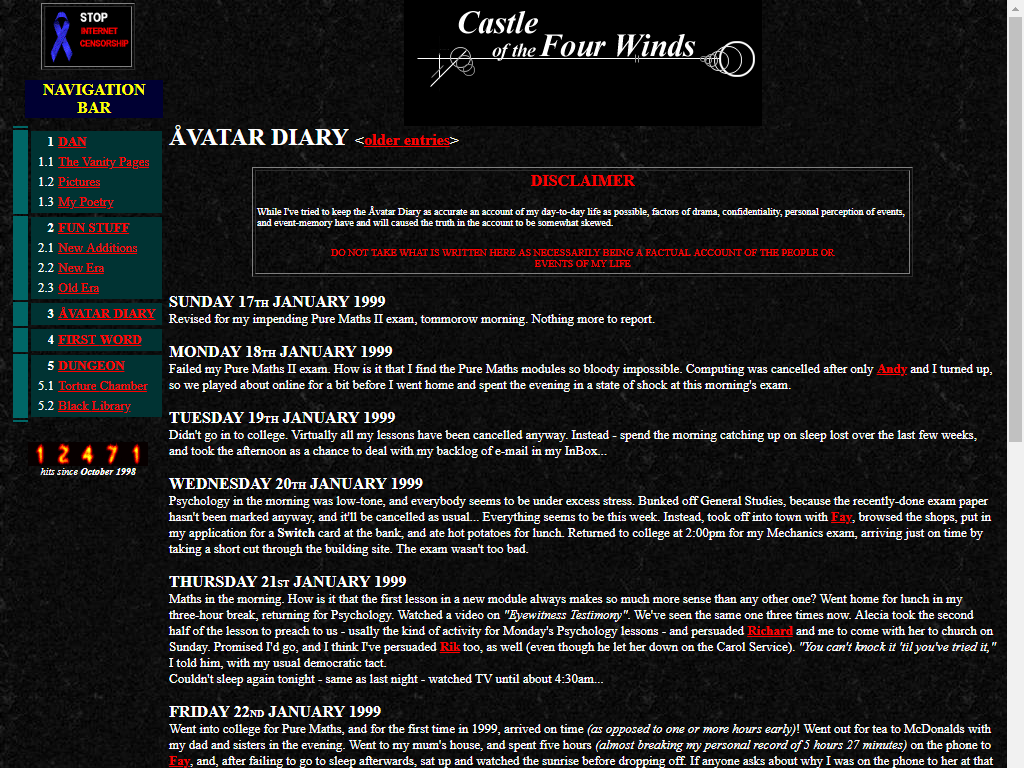
It was into this environment that in 1994 I published my first web pages: as far as I know, nothing remains of them now. It wasn’t until 1998 that I signed up an account with UserActive (whose website looks almost the same today as it did then) who offered economical subdomain hosting with shell and CGI support and launched “Castle of the Four Winds”, a set of vanity pages that included my first blog.
Except I didn’t call it a “blog”, of course, because it wasn’t until the following year that Peter Merholz invented the word (he also commemorated 20 years of blogging, this year). I didn’t even call it a “weblog”, because that word was still relatively new and I wasn’t hip enough to be around people who said it, yet. It was self-described as an “online diary”, a name which only served to reinforce the notion that I was writing principally for myself. In fact, it wasn’t until mid-1999 that I discovered that it was being more-widely read than just by me and my circle of friends when I attracted a stalker who travelled across the UK to try to “surprise” me by turning up at places she expected to find me, based on what I’d written online… which was exactly as creepy as it sounds.
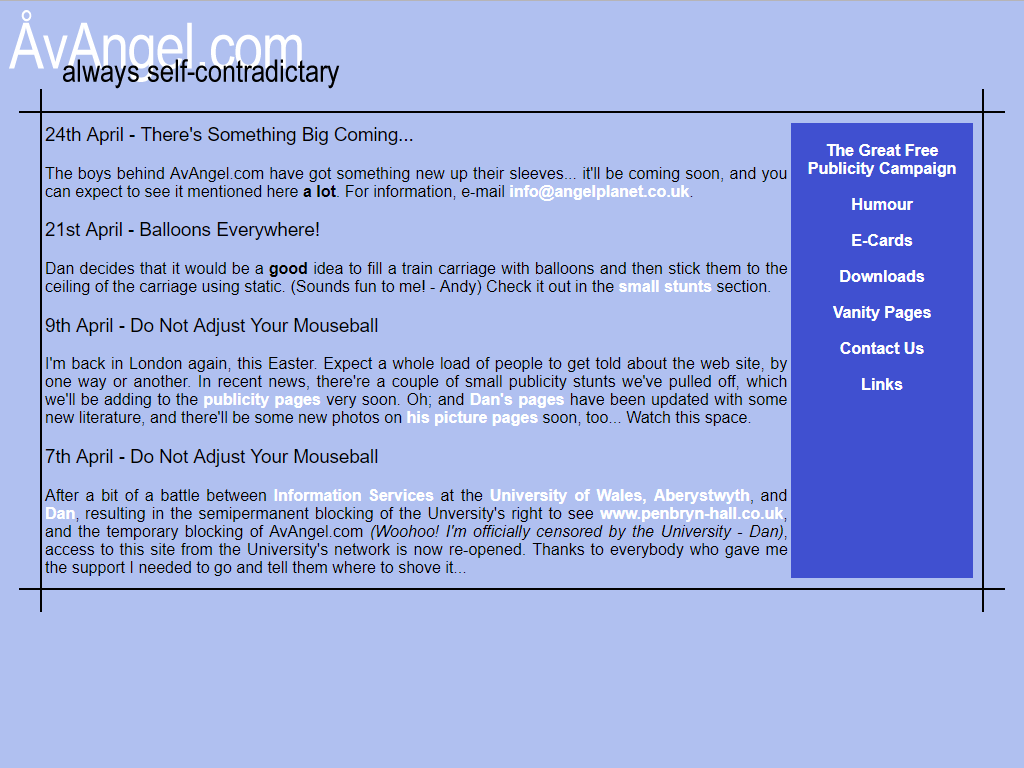
While the world began to panic that the coming millennium was going to break all of the computers, I migrated Castle of the Four Winds’ content into AvAngel.com, a joint vanity site venture with my friend Andy. Aside from its additional content (purity tests, funny stuff, risqué e-cards), what we hosted was mostly the same old stuff, and I continued to write snippets about my life in what was now quite-clearly a “blog-like” format, with the most-recent posts at the top and separate pages for content too old for the front page. Looking back, there’s still a certain naivety to these posts which exemplify the youth of the Web. For example, posts routinely referenced my friends by their email addresses, because spam was yet to become a big enough problem that people didn’t much mind if you put their email address on a public webpage somewhere, and because email addresses still carried with them a feeling of anonymity that ceased to be the case when we started using them for important things.
Technologically-speaking, too, this was a simpler time. Neither Javascript nor CSS support was widespread (nor consistently-standardised) enough to rely upon for anything other than the simplest progressive enhancement unless you were willing to “pick a side” in what we’d subsequently call the first browser war and put one of those apalling “best viewed in Internet Explorer” or “best viewed in Netscape Navigator” banners on your site. I’ve always been a believer in a universal web (and my primary browser at the time was Opera, anyway, as it mostly-remained until Opera went wrong in 2013), and I didn’t have the energy to write everything twice, so our cool/dynamic functionality came mostly from back-end (e.g. Perl, PHP) technologies.
Meanwhile, during my initial months as a student in Aberystwyth, I wrote a series of emails to friends back home entitled “Cool And Interesting Thing Of The Day To Do At The University Of Wales, Aberystwyth”, and put copies of each onto my student webspace; I’ve since recovered these and integrated them into my unified blog.
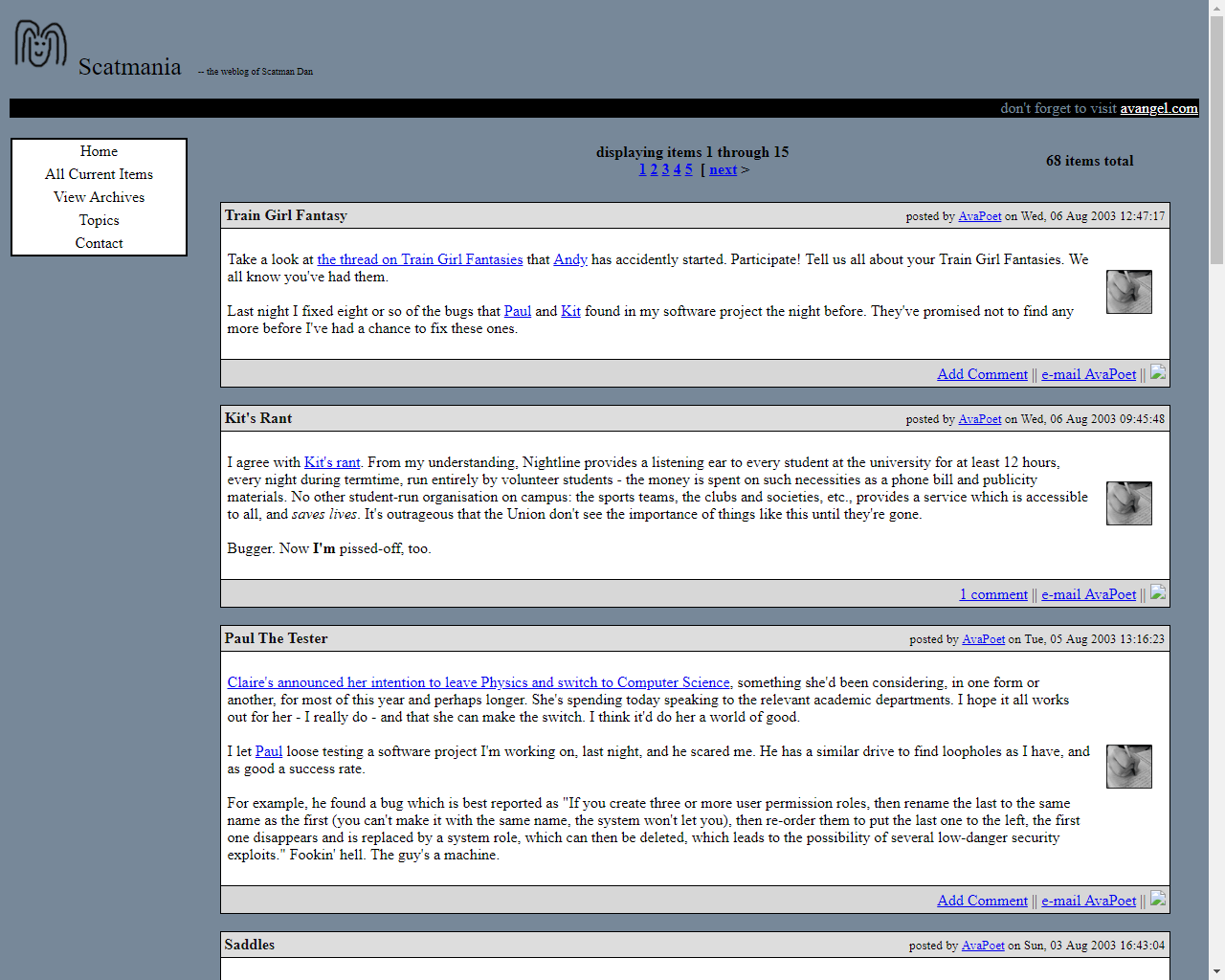
In 2002 I’d bought the domain name scatmania.org – a reference to my university halls of residence nickname “Scatman Dan”; I genuinely didn’t consider the possibility that the name might be considered scatalogical until later on. As I wanted to continue my blogging at an address that felt like it was solely mine (AvAngel.com having been originally shared with a friend, although in practice over time it became associated only with me), this seemed like a good domain upon which to relaunch. And so, in mid-2003 and powered by a short-lived and ill-fated blogging engine called Flip I did exactly that. WordPress, to which I’d subsequently migrate, hadn’t been invented yet and it wasn’t clear whether its predecessor, b2/cafelog, would survive the troubles its author was experiencing.
From this point on, any web address for any post made to my blog still works to this day, despite multiple technological and infrastructural changes to my blog (and some domain name shenanigans!) in the meantime. I’d come to be a big believer in the mantra that cool URIs don’t change: something that as far as possible I’ve committed to trying to upload in my blogging, my archiving, and my paid work since then. I’m moderately confident that all extant links on the web that point to earlier posts are all under my control so they can (and in most cases have) been fixed already, so I’m pretty close to having all my permalink URIs be “cool”, for now. You might hit a short chain of redirects, but you’ll get to where you’re going.
And everything was fine, until one day in 2004 when it wasn’t. The server hosting scatmania.org died in a very bad way, and because my backup strategy was woefully inadequate, I lost a lot of content. I’ve recovered quite a lot of it and put it back in-place, but some is probably gone forever.

The resurrected site was powered by WordPress, and this was the first time that live database queries had been used to power my blog. Occasionally, these days, when talking to younger, cooler developers, I’m tempted to follow the hip trend of reimplementing my blog as a static site, compiling a stack of host-anywhere HTML files based upon whatever-structure-I-like at the “backend”… but then I remember that I basically did that already for six years and I’m far happier with my web presence today. I’ve nothing against static site systems (I’m quite partial to Middleman, myself, although I’m also fond of Hugo) but they’re not right for this site, right now.
IndieAuth hadn’t been invented yet, but I was quite keen on the ideals of OpenID (I still am, really), and so I implemented what was probably the first viable “install-anywhere” implementation of OpenID for WordPress – you can see part of it functioning in the top-right of the screenshot above, where my (copious, at that time) LiveJournal-using friends were encouraged to sign in to my blog using their LiveJournal identity. Nowadays, the majority of the WordPress plugins I use are ones I’ve written myself: my blog is powered by a CMS that’s more “mine” than not!

Over the course of the first decade of my blogging, a few trends had become apparent in my technical choices. For example:
These were deliberate choices, but they didn’t require much consideration: growing up with a Web far less-sophisticated than today’s (e.g. truly stateless prior to the advent of HTTP cookies) and seeing the chaos caused during the first browser war and the period of stagnation that followed, these choices seemed intuitive.
(Perhaps it’s not so much of a coincidence that I’ve found myself working at a library: maybe I’ve secretly been a hobbyist archivist all along!)

As you’d expect from a blog covering a period from somebody’s teen years through to their late thirties, there’ve been significant changes in the kinds of content I’ve posted (and the tone with which I’ve done so) over the years, too. If you dip into 2003, for example, you’ll see the results of quiz memes and unqualified daily minutiae alongside actual considered content. Go back further, to early 1999, and it is (at best) meaningless wittering about the day-to-day life of a teenage student. It took until around 2009/2010 before I actually started focussing on writing content that specifically might be enjoyable for others to read (even where that content was frankly silly) and only far more-recently-still that I’ve committed to the “mostly technical stuff, ocassional bits of ‘life’ stuff” focus that I have today.
I say “committed”, but of course I’m fully aware that whatever this blog is now, it’ll doubtless be something somewhat different if I’m still writing it in another two decades…
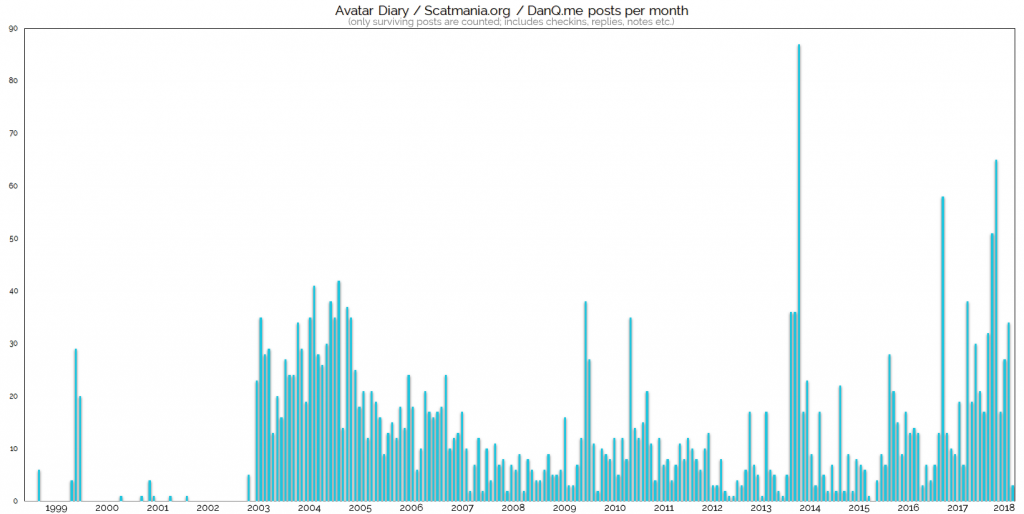
Once I reached the 2010s I started actually taking the time to think about the design of my blog and its meaning. Conceptually, all of my content is data-driven: database tables full of different “kinds” of content and associated metadata, and that’s pretty-much ideal – it provides a strong separation between content and presentation and makes it possible to make significant design changes with less work than might otherwise be expected. I’ve also always generally favoured a separation of concerns in web development and so I’m not a fan of CSS design methodologies that encourage class names describing how things should appear, like Atomic CSS. Even where it results in a performance hit, I’d far rather use CSS classes to describe what things are or represent. The single biggest problem with this approach, to my mind, is that it violates the DRY principle… but that’s something that your CSS preprocessor’s there to fix for you, isn’t it?
But despite this philosophical outlook on the appropriate gap between content and presentation, it took until about 2010 before I actually attached any real significance to the presentation at all! Until this point, I’d considered myself to have been more of a back-end than a front-end engineer, and felt that the most-important thing was to get the content out there via an appropriate medium. After all, a site without content isn’t a site at all, but a site without design is (or at least should be) still intelligible thanks to browser defaults! Remember, again, that I started web development at a time when stylesheets didn’t exist at all.
My previous implementations of my blog design had used simple designs, often adapted from open-source templates, in an effort to get them deployed as quickly as possible and move on to the next task, but now, I felt, it was time to do a little more.
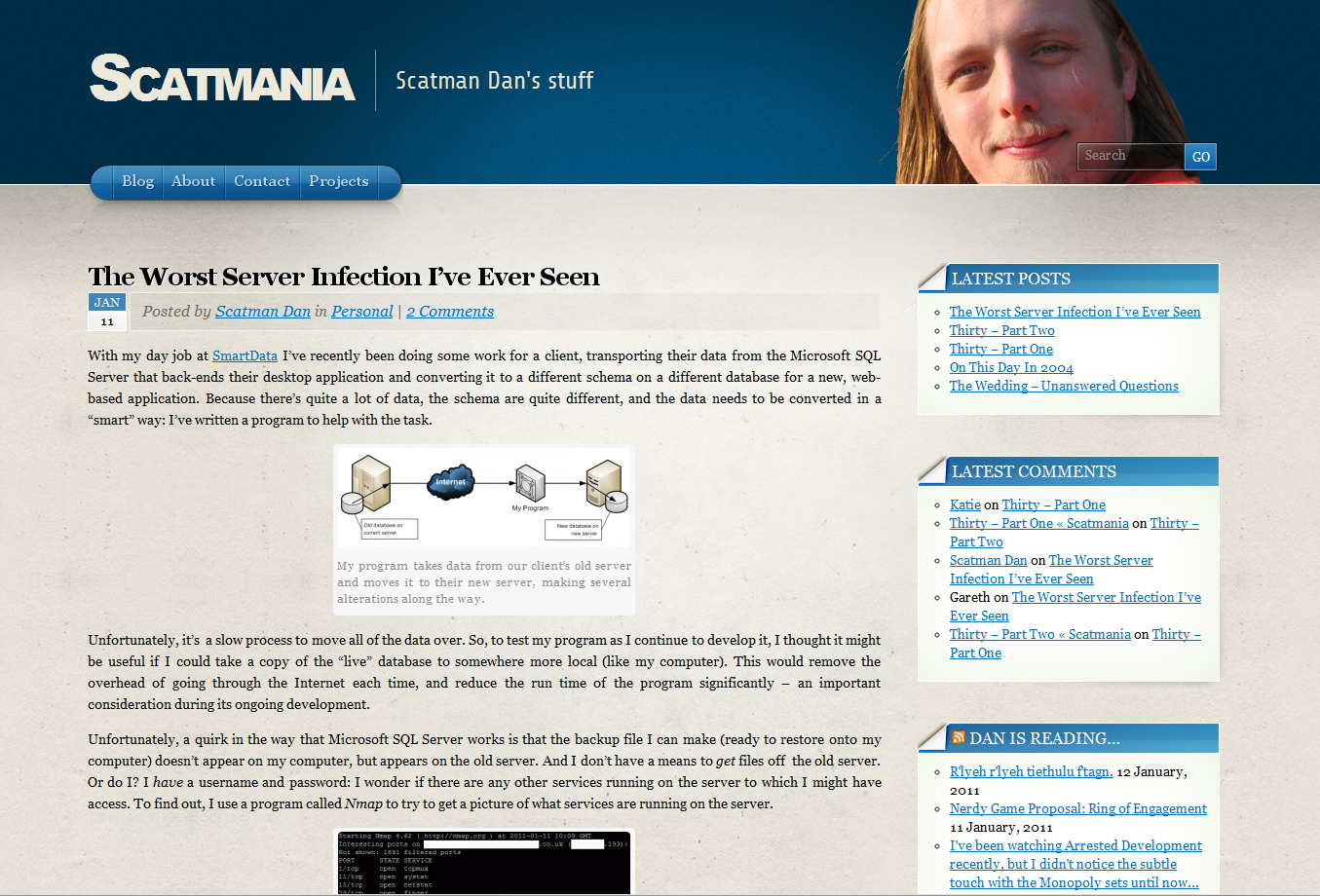
For a few years, I was producing a new theme once per year. I experimented with different colours, fonts, and layouts, and decided (after some ad-hoc A/B testing) that my audience was better-served by a “front” page than by being dropped directly into my blog archives as had previously been the case. Highlighting the latest few – and especially the very-latest – post and other recent content increased the number of posts that a visitor would be likely to engage with in a single visit. I’ve always presumed that the reason for this is that regular (but non-subscribing) readers are more-likely to be able to work out what they have and haven’t read already from summary text than from trying to decipher an entire post: possibly because my blogging had (has!) become rather verbose.
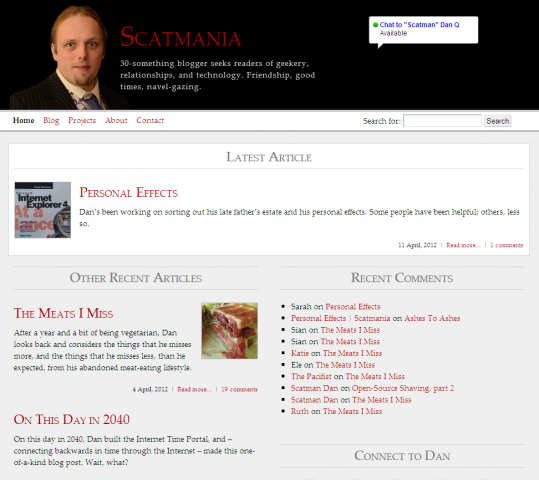
I went through a bit of a lull in blogging: I’ve joked that I spent more time on my 2010 and 2011 designs than I did on the sum total of the content that was published in between the pair of them (which isn’t true… at least, not quite!). In the month I left Aberystwyth for Oxford, for example, I was doing all kinds of exciting and new things… and yet I only wrote a total of two blog posts.
With RSS waning in popularity – which I can’t understand: RSS is amazing! – I began to crosspost to social networks like Twitter and Google+ (although no longer to Google+, following the news of its imminent demise) to help those readers who prefer to get their content via these media, but because I wasn’t producing much content, it probably didn’t make a significant difference anyway: the chance of a regular reader “missing” something must have been remarkably slim.
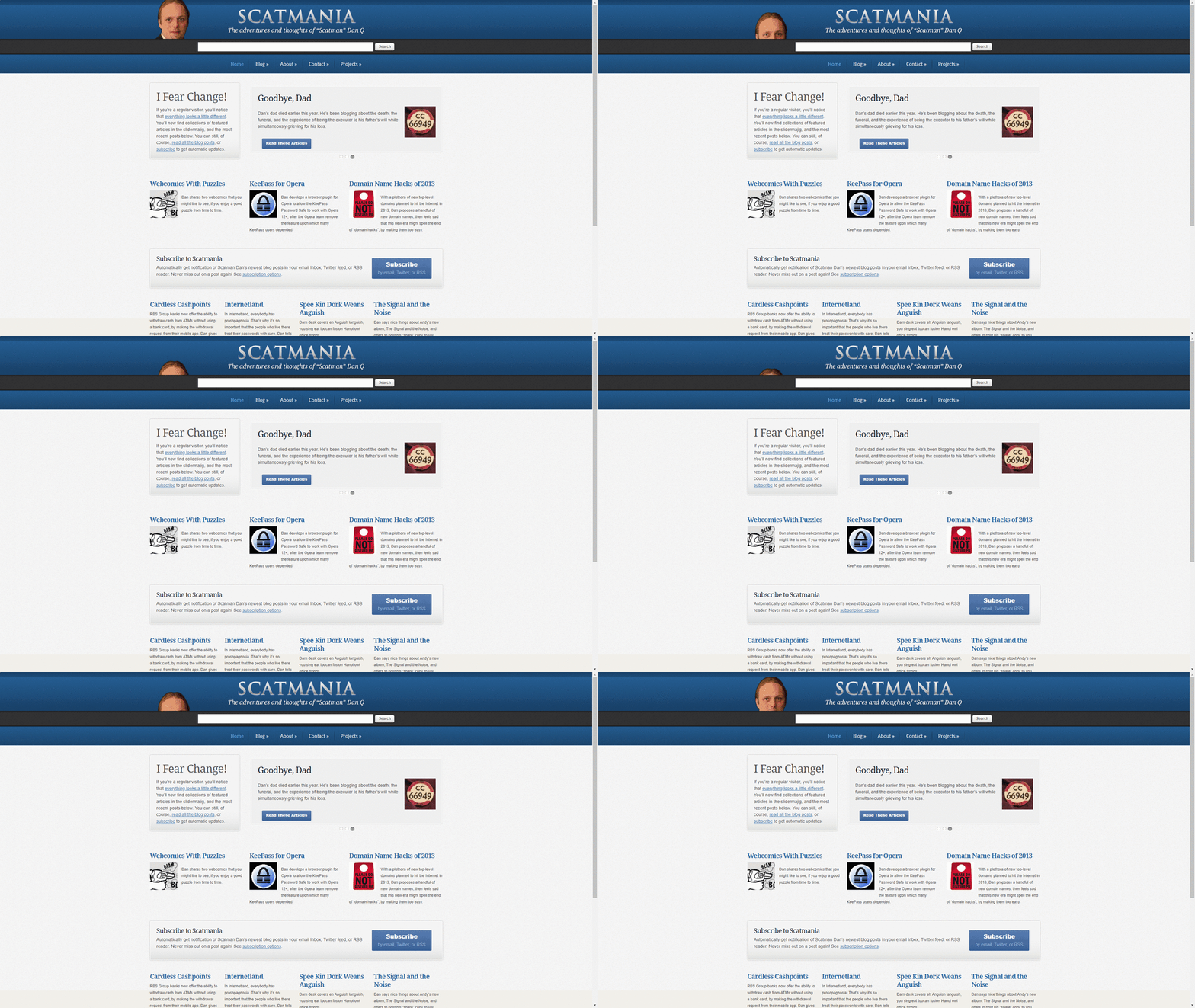
Nobody calls me “Scatman Dan” any more, and hadn’t for a long, long time. Given that my name is already awesome and unique all by itself (having changed to be so during the era in which scatmania.org was my primary personal domain name), it felt like I had the opportunity to rebrand.
I moved my blog to a new domain, DanQ.me (which is nice and short, too) and came up with a new collection of colours, fonts, and layout choices that I felt better-reflected my identity… and the fact that my blog was becoming less a place to record the mundane details of my daily life and more a place where I talk about (principally-web) technology, security, and GPS games… and just occasionally about other topics like breadmaking and books. Also, it gave me a chance to get on top of the current trend in web design for big, clean, empty spaces, square corners, and using pictures as the hook to a story.
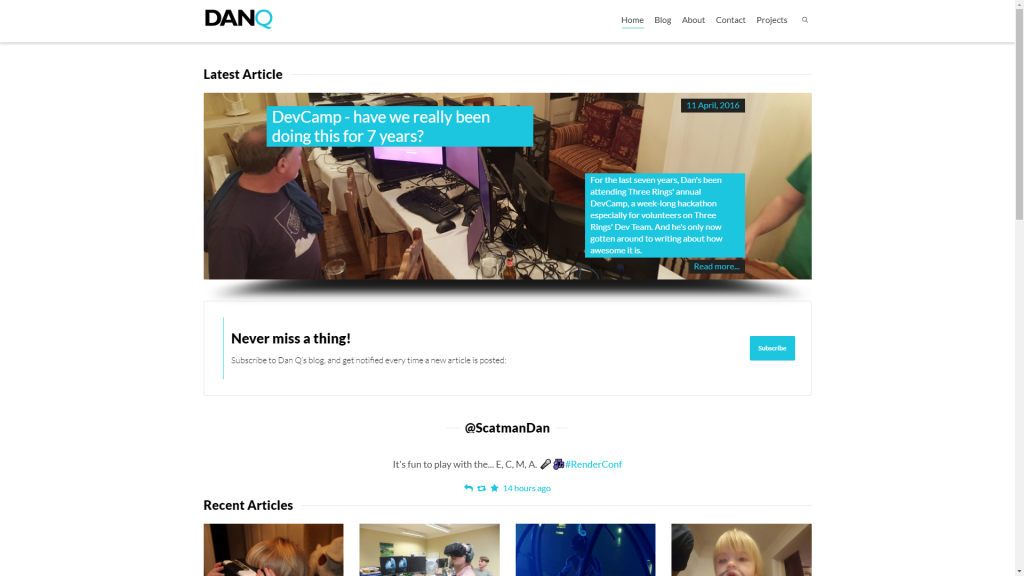
I’ve been working harder this last year or two to re-integrate (in a PESOS-like way) into my blog content that I’ve published elsewhere, mostly geocaching logs and geohashing expedition records, and I’ve also done so retroactively, so in addition to my first blog article on the subject of geocaching, you can read my first ever cache log without switching to a different site nor relying upon the continued existence and accessibility of that site. I’ve been working at being increasingly mindful of where my content is siloed outside of my control and reclaiming it by hosting it here, on my blog.
Particular areas in which I produce content elsewhere but would like to at-least maintain a copy here, and would ideally publish here first and syndicate elsewhere, although I appreciate that this is difficult, are:
(if you’re asking why I’m inclined to do all of these things: here’s why)
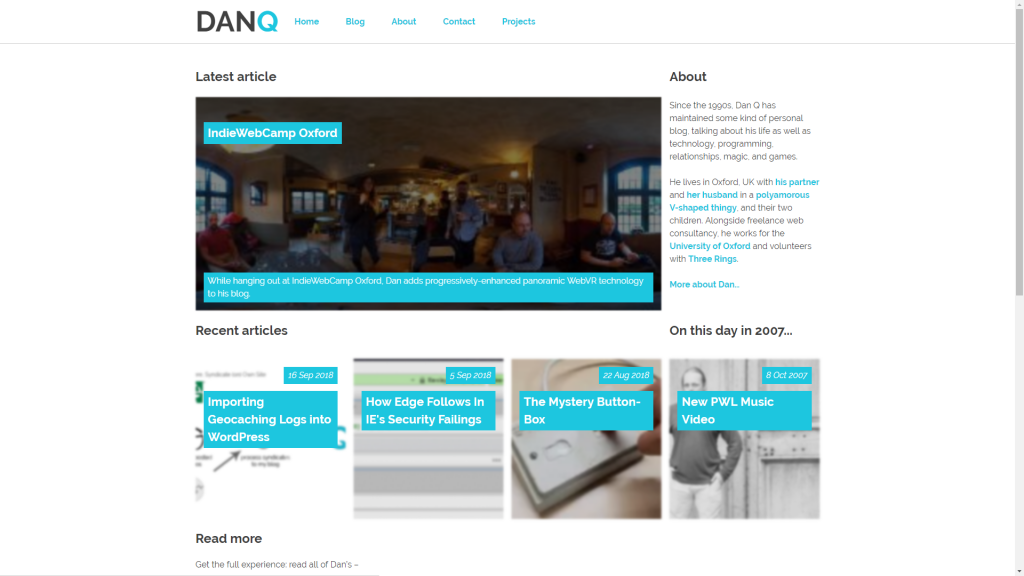
20 years and around 717,000 words worth of blogging down, it’s interesting to look back and see how things have changed: in my life, on the Web, and in the world in general. I’ve seen many friends’ blogs come and go: they move into a new phase of their life and don’t feel like what they wrote before reflects them today, most often, and so they delete them… which is fine, of course: it’s their content! But for me it’s always felt wrong to do so, for two reasons: firstly, it feels false to do so given that once something’s been put on the Web, it might well be online forever – you can’t put the genie back in the bottle! And secondly: for me, it’s valuable to own everything I wrote before. Even the cringeworthy things I wrote as a teenager who thought they knew everything and the antagonistic stuff I wrote in my early 20s but that I clearly wouldn’t stand by today is part of my history, and hiding that would be a disservice to myself.
The 17-year-old who wrote my first blog posts two decades ago this month fully expected that the things he wrote would be online forever, and I don’t intend to take that away from him. I’m sure that when I write a post in October 2038 looking back on the next two decades, I’ll roll my eyes at myself today, too, but for me: that’s part of the joy of a long-running personal blog. It’s like a diary, but with a sense of accountability. It’s a space on the web that’s “mine” into which I can dump pretty-much whatever I like.
I love it: I’ve been blogging for over half of my life, and if I can get back to you in 2031 and tell you that I’ve by-then been doing so for two-thirds of my life, that would be a win.
This is a reply to a post published elsewhere. Its content might be duplicated as a traditional comment at the original source.
Nicholas Avenell (Aquarionics) wrote:
…
(My first hard drive for the Amiga 600 was second hand from my dad’s old laptop. It was SIXTY MEGABYTES. It held DOZENS of games. I would need over EIGHT HUNDRED of those drives to hold a 50Gb World of Warcraft install).
…
I remember my first hard drive. It was 40Mb, and that felt flipping MASSIVE because I’d previously, like most people, been using floppy disks of no larger than 1.44Mb. My second hard drive was 105Mb and it felt like a huge step-up; I ripped my first MP3s onto that drive, and didn’t care for a moment that they each consumed 2%-3% of the available space (and took about 15 minutes each to encode).
Nowadays I look at my general-purpose home desktop’s 12TB RAID array and I think to myself… yeah, but it’s over half full… probably time to plan for the next upgrade. What happened‽ Somewhere along the line hard drive space became like mobile phone battery level became before it: something where you start to worry if you have less than half left. I don’t know how we got here and I’m not sure I’m happy about it, but suffice to say: technology today is nuts.
@adactio: The ampersand in https://adactio.com/notes/14395 isn’t being properly escaped in your RSS feed, breaking the XML – see e.g. https://validator.w3.org/feed/check.cgi?url=https%3A%2F%2Fadactio.com%2Frss
This is a repost promoting content originally published elsewhere. See more things Dan's reposted.
Why are testicles kept in a vulnerable dangling sac? It’s not why you think.
…
Some of you may be thinking that there is a simple answer: temperature. This arrangement evolved to keep them cool. I thought so, too, and assumed that a quick glimpse at the scientific literature would reveal the biological reasons and I’d move on. But what I found was that the small band of scientists who have dedicated their professional time to pondering the scrotum’s existence are starkly divided over this so-called cooling hypothesis.
…
This is a repost promoting content originally published elsewhere. See more things Dan's reposted.
Another monologue… This time from a suggestion of “Trophy”:
It’s weird, right? Stressing over something so small. I mean, it shouldn’t be that big a deal, but it is. It’s my trophy. I won it. I put in the hours and effort, I sacrificed for it, it’s mine.
I mean, she doesn’t even want it. She said so.
She said to me “Karen, I don’t care if I win”.
That drives me crazy. How could you not want to win? Isn’t that the point? I mean, why take part if you’re not wanting to win? What is the actual point? Dad always said “If you’re not a winner, then you’re a loser, and we’re not a family of losers”. So that’s driven me all through my life. I have to be first. I have to be the one to win. Nothing else matters. The highest grades in school, medals at the sports days, being top of the class. Nothing else matters.
Nothing.
…
Fabulous short story by my friend Bryn. Go read it…
This month’s blog activity was mostly dominated by 360° photos taken with my new camera, e.g. 1, 2, 3, 4, 5. I also had to archive two geocaches, Oxford’s Wild Wolf One and Two, as they’d been getting muggled/vandalised. I also shared a fabulous reinterpretation of Who’s On First? for the post-post-modern society.
Posts marked by an asterisk (*) are referenced by the summary above.
Reposts marked with a dagger (†) include my comments or interpretation.