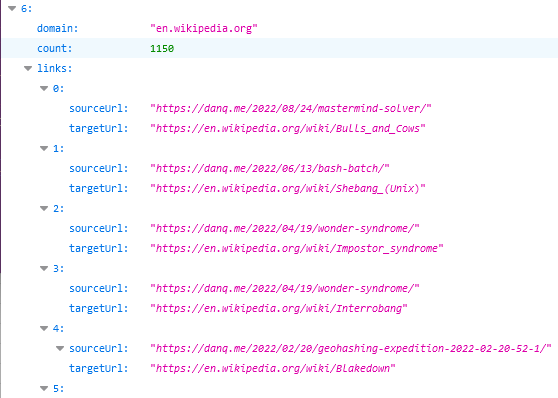
That’s a really useful thing to have in this new age of the web, where Refererer: headers are no-longer commonly passed cross-domain and Google Search no longer provides the link: operator. If you want to know if I’ve ever
linked to your site, it’s a bit of a drag to find out.
To nobody’s surprise whatsoever, I’ve made a so many links to Wikipedia that I might be single-handedly responsible for their PageRank.
So, obviously, I’ve written an implementation for WordPress. It’s really basic right now, but the source code can be
found here if you want it. Install it as a plugin and run wp outbound-links to kick it off. It’s fast: it takes 3-5 seconds to parse the entirety of danq.me,
and I’ve got somewhere in the region of 5,000 posts to parse.
You can see the results at https://danq.me/.well-known/links – if you’ve ever wondered “has Dan ever linked to my site?”, now you can find the
answer.
If this could be useful to you, let’s collaborate on making this into an actually-useful plugin! Otherwise it’ll just languish “as-is”, which is good enough for my purposes.
This weekend, while investigating a bug in some code that generates iCalendar (ICS) feeds, I learned about a weird quirk in the Republic of Ireland’s timezone. It’s such a strange thing (and has so little impact on
everyday life) that I imagine that even most Irish people don’t even know about it, but it’s important enough that it can easily introduce bugs into the way that computer calendars
communicate:
Most of Europe put their clocks forward in Summer, but the Republic of Ireland instead put their clocks backward in Winter.
If that sounds to you like the same thing said two different ways – or the set-up to a joke! – read on:
The timezones of Europe look pretty simple compared to some parts of the world, but the illustration of the British Isles hides an interesting eccentricity.
A Brief History of Time (in Ireland)
Spring forward, fall back… just a little bit back, though. Not too much.
After high-speed (rail) travel made mean solar timekeeping problematic, Great Britain in 1880 standardised on Greenwich Mean Time (UTC+0) as the time throughout the island, and Ireland
standardised on Dublin Mean Time (UTC-00:25:21). If you took a ferry from Liverpool to Dublin towards the end of the
19th century you’d have to put your watch back by about 25 minutes. With air travel not yet being a thing, countries didn’t yet feel the need to fixate on nice round offsets in the
region of one-hour (today, only a handful of regions retain UTC-offsets of half or quarter hours).
That’s all fine in peacetime, but by the First World War and especially following the Easter Rising, the British government decided that it was getting too tricky for their telegraph
operators (many of whom operated out of Ireland, which provided an important junction for transatlantic traffic) to be on a different time to London.
It’s widely believed that the world’s first “U UP? [STOP]” message never got a response as a direct result of Anglo-Irish timezone confusion.
So the Time (Ireland) Act 1916 was passed, putting Ireland on Greenwich Mean Time. Ireland put her clocks back by 35 minutes and synched-up with the rest of the British Isles.
And from then on, everything was simple and because nothing ever went wrong in Ireland as a result of the way it was governed by by Britain, nobody ever had to think about the question of
timezones on the island again.
Ah. Hmm.
“Those Irish people want to govern their own country, do they? After we so kindly shared our king with them? Right-ho: let’s set fire to their cities and see how
they feel then.”
Following Irish independence, the keeping of time carried on in much the same way for a long while, which will doubtless have been convenient for families spread across the Northern
Irish border. But then came the Second World War.
Summers in the 1940s saw Churchill introduce Double Summer Time which he believed
would give the UK more daylight, saving energy that might otherwise be used for lighting and increasing production of war materiel.
Ireland considered using the emergency powers they’d put in place to do the same, as a fuel saving measure… but ultimately didn’t. This was possibly
because aligning her time with Britain might be seen as undermining her neutrality, but was more likely because the government saw that such a measure wouldn’t actually have much impact
on fuel use (it certainly didn’t in Britain). Whatever the reason, though, Britain and Northern Ireland were again out-of-sync with one another until the war ended.
I like to imagine that the development of powerful computers by the folks at Bletchley Park was a result of needing to keep track of timezones across the British Isles.
From 1968 to 1971 Britain experimented with “British Standard Time” – putting the clocks forward in
Summer once, to UTC+1, and then leaving them there for three years. This worked pretty well except if you were Scottish in which case you’ll have found winter mornings to be even
gloomier than you were used to, which was already pretty gloomy. Conveniently: during much of this period Ireland was also on UTC+1, but in their case it was part of a
different experiment. Ireland were working on joining the European Economic Community, and aligning themselves with “Paris time” year-round was an unnecessary concession but an
interesting idea.
But here’s where the quirk appears: the Standard Time Act 1968, which made UTC+1 the “standard” timezone
for the Republic of Ireland, was not repealed and is still in effect. Ireland could have started over in 1971 with a new rule that made UTC+0 the standard and added a “Summer
Time” alternative during which the clocks are put forward… but instead the Standard Time (Amendment) Act
1971 left UTC+1 as Ireland’s standard timezone and added a “Winter Time” alternative during which the clocks are put back.
It all seems so simple until you actually think about it.
(For a deeper look at the legal history of time in the UK and Ireland, see this timeline. Certainly don’t get all your
history lessons from me.)
So what?
You might rightly be thinking: so what! Having a standard time of UTC+0 and going forward for the Summer (like the UK), is functionally-equivalent to having a standard time of UTC+1 and
going backwards in the Winter, like Ireland, right? It’s certainly true that, at any given moment, a clock in London and a clock in Dublin should show the same time. So why would
anybody care?
This code for Europe/Dublin, from the Perl module Data::ICal::TimeZone, is technically-incorrect
because it states that the winter time is the standard and daylight savings of +1 hour apply in the summer, rather than the opposite.
But declaring which is “standard” is important when you’re dealing with computers. If, for example, you run a volunteer rota management
system that supports a helpline charity that has branches in both the UK and Ireland, then it might really matter that the
computer systems involved know what each other mean when they talk about specific times.
The author of an iCalendar file can choose to embed timezone information to explain what, in that file, a particular timezone means. That timezone information might
say, for example, “When I say ‘Europe/Dublin’, I mean UTC+1, or UTC+0 in the winter.” Or it might say – like the code above! – “When I say ‘Europe/Dublin’, I mean UTC+0, or UTC+1 in the
summer.” Both of these declarations would be technically-valid and could be made to work, although only the first one would be strictly correct in accordance with the law.
But if you don’t include timezone information in your iCalendar file, you’re relying on the feed subscriber’s computer (e.g. their calendar software) to make a sensible
interpretation.. And that’s where you run into trouble. Because in cases like Ireland, for which the standard is one thing but is commonly-understood to be something different, there’s
a real risk that the way your system interprets and encodes time won’t necessarily be the same as the way somebody else’s does.
If I say I’ll meet you at 12:00 on 1 January, in Ireland, you rightly need to know whether I’m talking about 12:00 in Irish “standard” time (i.e. 11:00, because daylight savings are in
effect) or 12:00 in local-time-at-the-time-of-the-meeting (i.e. 12:00). Humans usually mean the latter because we think in terms of local time, but when your international computer
system needs to make sure that people are on a shift at the same time, but in different timezones, it needs to be very clear what exactly it means!
And when your daylight savings works “backwards” compared to everybody else’s… that’s sure to make a developer somewhere cry. And, possibly, blog about your weird legislation.
I think that CSS would be greatly helped if we solemnly state that “CSS4 is here!” In this post I’ll try to convince you of my viewpoint.
I am proposing that we web developers, supported by the W3C CSS WG, start saying “CSS4 is here!” and excitedly chatter about how it will hit the market any moment now and transform
the practice of CSS.
Of course “CSS4” has no technical meaning whatsoever. All current CSS specifications have their own specific
versions ranging from 1 to 4, but CSS as a whole does not have a version, and it doesn’t need one, either.
Regardless of what we say or do, CSS 4 will not hit the market and will not transform anything. It also does not describe any technical reality.
But if you’ve got more than a little web savvy you might still be surprised to hear me say that CSS4 is here, or even
that it’s a “thing” at all. Welll… that’s because it isn’t. Not officially. Just like JavaScript’s versioning has gone all evergreen these last few years,
CSS has gone the same way, with different “modules” each making their way through the standards and implementation processes
independently. Which is great, in general, by the way – we’re seeing faster development of long-overdue features now than we have through most of the Web’s history – but it
does make it hard to keep track of what’s “current” unless you follow along watching very closely. Who’s got time for that?
When CSS2 gained prominence at around the turn of the millennium it was revolutionary, and part of the reason for that
– aside from the fact that it gave us all some features we’d wanted for a long time – was that it gave us a term to rally behind. This browser already supports it, that browser’s
getting there, this other browser supports it but has a f**ked-up box model (you all know the one I’m talking about)… we at last had an overarching term to discuss what was supported,
what was new, what was ready for people to write articles and books about. Nobody’s going to buy a book that promises to teach them “CSS3 Selectors Level 3, Fonts Level 3, Writing Modes
Level 3, and Containment Level 1”: that title’s not even going to fit on the cover. But if we wrapped up a snapshot of what’s current and called it CSS4… now that’s going to sell.
Can we show the CSS WG that there’s mileage in this idea and make it happen? Oh, I hope so. Because while the
modular approach to CSS is beautiful and elegant and progressive… I’m afraid that we can’t use it to inspire junior developers.
Also: I don’t want this joke to forever remain among the top results
when searching for CSS4…
While being driven around England it struck me that humans are currently like the filling in a sandwich between one slice of machine — the satnav — and another — the car. Before the
invention of sandwiches the vehicle was simply a slice of machine with a human topping. But now it’s a sandwich, and the two machine slices are slowly squeezing out the human filling
and will eventually be stuck directly together with nothing but a thin layer of API butter. Then the human will be a superfluous thing, perhaps a little gherkin on the side of the
plate.
While we were driving I was reading the directions from a mapping app on my phone, with the sound off, checking the upcoming turns, and giving verbal directions to Mary, the driver. I
was an extra layer of human garnish — perhaps some chutney or a sliced tomato — between the satnav slice and the driver filling.
What Phil’s describing is probably familiar to you: the experience of one or more humans acting as the go-between to allow two machines to communicate. If you’ve ever re-typed a
document that was visible on another screen, read somebody a password over the phone, given directions from a digital map, used a pendrive to carry files between computers that weren’t
talking to one another properly then you’ve done it: you’ve been the soft wet meaty middleware that bridged two already semi-automated (but not quite automated enough)
systems.
Sigourney Weaver as Gwen DeMarco as Tawny Madison realised what she was doing back in 1999. Should I be alarmed that a science fiction spoof is a better indicator of the future that
the science fiction it parodies?
This generally happens because of the lack of a common API (a communications protocol) between two systems. If your
phone and your car could just talk it out then the car would know where to go all by itself! Or, until we get self-driving cars, it could at least provide the directions in a
way that was appropriately-accessible to the driver: heads-up display, context-relative directions, or whatever.
It also sometimes happens when the computer-to-human interface isn’t good enough; for example I’ve often offered to navigate for a driver (and used my phone for the purpose) because I
can add a layer of common sense. There’s no need for me to tell my buddy to take the second exit from every roundabout in Milton Keynes (did you know that the town has 930 of them?) – I can just tell them that I’ll let them know when
they have to change road and trust that they’ll just keep going straight ahead until then.
Finally, we also sometimes find ourselves acting as a go-between to filter and improve information flow when the computers don’t have enough information to do better by themselves. I’ll
use the fact that I can see the road conditions and the lane markings and the proposed route ahead to tell a driver to get into the right lane with an appropriate amount of
warning. Or if the driver says “I can see signs to our destination now, I’ll just keep following them,” I can shut up unless something goes awry. Your in-car SatNav can’t do that
because it can’t see and interpret the road ahead of you… at least not yet!
I was certainly glad that this prototype self-driving car could “see” me when it overtook my bike the other day.
But here’s my thought: claims of an upcoming AI
winter aside, it feels to me like we’re making faster progress in technologies related to human-computer interaction – voice and natural languages interfaces, popularised
by virtual assistants like Siri and Alexa and by chatbots – than we are in technologies related to universal computer interoperability. Voice-controller computers are hip and exciting
and attract a lot of investment but interoperable systems are hampered by two major things. The first thing holding back interoperability is business interests: for the longest while,
for example, you couldn’t use Amazon Prime Video on a Google Chromecast for a long while because the two companies couldn’t play nice. The second thing is a lack of interest by
manufacturers in developing open standards: every smart home appliance manufacturer wants you to use their app, and so your smart speaker manufacturer needs to implement code
to talk to each and every one of them, and when they stop supporting one… well, suddenly your thermostat switches jumps permanently from smart mode to dumb mode.
A thing that annoys me is that from a technical perspective making an open standard should be a much easier task than making an AI that can understand what a human is asking for or drive a car safely or whatever we’re using them for this week. That’s not to say that technical
standards aren’t difficult to get right – they absolutely are! – but we’ve been practising doing it for many, many decades! The very existence of the Internet over which you’ve been
delivered this article is proof that computer interoperability is a solvable problem. For anybody who thinks that the interoperability brought about by the Internet was inevitable or
didn’t take lots of hard work, I direct you to Darius Kazemi’s re-reading of the early standards discussions, which I first plugged a year ago; but the important thing is that people were working on it. That’s something we’re not really seeing in the Internet of
Things space.
Engineers: “Standards are good. Let’s have lots of them.”
Everybody else: “…?”
On our current trajectory, it’s absolutely possible that our virtual assistants will reach a point of becoming perfectly “human” communicators long before we can reach agreements about
how they should communicate with one another. If that’s the case, those virtual assistants will probably fall back on using English-language voice communication as their lingua
franca. In that case, it’s not unbelievable that ten to twenty years from now, the following series of events might occur:
You want to go to your friends’ house, so you say out loud “Alexa, drive me to Bob’s house in five minutes.” Alexa responds “I’m on it; I’ll let you know more in a few
minutes.”
Alexa doesn’t know where Bob’s house is, but it knows it can get it from your netbook. It opens a voice channel over your wireless network (so you don’t have to “hear” it) and says
“Hey Google, it’s Alexa [and here’s my credentials]; can you give me the address that [your name] means when they say ‘Bob’s house’?” And your netbook responds by reading
out the address details, which Alexa then understands.
Alexa doesn’t know where your self-driving car is right now and whether anybody’s using it, but it has a voice control system and a cellular network connection, so Alexa phones
up your car and says: “Hey SmartCar, it’s Alexa [and here’s my credentials]; where are you and when were you last used?”. The car replies “I’m on the driveway, I’m
fully-charged, and I was last used three hours ago by [your name].” So Alexa says “Okay, boot up, turn on climate control, and prepare to make a journey to [Bob’s
address].” In this future world, most voice communication over telephones is done by robots: your virtual assistant calls your doctor’s virtual assistant to make you an
appointment, and you and your doctor just get events in your calendars, for example, because nobody manages to come up with a universal API for medical appointments.
Alexa responds “Okay, your SmartCar is ready to take you to Bob’s house.” And you have no idea about the conversations that your robots have been having behind your back
I’m not saying that this is a desirable state of affairs. I’m not even convinced that it’s likely. But it’s certainly possible if IoT development keeps focussing on shiny friendly conversational interfaces at the expense of practical, powerful technical standards. Our already
topsy-turvy technologies might get weirder before they get saner.
But if English does become the “universal API” for robot-to-robot communication, despite all engineering common
sense, I suggest that we call it “sandwichware”.
This is part of a series of posts on computer terminology whose popular meaning – determined by surveying my friends – has significantly
diverged from its original/technical one. Read more evolving words…
The language we use is always changing, like how the word “cute” was originally a truncation of the word “acute”, which you’d use to describe somebody who was sharp-witted, as in “don’t
get cute with me”. Nowadays, we use it when describing adorable things, like the subject of this GIF:
Cute, but not acute.
But hang on a minute: that’s another word that’s changed meaning: GIF. Want to see how?
GIF
What people think it means
File format (or the files themselves) designed for animations and transparency. Or: any animation without sound.
What it originally meant
File format designed for efficient colour images. Animation was secondary; transparency was an afterthought.
The Past
Back in the 1980s cyberspace was in its infancy. Sir Tim hadn’t yet dreamed up the Web, and the Internet wasn’t something that most
people could connect to, and bulletin board systems (BBSes) –
dial-up services, often local or regional, sometimes connected to one another in one of a variety of ways – dominated the scene. Larger services like CompuServe acted a little like huge
BBSes but with dial-up nodes in multiple countries, helping to bridge the international gaps and provide a lower learning curve
than the smaller boards (albeit for a hefty monthly fee in addition to the costs of the calls). These services would later go on to double as, and eventually become
exclusively, Internet Service Providers, but for the time being they were a force unto themselves.
My favourite bit of this 1983 magazine ad for CompuServe is the fact that it claims a trademark on the word “email”. They didn’t try very hard to cling on to that claim, unlike their
controversial patent on the GIF format…
In 1987, CompuServe were about to start rolling out colour graphics as a new feature, but needed a new graphics format to support that. Their engineer Steve Wilhite had the
idea for a bitmap image format backed by LZW compression
and called it GIF, for Graphics Interchange Format. Each image could be composed of multiple frames each having up to 256
distinct colours (hence the common mistaken belief that a GIF can only have 256 colours). The nature of the palette system
and compression algorithm made GIF a particularly efficient format for (still) images with solid contiguous blocks of
colour, like logos and diagrams, but generally underperformed against cosine-transfer-based algorithms like
JPEG/JFIF for images with gradients (like most
photos).
This animated GIF (of course) shows how it’s possible to have more than 256 colours in a GIF by separating it into multiple non-temporal frames.
GIF would go on to become most famous for two things, neither of which it was capable of upon its initial release: binary
transparency (having “see through” bits, which made it an excellent choice for use on Web pages with background images or non-static background colours; these would become popular in
the mid-1990s) and animation. Animation involves adding a series of frames which overlay one another in sequence: extensions to the format in 1989 allowed the creator to specify the
duration of each frame, making the feature useful (prior to this, they would be displayed as fast as they could be downloaded and interpreted!). In 1995, Netscape added a custom extension to GIF to allow them to
loop (either a specified number of times or indefinitely) and this proved so popular that virtually all other software followed suit, but it’s worth noting that “looping” GIFs have never been part of the official standard!
Open almost any animated GIF file in a hex editor and you’ll see the word NETSCAPE2.0; evidence of
Netscape’s role in making animated GIFs what they are today.
Compatibility was an issue. For a period during the mid-nineties it was quite possible that among the visitors to your website there would be a mixture of:
people who wouldn’t see your GIFs at all, owing to browser, bandwidth, preference, or accessibility limitations,
people who would only see the first frame of your animated GIFs, because their browser didn’t support animation,
people who would see your animation play once, because their browser didn’t support looping, and
people who would see your GIFs as you intended, fully looping
This made it hard to depend upon GIFs without carefully considering their use. But people still did, and they just stuck a
button on to warn people, as if that made up for
it. All of this has happened before, etc.
In any case: as better, newer standards like PNG came to dominate the Web’s need for lossless static (optionally
transparent) image transmission, the only thing GIFs remained good for was animation. Standards like APNG/MNG failed to get off the ground, and so GIFs remained the dominant animated-image standard. As Internet connections became faster and faster in the 2000s, they experienced a
resurgence in popularity. The Web didn’t yet have the <video> element and so embedding videos on pages required a mixture of at least two of
<object>, <embed>, Flash, and black magic… but animated GIFs just worked and
soon appeared everywhere.
How animation online really works.
The Future
Nowadays, when people talk about GIFs, they often don’t actually mean GIFs! If you see a GIF on Giphy or WhatsApp, you’re probably actually seeing an MPEG-4 video file with no audio track! Now that Web video
is widely-supported, service providers know that they can save on bandwidth by delivering you actual videos even when you expect a GIF. More than ever before, GIF has become a byword for short, often-looping Internet
animations without sound… even though that’s got little to do with the underlying file format that the name implies.
What’s a web page? What’s anything?
Verdict: We still can’t agree on whether to pronounce it with a soft-G (“jif”), as Wilhite intended, or with a hard-G, as any sane person would, but it seems that GIFs are here to stay
in name even if not in form. And that’s okay. I guess.
To enable users to easily navigate to specific content in a web page, we propose adding support for specifying a text snippet in the URL. When navigating to such a URL, the browser
will find the first instance of the text snippet in the page and bring it into view.
Web standards currently specify support for scrolling to anchor elements with name attributes, as well as DOM elements with ids, when navigating to a fragment. While named anchors and elements with ids enable
scrolling to limited specific parts of web pages, not all documents make use of these elements, and not all parts of pages are addressable by named anchors or elements with ids.
Current Status
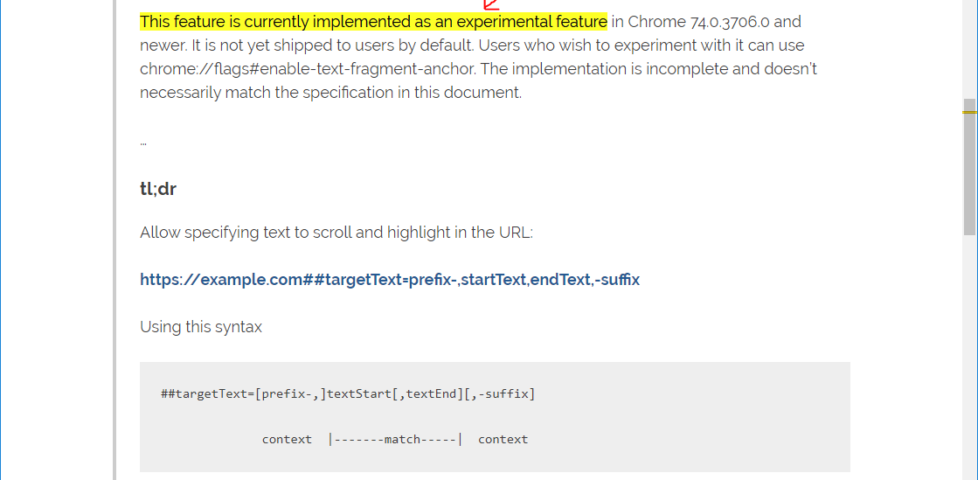
This feature is currently implemented as an experimental feature in Chrome 74.0.3706.0 and newer. It is not yet shipped to users by default. Users who wish to experiment with it can
use chrome://flags#enable-text-fragment-anchor. The implementation is incomplete and doesn’t necessarily match the specification in this document.
…
tl;dr
Allow specifying text to scroll and highlight in the URL:
This is a feature that I’ve wished that the Web had on many, many occasions. I’m sure you’ve needed it before, too: you’ve wanted to give somebody the URL of (or link to) a particular part of a page but there’s been no appropriately-placed anchor to latch on to. Being able to select part of the text
on the page and just copy that after a ## in the address bar would be so much simpler.
Naturally, I tried this experimental feature out on this very web page; it worked pretty nicely!
Chrome’s implementation is somewhat conservative, requiring a prefix of ##targetText= (this minimises the risk of collision with other applications which store/pass data
via hashes), but it’s still pretty full-featured, with support for prefixes and suffixes to the text to-be-selected. I quite like it, but of course it needs running down the standards
track before it can be relied upon as anything other than a progressive enhancement.
I do wonder, though, whether this will be met with resistance by ad/subscription-supported content creators as a new example of the deep linking they seem to hate so much.
Have you noticed how the titles printed on the spines of your books are all, for the most part, oriented the same way? That’s not a coincidence.
If you can’t see the spines of your books at all, perhaps you’re in a library and it’s the 17th century. Wait: how are you on the Internet?
ISO 6357 defines the standard positioning of titles on the spines of printed books (it’s also
codified as British Standard BS6738). If you assume that your book is stood “upright”, the question is one of which way you tilt your head to read the title printed on the spine. If you
tilt your head to the right, that’s a descending title (as you read left-to-right, your gaze moves down, towards the surface on which the book stands). If you tilt your head to
the left, that’s an ascending title. If you don’t need to tilt your head in either direction, that’s a transverse title.
Not every page in ISO 6357:1985 is as exciting as this one.
The standard goes on to dictate that descending titles are to be favoured: this places the title in a readable orientation when the book lays flat on a surface with the cover
face-up. Grab the nearest book to you right now and you’ll probably find that it has a descending title.
This eclectic shelf includes a transverse title (the Holy Bible), a semi-transverse title (The Book of English Magic) and a rare ascending title (A First
Dictionary) among a multitude of descending titles.
But if the book is lying on a surface, I can usually read the cover of the book. Only if a book is in a stack am I unable to do so, and stacks are usually relatively short and
so it’s easy enough to lift one or more books from the top to see what lies beneath. What really matters when considering the orientation of a spine title is, in my mind, how it appears
when it’s shelved.
It feels to me like this standard’s got things backwards. If a shelf of anglophone books is organised into any kind of order (e.g. alphabetically) then it’ll usually be from left to
right. If I’m reading the titles from left to right, and the spines are printed descending, then – from the perspective of my eyes – I’m reading from bottom to top:
i.e. backwards!
It’s possible that this is one of those things that I overthink.
The choice of this encoding has made ASCII-compatible standards the language that computers use to communicate to this day.
Even casual internet users have probably encountered a URL with “%20” in it where there logically ought to be a space character. If we look at this RFC we see this:
Column/Row Symbol Name
2/0 SP Space (Normally Non-Printing)
Hey would you look at that! Column 2, row 0 (2,0; 20!) is what stands for “space”. When you see that “%20”, it’s because of this RFC, which exists because of some bureaucratic
decisions made in the 1950s and 1960s.
…
Darius Kazemi is reading a single RFC every day throughout 2019 and writing up his understanding as to the content and importance of each. It’s good reading if you’re “into” RFCs and it’s probably pretty interesting if you’re just a casual Internet historian.