Questionnaire – Plain Text

This is a repost promoting content originally published elsewhere. See more things Dan's reposted.

Inspired by The Frugal Gamer, who was in turn inspired by Ellane, I today used my silly plain text only blog to answer a questionnaire that’s going around:

Questionnaire - Plain Text
==========================
The Frugal Gamer recently shared[1] her answers to the questions posed by plain-text advocate Ellane
in her post "Answer These Eight Questions About Your Plain Text Files"[2], and this blog (being even
more "plain text" than either of those!) seems like an obvious place to answer those questions on my
own behalf, too. Let's give them a go!
1. When did you start using plain text?
---------------------------------------
Way back in the mid-1980s, on an Amstrad CPC microcomputer, I guess, when I started editing files of
BASIC code (and, ocassionally, text-based data with CRLF delimiters). I'd later go on to extensively
make use of plain text in various flavours of DOS on IBM-compatible PCs: for programming, of course,
but also for general notetaking and personal documents.
2. Why did you start using plain text?
--------------------------------------
At those earliest points, it was an exercise in necessity! With only 64Kb of RAM and a 4MHz CPU, the
capabilities of my first microcomputer to do anything more gaphically-sophisticated than ASCII plain
text (or a nearby derivative of it) would be a stretch! It was around this same time that I tested a
basic word processing package called TASWord, but it was VERY bare-bones: just five font faces, able
to hold up to three "pages" in memory at once, and some kind of mail merge tool... even though I had
a (dot matrix!) printer capable of rendering those fonts, it didn't really justify the effort needed
to load the software from the tape deck in the first place with a simpler, lighter editor would, for
any real purpose, suffice!
3. What do you use plain text for?
----------------------------------
This blog, for a start!
Aside from when I'm programming or taking basic notes, mostly I end up writing Markdown, these days.
Obsidian's a wonderful notetaking app, but in practice all it REALLY is is a tool for collating text
files and doing on-the-fly plain-text-to-markdown rendering. I don't really use any of its many cool
plugins for anything more-sophisticated than that.
And I'm also routinely found writing Markdown (or plain text!) for programming-adjacent jobs: commit
logs, pull requests, test instructions, and the like.
4. What keeps you using plain text?
-----------------------------------
My favourite thing about plain text is its longevity. I have notes (old emails, poems, logs from IRC
and IM clients, personal notes, even letters) that I wrote in plain text formats 30+ years ago. Even
though technology has moved on, I have absolutely no problem reading them today just as I would have
when they were first written.
5. Do you use any markup or formatting languages? If so, which ones and why?
----------------------------------------------------------------------------
My most-used markup languages are Markdown and HTML (although neither on THIS blog, obviously). Both
provide functionality that's absent from plain text while still retaining at least a part of the top
feature of plain text: its universality and longevity. Markdown's perfectly human-readable even when
you don't have an interpreter to hand already. HTML _can_ be very human-readable, too, if the author
has taken the care to make it so... and even if it isn't, it can be transformed to plain text pretty
trivially even if there isn't a Web browser to hand.
6. What are your favourite plain text tools or applications?
------------------------------------------------------------
My go-to text editor is Sublime Text (I'm using it right now). After over a decade of Emacs being my
preferred text editor, Sublime Text was what dragged me kicking and screaming into 21st century text
editing! I love that it's clean, and simple, and really fast (I tried Atom or VSCode or one of those
other "heavyweight" editors, implemented in Electron, and found it it to be unbearably slow; perhaps
faster processors have made them more-bearable, but doesn't that feel a little bit like treating the
symptom rather than solving the problem?).
Oh, and Obsidian, as previously noted. Sometimes I'll use Notepad++ on a Windows box, or Nano, Pico,
or Emacs from a command-line.
And just sometimes - more often than you might expect, I just daisychain an `echo` or a `printf` and
a `>>` and just concatenate things into a file. Sometimes that's all you need!
7. Is there one tool you can’t do without?
------------------------------------------
Nope! I've spent long enough doing plain text things with enough different tools that - perhaps with
a little mumbling and grumbling - I can adapt to whatever tools are available. Though you'll find me
grumpy if you make me work on a system without `grep` available!
8. Is there anything you can’t do with plain text?
--------------------------------------------------
I mean... ultimately, there has to be right? Sure, you can write general-purpose software using your
plain text editor, but you'll still need a compiler or interpreter to run it, and how is ITS program
code rendered? No matter what your stack is, eventually you'll find that you're running into machine
code, and - even though it can be 1:1 mapped to assembly... that's a translation, not what it IS. So
fundamentally, there's a limit to the power of plain text.
But once you're balanced atop a well-made toolchain, there's a hell of a lot you can do! Data can be
rendered as CSV, YAML, JSON or whatever. Markup can add value while retaining the human-readable joy
of a simple, plain text file. It saddens me when I see somebody type out their shopping list in e.g.
Microsoft Word or some other monster, when Notepad would have plenty sufficed (and be faster, with a
smaller file size, and increased interoperability!).
I've long loved the "Unix Philosophy" that plain text should be the default data format, rather than
any binary format, between applications. That, in itself, is a reminder of plain text's versatility!
It's the universal language of humans and machines. And it's here to stay.
Links
-----
[1] https://www.thefrugalgamer.net/blog/2026/01/22/questionnaire-plain-text/
[2] https://ellanew.com/2025/01/19/ptpl-191-answer-8-questions-why-plain-text

D’ya know what? Back when I used to write lots of stuff on Usenet and BBSes, I got really good at manually wrapping at, say, 80 characters. Even doing full justification by tweaking word choices or by just manually injecting spaces in the places that that produce the fewest “rivers”.

I’ve sort-of lost the knack for it. But I think I did a pretty good job with this post!
The Scroll Art Museum

This is a repost promoting content originally published elsewhere. See more things Dan's reposted.

Scroll art is a form of ASCII art where a program generates text output in a command line terminal. After the terminal window fills, it begins to scroll the text upwards and create an animated effect. These programs are simple, beautiful, and accessible as programming projects for beginners. The SAM is a online collection of several scroll art examples.

Here are some select pieces:

  • Zig-zag, a simple periodic pattern in a dozen lines of code.
  • Orbital Travels, sine waves intertwining.
  • Toggler, a woven triangular pattern restricted to two characters.
  • Proton Stream, a rapid, chaotic lightning pattern.

There are two limitations to most scroll art:

  • Program output is limited to text (though this could include emoji and color.)
  • Once printed, text cannot be erased. It can only scroll up.

But these restrictions compel creativity. The benefit of scroll art is that beginner programmers can create scroll art apps with a minimal amount of experience. Scroll art requires knowing only the programming concepts of print, looping, and random numbers. Every programming langauge has these features, so scroll art can be created in any programming language without additional steps. You don’t have to learn heavy abstract coding concepts or configure elaborate software libraries.

Okay, so: scroll art is ASCII art, except the magic comes from the fact that it’s very long and as your screen scrolls to show it, an animation effect becomes apparent. Does that make sense?

Here, let me hack up a basic example in… well, QBASIC, why not:

Anyway, The Scroll Art Museum has lots of them, and they’re much better than mine. I especially love the faux-parallax effect in Skulls and Hearts, created by a “background” repeating pattern being scrolled by a number of lines slightly off from its repeat frequency while a foreground pattern with a different repeat frequency flies by. Give it a look!

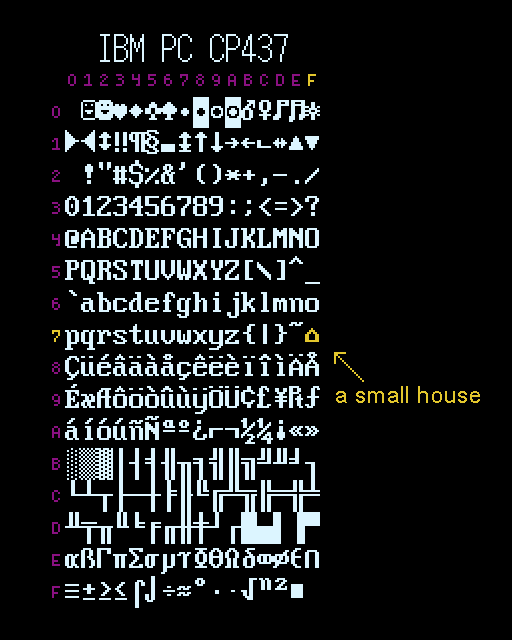
Why is there a “small house” in IBM’s Code page 437?

This is a repost promoting content originally published elsewhere. See more things Dan's reposted.

There’s a small house ( ) in the middle of IBM’s infamous character set Code Page 437. “Small house”—that’s the official IBM name given to the glyph at code position 0x7F, where a control character for “Delete” (DEL) should logically exist. It’s cute, but a little strange. I wonder, how did it get there? Why did IBM represent DEL as a house, of all things?

Code Page 437 table, highlighting the character 'small house' at 0x7F

It probably ought to be no surprise that I, somebody who’s written about the beauty and elegance of the ASCII table, would love this deep dive into the specifics of the unusual graphical representation of the DEL character in IBM Code Page 437.

It’s highly accessible, so even if you’ve only got a passing interest in, I don’t know, text encoding or typography or the history of computing, it’s a great read.

×

The Elegance of the ASCII Table

Duration

Podcast Version

This post is also available as a podcast. Listen here, download for later, or subscribe wherever you consume podcasts.

If you’ve been a programmer or programming-adjacent nerd1 for a while, you’ll have doubtless come across an ASCII table.

An ASCII table is useful. But did you know it’s also beautiful and elegant.

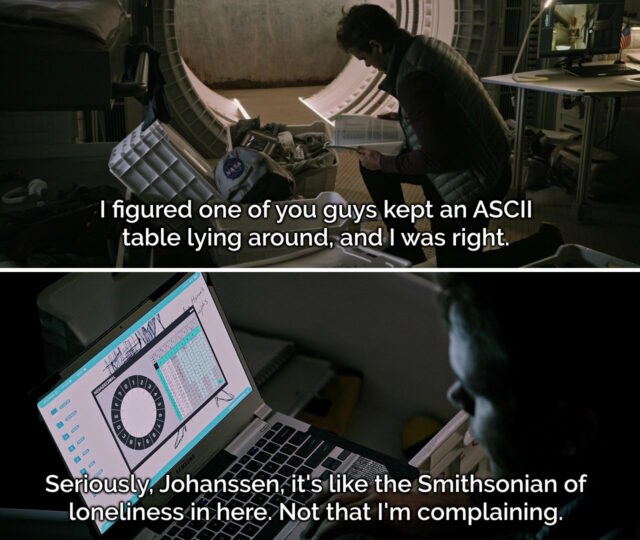
Frames from the scene in The Martian where Mark Watney discovers Beth Johanssen's ASCII table.
Even non-programmer-adjacent nerds may have a cultural awareness of ASCII thanks to books and films like The Martian2.
ASCII‘s still very-much around; even if you’re transmitting modern Unicode3 the most-popular encoding format UTF-8 is specifically-designed to be backwards-compatible with ASCII! If you decoded this page as ASCII you’d get the gist of it… so long as you ignored the garbage characters at the end of this sentence! 😁

History

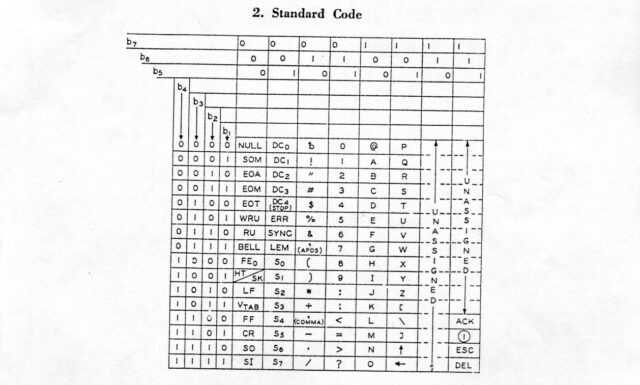
ASCII was initially standardised in X3.4-1963 (which just rolls off the tongue, doesn’t it?) which assigned meanings to 100 of the potential 128 codepoints presented by a 7-bit4 binary representation: that is, binary values 0000000 through 1111111:

Scan of a X3.4-1963 ASCII table.
Notably absent characters in this first implementation include… the entire lowercase alphabet! There’s also a few quirks that modern ASCII fans might spot, like the curious “up” and “left” arrows at the bottom of column 101____ and the ACK and ESC control codes in column 111____.

If you’ve already guessed where I’m going with this, you might be interested to look at the X3.4-1963 table and see that yes, many of the same elegant design choices I’ll be talking about later already existed back in 1963. That’s really cool!

Table

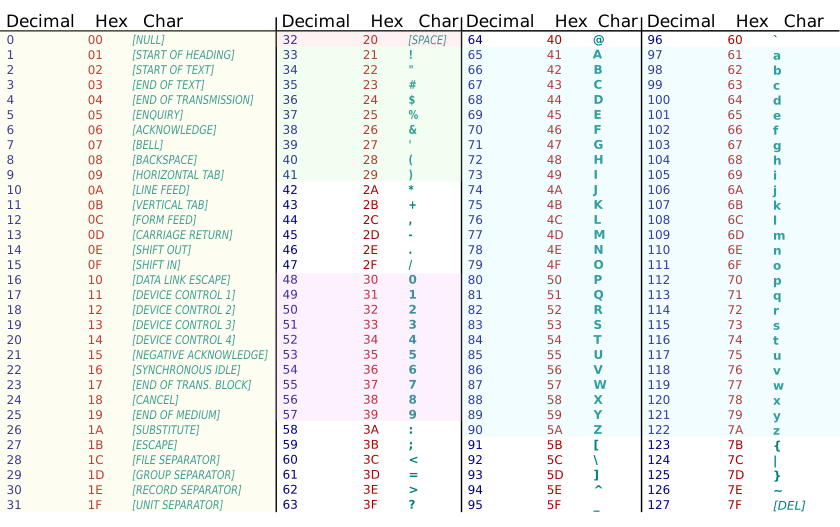
In case you’re not yet intimately familiar with it, let’s take a look at an ASCII table. I’ve colour-coded some of the bits I think are most-beautiful:

ASCII table with Decimal, Hex, and Character columns.That table only shows decimal and hexadecimal values for each character, but we’re going to need some binary too, to really appreciate some of the things that make ASCII sublime and clever.

Control codes

The first 32 “characters” (and, arguably, the final one) aren’t things that you can see, but commands sent between machines to provide additional instructions. You might be familiar with carriage return (0D) and line feed (0A) which mean “go back to the beginning of this line” and “advance to the next line”, respectively5. Many of the others don’t see widespread use any more – they were designed for very different kinds of computer systems than we routinely use today – but they’re all still there.

32 is a power of two, which means that you’d rightly expect these control codes to mathematically share a particular “pattern” in their binary representation with one another, distinct from the rest of the table. And they do! All of the control codes follow the pattern 00_____: that is, they begin with two zeroes. So when you’re reading 7-bit ASCII6, if it starts with 00, it’s a non-printing character. Otherwise it’s a printing character.

Not only does this pattern make it easy for humans to read (and, with it, makes the code less-arbitrary and more-beautiful); it also helps if you’re an ancient slow computer system comparing one bit of information at a time. In this case, you can use a decision tree to make shortcuts.

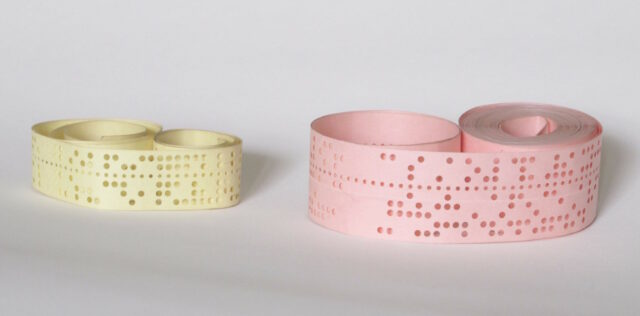
Two rolls of punched paper tape.
That there’s one exception in the control codes: DEL is the last character in the table, represented by the binary number 1111111. This is a historical throwback to paper tape, where the keyboard would punch some permutation of seven holes to represent the ones and zeros of each character. You can’t delete holes once they’ve been punched, so the only way to mark a character as invalid was to rewind the tape and punch out all the holes in that position: i.e. all 1s.

Space

The first printing character is space; it’s an invisible character, but it’s still one that has meaning to humans, so it’s not a control character (this sounds obvious today, but it was actually the source of some semantic argument when the ASCII standard was first being discussed).

Putting it numerically before any other printing character was a very carefully-considered and deliberate choice. The reason: sorting. For a computer to sort a list (of files, strings, or whatever) it’s easiest if it can do so numerically, using the same character conversion table as it uses for all other purposes7. The space character must naturally come before other characters, or else John Smith won’t appear before Johnny Five in a computer-sorted list as you’d expect him to.

Being the first printing character, space also enjoys a beautiful and memorable binary representation that a human can easily recognise: 0100000.

Numbers

The position of the Arabic numbers 0-9 is no coincidence, either. Their position means that they start with zero at the nice round binary value 0110000 (and similarly round hex value 30) and continue sequentially, giving:

Binary Hex Decimal digit (character)
011 0000 30 0
011 0001 31 1
011 0010 32 2
011 0011 33 3
011 0100 34 4
011 0101 35 5
011 0110 36 6
011 0111 37 7
011 1000 38 8
011 1001 39 9

The last four digits of the binary are a representation of the value of the decimal digit depicted. And the last digit of the hexadecimal representation is the decimal digit. That’s just brilliant!

If you’re using this post as a way to teach yourself to “read” binary-formatted ASCII in your head, the rule to take away here is: if it begins 011, treat the remainder as a binary representation of an actual number. You’ll probably be right: if the number you get is above 9, it’s probably some kind of punctuation instead.

Shifted Numbers

Subtract 0010000 from each of the numbers and you get the shifted numbers. The first one’s occupied by the space character already, which is a shame, but for the rest of them, the characters are what you get if you press the shift key and that number key at the same time.

“No it’s not!” I hear you cry. Okay, you’re probably right. I’m using a 105-key ISO/UK QWERTY keyboard and… only four of the nine digits 1-9 have their shifted variants properly represented in ASCII.

That, I’m afraid, is because ASCII was based not on modern computer keyboards but on the shifted positions of a Remington No. 2 mechanical typewriter – whose shifted layout was the closest compromise we could find as a standard at the time, I imagine. But hey, you got to learn something about typewriters today, if that’s any consolation.

A Remington Portable No. 3 typewriter.
Bonus fun fact: early mechanical typewriters omitted a number 1: it was expected that you’d use the letter I. That’s fine for printed work, but not much help for computer-readable data.

Letters

Like the numbers, the letters get a pattern. After the @-symbol at 1000000, the uppercase letters all begin 10, followed by the binary representation of their position in the alphabet. 1 = A = 1000001, 2 = B = 1000010, and so on up to 26 = Z = 1011010. If you can learn the numbers of the positions of the letters in the alphabet, and you can count in binary, you now know enough to be able to read any ASCII uppercase letter that’s been encoded as binary8.

And once you know the uppercase letters, the lowercase ones are easy too. Their position in the table means that they’re all exactly 0100000 higher than the uppercase variants; i.e. all the lowercase letters begin 11! 1 = a = 1100001, 2 = b = 1100010, and 26 = z = 1111010.

If you’re wondering why the uppercase letters come first, the answer again is sorting: also the fact that the first implementation of ASCII, which we saw above, was put together before it was certain that computer systems would need separate character codes for upper and lowercase letters (you could conceive of an alternative implementation that instead sent control codes to instruct the recipient to switch case, for example). Given the ways in which the technology is now used, I’m glad they eventually made the decision they did.

Beauty

There’s a strange and subtle charm to ASCII. Given that we all use it (or things derived from it) literally all the time in our modern lives and our everyday devices, it’s easy to think of it as just some arbitrary encoding.

But the choices made in deciding what streams of ones and zeroes would represent which characters expose a refined logic. It’s aesthetically pleasing, and littered with historical artefacts that teach us a hidden history of computing. And it’s built atop patterns that are sufficiently sophisticated to facilitate powerful processing while being coherent enough for a human to memorise, learn, and understand.

Footnotes

1 Programming-adjacent? Yeah. For example, geocachers who’ve ever had to decode a puzzle-geocache where the coordinates were presented in binary (by which I mean: a binary representation of ASCII) are “programming-adjacent nerds” for the purposes of this discussion.

2 In both the book and the film, Mark Watney divides a circle around the recovered Pathfinder lander into segments corresponding to hexadecimal digits 0 through F to allow the rotation of its camera (by operators on Earth) to transmit pairs of 4-bit words. Two 4-bit words makes an 8-bit byte that he can decode as ASCII, thereby effecting a means to re-establish communication with Earth.

3 Y’know, so that you can type all those emoji you love so much.

4 ASCII is often thought of as an 8-bit code, but it’s not: it’s 7-bit. That’s why virtually every ASCII message you see starts every octet with a zero. 8-bits is a convenient number for transmission purposes (thanks mostly to being a power of two), but early 8-bit systems would be far more-likely to use the 8th bit as a parity check, to help detect transmission errors. Of course, there’s also nothing to say you can’t just transmit a stream of 7-bit characters back to back!

5 Back when data was sent to teletype printers these two characters had a distinct different meaning, and sometimes they were so slow at returning their heads to the left-hand-side of the paper that you’d also need to send a few null bytes e.g. 0D 0A 00 00 00 00 to make sure that the print head had gotten settled into the right place before you sent more data: printers didn’t have memory buffers at this point! For compatibility with teletypes, early minicomputers followed the same carriage return plus line feed convention, even when outputting text to screens. Then to maintain backwards compatibility with those systems, the next generation of computers would also use both a carriage return and a line feed character to mean “next line”. And so, in the modern day, many computer systems (including Windows most of the time, and many Internet protocols) still continue to use the combination of a carriage return and a line feed character every time they want to say “next line”; a redundancy build for a chain of backwards-compatibility that ceased to be relevant decades ago but which remains with us forever as part of our digital heritage.

6 Got 8 binary digits in front of you? The first digit is probably zero. Drop it. Now you’ve got 7-bit ASCII. Sorted.

7 I’m hugely grateful to section 13.8 of Coded Character Sets, History and Development by Charles E. Mackenzie (1980), the entire text of which is available freely online, for helping me to understand the importance of the position of the space character within the ASCII character set. While most of what I’ve written in this blog post were things I already knew, I’d never fully grasped its significance of the space character’s location until today!

8 I’m sure you know this already, but in case you’re one of today’s lucky 10,000 to discover that the reason we call the majuscule and minuscule letters “uppercase” and “lowercase”, respectively, dates to 19th century printing, when moveable type would be stored in a box (a “type case”) corresponding to its character type. The “upper” case was where the capital letters would typically be stored.

× × × × ×