Coding, Drinking, And Burying: Hilarity Ensues

This weekend Gareth and Bryn came over and we set up a computer lab in Claire and I’s living room and spent most of the weekend hacking Ruby and Perl code (in between segments of munching coder snacks, drinking beer, watching films at Troma Night, and, last night, barbequing food on Ynyslas beach). We made some great progress on a project that we’ve all been working on that was otherwise at risk of stalling: not only progress in coding, but also in setting goals and deadlines and in discussing implementation strategies that I’m sure have made the next stage of the project a lot clearer for all of us.

Claire, Binky and I got to Ynyslas first last night and ate some fantastic lamb burgers. Later, as Gareth drove up and came to join us (I was stood atop a dune to get advance warning of his approach), Claire and I buried Binky against the side of a dune, covering his face with an overturned disposable barbeque box and stacking other provisions around him. Gareth didn’t have a clue that he was there: “Where’re Bryn and Jimmy?” he asked when he arrived. “They didn’t come,” I replied. We sat around and got chatting and drinking and, after a while, I asked Gareth if he could pass me my mobile phone. “Where is it?” he asked. “Under that box,” I said, gesturing towards where Binky was so-well buried.

The look on Gareth’s face was priceless when he lifted the box. Mucho respect to Binks for managing to stay undetected underground for so long (despite having eyes full of sand and other irratating side-effects of being buried alive).

This blog post was later featured in the On This Day series, in an article I wrote in 2010.

The Coolest “Learn A Programming Language” Tool. Ever.

Not only is it the coolest “hands on” tutorial to a programming language I’ve ever seen; it’s also (technologically) quite impressive as a web application, too. I’m talking about tryruby.hobix.com, a stunning tutorial in the Ruby programming language that’s simple enough for anybody to get started and doesn’t require you to install anything. Everything is done through your web browser into a virtual “irb” session.

If you’re a programmer with an interest in Ruby, or just a geek wannabe, it’s a must-see. Apologies if you’ve seen it before: I first saw it today.

How To Run Downloaded Stuff On Your Nintendo DS

14th July 2006: I’ve updated this article with some information on what could be an even easier and more cost-effective way to achieve this effect. Scroll down.
Here’s a guide to what you need to easily be able to run homebrew software like DSLinux on your Nintendo DS or DS Lite. Some things to know:

  • Yes, this could also be used to let you run pirated software too, but I can’t endorse that.
  • I’m fully aware that this isn’t the only way to run homebrew software on your DS, but this is the way I did it, and it works brilliantly for me. Your milage may vary.

You Will Need…

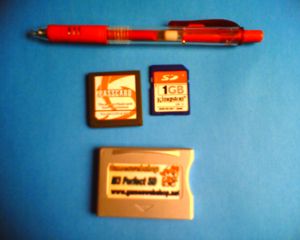
DS With M3 Picture One

I’d promised someone pictures showing exactly how big and chunky this kind of hardware is. Shown above is:

  • A red pen. You don’t need one of these, but I put one on the blurry photograph for a size-comparison.
  • A PassKey2 device like the one shown in the upper-right. Mine is branded “PassCard 3”. Older PassKeys required that you plugged a legitimately-bought game into their top port, but these new ones just plug straight into your Nintendo DS’s “DS” game port. It’s purpose is to make the DS think that a Nintendo-endorsed game is in the device, allowing it to run any code it feels like. Modern ones are needed for the later-version DS’s, including the DS Lite.
  • An M3 Perfect. This is the most recent incarnation of what was the GBA Movie Player. It’s a card reader (mine reads SD Cards, but there’s also a CF version available) that plugs into your DS’s chunky retro Game Boy Advance slot.
  • A flash memory card to put in your M3. Mine, of course, is an SD card. DSLinux weighs in at about 12MB, and games vary in size anywhere up to about 64MB. The more you can fit on your card, the better – particularly if you’re planning on carrying movies or music around with you and using your DS as a glorified MP3 or video player.

You will also need:

  • A PC running Windows. Use a virtual PC at your own risk.
  • The means to write whatever kind of flash card (e.g. SD card) you get, like a USB reader/writer. You might be able to get away with using your digital camera and some kind of link lead, but don’t count on it: a cheap SD reader/writer can be found for under a tenner.
  • The latest M3 Game Manager software.

You Will Do…
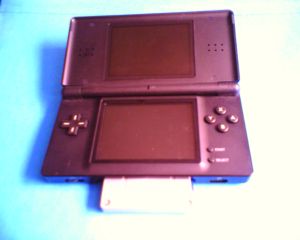
DS With M3 Picture Three

The PassCard goes into the DS slot, the flash card goes into the M3, and the M3 goes into the GBA slot, as shown in the picture, above. I’m using a DS Lite, and the M3 sticks out a little way, enough to be unsightly, but not problematic. The DS is upside-down, in case you’re confused. The small blue thing on the right of the M3 (at the top of the DS) is the tip of the SD card. Push gently against it to eject it.

Put the memory card into your PC’s reader, and run the M3 Game Manager software you installed. Select the media type you’re using, when prompted. Navigate to the memory card. Then just click the “Write NDS” button choose the Nintendo DS ROM you want to write. How many you can fit on at once depends on the capacity of the card. The M3 Perfect can handle CF cards up to 1GB and SD cards up to 2GB for the CF and SD varieties of M3, respectively.

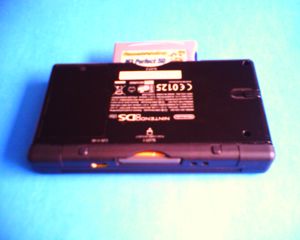
DS With M3 Picture Two

Here’s how the DS Lite looks with the M3 Perfect cartridge dangling out of it. Apparently it protudes less on the DS Phat.

Update: 14th July 2006: There May Be An Easier Way…

A friend has just let me know about the NinjaPass. The plain old NinjaPass Media Launcher is just a PassKey2, by the look of things, but the NinjaPass DS Flash is both a PassKey2 (like the PassCard, above) and a flashable memory card (like the M3 Perfect and it’s accompanying memory card). It’s a single-card solution that you copy your ROMs to, put into the NDS slot on your DS Phat or DS Lite, and it just works.

Of course, I’ve not tried the NinjaPass for myself, so your milage may vary. Read some reviews first.

Fun With A Nintendo DS

This post starts very geeky, but becomes about computer games later on. Feel free to scroll down three paragraphs if you like computer games but don’t like computer hardware hacking.
My M3 Perfect and some related hardware arrived today. Basically, it’s a SD card reader that plugs into a Game Boy Advance slot (which are found on not only the Game Boy Advance series but also the Nintendo DS). By itself, it allows a Nintendo DS (or a DS Lite, as my new toy is) to play music, videos, etc. But combined with an Passcard (also arrived this morning), it allows backup games and homebrew software to be easily loaded onto the device.

Within minutes, I had DSLinux, a Linux distribution for the Nintendo DS, working. It felt immensely cool to be typing at a Bash shell using my DS stylus. I couldn’t get the wireless internet connection working, though – the drivers kept failing to load, which is probably either a result of (a) the DS Lite possibly having different firmware for interfacing with the network subsystem or (b) the M3 Perfect I got is the SD card edition, rather than the CF edition, which is better supported by DSLinux. I chose the SD card edition despite it being a few pounds more expensive because it’s slightly smaller (and therefore doesn’t stick out of the side of my handheld in such an unslightly way as the CF one would have) and because I can potentially fit more onto a SD card (although the only SD card I own is 1Gb, the same size as the largest CF card the M3 can take). In any case, both possibilities sound equally unlikely: further investigation will ensure.

The ultimate aim of this little project is to get a graphical VNC client for the DS (take a look at that screenshot!) running, or some other remote control, so I can take full control of my desktop PC, wirelessly, from, like, my bed. Or from the couch. Or from and wireless internet hotspot anywhere that somebody hasn’t secured properly. Toy.

But the other benefit of this little purchase is the ability to, how shall we say, “try before I buy” Nintendo DS games. I’ve spent quite some time today playing the stunning Trauma Center: Under The Knife. It hasn’t been since Half-Life 2 that I’ve played a computer game that genuinely made me jump with fright.

This isn’t Theme Hospital. This is Life and Death (for those of you too young to remember, this was a stunning late-80s  “Sim Surgeon”). Starting as a junior surgeon, you’ll remove benign tumours, treat laceration injuries, and laser off polyps. The whole things starts with a very “hold your hand” approach, but the learning curve is steep. Within 25 minutes of play you’ll be performing surgery within the chest cavity of car crash victims when something goes wrong (their heart stops, or their symptoms severely exacerbate, or it turns out there’s something more seriously wrong with them) and you’ve got nobody there to help you: you have to work alone.

It’s dark and cold and hard. Very hard. I struggled to keep up with the pace and had to re-attempt some of the levels (such as the brutal on early in the second chapter in which I had to remove aneurisms from the arteries of the intestines, and they just kept exploding on me, showering blood everywhere and destabilising the patient’s condition) several times. Nonetheless, I had great fun watching Claire replay those levels, on the edge of my seat whenever I knew something was about to go terribly wrong. Contrary to the image Nintendo sometimes convey: this is not a game for kids.
Another game I’ve enjoyed trying out is Mario & Luigi: Partners In Time, which plays a lot like Paper Mario: The Thousand-Year Door, but with semi-independent simultaneous control over up to four (Mario, Luigi, Mario’s younger self, Luigi’s younger self) different characters. Yes, at the same time. Yes, that fucks with your head. Quite quickly.

Then there’s Super Princess Peach, a platform game in which Peach uses the power of mood swings (I kid you not – she fluctuates between singing, crying, and breathing fire, just like a real woman) in order to get her way. And Super Monkey Ball Touch & Roll, more stupid puzzle game fun…
It’s not all piracy (although at least a little bit ethically – we’ll buy legitimate copies of the good stuff, almost certainly including Trauma Center) of stuff I could have bought at my local Game: I’ve also had a great deal of fun with Electroplankton, for which a release outside of Japan is still promised, but sadly absent. Electroplankton is a software toy in the truest sense of the word. The player manipulates the movement of musical plankton in order to generate what can just about be described as music. I came home and hooked it up to the stereo and Claire and I had great fun for some time, playing with the different plankton and trying to discover how they all “worked”. And I’m also looking forward to giving some of the Naruto games (which’ll probably never be released outside of Japan) a go.

Computer Games And The Monetary Value Of Entertainment Time

How much does entertainment cost? Well, it depends on the medium. A recent interview with Bing Gordon (who has not only a crazy name but also a high ranking position with videogames company Electronic Arts) talks briefly at the end of the article about the comparative cost of different forms of entertainment, and tries to demonstrate that computer games are cheap if you factor in the amount of time they provide entertainment for.

The article’s not terribly interesting unless you’re an undergraduate student wondering how you can join the EA galley when you graduate, but it got me thinking about what we spend on entertainment. Here’s a few thoughts.

I might spend £10-£15 on a good book, and it’ll provide me with, say, 10-20 hours of entertainment, depending on the number of words and the re-readability of the story. I’ll frequently spend more than this on non-fiction books, but I’ll disregard them as entertainment for the time being (despite the fact that I’m frequently caught enjoying a good reference volume in the bath), because most normal people don’t read these for fun. So that’s 50p to £1.50 per hour of entertainment, on average – and I’ll frequently buy books that are cheaper than this. Books are also great in that I can hand them on to friends or family, which doubles or triples the value if we’re counting “person-hours”. Some of my favourite books, such as Imajica and Zen and the Art of Motorcycle Maintenance, which I have read multiple times and passed on to friends to read too, have values like 10p/hour or less. That’s pretty good value as far as entertainment goes.
Sometimes I rent DVDs (typically, only where it’s more convenient to do so than to download the film, and, sadly, it’s currently easier to download pirated versions of films than legitimate ones, so they win, but I look forward to being able to rent films online in a sensible manner). A DVD rental costs me about £3. If it were about an hour and a half long and I watched it alone, that’d give me a value of about £2/hour, but films not only have the advantage of being able to share them with friends, but they can be shared simultaneously with friends (try this with books and you’ll quickly get frustrated, particularly if you have an uncommonly fast or slow reading speed). If I watch a £3 DVD or (shocker) videotape rental with three friends, that’s a value of about 50p per person-hour. Pretty good value.

Buying films isn’t such good value, because at about £15 or so each you’d have to watch each one five times to get the equivalent value as if you’d rented it. Plus, you’re likely to rent the film (or see it at the cinema, which has only slightly greater cost than renting it) before buying it, which is a cost that counts against you because if you’d bought it in the first place you wouldn’t have needed to pay to rent it: so; assume I rent a DVD (£3), like it, and buy it (£15): I’ve then got to watch it a further five times before it becomes worth the same as re-renting it. Plus, buying a film puts you at risk of the disc becoming scratched (or the tape worn out), nullifying the value of your purchase. You have to particularly like a film to be worth buying it at retail prices: that, or be willing to sacrifice the money for the convenience of having the film always available at a moment’s notice, or really want the special features you don’t get on the rental copy.

Now let’s have a look at computer games. Computer games are a complicated beast, because their value on this (very simplistic, I know) scale is so hard to assess. I bought a copy of Civilization IV and I’ve probably played it for about 40 hours: at £25, that’s about 60p per person-hour so far, not counting the time that Claire has spent playing it, and based on my enjoyment of it’s prequels I anticipate I’ll have gotten it as low as about 4p per person-hour before I get sufficiently bored of it to put it away forever. But on the other hand, there’s a huge difference between NetHack, which is free, and has consumed well over 100 hours of my life, and Myst 4, for which I paid £35 and which has taken no more than about 6 hours of my time (that’s almost £6 per person-hour: unbelievably bad value).

Not only is the value by straight “person-hours” of videogames very variable, but they suffer from another complication: the loss, in the majority of cases, of the benefits of the social element. Books are high-value because they’re cheap and you can lend them to your friends. Films are medium-to-high value because they’re cheap to rent, you can try them out (by renting them) before you commit to buying them, and because you can watch them with a whole roomful of friends (although if there’s more than nine of you, or money changes hands, it might be considered a “public screening” and is illegal). But computer games are complex again: Civilization IV is a multiplayer-capable game, for example, and I can play it with anybody in the world, but if I want to play it with my girlfriend at the other end of the room, I have to buy another copy of the game. I can play with her on the same computer, but because the game has a copy-protection mechanism that requires that the CD is in the drive to play (and for no other purpose than this – all the data is on the hard disk), I’m restricted from playing across my local network. Well, until I install a No-CD crack or duplicate the disc, but you see my point.

Several of the early games in the Command & Conquer series came with two CDs, and allowed two players to play together from the same copy (if you wanted more players, you had to buy more copies). That seemed fair. The original Command & Conquer cost me under £20 and ate most of my life during the last few years of high school: the value is immeasurably high. But so many computer games these days are so expensive and the risk that you’ll pick up a crap one is high. Combine that with the fact that nobody does rentals of PC games, and you’ve got a great explanation of why the piracy rate is so high. I’d far rather download a copy of Latest Game 2: The Revenge and play it, and, if I like it, buy a copy. So that’s what I do. Only the companies who make crap games lose out, but all of the companies try to make it difficult for me. What’s up with that?

An interesting side effect of this approach is that I am more likely to pay for a game with no copy protection or weak copy protection than I am to pay for a game with strong copy protection (or shitty crippleware-laden copy protection like StarForce), simply because I’m less likely to have downloaded and played it already.

Wow; that was a fair meander from my original point.

The Infinity Machine

I read a great article this morning: The Infinity Machine, by Simon Tatham. It looks at the possibility of a hypothetical computer that is capable of processing at infinite speeds. However, unlike many other hypothetical infinity devices, it doesn’t look at the theoretical implications of the project, but the practical ones (if you had a hotel with an infinite number of rooms, what colour would the towels be?). For example, it looks at what instructions the instruction set would need to contain, and how language extensions to, for example, C, might be implemented to take advantage of the processor’s power. It examines the implications of such a system on cryptography, and proposes an alternative cryptographic system that this computer would be able to provide to make up for the fact that it’s existance will have broken all existing cryptographic systems except one-time pads.

It’s probably not interesting if you’re not some variety of geek, but I enjoyed it. The chap also wrote a great article on how be built a pair of dice that never roll a 7.

Fun And Games With Google Suggest

Ah, the fun that’s to be had with Google Suggest:

Google is...Microsoft is...Wikipedia is...Ebay is...Gay people are...Eat my...Blogs are...George Bush is...Christians are...

Some interesting facts we’ve learned:

  • “Gay people are gay” results in more hits than “Microsoft is bad”.
  • The only things people seem to say about Wikipedia is that it’s slow and that it’s down.
  • The only people who don’t distrust or hate eBay aren’t sure whether or not it’s safe.
  • Christians are one of the few things in the world that people don’t seem to think are gay. However, they still hate them more than pretty much anything else, even “gay people”, who are at least “cool.”
  • Blogs are only slightly more gay than they are stupid.
  • George Bush is a gay, evil, stupid moronic idiot. And, presumably, a Christian.

Have a play with Google Suggest yourself.

×

Aberystwyth Webcams Widget

There’s a reason that people shouldn’t show me new programming languages and development platforms: I try them out. Even when I’ve got other things I should be doing. Ah well.

Aberystwyth Webcam Widget

And so I’d like to present: the Aberystwyth Webcams Widget [update: link dead], which collates the images of the three Ceredigion Country Council webcams into a little widget that sits on your desktop. It works in both Windows and MacOS X (on MacOS, it integrates quite nicely with any other desktop widgets you’re using), but you do need to install the Yahoo! Widget Engine version 2.0 or above.

Aberystwyth Webcams Widget (165KB)  [update: link dead]

Never written a Yahoo! Widget before, so I’m interested in any feedback you care to leave.

Features UNIX Has That Life Needs

It’s come to my attention that there are a lot of things that computers in general – and, in particular, UN*X-flavoured operating systems – offer that are sadly lacking in Real Life. I’m hoping that Life 2.0 will include a number of these features. (Life 2.0, of course, will not be like Web 2.0 – there’ll be no more rounded corners and glowing effects than usual, thank you.)

The most important features I think are missing are as follows:

grep
I’m sure I’ve said it before, but life really lacks a grep command. grep is used to search for given text within a greater text (usually files, but stdin is equally valid). Whetever I use a ‘treeware’ book as a reference, I invariabley find myself disappointed at my inability to search it’s contents, leading me to favour the web and e-books as sources of information. How much easier would it be if I could simply write a regular expression that represented the kind of data I wanted to find? Johnny 5 could do it – why can’t I?
ctime
The other day, I was trying to remember the exact date that Claire and I moved into The Place. I couldn’t remember exactly, but I did remember that the note pinned to the kitchen noticeboard was written on that day. Had my life been more like a computer filesystem, it’s likely that I’d have been able to check the “modified date” of the piece of paper, and I’d have known exactly when we’d moved in.
dd
How great would it be if you could make a nice backup of the world before you had to make any kind of decision without knowing the outcome… It’d be like a “saved game” of life. Plus, with enough storage space we could keep incremental backups of the entire planet at various times, and restore them onto virtual machines (well, virtual planets) as an aid in teaching history. Although I’d like to make sure that only sane, rational, trustworthy people like me had superuser access, or else it wouldn’t take long before somebody typed dd if=/dev/null to=/mnt/universe and destroyed the universe. Or, perhaps more interestingly, /dev/random.
kill
At this point, you’re probably expecting me to imply that killing people is a good idea. But I’m not going to. After all, what a well-executed kill -9 does is merely removes the resources (processor cycles and memory) from a given process. And I’m sure we’ve all wanted to be able to steal memory from somebody, particularly when they’ve just heard us say something particularly embarrasing.
perl
Yesterday, I was heating a pan of noodles, checking it ocassionally to see that it wasn’t at risk of boiling dry. What I’d far rather have been doing while the noodles cooked, of course, would have been to be playing Paper Mario: The Thousand-Year Door, which I’m playing through again. But to do that would have involved me leaving some smart process in charge of the pan. Something like this:

#!/usr/bin/perl
while ($panwaterlevel > 10) { wait(1000); }
sprint("Dan! Come fix these noodles!");

Shouldn’t be so hard to implement once the other features in this list have been writeen.

As soon as I can find the address of the manufacturer of Life 1.0, I’ll be writing a letter of complaint.

Microsoft Visual Studio 2005

Would you like to share your setup experience with Microsoft?

What is a “setup experience”? And why do Microsoft want to share it with me, anyway?

Improved performant!

I can’t actually find a definition of the word “performant” – can anybody help?

× ×

LiveJournal Needs To Tighten Security

Hmm… as part of my ongoing work with Abnib v3.0, I’ve noticed a couple of interesting little quirks in the way that LiveJournal handles security for “friends only” and “private” posts. In fact, I’m pretty sure I’ve found a way to – for any given user – produce a list of the times, dates, and URLs of all posts made by anybody – even ones to which I don’t have access. Not terribly disturbing news, as I still can’t get access to the content of the posts or even the comments to them, but it’s an “opening” – a “way in” – which could potentially lead to a full-blown exploit.

For example, I can tell you that there is a post on Andy’s blog that I’m not allowed to read, that he wrote on the 17th of Januaryat about quarter past four in the afternoon (I hope you don’t mind me using you as my “guinea pig”, Andy – you’re the first person I came to who had a “recent” private post).

The numbers near the end of LiveJournal post URLs are supposed to be semi-random to prevent people from just “guessing” their way to posts, but it turns out this isn’t necessary. I’ve e-mailed LiveJournal to try to explain their flaw to them, but as I can’t be arsed to debug it myself (hey: not my weblog at risk, here), I don’t know yet how much of a priority they’ll make it.

Ho hum.

Edit: Further investigations have revealed that I can easily get the title (but not the content or the comments) of any LiveJournal post, including protected ones. For obvious reasons, I’ve now stopped using my friends’ weblogs as testbeds, and I’ve set up a couple of “play” accounts to try things out with. I wonder if I can get the content of posts? That’d be an interesting challenge.

How To Repair A Nintendo GameCube

For the last few months, Claire and my GameCube has been broken. It broke at one point, which I attributed to the drive motor being jammed up with dust and hair and crap, so I opened the lid and wiggled a knife-blade around inside it for awhile, which seemed to fix it… but a couple of weeks later, it was dead again. I decided to have another look into this, yesterday, and a little bit of research online revealed that the problem was probably that the strength of the laser had degraded, rendering it unable to read any discs. This is, apparently, one of the most common causes of death for the GameCube (and I’ve seen a good number of ‘cubes go on eBay which would appear to have exactly this problem). Thankfully, there’s a really well-written guide on lens calibration for the gamecube, which helped a lot. However, the thing that’s lacking online is a photographic guide: so, as part of this ‘blog entry, I’ve written one.

Usual disclaimer: following this guide will void your warranty. Plus, if you do it the way I did it, you risk electrocution, exposure to laser radiation, and worse yet, you may break your GameCube beyond repair.

I recommend that you read the guide to lens calibration for the gamecube – it’s far more in-depth than this blog entry. However, this blog entry has prettier pictures.

Symptoms

  • GameCube fails to load games – it claims that the disc is missing or unreadable, and will only load up as far as the “configuration cube” screen with the funky ambient noises.
  • Open the lid and detach the clips under the lid to release the circular plastic Nintendo-branded thing that sits on top of the lid: this will allow you to watch the disc spinning while the ‘Cube is running, even with the lid closed. Try again – the disc will start to spin (so, it’s not a broken drive motor) but then stop (when the system finds it can’t read the disc).

Problem

The power output of the laser which is used to read the surface of the disc has reduced with age. This is a common problem in GameCubes, apparently, between two and five years old. It can be repaired by a Nintendo engineer, but the price is prohibitive (you might as well buy a working second-hand one). However, we can fix it ourselves. [if you can’t see the rest of this article, read it here]

Tools

I didn’t have all the tools to hand that the author of the guide I followed had, but I made do. Here are my tools:

 Screwdriver and ball-point pen
  1. Screwdriver – this is a standard “size 0” (small, but not really small) Phillips-head screwdriver. This particular one cost me 45p from my local hardware store.
  2. Ball-point pen – mine was a WHSmiths-branded one with blue ink.

Method

First step is to prepare the tools as you’ll need them. The four main case screws that prevent you from taking a GameCube apart are a strange custom design deeply recessed within deep holes on the underside of the device. You can apparently buy a specialist tool for manipulating these screws, but I couldn’t be bothered, so I made one: remove the ink tube and nib from the pen, so you’re left with a long plastic tube. Then, using a hot flame (I used a gas ring) melt/ignite the end of the tube you’d normally write with (where the nib was, before you removed it). It will probably catch fire, but just blow it out while trying not to breathe in too much of the toxic black smoke you’re producing. It needs to be molten enough to be malleable. Then, once it’s hot, put it down into one of the four deep holes on the underside of your upside-down GameCube.

 Upside-down GameCube with holes highlighted

Push it down firmly but evenly so that it points directly up, and hold it there for a minute or so while it begins to take shape. What you’re doing is moulding the shape of the screw head into the molten plastic of the pen, so that when the plastic sets you will have a tool that exactly fits them. Of course, if then pen snaps, you’ve buggered any chance you had of ever getting into your GameCube, so be careful! Once it’s standing upright by itself, leave it for four or five minutes to finish cooling. Now’s a good opportunity to read the rest of this guide, if you haven’t already.

 The strange-headed screws that you need to remove

You should now be able to use your new tool to unscrew the four screws that hold your GameCube together. That’s the hard bit over with. Flip your GameCube the right way up again, put your hands on it’s sides, and pull upwards to remove the cover. If there isn’t one already, put a GameCube disc onto the spindle. This will serve two purposes: it will allow you to test the GameCube without reassembling it, later, but more importantly it will help to protect the laser lens from damage when you turn the drive mechanism upside-down, later. Next you need to remove the front and rear panels. These are attached by small plastic clips in the corners of the cube, as shown below.

 Howo to remove the front panel from a GameCube

Be careful not to detach the cables that connect the front panel to the rest of the GameCube, as these ribbon cables are very difficult to re-attach without damaging them! Now you’re ready to start removing the chassis screws (which are holding the fan in place and preventing you from getting at the underside of the disc drive. There are 14 screws to remove, in the areas shown below, but 3 of these are concealed underneath the fan and the 2 holding the fan in place will need to be removed to reveal them. Why did Nintendo see fit to use 14 screws where 6 would have done is beyond me.

 The 14 screws

By now you should have something that looks a lot like this:

 The 14 screws

A GameCube with the top, sides, and fan laid bare, and the screws removed from the main chassis. Now’d be a good time to have a closer look at what goes on when your ‘Cube turns on. This is optional, but I think it’s interesting. If you look near the back of the GameCube, on the right-hand side, you’ll see two plastic forks. This is the switch that detects whether or not the lid is closed (as a safety precaution, the disc will not spin and the laser will not turn on if the lid is opened).

 The switch that makes the lid work

Danger: laser radiation – do not do this! Connect the GameCube’s power (it connects to the back of the fan module) and output (where it normally is, albeit without the faceplace), to test it. Hold the “lid switch” (above) backwards to tell the GameCube that the lid is closed and press the power switch (it’s on the fan module). You should see the following happen:
  1. The power LED will turn on.
  2. The disc will start to spin.
  3. The laser, under the disc, will turn on. You should be able to see it shining through the disc. Now stop looking at it; you’re irradiating your eyes.
  4. The laser will move back and forth to try to “read” the disc.
  5. At this point, the laser will probably turn off and the disc will stop spinning – this is because the GameCube you’re using is broken. If it was working, the game would load. You can use this test later on to see if you’ve successfully fixed the device without having to re-assemble the entire thing!
  6. Don’t leave it running too long, because by this point the fan will be in the wrong place to help cool the unit.

Next, you need to remove the four long screws behind the ports (above the memory card slots).

 Four earthing screws need to be removed


This will also release two strange bits of metal which are held in place by these screws. I don’t know what they do, but I’m sure they’re probably important, so make sure you put them back after you’re done! Right; time to detach the disc drive. Lift the entire upper part of the system up and away from the base: there’ll be a little resistance as a plug becomes detached, but if you find you’re having to pull hard, you’ve probably left a screw in somewhere. The whole metal plate with the drive on top will come away in one piece. This is the bit we’ll be working with. Flip it over. Now, you’ve got to remove six small screws, highlighted in red on the photo below. I’ve also highlighted (in blue) the connector that links the drive to the bottom half of the console.

 Underneath the upper chassis

Removing the screws allows you to detach the metal plate and gain access to the circuitboard underneath. This is what we’re looking for. Again, I’ve highlighted the connector port in blue to help you navigate.

 Circuitboard

What you need to do is to turn the screw (highlighted in red) about 3 or 4 degrees anti-clockwise. This will increase the power given to the laser and fix your problem. If you turn it too much, your laser will overheat and burn out. If you turn it too little, the problem won’t be fixed. I recommend that you turn it a little at a time to find how short a distance you can turn it (anti-clockwise) to have the console begin to work again (i.e. so it “barely” works)… then turn it an extra 2 degrees or so to be sure. Be gentle!!! When you’ve made the adjustments you want to, re-assemble the thing so far as you need to to test it. You don’t need to put any screws in or even put the fan or panels back on – just hook it up to the TV and try not to look directly at the laser lens. If it still doesn’t work, go back and turn the screw a little more anti-clockwise (to boost the power some more). Hope that helps you get your GameCube back up-and-running again: it did mine! Feedback is welcome, but if you need more information I still highly recommend Lens Calibration For The Nintendo GameCube, which also has pointers on some of the other things that could be wrong (if this fix fails), what tools you need to do it without melting pens, and tips from somebody more-experienced on how far to turn the circuitboard screw. Good luck!

Abnib, Version 3.0

Abnib Version 1.0 was a funny little beast. It was built to accomodate for about half a dozen bloggers, but ended up with about nine or ten. It worked, though, and the principle of aggregating the blog entries of our friends and our friends’ friends took off. Abnib 1.0 had a few major flaws: firstly, it only showed a summary of the post. This was partially because all but two of the bloggers thereon were using free LiveJournal accounts, and a limitation of free accounts at that time was that you could only get the first couple of hundred characters of a post at once. Another limitation was that the site design was columnular – each person had a column of their own, which dramatically reduced the space available and made in-post images impossible. Furthermore, Abnib 1.0, which updated itself wholly or partially every time it was visited, was as slow as a dog.

Abnib died when I accidently deleted a few key files for which I didn’t have backups, and that was the end of that. However, with Gareth‘s help, it was reborn in August 2004 as Abnib 2.0. This was powered by Planet, a Python-driven flexible feed aggregator which is used in all kinds of places for just the kinds of purposes we use it for. Jon went a step further and added an interesting new style to it, and we added the Abnib Gallery (Abnib 2.1), a place for all things Abnib to share photos. Abnib became a real “centre” for our fun little crowd, gathering information on Troma Night and the RockMonkey wiki, as well as the usual weblogs. The release of Abnib 2.2 brought extra abilities much-requested by users, such as the ability to “hide” the community feeds. That’s where we are now.

However, all is not well. There are a few key things I’d like to see improved in Abnib:

  • Several LiveJournal users have commented (Paul comments, Matt comments) that sometimes, when they make multiple posts in quick succession, Abnib only picks up on the most recent of them. I’m not sure what’s causing this, so it’s probably Planet.
  • Some people like to make lots of “friends only” posts (a LiveJournal feature whereby you can restrict visability of your posts to specific other LiveJournal users). As more and more people use Abnib as their “quick window” onto Aber blogs, people are finding the need to make superficially-pointless posts (like this one) in order to ensure that people realise that they have made a “friends only” post that might otherwise be overlooked.
  • Abnib 2.2 still isn’t quite doing so much for the community as I’d like it to be; it isn’t as interactive or as inspiring as I feel a weblog aggregation portal should be.

So, in order to fix these problems (among others) and implement some new features, I’ve begun work on Abnib 3.0. This new version of Abnib will:

  • Correctly deal with multiple posts in quick succession from LiveJournal users.
  • Better integrate with Abnib Gallery.
  • If permitted (by individual bloggers – either overall or on a case-by-case basis), advertise when you have made a “friends only” post, and how to go about reading it if you have permission.
  • Load faster by holding content back until requested (for example, only the 20 most recent posts are shown by default, but more can be displayed without a page refresh: up to 80!).
  • Hold meta-information on members such as a short description, which can be updated by that member only.
  • Allow readers to ‘hide’ any or all feeds, in order to focus on the things that matter to them.

It’s all powered by a new weblog aggregation engine called Phatnet, which I’ve been building for the last few weeks specifically for this purpose. And it’s pretty damn gorgeous. But that’s not all. Experimental features which might end up part of it now or later include:

  • Tighter integration with RockMonkey – see what pages other people are reading.
  • Ajax-powered “keep me posted” features, such as a checkbox that, when checked, automatically adds new posts to Abnib as they are written – right in front of your eyes.
  • Comment counting: know how many comments have been made on standards-compliant blog posts.
  • A couple of other things I’ve been playing with.

Hopefully, I can get Abnib 3.0 finished and released later in December. If you want to see what’s been done so far and how it all fits together, take a peep at the Abnib 3.0 Preview (it updates every few days, so it’s no good for actually reading blog posts on, but it should give you an idea about some of the features: try clicking the “More Posts…” link at the bottom or on people’s names in the sidebar). It’s ugly as sin, but hey. Feedback appreciated.