tl;dr: This is a security update to MegaMegaMonitor. If you don’t update, your copy of MegaMegaMonitor will stop working.
Sorry for the wall of text – scroll down to “What’s new?” for the short version, and remember to upgrade:
So there’s been a security bug in MegaMegaMonitor since about the year dot. I’ve always known about it, and I’ve always intended to fix it (in fact, it was the very next thing on my
list), but for the time being I’d been doing something particularly naughty which was to rely on ‘security through obscurity’ – hoping that nobody would put the effort in to
undermining me. Well, I should’ve known better, really, and /u/BeanbagLover caught me out, making a minor tweak to their copy of MegaMegaMonitor to
pretend that it was me in order to read encrypted messages from any of the currently-available subs for crypto.
I’ll stress that this was my fault. I’d have rather than /u/BeanbagLover reached out and contacted me directly, rather than testing out their new-found power in an /r/askreddit_megalounge
thread (what I’d have called “ethical disclosure”), but fundamentally it was still me taking shortcuts in order to get more functionality out, quicker, that made the problem exist
in the first place.
So I’ve rushed-forward my efforts to release a more-secure version of MegaMegaMonitor, putting it together this lunchtime at work. Owing to the nature of the fix, old versions of
MegaMegaMonitor will stop working or will stop being up-to-date within the next few hours, so you might need to click the “install megamonitor”
button again if it stops working for you and the auto-update hasn’t kicked in yet.
What’s new?
It’s all behind-the-scenes stuff, this time, I’m afraid:
Faster updates on the server-side: this won’t affect you yet, but will make it possible to have MegaMegaMonitor update its data more-frequently in a future release
Handshake authentication – instead of just trusting that you are who you claim to be and giving you the appropriate membership data and encryption/decryption keys, MegaMegaMonitor
will now (if it doesn’t recognise you) perform one of several additional background identity checks to ensure that you really do have access to the subreddits that you claim
to. You won’t see it – it all happens in the background – but after an update or when you first install MegaMegaMonitor you might notice that it takes a couple of seconds longer to
run, the first time around.
Fresh cryptographic keys – I’d already implemented a system by which old encryption/decryption keys could be invalidated if they were leaked (as they now have been!), so that’s
included. Again, it’s silent, but the essence of it is that even though existing encrypted messages made with MegaMegaMonitor v104 and below can potentially be read by
anybody who broke the older (shit) security system (e.g. /u/BeanbagLover), they can’t read any newly-encrypted content (from v106 onwards)
without finding a whole new way to break in. Which is now a lot tougher.
So there you have it – the first major security-patch to MegaMegaMonitor, out now. And again I’ll stress that I’d far prefer to see ethical disclosure of vulnerabilities in this tool
(or any of my software): drop me a private message and I’ll fix things ASAP and credit you. Break them in public and I’ll still fix them, but I’ll have to do them under pressure and
it’ll make me sad. This particular bug was always going to be fixed in v106: I just didn’t expect to have to find time to finish and release v106 until Sunday.
I was asked to do an AMA here, so… here I am! If you know me already, it’s probably because you use MegaMegaMonitor [install here], a browser plugin I made that helps you to see where you are relative to others in the MegaLounges as well as in a variety of other private
subreddits. You’ve probably seen the link in the sidebar of /r/askreddit_megalounge, right?
Recently, I’ve been adding features to help moderators of private subreddits to manage their membership, and I’m always open to suggestions for future features. MegaMegaMonitor’s not
been without its controversies, though: and I’m happy to tell you about them, if you’re interested.
I’m a believer in the AMA concept, though (and I’m not sure how much I can really say about MegaMegaMonitor: it speaks for itself, doesn’t it?), so here’s some other things that
people often ask me about on Reddit or elsewhere, in case that’s what you wanted to know about:
I can pretty-much guarantee that I’ve got the shortest name of anybody you’ve ever met.
I live in Oxford, UK, where I run the websites of the libraries of the University of Oxford.
I also do freelance web application development and I help run a non-profit that makes software for charities.
I’m in a slightly-unusual romantic relationship, in that my partner is married to somebody other than me, and we all live together.
I’ve been blogging since the 1990s, and have never (deliberately) deleted a post.
I’m a keen geocacher and a magician-in-training.
So – what can I tell you about MegaMegaMonitor, me, or anything else? I’m all yours from now until I go to bed (and I’ll be back online in the morning, so anything I miss I’ll pick up
then)!
Edit (23:47 BST / 22:47 UTC): I’m going to bed, but I’m still answering questions (I’m taking my phone, so they’ll be shorter replies, and only until I fall asleep),
and then I’ll check in again tomorrow morning. Thanks for the lovely words, guys!
Edit2: Tuesday morning. Back at my desk; working from home today so if you still want me, I’m all yours. I’m hoping to release a new version of MegaMegaMonitor this
afternoon.
Tiny new release with thanks to /u/greypo for highlighting the need for it. In v102, bulk-inviting people to a subreddit would fall over and stop if it came to
somebody who was banned from that subreddit, requiring the user to manually remove their name from the list before they could continue. In v104, instead, it treats them the same as if
their username was invalid: it logs the reason that it failed to invite them, but then carries on with the rest of the list.
tl;dr: if you didn’t know you needed this feature, you don’t.
If there’s one place on Reddit that this kind of self-promotion shouldn’t be considered inappropriate, it’d be in the subreddit that carries my name. And now that we’re
this high up (and you’re seeing my face everywhere already), I’ve got no problem with any of you having a link by which you can work out exactly who I am in real
life.
So here’s the latest post from my ‘blog. It’s pretty dull unless you use the Squiz CMS at your workplace or write PHP code in your day job, though. I promise I’m more interesting,
sometimes.
Anybody who has, like me, come into contact with the Squiz Matrix CMS for any length of time will
have come across the reasonably easy-to-read but remarkably long CAPTCHA that it
shows. These are especially-noticeable in its administrative interface, where it uses them as an exaggerated and somewhat painful “are you sure?” – restarting the CMS’s internal
crontab manager, for example, requires that the administrator types a massive 25-letter CAPTCHA.
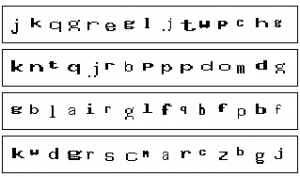
Four long CAPTCHA from the Squiz Matrix CMS.
But there’s another interesting phenomenon that one begins to notice after seeing enough of the back-end CAPTCHA that appear. Strange patterns of letters that appear in sequence
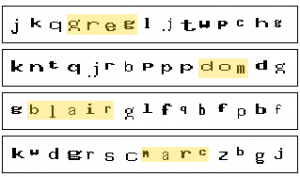
more-often than would be expected by chance. If you’re a fan of wordsearches, take a look at the composite screenshot above: can you find a person’s name in each of the four lines?
Four long CAPTCHA from the Squiz Matrix CMS, with the names Greg, Dom, Blair and Marc highlighted.
There are four names – Greg, Dom, Blair and Marc – which routinely appear in these CAPTCHA.
Blair, being the longest name, was the first that I noticed, and at first I thought that it might represent a fault in the pseudorandom number generation being used that was resulting
in a higher-than-normal frequency of this combination of letters. Another idea I toyed with was that the CAPTCHA text might be being entirely generated from a set of pronounceable
syllables (which is a reasonable way to generate one-time passwords that resist entry errors resulting from reading difficulties: in fact, we do this at Three Rings), in which these four names also appear, but by now I’d have
thought that I’d have noticed this in other patterns, and I hadn’t.
Instead, then, I had to conclude that these names were some variety of Easter Egg.
Smiley decorated eggs. Picture courtesy Kate Ter Haar.
I was curious about where they were coming from, so I searched the source code, but while I found plenty of references to Greg Sherwood, Marc McIntyre, and Blair Robertson. I
couldn’t find Dom, but I’ve since come to discover that he must be Dominic Wong – these four were, according to Greg’s blog – developers with Squiz in the early 2000s, and seemingly saw themselves as a
dynamic foursome responsible for the majority of the CMS’s code (which, if the comment headers are to be believed, remains true).
Greg, Marc, Blair and Dom, as depicted in Greg’s 2007 blog post.
That still didn’t answer for me why searching for their names in the source didn’t find the responsible code. I started digging through the CMS’s source code, where I eventually
found fudge/general/general.inc (a lot of Squiz CMS code is buried in a folder called “fudge”, and web addresses used internally sometimes contain this word, too: I’d like to
believe that it’s being used as a noun and that the developers were just fans of the buttery sweet, but I have a horrible feeling that it was used in its popular verb form). In that file, I found
this function definition:
/**
 * Generates a string to be used for a security key
 *
 * @param int            $key_len                the length of the random string to display in the image
 * @param boolean        $include_uppercase      include uppercase characters in the generated password
 * @param boolean        $include_numbers        include numbers in the generated password
 *
 * @return string
 * @access public
 */
function generate_security_key($key_len, $include_uppercase = FALSE, $include_numbers = FALSE) {
  $k = random_password($key_len, $include_uppercase, $include_numbers);
  if ($key_len > 10) {
    $gl = Array('YmxhaXI=', 'Z3JlZw==', 'bWFyYw==', 'ZG9t');
    $g = base64_decode($gl[rand(0, (count($gl) - 1)) ]);
    $pos = rand(1, ($key_len - strlen($g)));
    $k = substr($k, 0, $pos) . $g . substr($k, ($pos + strlen($g)));
  }
  return $k;
} //end generate_security_key()
For the benefit of those of you who don’t speak PHP, especially PHP that’s been made deliberately hard to decipher, here’s what’s happening when “generate_security_key” is being called:
A random password is being generated.
If that password is longer than 10 characters, a random part of it is being replaced with either “blair”, “greg”, “marc”, or “dom”. The reason that you can’t see these words in the
code is that they’re trivially-encoded using a scheme called Base64 – YmxhaXI=, Z3JlZw==, bWFyYw==, and ZG9t are Base64 representations of the four
names.
This seems like a strange choice of Easter Egg: immortalising the names of your developers in CAPTCHA. It seems like a strange choice especially because this somewhat weakens the
(already-weak) CAPTCHA, because an attacking robot can quickly be configured to know that a 11+-letter codeword will always consist of letters and exactly one instance of one of these
four names: in fact, knowing that a CAPTCHA will always contain one of these four and that I can refresh until I get one that I like, I can quickly turn an
11-letter CAPTCHA into a 6-letter one by simply refreshing until I get one with the longest name – Blair – in it!
A lot has been written about how Easter Eggs undermine software security (in
exchange for a small boost to developer morale) – that’s a major
part of why Microsoft has banned them from its operating systems (and, for the most part, Apple has too). Given that these particular CAPTCHA in Squiz CMS are often nothing more than
awkward-looking “are you sure?” dialogs, I’m not concerned about the direct security implications, but it does make me worry a little about the developer culture that produced them.
I know that this Easter Egg might be harmless, but there’s no way for me to know (short of auditing the entire system) what other Easter Eggs might be hiding under the
surface and what they do, especially if the developers have, as in this case, worked to cover their tracks! It’s certainly the kind of thing I’d worry about if I were, I don’t
know, a major government who use Squiz software, especially their cloud-hosted variants
which are harder to effectively audit. Just a thought.
I’ve just released MegaMegaMonitor v102. As usual, the new version will probably install itself automatically the next time that your installation of Greasemonkey/Tampermonkey decides
to check for it, but you can – if you prefer – force the upgrade to happen immediately by installing MegaMegaMonitor again.
Here’s what’s new in 102:
The message encryption tools, which were partially
shown off last month, are now available for your use. With them, you can add secret messages to posts and comments that can only be read my MegaMegaMonitor users who also happen
to be in particular private subreddits. For example, here’s a secret message that only people in /r/MegaMegaMegaLounge (or higher) will be able to
read:
For those of you who were concerned about the proliferation of icons across your screens, and don’t want to see so many, there’s now an icon suppression option.
So if you’re in /r/gildeddrunk but don’t want to keep spotting your fellow alcoholics around the place, you can hide that icon. It doesn’t stop other
people from that subreddit from seeing the icon next to your name, though!
Edit: Turns out this feature was in v100, too. I can’t keep track. I was pretty sure that there were four features I meant to tell you about today, though… I wonder
what I’ve forgotten…
Remember the gilding graphs tool I showed you
at the start of this month? Well: now it’s a bona fide part of MegaMegaMonitor, and it’s far easier to use than the old copy-and-paste-the-Javascript way, so there’s no
excuse for you not to make yourself a graph to show off how you’ve been gilding.
And finally, lists. I showed off
screenshots from a prototype version of this feature last week, and since then it’s been refined and improved into something that I hope will really help the moderators of some of
my favourite private subreddits. But because it runs from your own computer, you can use it even on subreddits that I’m not personally part of (although that does make it a little
slower than other MegaMegaMonitor features)! If you can’t see how MMM lists might be useful to you, here’s a recipe book
of use cases that might help you to understand.
This is probably the biggest ever new release of MegaMegaMonitor, with a stack of fun new features. Sorry about the delay in releasing it: those of you who know about my personal life
have an idea of how busy this month has been for me, so that’s my excuse for the delay!
Edit2: I’ve remembered what the fourth thing is, now! I’ve tried to improve the ‘hover’ behaviour of the MMM popup, so it shouldn’t bug you so much if your cursor
drifts over it by accident!
As some of you probably already know, I had an interview for my boss’s job the other week. Well my employee has taken the unusual (for them) step of cutting down the list and then
arranging a second interview! Me and two others left, by my estimation. Wish me luck!
Edit: Wow, you guys are awesome. I love you all so much. Came out of the interview, looked at my phone, and saw this outpouring of good wishes. Thanks so much! Just
what I needed.
Interview went well: better than the first one; think I’m in with a real chance. Should know by the weekend.