Hmm… my blog works. On it’s new host.
This looks promising.
More when I have it.
Hmm… my blog works. On it’s new host.
This looks promising.
More when I have it.
Every year the Students Union here in Aberystwyth puts on the May Ball, an excuse to dress up and party if ever I saw one, for students. For the last few years this has been held on-campus, in the Arts Centre, Students Union, and the concourse in-between the two. Live music and shows, dancing, and a fairground… and hundreds of students in ball gowns and tuxedos… Since the event had been moved “on campus” there have been less tickets available than ever, and demand grows steadily higher. As a result, students queue for hours to get their tickets.
This year, tickets began to be served at 10am, but the queue was 270 people long by forming by midnight: yes, people were willing to stand, all night, for ten hours, to be first in a queue for May Ball tickets. The Students Union have, of course, monopolised on the situation and will be selling drinks to the people queuing. Hey; let’s charge them twice.
Another recent problem has been that of ticket touting. Tickets sell for under £40, but can be re-sold to those desperate to go for as much as £100. Last year, the Students Union would not allow more than 8 tickets to be bought in a single transaction (and with queues so long, there’s no chance of queuing again), but that still meant that sly touts could easily earn up to £480 for a few hours work. This year, only four tickets can be bought by any single person, but this simply resulted in a longer queue, sooner, and I don’t think it’ll stop touting (if I was going to the May Ball, and therefore needed to queue anyway, I would buy my full allotted four tickets, regardless of how many people I was actually purchasing tickets for… and I know of dozens of others who follow this methodology every year, meaning that even as demand goes up, the touts take an even larger share of the profits).
Thankfully, I’ve been to the May Ball once and I’ll happily get by without ever going again. But I got to thinking, having seen the lunacy in those students who’ve spent all of this morning and all of last night queueing, that this isn’t the best way to be arranging this event…
A Better Way
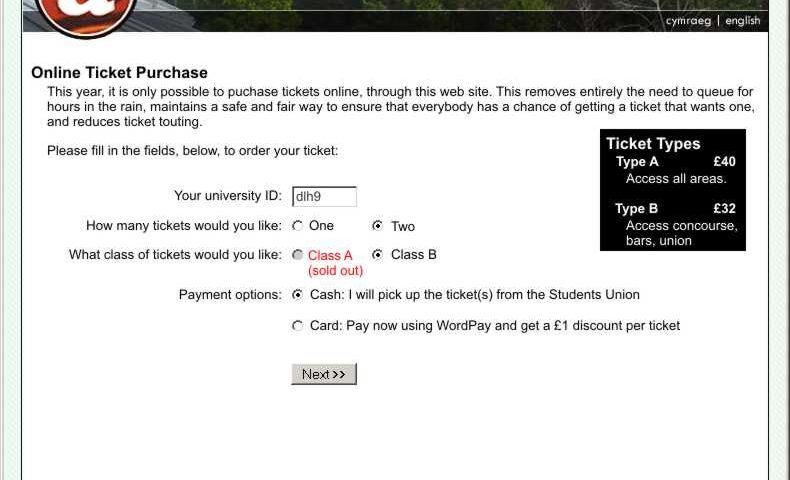
Here’s how it should be done. All the tickets should be sold online, by the Students Union. If you want to buy tickets, you connect to their web site and fill in the following details:
An e-mail is sent to your university e-mail address to confirm that it really was you who ordered the tickets (and not somebody ordering in your name). If this is not replied to within 24 hours (as will be explained in the e-mail), the order is cancelled. The tickets (which are posted to you or collected from the union) are printed with “Your Name”, and “Guest of Your Name”, eliminating the risk of touting (assuming that reasonable checks are made by security at the gate – just checking the identity of every fifth person in would act as sufficient deterrent to those who would like to go to the ball using a ticket in somebody else’s name).
The e-mail confirmation also gives people a chance to change their mind: if their friends, who they wanted to go with, were unable to get tickets before they all sold out, for example, they would know about it and be able to cancel their order. But it would also ensure the identity of the purchaser without requiring them to pass their password over the network. Students collecting tickets from the union would have to produce photo ID.
Those tickets remaining unsold after the web server is hammered by requests for tickets (for example, those cancelled or released later) would all be sold in a “second wave” (which would be announced in advance).
It is terribly unfair for the union to make students stand out in the cold and the rain, without sleep, to get tickets to an event; it could even be argued as discriminatory (whereas the University ensures that all students have the capacity and tools to use an internet connection). There would be no queues, no touts, and no unfairness. There would be no fights for the limited amount of cash in the on-campus cashpoints. The union would save money in ticket salespeople and policing the queue. And a system like this could be implemented for them for a sum of money that could be measured in the hundreds, not the thousands, of pounds. Hell; I will quote them for it, if they ask: I’ve already knocked up a prototype. Why not send a message to the May Ball organisers and tell them what a good idea it would be, particularly if it would make the difference to you, personally, about going to the May Ball.
They still won’t listen.
People have asked me for GMail invites again, but one of these people’s @aber.ac.uk e-mail address doesn’t seem to be working, says GMail, so here are some “ready to pick up”:
Get ’em while they’re hot. If one doesn’t work, try another. If they all don’t work, leave a comment (and pull your finger out next time).
Got home videos? Send them to Google! That’s the message that Google co-founder Larry Page is trying to put out.
In anticipation of launching a “video search” system, Google wants a stack of material on which they can test their “video spider” – a program which will hunt for keywords (spoken, or on-screen) in video material, so that it’s searchable in much the same way as web pages already are.
Fucking weird.
Do you remember Ceefax, that wonderful service from the BBC that seemed so cool until you discovered the internet? Well I do. And so does a Dutch consultant who set up a system, on the web, for searching Ceefax pages.
Well; in any case; I thought that his site was fun (in a nostalgic kind-of way) but hard-to-navigate, so I’ve developed a sensible front-end that’s far more reminiscent of the way Ceefax works: Ceefax Browser On Scatmania. Give it a go.
A PhD student in San Deigo has written a fascinating paper which will spook internet anonymity freaks – Remote Physical Device Fingerprinting – which describes how a physical computer can be uniquely identified on the internet, regardless of operating system, IP address, or data sent, just by looking carefully at it’s TCP packets (which contain the data for a large amount – perhaps a majority – of the internet’s traffic, including all web and e-mail traffic).
The technique works by observing the deviation in the timestamps sent (in accordance with the widely-adopted RFC 1323: TCP Extensions for High Performance, specified back in 1992). Each computer’s hardware clock is made from a separate piece of quartz, and each quartz crystal is unique in it’s imperfections. By measuring these imperfections across the internet, it’s possible (with enough sample data) to identify a computer individually, which has implications both good (computer forensics) and bad (anonymity).
The paper itself [PDF] is well worth reading. And, for those that are paranoid about their anonymity online, here’s how to “turn off” this feature of TCP for Windows 2000, Windows XP, and Linux:
echo 0 > /proc/sys/net/ipv4/tcp_timestamps
Of course, the absence of timestamps from your machine may, if you’re in a small enough sample group, single you out even more, but at least you’re not globally unique any more; which from an anonymity perspective is a really good thing.
I’m sure you’ve all seen the recent Internationalized Domain Name exploit, which affects most web browsers (except for Internet Explorer – shocker! – because it doesn’t yet have the power to support internationalized domain names): if you haven’t, why not visit paypal.com – looks just like the real thing; doesn’t it: the browser bar says you’re at PayPal’s real site, but you’re not. That first ‘a’ in the name is an international character (actually the letter ‘a’ from the Cyrillic character set, which is just slightly different from a Western ‘a’, if you look closely. Of course, this leads to potentially thousands of dangerous phishing exploits, tricking users into exposing their bank account details to random Nigerians.
Opera, makers of a stunning web browser that I’m not quite sure I should be abandoning yet, have announced their solution to this problem (which isn’t actually a web browser problem at all, but a specification problem): IDN domain names from outside of places which are expected to need then (e.g. dot-jp, etc.) will be displayed longhand, and secure sites (https) will display their certificate holder’s name – longhand – alongside the domain name in the address bar.
Of course, unless you’re using Opera 8 beta, the only way to be sure you’re safe from this exploit is to manually type in every link you follow.
This screenshot taken from Microsoft Anti-Spyware:
[screenshot removed – later turned out to be a fake]
As you may all know, I’m a die-hard supporter of the Opera web browser, despite many of my friends now claiming that Firefox is superior. I’ve been following the Mozilla project for a long while (haven’t we all), and on the many occasions I’ve tried Firefox (and it’s grandparents) I’ve always been unimpressed. It’s always been the little things that Opera did that kept me coming back to it, time and time again.
With the full release of Firefox 1.0 (download Firefox here), there’s been an explosion in the number of Firefox extensions that have become available, so I decided to try to find a combination of extensions that would at long last give Firefox the capabilities that always kept me coming back to Opera. The theory is – if I can find enough extensions to give me the functionality I need in a web browser (which Opera very-nearly perfectly provides) in Firefox, it’ll make a convert out of me. Here goes –
This only leave one “big” niggle that still pisses me off – I can’t find a plug-in that will allow me to hold down a particular key (e.g. shift) and click on a tab, to close it (really useful for closing multiple tabs at once, after running and completing a multi-tab information seek). If anybody can suggest an extension that does this, let me know!
So; I guess I’m a Firefox convert. I knew it would happen someday, but I’m just surprised it happened so soon.
There’s a lesson here for any business with a web site:
I’m sure that you may be familiar with Freedom Sport & Surf, the sports goods shop on Alexandra Road (opposite the carpet shop formerly known as Rumbletums Cafe). Well; they had a website – FreedomSportAndSurf.com. But they let the domain name expire, and it’s been picked up by a porn site: take a look.
In any case, the owners of the store aren’t internet-savvy, and had completely forgotten they had a web site. Similarly, most of the staff weren’t aware of it, either, until a lady came in, recently, and informed the staff member at the counter they she thought it was “disgraceful” that the shop had “things like that” on it’s website, where “children could view it”.
Today, staff at the shop are frantically scrubbing the web address from their carrier bags. Hilarity.
This was one of my most-popular articles in 2005. If you enjoyed it, you might also enjoy:
Here’s a giggle – somebody’s found a cleverly crafted Google search string that will reveal the (unprotected) web interfaces of a particular kind of Panasonic web-capable security camera. Just point a web browser at http://www.google.com/search?sourceid=mozclient&ie=utf-8&oe=utf-8&q=inurl%3A%22ViewerFrame%3FMode%3D%22, then select one of the cameras (you might have to try a few before you get a working one). If you get a motorised one, you can even remotely control it! Here’s some I found earlier:
Update 17th August 2011: fixed broken link to Panasonic website!
Following up yesterday’s rumours, it can now be seen that, officially, LiveJournal has been sold to SixApart. The details look pretty good – the service will remain much as-it-is, nobody will be ‘migrated’ to TypePad or MoveableType, and – better yet – LiveJournal might actually (finally) get some much-needed new features, such as trackback (which can be seen in effect right here, on my post yesterday – this post will be linked as a ‘trackback’ comment, because this post follows it up – with trackback, this kind of thing can be posted cross-journal, too).
There’s yet another killer Internet Explorer bug out there, which is manifesting itself in the form of a new trojan, Phel.A. This one only affects Windows PCs updated with SP2 (the supposedly ‘safe’ people) and works by confusing the ‘trusted’ and ‘untrusted’ zones.
I always find reports like this interesting, so I’ve written an exploit of my own. If you’re still using Microsoft Internet Explorer, and you’d like to see why you shouldn’t be:
The information on how to use this exploit is easily available on the web. Before long, we’ll be seeing another wave of web sites that can install software on ant Internet Explorer users’ computer.
If you’re still using Internet Explorer, take a look at BrowseHappy.
Google Suggest is the newest crazy invention from the guys at Google Labs… and it’s actually pretty cool! Go give it a go…
Checking my GMail account this morning, I noticed an unusual icon in the lower-right corner of the browser window:
It turns out that Google‘s GMail service seems to be testing an ATOM feed – a kind of syndication feed (similar to those used by weblogs and news sites – see Scatmania’s ATOM feed) that can be ‘subscribed’ to from your desktop computer.
Right now, the GMail feed looks pretty bare:
Nonetheless, this is an interesting turn of events – didn’t Google recently say that no other automated mail checking tools were to be used except for their own GMail Notifier (sorry, can’t find a news story to link)? But now it looks like they’re working on developing a format by which anybody can ‘subscribe’ to their own inbox (although probably only using a web browser – the non-browser-based XML readers seem to have difficulty with cookies, which are likely to be required.
It’s all interesting.