The secret API I used to tell LeShuttle about different outbound and return passengers

I’ve got an upcoming trip to France: I’ll be driving there through the Channel Tunnel, via LeShuttle. But owing to a quirk in our family travel arrangements, we’ve have a slightly different set of passengers in the car for the outbound leg than for the return journey.

LeShuttle’s broken website

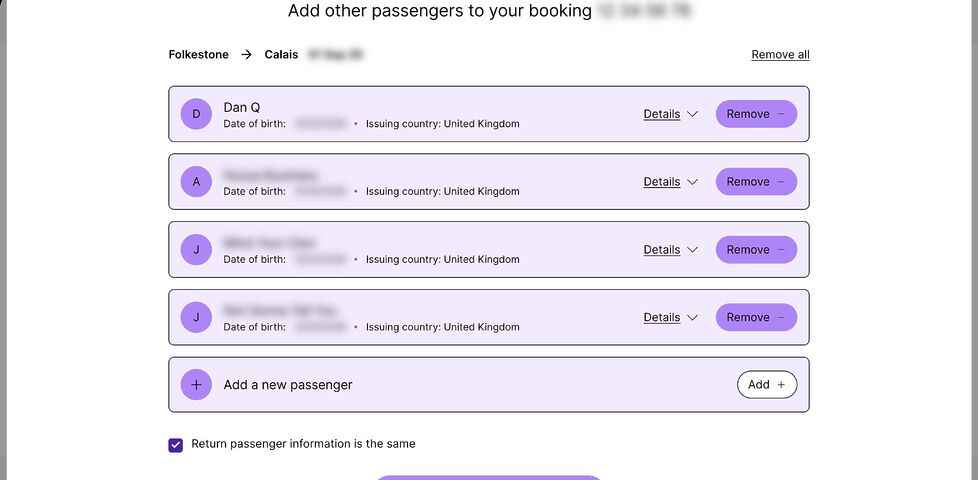
This is something that LeShuttle’s Advance Passenger Information registration form ought to be able to handle… but it very-much can’t.

Screenshot showing a web form with Dan Q and three other passengers on the outbound leg of a journey. Personal details appear to be blurred, but are actually spoofed AND blurred, per Dan's tradition. A 'Return passenger information is the same' checkbox is checked.
You’d think that to specify different passengers for the return leg, all I’d have to do is uncheck that checkbox, right? Wrong!

I was able to provide all of the personal and passport details of everybody on the outbound leg, but un-checking the “Return passenger information is the same” checkbox did… nothing. In fact, when saving the form and logging in again, the checkbox would be automatically re-checked.1

This is the point at which a normal person would either:

  1. Add the details of all passengers, both outbound and returning, to the form, and just hope they can sort out the confusion at the terminal, or,
  2. Try to get hold of a human Help Centre/Contact Us system (good luck!) who can sort it out.

Fortunately, I am not a normal person. I… am a software security engineer.

API reverse-engineering

My browser debug tools quickly indicated how this entire process works, and gave a clue as to what was broken in LeShuttle’s systems.

  1. When you log in, it makes a POST request to https://nextus-api-prod.leshuttle.com/b2c-api/GuestApi/Read?bookRef=...&surname=..., including your booking reference and surname (which acts as your password) in the relevant parameters.
  2. This returns all of your details in a JSON document. Prettified, and with all of the actual data replaced with explanatory comments, it looks something like this:
{
  "loginDetails": {
    /* credentials you used and other metadata */
  },
  "bookingDetails": {
    "outboundTravelDetails": {
      /* details about your outbound train and vehicle */
    },
    "returnTravelDetails": {
      /* details about your return train and vehicle */
    },
    "leadName": {
      /* details of the person who booked the trip */
    },
    "outboundPaxDetails": {
      /* For the outbound journey: */
      "paxLine": [
        /* First passenger: */
        {
          "paxDets": {
            /* - name, nationality, gender, DOB */
          },
          "docDets": {
            /* - passort number, expiry, issuing country */
          }
        },
        /* Second passenger: */
        {
          /* ... and so on .... */
        },
      ],
      /* Total number of passengers: */
      "noOfPax": "4"
    },
    "returnPaxDetails": {
      /* For the return journey: */
      "paxLine": [
        /* ... each passenger: same format as outbound... */
      ],
      /* Total number of passengers: */
      "noOfPax": "5"
    },
    "storedPaxDetails": {
      /* Pre-saved details? All blank for me */
    },
    /* More metadata */
  },
  "status": {
    /* Yet more metadata */
  },
  /* Even more metadata */
}
  1. Once you’ve made some changes, you press “Save”. This triggers a POST request to https://nextus-api-prod.leshuttle.com/b2c-api/GuestApi/Save with Content-Type: application/json and the entire JSON document from before, with your modifications, passed back.2

If you’re a programmer, you’re probably already making a guess as to what the underlying problem is. And you’re probably right:

  • The “Return passenger information is the same” checkbox value is not stored in the data that gets passed back and forth.
  • Instead, it’s derived by looking at the outbound and return passenger information. If it matches, it gets checked.
  • If it’s initially checked… the form doesn’t bother loading the UI that allows return passenger details to be modified.
  • But… this means that it never loads that UI:
    • the first time you visit the page the passenger list is empty both ways, which matches: anything you enter will necessarily be recorded into both the outbound and return fields, so
    • the next time you visit, it also matches… so it still doesn’t load the fields,
    • and so on.3

“Fixing” the problem

Knowing how the API worked, I was able to simply take the JSON document from the /Read endpoint, modify it so that the outboundPaxDetails and returnPaxDetails each contained the correct details for that leg of the journey (being sure also to update the total number of passengers noOfPax, which is for some reason a stored value rather than a derived one), and then submit it back via the /Save endpoint.

Having done this, I hit the /Read endpoint again to confirm that the data had, indeed, retained the data I submitted. When logging in again to the Web interface, I noticed that the checkbox now doesn’t automatically check itself. The correct data gets passed back and forth4.

Obviously LeShuttle need to fix their damn site. But at least – thanks to a little API reverse-engineering – I was able to submit the details they wanted from us.

Footnotes

1 Before anybody asks: yes, I tried all of the obvious things like using different browsers, clearing caches, disabling plugins, etc. I even had another passenger, using a different computer and operating system, give it a go. This one’s definitely a bug in LeShuttle’s systems.

2 I choose to assume that they’re doing some kind of server-side validation to ensure that a customer can’t, for example, modify details they’re not permitted to without a charge, such as which train they’re booked onto or the registration plate of the vehicle they’re bringing. But obviously I haven’t tested this, because it’s not among the information that I’m authorised to modify. Ethical hackers get permission before they poke at things they’re not sure whether they’re supposed to… especially if it’s a travel-related system and they’re somebody who has an unusual name that routinely gets them stopped and questioned at the UK border in general. 🤭

3 It occurs to me that possibly LeShuttle provide access to the relevant form only after the outbound journey has been made? Which would be a terrible design for the system and would represent terrible UI (why provide the checkbox if it doesn’t do anything?). I decided not to chance that this could be the expected approach, though, and just “fixed” the data up-front.

4 I haven’t tried modifying any of the outbound details to see if this re-breaks the return details. I suspect it would be fine, based on my analysis that the bug exists only in the front-end. But I can’t be sure without testing, and proper testing is something that LeShuttle’s own techies are getting paid to do. I don’t care enough about their website to do it for free!

×