Things Champ’d Up thinks are uniquely American

Filter US-centric content?

I’ve enjoyed the mixed-bag that are Jackbox Games since… well, since You Don’t Know Jack‘s UK edition!1 Nowadays they’re better known for the Jackbox Party Pack game series, which can be a real riot of beer-and-pretzels sofa-gaming fun, if you’ve got the right crowd2.

Champ'd Up screenshot showing competition for The Champion of Cult Leaders, featuring Smarmy Frog versus Trump.
This wasn’t one of our games, but I’ve definitely drawn convicted felon Donald Trump a few times while playing it!

One of those games is Champ’d Up, in which you draw-and-name characters who you think will win a particular contest, e.g. “The Champion of Looking Suspicious”. Another player, without seeing the prompt, tries to develop a character who will beat you at that category in a popular vote3.

There’s this checkbox in most of the games that lets you “filter US-centric content”. This aims to remove most cultural references that, if you’re from a part of the Anglophone world outside of the US, you might “not get”.

Screenshot from Champ'd Up's settings page showing the Filter US-Centric Content checkbox.
I’ve no idea what the “Family-Friendly” checkbox does, and I have no intention of finding out4.

I check that box as standard because, like many of us from “rest of world” I don’t understand things like pledging allegiance to a flag, being able to buy firearms in a supermarket, pies only being a sweet food and never a savoury one, refusing to use metric measurements at every opportunity, the risk of going bankrupt if you have to go to hospital, and using fractions like “one fourth” even while having a coin called a quarter. These are cultural touchstones that are alien to me. And I figure that toggling that switch to “on” is shielding me from having to learn these unfamiliar concepts, right?

But I found myself wondering: what exactly gets filtered out when I check that box? Because determining what the developers think is US-centric is a more-interesting question than what I think.

Scene from Team America: World Police, showing Spottswoode in front of INTELLIGENCE's computer screen, showing a world map.
Rest of world? Fuck yeah.

What does Champ’d Up think “US-centric” means?

Fortunately, Champ’d Up‘s prompt data files are stored in JSON files (with a slightly-unusual file extension .jet), which means that – once we’ve found them – it’s pretty easy to extract all of the prompts and metadata from them. I’m on a Mac right now, and I found the files in the horrendously-long path ~/Library/Application Support/Steam/steamapps/common/The Jackbox Party Pack 7/The Jackbox Party Pack 7.app/Contents/Resources/macos/games/WorldChampions/content.5

Let’s see what prompts Champ’d Up marks as being “US-centric”:

Terminal showing command `jq -r '.content[] | select(.us == true) | .contest' WorldChampions*.jet` resulting in a long list of 'The Champion of...' prompts.
My go-to tool for extracting data from JSON is the excellent jq. If it’s not already in your toolbox… then, well, it should be! My command, if you’re looking to copy/paste, was: jq -r '.content[] | select(.us == true) | .gameText' WorldChampions*.jet

I get that I’m coming from the perspective of a British person, and maybe my experience isn’t universal. But many of these seem to be… not as US-centric as they’re made-out to be!

Here’s the full list:

  • the Midwest
  • High School
  • Bachelorette Parties
  • Country Music
  • Orlando
  • Misdemeanors
  • Margaritaville
  • the Underworld
  • Black Friday Shoppers
  • Jocks
  • Twerps
  • Forever Alone
  • Porta Potties
  • Being Zen
  • My Way or the Highway
  • “Bless Their Heart”
  • Spring Break
  • West Coast Livin’
  • the Hootenanny
  • Tinseltown
  • Applebee’s
  • Village Idiots
  • Looking Lost
  • Monster Truck Fans
  • Hot Topic
  • Having An Estranged Family
  • Hogging The Bathroom
  • PBS
  • Paul Giamatti Roles
  • “Burn It With Fire”
  • Thanksgiving Dinner
  • “Do You Know Who My Dad Is?”
  • Being Emotionally Stunted
  • Peeing in the Pool
  • Going Down in a Blaze of Glory
  • the Gap Year

Sure, some of these are uniquely American like spring break, PBS, and Black Friday (although that last one’s been leaking lately).

But do Americans think that the rest of the world doesn’t have gap years or village idiots?6 That we don’t have people who pee in pools or hog the bathroom? Or that we can’t translate “bachelorette party”, “high school” or “porta potties” to our local dialect (while simultaneously expecting us to be fine with “theater”, “dive bar”, and “Axe body spray”)?

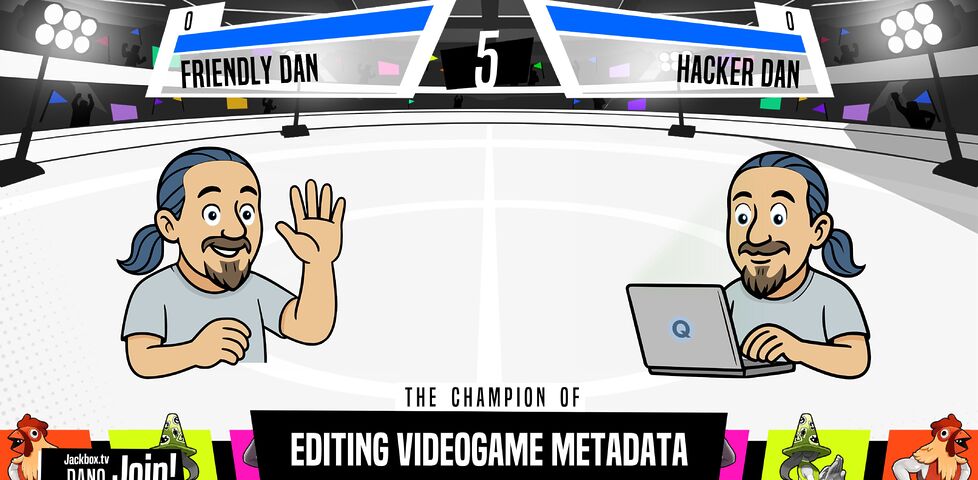
Edited Champ'd Up screenshot showing the battle for The Champion of Editing Videogame Metadata, pitting Friendly Dan against Hacker Dan.
In case you’re wondering “wait, can I edit those .jet files?” then I’ve got good news for you…

I note that several things not filtered out by the “filter US-centric content” option include “The Champion of Being $100,000 In Debt”, “The Champion of the Barn Dance”, and “The Champion of Jaywalking!”, all of which clearly do require more translation!7

I guess what I can conclude from this is that “US-centric” doesn’t necessarily mean the same thing to people in the US… as it does to those of us in the rest of the world.8 Which was an interesting thing to learn from a random thought about a toggle-switch.

Footnotes

1 Which was already 8 years old by the first time I blogged about it.

2 Jackbox games can also work okay streamed to your friends over Zoom: I wrote a guide to doing this well based on my experience of hosting many such events during the most-isolated bits of the COVID-19 pandemic.

3 There’s marginally more to it than that, like the fact that previously-drawn characters – even from earlier games – can be called back up in tag team matches to take over when the prompt changes… but you’ve got the essence of it.

4 In my last game I ended up inventing a character called “Chad McHugedick”, with an appropriately inappropriate picture. And that wasn’t even for an especially-racy prompt!

5 If you want to repeat my experiment on a PC then the equivalent path, once you find your steamapps/ folder, will be .../steamapps/common/The Jackbox Party Pack 7/games/WorldChampions/content.

6 Perhaps Americans really do think these things are unique to their country. Maybe my Team America: World Police reference was more-relevant than I thought!

7 For US readers who need a hand: dollars aren’t the currency in all Anglophone countries, and the value of the US dollar is for many of us something we’re not acutely familiar with. I’ve never heard of or seen a “barn dance” here in the UK; I reckon the closest thing we’ve got would be a cèilidh? And “jaywalking” doesn’t really appear in the vocabulary of non-US English, on account of it not being a crime at all in many countries where driving everywhere isn’t the default option (here in the UK, for example, as long as you’re not actively or maliciously obstructing traffic, you can cross most roads wherever you want to).

8 And, perhaps, that maybe Jackbox Games would like to bring me on as an internationalisation consultant in exchange for free videogames?

× × × × ×

Taking a Jackbox Zoom Party to the Next Level

A love a good Jackbox Game. There’s nothing quite like sitting around the living room playing Drawful, Champ’d Up, Job Job, Trivia Murder Party, or Patently Stupid. But nowadays getting together in the same place isn’t as easy as it used to be, and as often as not I find my Jackbox gaming with friends or coworkers takes place over Zoom, Around, Google Meet or Discord.

There’s lots of guides to doing this – even an official one! – but they all miss a few pro tips that I think can turn a good party into a great party. Get all of this set up before your guests are due to arrive to make yourself look like a super-prepared digital party master.

1. Use two computers!

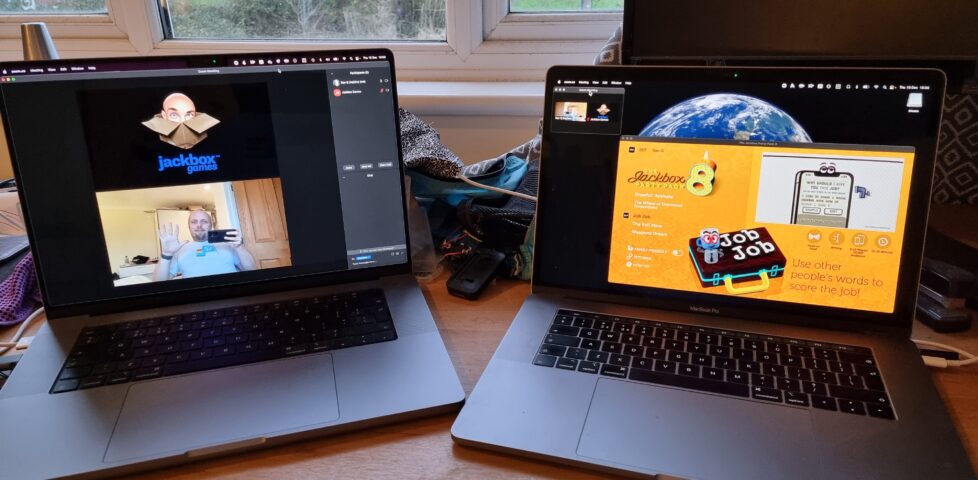
Two laptops: one showing a full-screen Zoom chat with Dan and "Jackbox Games"; the second showing a windowed copy of Jackbox Party Pack 8.
You can use more than two, but two should be considered the minimum for the host.

Using one computer for your video call and a second one to host the game (in addition to the device you’re using to play the games, which could be your phone) is really helpful for several reasons:

  • You can keep your video chat full-screen without the game window getting in the way, letting you spend more time focussed on your friends.
  • Your view of the main screen can be through the same screen-share that everybody else sees, helping you diagnose problems. It also means you experience similar video lag to everybody else, keeping things fair!
  • You can shunt the second computer into a breakout room, giving your guests the freedom to hop in and out of a “social” space and a “gaming” space at will. (You can even set up further computers and have multiple different “game rooms” running at the same time!)

2. Check the volume

3.5mm adapter plugged into the headphone port on a laptop.
Plugging an adapter into the headphone port tricks the computer into thinking some headphones are plugged in without actually needing the headphones quietly buzzing away on your desk.

Connect some headphones to the computer that’s running the game (or set up a virtual audio output device if you’re feeling more technical). This means you can still have the game play sounds and transmit them over Zoom, but you’ll only hear the sounds that come through the screen share, not the sounds that come through the second computer too.

That’s helpful, because (a) it means you don’t get feedback or have to put up with an echo at your end, and (b) it means you’ll be hearing the game exactly the same as your guests hear it, allowing you to easily tweak the volume to a level that allows for conversation over it.

3. Optimise the game settings

Jackbox games were designed first and foremost for sofa gaming, and playing with friends over the Internet benefits from a couple of changes to the default settings.

Sometimes the settings can be found in the main menu of a party pack, and sometimes they’re buried in the game itself, so do your research and know your way around before your party starts.

Jackbox settings screen showing Master Volume at 20%, Music Volume at 50%, and Full-screen Mode disabled

Turn the volume down, especially the volume of the music, so you can have a conversation over the game. I’d also recommend disabling Full-screen Mode: this reduces the resolution of the game, meaning there’s less data for your video-conferencing software to stream, and makes it easier to set up screen sharing without switching back and forth between your applications (see below).

Jackbox accessibility settings: Subtitles, Motion Sensitivity, and Extended Timers are turned on.
Turning on the Motion Sensitivity or Reduce Background Animations option if your game has it means there’ll be less movement in the background of the game. This can really help with the video compression used in videoconferencing software, meaning players on lower-speed connections are less-likely to experience lag or “blockiness” in busy scenes.

It’s worth considering turning Subtitles on so that guests can work out what word they missed (which for the trivia games can be a big deal). Depending on your group, Extended Timers is worth considering too: the lag introduced by videoconferencing can frustrate players who submit answers at the last second only to discover that – after transmission delays – they missed the window! Extended Timers don’t solve that, but they do mean that such players are less-likely to end up waiting to the last second in the first place.

Jackbox game content settings; "Filter US-centric content" is switched on.
Finally: unless the vast majority or all of your guests are in the USA, you might like to flip the Filter US-Centric Content switch so that you don’t get a bunch of people scratching their heads over a cultural reference that they just don’t get.

By the way, you can use your cursor keys and enter to operate Jackbox games menus, which is usually easier than fiddling with a mouse.

4. Optimise Zoom’s settings

MacOS desktop showing a Jackbox game running and Zoom being configured to show a "portion of screen".
A few quick tweaks to your settings can make all the difference to how great the game looks.

Whatever videoconferencing platform you’re using, the settings for screen sharing are usually broadly similar. I suggest:

  • Make sure you’ve ticked “Share sound” or a similar setting that broadcasts the game’s audio: in some games, this is crucial; in others, it’s nice-to-have. Use your other computer to test how it sounds and tweak the volume accordingly.
  • Check “Optimize for video clip”; this hints to your videoconferencing software that all parts of the content could be moving at once so it can use the same kind of codec it would for sending video of your face. The alternative assumes that most of the screen will stay static (because it’s the desktop, the background of your slides, or whatever), which works better with a different kind of codec.
  • Use “Portion of Screen” sharing rather than selecting the application. This ensures that you can select just the parts of the application that have content in, and not “black bars”, window chrome and the like, which looks more-professional as well as sending less data over the connection.
  • If your platform allows it, consider making the mouse cursor invisible in the shared content: this means that you won’t end up with an annoying cursor sitting in the middle of the screen and getting in the way of text, and makes menu operation look slicker if you end up using the mouse instead of the keyboard for some reason.

Don’t forget to shut down any software that might “pop up” notifications: chat applications, your email client, etc.: the last thing you want is somebody to send you a naughty picture over WhatsApp and the desktop client to show it to everybody else in your party!

× × × × × ×

Yo-Ho-Ho And A Bottle Of Caern ‘O’ Moor

My mum and my sisters came down for the weekend. I’d not quite gotten around to recovering from my illness these past few days, so I was probably at least slightly grotty company, but nonetheless we all had a good time.

We visited Little Amsterdam, Aberystwyth’s first sex shop, shortly after they opened on Monday morning. They’ve got a huge selection of smoking goodies on display, and magic mushrooms for sale, but the sex toys won’t be arriving until Friday, I’m told. Aww. I play with myself a lot more often than I smoke. Ah well; I’ll return when they have some. At any rate, I got the chance to congratulate the store on making it to Aber after it’s months of legal efforts. Great work!

I’ve just bought a lifetime subscription to Yohoho! Puzzle Pirates!, perhaps the best MMORPG I’ve ever seen. It’s very, very impressive. If you haven’t seen it yet, give it a go.

When my family left, Paul, Claire and I lounged, drank a couple of bottles of red wine, and played You Don’t Know Jack, a hilarious quiz game, on our TV. Paul won by a mile, and only a few times did I manage to finish with a score above zero (although I did improve as I got more drunk). Claire puked.

I need to catch up on all the lecture notes I’ve missed this last week. And apologise to my personal tutor for not having been at the tutorial meeting. And get to the office tomorrow and catch up on some *real* work. And harrass the Student Loans Company into getting me money faster.